
How to Automate Video Creation in 2026: 6 Steps, Tools and Rules
How to automate video creation without making AI slop: what to automate, what to keep human, the tools that fit each workflow, and the platform rules automated videos must follow in 2026.
On this page
To automate video creation, pick one repeatable format, give an AI video tool a prompt, script or link, and let it generate the script, visuals, voice-over, captions and music. Then schedule the video to publish directly. Keep one human step: review every video before it goes live, and let your analytics decide what the system makes next.
The step most pipelines automate first is also the weakest: an AI voice reading over stock clips from the first second to the last. In Revid's analysis of 176,367 TikToks with 1,000+ likes posted between October 2025 and October 2026, videos with under 40 characters of speech had a 123K median and 20.2% passed 1 million views. Videos narrated throughout (300+ characters of speech) had 68K and 11.9%.
That is TikTok data. The sample only includes videos that already reached 1,000 likes, and it shows what top videos have in common, not what causes their success. Still, the warning holds for anyone automating: more narration does not make a better video. The full method is in our study of what makes a TikTok go viral.
Videos with just a few spoken words (a line or two) beat both silent videos and videos that talk the whole way through, which were the most common and the weakest.
Source: Revid analysis of 176,367 TikToks analyzed by AI, with 1,000+ likes posted between Oct 1, 2025 and Oct 16, 2026 (61,203 creators)
Show the data
| Median views | Share that passed 1M views | |
|---|---|---|
| No speech | 73.3K | 14.3% |
| Under 40 | 122.7K | 20.2% |
| 40 to 120 | 97.2K | 17.6% |
| 120 to 300 | 91.6K | 16.8% |
| 300+ | 67.7K | 11.9% |
Using automation is no longer unusual. In Wyzowl's 2026 survey (December 2025), 63% of video marketers said they had used AI video tools to create or edit marketing videos, up from 51% a year earlier (more in our short-form video statistics). What separates channels that grow from channels that get scrolled past is which steps they automate and which they keep human.
What parts of video creation can you automate?
You can automate almost every production step, but not every decision. Use this split as your default:
| Stage | What to automate | What a person should still do |
|---|---|---|
| Ideas | Pull topics from a content source (blog, RSS, product feed) or from proven viral references | Pick the niche, the angle and what you will never post |
| Script | First draft from a prompt, article or reference video | Check facts, sharpen the hook, cut filler |
| Visuals | Stock footage, AI images, AI video clips, motion graphics | Catch wrong or uncanny shots, disclose realistic AI |
| Voice-over | AI voice in your chosen language | Choose the voice once, listen to every final cut |
| Captions and format | Auto captions, resizing to 9:16, 4:5, 1:1 or 16:9 | Check that text stays clear of platform buttons |
| Publishing | Scheduling and direct posting | Approve each video before it enters the queue |
| Analytics | Collecting views, retention and shares per post | Decide what to make more or less of |
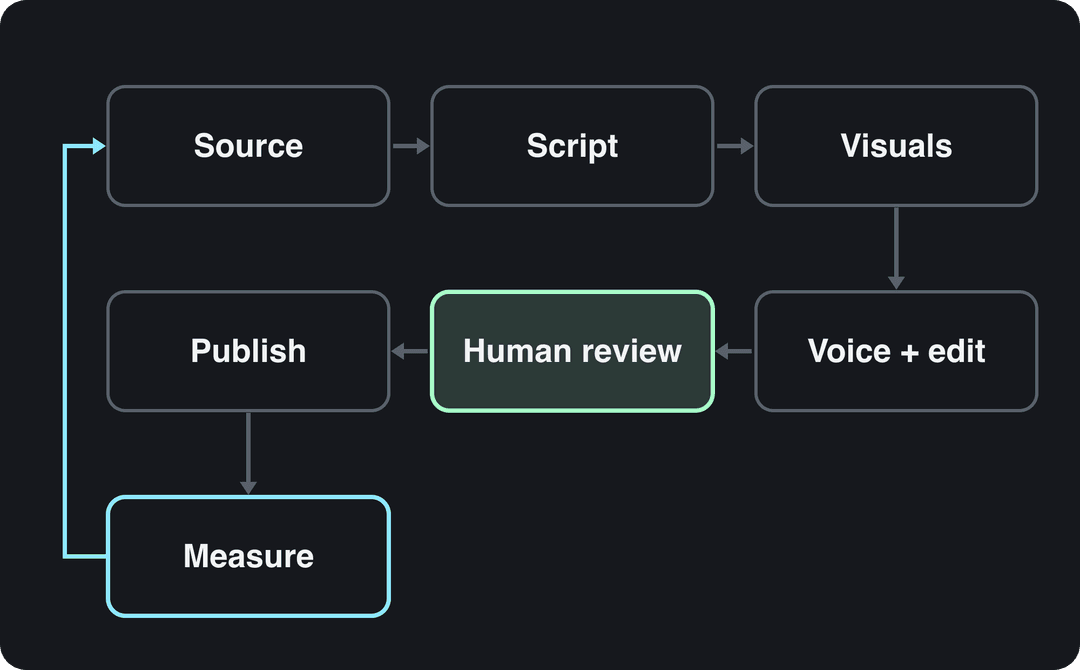
Tools fall into two groups. Template-based automation drops your text and clips into a fixed design: fast and consistent, but every video looks alike. Generative automation starts from a prompt, script or URL and builds the whole video: script, scenes, voice, captions and music. Generative tools are what make a daily posting cadence realistic for one person, and they are also what platforms scrutinize most, so the review step matters more there.
How to automate video creation in 6 steps
1. Choose one format and one source
Automate one format well before you add a second. Use the material you already have to decide:
- If you have long recordings (podcasts, webinars, streams), automate clipping: one episode becomes a set of captioned vertical clips.
- If you publish written content (blog posts, newsletters, product pages), automate text to video, so every new post triggers a short video.
- If you have neither, run a faceless series in a single niche from prompts.
Faceless formats are not a compromise. In the same Revid TikTok analysis, faceless videos had a 114K median against 67K for one person on camera. To see what fully automated channels look like, browse this roundup of YouTube automation channels from Monetized Profiles, then check each one against the YouTube rules further down.
2. Set up your asset library
Automation can only pull what it can find. Create one shared folder in Google Drive or Dropbox with these subfolders:
- Brand: logo files, fonts, color codes, caption style.
- B-roll: approved clips sorted by topic, not by date.
- Scripts: split into "draft", "ready for voice" and "done".
- Music and SFX: licensed tracks sorted by mood.
- Exports: final files named by date and platform.
For footage, free libraries such as Unsplash and Pexels cover generic scenes, paid libraries such as Storyblocks or Envato Elements add variety, and your own screen recordings and phone footage add the authenticity stock cannot. Curate a small on-brand set rather than letting the tool grab the first search result.
3. Write scripts for the ear, not the page
AI voices sound natural when the text is written to be spoken. Pasting a blog paragraph does not work. Apply these rules to every script, whether you or an AI wrote the first draft:
- Put the hook in the first line: the claim, the result or the question the video answers.
- Use short sentences and plain punctuation. Split any sentence with more than one comma.
- Write one idea per scene, so the visuals can change with the words.
- Cut any line that only describes what is already on screen. Let the visuals carry those beats (the speech data above points the same way).
- End on the payoff, not on a recap.
If your platform's built-in voices are not good enough for your niche, dedicated text-to-speech services such as WellSaid Labs and Murf.ai export voice tracks you can drop into the pipeline.
Prompt to try
Make a 25-second faceless vertical video about why phone batteries drain faster in cold weather. Open with the hook "Your phone isn't broken, it's cold." Use one short spoken line per scene, let close-up AI visuals carry the rest, add bold readable captions, and end on the fix: keep the phone in an inner pocket.
4. Generate and edit from a template
A template is a blueprint for every video in the series, not just a logo in the corner. Lock these once:
- Caption style: font, size, color and position. An auto caption generator handles transcription and timing; your job is to pick a style that stays readable with the sound off.
- Text overlays: one style for titles, one for key numbers.
- Music and levels: a default track mood and voice-over volume above the music.
- Openings: skip animated logo intros on short-form. Start on the hook.
Generate one master version per aspect ratio rather than cropping blindly. TikTok's Creator Academy recommends 9:16 at 1080x1920. Smart-crop tools keep the subject in frame when you reformat to 4:5, 1:1 or 16:9. For edits to real footage, text-based editors let you cut video by deleting words from the transcript.
Choose your visual style per platform. Revid's study of AI videos vs real footage found AI-generated TikToks averaged twice the views of real footage, while on X, Instagram and Threads AI visuals clustered in the lowest engagement tier. An all-AI look that works on TikTok may need more real footage elsewhere.
5. Put a human review before anything posts
This is the step that keeps automation from turning into slop. Sprout Social research published in March 2026 found that 50% of Gen Z had already blocked, muted or unfollowed a brand or creator because their content felt like "AI slop". Review every video against a short checklist:
- Is every fact and number correct?
- Does the first line make someone stop scrolling?
- Does any shot look wrong, uncanny or off-topic?
- Are the captions accurate, especially names and brand terms?
- Does the video need an AI disclosure (see the rules below)?
On a team, connect generation to a task board. A finished draft creates a card in Trello or Asana, the reviewer comments or approves, and only approved videos move to the publishing queue. Without that step, finished videos sit unreviewed and the time you saved is lost.
6. Publish on a schedule and close the loop
Schedule posts so the channel stays active whether or not you are at your desk. Freshness matters: Meta said same-day posts made up more than 30% of recommended Reels on Instagram and Facebook in Q1 2026, more than double the level a year earlier.
Adapt each export to its platform (caption length, hashtags, cover) instead of posting the identical file everywhere. Technogital's guide to social media content creation covers platform-by-platform adjustments. Then review results in batches, keep the formats that hold attention, and feed those back into step 1. That loop is what makes the system improve rather than just repeat.
Which tool should you use to automate video creation?
There is no single best tool. Each one automates a different starting point:
| Tool | Best for | Starting price | What it automates |
|---|---|---|---|
| Synthesia | Corporate training and internal comms | From $29/month | Avatar presenter videos in 140+ languages, slide-based workflow |
| Descript | Podcasts and recorded talks | From $24/month ($16 billed annually) | Transcript-based editing, filler-word removal, clips from long recordings |
| InVideo | Quick promos edited by typing commands | From $20/month | Chat-style agent, large stock library, third-party AI models |
| Pictory | Blog posts and webinars turned into videos | From $29/month | Article and URL to video, highlight clips from meeting recordings |
| Canva | Beginners already designing in Canva | Free plan, Pro from €110/year | Templates, brand kits, short Veo 3 clips on paid plans |
| Revid | Short-form creators, founders and agencies | Free credits to try, plans from $39/month ($32 billed yearly) | Prompt, script, link or viral reference to finished vertical video, Auto-Mode workers, direct publishing, API, MCP and CLI |
Decision rules: if you edit recordings you already have, start with a transcript editor. If you need a presenter for training, use an avatar platform. If you want finished short-form videos published every day without filming, use an end-to-end generator. Our side-by-side tool comparisons go deeper on each pairing. Zebracat, itself an AI video vendor, keeps a roundup of AI video creation statistics if you want market context, but treat vendor-compiled figures with caution.
Before paying for a year, run a pilot: make one real video from idea to published post on each shortlisted tool. Note how long it actually took, whether the output meets your standard without heavy fixes, and where you got stuck. That tells you more than any feature list.
How to automate video creation with Revid
Revid covers the whole loop in one place: script, visuals, voice, captions, music, editing, publishing and per-post results.
- Set up an Auto-Mode worker for automated video creation from a prompt or a content source. Each worker creates a fresh video every day (3 workers on Growth, 5 on Elite, 10 on Ultra).
- Pick the voice (1,000+ voices in 70+ languages), a caption style and the AI video model per scene: Seedance 2.5, MiniMax Hailuo H3, Wan 3.0 or Google Veo 3.
- To start from formats audiences already watch, use the Search & Remix automation instead: it searches Revid's library of about 2.77 million short-form videos, picks a well-matched high-engagement reference and generates an original video from it, never reusing the same reference twice.
- Connect TikTok, Instagram and YouTube to publish and schedule from one queue, and open any video in the timeline editor before it posts.
- Check the views, likes and comments each post reports, and remix the ones that did well.
Developers can run the same pipeline through the REST API, the MCP server or the CLI, included on every paid plan. As a guide, a 30-second video with Pro AI visuals and a voice-over costs about 40 to 80 credits, and Growth includes 2,000 credits a month. The live pricing page is the authoritative price list.
What rules do automated videos have to follow?
Automation is allowed on every major platform. Mass-produced, unoriginal or undisclosed realistic AI content is what gets penalized.
- YouTube monetization: on July 15, 2025, YouTube renamed its "repetitious content" policy to "inauthentic content", covering repetitive or mass-produced videos. AI content made from generic templates without the creator's own insight cannot monetize. Neither can videos that only read out text you didn't write, or AI personas presented as human experts giving health, legal, financial or political advice. AI tools are fine when the final video shows your creative vision and gives real value. Our guide to YouTube automation rules covers this in detail.
- YouTube disclosure: realistic AI-generated or altered content must be disclosed with the "AI use" setting in YouTube Studio. Since May 2026, YouTube also labels undisclosed videos with significant photorealistic AI automatically. AI-written scripts, captions and thumbnails need no disclosure.
- TikTok: you must label AI-generated content that contains realistic images, audio or video. TikTok says the label does not affect distribution if the video follows the Community Guidelines.
- Instagram and Facebook: Meta requires its AI disclosure tool for photorealistic video or realistic audio that was digitally created or altered, and shows an "AI info" label. Since March 2026, Facebook deprioritizes reels that only narrate what is on screen, stitch clips together or repost with cosmetic changes.
Which metrics show your automation is working?
View counts alone mislead, and more so now: since August 24, 2026, YouTube counts a view the moment playback starts, on every format. Judge automated videos on whether people actually watch:
| Metric | What it tells you | Where to find it | What to do when it is weak |
|---|---|---|---|
| Audience retention | Where viewers drop off | YouTube Studio, TikTok Studio, Instagram insights | Rewrite the opening line, cut the scene before the drop |
| Click-through rate | Whether the title and thumbnail earn the click | YouTube Studio | Test titles and thumbnails (YouTube's Test & Compare handles up to 3, long-form only) |
| Watch time | Total attention earned | All platforms | Compare your best and worst videos, template what the best share |
| Shares | Whether the video is worth passing on | All platforms | Lean into the topics and formats that get shared |
| Conversion rate | Whether viewers act (click, sign up, buy) | Your site or link tool | Make the call to action specific and place it after the payoff |
Use the data to change the pipeline itself. If retention dips every time a particular AI voice speaks, test another voice. If one visual style holds viewers longer, make it the template default. Market reports such as Precedence Research's video analytics market study track the industry; for your channel, each platform's native analytics are the numbers that count.
How to scale video automation with a team
Going from a handful of videos a week to dozens breaks the one-login, one-person setup. Split the work into four roles, even if one person holds two of them:
- Strategist: researches topics, owns the content calendar and writes the prompts or source briefs.
- Operator: runs the tools, maintains templates and workers, and generates drafts.
- Quality controller: reviews every draft against the checklist in step 5.
- Publisher: writes platform-specific captions, schedules posts and reports results.
Once roles are clear, connect automation to the content you already produce. An e-commerce store can generate a product video for every new listing through an API. A publisher can turn each new article into a short with a blog to video converter and push it to social and email. For the wider system around video, see our guide to automating content creation.
FAQ
Can you fully automate video creation?
Technically yes: tools like Revid can generate and publish a video every day with no input after setup. In practice, keep a human review step, because platforms penalize mass-produced content and an unattended pipeline repeats its mistakes.
How much does it cost to automate video creation?
Entry plans for the tools above run from $20/month (InVideo) to $39/month (Revid Growth, with 2,000 credits and 3 Auto-Mode workers), and Canva Pro starts at €110/year. AI generation is usually metered by credits, so check each vendor's pricing page against the number of videos you plan to make.
Do automated or AI videos get less reach?
Not because they are automated. TikTok and YouTube both say an AI label alone does not limit distribution. Reach drops when videos look mass-produced, repetitive or unoriginal, which YouTube and Facebook policies target directly.
Which videos are easiest to automate?
Faceless explainers, list videos, narrated stories, product videos and clips cut from long recordings are the easiest, because they follow a repeatable structure. Videos that depend on your face, live reactions or on-location filming still need you.