
On this page
Yes, you can schedule TikTok videos. TikTok's free native scheduler works when you upload from a computer in TikTok Studio: switch from posting now to Schedule and pick a date and time. For longer lead times, several accounts or cross-posting to Instagram and YouTube, use a TikTok scheduling tool such as Hootsuite, Later, Buffer, SocialPilot or Revid.
Scheduling also solves a timing problem most creators never notice. In Revid's data, English-language TikToks posted at 4 a.m. US Eastern had the highest median views (120K), while 7 p.m., an evening slot many guides recommend, had the lowest (50K). Few people want to be awake at 4 a.m. to tap Post. A scheduler is.
How to schedule a TikTok video with TikTok's native scheduler
TikTok's built-in scheduler lives in TikTok Studio on the web. It is free and needs no extra app.
- On a computer, log in at tiktok.com, open TikTok Studio and click Upload.
- Add your video. Studio Web accepts landscape or vertical files up to 60 minutes long and 30 GB, in 1080p, 2K or 4K. For the feed, export at 9:16 and 1080x1920, the size TikTok's Creator Academy recommends.
- Write the caption, add hashtags, choose a cover and set who can comment, Duet or Stitch.
- Switch the posting option from posting now to Schedule, then pick the date and time.
- Confirm. The post waits in TikTok Studio until it goes live.
The scheduling window is limited. It has long been 10 days ahead; the date picker shows the current limit for your account.
If you see no Schedule option on the upload page, the feature is not enabled for your account or region. The workaround is a third-party scheduler or Revid, both covered below.
What TikTok's native scheduler can't do
The native option covers the basics and nothing more:
- One platform, one account. It posts to TikTok only, so the same clip for Instagram Reels or YouTube Shorts needs a separate upload.
- A short horizon. You cannot load a month of posts at once; plan on refilling the queue every week or so.
- No file swaps. To change the video itself, delete the scheduled post and upload it again.
- No cross-channel calendar. You see your TikTok queue, not your whole content plan.
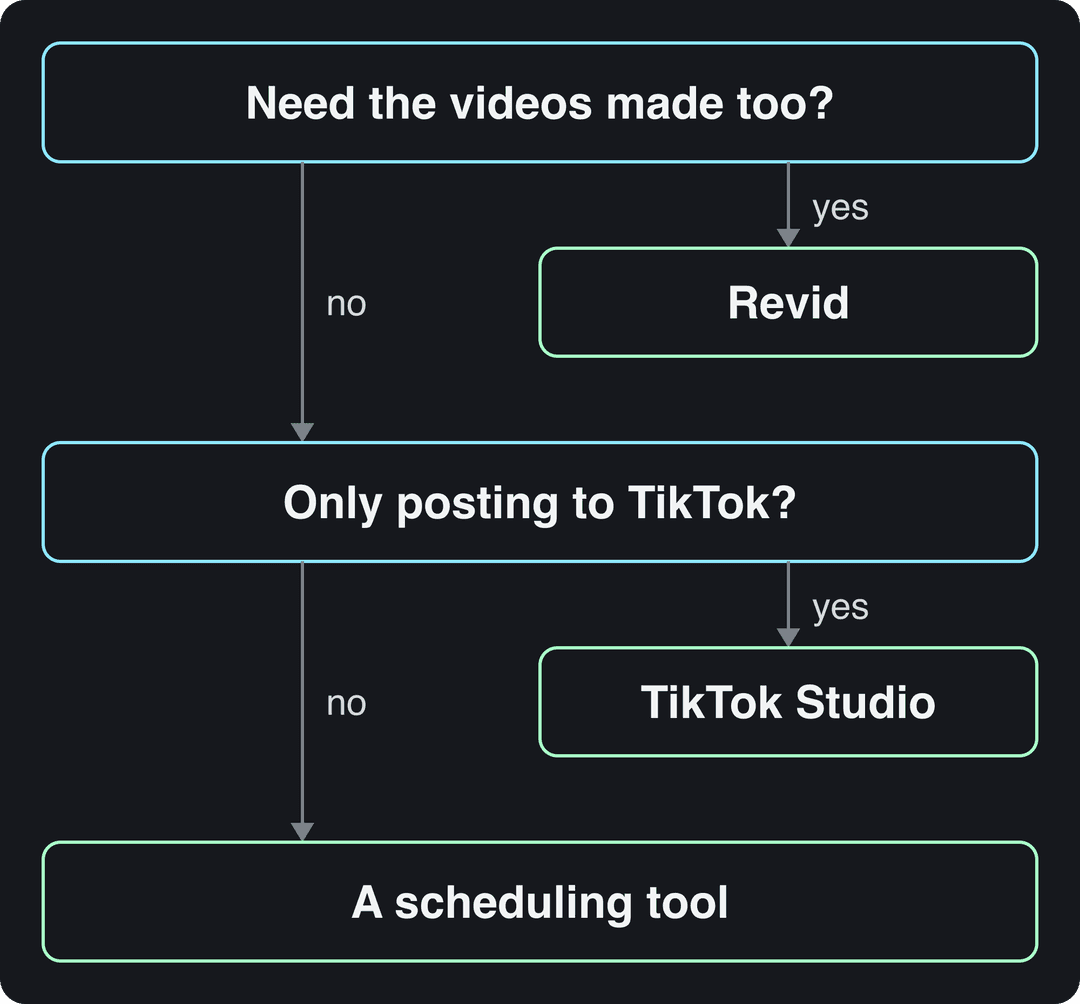
Decision rule: if you post only to TikTok from one account and plan a week at a time, the native scheduler is enough. If you manage several accounts, cross-post, or want the videos made for you, use a tool.
TikTok scheduling tools compared
Third-party TikTok scheduling apps add bulk uploads, a calendar across networks, team approvals and analytics. They differ mostly in who they are built for.
| Tool | Best for | Good to know |
|---|---|---|
| TikTok Studio (native) | One TikTok account, planning a week or so ahead | Free, desktop only, TikTok only, accepts videos up to 60 minutes |
| Hootsuite | Teams running many social networks | Suggests posting times from your past results |
| Later | Visual-first creators planning Instagram and TikTok together | Visual content calendar |
| Buffer | Solo creators who want a simple queue | Minimal interface, quick to learn |
| SocialPilot | Agencies managing many client accounts | Client and team workflows |
| Revid | Making the videos and scheduling them in one place | Creates videos, then publishes to TikTok, Instagram and YouTube from one queue |
Plans and prices change often, so check each site before you commit. For a longer roundup, see our list of tools to schedule video content.
Tools that post for you go through TikTok's Content Posting API, which has tighter limits than the TikTok Studio upload: MP4 (recommended), WebM or MOV, 23 to 60 FPS, up to 4 GB and 10 minutes per video, with captions up to 2,200 characters. If your video runs longer than 10 minutes, schedule it natively in TikTok Studio. Depending on the tool and account, some schedulers send a phone notification so you finish the post in the TikTok app instead of publishing directly, so schedule one test post before you load a full week.
Can you schedule TikToks with Hootsuite?
Yes. Connect your TikTok account in Hootsuite, create a post in its composer, upload the video, write the caption and pick a time. Hootsuite can also suggest posting times based on how your past posts performed, which is useful once you have a few weeks of history.
How to schedule TikToks with Revid
If the bottleneck is making the videos rather than posting them, Revid's social media scheduler handles both steps:
- Open the AI TikTok video generator and paste a script, a link or an idea. Revid builds the scenes, voice-over, synced captions and music, and you can adjust any scene in the timeline editor.
- Connect your TikTok account, plus Instagram and YouTube if you cross-post.
- Pick a date and time and add the video to your publishing queue. The same video can go to all three platforms from that one queue.
- To keep a daily schedule without making each video by hand, set up an Auto-Mode worker, which creates a fresh video every day from a prompt or a content source (automated video creation). The Growth plan ($39/month) includes 3 workers.
- After posting, each post reports its views, likes and comments in Revid, and any post that did well can be remixed in one click.
When to schedule TikTok posts for maximum reach
In Revid's analysis of 176,367 TikToks with 1,000+ likes posted between October 2025 and October 2026 (the full study: what makes a TikTok go viral), English-language posts made between 3 and 6 a.m. US Eastern did best. Posts at 4 a.m. had the highest median (120K views) and the highest share past 1 million views (19.9%). The 5 to 9 p.m. window was the weakest, with 7 p.m. lowest at 50K.
Videos posted between 3 and 6 a.m. Eastern earned the most views and passed 1M views most often. The evening slot most guides recommend (5 to 9 p.m.) was the weakest of the day.
Source: Revid analysis of 123,704 English-language TikToks with 1,000+ likes posted between Oct 1, 2025 and Oct 16, 2026
Show the data
| Median views | Share that passed 1M views | |
|---|---|---|
| 12a | 67.3K | 14% |
| 1a | 79.4K | 15.1% |
| 2a | 79K | 14.2% |
| 3a | 90.8K | 16.1% |
| 4a | 120.4K | 19.9% |
| 5a | 93.5K | 16.7% |
| 6a | 97K | 17% |
| 7a | 75.8K | 13.1% |
| 8a | 83.9K | 14.3% |
| 9a | 70.5K | 13.1% |
| 10a | 65.5K | 13.6% |
| 11a | 65.7K | 13.1% |
| 12p | 60.4K | 11.9% |
| 1p | 60.9K | 11.8% |
| 2p | 53.7K | 11.2% |
| 3p | 63K | 11.9% |
| 4p | 63.8K | 11.5% |
| 5p | 55.6K | 11.1% |
| 6p | 55.3K | 11.5% |
| 7p | 50.4K | 11% |
| 8p | 60.5K | 12.3% |
| 9p | 62.2K | 13.1% |
| 10p | 62.3K | 12.6% |
| 11p | 67.2K | 13.3% |
The day matters far less than the hour. Weekdays were all within a few percent of each other (63K to 65K median views). Saturday had the best median (70K) and Sunday the highest share of videos past 1 million views (13.6%), so keep your schedule running through the weekend.
The day matters far less than the hour: every weekday lands within a few percent of the others, and Saturday and Sunday posts pass 1M views slightly more often.
Source: Revid analysis of 123,704 English-language TikToks with 1,000+ likes posted between Oct 1, 2025 and Oct 16, 2026
Show the data
| Median views | Share that passed 1M views | |
|---|---|---|
| Monday | 63.5K | 12.5% |
| Tuesday | 63.5K | 12.4% |
| Wednesday | 62.7K | 12.5% |
| Thursday | 64.6K | 12.5% |
| Friday | 64.5K | 12.6% |
| Saturday | 70.2K | 13.4% |
| Sunday | 65.1K | 13.6% |
Read these numbers with their limits. The sample only holds TikToks that already reached 1,000+ likes, so it shows what strong videos have in common, not what causes views. English-language TikToks come from creators worldwide, so 3 to 6 a.m. Eastern is also daytime in the UK, Europe, India and Asia. The practical takeaway: early-morning Eastern slots are worth testing, and scheduling lets you test them while you sleep.
For a full breakdown by day and hour, see our guide to the best time to post on TikTok. SocialPilot's guide to the best time to post on TikTok offers a second data set to compare.
Find your own audience's active hours
General data is a starting point; your audience's hours decide the slots. In TikTok Studio, go to your profile, open the menu, then TikTok Studio, Analytics and View all. The Viewers tab shows when viewers were most active over the last 7 days, and the Followers tab breaks follower activity down by hours and days. TikTok's analytics help article explains the metrics.
A simple test: for two weeks, schedule half your posts in your followers' peak hour and half in an early-morning Eastern slot. Compare the median views of each group, not your single best video, then move your default slots to the winner.
Prompt to try
Make a 30-second vertical TikTok about 3 kitchen hacks that save 10 minutes every morning. Open with the hook "You're making breakfast the slow way." Use fast stock footage cuts, an upbeat voiceover and bold synced captions, and end with a question that invites comments.
A weekly TikTok scheduling workflow
Consistency pays because your audience checks in daily: about a quarter of U.S. adults (24%) use TikTok every day, according to Pew Research Center's 2025 data in our short-form video statistics. SocialPilot's TikTok statistics roundup has more usage figures. A routine that holds up:
- Plan. Pick 2 or 3 recurring formats for your niche and map them onto a social media calendar template.
- Batch-create. Film or generate the week's videos in one session.
- Write captions. In the same Revid study, captions of 41 to 80 characters and 3 to 4 hashtags had the best median views. A TikTok caption generator speeds this up.
- Label AI content. TikTok requires a label on AI-generated content with realistic images, audio or video. Turn the setting on before you schedule; TikTok says it does not affect distribution if the video follows the Community Guidelines.
- Schedule with gaps. Fill your tested slots but leave one or two open each week for trends you cannot plan.
- Review. After 7 days, check Analytics and move slots that underperform.
Scheduled posts still need you after they go live. Check in soon after each one publishes and reply to early comments, since conversation under a video is the part a scheduler cannot do for you.
FAQ
Does scheduling TikToks affect views?
There is no evidence that it does. TikTok does not say scheduled posts are ranked differently, and a scheduled video publishes as a normal post. What changes views is the video itself and when it goes live, which scheduling lets you control.
Can you schedule TikToks on the mobile app?
The reliable way is a computer: TikTok's scheduler is built into TikTok Studio on the web. If you only use a phone, a third-party scheduling app or Revid can publish to TikTok for you.
Can you schedule reels on TikTok?
Yes, though TikTok calls them videos, not reels, and you schedule them the same way as any TikTok post. To schedule the same clip as an Instagram Reel too, use a cross-platform tool that publishes to both.
Can you edit a scheduled TikTok?
To change the video file, you have to delete the scheduled post in TikTok Studio and upload it again. Check the caption, cover and settings before you confirm to avoid redoing the post.
Is TikTok scheduling free?
TikTok's native scheduler is free. Third-party tools have their own plans and change them often, and Revid, which also creates the videos, starts at $39/month.