Blog to Video: How to Convert a Blog Post (Script Template)
How to turn a blog post into a short or long video: which posts to pick, a script template, how to turn each part of the post into visuals, export specs and the tools that do it from a URL.

On this page
To convert a blog post to video, keep the post's main idea and the few points that prove it, rewrite them as a short spoken script, and give each point one visual. Then add a voice-over, captions and a call to action. A blog to video generator does the script, visuals and voice for you from the post's URL.
The most common mistake is narrating the whole post. In Revid's analysis of 176,367 TikToks with 1,000+ likes posted between October 2025 and October 2026, videos with under 40 characters of speech had a median of 123K views, and 20.2% passed 1 million. Videos that talked throughout (300+ characters of speech) had 68K and 11.9%. A blog post read aloud is the second kind. This is TikTok data on videos that already did reasonably well, so it shows what top videos have in common, not causes. The full viral TikTok study explains the method.
Videos with just a few spoken words (a line or two) beat both silent videos and videos that talk the whole way through, which were the most common and the weakest.
Source: Revid analysis of 176,367 TikToks analyzed by AI, with 1,000+ likes posted between Oct 1, 2025 and Oct 16, 2026 (61,203 creators)
Show the data
| Median views | Share that passed 1M views | |
|---|---|---|
| No speech | 73.3K | 14.3% |
| Under 40 | 122.7K | 20.2% |
| 40 to 120 | 97.2K | 17.6% |
| 120 to 300 | 91.6K | 16.8% |
| 300+ | 67.7K | 11.9% |
Which blog posts make good videos?
Start with posts that already earn attention: high traffic, long time on page or strong conversions in your analytics. A topic readers already search for is the safest bet for a video. Then check the post type.
| Post type | Video potential | Why |
|---|---|---|
| How-to or step-by-step | High | Each step becomes a scene viewers can follow |
| Listicle | High | Each item is a scene, and the list splits easily into a series |
| Product review or comparison | High | You can show the product instead of describing it |
| Original data or research | Medium to high | One striking number makes the hook, and a chart makes the proof |
| Opinion or essay | Medium | Works only if the first line states a strong claim |
| Reference page (glossary, specs list) | Low | Better as text; pull out one fact for a short instead |
Decision rule: if you can't say the post's point in one spoken sentence, it isn't ready to be a short video yet. Turn it into a longer YouTube walkthrough, or pick one section of it.
How to convert a blog post to video, step by step
- Pick one post and one goal. Decide what the video should do: send traffic to the post, win followers or drive sign-ups. The goal decides the call to action at the end.
- Choose the format. A vertical video of 30 to 60 seconds for TikTok, Reels and Shorts, or a horizontal walkthrough for YouTube (see the comparison below).
- Cut the post to its spine. Turn the headline into a one-sentence claim, keep only the points a viewer needs to act, and drop the background, caveats and SEO intro.
- Write the script for the ear. Use short sentences, second person and one idea per line. Put the payoff in the first line, not the last.
- Give every line a visual. Change the picture each time the script moves to a new idea (the table below shows what to use).
- Add voice, captions and music. Record clean audio or pick an AI voice, burn in captions and keep music under the voice.
- Export, publish and point back to the post. Export in the right ratio for each platform, then end with where to read the full post (link in bio, description or pinned comment).
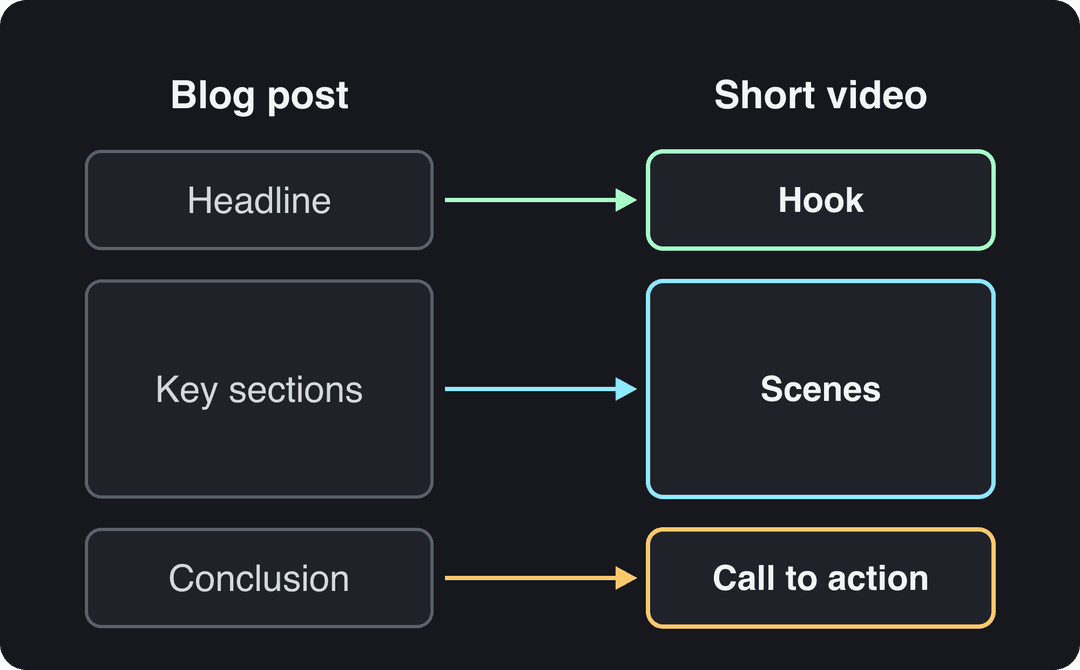
Each part of the post has a job in the video. The headline becomes the hook, the key sections become scenes, and the conclusion becomes the call to action.
Prompt to try
Make a 40-second vertical video for freelancers that opens with the hook "Charging by the hour punishes you for getting faster." Explain in three short spoken lines why to price the result instead, with one bold on-screen text visual per line. Use a confident AI voice, clean captions and end with "The full guide is linked in my bio."
Turn the post into a script: a template
Copy this structure for any short video made from a blog post:
HOOK (first line): the post's main claim or result, stated as a fact or a tension.
POINT: one sentence per key point, each paired with one visual.
PROOF: the single best number, example or before/after from the post.
CTA: "The full guide is linked in my bio" or "Read the whole post, link below."Here is the rewrite in practice. A blog paragraph like "Many freelancers set their rates by estimating an hourly wage and multiplying it by the hours a project will take, an approach that ignores the value delivered to the client" becomes three spoken lines: "Charging by the hour punishes you for getting faster. Price the result instead. Here's how."
The hook does most of the work. Rewrite your headline as something a person would say out loud:
| Blog headline | Video hook |
|---|---|
| How to Price Your Freelance Work | "Charging by the hour punishes you for getting faster." |
| The Beginner's Guide to Sourdough | "Your sourdough is flat because of one step you're rushing." |
| Best Project Management Tools for Small Teams | "Most small teams pick a project tool for features they never open." |
| Why Your Emails Land in Spam | "Your emails aren't bad. Your sender setup is." |
For more opening lines by format, browse these TikTok hooks that stop the scroll.
How do you convert a blog into visuals?
Match each element of the post to a visual that shows it, rather than putting the text on screen.
| Blog element | Visual in the video |
|---|---|
| Headline or main claim | Bold on-screen text over the first shot |
| Statistic | An animated number or a simple chart, with the source named on screen |
| Numbered steps | A screen recording, or one scene per step with a step label |
| Product or tool mention | A product shot or a screen recording of it in use |
| Abstract idea | Stock footage, an AI image or an AI video clip |
| Quote | A text card with the speaker's name |
| Existing blog images and charts | Reuse them, reframed to 9:16 with the text kept away from the edges |
Never put a paragraph on screen. If a scene needs more than one short line of text to make sense, the script line behind it is too long.
Voice, captions and audio
Your own voice builds recognition. An AI voice is faster and lets you publish the same video in other languages. Either way, the audio has to be clean: a cheap lapel mic in a quiet room beats a good camera with a noisy room.
Burn in captions so the message still lands for people watching with the sound off; an AI caption generator syncs them to the voice automatically. Keep the music low enough that you can follow every word.
Export settings for each platform
| Platform | Format | Length limit | Watch out for |
|---|---|---|---|
| TikTok | 9:16, 1080x1920 recommended | Uploads up to 60 minutes | Keep captions clear of the bottom buttons |
| Instagram Reels | 9:16 recommended (1.91:1 to 9:16 accepted), at least 30 FPS | Up to 20 minutes | Reels over 3 minutes are not recommended to non-followers |
| YouTube Shorts | Vertical or square | Up to 3 minutes | Shorts over 1 minute with an active Content ID claim are blocked |
| YouTube (long-form) | 16:9 | 15 minutes by default, longer for verified accounts | Add chapters that match the post's sections |
| 1:2.4 to 2.4:1 | Up to 15 minutes | Vertical videos can appear in the mobile video feed |
Prompt for a listicle series
Create a 30-second YouTube Short from item one of a listicle on project management tools, opening with "Most small teams pick a project tool for features they never open." Show one feature that actually matters with a screen-style visual, state one supporting fact, and close by pointing viewers to the full list in the description.
Short video or long video?
Short-form is the default for most blog posts. In HubSpot's 2026 State of Marketing Report, 49% of marketers named short-form video their top ROI-driving content format, ahead of long-form video (29%), according to our short-form video statistics. In Wyzowl's 2026 survey, 63% of consumers said a short video is how they would most like to learn about a product or service, ahead of text articles (12%). For broader benchmarks, Dash's roundup of video marketing statistics collects more figures.
Retention drops as videos get longer. According to Vidyard's 2024 benchmark data, 65% of viewers stay engaged to the end of business videos under 1 minute, compared with 20% for videos over 20 minutes. Wistia's video marketing statistics cover more data on business video. In Wyzowl's 2026 survey, 71% of marketers said videos between 30 seconds and 2 minutes are the most effective length.
Exact length matters less than what fills it. In the same Revid TikTok study, every length bucket from under 15 seconds to 10 minutes had a median between 58K and 76K views. What matters is whether every second earns its place.
Use these rules:
- The post makes one argument or shares one number: make one short video.
- The post is a listicle: make one short per item and post them as a series that points back to the post.
- The post teaches a process people follow along with: make a long YouTube video with chapters, plus a short for the single most useful step.
- The post is your flagship guide: make both. The long video earns search traffic, and the shorts bring people to it.
For longer formats and repurposing strategy, see our guide to turning a blog post into a video.
How to turn a blog post into a video with Revid
Revid is a blog to video generator: it reads a post from its URL and builds a finished short video from it.
- Open Revid's blog to video converter and paste the post's URL.
- Revid writes the script and builds the video scene by scene with stock footage, AI images or AI video. You can choose the model per scene: Seedance 2.5, MiniMax Hailuo H3, Wan 3.0 or Google Veo 3.
- It adds a voice-over (1,000+ voices in 70+ languages), synced captions in one of 30 styles, and music.
- Adjust any line, scene or visual in the timeline editor, then export in 720p, 1080p or 4K.
- Publish or schedule it to TikTok, Instagram and YouTube from the same queue.
You don't need to appear on camera. In the same TikTok study, faceless videos had a median of 114K views versus 67K for one person on camera. To make a video every time you publish, an Auto-Mode worker can create a fresh one each day from a content source; here's how to set up automated videos from your blog. As a guide, a 30-second video with Pro AI visuals and a voice-over uses about 40 to 80 credits, and paid plans start at $39/month for 2,000 credits.
Blog to video generators and editors compared
| Tool | Type | Best for |
|---|---|---|
| Revid | AI video generator | A blog URL to a finished vertical video with voice, captions and direct publishing |
| InVideo | AI generator with chat-style editing | Editing by typing commands, a large stock library; from $20/month (Revid vs InVideo) |
| Pictory | AI generator | Turning blog posts, scripts and URLs into videos at volume with licensed stock; from $29/month (Revid vs Pictory) |
| Sendspark | Video messaging platform | Personalized videos for sales and outreach, not blog conversion |
| Adobe Premiere Pro | Professional editor | Full manual control: precise cuts, color correction, audio mixing |
| Final Cut Pro | Professional editor (Mac) | The same level of control for Apple users |
Pick by how much of the work you want to do yourself. If you want a finished video from a link, use a generator. If you already film footage and want control over every cut, use an editor. Many teams do both: they draft in a generator, then polish the flagship videos in Premiere Pro or Final Cut Pro.
How to measure whether your blog videos work
Views tell you reach, not results. Track the metric that matches the goal you picked in step 1.
| Goal | Metric to watch | Where to find it |
|---|---|---|
| Reach | Views, shares, saves | TikTok Studio, Instagram insights, YouTube Studio |
| Watch quality | Watch time and retention | YouTube Studio and TikTok Studio analytics |
| Traffic to the post | Link clicks and sessions from social referrers (tag links with UTM parameters) | Your web analytics |
| Conversions | Sign-ups or sales from those sessions | Your web analytics or CRM |
Use the post as your baseline. If the blog post gets 1,000 visits a month at a 2% conversion rate, compare the sessions and conversions that arrive from the video. That shows whether the video adds an audience or only reshuffles the one you have.
Embed the video in the original post too: it gives visitors a second way to take in the content, and video results can show up in search next to text pages. Yans Media's video marketing statistics collect more data on video and conversions. Give each video weeks, not days, before judging it: short promotional clips can drive quick results, while educational videos build traffic slowly.
FAQ
Can I convert a blog post to video for free?
Partly. Most generators offer limited free plans, often with a watermark or caps (InVideo's free plan adds a watermark). Revid sign-up is free with no credit card, and new accounts get free credits to try video creation. Regular creation then uses the monthly credits of a paid plan, starting at $39/month.
Do I need to label a blog video made with AI?
Only when it contains realistic AI visuals or audio that could pass for real. TikTok asks creators to label realistic AI-generated images, audio or video and says the label alone does not reduce distribution. YouTube does not require disclosure for AI-written scripts, captions or cloning your own voice.
Can I turn someone else's blog post into a video?
Only with the author's permission, and even then you should add your own commentary and structure. YouTube treats videos that only read out text the creator didn't write as reused content, which can't be monetized.
Is blog to video the same as text to video?
Almost. Blog to video starts from a URL and keeps the post's structure and images, while text to video starts from any script or prompt. See how to convert text to video for that workflow.