On this page
To convert text to video, cut your text down to a short script and split it into scenes of one idea each. Give every scene a visual, add a voice-over and captions, then export a 9:16 file at 1080x1920 for TikTok, Reels and Shorts. An AI text-to-video tool can do all of this from pasted text in minutes.
The mistake that sinks most text-to-video projects is letting the AI voice read every word you wrote. In Revid's analysis of 176,367 TikToks with 1,000+ likes posted between October 2025 and October 2026, videos with under 40 characters of speech had a median of 123K views, and 20.2% passed 1 million views. Videos that talked from start to finish (300+ characters of speech) had a 68K median and 11.9% past 1 million. Silent videos landed at 73K and 14.3%.
Videos with just a few spoken words (a line or two) beat both silent videos and videos that talk the whole way through, which were the most common and the weakest.
Source: Revid analysis of 176,367 TikToks analyzed by AI, with 1,000+ likes posted between Oct 1, 2025 and Oct 16, 2026 (61,203 creators)
Show the data
| Median views | Share that passed 1M views | |
|---|---|---|
| No speech | 73.3K | 14.3% |
| Under 40 | 122.7K | 20.2% |
| 40 to 120 | 97.2K | 17.6% |
| 120 to 300 | 91.6K | 16.8% |
| 300+ | 67.7K | 11.9% |
These figures come from our full study, what makes a TikTok go viral. It only covers TikToks that already reached 1,000 likes, so it shows what strong videos have in common rather than proving cause. The lesson for converting text still holds: your text is raw material, not the script. Cut hard and let the visuals carry the rest.
How to convert text to video in 6 steps
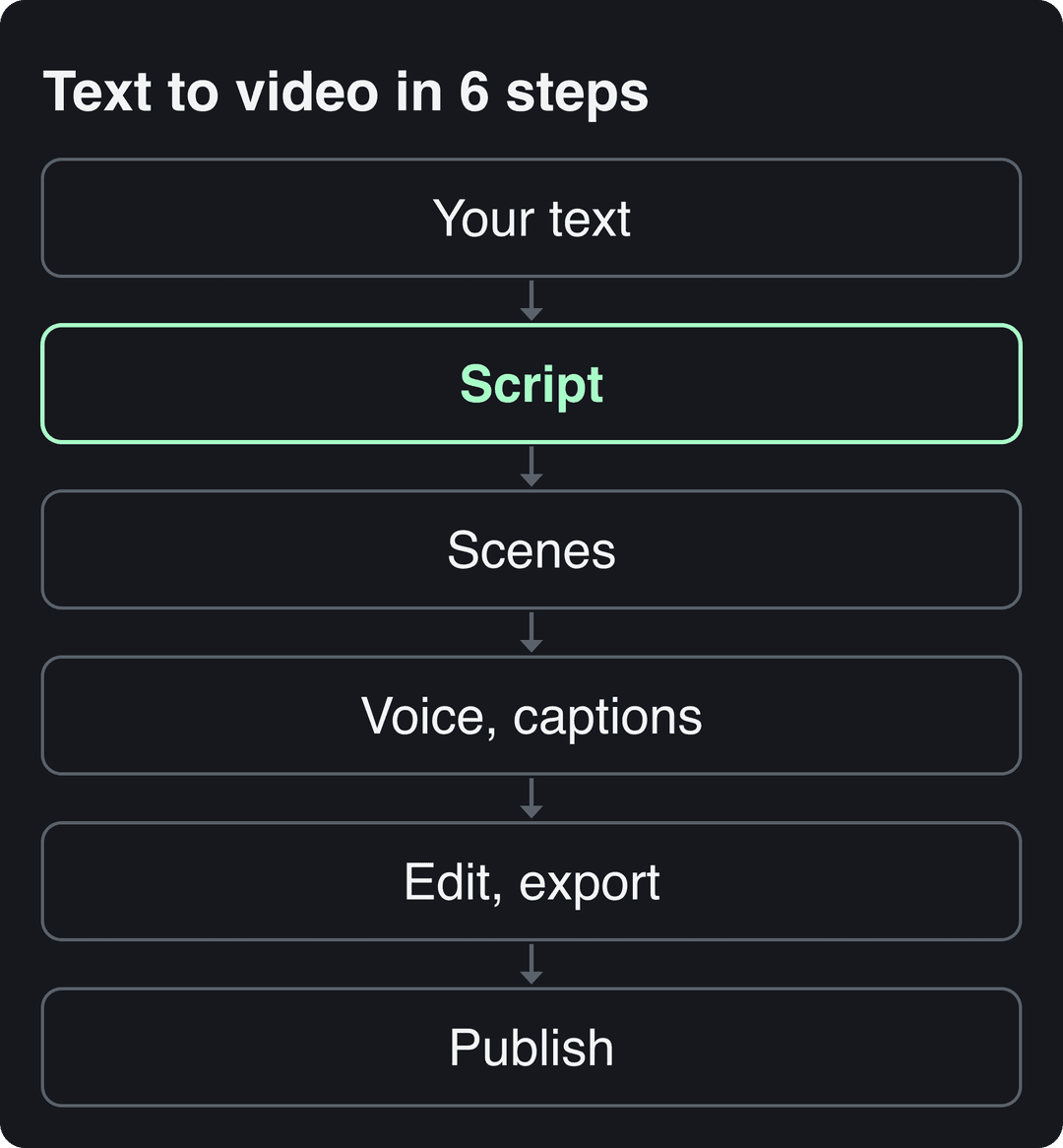
1. Cut your text into a short script
Take one idea from your text per video. A blog post with several tips becomes several short videos, not one long one. Then rewrite that idea for the ear, using this structure:
| Part | What it does | Example (from a post about SaaS pricing) |
|---|---|---|
| Hook | States the problem or a surprising claim | "Your cheapest plan might be costing you money." |
| Point | The one idea of the video | "Low plans often bring in the users who need the most support." |
| Proof | One example, number or visual | Screen recording of a support inbox filling up |
| Payoff | What the viewer should do | "Raise the floor, or cut the plan." |
| Call to action | One next step | "Follow for part two: how to price your top plan." |
Rules that make the cut work:
- Write sentences you can say in one breath. If a line needs a comma to survive, split it.
- Delete any line that only restates the one before it.
- Remove openers like "In this video I will explain". Start with the hook.
- Put your strongest line first, even if it was your conclusion in the written version.
Prompt to try
Make a 30-second vertical video about why a SaaS company's cheapest plan can cost it money. Open with the hook "Your cheapest plan might be costing you money.", give one point and one example, then end with "Raise the floor, or cut the plan." Use short spoken lines, show numbers as on-screen text, and use clean motion graphics with bold captions.
2. Split the script into scenes
Give each sentence (or each beat) its own scene, and change the visual every time the sentence changes. Then mark every line as spoken, on-screen text, or both.
Use this decision rule: if a line is a number, a list or a name, show it as on-screen text. If it carries emotion or a transition, say it out loud. This is how you keep the voice-over short without losing information, which is exactly what the speech data above rewards.
3. Pick a visual for each scene
Match the visual type to what the scene needs to show:
- Stock footage: fast and cheap, but generic. Use it to set a place or mood.
- AI images: for concepts no camera can film, such as a metaphor or a historical scene.
- AI video clips: for motion and specific actions. Models such as Seedance, Veo and Kling generate short clips from a text prompt.
- Charts and motion graphics: for numbers. Build the chart in Google Sheets, export it as an image and drop it into the scene.
- Screen recordings: for software, websites and tutorials.
The visual should show what the voice does not say. If the voice says "our inbox exploded", show the inbox, not a stock photo of a person typing. If you want examples of how a company presents its product in video, the videos page on My AI Front Desk's site is one reference to compare styles against.
4. Add the voice-over, music and captions
- Voice: pick one voice that fits the tone (calm for explainers, energetic for promos) and keep it across a series so viewers recognize you.
- Music: keep it under the voice. Upbeat tracks suit product promos; quieter ones suit educational content.
- Captions: burn them into the video and sync them word by word. Many people scroll with the sound off, and captions are what carry your on-screen text lines. Keep them clear of the platform's buttons and description area.
5. Set the format and export
Export one vertical master file, then resize for other placements. Use these specs:
| Where it goes | Aspect ratio | Resolution and frame rate | Length to know |
|---|---|---|---|
| TikTok | 9:16 | 1080x1920 recommended | Uploads up to 60 minutes |
| Instagram Reels | 9:16 recommended (1.91:1 to 9:16 accepted) | At least 720 px, at least 30 FPS | Up to 20 minutes; reels over 3 minutes are not recommended to non-followers |
| YouTube Shorts | Vertical or square | Same 9:16 file as TikTok | Up to 3 minutes |
| 1:2.4 to 2.4:1 | Up to 4096x2304, 10 to 60 fps | Up to 15 minutes | |
| YouTube (long-form) | 16:9 landscape | 1080p or 4K | 15 minutes by default; longer once your account is verified |
If you need the same video in several shapes, a video resizer for 9:16, 4:5, 16:9 and 1:1 converts one file into each format.
6. Review, label AI content and publish
Watch the video once with the sound off: the captions and on-screen text alone should tell the story. Then watch it with sound and check that every caption lands on the right word. If you need frame-precise audio sync or a long, hand-edited cut, a professional editor such as Adobe Premiere Pro gives you that control.
Label AI visuals before you post. TikTok requires a label on AI-generated content with realistic images, audio or video. YouTube requires you to disclose realistic AI content through the "AI use" setting in YouTube Studio, and Meta asks for disclosure on photorealistic AI video on Instagram and Facebook. TikTok and YouTube both state that the label alone does not reduce a video's distribution.
Tools that post to several networks at once first connect to your social accounts. The demo below shows one such account-linking page.
How to convert text to video with Revid
Revid runs all six steps in one place:
- Open the text to video AI tool and paste your script. To start from an article instead, the blog to video converter reads the page and writes the script. To start from a one-line idea, use prompt to video.
- Choose the visuals for each scene: stock footage, AI images, AI video or motion graphics. You can pick a different AI video model per scene (Seedance 2.5, MiniMax Hailuo H3, Wan 3.0 or Google Veo 3).
- Pick one of 1,000+ AI voices in 70+ languages and one of 30 caption styles. Captions sync to the voice automatically.
- Fix any scene in the timeline editor, then export in 720p, 1080p or 4K at 30 or 60 fps.
- Publish or schedule the video to TikTok, Instagram and YouTube from the same queue.
As a guide, a 30-second video with Pro AI visuals and a voice-over costs about 40 to 80 credits, and Revid shows the cost before you generate. Sign-up is free and new accounts get free credits to try video creation, no credit card needed; regular creation then uses the credits of a paid plan, starting with Growth at $39/month for 2,000 credits (see current plans and credits).
Best tools to convert text to video, compared
The right tool depends on what your text should become: a short social video, a presenter video or a single cinematic clip. These tools are grouped by type, not ranked.
| Tool | Type | Starts from | Free option | Paid from | Best for |
|---|---|---|---|---|---|
| Revid | AI video platform | Script, prompt or link | Free sign-up with free credits to try creation, no credit card needed | $39/month | Short-form videos with AI scenes, voice and captions, published to TikTok, Reels and Shorts |
| Pictory | Template and stock editor | Blog posts, scripts, URLs | Free trial, no permanent free tier | $29/month | Turning articles into stock-footage videos at volume |
| InVideo | Stock editor with a chat agent | Prompt or script | Free plan with watermark and weekly limits | $20/month | Editing by typing commands, large stock library |
| Fliki | Voice-first generator | Script | Free plan with watermark, 720p, 1-minute max | $28/month | Voice-led videos (2,000+ voices, 80+ languages) |
| Synthesia | Avatar platform | Script or slides | Up to 10 minutes of video per month | $29/month | Corporate training with a presenter |
| HeyGen | Avatar platform | Script | 3 watermarked videos per month, up to 1 minute | $29/month | Realistic avatars and video translation |
| Runway | Raw clip generator | Prompt | 125 one-time credits, watermarked | $15/month | Single cinematic clips with shot-level control |
Prices come from Revid's comparison pages, checked in August and September 2026; check each tool's site before you buy. For a longer roundup, see our list of text to video AI generators.
Use this decision rule. If you need a finished, captioned vertical video, pick a full platform (Revid, Pictory, InVideo). If you need a talking presenter for training, pick an avatar platform (Synthesia, HeyGen). If you only need one striking clip and will edit the rest yourself, pick a clip generator (Runway).
If you plan to build your own generator instead, note that AnotherWrapper's AI Sora text-to-video generator template was built on OpenAI's Sora API, which OpenAI shut down on September 24, 2026. Check that it still runs before you rely on it.
Which kinds of text work best as video?
Text that already has a clear structure converts best. Here is the format each type of text should become:
| Your text | Best video format | Visuals to use | Watch out for |
|---|---|---|---|
| Blog post or article | Several short narrated videos, one tip each | Stock footage, AI images, on-screen key points | Reading the whole post aloud |
| Product description | Product demo or UGC-style ad | Product photos, screen recordings | Listing features instead of showing one benefit |
| FAQ or support doc | One short video per question | Screen recordings with arrows and captions | Videos going stale when the product changes |
| Training memo or onboarding doc | Presenter video | Avatar plus slides | Long videos nobody finishes; split by topic |
| Story or script | AI video scenes with a voice-over | AI video clips, consistent characters | Visuals that change style between scenes |
| Data report | Motion graphics explainer | Charts and animated numbers | Too many numbers per scene; one per scene |
Prompt for a data video
Create a 20-second motion graphics explainer on how fast the text-to-video AI market is growing. Open with the hook "This market could nearly triple in four years.", show one animated number per scene, and close with one takeaway line. Keep the narration short and the style clean and modern.
How big is the text-to-video AI market?
The Business Research Company valued the text-to-video AI market at $0.31 billion in 2024, rising to $0.4 billion in 2025 (29.5% growth) and $1.18 billion by 2029 (a 30.9% CAGR). Its follow-up article on market share credits better voice synthesis and responsible AI practices for the growth. Market.us uses a different definition and puts the text-to-video AI market at $256.5 million in 2022, reaching $2,479.7 million by 2032 (a 26.2% CAGR).
The estimates differ because each firm defines the market differently, so read them as a direction rather than precise figures. Usage tells the same story: in Wyzowl's 2026 survey (published December 2025), 63% of video marketers said they had used AI video tools to create or edit marketing videos, up from 51% a year earlier, as listed on our short-form video statistics page.
FAQ
Can I convert text to video for free?
Yes, with limits. InVideo, Fliki and HeyGen have free plans with watermarks or caps on length and resolution, and Runway gives one-time free credits. On Revid, sign-up is free and new accounts get free credits to try video creation with no credit card needed; regular creation then uses the credits of a paid plan from $39/month.
What is the best AI to convert text to video?
It depends on the output you need. For finished short-form videos with AI scenes, voice and captions, use a full platform such as Revid. For a talking presenter, use Synthesia or HeyGen. For a single cinematic clip, use Runway.
How long should a text-to-video script be?
Short enough to cover one idea, because length matters less than how much you say. In Revid's study of 176,367 TikToks posted from October 2025 to October 2026, every length from under 15 seconds to 10 minutes had a median between 58K and 76K views. If you want TikTok Creator Rewards earnings, only videos of at least one minute qualify.
Can AI-generated text-to-video content make money on YouTube?
Yes, if the final video shows your own creative input and gives real value. YouTube does not monetize AI content made from generic templates that looks mass-produced. It also excludes videos that only read out text you did not write.
How long does it take to convert text to video with AI?
A short video usually takes a few minutes to generate once the script is ready. Writing and cutting the script is the slow part, and it is the part that decides whether the video gets watched.