On this page
To create a TikTok video, tap + in the TikTok app, record with the in-app camera (up to 10 minutes) or upload a clip (up to 60 minutes), add sound, text and effects, then write a caption and post. For reach, plan the hook before you film and shoot vertical at 9:16, 1080x1920 pixels.
The way most people film is also the weakest. In Revid's analysis of 176,367 TikToks with 1,000+ likes posted between October 2025 and October 2026, selfie-style videos had a median of 48K views, the lowest of any shooting style, while POV shots reached 107K. Before you buy a ring light, change the angle and the format. This guide shows how, with the numbers behind each choice.
How to create a TikTok video, step by step
- Open TikTok and tap + at the bottom of the screen.
- Record or upload. Hold or tap the record button to film with the TikTok camera (up to 10 minutes), or tap Upload to pick clips from your camera roll. Uploaded videos can run up to 60 minutes.
- Edit in the app. Trim clips, then add a sound, text, stickers and effects.
- Tap Next and write the post. Add a short caption and 3 to 4 hashtags, then pick a cover frame.
- Choose who can watch, then post. If the video contains realistic AI-generated images, audio or video, turn on the AI-generated content label first.
On a computer, TikTok Studio Web accepts landscape or vertical uploads up to 60 minutes long in 1080p, 2K or 4K, with files up to 30 GB. That route is easier if you edit on a desktop.
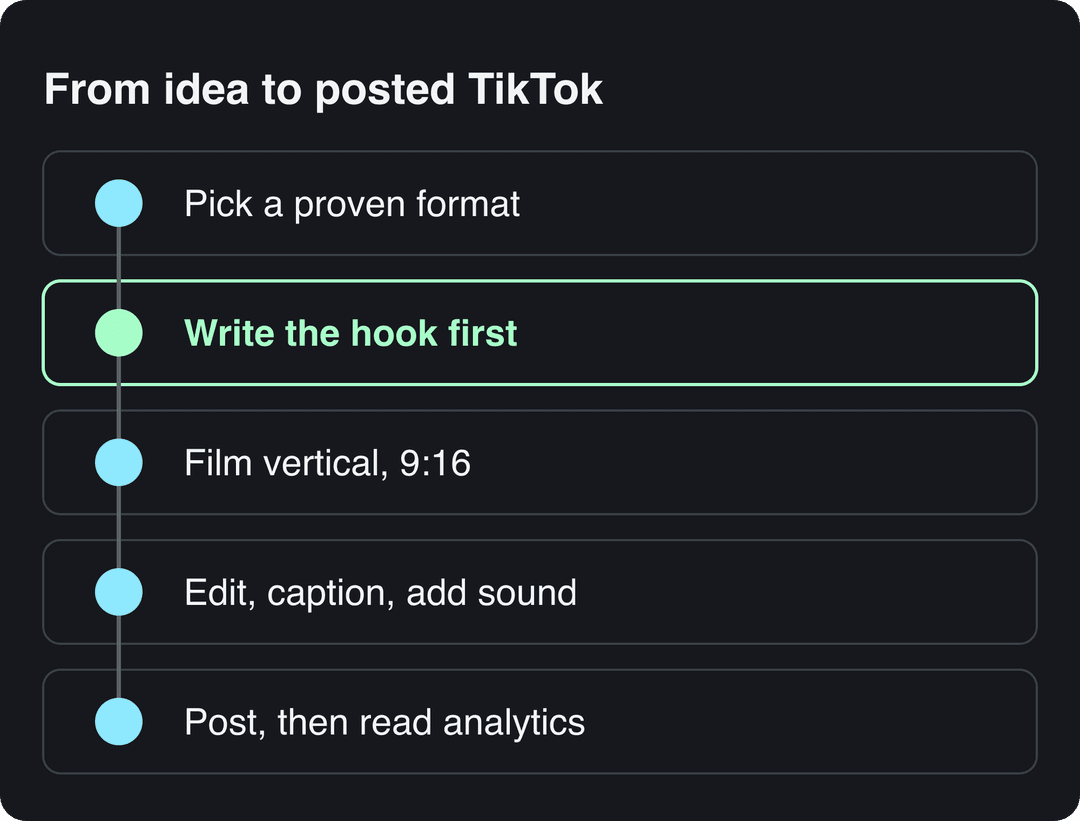
Those steps get a video online. Whether anyone watches it depends on the choices you make before you tap record: format, hook, framing, edit and caption.
What kind of TikTok videos get the most views?
The audience is large enough for almost any niche: in Pew Research Center's 2025 survey, 37% of U.S. adults said they use TikTok, up from 21% in 2021. Revid keeps sourced numbers in its short-form video statistics, and SendShort's TikTok statistics roundup is a third-party collection of older figures.
Format has the widest spread in Revid's data. Challenges had a median of 182K views (25.6% passed 1 million), comedy 155K and reactions 105K, while storytelling (66K) and tutorials (62K) sat close to the overall median of 64.4K. The full study of what makes a TikTok go viral breaks down every format.
Challenges and comedy passed 1M views about twice as often as tutorials and storytelling, which are the most common formats.
Source: Revid analysis of 176,367 TikToks with 1,000+ likes posted between Oct 1, 2025 and Oct 16, 2026 (61,203 creators)
Show the data
| Median views | Share that passed 1M views | |
|---|---|---|
| Challenge | 182.3K | 25.6% |
| Comedy | 154.8K | 22.1% |
| Reaction | 104.8K | 16% |
| Dance | 83.8K | 15.5% |
| Storytelling | 66.1K | 12.2% |
| Lip Sync | 61.7K | 12.3% |
| Tutorial | 61.9K | 12.1% |
Showing your face is optional. Faceless videos had a median of 114K views against 67K for one person on camera, and faceless tutorials reached 156K against 52K for on-camera tutorials. If you would rather stay off screen, a faceless video generator builds narrated videos without any filming.
Decision rules from the data:
- If you teach something, show the screen or your hands instead of a talking head.
- If you sell a product, film it in use from a POV angle and let the result carry the video.
- If you are funny, lean on comedy: faceless comedy (voiced skits, text over footage) had a 327K median.
- If you tell stories, expect median results unless the first line is strong, because storytelling has less built-in pull than a challenge.
These figures come only from videos that already passed 1,000 likes, so they describe what strong TikToks have in common, not guaranteed causes. Format and perspective labels come from Revid's AI analysis of each video.
Prompt to try
Make a 30-second vertical TikTok for a home cleaning niche. Open with the hook "Your shower glass is streaky because of the squeegee, not the soap," then show streaky glass in close-up, the fix in action and a before and after. Keep narration short, use bold captions, and end with "Want the grout version next?"
How to write a TikTok hook and script
The hook is the first line viewers hear or read, and it decides whether they stay. Revid's data also argues for fewer words: videos with under 40 characters of speech had a 123K median and 20.2% passed 1 million views, against 68K and 11.9% for videos that talk throughout. Let the visuals tell the story and keep the voice for what images cannot show.
Emotion counts as well. Videos whose dominant mood was outrage had a 156K median and humor 121K, while inspirational videos had 45K. A hook that names a frustration fits that pattern better than a motivational quote.
Hooks you can adapt:
- "Stop doing this when you [common task]."
- "I tried [popular product] so you don't have to."
- "Nobody tells you this about [niche topic]."
- "This costs less than [everyday item] and fixes [problem]."
- "POV: you just found out [surprising fact]."
A script template for a 30-second video:
| Part | What it does | Example (cleaning niche) |
|---|---|---|
| Hook | States the problem or promise in one line | "Your shower glass is streaky because of the squeegee, not the soap." |
| Setup | Shows the situation | Close-up of streaky glass |
| Payoff | Delivers the fix or punchline, shown rather than explained | The fix in action, before and after |
| Close | Gives one reason to comment or follow | "Want the grout version next?" |
For more first lines, browse these 130+ TikTok hooks or draft a full script with the free TikTok script generator.
How to film TikTok videos with your phone
Settings first. Shoot vertical at 9:16, which TikTok's Creator Academy recommends at 1080x1920 pixels, and set your phone camera to at least 1080p. Wipe the lens, and if your camera app allows it, tap and hold on your subject to lock focus and exposure.
Then pick the angle. In Revid's data, POV videos had a 107K median (19% past 1 million), screen recordings 91K, handheld 80K, tripod 77K and selfie 48K (9.2%).
POV shots and screen recordings earned the most views. Selfie-style videos, the default for many creators, earned the least.
Source: Revid analysis of 176,367 TikToks with 1,000+ likes posted between Oct 1, 2025 and Oct 16, 2026 (61,203 creators)
Show the data
| Median views | Share that passed 1M views | |
|---|---|---|
| POV | 107.3K | 19% |
| Screen recording | 90.7K | 12.7% |
| Handheld | 79.8K | 14.5% |
| Steady cam | 78.2K | 14.9% |
| Drone | 83.4K | 14.9% |
| Tripod | 77.4K | 15.5% |
| Selfie | 48.4K | 9.2% |
What that means in practice:
- POV: hold the phone where the viewer's eyes would be, so they see the task, the product or the scene as if they were doing it.
- Screen recordings: use them for apps, software, recipes from a site or anything that happens on a screen.
- Handheld: move with the action when the scene changes; a little motion reads as real.
- Tripod: keep it for demos where your hands need to be free.
- Selfie: save it for short reactions instead of filming the whole video at arm's length.
Keep faces and text away from the edges where TikTok's buttons and caption sit. The free TikTok safe zone checker overlays them on your frame.
Lighting, sound and gear that matter
You do not need a camera. Light, sound and stability do most of the work, and the cheap options are good enough to start.
| Need | Free or cheap | Upgrade |
|---|---|---|
| Light | Face a window in daytime; bounce light with white poster board | Ring light (often under $50) |
| Sound | Phone mic in a quiet, soft-furnished room | Clip-on lavalier mic ($20 to $50) |
| Stability | Prop the phone on books or a shelf | Mini tripod, or a phone gimbal for moving shots |
| Background | Clean wall or plain curtain | A set that shows your niche (desk, kitchen, workshop) |
If you can only fix one thing, fix sound: viewers forgive average video far more easily than muffled or echoing audio.
How to edit TikTok videos
TikTok's built-in editor handles trimming, text, sounds and effects, and it is enough for quick posts. For more control, CapCut offers a free tier with the full editor, 1080p export, auto-captions and trend templates, and InShot is a simple mobile editor for trimming, music and text.
Editing rules that hold for every format:
- Cut the start. Delete every pause, breath and "hey guys"; the first frame should already show the subject.
- Add captions so the video works with the sound off.
- Match pacing to the format: quick cuts for comedy and challenges, longer shots for tutorials and stories.
- Use a trending sound only when it fits the mood of the video. If you plan to earn from Creator Rewards, note that videos with copyrighted music playing over one minute do not count as original.
- Use transitions sparingly. A clean cut beats a flashy effect that hides the content.
A clip made for Instagram Reels or YouTube Shorts can run on TikTok too. Re-edit the first line, the on-screen text and the caption for TikTok instead of posting the same file unchanged.
How long should a TikTok video be?
TikTok accepts uploads up to 60 minutes, but length barely moved views in recent data. In Revid's 12-month study, every length bucket from under 15 seconds to 10 minutes had a median between 58K and 76K views. Videos of 61 to 90 seconds had a 70K median, while clips under 15 seconds had the lowest median (58K) but the most shares per view (1.41 per 100).
Revid's full index of about 2.39 million TikToks with 1,000+ likes, across all posting dates, found 16 to 30 second videos ahead at about 141K median views. Comparing the two samples, the edge of very short videos has faded for recent posts.
Decision rule: if you want to earn from the Creator Rewards Program, make the video at least one minute long, because shorter videos do not earn. Otherwise, make it as long as the idea needs and cut anything that repeats.
What caption and how many hashtags should you use?
Use 3 to 4 hashtags. In Revid's data, posts with 4 hashtags had the best median (77K views, 13.4% past 1 million) and 3 hashtags had 75K, while posts with no hashtags had 51K and posts with 9 or more had only 16K.
Keep the caption to one line. Captions of 41 to 80 characters had the best median (67K views), and posts with no caption had 36K. Examples of that length:
- "The cheapest fix for streaky shower glass"
- "I tested 4 budget mics so you don't have to"
- "POV: your first week running a coffee cart"
Pick hashtags that describe the topic and the audience (#cleaningtips, #smallbusiness) rather than generic tags that say nothing about the video.
When should you post on TikTok?
In Revid's data on English-language TikToks, posts at 3 to 6 a.m. US Eastern did best: 4 a.m. had the highest median (120K views) and 19.9% passed 1 million. Posts at 7 p.m. had the lowest median (50K), and 5 to 9 p.m. was the weakest window. Saturday had the best median of the week (70K), with weekdays all between 63K and 65K.
Those creators post from all over the world, so the early US hours also cover daytime in the UK, Europe, India and Asia. Use the data as a starting point, then check your own audience: in TikTok Studio, the Viewers tab shows when your viewers were most active over the last 7 days, and the Followers tab breaks follower activity down by hour and day.
How to use TikTok trends without copying them
Join a trend while it is still growing: early enough that people are searching for it, late enough that the format is clear. A daily list of TikTok trends today shows which hashtags and sounds are rising.
Then make it yours. Put a trending sound under a demo of your product, or use a trending format to answer a question from your niche. Smaller trends inside your niche (a recipe style, a tool everyone is testing) often bring more relevant viewers than broad ones.
Before you commit, ask four questions:
- Relevance: does it fit your niche and your audience?
- Fit: can you add your own angle, or would you only copy it?
- Timing: is it still rising, or already everywhere?
- Effort: can you make a good version today, while it is still current?
If the answers are no, skip it. For the wider picture on reach, see this guide on how to make viral videos.
How to read TikTok analytics and improve the next video
TikTok analytics live in TikTok Studio: profile, menu, TikTok Studio, Analytics, View all. They are also on Studio Web and in the TikTok Studio app, with date ranges of 7, 28, 60 or 365 days or custom.
What to check after each post:
- Retention and watch time: where viewers leave tells you which second to fix. A drop at the start means the hook failed; a drop in the middle means the setup dragged.
- Shares and saves: they show which ideas people want to pass on or come back to.
- Followers gained: shows which videos turn viewers into an audience.
Change one thing at a time. Repost a strong idea with a new hook, or the same hook with a different angle, and compare it with your own median rather than with other creators.
How to create TikTok videos with AI in Revid
If filming every day is the bottleneck, Revid turns an idea, a script or a link into a finished vertical video and publishes it to TikTok. With the AI TikTok video generator:
- Paste a script, an idea or a link (a blog post, a YouTube video, a Reddit thread).
- Pick a voice from 1,000+ AI voices in 70+ languages and a visual style: stock footage, AI images or AI video from models such as Seedance 2.5, MiniMax Hailuo H3, Wan 3.0 and Google Veo 3.
- Choose one of 30 caption styles and adjust any scene in the timeline editor.
- Export in 1080p or 4K, or publish and schedule straight to TikTok.
You can also start from a format that already worked: Revid's library of about 2.77 million short-form videos with engagement data lets you remix a proven viral format into an original video with a new script. Every post published through Revid reports its views, likes and comments. Sign-up is free and new accounts get free credits to try video creation, no credit card needed; regular creation then uses the monthly credits of a paid plan, from $39/month.
FAQ
Can I create TikTok videos on a computer?
Yes. TikTok Studio Web accepts landscape or vertical uploads up to 60 minutes long in 1080p, 2K or 4K, with files up to 30 GB.
How do I make a TikTok with photos?
Tap +, choose Upload and select your photos; a TikTok photo post can contain up to 35 photos. Photo-only posts do not count as original for Creator Rewards, so they will not earn.
What is the best free app to make TikTok videos?
The TikTok app itself is enough for quick posts. For more control, CapCut's free tier includes the full editor, 1080p export and auto-captions.
Do TikTok videos make money?
Yes, through the Creator Rewards Program, which needs you to be 18 or older with 10,000 followers and 100,000 video views in the last 30 days. Only videos at least one minute long earn, and TikTok publishes no fixed rate per 1,000 views.
How many hashtags should I put on a TikTok?
Use 3 to 4. In Revid's data, 4 hashtags had the best median (77K views), while 9 or more dropped to 16K.