YouTube Shorts Creation: A Step-by-Step Guide With Data (2026)
How to create YouTube Shorts in 2026: the five steps, current specs, a script template, what formats perform, and what Shorts actually pay.
On this page
YouTube Shorts creation takes five steps: choose one idea, write a hook for the opening seconds, shoot or generate a vertical 9:16 video of up to 3 minutes, edit it tight with captions, and upload it with the + button in the YouTube app or through YouTube Studio on a computer. The rest is testing and repeating what works.
Small channels have the most to gain. Socialinsider's 2026 study of 69 million short-form videos found that accounts with under 5,000 followers averaged 15,160 views per YouTube Short, against 625 on Instagram Reels and 350 on TikTok. The catch: Shorts also had the lowest engagement rate by followers (0.30%, versus 2.60% on TikTok and 0.45% on Reels), so reach comes easily and loyalty is the part you have to build.
- Average views per YouTube Short for accounts under 5,000 followers
- 15,160
- Socialinsider, August 2026
- Daily YouTube Shorts views
- 200B+
- YouTube Official Blog, August 2026
- Shorts RPM per 1,000 views for US audiences
- $0.328
- AIR Media-Tech, September 2026
- Maximum length of a YouTube Short (square or vertical)
- 3 min
- YouTube Official Blog, October 2024
What counts as a YouTube Short in 2026
A Short is a square or vertical video up to 3 minutes long. That rule applies to videos uploaded on or after October 15, 2024. The specs that affect how you create one:
| Spec | Current rule |
|---|---|
| Length | Up to 3 minutes, square or vertical |
| Shape | 9:16 vertical is the standard; square also counts |
| Title | Up to 100 characters |
| Music from the Audio Library | Most tracks usable for up to 90 seconds; some only 60 or 30 seconds |
| Copyright | A Short over one minute with an active Content ID claim is blocked globally and can't be monetized |
| Custom thumbnail | Verified accounts only, in YouTube Studio on a computer; 9:16 at 2160x3840 recommended, minimum height 640 px |
| Where to upload | The YouTube app on a phone or YouTube Studio on a computer |
The player buttons, channel name and title sit over the bottom and right of the frame. Keep faces, captions and key text away from those edges, and check your layout with the YouTube Shorts safe zone checker before you export.
How to create a YouTube Short, step by step
Step 1: Pick one idea per Short
One Short, one point. If you can't say the idea in a single sentence ("why your sourdough comes out flat"), split it into a series. Good sources of ideas: questions in your comments, the most-watched moment of a long video, and formats that are already working in your niche.
Prompt to try
Make a 30-second vertical YouTube Short for a baking channel. Hook: "Your sourdough is flat because of one step you're skipping." Show a flat loaf next to a tall one, reveal the fix (a proper bulk ferment and shaping for tension) in one clear scene, then end with a line that loops back to the flat loaf. Warm kitchen visuals, calm voice-over, bold captions.
Step 2: Script the hook, the payoff and the loop
Write the script before you film. A Short that works usually follows this shape:
- Hook: one line, spoken and shown on screen, that states the problem or the promise.
- Setup: the minimum context, shown rather than explained.
- Payoff: the answer, the reveal or the punchline.
- Loop or next step: a last line that flows back into the first, or points to the next part.
Example for a baking channel:
- Hook: "Your sourdough is flat because of one step you're skipping."
- Setup: a flat loaf next to a tall one.
- Payoff: the fix, shown in a single shot.
- Loop: "And that's why the first loaf looked like... this." (cut back to the flat loaf)
Hooks that stop the scroll are specific and visual. A few patterns you can adapt:
- "Stop doing [common habit] if you want [result]."
- "I tried [popular method] so you don't have to."
- "The mistake that ruins every [thing your audience makes]."
- "Watch what happens when [unexpected action]."
For more patterns, browse this list of scroll-stopping hooks, or draft a full script with the free YouTube Shorts script generator.
The index leans toward videos that surface in hashtag and keyword searches, so its view counts run high: compare the groups, not the absolute numbers.
Source: Revid TikTok index: 2,377,477 TikToks with AI labels per video, snapshot of Sep 15, 2026. Median views estimated from view buckets.
Show the data
| Median views | Share past 1M views | |
|---|---|---|
| Animal-focused | 273.2K | 36.3% |
| Faceless | 199.4K | 29.7% |
| Object-focused | 143.1K | 24.9% |
| Group-focused | 140.3K | 23.7% |
| Person-focused | 104.8K | 21.8% |
Step 3: Shoot or generate vertical footage
A recent phone is enough. Spend on sound and light before you spend on a camera.
| Gear | Starter setup | Upgrade when you're posting weekly |
|---|---|---|
| Camera | Your phone's rear camera | Same phone, or a dedicated camera |
| Light | A window in front of you, or a small LED panel | An adjustable light kit |
| Audio | A clip-on lavalier mic | A shotgun or wireless mic for noisy places |
| Stabilization | A tripod or a stack of books | A gimbal for moving shots |
| Editing | The YouTube app or a phone editor | A desktop editor or an AI video tool |
Film vertically, fill the frame with the subject, and shoot more short takes than you think you need. Faceless Shorts (screen recordings, product close-ups, AI visuals with a voice-over) are a valid choice, not a fallback; the data section below shows why.
Step 4: Edit for retention
- Cut every pause and filler word. If a shot doesn't add information, it goes.
- Put the hook on screen as text in the first frame, because many people watch with the sound off.
- Add burned-in captions; an AI caption generator does this in minutes.
- Change the picture often: a new angle, a zoom, a text callout or a B-roll shot.
- Use music from the Audio Library within its time limit, and keep claimed music out of Shorts longer than one minute.
Step 5: Upload and publish
From your phone: open the YouTube app, tap the + button, choose Create a Short, then record or pick a video from your gallery. Add sound, text or filters, tap Next, write the title, set visibility and upload.
From a computer: in YouTube Studio, click Create, then Upload videos, and pick a square or vertical file up to 3 minutes long. YouTube classifies it as a Short automatically. This is also where verified accounts can upload a custom Shorts thumbnail.
Write a title that says what the viewer gets, not a teaser with no subject, and link a related long video from your channel when one fits.
How to create viral YouTube Shorts: what performs
No one can promise a viral Short, but some formats clear the bar far more often than others. In Revid's analysis of 176,367 TikToks with 1,000+ likes posted between October 2025 and October 2026, challenges had the highest median views (182K, with 25.6% passing 1M), followed by comedy (155K) and reactions (105K). Storytelling and tutorials sat near the middle at 66K and 62K. This is TikTok data, not YouTube data, and the sample only holds videos that already reached 1,000+ likes, so read it as a map of what strong short-form videos have in common, not a guarantee. The full study of what makes a video go viral has the method and every chart.
Challenges and comedy passed 1M views about twice as often as tutorials and storytelling, which are the most common formats.
Source: Revid analysis of 176,367 TikToks with 1,000+ likes posted between Oct 1, 2025 and Oct 16, 2026 (61,203 creators)
Show the data
| Median views | Share that passed 1M views | |
|---|---|---|
| Challenge | 182.3K | 25.6% |
| Comedy | 154.8K | 22.1% |
| Reaction | 104.8K | 16% |
| Dance | 83.8K | 15.5% |
| Storytelling | 66.1K | 12.2% |
| Lip Sync | 61.7K | 12.3% |
| Tutorial | 61.9K | 12.1% |
Two more findings from the same TikTok sample are worth applying to Shorts:
- Talk less. Videos with under 40 characters of speech had a 123K median and 20.2% passed 1M views; videos talking throughout had 68K. Let the visuals carry the story and keep narration to what the picture can't show.
- Faceless works. Faceless videos had a 114K median, against 67K for one person on camera. If you hate filming yourself, you lose nothing by not doing it.
On length, every bucket from under 15 seconds to 10 minutes landed between 58K and 76K median views in the 12-month sample, with 61 to 90 seconds slightly ahead at 70K. Make the Short as long as the payoff needs and no longer, and keep it under one minute if it uses music that may be claimed.
For tactics after you publish (titles, posting rhythm, comments), see these tips on getting more views on YouTube Shorts.
Series format to try
Create a 45-second vertical Short in a repeatable "myth, then the fix" format for a home fitness channel. Hook: "Stop doing crunches if you want a flat stomach." Bust the myth with simple visuals, show two better moves, and end by teasing the next myth in the series. Fast cuts, minimal narration, bold on-screen text.
How to plan a strategy to create engaging, viral YouTube Shorts
A strategy is a format you can repeat, a schedule you can keep and a rule for what to change.
- Pick a repeatable format. One structure (a myth, then the fix; a before and after; a ranked list) that you can fill with new topics every week. YouTube began rolling out Shorts series in September 2026, which lets you organize Shorts into seasons and episodes, so a named recurring format also gets its own shelf.
- Mix Shorts with long-form if you make both. AIR Media-Tech's study of 18,000 English-language channels found the best results when Shorts made up 25% to 40% of a channel's uploads.
- Use Shorts to test long-form ideas. A topic that performs as a Short is a strong candidate for a full video; one that flops costs you an afternoon, not a week.
- Measure the right thing. Since August 24, 2026, YouTube counts a view the moment a video starts to play, so raw views say little about quality. In the Shorts analytics in YouTube Studio, watch how many viewers keep watching versus swipe away, and average percentage viewed. The YouTube Analytics help page explains each report.
Decision rules once you have a few weeks of data:
- If most viewers swipe away, rewrite the hook and first shot, not the whole video.
- If viewers stay but don't finish, cut the middle and move the payoff earlier.
- If a Short beats your average clearly, post a part two within a week.
- If Shorts viewers never reach your long videos, link a related video on every Short and make the topics match.
A repeatable YouTube Shorts production workflow
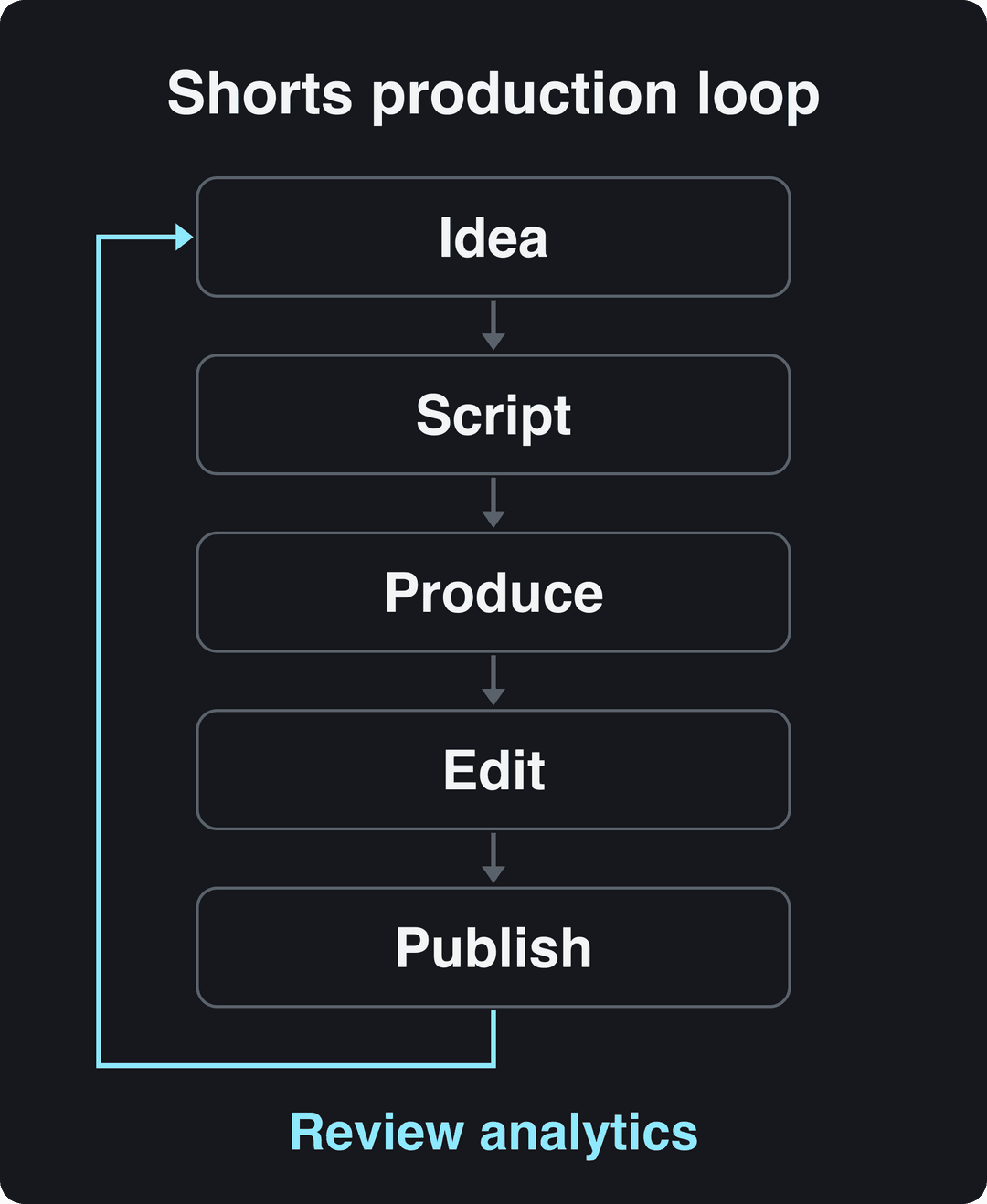
YouTube Shorts production gets easier when you batch it: write a week of scripts in one sitting, film or generate them in a second, edit in a third, then schedule. Review the numbers before the next batch so each round improves on the last.
Which platform you create Shorts with depends on what you start from:
| You start from | Good fit | Trade-off |
|---|---|---|
| Footage you film on your phone | The YouTube app's Shorts camera, or a phone editor such as CapCut | Manual work for every video |
| An idea, a script or a link, with no footage | An AI video platform such as Revid | AI generation uses paid credits |
| A long video or podcast | A clipping tool, such as Revid's YouTube clip maker | You need long source material |
| Cinematic, hand-edited work | A desktop editor (Premiere Pro, DaVinci Resolve) | Slow per video |
The YouTube app is enough for your first Shorts. Add tools only when they remove a step you repeat every week.
How to create YouTube Shorts with Revid
Revid fits when you want finished Shorts without filming every one:
- Open the AI YouTube Shorts generator and enter an idea, a script or a link (a blog post, a YouTube or TikTok video).
- Or start from proof: search Revid's library of about 2.77 million short-form videos with engagement data, run the free Deep analysis on one to see its hook and structure, then choose Same energy, new script or Make it about your topic. You can also repurpose a YouTube Short you add as a reference.
- Revid writes the script and builds each scene with stock footage, AI images or AI video (Seedance 2.5, MiniMax Hailuo H3, Wan 3.0 or Google Veo 3), plus a voice-over in 70+ languages and synced captions.
- Fix any scene in the timeline editor, export in 1080p or 4K, and publish or schedule it straight to YouTube.
Sign-up is free and new accounts get free credits to try video creation, no credit card needed. Paid plans start at $39/month (Growth, 2,000 credits), and you can estimate a video's credit cost before generating it.
How much do YouTube Shorts pay? RPM and monetization in 2026
Shorts pay through a shared Creator Pool: Shorts Feed ad revenue is pooled each month, split by each creator's share of engaged Shorts views per country, and creators keep 45% of their allocation whether or not they used music.
To earn that, you need to be in the YouTube Partner Program. Today, ad revenue sharing requires 1,000 subscribers plus either 4,000 qualified public watch hours in the last 12 months or 10 million qualified Shorts views in the last 90 days. A lower tier (500 subscribers plus 3,000 watch hours or 3 million Shorts views) gives access to fan funding and shopping, not ad revenue.
The rules change on February 1, 2027:
- New applicants will need 1,000 subscribers plus 8,000 qualified watch hours in 365 days or 20 million qualified Shorts views in 90 days. Existing partners are not affected.
- Earning Shorts ad and Premium revenue in a given month will require at least 10 million qualified Shorts views in the last 90 days. Channels below that stay in YPP and keep long-form earnings.
- YPP members must accept the updated terms in YouTube Studio by January 31, 2027.
As for rates, AIR Media-Tech's September 2026 analysis of 274 channels put Shorts RPM for US audiences at $0.328 per 1,000 views, against $0.166 for the UK and $0.165 for Canada. Shorts RPM was 3% to 14% of long-form RPM in almost every niche, so most channels need 11,000 to 34,000 Shorts views to earn what 1,000 long-form views generate. Photutorial's YouTube Shorts statistics collect more figures on earnings and usage. (For context, the separate $100 million YouTube Shorts Fund announced in 2021 paid out over 2021 and 2022; today's model is revenue sharing.)
The audience is large: YouTube said in August 2026 that Shorts get over 200 billion daily views, up from the 30 billion Alphabet reported in April 2022 (official sourced figures). SendShort's Shorts statistics page, StoryLab's Shorts statistics roundup and Blogging Wizard's Shorts statistics gather third-party numbers too; check any figure against its original source before you quote it.
Because the per-view rate is low, most Shorts income comes from what they feed:
- Brand deals: a niche audience that comments and clicks is worth more to a sponsor than raw views.
- Your own products or membership: tease the full version in a Short and sell it on a page like Patreon.
- Cross-posting: the same vertical video can run on Instagram, where Reels launched in 2020 (Meta's Instagram Reels announcement), and on TikTok's web app. Remove other platforms' watermarks before uploading.
FAQ
Is a YouTube reel the same as a YouTube Short?
Yes. YouTube calls its vertical short videos Shorts; reels is Instagram's name, but people often use it for both. To create a YouTube reel, follow the Shorts steps above: a vertical video up to 3 minutes, uploaded through the + button in the YouTube app or through YouTube Studio.
How do you create content for YouTube Shorts if you don't want to show your face?
Use a voice-over over screen recordings, product close-ups, B-roll or AI-generated scenes. In Revid's TikTok data, faceless videos had a higher median than videos with one person on camera (114K versus 67K views), so faceless is a strong choice, not a compromise.
Can you make YouTube Shorts on a computer?
Yes. Upload a square or vertical video up to 3 minutes long in YouTube Studio and YouTube classifies it as a Short. Custom Shorts thumbnails can only be added this way, by verified accounts.
Can AI-generated YouTube Shorts be monetized?
Yes, if the final video shows your creative vision and gives real educational or entertainment value. YouTube refuses to monetize mass-produced template content, incoherent compilations of AI clips, and AI personas posing as experts on health, legal, financial or political topics.
Do Shorts views from replays count?
Yes. Since August 24, 2026, YouTube counts a view whenever a video starts to play, including replays. YPP eligibility and earnings still use qualified and engaged views, which filter out low-quality plays.
Sources
- Revid analysis of 176,367 TikToks with 1,000+ likes posted between Oct 1, 2025 and Oct 16, 2026 (61,203 creators)
- Revid TikTok index: 2,377,477 TikToks with AI labels per video, snapshot of Sep 15, 2026. Median views estimated from view buckets.
- Socialinsider, TikTok vs. Reels vs. Shorts: 2026 Engagement Data (August 2026)
- YouTube Official Blog, New opportunities to earn and changes to the YouTube Partner Program (August 2026)
- AIR Media-Tech, YouTube Shorts RPM vs long-form: real monetization data from 274 channels (September 2026)
- YouTube Official Blog, Tall updates coming to Shorts (October 2024)
Charts and figures checked on November 6, 2026.