On this page
To create a viral video on YouTube, start from a format that already works in your niche, open with a first line that makes a clear promise, deliver the payoff fast, and pair it with a title and thumbnail that tell one story. Then publish it as a Short or a tight long-form video and promote it hard in the first 24 hours.
Small channels have a better shot on YouTube than on any other short-form platform. In Socialinsider's 2026 study of 69 million short-form videos, YouTube Shorts from accounts with under 5,000 followers averaged 15,160 views per video, against 625 on Instagram Reels and 350 on TikTok. Most creators spend that advantage on gear and editing, but the idea and the opening line decide most of the outcome.
What makes a YouTube video go viral?
A viral video is a feeling that people want to pass on. Viewers don't share a clip. They share the laugh, the shock or the "I knew it" moment it gave them. Every breakout video rests on three things:
- Emotion (why they share): humor, surprise, awe, disagreement or validation. A video that is only mildly interesting gets watched and forgotten.
- Timing (why they share it now): a fresh take on something people already talk about, such as a meme, a product launch or a cultural moment.
- Story (why they keep watching): even a short clip needs a setup, a build and a payoff, or viewers swipe before the moment worth sharing.
The emotion matters more than most creators expect. In Revid's analysis of 176,367 TikToks with 1,000+ likes posted between October 2025 and October 2026, videos whose dominant mood was outrage had a median of 156K views and humor 121K, while inspirational videos had only 45K. This is TikTok data, and the sample only holds videos that already passed 1,000 likes, so it shows what top performers have in common rather than proving cause. The lesson still carries over to YouTube: strong reactions travel, and gentle uplift rarely does. Aim for surprise, laughter or a debate, not rage bait that breaks the rules. The full study of what makes a TikTok go viral has the method and every chart.
High-arousal emotions (outrage, humor, sadness) earned the most views. Calm, inspirational videos earned the least, even though they collect the most likes per view.
Source: Revid analysis of 176,367 TikToks with 1,000+ likes posted between Oct 1, 2025 and Oct 16, 2026 (61,203 creators)
Show the data
| Median views | Share that passed 1M views | |
|---|---|---|
| Outrage | 156K | 23.7% |
| Humor | 121K | 19.3% |
| Sadness | 104.4K | 16.5% |
| Excitement | 92.5K | 15.9% |
| Joy | 89.9K | 18% |
| Informative | 64.1K | 11.2% |
| Neutral | 61.2K | 11.5% |
| Inspirational | 44.6K | 11.3% |
Format follows the same logic. In the same study, challenges had a 182K median and comedy 155K, while tutorials sat at 62K. Teaching content can still break out, but it needs a twist (a challenge, a reveal, a surprising result) to compete.
| Component | What it is | What to do |
|---|---|---|
| Hook | The first line and first frame | Make a clear promise or open a question the viewer needs answered |
| Emotional trigger | The core feeling the video creates | Pick one emotion before you write a word |
| Relatability | The "that's so me" factor | Show a common problem or experience, in specific detail |
| Timing | A link to something current | Tie the idea to a trend, event or conversation people already follow |
| Shareable climax | The punchline, reveal or result | Build everything toward one moment people will rewatch and send |
| Simple premise | An idea understood instantly | If it needs a paragraph of context, simplify it |
Step 1: Find an idea with proven demand
The fastest way to a viral idea is to study videos that already broke out. Open the channels in your niche, sort their videos by Popular, and look for outliers: videos with far more views than the channel's usual. For each one, answer three questions:
- What emotion did it trigger in the first few seconds?
- Was it tied to something happening at the time?
- What was the payoff that made people share it?
The answers give you a blueprint. You are not copying the video. You are copying the reason it worked. This practical guide on how to make viral videos from a third-party AI video site covers more ways to spot patterns.
Then narrow the topic until it becomes a specific problem. "Home workouts" is crowded. "Workouts for people with no equipment and noisy downstairs neighbors" has a built-in audience that feels seen. Comments, Reddit threads and the questions under popular videos are where these specific problems show up.
Revid makes this research faster. Its library holds about 2.77 million real short-form videos and posts with their public engagement data, searchable by topic, platform, engagement tier and length. The free deep analysis (up to 60 a day) watches any video and explains its hook, its timed structure, its scroll-stopping moment and three ways to adapt it to your niche. You can then remix a proven viral video into an original one on your own topic.
One thing not to chase: the old Trending page. YouTube's Help Center now describes Trending Charts only for select categories (Movie Trailers, Music Videos and Gaming). Recommendations and search are where views come from.
Should your viral video be a Short or a long-form video?
Decide the format before you script, because it changes everything from pacing to packaging.
| YouTube Short | Long-form video | |
|---|---|---|
| Shape | Vertical or square | Usually 16:9 landscape |
| Length | Up to 3 minutes (since October 15, 2024) | No fixed ideal; match the content |
| Where it spreads | The Shorts feed | Home page, search, suggested videos |
| Best for | One moment, one reveal, one joke | Payoffs that need setup, demonstration or story |
| Watch out for | Content ID claims and music limits | Slow intros that lose viewers |
The Shorts feed is huge: in August 2026 YouTube said it sees over 200 billion daily Shorts views. Two rules matter if you go long on a Short. Any Short longer than one minute with an active Content ID claim is blocked globally and cannot be monetized, and most Shorts Audio Library songs can only be used for up to 90 seconds.
For long-form, ignore the idea of a magic length. Third-party roundups like this collection of YouTube statistics give general benchmarks, but the right length is the shortest one that delivers the full payoff without padding.
Decision rule: if the idea lives in a single moment, make a Short. If the payoff needs a build, make a long-form video and cut its best moments into Shorts that send viewers to it. AIR Media-Tech's study of 18,000 English-language channels found the best results when Shorts made up 25% to 40% of a channel's uploads. Revid can turn a long video into short clips automatically.
Prompt to try
Make a 45-second YouTube Short that opens with: "I tried the 5 AM routine of billionaires for a week. Day one was a disaster." Follow the AIDA structure: the groggy first morning, the awkward meditation and empty laptop, then a Day 1 vs Day 7 reveal where the energy is clearly better. Use a conversational, slightly self-deprecating voice, fast cuts and bold captions, and end on a line that loops back to the opening.
Step 2: Write a hook and a script people finish
The hook is the first line and the first frame, and its job is to make leaving feel like a mistake. Make a clear promise, ask a question that needs an answer, or drop the viewer into the middle of the action. A bold, direct statement is a strong default: when Revid looked at the 1,588 TikToks with over 100 million views, 51% of those with a transcript opened with a statement and 16% with a question. That is TikTok data, but the mechanics of a vertical feed are the same on Shorts.
Sample hooks you can adapt:
- "I tried the 5 AM routine of billionaires for a week. Day one was a disaster."
- "This is the one mistake that's killing your plants."
- "I survived 50 hours in a cardboard box."
- "Here's how to work out without your downstairs neighbors knowing."
- "Nobody tells you this before you buy [product]."
For more, browse these TikTok hooks that stop the scroll; most work word for word on Shorts.
After the hook, use a simple structure. The AIDA model fits short and long videos alike:
- Attention: the hook.
- Interest: the problem or mystery, and why it matters to the viewer.
- Desire: the result, the reveal or the information they came for.
- Action: one next step: subscribe, watch the next video, or comment.
Then turn the script into shots. A two-column storyboard is enough:
| What we see | What we hear |
|---|---|
| Close-up on an alarm clock showing 4:59 AM. I groan and roll over. | "Day one. I already hate this. What was I thinking agreeing to live like a tech CEO for a week?" |
| Quick cuts of making coffee, meditating awkwardly, staring at a blank laptop. | "The first few hours were a blur. This was supposed to make me a genius. Mostly I wanted a bagel." |
| Split screen of my energy on Day 1 vs. Day 7. Day 7 looks much brighter. | "But by the end of the week, I wasn't just waking up early. I was waking up with a plan." |
This tells you exactly which shots to film and keeps the story tight.
AI prompts for creating viral YouTube videos
AI is most useful for speed: you can test dozens of angles, hooks and titles in minutes, then keep the best and rewrite them in your own voice. Vague prompts get generic output, so give the AI the audience, the emotion and the format. Copy these and replace the brackets:
- Idea mining: "I make YouTube videos about [niche] for [audience]. List the most common frustrations this audience has that existing videos don't solve well. For each, write one sentence describing a video that solves it in a surprising way."
- Angles: "Generate five unique video titles about [topic]. Frame them for [audience] who feel [emotion, e.g. self-conscious]. Each title must create curiosity without lying about the content."
- Hooks: "Write five opening lines for a YouTube Short about [topic]. Each must make a clear promise or open a question in one sentence. Mix bold statements and questions. No greetings, no 'in this video'."
- Script structure: "Write a script for a long-form video titled '[title]'. Use the AIDA structure: a one-sentence hook, the problem and why it matters, a demonstration in three distinct parts, and a short close with a call to subscribe. Write it as spoken narration in a conversational tone."
- Short cut-down: "Here is my long-form script: [paste]. Find the single most surprising moment and rewrite it as a self-contained vertical Short with its own hook, payoff and a last line that loops back to the first."
- Title and thumbnail pair: "For a video about [topic], suggest five title and thumbnail pairs. The title makes the promise; the thumbnail shows the emotion or result. Describe each thumbnail as one subject, one expression and at most three words of text."
A free YouTube Shorts script generator does steps 3 to 5 for you. Inside Revid, the script writer goes one step further: before writing from a prompt, it retrieves transcripts of related TikToks with more than 10,000 likes and uses them as references for style and story.
Step 3: Package it with a title, thumbnail and description
A great video with weak packaging never gets the chance to spread. YouTube recommends videos that viewers click and keep watching, so two numbers in YouTube Studio matter most: impressions click-through rate (does the title and thumbnail earn the click?) and audience retention (does the video keep the promise?).
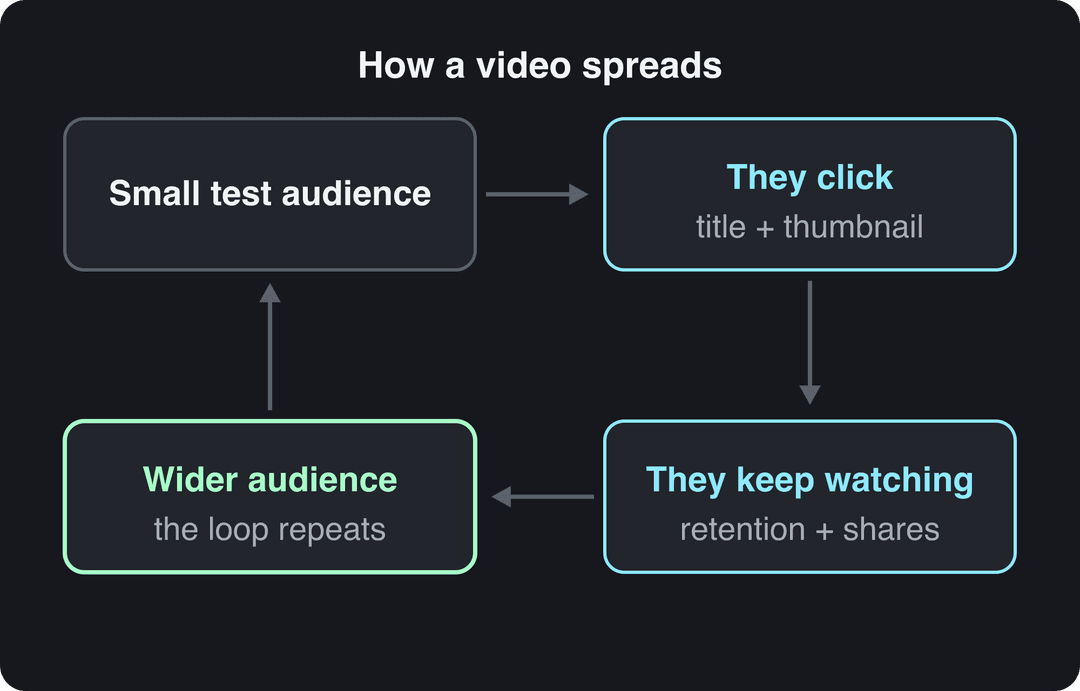
Know the current limits before you write:
| Element | Limit or spec |
|---|---|
| Title | Up to 100 characters (Shorts too) |
| Description | Up to 5,000 characters |
| Tags | 500 characters in total, not per tag |
| Video thumbnail | 3840x2160 recommended, minimum width 640 px, 16:9; up to 50 MB on desktop, 2 MB on mobile; verified account required |
| Shorts thumbnail | 9:16 at 2160x3840 recommended; upload only in YouTube Studio on a computer, verified accounts |
Titles. Put the main search phrase near the start for searchable topics ("The Ultimate Faucet Fix in 5 Minutes"). For entertainment, open a curiosity gap instead ("The ONE Mistake That's Killing Your Plants"). Never promise what the video doesn't deliver: a click followed by a fast exit hurts more than no click. A YouTube title generator gives you options to test.
Thumbnails. One subject, high contrast, a readable emotion, and very little text. The title makes the promise and the thumbnail shows the feeling: for "I Built a Secret Room in My House", show your shocked face at a dark opening, not a hammer.
Test instead of guessing. YouTube Studio on desktop can A/B test up to 3 titles and thumbnails on a long-form video, then shows the variant with the highest watch time to everyone. Shorts are not eligible.
Description, captions, chapters. Use the first two lines of the description to expand on the title in plain language. Add timestamps to create chapters, and upload an accurate caption file instead of relying on auto-captions, which often get names and terms wrong.
Playlists and end screens. Group related videos into playlists so one view turns into several, point your end screen at your best next video, and pin a comment that asks a question viewers want to answer.
Step 4: Launch it hard in the first 24 hours
Publishing is the starting gun. Early views, watch time and shares tell YouTube the video is worth showing to more people, so coordinate your promotion to land at the same time.
- Email and community first. Send your list and post to your Community tab the moment the video goes live. Your most loyal viewers watch longest, which is exactly the signal you want early.
- Cut native clips for other platforms. For TikTok and Instagram Reels, don't post a random chunk: pick the single best hook or reveal and edit it into a self-contained vertical clip with on-screen text. On X, a thread that summarizes the takeaways and ends with the link works better than a bare link. In Facebook groups, frame the video as the answer to a problem members already discuss.
- Go to niche communities as a member, not an advertiser. On Reddit, "Check out my new video" gets ignored or banned. A detailed text post titled "My honest thoughts after 50 miles with the [product] backpack", with the full review linked at the end, gives value first and sends interested people to the video.
For more ideas on turning a launch spike into lasting fans, see this agency guide to YouTube promotion and gaining more fans.
When you read the results, keep one change in mind: since August 24, 2026, YouTube counts a view the moment a video starts to play, on every format. A rising view count alone no longer tells you the video is landing. Watch retention, shares and engaged views instead.
How to make a viral YouTube Short with Revid
Revid starts from videos audiences have already proven they watch, then turns their structure into an original video:
- Search the viral video library for your topic and filter for high-engagement videos, or run the free deep analysis on a video you admire.
- Choose "Make it about your topic" to apply its hook style, pacing and energy to your niche. Revid writes a new script and new visuals, not a copy.
- Adjust the script, pick a voice (1,000+ AI voices in 70+ languages) and a caption style, and choose the visuals per scene: stock footage, AI images or AI video from Seedance 2.5, MiniMax Hailuo H3, Wan 3.0 or Google Veo 3.
- Fix anything in the timeline editor, then publish directly to YouTube or schedule it, alongside TikTok and Instagram.
You can start from the AI YouTube Shorts generator. Sign-up is free and new accounts get free credits to try video creation, no credit card needed; regular creation then uses the monthly credits of a paid plan, from $39/month.
How to use AI without breaking YouTube's rules
AI tools are allowed for monetized content when the result shows your creative vision and gives viewers real value, for example AI to draft a script or create a background visual. Follow YouTube's Community Guidelines, plus these monetization rules:
- Disclose realistic AI content with the "AI use" setting in YouTube Studio, such as a real person appearing to say something they didn't, or a realistic scene that never happened. AI-written scripts, titles, thumbnails and captions don't need disclosure. Since May 2026, YouTube also labels undisclosed videos with significant photorealistic AI automatically.
- Avoid mass-produced content. YouTube renamed its "repetitious content" policy to "inauthentic content" on July 15, 2025. AI videos made from generic templates without original insight cannot monetize.
- No incoherent AI compilations that stitch unrelated clips together to shock, and no AI personas presented as human experts giving health, legal, financial or political advice.
For the bigger picture on how the format is growing and how Shorts pay, see these sourced YouTube Shorts statistics.
FAQ
How long does it take for a YouTube video to go viral?
There is no set timeline. A video can take off within hours or sit quietly for weeks before recommendations pick it up, so optimize every upload as if it could be the one and keep a consistent schedule.
Do I need expensive gear to make a viral video?
No. Clean audio (a cheap lapel mic), natural light from a window and a steady shot (a tripod or a stack of books) matter far more than the camera, and many viral videos are shot on a phone.
How many views does a video need to count as viral?
There is no official threshold. Revid's library labels a post viral at 1 million+ views, but a video that reaches far beyond your usual audience and keeps getting shared is viral for your channel.
Does labeling a video as AI-generated hurt its reach?
No. YouTube says disclosing AI content does not by itself limit a video's audience or its eligibility to earn money, but repeatedly failing to disclose realistic AI content can lead to labels, removal or suspension from the Partner Program.