On this page
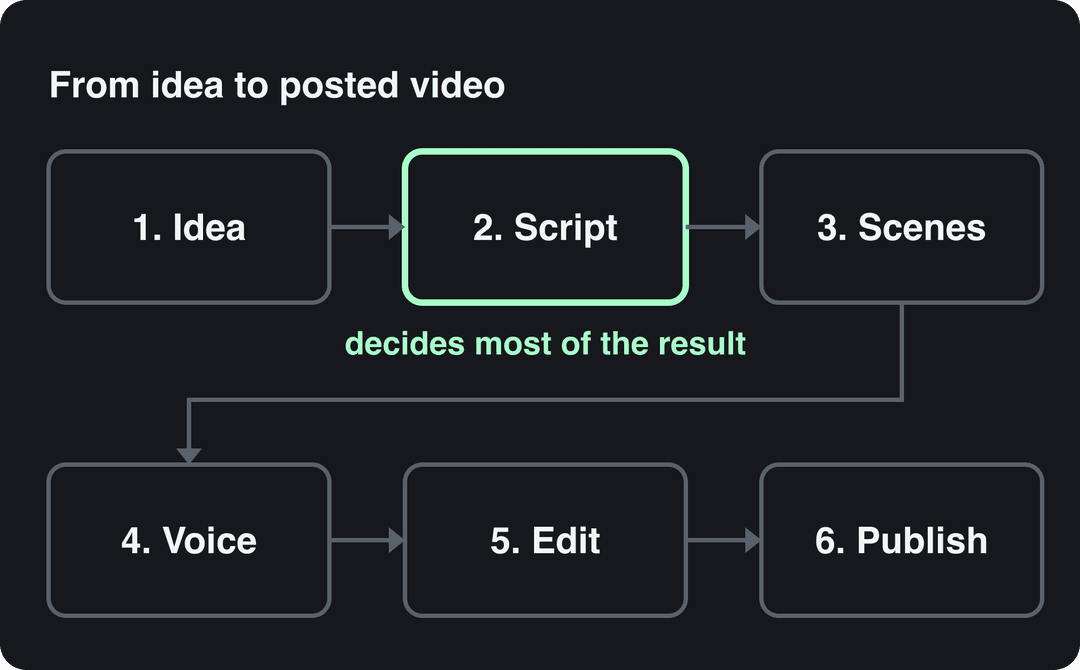
To make an AI video, write a short script, generate each scene with an AI video model, add an AI voice-over, captions and music, fix weak scenes in an editor, then export in 9:16 and post. An all-in-one generator runs all six steps from one prompt. Separate tools give you more control but take longer.
The model you pick matters less than most guides suggest. Every AI video tool rents the same few models (Google Veo, Seedance, Kling, Wan, MiniMax Hailuo), so two tools sent the same prompt return comparable clips. The idea, the hook and the script decide whether people watch. The platform matters too: in Revid's analysis of 292,784 TikToks, AI-generated videos averaged 1.4M views against 661.4K for real footage. On X, Instagram and Threads, though, AI visuals were 5x more common in the lowest engagement tier than in the viral tier.
- Average views of AI-generated TikToks, vs 661.4K for real footage
- 1.4M
- Revid analysis of 292,784 TikToks
- Median views of faceless TikToks, vs 67K with one person on camera
- 114K
- Revid analysis of 176,367 TikToks
- Median views of TikToks with under 40 characters of speech
- 123K
- Revid analysis of 176,367 TikToks
- Revid Growth plan per month, with 2,000 credits
- $39
- Revid pricing
How do people make AI videos?
Almost every AI video on TikTok, Reels and Shorts comes out of one of four workflows. Pick by what you start with (an idea, a script, your own footage) and what the video needs to show.
| Workflow | How it works | Best for | Example tools |
|---|---|---|---|
| All-in-one generator | You give an idea, script or link; the tool writes the script, generates the scenes and adds voice, captions and music | Daily short-form posts with no filming | Revid, InVideo |
| Clip generator + editor | You prompt short clips one by one, then assemble them and add sound in an editor | Cinematic shots, ads, full control of every frame | Runway, Pika, then a classic editor |
| Avatar presenter | You type a script and an AI presenter reads it to camera | Training, explainers, talking-head videos | Synthesia, HeyGen |
| AI-assisted editing | You film or record, and AI handles transcripts, cuts and captions | Your own footage and podcasts | Descript, CapCut |
Use these decision rules:
- No footage, and you want to post often: start with an all-in-one generator.
- You need one perfect shot: use a clip generator.
- The video is a person explaining something: use an avatar tool.
- You already film: keep filming and let AI speed up the edit.
How does AI make a video?
An AI video model learns from large amounts of video how scenes look and move. It then generates new frames that match a text prompt or a starting image. Each generation is a short clip: Google's Veo 3.1, for example, produces 4, 6 or 8-second clips in 16:9 or 9:16 with native audio.
A finished 30-second video is several of those clips stitched together with a voice-over, captions and music. That assembly is the part all-in-one tools automate.
How to make an AI video, step by step
Step 1: Pick one idea, one platform and a format
Decide where the video goes first. TikTok, Reels and Shorts all favor vertical 9:16, so generate in that format from the start instead of cropping later. Then write the single takeaway in one sentence. If you can't, the video has no point yet.
Format is where AI video has a built-in edge, because it makes faceless video easy. In Revid's analysis of 176,367 TikToks with 1,000+ likes posted between October 2025 and October 2026, faceless videos had a median of 114K views, and 17.4% passed 1M views. Videos with one person on camera had 67K and 12.7%. The sample only holds videos that already did reasonably well, so it shows what successful videos have in common, not proof that hiding your face causes views. The method and every chart are in our study of what makes a TikTok go viral.
Faceless videos earned a median of 114K views, against 67K for videos with one person on camera, and passed 1M views 38% more often.
Source: Revid analysis of 176,367 TikToks with 1,000+ likes posted between Oct 1, 2025 and Oct 16, 2026 (61,203 creators)
Show the data
| Median views | Share that passed 1M views | |
|---|---|---|
| Animals | 147.4K | 24.1% |
| Faceless | 113.9K | 17.4% |
| Groups of people | 96.1K | 16% |
| Objects or products | 70.8K | 13.2% |
| One person on camera | 67.4K | 12.7% |
If you're unsure what works in your niche, study a handful of high-performing videos in it before writing anything. Note the first line, the length and the visual style, then make your own version of that recipe.
Prompt to try
Make a 30-second vertical faceless video about why octopuses are the smartest animals in the ocean. Open with the hook "This animal can solve puzzles with its arms." Use realistic underwater AI visuals, a calm narrator who speaks only a line or two per scene, and bold captions.
Step 2: Write the script before you touch a model
A model can't fix a weak idea. Write the script first, as a list of scenes with one spoken line (or one piece of on-screen text) each.
| Part | Job | Example line (a video about AI video) |
|---|---|---|
| Hook | Promise the payoff in the first line | "This whole video started as one sentence." |
| Setup | Say what the viewer will get | "Here's how it went from text to a posted Short." |
| Beats | Two or three steps, one per scene | "First the script. Then one prompt per scene." |
| Payoff | Deliver what the hook promised | "Total filming: zero." |
| Call to action | One ask | "Follow for the prompts." |
Keep the narration lean. In the same Revid dataset:
- Videos with under 40 characters of speech had a 123K median, and 20.2% passed 1M views.
- Videos that talked throughout (300+ characters of speech) had 68K and 11.9%.
- Silent videos had 73K and 14.3%.
For AI videos, that argues for letting the visuals carry the story and using voice only where it adds information.
Videos with just a few spoken words (a line or two) beat both silent videos and videos that talk the whole way through, which were the most common and the weakest.
Source: Revid analysis of 176,367 TikToks analyzed by AI, with 1,000+ likes posted between Oct 1, 2025 and Oct 16, 2026 (61,203 creators)
Show the data
| Median views | Share that passed 1M views | |
|---|---|---|
| No speech | 73.3K | 14.3% |
| Under 40 | 122.7K | 20.2% |
| 40 to 120 | 97.2K | 17.6% |
| 120 to 300 | 91.6K | 16.8% |
| 300+ | 67.7K | 11.9% |
Step 3: Generate the scenes with specific prompts
A vague prompt gets a generic clip. Write each scene prompt with the same seven parts: subject, action, setting, camera, light, style and format.
| Weak prompt | Strong prompt |
|---|---|
| A video about dogs | Close-up, handheld phone shot of a golden retriever puppy chasing a red ball across a park lawn, warm late-afternoon light, shallow depth of field, slow motion, vertical 9:16 |
| A city at night | Slow drone push-in over a rain-wet city street at night, neon signs reflecting on the asphalt, cinematic, cool blue and pink palette, vertical 9:16 |
These rules save the most regenerations:
- One action per clip. Models handle "a puppy chases a ball" far better than a whole sequence of events.
- Name the camera. "Handheld", "static tripod", "drone push-in" or "POV" changes the result more than adjectives do.
- Reuse character descriptions word for word, or start from the same reference image, so a character looks the same in every scene.
- Generate two or three versions of each scene and keep the best one.
If you're stuck on wording, a free AI video prompt generator turns a rough idea into a prompt with camera directions.
Prompt to try
Create a 20-second vertical 9:16 video of a golden retriever puppy's first day at the beach. Hook: "He had never seen the ocean before." Use close-up handheld phone shots, warm late-afternoon light, shallow depth of field and slow motion, one action per scene, with soft acoustic music and short captions.
Step 4: Add voice-over, captions and music
Pick an AI voice that fits the tone: calm for explainers, fast for lists. Keep the same voice across a series so viewers recognize it. Dedicated voice tools such as Murf generate narration you can import into any editor, and all-in-one generators have voices built in.
Add burned-in captions so the video works without sound. Keep them away from the bottom and right edges, where the app interface sits.
For music, use royalty-free tracks or the platform's own library. On YouTube, any Short longer than one minute with an active Content ID claim is blocked globally and can't be monetized.
Step 5: Edit and fix the weak scenes
AI clips fail in predictable ways. Fix them before you post.
| Problem | Fix |
|---|---|
| Warped hands, morphing faces | Regenerate the scene, or cut the clip before the artifact appears |
| Garbled text in the frame | Remove text from the prompt and add titles in the editor |
| Lighting or color shifts between scenes | Color-correct all clips to one look |
| Robotic or noisy audio | Change the voice, clean the track, lower the music |
| Scenes that drag | Trim each clip to its strongest moment |
Regenerating is usually faster than repairing. For manual fixes:
- Adobe Premiere Pro and DaVinci Resolve handle cuts and color grading.
- After Effects handles titles and motion graphics.
- Audacity is a free audio editor for cleaning up narration.
Step 6: Export and post
Export in 9:16 at 1080x1920, the size TikTok recommends. Then upload the file to each platform directly rather than sharing a link.
| Platform | Format | Length | AI label |
|---|---|---|---|
| TikTok | 9:16, 1080x1920 recommended | Uploads up to 60 minutes | Required for realistic AI content |
| Instagram Reels | 1.91:1 to 9:16, at least 30 FPS | Up to 20 minutes; reels over 3 minutes aren't recommended to non-followers | "AI info" disclosure required for photorealistic video |
| YouTube Shorts | Square or vertical | Up to 3 minutes | Disclose realistic AI in YouTube Studio |
Which AI video tool should you use?
Choose by the job, not by the hype around a model. Prices below are entry plans as last checked (August to September 2026); confirm them on each site.
| Tool | Best for | Entry price |
|---|---|---|
| Revid | Finished short-form videos from an idea, script or link, published to TikTok, Instagram and YouTube | Free sign-up with free credits; from $39/month |
| Synthesia | Corporate training and explainers with AI presenters | From $29/month; free plan up to 10 minutes a month |
| Steve.AI | Animated explainer videos without animation skills | See its site |
| Descript | Editing recorded video and podcasts by editing the transcript | From $24/month; free plan with 60 media minutes |
| Pictory | Turning blog posts, scripts and URLs into stock-footage videos | From $29/month; free trial |
| InVideo | Editing by typing commands to a chat-style agent | From $20/month |
| Runway | High-control cinematic clips | From $15/month |
The category moves fast, and artsmart.ai keeps a roundup of AI video generator market statistics. Vendors often claim large time and cost savings over traditional production, and Skim AI's list of generative AI video marketing statistics collects several. Treat those claims as directional: your savings depend on how many regenerations your scenes need.
For head-to-head details, see Revid's sourced comparisons with other AI video tools. For a shorter, tool-focused take, see our guide to creating AI videos.
How to make AI videos with Revid
Revid covers all six steps in one place, from script to publishing.
- Open the Revid AI video generator and paste an idea, a script or a link (a blog post, a YouTube video, a Reddit thread).
- Or start from a video that already worked. Search Revid's library of about 2.77 million short-form videos with engagement data, then choose "Same energy, new script" or "Make it about your topic" to remix a viral format into an original video.
- Revid writes the script. In several of its tools, it first pulls transcripts of related TikToks with more than 10,000 likes as references for style and structure.
- Pick the visuals for each scene (Seedance 2.5, MiniMax Hailuo H3, Wan 3.0 or Google Veo 3), a voice from 1,000+ in 70+ languages, and one of 30 caption styles.
- Fix any scene in the timeline editor and export in 720p, 1080p or 4K at 30 or 60 fps. Then publish or schedule to TikTok, Instagram and YouTube.
A 30-second video with Pro AI visuals and a voice-over costs about 40 to 80 credits. The Growth plan ($39/month) includes 2,000 credits, and you see the cost before generating.
For a presenter-style video, the AI talking avatar tool turns text into a talking-head video. Revid University also has a step-by-step walkthrough of generating a video with AI.
How to make realistic AI videos
- Prompt like a camera operator: "handheld phone footage", "overcast daylight", "shallow depth of field". Real cameras have imperfections, so ask for them.
- Keep clips short and simple. Long, busy clips are where physics and faces break.
- Avoid close-ups of hands and any readable text in the frame.
- Lock each character with the same reference image in every scene.
- Add real-sounding ambient audio: room tone, street noise, footsteps.
Realism also raises the stakes on labeling.
Do you have to label AI videos?
Yes, when the video looks real. Each platform has its own rule:
- TikTok requires creators to label AI-generated content with realistic images, audio or video. It may also label uploads automatically when they carry C2PA Content Credentials.
- YouTube requires disclosure through the "AI use" setting in YouTube Studio for realistic content, such as a real person appearing to say something they didn't. Since May 2026, it labels undisclosed photorealistic AI automatically.
- Meta (Instagram, Facebook, Threads) requires its AI disclosure for photorealistic video and shows an "AI info" label.
The label itself doesn't cost you reach: TikTok and YouTube both say disclosure alone doesn't limit distribution or eligibility to earn. These do cost you:
- Using a real person's face or voice without consent. Only use faces and voices you have the rights to.
- Mass-produced AI videos made from generic templates, which YouTube doesn't allow to monetize. AI-made videos can monetize when they show your own creative input and give viewers real value.
- Stitching unrelated AI clips together to shock viewers, or faking real events.
FAQ
Can AI create videos?
Yes. Models such as Google Veo, Seedance, Kling, Wan and MiniMax Hailuo generate video clips from a text prompt or an image. All-in-one tools combine those clips with a script, voice-over, captions and music into a finished video.
Can you make AI videos for free?
Yes, within limits, since free plans are capped or watermarked. Synthesia's free plan allows up to 10 minutes a month, Runway's gives 125 one-time watermarked credits, and HeyGen's gives 3 watermarked videos a month. Revid's sign-up is free, with no credit card needed, and new accounts get free credits to try video creation plus the viral video library, while regular creation uses credits from a paid plan starting at $39/month.
How do I make an AI vlog?
Create one consistent character from a reference image or an AI avatar, write the script in first person, and generate scenes in a selfie or POV style with the same voice in every episode. If the character looks like a real person, label the video as AI-generated.
What's the best way to make AI videos?
Start from a format that already works in your niche, write the script before prompting, and use an all-in-one generator if you post often. Keep a clip generator and a classic editor for the shots that need frame-level control.
Is Sora still available for AI videos?
No. OpenAI closed the Sora web and app experiences on April 26, 2026, and removed Sora 2 from its API on September 24, 2026. Current options include Google Veo, Seedance, Kling, Wan and MiniMax Hailuo.
Sources
- Revid analysis of 176,367 TikToks with 1,000+ likes posted between Oct 1, 2025 and Oct 16, 2026 (61,203 creators)
- Revid analysis of 176,367 TikToks analyzed by AI, with 1,000+ likes posted between Oct 1, 2025 and Oct 16, 2026 (61,203 creators)
Charts and figures checked on November 6, 2026.