On this page
To find YouTube keywords, type your topic into the YouTube search bar and collect the autocomplete suggestions, check demand in YouTube Studio's Research tab or Google Trends set to YouTube Search, then read the top results to judge competition. To see the keywords viewers already use to find your videos, open YouTube Studio > Analytics > Traffic source: YouTube search.
YouTube does not publish exact search volume anywhere. Every "monthly searches" figure in a keyword tool is an estimate, so the most reliable keyword data you have is free: the search terms in your own Studio and the suggestions YouTube shows itself. Most creators skip both and pay for guesses.
Where to see the keywords viewers use to find your video
YouTube Studio shows the actual search terms that led people to your videos. It is the best keyword source you have, because it records real behavior on your channel instead of estimating it.
For one video:
- Open YouTube Studio and click Content.
- Hover over the video and click the Analytics icon.
- Open the Reach tab and find the card "Traffic source: YouTube search". It lists the top search terms for that video.
For the whole channel:
- In YouTube Studio, click Analytics, then Advanced mode.
- Select the Traffic source tab and click YouTube search.
- The table switches to the search terms behind your views, with views and watch time for each term.
Then open the Research tab in Analytics. "Your viewers' searches" shows what your audience has been searching for on YouTube, and "Searches across YouTube" lets you look up any topic, see related searches and spot content gaps: searches where viewers do not find what they want.
Put what you find to work. A term that brings views but is missing from your title is a candidate for a clearer title on that video, or for the main keyword of your next one.
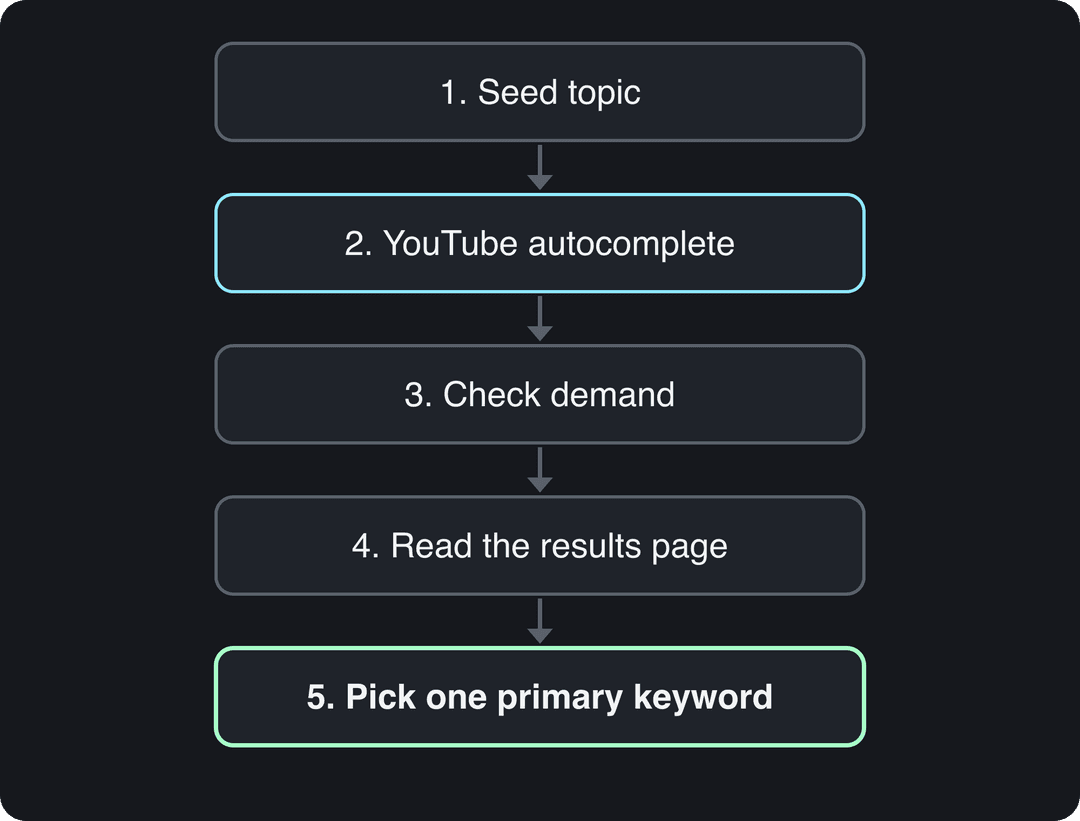
How to find keywords for YouTube videos in 5 steps
1. Start with a seed topic
A seed is a short, broad phrase that describes what your channel covers: "sourdough starter", "video editing", "home workout". You will not target the seed itself. It is the starting point that the next steps expand into specific, winnable phrases.
2. Expand it with YouTube autocomplete
Type the seed into the YouTube search bar slowly and note every suggestion. Autocomplete only suggests phrases people actually search, so each one is a validated idea.
Type "how to edit" and you get suggestions like "how to edit videos for youtube" and "how to edit reels". Type "how to get abs" and you may see "how to get abs at home" or "how to get abs without equipment". Each is a separate video with a separate audience.
Three ways to pull out more suggestions:
- Alphabet method: type the seed followed by a, then b, then c, and so on.
- Question prefixes: start with "how to", "why", "best", "vs" or "for beginners".
- Search signed out: use a private window so your own watch history does not skew the suggestions.
3. Check demand
Autocomplete proves a phrase is searched, not how often. Compare your candidates in the Studio Research tab, in Google Trends or in a keyword tool (both covered below). You are ranking candidates against each other, so relative data is enough to decide.
Prompt to try
Create a 40-second YouTube Short titled "Why Your Sourdough Starter Smells Like Acetone (and the Fix)". Open with the hook "That nail polish smell means your starter is starving." Explain the cause in plain words, then give a three-step feeding fix, with close-up kitchen visuals, bold captions and a calm, friendly voiceover.
4. Read the results page before you commit
Search each candidate and study the first page of results:
- Intent: are the top videos tutorials, reviews, lists or entertainment? Match the format. Someone searching "how to fix a leaky faucet" wants the fix, so "Easy 5-Minute Leaky Faucet Fix (Step-by-Step)" wins the click over "My Crazy Plumbing Adventure", even if both show the repair.
- Competition: if every top result comes from a large channel with the exact phrase in its title, pick a narrower variant.
- Gaps: old, off-topic or low-view videos ranking high mean the search is underserved. That is your opening.
A sourdough channel shows how this plays out. "how to feed a sourdough starter" is heavily searched and crowded. "sourdough starter smells like acetone" is a real problem with fewer strong answers. "rye flour sourdough starter ratio" is small but almost empty.
5. Pick one primary keyword and three to five secondary ones
Each video targets one primary keyword, the phrase you most want to rank for, backed by three to five secondary keywords that add context. Decision rules:
- If your channel is new, choose specific long phrases where small channels already rank on the first page.
- If you already get steady search traffic, test broader terms next to your proven topics.
- If two phrases mean the same thing, use the wording autocomplete shows, because that is how viewers type it.
How to find the keywords used in a competitor's video
A competitor's keywords live in four places, and only one of them is hidden.
- Title, description and chapters. These are visible and carry the most weight. Note the phrase that opens the title and any repeated terms in the first lines of the description.
- Spoken words. Click "Show transcript" under the description to see which terms they say out loud.
- Tags. YouTube does not display tags on the watch page. On a computer, open the video, right-click, choose View page source, press Ctrl+F (Cmd+F on a Mac) and search for "keywords". The list that follows is the video's tags. The vidIQ and TubeBuddy browser extensions show the same tags next to the video without digging through code.
- Their best topics. On the channel page, sort videos by Popular. The titles of their most-viewed videos tell you which keywords already pay off in your niche. To see the channel's own keywords, open the channel page source and search for "keywords" the same way.
Do not copy a competitor's tags wholesale. YouTube says tags play a minimal role in discovery and mostly help with commonly misspelled searches. Their titles and the questions their videos leave unanswered are far more useful.
How to find YouTube search volume
Since YouTube publishes no exact numbers, use these sources together and treat every figure as directional.
| Source | What it shows | Cost |
|---|---|---|
| YouTube Studio Research tab | Search interest from YouTube's own data, shown as a rough level rather than a count | Free |
| Google Trends (YouTube Search) | Relative interest over time and by region | Free |
| Google Keyword Planner | Google search volume, not YouTube volume | Free with a Google Ads account |
| vidIQ, TubeBuddy, Ahrefs | Estimated monthly YouTube searches | Free tiers or paid plans |
Using Google Trends for YouTube keywords
Google Trends defaults to web searches. Switch the "Web Search" filter to YouTube Search to see platform-specific interest.
- Enter your keyword.
- Change the search type to YouTube Search.
- Add a few comparison terms and set the time range to the last five years to reveal seasonal patterns.
A cooking channel comparing "air fryer recipes" with "slow cooker recipes" will usually see each one peak in a different season, which tells you when to publish. Some keywords are almost dead most of the year and spike for a few weeks: "last-minute tax tips for freelancers" in early April, a game title on release day, a recipe before a holiday. Publish just before the rise, not at the peak. For more ways to catch rising topics early, see our guide to finding trending topics.
YouTube keyword tools compared, including vidIQ keyword search
Free methods get you most of the way. A paid tool saves time when you research many topics a week.
| Tool | What it adds | Pricing model | Best for |
|---|---|---|---|
| vidIQ | Keyword research with volume estimates, competition scores, related terms, and tags shown on any video | Freemium, paid tiers | Creators who want data next to YouTube in the browser |
| TubeBuddy | Keyword explorer, tag viewer, title and thumbnail testing | Freemium, paid tiers | Creators who optimize every upload |
| Ahrefs | YouTube search volume estimates and keyword difficulty | Paid subscription | Teams tracking YouTube and Google traffic together |
| Semrush | Keyword Magic Tool with a filter for keywords that show videos in Google | Paid subscription | Channels that want traffic from Google search too |
The vidIQ keyword search works like the manual process above, sped up: enter a seed, get a list of related phrases with estimated volume and competition, and sort to find specific terms with demand and weak competition. Then still open the YouTube results page before you commit, because no score tells you whether you can make a better video than what ranks.
For quick lookups without an account, you can also try this browser-based YouTube keyword tool on ryrob.com. And if A/B testing is your reason to pay, note that YouTube Studio on desktop now tests up to 3 titles and thumbnails natively (Shorts are not eligible).
How to find YouTube keywords that also rank on Google
Google shows videos for many searches, especially how-tos, reviews, tutorials and unboxings. A video that ranks there gets viewers who never opened the YouTube app.
- Search your candidate keyword on Google.
- If a videos block or a featured video appears on the first page, Google has decided a video answers that search. Move the keyword up your list.
- To check many keywords at once, use a filter for video results in an SEO tool. Semrush offers this in its Keyword Magic Tool, as its own guide to YouTube keyword research explains.
- Write the title and the opening of the description so they answer the Google query as directly as the YouTube one.
This builds a second source of views that does not depend on the YouTube recommendation system alone. For the wider picture beyond video, this guide to increasing organic traffic covers the general principles.
Keyword-first Short
Make a 30-second YouTube Short called "Beginner Sourdough Starter Recipe: An Easy Guide". Say "sourdough starter recipe" in the first sentence, open with the hook "You only need flour, water and five days." Show each day as a quick step with clean overhead shots and large on-screen captions.
Where to put YouTube keywords
Placement tells YouTube and Google what the video is about. Here is where each keyword goes, with YouTube's limits.
| Field | Limit | What to do |
|---|---|---|
| Title | 100 characters | Put the primary keyword as close to the start as reads naturally |
| Description | 5,000 characters | Use the primary keyword in the first two or three sentences, secondary keywords further down |
| Chapters | One timestamp per section | Name chapters with secondary keywords that describe each part |
| Spoken words | None | Say the primary keyword out loud early so it appears in the transcript |
| Tags | 500 characters in total | Add the primary keyword, secondary keywords and common misspellings |
"Beginner Sourdough Starter Recipe: An Easy Guide" is a good model: the keyword opens the title and the rest makes a clear promise. To draft options fast, try the free YouTube title generator and YouTube description generator, then edit so the keyword reads naturally. Our YouTube SEO tips cover thumbnails, retention and the rest of the ranking picture.
How to track YouTube keyword rankings
Rankings move with watch time and engagement, so check them on a schedule instead of every day.
- Keep a sheet with one row per video: primary keyword, publish date, position in signed-out search, and views from YouTube search.
- Once a month, search each keyword in a private window and record the video's position.
- In YouTube Studio, compare the video's "Traffic source: YouTube search" terms with your target. If it ranks for a different phrase, consider retitling toward that phrase.
- Once a quarter, review the whole list: drop keywords that stopped bringing views and add the new terms showing up in the Research tab.
A video that slips usually lost retention, not keywords. Our guide to video engagement metrics explains which numbers to read first. Many paid tools also offer rank tracking; check whether it covers YouTube results or only Google.
Finding keywords for YouTube Shorts with Revid
Shorts get much of their reach from the Shorts feed, so the topic you pick matters more than tags. Revid's library of real short-form videos (73,227 YouTube posts and 2,377,477 TikToks as of September 15, 2026, each with public engagement data) shows which topics already get watched for your keyword.
- Sign up free and search the library for your keyword, filtered to YouTube and the high (100,000+ views) or viral tier.
- Open a Short that performed and run the free deep analysis (up to 60 a day) to see its hook, structure and how to adapt it.
- Choose "Make it about your topic" to generate an original Short with your keyword in the script, or start from scratch with the AI YouTube Shorts generator.
- Edit on the timeline, then publish or schedule straight to YouTube.
The viral video remix feature explains each option in detail. Sign-up is free and new accounts get free credits to try it, then regular creation uses the monthly credits of a paid plan, from $39/month.
FAQ
Do YouTube tags still matter for keywords?
Only a little. YouTube says tags play a minimal role in discovery and mostly help with commonly misspelled searches, so spend your effort on the title, the description opening and what you say in the video.
How many keywords should I target in one video?
One primary keyword plus three to five secondary keywords. More than that blurs what the video is about for both viewers and YouTube.
Can I use Google Keyword Planner for YouTube keywords?
Not directly. Keyword Planner reports Google searches, which often differ from YouTube searches, so pair it with Google Trends set to YouTube Search or the Research tab in YouTube Studio.
How often should I redo YouTube keyword research?
Research keywords for every new video, and review your overall keyword list once a quarter using the search terms in YouTube Studio. Seasonal niches should also check Google Trends a few weeks before each peak.
Does buying bot traffic for a keyword help a video rank?
No. Bot views sold "by keyword" break YouTube's fake engagement policy, and YouTube can remove the views, the video or the whole channel. Fake viewers also do not watch, so they drag down the retention signals that actually drive rankings.