How to Get More Views on Instagram Reels in 2026 (With Data)
What actually gets Instagram Reels more views in 2026: the signals Instagram ranks on, hooks, formats, length, hashtags and trial reels, with Revid's data on 176,367 TikToks.
On this page
To get more views on Instagram Reels, hook viewers in the first 3 seconds, keep each Reel under 3 minutes so Instagram can recommend it to non-followers, and post original 9:16 video with a searchable caption and no more than 5 hashtags. Then test new ideas as trial reels and repeat the formats that hold attention.
Expect to start small. Socialinsider's 2026 study of 69 million short-form videos found that accounts with under 5,000 followers averaged 625 views per Reel, so a Reel stuck at a few hundred views is normal, not broken. What moves that number is mostly what you post and how it opens, far more than posting-time tricks.
How does Instagram decide who sees your Reel?
Every Reel starts with a small audience: some of your followers and people Instagram predicts will like it. If they watch, like it and send it to friends, Instagram shows it to more people. If they scroll past, distribution stalls.
Instagram head Adam Mosseri has named three signals as the most important for reach: watch time, likes per reach and sends per reach (how often viewers share the Reel by DM). Everything below is a way to raise one of them.
| Signal | What it tells Instagram | How to raise it |
|---|---|---|
| Watch time | People stayed | Hook in the first 3 seconds, cut every pause, end on a loop |
| Sends (DM shares) | It's worth showing a friend | Relatable or useful content, a "send this to..." line |
| Likes | Viewers enjoyed it | Deliver the payoff the hook promised |
| Originality | You made it | No other app's watermark, no straight reposts |
Two hard limits sit on top of these signals. Reels longer than 3 minutes are not recommended to non-followers, so they only reach people who already follow you. And fresh content gets priority: Meta said same-day posts made up more than 30% of recommended Reels on Instagram and Facebook in Q1 2026, more than double the level a year earlier.
Prompt to try
Create a 25-second vertical Instagram Reel about storing kitchen knives. Open with the bold on-screen hook "You're storing your knives wrong" over a close-up of a dull blade, then show 3 quick fixes with clean, bright kitchen visuals and short captions. End with "Send this to the friend whose knives live in a drawer."
1. Hook viewers in the first 3 seconds
Watch time is won or lost before the viewer decides to stay. Open on the most interesting frame of the video, not on a greeting, a logo or a slow pan. Put the hook on screen as text as well as in the voice-over, because many people scroll with the sound off.
Hook formulas that work in most niches:
- Bold claim: "You're storing your knives wrong."
- Result first: show the finished room, dish or design, then rewind to how you got there.
- Specific question: "Why does a cafe latte taste better than yours?"
- Mid-action start: begin with the pour, the cut or the fall already happening.
- Curiosity gap: "The last tip is the one nobody uses."
Revid's own data points the same way. In Revid's study of the 1,588 TikToks with over 100 million views, 51% of the videos with a transcript open with a statement and 16% with a question. In a wider sample of 176,367 TikToks with 1,000+ likes, videos with under 40 characters of speech had a median of 123K views, against 68K for videos that talk throughout. Both samples are TikTok, but Reels are watched the same way: full screen, one swipe from the next video. Let the visuals carry the opening and keep the talking tight.
For more opening lines, borrow from these copy-and-paste video hooks and rewrite them for your niche.
2. Post formats people already watch
The format you pick sets the ceiling before you film anything. In Revid's analysis of 176,367 TikToks with 1,000+ likes posted between October 2025 and October 2026, challenges had the highest median views (182K), followed by comedy (155K), reactions (105K) and dance (84K), while storytelling (66K) and tutorials (62K) trailed. Faceless videos had a 114K median against 67K for one person on camera. This is TikTok data, and the sample only includes videos that already passed 1,000 likes, so read it as what top performers have in common, not proof of cause. The method and every chart are in our study of what makes a TikTok go viral.
Challenges and comedy passed 1M views about twice as often as tutorials and storytelling, which are the most common formats.
Source: Revid analysis of 176,367 TikToks with 1,000+ likes posted between Oct 1, 2025 and Oct 16, 2026 (61,203 creators)
Show the data
| Median views | Share that passed 1M views | |
|---|---|---|
| Challenge | 182.3K | 25.6% |
| Comedy | 154.8K | 22.1% |
| Reaction | 104.8K | 16% |
| Dance | 83.8K | 15.5% |
| Storytelling | 66.1K | 12.2% |
| Lip Sync | 61.7K | 12.3% |
| Tutorial | 61.9K | 12.1% |
How to use it:
- If you teach, try faceless: in the same TikTok sample, faceless tutorials had a 156K median versus 52K for on-camera tutorials. Screen recordings and hands-only shots count.
- If your niche allows humor, wrap the tip in a joke or a relatable moment rather than a straight explainer.
- If you sell a product, frame it as a challenge or a reaction: "Testing the cheapest vs the most expensive version."
To see which formats are working on Instagram right now, browse a finder for trending Instagram Reels and note the opening, the length and the caption of the ones that keep showing up in your niche. Trends work the same way: save trending audio as you find it, use it early, and adapt it to your niche instead of copying the original.
3. How long should a Reel be to get more views?
Instagram lets you record and edit Reels up to 20 minutes long, but only Reels of 3 minutes or less can be recommended to non-followers. Instagram raised that cap from 90 seconds on January 21, 2025. Anything longer is a follower-only video.
Inside that limit, pacing matters more than length. In Revid's 12-month TikTok sample, every length bucket from under 15 seconds to 10 minutes had a median between 58K and 76K views, with 61 to 90 seconds slightly ahead at 70K. Videos under 15 seconds had the lowest median (58K) but the most shares per view: 1.41 per 100 views. Since sends are one of Instagram's top signals, very short Reels make sense when the goal is to get shared.
Viewers lean short too: in Sprout Social's 2026 Content Strategy Report, 52% of social media users said they are most likely to interact with short-form video under 60 seconds on Instagram.
A simple rule:
- Meme, reaction or relatable moment: under 15 seconds.
- Tip, recipe or before-and-after: 30 to 90 seconds.
- Story or multi-step tutorial: up to 3 minutes, and only if every second earns its place.
4. Export Reels in the right format
A blurry, letterboxed or watermarked Reel loses viewers in the first second. Use these settings:
| Setting | Use | Instagram's rule |
|---|---|---|
| Aspect ratio | 9:16 vertical | Accepts 1.91:1 to 9:16 |
| Resolution | 1080x1920 | Minimum 720 px |
| Frame rate | 30 fps | Minimum 30 FPS |
| Length for reach | 3 minutes or less | Up to 20 minutes allowed |
| Cover image | 420x654 px | Recommended cover size |
| Caption | Keywords in the first line | Up to 2,200 characters |
| Hashtags | 3 to 5 | Up to 5 per post |
Instagram's interface covers the bottom of the frame (caption, audio, username) and the right edge (like, comment and share buttons). Keep text and faces in the center, and check your layout with this Instagram Reels safe zone template.
Post original files. Instagram has said it shows Reels with visible watermarks or logos from other apps less in recommendations, so export a clean file instead of saving your TikTok and reuploading it. Instagram's own Edits app exports without a watermark, and Meta said nearly 10% of the Reels people view each day are created in Edits.
5. Write captions and on-screen text Instagram can read
Instagram uses the words in your caption and on screen to understand what a Reel is about and to surface it in search. Write the first line like a search result, not a mood.
A caption template that works:
[Keyword phrase]: [the payoff in one line]. [Question or send prompt]
Example: "Small kitchen storage: 3 fixes under the sink. Which one are you stealing?"
Keep it short. In Revid's TikTok sample, captions of 41 to 80 characters had the best median (67K views), against 36K for posts with no caption at all. That is TikTok data, but the habit of reading one line before swiping is the same on Reels.
For on-screen text, keep each screen to 5 to 7 words, use high-contrast colors, and time each line with the point it supports. Burned-in subtitles keep sound-off viewers watching; you can add subtitles to any video automatically instead of typing them.
6. How many hashtags should you use on Reels?
Use 3 to 5 specific hashtags. Instagram allows up to 5 per post, so the old advice of stuffing 30 tags into the first comment no longer works.
Few, relevant tags also matched the best results in Revid's TikTok data: posts with 4 hashtags had the best median (77K views), 3 hashtags 75K, no hashtags 51K, and 9 or more only 16K. Instagram's cap makes the same choice for you.
A good mix for a home baker: one broad niche tag (#sourdough), two specific ones (#sourdoughforbeginners, #sourdoughscoring) and one branded tag. Hashtags help Instagram categorize a Reel, but the hook and the caption keywords do more for reach.
Trial reel idea
Make a 20-second faceless Reel for beginner sourdough bakers. Hook in the first second with the finished loaf and the text "The scoring mistake that flattens your bread", then rewind to a hands-only demo of the right cut with warm kitchen lighting. Close with "Save this for your next bake."
7. Test new ideas with trial reels
Trial reels are the most useful Reels feature most creators ignore. A trial reel is shown first to non-followers only, so a weak idea never reaches your followers. Insights arrive within 24 hours, and you can share it to everyone manually or let Instagram share it automatically if it performs well. Trial reels don't affect the ranking of your standard Reels.
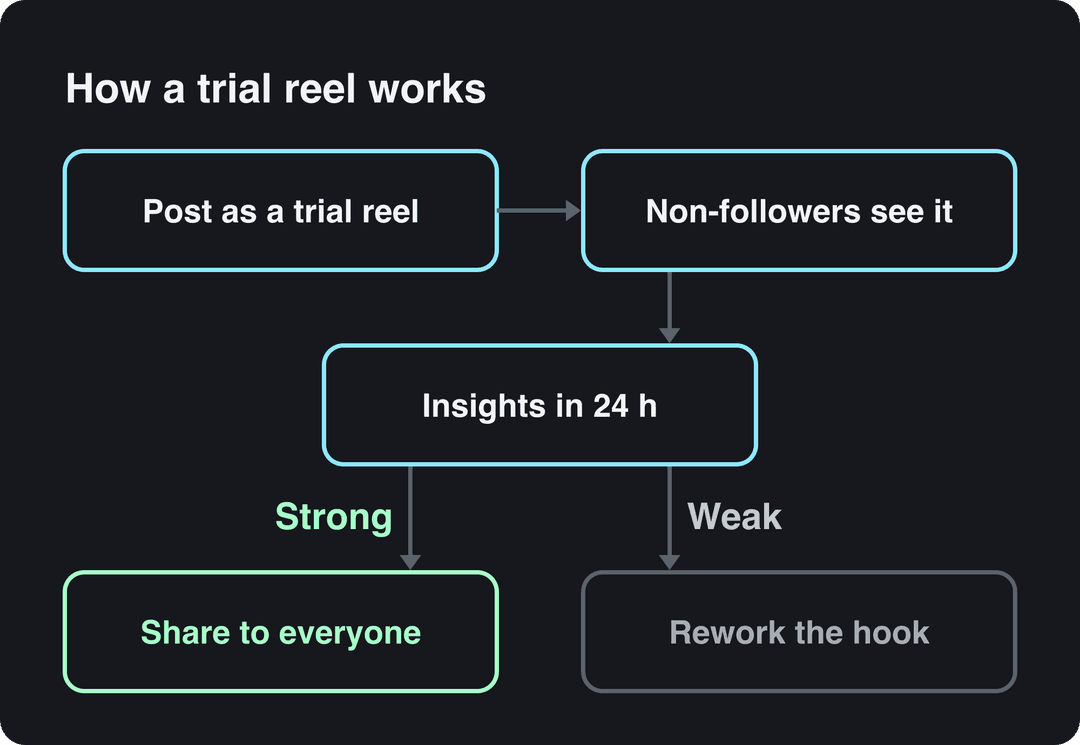
You need a public account with at least 200 followers for a professional account, or 1,000 followers for a personal one. The best use: post two versions of the same Reel with different hooks as trial reels, then share the one that held viewers longer.
8. Post consistently, when your followers are online
Once you have at least 100 followers, Instagram insights show where your followers are and when they are most active, over up to the past 90 days. Pick the two or three time slots where your followers peak and post there consistently.
Consistency is easier in batches. Block one session to film several Reels, reuse a few templates (tutorial, before-and-after, reaction), and schedule them in Meta Business Suite. Leave room for a trend or a timely reaction each week, since fresh posts get a large share of recommendations.
9. How to get more likes, sends and saves on Reels
Views and likes rise together when the Reel gives people a reason to act. End with one clear prompt, matched to the content:
- Sends: "Send this to the friend who always does this."
- Saves: "Save this for your next grocery run."
- Comments: "This or that? Tell me which one you'd pick."
- Follows: split a strong idea into a series and say "Part 2 tomorrow."
Reply to comments early, pin the best one, and turn good questions into your next Reel. One prompt per Reel is enough; three in a row reads as bait.
10. Make it look and sound clean
You don't need a cinema camera, but viewers skip shaky, dark or muddy Reels. The basics that matter most:
- Face a window or use a ring light or softbox.
- Use a tripod or a stabilizer.
- Record audio with a clip-on mic, close to the speaker.
- Keep one color look across your Reels so they're recognizable.
- Write a shot list before filming, and cut to the beat of the music.
To calibrate, study how polished accounts frame, light and cut their Reels, for example the brand @everlane on Instagram and creator accounts such as @benengsproduction on Instagram and @samseats on Instagram. Note what they repeat, then pick two or three signature moves of your own.
11. Promote every Reel beyond the Reels tab
Give each Reel a head start from the audiences you already have:
- Share it to your Story with a poll or question sticker.
- Use Collab posts with another creator so the Reel appears on both profiles.
- Tease it on other platforms or in your newsletter with a reason to watch the full version.
- Embed it on your website or blog post on the same topic.
How do you get 100K views on a Reel?
No setting guarantees 100K views, and for an account averaging a few hundred views it is a long jump. The Reels that get there usually combine a proven format, a strong hook and a reason to send. A practical sequence:
- Pick a format that already performs in your niche (see section 2).
- Write three different hooks for the same idea.
- Post the strongest two as trial reels and keep the one with more watch time.
- Keep it under 90 seconds unless the story needs more, and never over 3 minutes.
- End with a send or save prompt.
- When one Reel breaks out, make a Part 2 within days while the audience is still warm.
For benchmarks on what counts as viral on Instagram, compare against your own average views, not other creators' best posts.
How to get more views on a Reel after posting
You can't change the video once it's live, but you can still help it:
- Share it to your Story and to relevant group chats or communities where that's welcome.
- Reply to every comment early and pin the best one.
- Edit the caption to add a clearer keyword in the first line.
- If the Reel stalls, rework the hook and post the new version as a trial reel instead of deleting and reuploading the same file.
Why are your Reels getting low views?
| Problem | Fix |
|---|---|
| Reel is longer than 3 minutes | Cut it to 3 minutes or less so non-followers can see it |
| Slow opening (greeting, logo, intro) | Start on the most interesting frame |
| Watermark from another app | Export an original, clean file |
| Horizontal or low-resolution video | Export 9:16 at 1080x1920, at least 720 px |
| Text hidden under the buttons or caption | Keep text in the center safe zone |
| More than 5 hashtags | Use 3 to 5; more and the caption won't post |
| Realistic AI person, no label | Use Meta's AI disclosure and the "AI-generated profile" label |
| Same format every time with flat results | Test new formats as trial reels |
How to get more views on Instagram overall
Instagram insights now lead with Views, which count every time your content was played or displayed across Reels, posts, Stories, live and ads. Stories only reach your followers, so Reels are the format to use when you want new people to find you. Use Stories and Collab posts to send your followers to each new Reel.
Make Reels faster with Revid
Testing more ideas is the fastest way to find the Reel that breaks out, and Revid makes each test cheaper to produce:
- Find a format: search Revid's library of about 2.77 million short-form videos with their engagement data, filtered by topic and platform.
- Remix it: add a Reel as a reference in the Instagram Reels repurposing tool. Revid keeps its structure, hook style and pacing, and writes a new script, new visuals and original music direction.
- Or start from an idea: the AI Reel generator writes the script and adds visuals, a voice-over in 70+ languages, synced captions and music, with export up to 4K.
- Publish: schedule and post directly to Instagram, then check each post's views, likes and comments in Revid.
If a Reel uses realistic AI visuals, turn on Meta's AI disclosure when you post it.
FAQ
Can you see who viewed your Instagram Reel?
No. Instagram shows how many views and viewers (unique accounts) a Reel got, but not who they are. Only Stories show a list of the accounts that watched.
Do Reels get more views than Stories and photo posts?
Usually, for reach beyond your followers. Reels have their own full-screen feed that recommends videos from accounts people don't follow, while Stories only reach your followers.
Does labeling a Reel as AI-generated hurt its views?
Label it anyway. Meta requires a disclosure for photorealistic video or realistic audio that was digitally created or altered and may penalize people who skip it, and since September 2026 accounts featuring an AI-generated person without the "AI-generated profile" label can have their reach limited.
How often should you post Reels to get more views?
As often as you can without weaker hooks. A steady weekly rhythm you can keep for months beats a burst of daily posts followed by weeks of silence.
What counts as a view on an Instagram Reel?
A view is each time your Reel is played or displayed; viewers are the unique accounts that saw it. When views are much higher than viewers, people watched it more than once.