How to Make a Highlight Video: Plan, Cut and Export (2026)
A step-by-step method for highlight videos that hold attention: choose the goal, find the best moments, structure them, add music and captions, and export the right cut for each platform.
On this page
To make a highlight video, define its audience, collect your footage, keep only the strongest moments and order them as hook, build-up, climax and call to action. Add music, captions and branding, then export a 1080p MP4 at 30 fps. Keep social cuts under 60 seconds and portfolio reels to 2 to 3 minutes.
The most common mistake is cutting in chronological order, which buries your best moment in the middle, where many viewers never get to it. The second mistake is expensive on YouTube: a Short longer than one minute with any active Content ID claim (a broadcast clip, a commercial song) is blocked worldwide and cannot be monetized. Both are easy to avoid if you plan before you edit.
How to make a highlight video, step by step
- Decide what the video is for and who will watch it.
- Gather your footage in one organized project folder.
- Find the best moments, by hand or with an AI clip tool.
- Put them in order: hook, build-up, climax, call to action.
- Edit for pace: short cuts, no dead air, no slow intro.
- Add music, captions and branding.
- Export one version per platform and publish.
The sections below cover each step, then length, event recaps and sports reels.
Decide what your highlight video is for
The goal sets the length, the pace and the ending. A recruiter, a TikTok scroller and a conference sponsor want different things from the same footage, so write one sentence before you open an editor: "This video makes [viewer] do [action]."
| Highlight video type | Who watches | Length | How it ends |
|---|---|---|---|
| Social recap (TikTok, Reels, Shorts) | Followers and strangers scrolling | Under 60 seconds | Follow prompt or a question for the comments |
| Sports highlight reel | Coaches, recruiters, scouts | 2 to 3 minutes | Name, position and contact card |
| Event highlight video | Attendees, sponsors, future buyers | Under 60 seconds for social, 2 to 3 minutes for the full recap | Date or ticket link for the next edition |
| Webinar or podcast highlights | People who skipped the full recording | Under 60 seconds per clip | Link to the full recording |
| Product or brand highlights | Customers, investors | Under 60 seconds for social, 2 to 3 minutes for a website | Website or demo link |
If the recap is for a company, this Dubai agency's overview of corporate video production shows how professional crews plan brand shoots. It helps whether you hire a crew or brief your own team.
Gather and organize your footage
A single folder called "Raw Clips" with a thousand untitled files will cost you more time than the edit itself. Set up one project folder before you import anything:
- /Project - Summer 2026 Reel/
- /01_Raw Footage/ (one subfolder per game, session or camera, plus B-roll)
- /02_Edited Sequences/
- /03_Audio/ (music and sound effects)
- /04_Graphics & Branding/ (logo, fonts, end card)
- /05_Final Exports/
Rename clips by what happens in them, not by camera file number: "Game1_Q4_goal_wide" is searchable, the camera's default file name is not.
If you are still filming, follow your shot list and capture more B-roll than you think you need (crowd, venue, details, reactions). Hold each shot for 5 to 10 seconds before the action starts and after it ends. These handles give you room to trim cleanly and add transitions later.
Find the best moments
This is where most of the time goes. You have two ways to do it.
By hand: watch everything once and drop a marker every time you react (a laugh, a gasp, a great play, a quotable line). On a second pass, rate each marker and keep only the top tier. If you hesitate about a clip, cut it.
With AI: paste a link or upload a long recording and let a tool pick candidate moments for you. Revid's YouTube clip maker takes one YouTube link, picks up to 3 highlights of 10 seconds to 2 minutes (optionally on a topic you name) and reframes them to 9:16. For files you have on your drive, such as a webinar or a stream recording, use the long video to short video converter. Our guide on getting clips from YouTube videos covers the YouTube side in more detail.
AI is fastest for speech-heavy footage (interviews, talks, podcasts), where the transcript shows what matters. For pure action with no commentary, review its picks yourself, because the best play is not always the loudest moment.
Structure it: hook, build-up, climax, call to action
A highlight video is a story, condensed. Use four beats:
- Hook: your single best clip, first. You have about three seconds to stop the scroll, so open on action, not a logo or a title card.
- Build-up: context and progression. For an event, arrivals and the room filling up. For a game, the run of plays that led to the big moment.
- Climax: the peak: the winning goal, the product reveal, the strongest line of the keynote.
- Call to action: a closing shot, then one clear next step (follow, visit, contact, buy a ticket).
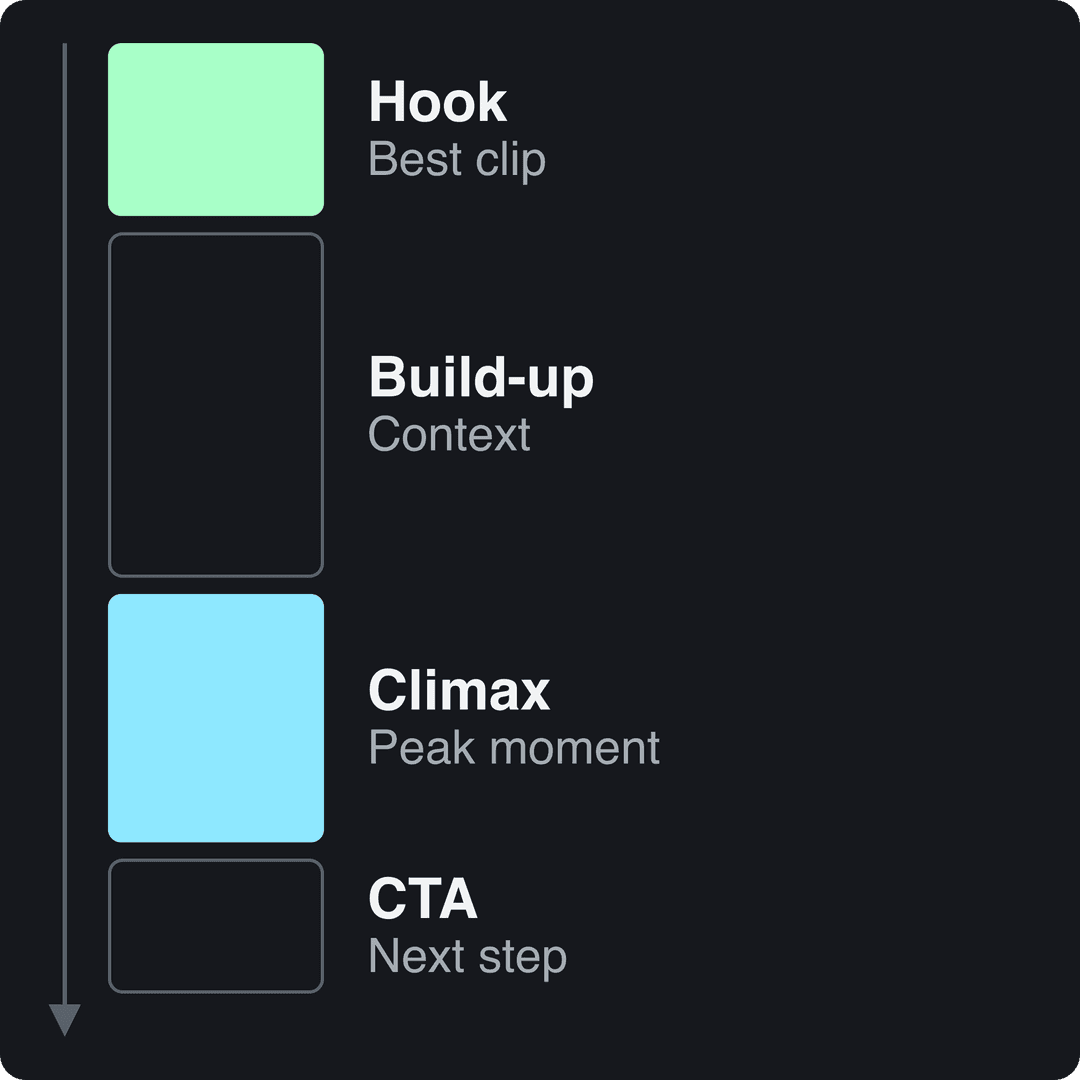
You can show your best moment twice: as a quick tease in the hook and in full at the climax. Viewers who saw the tease stay to see it play out.
Edit for pace
Pacing is what separates a highlight video from a home-video montage.
- For action and social cuts, aim for a new cut every 1 to 3 seconds.
- Let a key soundbite or a full play run to its end. Cutting a goal before the ball crosses the line kills the payoff.
- Delete every slow intro, countdown and "hey guys".
- Cut on the beat of your music track. It makes even simple edits feel intentional.
- Use plain cuts by default. Save flashy transitions for one or two moments, or they start to look like a template.
Add music, captions and branding
Choose music that fits the footage
- High energy (sports, product launches): upbeat electronic or rock with a driving beat.
- Inspirational (event recaps, testimonials): orchestral or ambient tracks that build.
- Calm and focused (tutorials, educational clips): lo-fi or light acoustic music that stays under the voice.
Keep the music under any speech, and use sound effects only to punch up key actions.
Add captions and text
Captions make your highlight video readable with the sound off and help viewers follow what is said in interviews and speeches. An automatic caption generator handles this in minutes, in 100+ languages. Then add:
- A short title at the start, only if it does not delay the hook (overlay it on the first clip instead of using a separate card).
- Lower thirds to name speakers or players without covering the action.
- Stat callouts (score, time, result) in bold text for sports and event highlights.
- An end card with your call to action.
Keep branding consistent
Use the same font, colors and logo position on every video, with a small watermark in a corner that never covers the action. Keep text away from the edges of a vertical frame, where platform buttons and captions sit.
Export and share your highlight video
For almost every case, export an MP4 (H.264) at 1080p and 30 fps. Use 60 fps for fast sports action if your footage was shot at 60. Instagram Reels need at least 30 fps, so 24 fps is the wrong default for social.
| Where it goes | Aspect ratio | Resolution | Length to aim for | Platform limit |
|---|---|---|---|---|
| TikTok | 9:16 | 1080x1920 | Under 60 seconds | Uploads up to 60 minutes |
| Instagram Reels | 9:16 (accepts 1.91:1 to 9:16) | 1080x1920, at least 30 fps | Under 60 seconds | Up to 20 minutes; over 3 minutes is not recommended to non-followers |
| YouTube Shorts | 9:16 or square | 1080x1920 | Under 60 seconds | Up to 3 minutes; over 1 minute with a Content ID claim is blocked |
| YouTube, website, portfolio | 16:9 | 1920x1080 | 2 to 3 minutes | Long-form limits apply |
Make a separate cut for each format instead of letterboxing one file everywhere. A video resizer converts a cut to 9:16, 4:5, 16:9 or 1:1 in one step, but check the crop so the action stays in frame.
When you post, write a caption that adds something the video does not show: a question for the comments, the result, or the strongest quote. Post the vertical cut on TikTok, Reels and Shorts, and the 16:9 version on YouTube or your site. For promotion beyond organic posting, these video marketing tutorials from Cherubini Company cover paid and broader distribution tactics.
How long should a highlight video be?
Under 60 seconds for social, 2 to 3 minutes for a portfolio, recruiting reel or full event recap. Survey data points the same way: in Wyzowl's 2026 survey, 71% of marketers said videos between 30 seconds and 2 minutes are the most effective length. Vidyard's benchmark data found that 65% of viewers stay to the end of business videos under 1 minute, compared with 20% for videos over 20 minutes (both via our short-form video statistics).
On TikTok, the exact length matters less than people think. In Revid's analysis of 176,367 TikToks with 1,000+ likes posted between October 2025 and October 2026, every length bucket from under 15 seconds to 10 minutes had a median between 58K and 76K views. Videos under 15 seconds earned the most shares per view (1.41 per 100). The sample only includes TikToks that already passed 1,000 likes, so it shows what well-performing videos have in common, not what causes success. The practical rule: cut until every second earns its place, then stop.
Length alone barely moves views: every bucket lands between 58K and 76K median views (the 790 videos over 10 minutes are a small, unusual group). Clips under 15 seconds get shared the most per view.
Source: Revid analysis of 176,367 TikToks with 1,000+ likes posted between Oct 1, 2025 and Oct 16, 2026 (61,203 creators)
Show the data
| Median views | Share that passed 1M views | Shares per 100 views | |
|---|---|---|---|
| Under 15 s | 57.6K | 11.6% | 1 |
| 16 to 30 s | 64.9K | 12.3% | 1 |
| 31 to 60 s | 61.8K | 11.8% | 1 |
| 61 to 90 s | 70.5K | 12.2% | 1 |
| 91 s to 3 min | 63.4K | 11.1% | 1 |
| 3 to 10 min | 76.4K | 12.4% | 1 |
| 10 min+ | 129.6K | 13.8% | 0 |
Prompt to try
Make a 45-second vertical event recap for a tech conference called Build Summit 2026. Open on a roaring crowd reaction as the keynote speaker reveals a new product, then cut fast through arrivals, the packed main hall and close-ups of badges and demo booths. Use an upbeat build-up track, bold captions and end on "See you at Build Summit 2027, tickets now open."
How to make an event highlight video
Event highlights are planned before the doors open, because you cannot reshoot a keynote.
- Write a shot list: a wide shot of the venue, arrivals, the room filling up, stage moments, crowd reactions, close-ups of details (badges, food, products), and two or three short interview soundbites.
- Capture sound separately for speeches and interviews if you can. Bad audio ruins a recap faster than shaky video.
- Hook with the peak: open on the loudest crowd reaction or the best line from the stage, not the registration desk.
- Build with energy: arrivals and atmosphere in fast cuts, then slow down for one or two soundbites.
- End with what is next: next year's date, a ticket link or a thank-you to sponsors.
- Export two cuts: a 9:16 version under 60 seconds for social and a 16:9 recap of 2 to 3 minutes for the website and sponsors.
Get consent from anyone you feature in interviews, and check your venue's rules on filming the audience.
How to make a sports highlight reel
Recruiters and coaches want a complete picture, not only the flashy plays. Open with your single best play. Then show range: defense, assists, decision-making, effort plays. Mark yourself at the start of each clip (an arrow or a circle) so nobody has to guess which player you are, and keep the whole reel to 2 to 3 minutes. Put your name, position, team and contact details on the opening and closing cards.
If you have full game recordings, an AI sports highlights generator turns raw footage into a short highlight video you can then refine. For more on choosing and cutting highlight types, see our guide to making video highlights.
Make a highlight video with Revid
Revid fits when your highlights live inside long footage, such as a stream, a webinar, a podcast or a game recording:
- Paste a YouTube link into the YouTube Clip Maker (or upload game footage in the sports highlights generator) and, if you want, name the topic to focus on.
- The AI picks up to 3 highlights of 10 seconds to 2 minutes, reframes them to 9:16 and adds captions.
- Open the Transcript tab to trim the source by selecting words instead of scrubbing the timeline.
- Reorder clips, pick one of 30 caption styles and adjust text and visuals scene by scene in the timeline editor.
- Export in 720p, 1080p or 4K at 30 or 60 fps, or publish directly to TikTok, Instagram and YouTube.
Sign-up is free and new accounts get free credits to try video creation, no credit card needed; regular creation then uses the credits of a paid plan, starting at $39/month.
FAQ
What is a highlight video?
A highlight video is a short edit of the best moments from longer footage: a game, an event, a stream, a webinar or a season. It is built as a story (hook, build-up, climax, call to action) rather than a chronological replay.
How do I make a highlight video for free?
Use a free editor such as CapCut, whose free tier includes the full editor, auto captions and 1080p export, and cut your footage by hand following the steps above. AI tools that find the moments for you usually need a paid plan for regular use; Revid gives new accounts free credits to try it, then regular creation uses a paid plan (see our Revid vs CapCut comparison).
What is the difference between a highlight video and a highlight reel?
Mostly none: people use the terms interchangeably. "Highlight reel" is more common for sports and portfolio videos of 2 to 3 minutes, while "highlight video" also covers social recaps under 60 seconds and event or webinar highlights.
What is the best app to make a highlight video?
It depends on your footage. If you filmed short clips and want full manual control, a classic editor like CapCut or Premiere Pro fits best. If your highlights are buried in long recordings, an AI clip tool that finds the moments first will save you most of the work.