How to Make a Picture Video on Instagram, Step by Step (2026)
The exact steps to turn your photos into an Instagram Reel, Story or carousel, plus the right size, length and app for a picture video people actually watch.
On this page
To make a picture video on Instagram, tap +, choose Reel, open your gallery, select several photos in the order you want and tap Next. Instagram turns them into one video. Add a song, set how long each photo stays on screen, add text, then share it as a Reel. You don't need another app.
Most people skip the step that decides how the video looks: matching each photo to the 9:16 frame. A 4:5 or landscape photo dropped into a Reel either gets empty bars or loses its edges, and the faces you cared about end up cropped. Fix that first. Then keep the Reel at 3 minutes or less so Instagram can show it to people who don't follow you.
How do you make a video of pictures on Instagram?
The Reels editor inside the Instagram app does the whole job:
- Tap + at the bottom of the screen and choose Reel.
- Tap the gallery preview in the bottom-left corner of the camera.
- Turn on multi-select and tap your photos in the order they should play. The number on each thumbnail is its position.
- Tap Next. Instagram lays the photos on a timeline, one after another.
- Tap the audio button and pick a song. If Instagram offers to sync your clips to the beat, accept it: every cut lands on the music without manual trimming.
- Tap any photo on the timeline to change its duration, move it or delete it. Add text and stickers.
- Tap Next, write the caption, choose a cover, add up to 5 hashtags and tap Share.
Use a Reels template for instant beat timing
In the Reels camera, the Templates tab shows reels made of clip slots already timed to a song. Tap Use template, drop one photo into each slot, and the pacing is done for you. It's the fastest way to copy a trending format with your own pictures.
How to make a photo video in Instagram Stories
Tap +, choose Story, open the gallery, select multiple photos and tap Next. Each photo becomes its own Story slide, which works for a quick recap but disappears after 24 hours and only reaches your followers. If you want one continuous video in Stories, make it as a Reel first, then share the Reel to your Story.
Can you post pictures and a video in one Instagram post?
Yes. A feed carousel holds up to 20 photos and videos, mixed in any order, and you can add a song to it. It isn't a video, though: people swipe through it at their own pace.
Choose a carousel when viewers will want to stop on each image (a recipe, a menu, before and after shots). Choose a Reel when the sequence should play by itself and reach non-followers.
Which app should you use to make a video with pictures for Instagram?
The in-app editor is enough for a quick montage. Move to another app when you want precise timing, motion on each still or a voice-over.
| Tool | Cost | Best for | Trade-off |
|---|---|---|---|
| Instagram Reels editor | Free | Fast montages with trending audio | Few controls for motion, color and pacing |
| Edits (Instagram's editor app) | Free | Precise edits, generated captions, exports with no watermark | Manual work, phone only |
| CapCut | Free tier with 1080p export; Standard about $9.99/month | Templates, keyframed zooms, effects | Manual timeline; most AI features are paid |
| InShot | Free, with paid upgrades | Simple trims, text and resizing | Every cut is placed by hand |
| Revid | Free sign-up with free credits to try it; regular creation uses paid-plan credits (from $39/month) | Narrated videos with script, captions and music built from your photos, published to Instagram | Each video uses credits |
Edits is now a serious option: Meta said on its Q4 2025 earnings call that nearly 10% of the Reels people view each day are made in Edits. It runs on Android and iPhone and adds tools the Reels editor lacks, such as cutouts and clickable links to reels or accounts. If you're choosing between a manual editor and an AI generator, our Revid vs CapCut comparison lays out the trade-offs.
How to make a picture video for Instagram with Revid
Use Revid when you want more than a slideshow: a narrated video with captions and music built from your photos, without placing each cut yourself.
- Open the photo to video converter and upload your photos in order.
- Describe what the video should say, for example: "Our 5 best-selling drinks this fall, one line each, end with: which one are you ordering?"
- Revid writes the script, adds a voice-over (1,000+ AI voices in 70+ languages, or none), synced captions and music, and places your photos on the scenes.
- Fix anything in the timeline editor, then export in 1080p or 4K, or publish and schedule straight to Instagram.
Want the stills to move? The AI image animator turns a single photo into a short moving shot you can drop in as a scene.
What size should a photo video for Instagram be?
Export vertical. These are the settings that matter:
| Setting | What to use |
|---|---|
| Aspect ratio | 9:16 vertical (Instagram accepts 1.91:1 to 9:16) |
| Resolution | 1080 x 1920; Instagram's minimum is 720 px |
| Frame rate | 30 fps or more (Instagram's minimum is 30 FPS) |
| Length | Up to 20 minutes; reels over 3 minutes aren't recommended to non-followers |
| Cover image | 420 x 654 px (1:1.55) |
| Caption | Up to 2,200 characters |
| Hashtags | Up to 5 per post |
| Source photos | 1080 px wide; the tallest uncropped portrait is 3:4 (1080 x 1440) |
Most phone photos are 3:4 or 4:5, and landscape shots are wider still, so none of them fill a 9:16 frame on their own. You have two choices. Fit keeps the whole photo and leaves empty bars above and below. Fill scales the photo up until it covers the screen and cuts off the sides. Use fill for close-ups with a centered subject, and use fit (with a blurred or colored background) for group shots and wide landscapes where the edges matter.
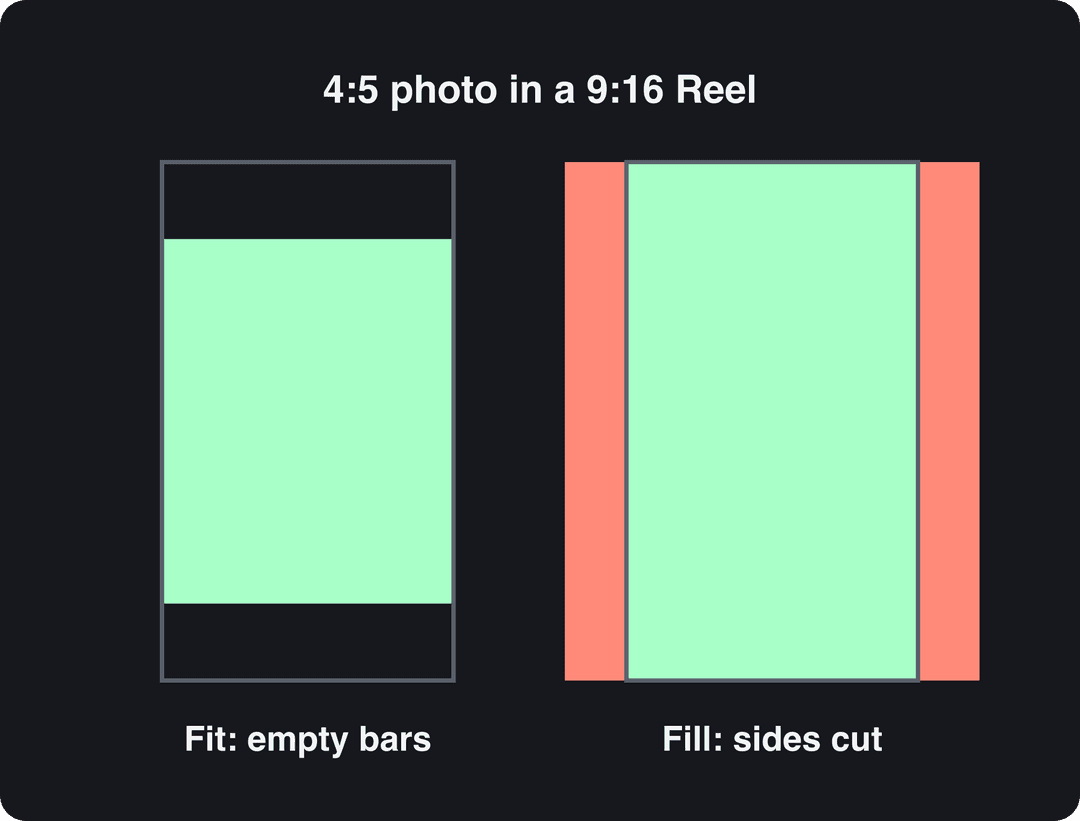
Keep text and faces away from the bottom of the frame and the right edge, where the caption, username and buttons sit. You can check a frame with the Instagram Reels safe zone checker.
How long should a picture video be, and how many photos?
Set the length from your photos, not the other way round. For a fast montage on an upbeat track, give each photo about 1 second: 10 to 15 photos fill a 15-second Reel. For a slower story, leave each photo up 2 to 3 seconds so the viewer can take it in.
Length itself matters less than people think. In Revid's analysis of 176,367 TikToks with 1,000+ likes posted between October 2025 and October 2026, every length bucket from under 15 seconds to 10 minutes had a median between 58K and 76K views. Clips under 15 seconds had the lowest median (58K) but the most shares per view: 1.41 per 100 views. This is TikTok data on videos that had already passed 1,000 likes, so treat it as a pattern rather than an Instagram rule. The full study of what makes TikToks go viral explains the method.
Length alone barely moves views: every bucket lands between 58K and 76K median views (the 790 videos over 10 minutes are a small, unusual group). Clips under 15 seconds get shared the most per view.
Source: Revid analysis of 176,367 TikToks with 1,000+ likes posted between Oct 1, 2025 and Oct 16, 2026 (61,203 creators)
Show the data
| Median views | Share that passed 1M views | Shares per 100 views | |
|---|---|---|---|
| Under 15 s | 57.6K | 11.6% | 1 |
| 16 to 30 s | 64.9K | 12.3% | 1 |
| 31 to 60 s | 61.8K | 11.8% | 1 |
| 61 to 90 s | 70.5K | 12.2% | 1 |
| 91 s to 3 min | 63.4K | 11.1% | 1 |
| 3 to 10 min | 76.4K | 12.4% | 1 |
| 10 min+ | 129.6K | 13.8% | 0 |
The practical rule: if you want shares (a trip recap friends send each other), stay under 15 seconds. If the photos build to a payoff, take the time the story needs and cut every photo that doesn't move it forward.
How to make a picture video people watch to the end
Order the photos as a story. Put your strongest image first, because the first frame is your hook. Build through the middle, and end on the payoff: the summit view, the finished cake, the product in use.
Cut on the beat. Change photos on the kick or snare of the track. Quick cuts suit upbeat songs; slow, lingering shots suit mellow ones. If timing by ear is hard, use Instagram's beat sync or a template.
Add motion to stills. A slow zoom or pan on each photo (the Ken Burns effect) makes a slideshow feel like footage. CapCut and Edits do this with keyframes; the Reels editor has no equivalent.
Put one line of text on the first frame. It tells the viewer why to keep watching. A few that work for picture videos:
- "3 cafés in Lisbon worth the queue"
- "Our kitchen, before and after"
- "Every cake we baked this week"
Match the color. Photos shot in different light look like a random dump. Apply the same filter or warmth setting to all of them so the video reads as one piece.
Use licensed music. Pick songs from Instagram's audio library or your editor's royalty-free library, never a ripped track. For more on pairing photos and songs, see how to make a video with photos and music.
End with one call to action. The last frame should say what to do next: "Comment your pick", "Save this for your trip", "Shop the collection, link in bio".
Prompt to try
Make a 20-second vertical Instagram Reel called "3 cafés in Lisbon worth the queue". Open on a close-up of a pastel de nata with the hook text on screen, give each café one short spoken line about what to order, use warm natural colors and upbeat acoustic music, and end with: "Save this for your trip."
How to create other videos for Instagram
Pictures are only one way in. You can record directly in the Reels camera (reels can be recorded and edited up to 20 minutes), upload clips you already have (here's how to make Reels with existing videos), or generate a full Reel from a text idea with the AI reel generator when you have no footage at all. For more on growing views with photo-based Reels specifically, see our guide to Instagram videos with pictures.
How to post your picture video so people see it
Post it as a Reel. Reels are the format Instagram recommends to non-followers. Socialinsider's Instagram benchmarks report that Reels get 36% more reach than carousels and 125% more than single-image posts.
Post while it's fresh. Meta said same-day posts made up more than 30% of recommended Reels on Instagram and Facebook in Q1 2026. Share a trip or event recap the same day, not a week later.
Write a caption that starts a conversation. "A few shots from our weekend" gives nobody a reason to reply. "Found a hidden beach this weekend. What's the best spot you've stumbled on?" does. A free Instagram caption generator gives you options to start from.
Use up to 5 hashtags. Instagram caps posts at 5; with more, the caption won't post. Use one broad tag (#travelvideo) and the rest specific (#pnwhiking, #londoncoffee).
Choose a clear cover. Pick a bright frame with the subject visible, or upload a 420 x 654 px image with readable text. It's what people see on your profile grid.
Test with trial reels. Trial reels go to non-followers first, report results within 24 hours and don't affect your other reels. They need a public account with 200 followers (professional accounts) or 1,000 (personal accounts).
Tag people and places. Tag any brand, creator or friend in the photos, and add a location so the Reel shows up in local discovery.
FAQ
Can I use any song in my Instagram picture video?
No. Use tracks from Instagram's own audio library or royalty-free music from your editor, or the video may be muted or removed. Business accounts get a smaller, commercially cleared library, so some songs you hear on personal accounts won't be available.
How many photos can I put in an Instagram video?
Pace is the real limit: about 10 to 15 photos fit a 15-second montage at roughly 1 second each. If you post a feed carousel instead of a video, the hard limit is 20 photos and videos.
Can I make a video from photos I already posted on Instagram?
Yes, as long as you have the files. If they only exist on Instagram, request a copy of your information in Accounts Center (Download your information), then build the video from those files. Originals from your camera roll will look sharper.
Why does my picture video look blurry on Instagram?
Usually the photos or the export are low resolution, or the upload was compressed. Export at 1080 x 1920 and 30 fps or more, and turn on the highest-quality upload option in Instagram's media quality settings.
Do picture videos get shown to people who don't follow me?
Yes, when you post them as Reels of 3 minutes or less. Stories reach only your followers, and Reels longer than 3 minutes aren't recommended to non-followers.