How to Create Viral Videos: 7 Steps Backed by TikTok Data
A 7-step method for creating viral videos: pick a proven format, write the hook first, build to one payoff and post with 3 to 4 hashtags, backed by Revid's data on 176,367 TikToks.
On this page
To create a viral video, start from a format people already share (challenges, comedy, reactions), put your hook in the first second, cut everything that doesn't build toward one payoff, and end in a way that makes viewers rewatch or send it. Then post consistently and repeat what your analytics show working.
The usual advice gets two things backwards. In Revid's analysis of 176,367 TikToks with 1,000+ likes posted between October 2025 and October 2026, inspirational videos had a median of only 45K views, against 156K for outrage and 121K for humor. And videos with under 40 characters of speech beat videos that talked the whole way through, 123K to 68K. Viral videos say less and make people feel more.
What makes a video go viral
Recommendation feeds (TikTok's For You feed, the Reels feed, the Shorts feed) decide how far a video travels from how viewers react to it: whether they keep watching, rewatch, comment and share. You can't control the feed. You control the three things it reacts to: the format, the opening and the payoff.
Format comes first. In Revid's study of what makes a TikTok go viral, challenges had the highest median views (182K, with 25.6% passing 1 million views), followed by comedy (155K, 22%) and reactions (105K, 16%). Storytelling (66K) and tutorials (62K) sat close to the overall median of 64.4K.
Challenges and comedy passed 1M views about twice as often as tutorials and storytelling, which are the most common formats.
Source: Revid analysis of 176,367 TikToks with 1,000+ likes posted between Oct 1, 2025 and Oct 16, 2026 (61,203 creators)
Show the data
| Median views | Share that passed 1M views | |
|---|---|---|
| Challenge | 182.3K | 25.6% |
| Comedy | 154.8K | 22.1% |
| Reaction | 104.8K | 16% |
| Dance | 83.8K | 15.5% |
| Storytelling | 66.1K | 12.2% |
| Lip Sync | 61.7K | 12.3% |
| Tutorial | 61.9K | 12.1% |
Your face matters less than you'd think. Faceless videos had a 114K median and 17.4% past 1M views, versus 67K and 12.7% for one person on camera, and faceless tutorials reached a 156K median against 52K for on-camera tutorials. If you'd rather not appear on screen, a faceless video generator is a real route, not a compromise.
Two limits to keep in mind: the study only covers TikToks that already reached 1,000 likes, so it compares videos that did reasonably well, and format and perspective come from Revid's AI analysis of each video. The numbers show what top performers have in common, not what causes virality. It's TikTok data, so treat it as a strong hint for Reels and Shorts rather than a rule.
How to create viral videos in 7 steps
1. Pick a format that already spreads
Don't invent a format. Borrow a proven one and change what goes inside it.
- Search your niche on TikTok, Reels and Shorts and save the videos that got far more views than their account usually gets.
- For each one, write down the format (challenge, reaction, POV, tutorial, before and after), the first line, and where the payoff lands.
- Pick the format that shows up most often and make your version of it about your topic.
Decision rules:
- If you teach something, make it a faceless tutorial or a screen recording (screen recordings had a 91K median in Revid's data).
- If you sell a product, show it in a challenge, a reaction or a before and after rather than a narrated demo.
- If you're funny, comedy is the second-best format in the data. If you're not comfortable performing, POV videos (107K median) let you act out a situation without talking to the lens.
Prompt to try
Make a 30-second vertical TikTok for renters with a curiosity-gap hook: "Nobody tells you this before you rent your first apartment." Show three quick tips with stock footage and large on-screen text, keep narration to short lines, and end on the most surprising tip so viewers rewatch.
2. Write the hook before anything else
The hook is the first line and the first frame together. Write it first, because if it's weak nothing after it gets watched. Open on the most interesting image you have, and say or show the reason to stay.
| Hook type | Example | Use it when |
|---|---|---|
| Result first | "This is the same room. Watch how we got here." | You have a visual transformation |
| Curiosity gap | "Nobody tells you this before you rent your first apartment." | You share tips or insider knowledge |
| Contrarian | "Stop meal prepping on Sundays." | You disagree with common advice |
| Direct callout | "If you run a coffee shop, watch this." | Your audience is a specific group |
| Challenge | "Try to watch this without flinching." | The video has a visual payoff |
| POV | "POV: your boss just found your side hustle." | You can act out a relatable moment |
Mood matters too. In Revid's TikTok data, videos driven by outrage (156K median) and humor (121K) far outperformed inspirational ones (45K). A hook that names a frustration usually beats one that promises motivation.
Statements beat questions at the very top. Among the 1,588 TikToks over 100 million views in Revid's index, 51% of those with a transcript open with a statement and only 16% with a question. For more opening lines by niche, browse these copy-and-paste TikTok hooks.
Two hook mistakes sink good videos: a slow intro ("hey guys, so today...") and a promise the video doesn't keep. Clickbait wins the first second and loses the rest, because viewers swipe as soon as they sense the payoff isn't coming.
3. Build toward one payoff
A viral short has one idea and one payoff. Everything between the hook and the payoff should raise the stakes or move closer to it. Anything else gets cut. This hook, build, payoff and loop sequence is the simplest viral video framework that holds across niches.
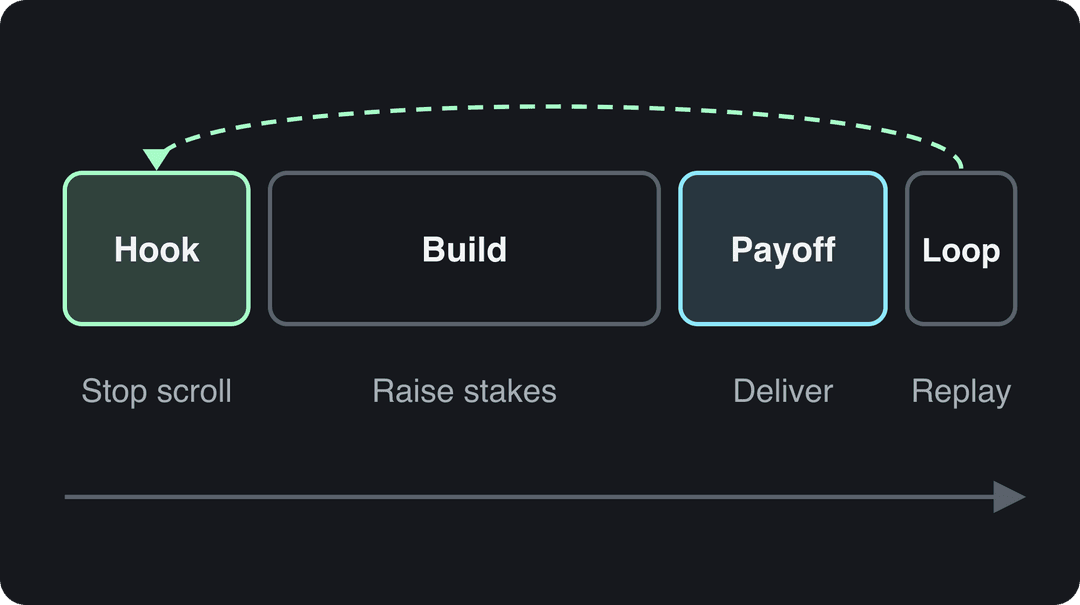
- Hook: stop the scroll with your strongest frame and line.
- Build: add context, steps or tension, and change the shot each time the idea moves forward.
- Payoff: the reveal, the answer, the punchline. Don't bury it behind an outro.
- Loop: end on a frame or line that leads back into the start, or on a question people will answer in the comments.
Cut every pause, every "hey guys" and every second where nothing changes. If you're unsure whether a shot stays, remove it and watch again.
Prompt to try
Create a 20-second faceless before-and-after video of a cluttered rental kitchen becoming clean and organized, opening on the finished result with the line "This is the same kitchen. Watch how we got here." Use AI video visuals, one short sentence of voiceover, bold captions and an upbeat track, ending on a frame that loops back to the opening shot.
4. Say less, show more
Talking less was one of the clearest patterns in Revid's TikTok study. Videos with under 40 characters of speech (about one short sentence) had a 123K median, and 20.2% passed 1M views. Videos that talked throughout had 68K and 11.9%; fully silent videos had 73K and 14.3%.
Videos with just a few spoken words (a line or two) beat both silent videos and videos that talk the whole way through, which were the most common and the weakest.
Source: Revid analysis of 176,367 TikToks analyzed by AI, with 1,000+ likes posted between Oct 1, 2025 and Oct 16, 2026 (61,203 creators)
Show the data
| Median views | Share that passed 1M views | |
|---|---|---|
| No speech | 73.3K | 14.3% |
| Under 40 | 122.7K | 20.2% |
| 40 to 120 | 97.2K | 17.6% |
| 120 to 300 | 91.6K | 16.8% |
| 300+ | 67.7K | 11.9% |
Rule: if the idea can be shown, show it and put a short line of on-screen text over it. If it needs narration, write the script, then cut it in half before you record.
5. Produce for a phone screen (viral video production)
Viral video production doesn't need a studio. It needs a vertical frame, clear sound and readable text.
| Element | What to do | Why |
|---|---|---|
| Frame | Shoot 9:16 vertical at 1080x1920 | TikTok's Creator Academy recommends it, and it fills the screen on Reels and Shorts too |
| Light | Face a window, or use a ring light | Even light on the subject looks sharper on a phone than any filter |
| Sound | Clip-on mic close to the mouth, quiet room | Bad audio is much harder to fix in editing than bad light |
| Stability | Prop the phone or use a cheap tripod | Constant shake reads as low effort |
| Text | Large on-screen text, away from the bottom and right edges | The caption and buttons cover those areas |
| Captions | Burn in captions for any speech | Viewers who scroll muted still get the message |
| Effects | One purposeful zoom, or a cut on the beat | Effects should point at the payoff, not decorate |
If you're not sure what a ring light does or whether you need one, Adorama's explainer covers the types and when each helps. Shooting style shows up in the data as well: handheld (80K median) and tripod (77K) footage both beat selfie-style video (48K) in Revid's TikTok study.
A new angle can carry a whole video. Small camera drones made aerial shots possible for solo creators; this write-up on Snapchat's Pixy drone camera shows the idea, though Snap has since stopped making Pixy, so check what is on sale today. For a broader checklist beyond virality, see these social media video best practices.
The editing basics in this video apply to short-form cuts as much as long ones:
6. Write a short caption and use 3 to 4 hashtags
In Revid's TikTok data, 4 hashtags had the best median (77K views, 13.4% past 1M), with 3 hashtags close behind at 75K. No hashtags got 51K, and 9 or more only 16K. Captions of 41 to 80 characters did best (67K median), while videos with no caption had 36K.
A caption that fits that range: one line of context the video doesn't say, then the tags. For example: "Fixing a rental kitchen without losing the deposit #diy #rentalhacks #kitchenmakeover #renovation". Mix one niche tag, one or two topic tags and one broad tag. Instagram allows up to 5 hashtags per post, so the same set carries over.
7. Read the numbers and make the sequel
Virality is rarely one video. It's usually the follow-up to a video that started to move.
- Open TikTok Studio analytics (profile > menu > TikTok Studio > Analytics). The Viewers tab shows when your viewers were most active over the last 7 days.
- Sort your posts by views and find the one that beat your usual numbers.
- Check where viewers dropped off. A drop in the first seconds points at the hook; a drop in the middle means the build was slow.
- Make a Part 2 that answers the question the first video left open, with the same hook style.
- Write the winning format into your social media content strategy so it becomes a series, not an accident.
Shares tell you more than views. Across Revid's index of TikToks with 1,000+ likes, likes came to 7.1% of views and shares to 0.88%. A video whose share rate runs well above that is being passed along; one with plenty of views and few shares has a hook that works and a payoff that doesn't.
What to do in the first hour after posting
Early reactions decide whether the feed shows your video to more people, so don't post and walk away.
- Post when your audience is online. TikTok Studio's Followers tab breaks follower activity down by hours and days; Instagram shows most-active times once you have 100 followers.
- Reply to the first comments with a question back, so each reply starts a thread.
- Pin a comment that adds context or asks something people want to answer.
- Share it everywhere you have an audience, with a teaser in Stories rather than a bare link.
- Cross-post the original file, never a download that carries another app's watermark, and rewrite the caption or title for each platform.
How to recreate a viral video style for your brand
Recreating a viral style means copying the recipe, not the video: keep the hook pattern, structure, pacing and camera perspective, and replace the topic, script, footage and audio with your own.
- Find an outlier: a video in your niche, or an adjacent one, that got far more views than its account usually gets.
- Break it down: write out the hook (first line and first frame), when each beat lands, the shooting style (POV, screen recording, handheld) and the payoff.
- Keep the structure: hook pattern, beat timing, pacing and perspective.
- Replace everything else: your product or topic, your words, your footage, your brand's look and voice, and audio you have the rights to.
- Put the brand in the payoff: the reveal should show your product doing the job, not a logo card at the end.
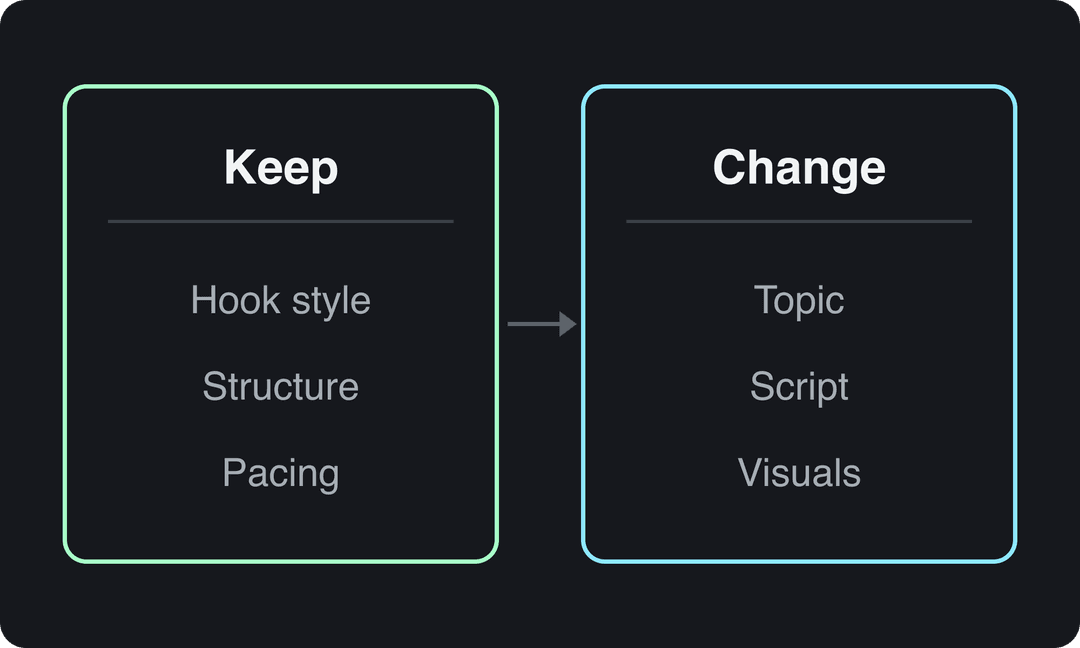
Example: a trending "things I'd never buy again" list becomes, for a coffee roaster, "coffee mistakes I'd never make again", with the same pacing and list structure and the final item showing your beans.
Light edits don't make a repost original. TikTok's Creator Rewards Program treats lightly modified reposts as not original, and since March 2026 Facebook deprioritizes reels changed only with borders, captions or speed changes.
Revid builds this into its library of about 2.77 million short-form videos: open any video and choose "Make it about your topic" to apply its hook style, pacing and energy to your niche, with a new script, new visuals and original music direction (how remixing viral videos works). Its free Deep analysis also explains any video's hook, timed structure and scroll-stopping moment, with three ways to adapt it.
How to create trending videos without copying them
Trending videos ride a format, sound or topic that's rising right now. Join early and change the subject instead of reposting the original.
- Find rising trends: check TikTok's trending hashtags, sounds and videos, Instagram's Explore tab and the Shorts feed. YouTube's help center no longer describes a general Trending page, only trending charts for a few categories such as music videos and gaming.
- Keep the format, change the topic: a trending audio about bad roommates becomes a video about bad clients if you're a freelancer.
- Add one thing the original didn't have: a skill, a twist ending, a joke only your niche gets.
- Filter for fit: skip trends your audience wouldn't expect from you; a forced trend costs more trust than it earns in views.
Past trend cycles show the pattern. Festivaltopia's list of the most viral YouTube and TikTok trends of 2025 includes nostalgia-driven formats where creators reworked content from earlier decades.
TikTok vs Instagram Reels vs YouTube Shorts: what to change
One vertical file can go to TikTok, Instagram Reels and YouTube Shorts. Instagram launched Reels as its short-video format, and today the three differ mainly in length limits, reach rules and hashtags.
| TikTok | Instagram Reels | YouTube Shorts | |
|---|---|---|---|
| Max length | Uploads up to 60 minutes (10 minutes when recorded in the app) | Up to 20 minutes | Up to 3 minutes, square or vertical |
| Reach note | Creator Rewards only pays on videos of at least 1 minute | Reels over 3 minutes aren't recommended to non-followers | Shorts over 1 minute with a Content ID claim are blocked |
| Hashtags | No verified cap; 3 to 4 performed best in Revid's data | Up to 5 per post | Optional |
| Text | Caption plus on-screen text | Caption plus on-screen text | Title up to 100 characters |
| Format | 9:16, 1080x1920 recommended | 1.91:1 to 9:16, at least 30 FPS and 720 px | Square or vertical |
Where you start matters. Socialinsider's 2026 study of 69 million short-form videos found the highest engagement rate by followers on TikTok (2.60%, versus 0.45% on Reels and 0.30% on Shorts), but for accounts under 5,000 followers, Shorts averaged 15,160 views per video against 625 on Reels and 350 on TikTok, as listed in our YouTube Shorts statistics. If you're starting from zero, post every video to all three and let the numbers tell you where to focus.
TikTok rewards speed and trend participation more than the other two; Rebus Advertising's guide to cracking the TikTok code covers that side of the platform.
How to make viral AI videos
AI visuals can go viral, but the platform matters. Revid's study of AI videos vs real footage found that AI-generated TikToks averaged twice the views of real footage, while on X, Instagram and Threads, AI visuals clustered in the lowest engagement tier. Lead with AI on TikTok; on Instagram, mix it with real footage.
Label realistic AI content. TikTok requires a label on AI-generated content with realistic images, audio or video, and says the label doesn't affect distribution when the video follows its Community Guidelines. YouTube asks you to disclose realistic AI with the "AI use" setting in YouTube Studio and says disclosure alone doesn't limit a video's audience or its eligibility to earn.
How to create viral videos with AI in Revid
Revid starts from videos that already performed instead of a blank prompt.
- Search Revid's library by topic, platform and engagement tier, or open the AI video generator with your own idea.
- On a reference video, choose a remix such as "Make it about your topic" or "Same energy, new script". Revid keeps the hook style, structure and pacing and writes a new script and new visuals.
- Pick the visuals per scene (stock footage, AI images, or AI video from Seedance 2.5, MiniMax Hailuo, Wan 3.0 or Google Veo 3), a voice-over in 70+ languages and a caption style.
- Adjust anything in the timeline editor, then publish or schedule directly to TikTok, Instagram and YouTube.
Sign-up is free, lets you search the library, and comes with free credits to try video creation; regular creation then uses the monthly credits of a paid plan, from $39/month.
How to make viral clips from long videos
A long video often hides several viral clips. Look for moments that make sense with no context: a strong opinion, a surprising fact, a story with a punchline.
- Start each clip at the hook, not at the start of the thought, and cut setup the viewer doesn't need.
- Reframe to 9:16 so the speaker fills the frame.
- Add burned-in captions and a short on-screen title that states the claim.
- End right after the punchline.
Revid's YouTube clip maker does the first pass: paste a YouTube link and it turns the video into short vertical clips you can edit before posting. If you publish the long version too, YouTube video chapters make its best moments easier for viewers (and you) to find.
How to make a video go viral for free
You don't need ads or paid promotion. Paid and promoted views don't even count toward TikTok's Creator Rewards earnings.
- Film with what you have: a phone, a window and a clip-on mic.
- Edit for free: Instagram's Edits app generates captions and exports without a watermark.
- Test without risk: on Instagram, trial reels are shown first to non-followers and don't affect how your standard reels rank. Professional accounts need 200 followers, personal accounts 1,000.
- Study what works: Revid's Deep analysis is free for up to 60 videos a day.
- Seed it where it fits: share the video in communities where it answers a real question, framed for that group, not dropped as a bare link.
What to do after a video goes viral
A spike fades fast unless new viewers get a reason to follow. Post the sequel quickly, pin a comment that points to related videos, and keep the format going as a series. A recognizable look, voice and topic make that easier; this guide on how to build a personal brand covers the basics.
Expect negative comments once a video reaches strangers. Ignore pure trolling, correct false claims once and politely, and thank people for fair criticism: it often hands you the next video idea.
Then turn attention into income:
- TikTok: on TikTok, the Creator Rewards Program replaced the old Creator Fund. You need to be 18 or older, with 10,000 followers and 100,000 video views in the last 30 days on a personal account, and only videos of at least one minute earn. TikTok publishes no fixed rate per view.
- YouTube: on YouTube, the Partner Program shares ad revenue at 1,000 subscribers plus 4,000 public watch hours in 12 months or 10 million Shorts views in 90 days. From February 1, 2027, new applicants need 8,000 watch hours in 365 days or 20 million Shorts views in 90 days, and earning Shorts revenue in a given month will require 10 million qualified Shorts views in the last 90 days.
- Brand deals and shopping: brands weigh engagement, not only follower counts. In the US, TikTok Shop affiliate creators must be 18 or older with at least 1,000 followers. For third-party figures on shoppable and short-form video, see Beacon's short-form video statistics roundup.
FAQ
Can you guarantee that a video will go viral?
No. A proven format, a strong hook and a fast payoff raise the odds, but no tool or tactic guarantees views. Treat each post as a test and build on the ones that work.
How many views does a video need to count as viral?
There's no official threshold. Revid's library classifies 1 million+ views as viral and 100,000+ as high engagement; for a small account, a video that reaches far beyond your follower count is already spreading.
How long should a viral video be?
Length matters less than pacing. In Revid's 12-month TikTok study, every length bucket from under 15 seconds to 10 minutes had a median between 58K and 76K views, with 61 to 90 seconds slightly ahead and videos under 15 seconds getting the most shares per view.
What is the best time to post a video to go viral?
On TikTok, Revid's data found posts at 3 to 6 a.m. US Eastern did best (4 a.m. had a 120K median) and 5 to 9 p.m. did worst. Those hours also cover daytime in Europe and Asia, so check your Followers tab in TikTok Studio before you set a schedule.
Do you need expensive equipment to make viral videos?
No. A phone, a window for light and a clip-on mic cover most viral formats. Polish isn't what drives views: in Revid's data, faceless and POV videos outperformed one person talking to camera.
How do you make aesthetic videos go viral organically?
Give the aesthetic a format and a payoff: a beautiful clip with no hook is wallpaper. Use a POV or before-and-after structure, open on your most striking frame, keep speech to a line of on-screen text, and post consistently instead of paying for reach.