How to Measure Content Performance: 6 Steps, Metrics and Report
A 6-step process to measure content performance: one goal per piece, one matching metric, clean tracking, your own baseline, fixed checkpoints and a decision for every result. Includes the metrics to track with formulas, a performance matrix and a report template.

On this page
To measure content performance, give each piece one goal (reach, engagement, conversion or retention), track the one metric that proves it in Google Analytics and each platform's analytics, and compare the result to your own median at fixed checkpoints. Then update, promote, repurpose or cut each piece based on the numbers.
Most content reports fail because they compare a post to the outliers in your feed instead of to your own history. In Revid's analysis of 176,367 TikToks with 1,000+ likes posted between October 2025 and October 2026, the median video got 64.4K views and only 11.9% passed 1 million. Those are videos that already cleared a bar. A post that misses those numbers has not failed. A post that misses your own median is the one to look at.
What is content performance?
Content performance is how well a piece of content achieves the goal it was made for, measured with data: who saw it, what they did with it, and what it led to. A blog post built to rank is judged on search clicks and sign-ups. A TikTok built for reach is judged on views and shares. ImageKit's glossary entry on content performance gives a short general definition if you need one for a brief.
Content measurement is the system around those numbers: goals, tracking, benchmarks and a review routine. The six steps below set that system up, and the metrics section after them defines each number and its formula.
How to measure content performance in 6 steps
1. Give every piece one job
Four jobs cover almost all content:
- Reach: get seen by people who don't know you yet.
- Engagement: get read, watched, saved and shared.
- Conversion: drive a sign-up, demo request or sale.
- Retention: bring people back and keep customers.
Write the job in your content calendar before you publish. If a piece seems to have two jobs, pick the one you would defend in a budget meeting. A piece measured against everything gets judged on nothing.
2. Pick one primary metric for that job
| Job | Primary metric | Supporting metrics | Where to find it |
|---|---|---|---|
| Reach | New visitors or views | Impressions, search clicks, reach to non-followers | Google Search Console, platform analytics |
| Engagement | Engaged time or watch time | Scroll depth, shares per view, comments, saves | Google Analytics, platform analytics |
| Conversion | Conversion rate (key events per visitor) | Leads, sign-ups, assisted conversions, revenue | Google Analytics, CRM |
| Retention | Returning visitors or repeat viewers | Email subscribers, churn, follows per view | Google Analytics, email tool, platform analytics |
Page views and follower counts are context, not results, unless the job is reach. The formulas for each metric are in the metrics section below.
3. Set up tracking before you publish
Tracking added after launch loses the first days of data, which is when most social posts get their reach.
- Mark the actions that count as results (sign-up, demo request, purchase) as key events in Google Analytics.
- Add UTM parameters (utm_source, utm_medium, utm_campaign) to every link you share outside your site, so visits are credited to the right post and channel.
- Verify your site in Google Search Console to see queries, clicks, impressions and average position for each page.
- Keep a content log: URL, publish date, job, primary metric, baseline and result. A spreadsheet is enough.
4. Set a baseline as your performance standard
Your standard is your own median, not an industry average. Take the median of your last 10 to 20 pieces of the same type on the same channel. Use the median, not the mean, because one viral post drags the average up and makes everything else look weak.
External benchmarks are a sanity check. For short-form video, the same Revid study found a like-to-view ratio of 7.1%, a share-to-view ratio of 0.88% and a comment-to-view ratio of 0.08%. The sample only includes TikToks that already passed 1,000 likes, so read these numbers as what strong posts look like, not as an average account. More sourced figures are on our short-form video statistics page.
5. Measure at fixed checkpoints
Compare pieces at the same age. A week-old post and a year-old post are not comparable.
- Social video: check at the end of the first week, then at 28 days.
- Blog and search content: check monthly, and judge search performance after a few months, because rankings take time to settle.
- Email and sales content: check after the campaign or deal cycle closes.
6. Make a decision for every result
A number that does not change a decision is not worth reporting. At each review, place every piece in the content performance matrix further down and take the action for its quadrant.
Content performance metrics: what to track and how to calculate it
Eight metrics cover nearly every content goal. Use the one that matches a piece's job as its primary metric and keep the others as diagnostics.
| Metric | What it tells you | How to calculate it | Where to find it |
|---|---|---|---|
| Reach and impressions | How many unique people saw it (reach) and how many times it was shown (impressions) | Read from the platform | Platform analytics, Search Console |
| Click-through rate (CTR) | Whether the title, thumbnail or call to action earns the click | Clicks / impressions x 100 | Search Console, YouTube Studio, email tool |
| Engagement rate | Whether people interact with it | Engagements (likes, comments, shares, saves) / reach or impressions x 100 | Platform analytics |
| Engaged time and retention | Whether it holds attention | Average engagement time; for video, average view duration and the retention curve | Google Analytics, YouTube Studio, TikTok Studio |
| Shares per view | Whether people pass it on to their own network | Shares / views x 100 | Platform analytics |
| Bounce rate | Whether visitors leave without engaging | In GA4, the share of sessions that were not engaged sessions | Google Analytics |
| Conversion rate | Whether it drives the action you want | Conversions / visitors or views x 100 | Google Analytics key events, CRM |
| Return visitor rate | Whether people come back | Returning users / total users x 100 | Google Analytics |
Engagement rate is the one that changes most between tools, depending on whether you divide by reach, impressions or followers. Our guide to calculating social media engagement rates compares the versions. Pick one formula and keep it, because switching mid-year breaks your baseline.
How to read content performance data together
One metric tells you what happened. Two side by side usually tell you why:
| Pattern | What it means | What to do |
|---|---|---|
| High CTR, high bounce rate | The title or thumbnail promises something the page doesn't deliver right away | Rewrite the opening so it pays off the promise in the first lines |
| High reach, low engaged time or retention | The hook works, the body doesn't | Cut the slow middle and move the payoff earlier |
| Low reach, high shares per view | People who see it pass it on; distribution is the problem | Share it again, cross-post it, link to it from stronger pages |
| High engaged time, low conversion | People read or watch, then have nowhere to go | Add a call to action that matches the topic, right after the main payoff |
| High bounce rate on a single-answer post | The post answered the question on one page | Leave it if engaged time is healthy; bounce rate matters more on home and landing pages |
The video below walks through three of these website metrics (scroll depth, time on page and bounce rate) for content sites.
The content performance matrix
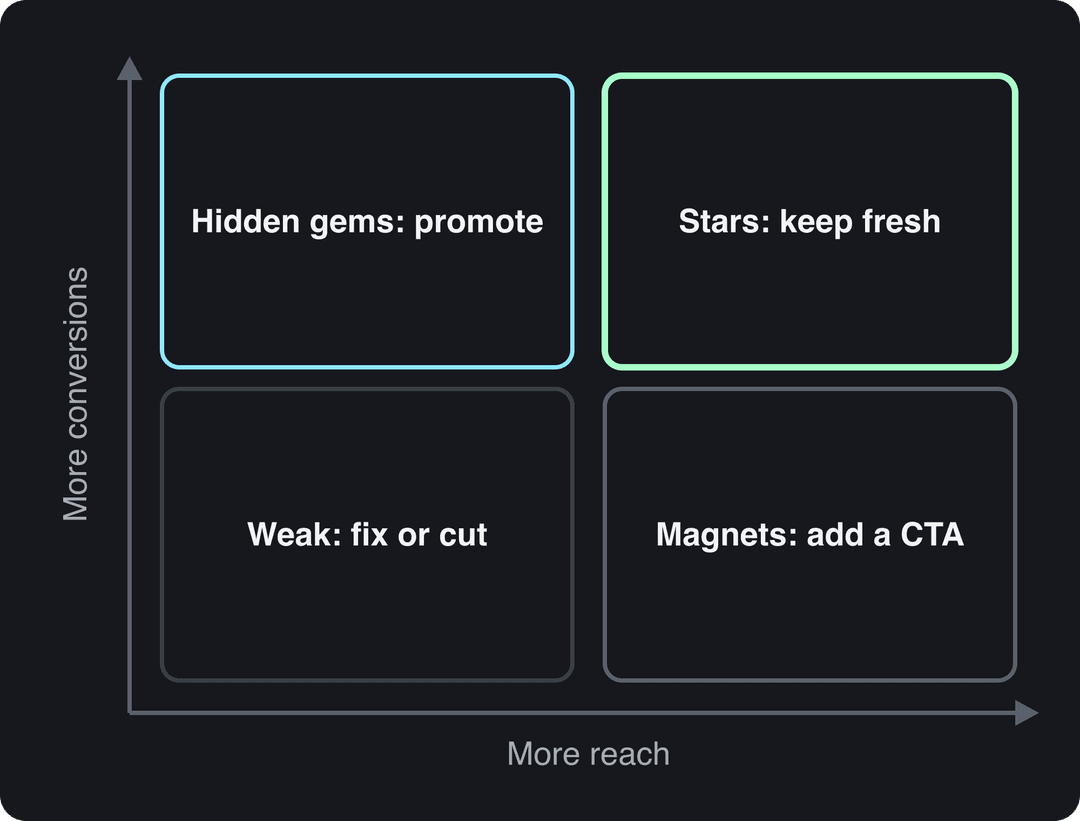
The matrix plots each piece on two axes: reach (views or visits) and conversion (key events, sign-ups or sales). "High" and "low" mean above or below your own median for that format.
| Quadrant | What you see | What to do |
|---|---|---|
| Stars | High reach, high conversion | Keep it updated, link to it from new pieces, make more on the same topic or format |
| Hidden gems | Low reach, high conversion | Promote it: sharpen its search targeting, share it again, turn it into a short video |
| Magnets | High reach, low conversion | Add or move the call to action, match the offer to why people arrived |
| Weak | Low reach, low conversion after a fair window | Rewrite it, merge it into a stronger page, or remove it |
Hidden gems are the cheapest win, because the content already converts. Revid's article to video converter turns a blog post into a narrated short you can post where the article gets no reach.
Add one column for cost to measure content efficiency: results per unit of effort, such as sign-ups per hour of production. Two posts with the same result are not equal if one took an afternoon and the other took a week.
How to find your best-performing content
Divide each piece's primary metric by the median for its format and channel, then sort your content log by that ratio. This puts a LinkedIn post and a blog post on the same scale, and the pieces at the top are your best-performing content.
Then look for the common thread: topic, format, hook, length or channel. One star can be luck; three stars with the same angle is a pattern worth turning into a series. To see what performs for others in your niche, Revid's channel watcher syncs the TikTok and YouTube channels you choose every day and flags their outlier videos.
How to track content performance: tools by channel
| Channel | Tool | What to look at |
|---|---|---|
| Website and blog | Google Analytics | Engaged sessions, key events, landing pages, traffic sources |
| Search | Google Search Console | Queries, clicks, impressions, CTR and average position per page |
| YouTube | YouTube Studio | Views, watch time, audience retention, subscribers gained |
| TikTok | TikTok Studio | Views, watch time, shares, follower activity by hour and day |
| Instagram Insights | Views, Viewers, shares, saves, follows | |
| Your email platform | Clicks to the content, conversions from the email | |
| Sales content | CRM or sales enablement tool | Times shared by reps, prospect views, deals influenced |
Pull the primary metric from each tool into your content log rather than building one dashboard per platform. If your team uses an SEO suite, add backlinks and ranking keywords per page to the same log.
Prompt to try
Create a 30-second vertical video for marketers titled "Stop judging your posts by views". Open with the hook "Your best post might be the one with the fewest views." Explain comparing each post to your own median and checking shares per view, with bold captions, clean motion graphics and a calm, confident voiceover.
How to measure video and visual content performance
For video, views measure reach, watch time and retention measure whether the video held attention, and shares and saves measure whether people found it worth passing on. Judge a video on the ratio that matches its job (shares per view for reach, follows per view for growth), not on raw views. Our guide to video engagement metrics explains each one.
The retention curve is the most useful chart you have. Find the second where it drops hardest, watch that moment, and fix the cause in the next video: a slow intro, a confusing step or a payoff that came too late.
Where each platform keeps the numbers:
- TikTok: profile > menu > TikTok Studio > Analytics, with date ranges of 7, 28, 60 or 365 days. The Followers tab breaks follower activity down by hours and days.
- Instagram: insights lead with Views (times content was played or displayed) and report Viewers (unique accounts) separately. Follower insights need at least 100 followers and cover up to the past 90 days.
- YouTube: on YouTube, open YouTube Studio > Analytics. On desktop you can A/B test up to 3 titles and thumbnails per video; Shorts are not eligible.
How to measure content quality
Quality is not a single number, but it leaves measurable traces. Score each piece on these signals:
| Quality signal | How to measure it |
|---|---|
| Answers the search | Average position and CTR in Search Console for the query it targets |
| Gets consumed | Scroll depth, engaged time, video completion |
| Earns trust | Returning visitors, newsletter sign-ups from the page |
| Gets referenced | Backlinks, mentions, citations by AI assistants |
| Stays accurate | Date of the last fact check; specs and prices still current |
Pair the data with a short editorial review: does the first paragraph answer the question, is every claim sourced, could a reader act on it today. Omniscient Digital's guide to content measurement walks through measuring content in layers, from production inputs to business outcomes, which keeps quality checks separate from results.
How to measure sales content performance
Sales content (case studies, one-pagers, decks, demo videos) has a different job: helping reps close. Track:
- Usage: how often reps send each asset. Content nobody sends is not working, however good it looks.
- Prospect engagement: opens and time viewed when the asset is tracked.
- Influenced pipeline: opportunities where the asset was shared before the deal moved forward.
- Win rate and cycle length: deals where the asset was used compared with similar deals where it was not.
Ask reps which assets they skip and why. That answer often explains low usage faster than the CRM does.
Learning content performance metrics
For training and course content, the Kirkpatrick model's levels (reaction, learning, behavior and results) map cleanly to metrics:
- Reaction: learner ratings and comments after each module.
- Learning: completion rate and the change in assessment scores before and after.
- Behavior: whether people apply the skill on the job, from manager check-ins or work samples.
- Results: the business number the training was meant to move, such as fewer support tickets or faster onboarding.
Completion rate alone is a weak signal. A short, easy module can have high completion and change nothing.
How to measure repurposed and automated content
Repurposing (a webinar cut into clips, a blog post turned into a video) and automated publishing need their own scorecard:
- Native performance: each derivative against your baseline on its platform, not against the original piece.
- Hit rate: the share of repurposed pieces that reach your median.
- Cost per published piece: time or money, compared with making the piece from scratch.
- Return traffic: visits or sign-ups that flow back to the source.
Watch originality rules too. Since March 2026, Facebook treats reposts changed only with borders, captions or speed changes as unoriginal and deprioritizes them, and YouTube does not let mass-produced, template-made content monetize. Repurposing that adds a new script, structure or angle is safer and usually performs better. Our content repurposing workflow shows how to build that into the process.
How to close the loop with Revid
If you publish short-form video with Revid, measurement sits next to creation. Every post published through Revid to TikTok, Instagram or YouTube reports its views, likes and comments, and any post that did well can be remixed in one click.
- Create and schedule posts from one queue with Revid's social publishing.
- After the first week, compare each post's views and likes with your account median.
- Remix the posts above baseline into new versions, and drop the formats that stay below.
For a free read on an existing account, the TikTok account audit shows which of your videos work best.
Attribution: how to credit content for conversions
Most content influences a purchase before the final click, so the attribution model you choose decides how much credit content gets.
| Model | How it works | Best for | Limitation |
|---|---|---|---|
| Last touch | 100% of credit to the final touchpoint | Short, simple purchases | Ignores content that started the interest |
| First touch | 100% of credit to the first touchpoint | Understanding discovery | Ignores content that nurtured the lead |
| Linear | Equal credit to every touchpoint | Seeing every interaction | Treats a glance and a demo the same |
| Time decay | More credit to touchpoints near the conversion | Short sales cycles | Undervalues early content |
| Position-based (U-shaped) | 40% to the first and last touchpoints each, 20% split across the middle | Balancing discovery and closing | Middle content gets little credit |
| W-shaped | Largest shares to first touch, lead creation and last touch | Long B2B cycles with clear milestones | Needs clean lead tracking |
| Data-driven | An algorithm assigns credit from observed paths | Accounts with enough conversion data | Opaque, and weak with little data |
Google Analytics 4 offers data-driven and last-click attribution; the rule-based models above live mostly in CRMs and dedicated attribution tools. If your leads live in Salesforce, ClickClickBangBang's guide to Salesforce marketing attribution covers how to set it up there.
Whatever the model, add a self-reported field to your sign-up or demo form ("How did you hear about us?"). It often credits content and video that click-based tracking misses. To turn attributed conversions into a return figure, see how to measure content ROI.
How to build a content performance report
A content performance report should lead to decisions, so build it around them:
| Section | What goes in it |
|---|---|
| Headline | What changed since the last report and the decision you need |
| Goal scoreboard | Each goal's primary metric against baseline |
| Top and bottom performers | The best and worst pieces, with a one-line reason for each |
| Matrix moves | Pieces that changed quadrant and the action taken |
| Next actions | What you will update, promote, repurpose or cut, with an owner |
Tailor the depth to the reader. Creators need per-piece detail (retention, scroll depth, hooks that held). Executives need the goal scoreboard and the link from content to pipeline or revenue. Review social content weekly, blog content monthly and the overall strategy quarterly. For a full account-level review, run our social media audit checklist alongside the report.
FAQ
What's the best way to measure content?
Measure each piece against the single goal it was made for and against your own median for that format and channel. Raw totals such as page views only matter when the goal is reach.
How often should you measure content performance?
Check social posts weekly, blog content monthly, and make strategy decisions quarterly. Always compare pieces at the same age.
How do you measure content performance and refine your strategy?
Place every piece in the content performance matrix at each review, then shift effort: more of what lands in the stars quadrant, fixes for magnets and hidden gems, and fewer of the formats that keep landing in the weak quadrant. Compare the next cycle's results to see whether the change worked.
Which analytics metrics can an AI platform track for content performance?
It depends on the platform; most report views, likes and comments per post, pulled from the social networks. Revid, for example, reports the views, likes and comments of every post published through it to TikTok, Instagram and YouTube, while conversions and revenue still come from Google Analytics or your CRM.
What are the top options for tracking content retrieval performance?
For AI assistants, track referral traffic from ChatGPT, Perplexity and similar assistants in Google Analytics, and check a fixed list of prompts each month to log whether your pages are cited. For an internal search or knowledge base, run a set of real queries and record whether the right document comes back near the top.
Are page views a vanity metric?
Only when they are reported without a goal. Page views are the right primary metric for reach content and a misleading one for content meant to convert, where key events per visitor tell you more.