On this page
To rank YouTube videos, pick a topic people actually search for, put that phrase at the start of your title and in the first lines of your description, and design a thumbnail that earns the click. Then hold viewers through the first 30 seconds: YouTube ranks on relevance, engagement and quality, and watch time decides how far a video travels.
Stop judging rankings by view count. Since August 24, 2026, YouTube counts a view the moment a video starts to play, on Shorts, long-form and live alike, so a big number can hide a video that viewers abandon in seconds. The two numbers that tell you whether YouTube will keep showing a video are impressions click-through rate and average view duration, and both live in YouTube Studio.
How does YouTube decide which videos rank?
YouTube surfaces videos through two systems. Search ranks results for a typed query, and YouTube's own explanation of search names three ingredients: relevance (does the title, description and content match the query), engagement (do people who see it click and watch) and quality (does the channel show expertise on the topic). Recommendations on the Home feed and next to other videos work differently: they show each viewer what similar viewers watched, kept watching and were satisfied with.
The practical consequence: keywords get you considered, but clicks and watch time decide whether you stay. Here is each signal, where to read it, and what to change.
| Signal | What YouTube reads | Where to check it in Studio | What to fix |
|---|---|---|---|
| Relevance | Title, description, spoken words, topic match | Reach tab: traffic from YouTube search and search terms | Keyword at the start of the title and description |
| Click-through | Impressions click-through rate | Reach tab | Thumbnail and title |
| Retention | Average view duration, retention curve | Engagement tab | Hook, pacing, cut the intro |
| Engagement | Likes, comments, shares, subscribers gained | Engagement and Audience tabs | Ask one specific question, reply early |
| Satisfaction | Returning viewers, viewer surveys | Audience tab (returning viewers) | Deliver exactly what the title promises |
The competition is large: Lenostube's roundup of YouTube stats and trends gives a sense of how much video you are up against. That is the argument for a specific, searchable topic over a broad one. For the wider SEO picture, see our YouTube SEO tips.
Step 1: Find a keyword people actually search
A video can only rank for a search that exists. Spend ten minutes on research before you script.
- Type your topic into the YouTube search bar and note the autocomplete suggestions. They come from real searches. "how to edit videos" expands into "how to edit videos on iphone" and "how to edit videos for youtube", which are two different videos.
- Open the Research tab in YouTube Studio analytics on desktop. It shows what your viewers and YouTube users search for, including topics where viewers are not finding what they want.
- Study the top results. Look at the titles, length and angle of the videos already ranking. vidIQ shows the tags and search interest behind competitor videos, and Ahrefs Keyword Explorer can be filtered to YouTube to compare volumes, such as "how to create youtube thumbnails" against "how to make youtube thumbnails".
- Match the intent. Someone searching "best video editing software" wants a comparison, not a tutorial. If the top results are all comparisons, a tutorial will not rank there no matter how good it is.
- Pick the narrowest phrase you can fully answer. A small channel rarely wins "how to cook rice". It can win "how to cook basmati rice in a rice cooker".
Trending topics and seasonal searches (holidays, launches, annual events) bring temporary demand. YouTube's Help Center now describes Trending Charts only for select categories (Movie Trailers, Music Videos and Gaming), so the YouTube trending page is mainly useful if you work in those categories. For everyone else, autocomplete and the Research tab are better trend detectors.
Step 2: Write a title that ranks and gets clicked
The title does two jobs: it tells YouTube what the video answers, and it convinces a person to click. YouTube allows 100 characters, but search results and mobile screens cut long titles, so keep the keyword and the promise in the first 60 characters or so.
- Put the main keyword first, then the promise.
- Add one concrete detail: a number, a result, a time frame, a tool name.
- Never promise what the video does not deliver. A click followed by an instant exit hurts more than no click.
| Weak title | Stronger title | Why it works |
|---|---|---|
| My Rice Cooker Video | How to Cook Basmati Rice in a Rice Cooker (No Mush) | Keyword first, specific problem solved |
| How to Bake a Cake | How to Bake a Cake: 5 Mistakes That Make It Dense | Keyword plus curiosity |
| Editing Tips | How to Edit YouTube Videos on iPhone in CapCut | Matches an autocomplete phrase exactly |
If you get stuck, a free YouTube title generator gives you variants to test. And if your goal is sending viewers to your site, Evergreen Feed's guide to marketing your website with YouTube covers how to point videos back to your pages.
Step 3: Make a thumbnail that wins the click
In search results your thumbnail sits next to every competitor's. It has to read at phone size in under a glance.
- One subject, one idea. A face or the object, large, with clear contrast against the background.
- A few words at most, and not the same words as the title. The thumbnail adds to the title instead of repeating it.
- Show the outcome, not the process: the finished cake, the before and after, the result on screen.
| Thumbnail spec | Current YouTube guidance |
|---|---|
| Recommended size | 3840x2160 |
| Minimum width | 640 px |
| Aspect ratio | 16:9 |
| File size | Up to 50 MB on desktop, 2 MB on mobile |
| Requirement | Verified account |
| Vertical videos | A 16:9 thumbnail is replaced by an auto-generated 4:5 one on home, explore and subscription pages |
Step 4: Write the description, tags and chapters
The description can run to 5,000 characters, but the first couple of lines matter most: they show in search and above the "more" fold. Open with a sentence that contains your main keyword and says what the viewer will get.
A simple template:
- First two lines: the keyword and the promise ("How to cook basmati rice in a rice cooker without it turning mushy, with the exact water ratio.").
- A short summary of what the video covers, using related phrases naturally.
- Chapters: timestamps listed in the description, the first one marking the start of the video. Chapters help viewers jump to what they need and give YouTube more context about each section.
- Links: related videos, a playlist, your site.
A YouTube description generator can draft this structure for you to edit.
Tags are limited to 500 characters in total, not per tag, and YouTube's own help says they play a minimal role in discovery. Add your main keyword and common misspellings, then move on. Also say the keyword out loud early in the video: YouTube generates automatic captions, and what you say is part of what the video is about.
Prompt to try
Make a 45-second vertical YouTube Short titled "How to Cook Basmati Rice in a Rice Cooker (No Mush)". Open with the hook "This is the rice ratio that fixed my mushy rice" and show the finished fluffy rice in the first 3 seconds. Then give 3 quick steps with the exact water ratio, close-up kitchen visuals, a warm friendly voice and bold captions.
Step 5: Hold viewers past the first 30 seconds
Retention is where most videos lose their ranking. The first 30 seconds decide whether a viewer stays, so cut everything that is not the reason they clicked.
- Confirm the promise immediately. Restate what the title promised in the first sentence, then start.
- Show proof early. The finished result, the number, the before and after.
- Open a loop. Tease something you will reveal later ("the third mistake is the one almost everyone makes").
- Kill the long intro. Logo animations, channel greetings and "before we start" segments belong at the end or nowhere.
Sample hooks you can adapt:
- "This is the rice ratio that fixed my mushy rice, and you only need one cup to test it."
- "Three settings in YouTube Studio decide whether your video gets found. Most people never touch the second one."
- "By the end of this video you'll have a thumbnail that reads at phone size. Here's the finished one."
Then check the audience retention graph in the Engagement tab. A steep drop in the opening means the hook missed. A dip in the middle points to a tangent or a slow section. Bumps upward show moments people rewatch: do more of that. If you want outside benchmarks on viewing behavior, SocialPilot's YouTube statistics roundup collects third-party data.
Step 6: Earn engagement that YouTube can trust
Engagement tells YouTube real people valued the video. Earn it; never fake it.
- Ask one specific question tied to the video ("Which side do you serve with this rice?"), not "let me know what you think".
- Reply to comments in the first hours and pin a comment that adds value, such as a correction or a link to the next video.
- Extend the session. Add end screens and put the video in a playlist, so viewers keep watching your channel instead of leaving.
- Avoid shortcuts. Bought views, likes or subscribers and sub4sub schemes break YouTube's fake engagement policy and can cost you the channel.
Backlinko's guide to ranking YouTube videos is a useful second opinion on engagement signals. For the long game of turning viewers into a community, see how to grow a YouTube channel fast.
Step 7: Promote the video to the right audience
Early viewers shape how YouTube tests a video, so send it to people who actually want it: your subscribers through a Community post, your email list, a relevant forum thread, or a blog post where you embed it.
Avoid blasting it to audiences who will not care. Untargeted traffic clicks and leaves, which lowers your retention and click-through numbers right when YouTube is deciding who else to show it to.
How do you fix a YouTube video that isn't ranking?
Do not delete it. Diagnose it in order, because each problem has a different fix. YouTube's guide to YouTube Analytics explains where each metric lives.
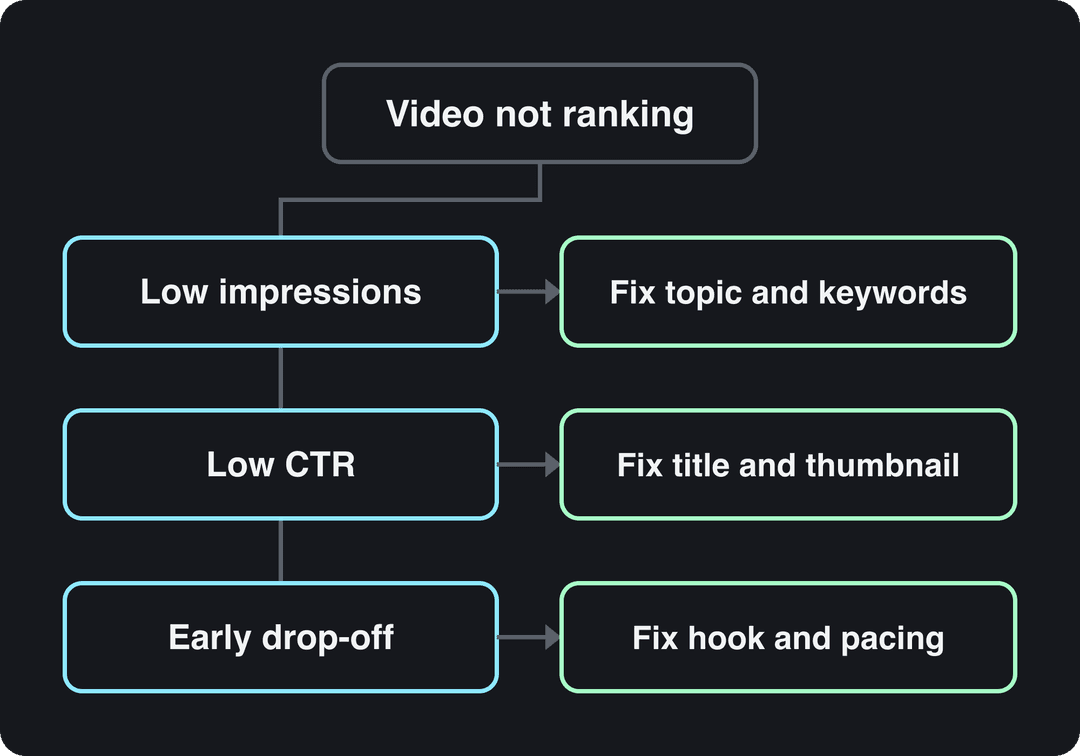
- Few impressions: YouTube is not showing the video. The topic has little demand or the title and description do not match a real search. Rework the keyword (Step 1) and the opening lines of the description.
- Impressions but a low click-through rate: people see it and pass. Change the thumbnail first, then the title.
- Clicks but an early drop-off: the video does not deliver what the click promised, or the opening is slow. Check that the title matches the content; for future uploads, rebuild the hook.
- Good numbers but no growth: the video works for the people who find it. Promote it, add it to playlists and link to it from your other videos' end screens.
YouTube Studio on desktop can A/B test up to 3 titles and thumbnails on a long-form video with Test and Compare. The variant with the highest watch time wins and is shown to all viewers.
If a video still fails after a new thumbnail, title and some promotion, treat it as research: compare it with your best performer and change the topic or angle on the next upload rather than reworking the same one again.
How do you rank YouTube Shorts?
Shorts follow the same logic with different surfaces. Square or vertical videos up to 3 minutes long count as Shorts, and most of their views come from the Shorts feed, where the deciding signal is whether viewers keep watching instead of swiping away. Titles still matter for search, and verified accounts can add a custom Shorts thumbnail in YouTube Studio on a computer (9:16, 2160x3840 recommended).
Shorts are also a strong discovery channel for small channels: in Socialinsider's 2026 study of short-form videos, accounts with under 5,000 followers averaged 15,160 views per YouTube Short, far more than the same size accounts got on Reels or TikTok. More sourced figures are in our YouTube Shorts statistics, and the step-by-step for Shorts is in YouTube Shorts SEO.
Where Revid helps
Revid does not write your YouTube SEO, but it helps with two parts of ranking: knowing what already works in your niche and publishing consistently.
- Watch competitors. Revid's channel watcher tracks YouTube and TikTok channels you choose (5 on the Growth plan), syncs them daily and flags their outlier videos, so you see which topics are breaking out before you plan your next upload.
- See why a video worked. Deep analysis (free, up to 60 a day) breaks down any video's hook, timed structure and scroll-stopping moment, which is useful input for your own retention work.
- Turn long videos into Shorts. The YouTube clip maker turns a long YouTube video into short vertical clips that can send viewers back to the full version.
- Publish on a schedule. Revid publishes and schedules directly to YouTube, TikTok and Instagram from one queue.
If you use AI visuals, keep the creative direction your own: YouTube does not monetize mass-produced, template AI content, and it requires you to disclose realistic AI-generated scenes with the "AI use" setting in YouTube Studio.
Once you have a library of videos that rank, you can reuse it in other ways too; Docsbot's guide to training a chatbot on your YouTube videos shows one approach for turning a back catalog into a searchable assistant.
FAQ
How long does it take for a YouTube video to rank?
There is no fixed timeline. Search videos on evergreen topics often keep climbing for weeks or months as watch time accumulates, while trend-driven videos peak early, so judge a video on its click-through rate and retention trend rather than its first day of views.
Does disclosing AI-generated content hurt a video's ranking?
No. YouTube says disclosing AI content does not by itself limit a video's audience or its eligibility to earn money, but repeatedly failing to disclose realistic AI content can lead to labels being applied, removal or YPP suspension.
Can a YouTube video rank on Google as well?
Yes. Google shows video results for many searches, and a clear keyword-led title, a descriptive opening paragraph and chapters help a video appear there; our guide to video SEO on YouTube and Google covers both.
Does buying views or subscribers help a video rank?
No. Fake engagement breaks YouTube's policies, and bought viewers do not watch, so they drag down the retention and click-through numbers that actually decide rankings.
Should I re-upload a video that isn't ranking?
Usually not. Change the thumbnail and title first and test them with Test and Compare, because a re-upload starts again from zero and loses the comments and watch time the original already earned.