How to Repurpose Video Content With AI: 2026 Workflow and Data
Turn one long video into clips, posts, ads and audio: a step-by-step workflow, 2026 platform limits, AI tool options and Revid's TikTok data on how long clips should be.

On this page
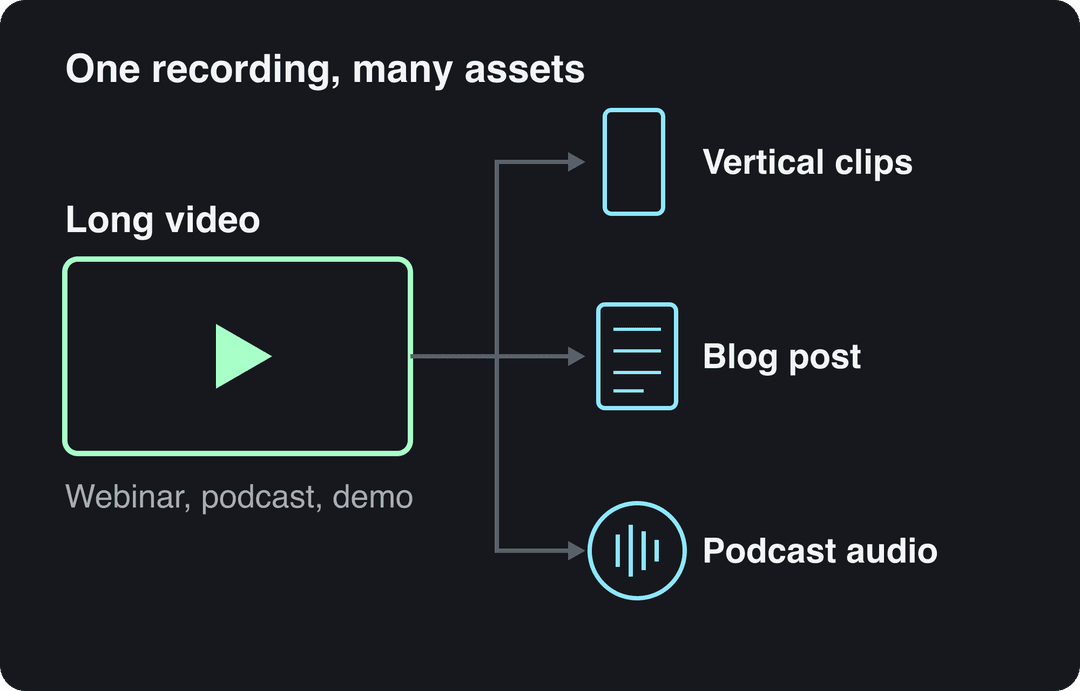
To repurpose video content, cut one long video (a webinar, podcast, demo or YouTube upload) into self-contained vertical clips, give each clip its own hook and captions, and turn the transcript into written posts. AI tools now handle the cutting, captioning and resizing in minutes, so your real job is choosing the moments and adapting them to each platform.
The most common mistake is trimming every clip to 15 seconds. In Revid's analysis of 176,367 TikToks with 1,000+ likes posted between October 2025 and October 2026, videos under 15 seconds had the lowest median views of any length bucket (58K), while 61 to 90 second videos reached 70K. Cut where the idea ends, not where a timer says.
What does repurposing video content mean?
Repurposing means adapting a video you already made into new formats for new places. That can be a vertical clip for TikTok, a quote card for LinkedIn, a blog post built from the transcript, or an ad cut from your best clip. It is not reposting the identical file everywhere. Each version gets a new opening, new framing and copy written for the platform it lands on, while the message and visual style stay recognizably yours.
The approach has a track record. YouTube reported that Shorts containing content sampled from long-form videos generated over 100 billion views in April 2022 alone. Viewing keeps shifting toward short formats: Tubular Labs data published in January 2026 found that 77% of global YouTube views in 2025 came from videos less than a minute long, up from 70% in 2024.
Viewers ask for it too. When asked how they would most like to learn about a product or service, 63% of consumers in Wyzowl's 2026 survey chose a short video, ahead of text articles (12%) and infographics (7%). More sourced figures are on our short-form video statistics page.
Most companies already do some of this, but unevenly. Wistia's 2026 State of Video Report found that over half of companies repurpose their videos into social clips, with LinkedIn the top destination (67% of teams), followed by Instagram (49%) and YouTube (41%). Only about one in five share clips on TikTok. If your team fits that pattern, TikTok is the audience you are not reaching yet.
The economics are simple. The expensive parts of a video (research, recording, the guest, the edit) are already paid for, and each clip costs a fraction of a new shoot. For more background, Project Aeon has a guide to repurposing video for engagement and another on the marketing ROI of content repurposing. Planable's guide to repurposing content covers written formats.
Older roundups such as this 2023 list of content repurposing statistics and TranscribeTube's content repurposing statistics collect more numbers. Check each figure's original source before you quote it. If you are repurposing text posts rather than video (threads into carousels, newsletters into captions), see our guide to AI content repurposing for social media.
How to repurpose video content: the workflow from one recording to a week of posts
- Audit your library and pick a source with proven attention. Start with a video whose retention graph shows spikes, or a recording people asked questions about. Webinars, podcasts, product demos, talks, interviews and event or stage footage all work.
- Get a transcript. A tool like Otter (or the auto-transcript in your editor) turns speech into searchable text. Scanning text for quotes is much faster than scrubbing a timeline.
- Mark self-contained moments. Each clip should make one point, with a beginning, a middle and an end. The test: would it make sense to someone who never saw the original? Good candidates include a question answered, a strong opinion, a number, a before-and-after or a mistake explained.
- Write a new hook for every clip. Long videos warm up slowly, and clips can't. Cut the run-up and open on the payoff (examples below).
- Reframe to 9:16 and caption. Keep the speaker's face and any on-screen text inside the platform's safe zone. Add burned-in captions so the clip works on mute: an AI caption generator does this in 100+ languages.
- Rewrite the copy per platform. Same clip, different caption: a casual line on TikTok, a takeaway-led post on LinkedIn, a searchable title on YouTube Shorts.
- Schedule, stagger and link back. Spread clips over several days so each one gets its own window, and point every clip to the full video or the post it came from. A scheduler such as Buffer handles the posting. When several people are involved, a board in Asana tracks which clip is cut, captioned and live.
The hook is where most repurposed clips fail, because the original sentence was written for a viewer who was already watching. Rewrite it for a stranger who is scrolling:
| What the long video says | What the clip opens with |
|---|---|
| "So, moving on to pricing, which a lot of you asked about..." | "Most founders price their app too low. Here's the fix." |
| "Let me share my screen and walk you through the dashboard." | "This one setting hides most of your data." |
| "Our guest today has built and sold companies..." | "He sold his company and regrets one decision." |
| "To wrap up, the main takeaway is..." | "If you remember one thing from this, make it this." |
Reframing horizontal footage to vertical
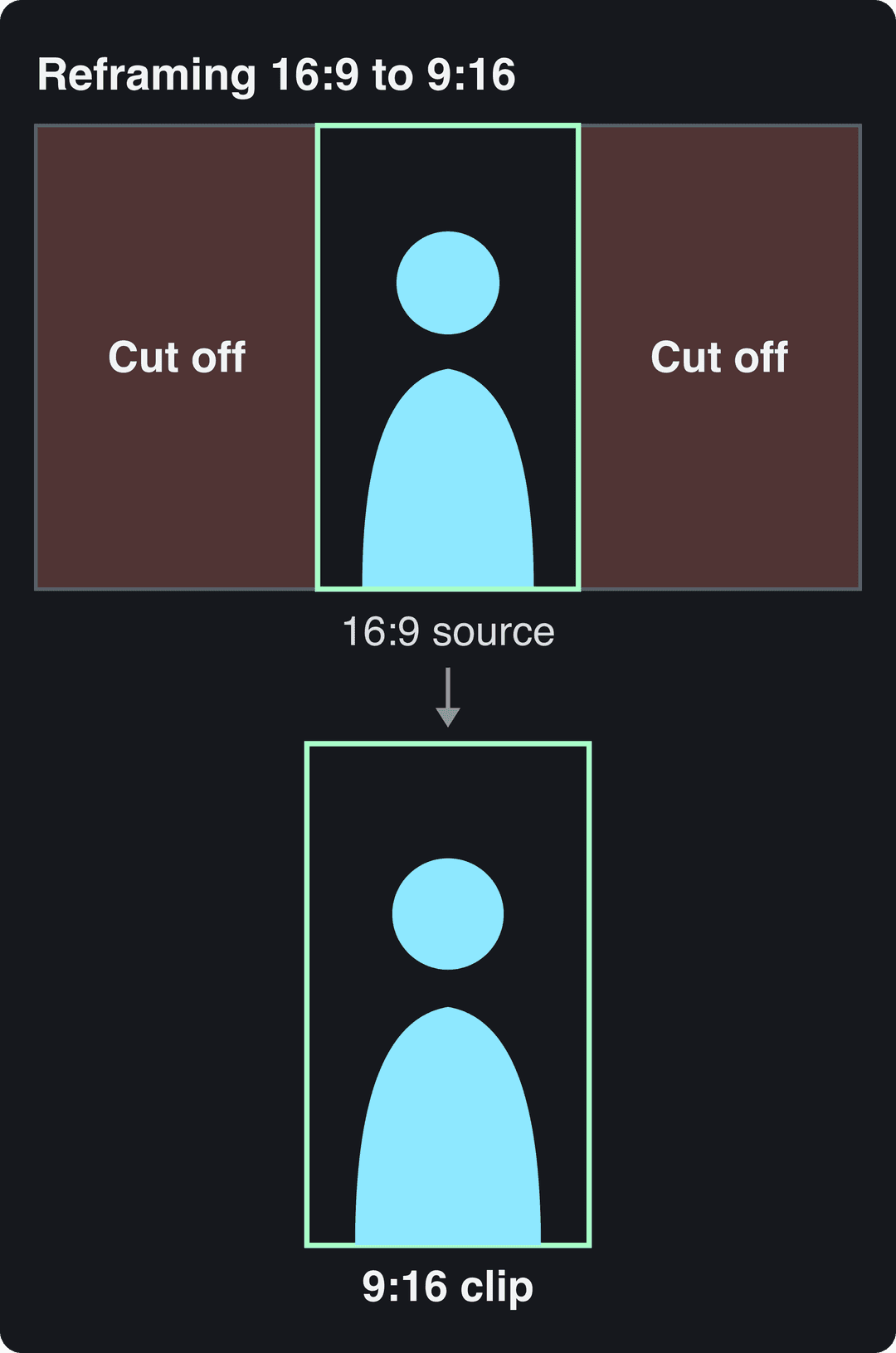
A 9:16 crop of a 16:9 recording keeps the full height and drops most of the width. Anything at the edges of the original frame (a second guest, slides, a logo) disappears. Before you cut, check where each speaker sits, and use a tool with face tracking or split-screen layouts when two people talk.
In the video below, a creator walks through how one recording becomes dozens of posts.
How long should repurposed clips be?
Length matters far less than most advice suggests. In the same Revid study, every length bucket from under 15 seconds to 10 minutes had a median between 58K and 76K views. Clips under 15 seconds had the lowest median, but they also had the most shares per view: 1.41 shares per 100 views. The sample only includes TikToks that already passed 1,000 likes, so it shows what successful videos have in common, not what causes success. The method and every chart are in what makes a TikTok go viral.
Length alone barely moves views: every bucket lands between 58K and 76K median views (the 790 videos over 10 minutes are a small, unusual group). Clips under 15 seconds get shared the most per view.
Source: Revid analysis of 176,367 TikToks with 1,000+ likes posted between Oct 1, 2025 and Oct 16, 2026 (61,203 creators)
Show the data
| Median views | Share that passed 1M views | Shares per 100 views | |
|---|---|---|---|
| Under 15 s | 57.6K | 11.6% | 1 |
| 16 to 30 s | 64.9K | 12.3% | 1 |
| 31 to 60 s | 61.8K | 11.8% | 1 |
| 61 to 90 s | 70.5K | 12.2% | 1 |
| 91 s to 3 min | 63.4K | 11.1% | 1 |
| 3 to 10 min | 76.4K | 12.4% | 1 |
| 10 min+ | 129.6K | 13.8% | 0 |
Older data told a different story. Across Revid's full index of about 2.39 million TikToks with 1,000+ likes from all posting dates, 16 to 30 second videos had the highest median (about 141K views). In recent posts, that edge for very short videos has largely faded. These are TikTok figures, but they are the best large-scale signal available for cutting Reels and Shorts too.
Decision rules for cutting:
- If the point lands fast, stop there. Padding a clip to reach a target length hurts more than length itself.
- If a clip needs setup (a story, a demo, a before-and-after), let it run past a minute.
- Use very short cuts for a single stat, punchline or reveal you want people to share.
- If you are in TikTok's Creator Rewards Program, plan some longer cuts: only videos at least one minute long can earn.
Platform limits for repurposed videos
These are the current official limits. They matter most when you cut a long recording down, because each platform treats longer videos differently.
| Platform | Maximum length | What to know when repurposing |
|---|---|---|
| TikTok | 60 minutes uploaded, 10 minutes recorded in the app | 9:16 at 1080x1920 recommended |
| YouTube Shorts | 3 minutes (square or vertical) | A Short over 1 minute with an active Content ID claim is blocked |
| Instagram Reels | 20 minutes | Reels over 3 minutes are not recommended to non-followers; ratios from 1.91:1 to 9:16 |
| No length limit; every new video is a reel | 1080p MP4 at 24 to 60 FPS recommended | |
| 15 minutes, 5 GB | Ratios from 1:2.4 to 2.4:1; the vertical video feed is mobile-only | |
| X | 20 minutes (non-Premium), 125 minutes (Premium) | Ratios from 1:3 to 3:1; one video per post |
If you still follow advice written around Instagram's original Reels announcement or the old 60-second Shorts cap, update it. Those limits no longer apply.
How to adapt a repurposed clip for each platform
- TikTok: put on-screen text in the first frame and keep the edit tight. In Revid's TikTok data, captions of 41 to 80 characters had the best median (67K views), and posts with no caption the worst (36K).
- Instagram Reels: use up to 5 hashtags (Instagram's current cap). Test a clip as a trial reel first: it is shown to non-followers and doesn't affect your standard reels. Trial reels need at least 200 followers on a professional account or 1,000 on a personal one.
- YouTube Shorts: write a searchable title (up to 100 characters) and point viewers to the full video. Verified accounts can upload a custom Shorts thumbnail from YouTube Studio on a computer.
- LinkedIn: lead with the business takeaway in the post text. Any video you post may also surface in the mobile vertical feed.
- Facebook: every video now posts as a reel. Facebook's 2026 originality rules (below) apply to repurposed footage too.
- X: keep the copy short, attach one video per post, and use a 1:3 to 3:1 ratio.
Whatever the platform, keep your fonts, caption style and colors consistent so a viewer who sees three of your clips recognizes the fourth.
Input
Your video as it is
Output
Talking-head clips need a visual hook
Podcast and webinar clips talk from the first second to the last, which is a handicap in the feed. In Revid's TikTok data, videos with under 40 characters of speech had a 123K median, and 20.2% of them passed 1 million views. Videos talking throughout (300+ characters of speech) had a 68K median, with 11.9% past 1 million. Silent videos sat in between at 73K.
Videos with just a few spoken words (a line or two) beat both silent videos and videos that talk the whole way through, which were the most common and the weakest.
Source: Revid analysis of 176,367 TikToks analyzed by AI, with 1,000+ likes posted between Oct 1, 2025 and Oct 16, 2026 (61,203 creators)
Show the data
| Median views | Share that passed 1M views | |
|---|---|---|
| No speech | 73.3K | 14.3% |
| Under 40 | 122.7K | 20.2% |
| 40 to 120 | 97.2K | 17.6% |
| 120 to 300 | 91.6K | 16.8% |
| 300+ | 67.7K | 11.9% |
This is a correlation among already-successful videos, not proof, but the practical takeaway is clear: give viewers something to look at, not only something to listen to.
- Open on a visual or a line of on-screen text, then let the speaker start.
- Cut every pause, filler word and repeated sentence.
- Cover long stretches of talking with b-roll, screenshots or motion graphics. Revid's auto edit tool takes a talking video or a link and turns your key lines into motion graphics.
- Reframe or zoom at each new point so the shot keeps changing.
How to use AI to find the most engaging moments in a long video
AI is good at shortlisting moments and bad at judging them, so combine it with your own data.
- Start with retention. On YouTube, the audience retention graph in YouTube Studio shows where viewers rewatched or stayed. Spikes are your first candidates.
- Ask an AI assistant to scan the transcript. A prompt that works: "List every moment in this transcript that makes one complete point on its own. For each, give the timestamps, the strongest opening line, and why a stranger scrolling past would care."
- Use a virality score as a filter, not a verdict. OpusClip and Klap rank the clips they cut by predicted performance. Treat the ranking as a shortlist.
- Compare with what already works in your niche. Revid's free deep analysis (up to 60 a day) breaks down any video's hook, timed structure and scroll-stopping moment, so you can check whether your candidate has the same ingredients.
- Review every pick yourself. Tools cut mid-thought, miss context, or choose a lively moment that doesn't serve your audience, and none of them checks whether a claim is accurate.
This video shows how to use ChatGPT for the planning side of repurposing:
AI video repurposing tools: what each type does
AI content repurposing tools apply artificial intelligence to the slow parts of the job: transcription, finding highlights, reframing horizontal footage to vertical, captions and translation. The main tool types do different jobs.
| Tool type | Examples | Best for | Limits |
|---|---|---|---|
| Clipping and caption tools | OpusClip, Klap, Vizard, Submagic | Cutting your own long recordings into captioned clips; OpusClip and Klap also score clips for virality | You need source footage |
| Transcript editors | Descript | Editing recordings by editing the transcript, then cutting clips | Built around footage you recorded |
| Manual editors | Adobe Premiere Pro, CapCut | Full frame-by-frame control | Every clip takes editing time |
| Schedulers | Buffer | Posting across many accounts | No editing or creation |
| Revid | Revid | Turning YouTube videos into Shorts, plus creating new videos from links, scripts, blog posts or proven viral formats, with publishing built in | For pure high-volume clipping of your own recordings, a dedicated clipper may fit better |
If cutting long recordings is your main need, compare the trade-offs in our Revid vs OpusClip comparison.
On YouTube, using AI to edit is allowed for monetized content when the result shows your creative vision. Mass-produced clips from a generic template are not allowed to monetize.
How to repurpose video content with AI in Revid
- Paste a YouTube link into the YouTube clip maker to get short vertical clips, or upload a file to the long video to short video converter.
- Open a clip in the timeline editor to adjust the cut, rewrite the opening text and pick one of 30 caption styles.
- For accounts in other languages, run the project through the AI Video Translator, which keeps the edit, media and captions.
- Export in 720p, 1080p or 4K at 30 or 60 fps, or publish and schedule to TikTok, Instagram and YouTube from one queue. Each published post reports its views, likes and comments, so you can see which clip to remake.
Turn one video into written and audio content
A transcript is the raw material for every non-video format. Here is what to pull from it for each one.
| Format | What to take from the video | Where it goes |
|---|---|---|
| Blog post | The transcript, restructured under headings, with the video embedded | Your site, for search traffic |
| LinkedIn text post | One insight plus a direct quote | LinkedIn feed |
| Thread | The key points in order, one per post | X, Threads |
| Newsletter | The main argument plus links to the clips | Email list |
| Carousel | Strong frames with one point per slide | Instagram, LinkedIn |
| Podcast episode | The audio track, lightly cleaned | Podcast apps |
It works in reverse too. If you start from audio, Revid's podcast clip generator turns a recording into a captioned video.
Prompt to try
Turn my blog post on why most founders underprice their app into a 45-second vertical video. Open with the hook "Most founders price their app too low. Here's the fix.", then cover one pricing mistake and one concrete fix. Use clean motion graphics, a confident voiceover and bold burned-in captions, ending with a line pointing viewers to the full post.
How to repurpose blog content for video
Run the workflow backwards. Pick a post that already gets search traffic, pull out one point per video, and write a spoken hook that states the payoff in the first line. Revid's blog to video converter takes the post URL and builds the script, visuals, voice-over and captions, which you can then adjust in the timeline before publishing.
How to repurpose content for video advertising
Your best organic clips are pre-tested ads: they already earned watch time and shares without paid reach. The practice is common. In Aspire's State of Influencer Marketing 2026 research, 77% of brands said they repurpose creator content in their paid ads.
- Pick winners, not favorites. Shortlist the clips with the most shares, saves and profile visits per view, not the ones the team likes best.
- Recut for a cold audience. Show the product or the result in the opening seconds, keep one message, and end on one call to action. Keep captions burned in for viewers watching on mute.
- Export every ratio you will buy. Use 9:16 for TikTok, Reels and Shorts placements and 4:5 or 1:1 for feeds. Revid's resize tool converts a clip between these formats.
- Run it from the creator's handle when you can. Meta reported in December 2025 that adding partnership ads (creator content run as ads) to business-as-usual campaigns delivers 19% lower CPAs and 13% higher click-through rates, on average. On TikTok, the equivalent is Spark Ads.
- Clear the rights first. If the footage features a creator or a customer, get paid usage rights in writing. In Aspire's 2026 research, 67% of brands include them in the creator's initial contract or rate.
- Disclose realistic AI. Meta requires its AI disclosure for photorealistic video or realistic-sounding audio that was digitally created or altered.
If you have no footage yet, Revid's AI ad generator and UGC ad generator create video ads from product images.
Repurposing without being flagged as unoriginal
Re-editing your own footage is what platforms want. The risk comes from reuploading other people's work, or from flooding a feed with near-identical clips.
- TikTok: for Creator Rewards, duets, stitches, lightly modified reposts, looping videos, and photo-only or text-only videos don't count as original.
- YouTube: content that only reads out material you didn't write, or relies on mostly non-verbal reactions, counts as reused content, and the policy applies to the whole channel. On July 15, 2025, YouTube renamed its "repetitious content" policy to "inauthentic content" to make clear it covers repetitive or mass-produced videos.
- Facebook: since March 2026, reaction-only reels, clip-stitching reels, narrate-what's-on-screen reels and reposts changed only with borders, captions or speed are treated as unoriginal. They are deprioritized, and repeat offenders can be demonetized.
How to measure repurposed video
Compare clips with each other, not with the original long video. They serve different jobs.
| Where it runs | Watch first | It worked if |
|---|---|---|
| TikTok | Views, shares, watch time | Profile visits and follows rise |
| Instagram Reels | Views, saves, shares | Follows and link clicks rise |
| YouTube Shorts | Engaged views, retention | Traffic to the full video and new subscribers |
| Impressions, comments | Clicks, leads, DMs | |
| Blog post | Page views, time on page | Sign-ups and backlinks |
Two 2026 changes affect these numbers. Since August 24, 2026, YouTube counts a view the moment playback starts, so judge Shorts by engaged views and retention. Instagram insights now lead with Views, which is separate from Viewers (unique accounts). On TikTok, analytics live in TikTok Studio, where the Viewers tab also shows when your audience was most active.
Look past views to the actions that matter: comments, shares and saves per view, click-through on links, and conversions. Add UTM parameters to every link in a caption or bio so your site analytics show which clip drove the visit. When one topic or format keeps converting, cut more clips like it from your next recording.
FAQ
Will automated video repurposing become a must-have for content creators?
It already is for anyone publishing on several platforms: 63% of video marketers in Wyzowl's 2026 survey had used AI video tools, up from 51% a year earlier. AI handles transcription, clipping, reframing and captions. Choosing which moments are worth posting and checking each clip stays manual.
Can you repurpose video content with AI for free?
Partly. Some clipping tools have free plans with limits; OpusClip's free plan, for example, adds watermarked animated captions. Revid sign-up is free and new accounts get free credits to try video creation, no credit card needed; regular creation then uses the monthly credits of a paid plan, starting at $39/month.
Is it OK to post the same clip on TikTok, Reels and Shorts?
Yes, if the footage is yours. None of the platform rules above ban cross-posting your own video; they target reaction-only content, lightly modified reposts and mass-produced duplicates. Still write a separate caption and title for each platform.
How many clips can you get from one long video?
As many as it has self-contained points. A dense interview yields far more than a rambling one of the same length, so count ideas, not minutes.
What is the best AI tool to repurpose videos?
It depends on your source and your goal. If you mainly cut your own long recordings, a dedicated clipper such as OpusClip, Klap or Vizard is built for that. If you also want to create new videos from links, scripts or proven formats and publish them from one place, Revid covers both.