How to Schedule Social Media Posts: Tools, Timing and a Weekly Plan
How to schedule social media posts step by step: which native and third-party schedulers to use, how often and when to post, and how to keep a queue fresh.
On this page
To schedule social media posts, plan them in a content calendar and create them in batches. Load them into a scheduler, either a platform's own tool (Meta Business Suite, TikTok Studio, YouTube Studio, LinkedIn) or a multi-platform tool like Buffer, Sprout Social, Planable or Revid. Then pick a date and time for each network and let it publish automatically.
The common mistake is treating the queue as set-and-forget. Meta said in April 2026 that same-day posts made up more than 30% of recommended Reels on Instagram and Facebook in Q1 2026, more than double the level a year earlier (see our short-form video statistics). A queue loaded weeks ahead with stale posts is competing against fresh content. Schedule your foundation, keep room for timely posts, and spend the time you save replying to people.
How to schedule social media posts, step by step
Scheduling is one part of social media marketing (Wikipedia overview). Here is the full process:
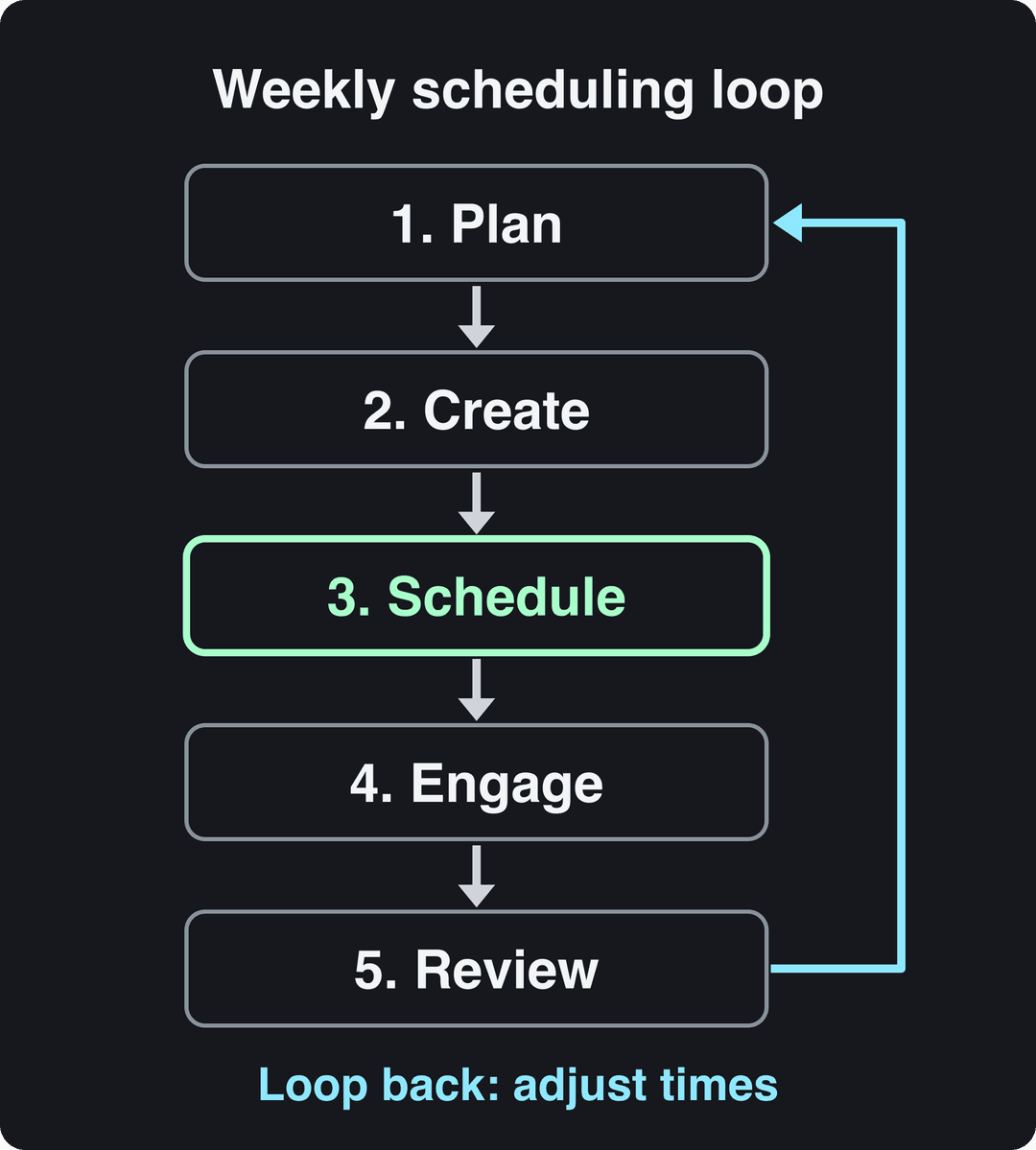
- Pick your platforms and one goal per platform. Examples: LinkedIn for leads, Instagram Reels and TikTok for reach, YouTube for search.
- Set 2 to 4 content pillars. These are the themes you will post about every week (more on this below).
- Build a content calendar with a date, platform, pillar, format, copy, asset link and status for every post.
- Batch-create content at least one week ahead. Write captions and finish videos in one sitting instead of one post a day.
- Choose a scheduler and connect your accounts. Use native tools if you post to one network, or a multi-platform tool if you post to several.
- Set times from your own analytics, not only from generic "best time" lists.
- Check that the first scheduled post goes live. Then be online after each post publishes to answer comments.
- Review after 30 to 60 days and change frequency, times and formats based on what the data shows.
Native schedulers vs. third-party scheduling tools
Every major platform now lets you schedule inside its own app or web dashboard, for free. Native tools are the safest option for a single network: they publish through the platform itself and support its newest formats first. Their limit is that each one only covers its own platform.
| Platform | Native scheduling option |
|---|---|
| Facebook and Instagram | Meta Business Suite (also a schedule option in the Instagram app's advanced settings for professional accounts) |
| TikTok | TikTok Studio on the web (how TikTok's native scheduler compares with tools) |
| YouTube (long-form and Shorts) | YouTube Studio: set the video's visibility to Scheduled |
| The schedule (clock) icon in the post composer | |
| X | The schedule icon in the post composer on the web |
Menus change often, so look for the schedule or clock icon if a label has moved.
If you post to three or more networks, a third-party tool saves the copy-paste work. You get one calendar, one approval flow and one place to see what is going out.
Which social media scheduling tool should you use?
Match the tool to how you work, not to the longest feature list. Use these rules:
- One network, or only Facebook and Instagram: start with the native tools above. They cost nothing.
- Solo creator or small business on several networks: pick a simple multi-platform scheduler such as Buffer.
- Team that needs drafts, comments and approvals before anything goes live: pick a collaboration-first tool such as Planable.
- Larger team or agency that needs social listening and deep reporting: look at an all-in-one suite such as Sprout Social.
- Short-form video is the bottleneck, not the posting: pick a tool that also makes the videos, such as Revid.
| Tool | Best for | Key features |
|---|---|---|
| Buffer | Solo creators and small businesses | Straightforward scheduling, clean interface, simple analytics, a free plan |
| Sprout Social | Medium to large teams and agencies | All-in-one suite, advanced analytics, social listening, employee advocacy, deep reporting |
| Planable | Teams with high-volume collaboration | Visual calendar, true-to-life post previews, multi-level approval workflows |
| Revid | Creators and small teams publishing short-form video | Creates the video (script, AI visuals, voice-over, captions, music), then publishes and schedules it to TikTok, Instagram and YouTube from one queue |
Prices and plan limits change often, so check each tool's pricing page before you commit. For a wider list focused on video, see our roundup of tools to schedule video content. eClincher's social media scheduling guide covers more general scheduling features, including AI-suggested posting times.
If your tools don't talk to each other, an automation service like Zapier can push the same content to several platforms:
Scheduling on LinkedIn without unpredictable timing
Some scheduling suites publish to LinkedIn within a time window or at the next queue slot rather than at the exact minute you chose. If precise timing matters (a launch, an event, a live announcement), do three things:
- Read the tool's documentation for "exact time" versus "queue" or "posting window" behavior on LinkedIn.
- Schedule a test post and compare its published timestamp with the time you set.
- If the gap is not acceptable, schedule that post with LinkedIn's own composer, which publishes at the time you pick.
Also keep the LinkedIn connection healthy. When an account disconnects from a third-party tool, scheduled posts can fail silently, so reconnect as soon as the tool warns you.
Prompt to try
Create a 30-second Instagram Reel for a small marketing agency sharing one quick-win tip: how to write a hook in the first 2 seconds. Open with the hook "Your first line is losing you 80% of viewers", then show a before and after caption example. Clean motion graphics style, upbeat music, bold captions.
How to build a content calendar that you will actually use
A calendar works when it removes the daily "what do I post?" decision. The base is 2 to 4 content pillars: themes your audience cares about and you can speak to with authority.
For example, a small marketing agency might choose:
- Behind-the-scenes strategy: how and why a campaign worked.
- Client spotlights: customer wins, which double as social proof.
- Quick-win tips: one actionable tip a non-marketer can apply today.
A week then writes itself: one strategy post on LinkedIn, two quick-win tips as Instagram Reels, one client spotlight on Facebook. Keep roughly 80% of posts useful (educate, entertain, solve a problem) and 20% about your product.
Give every row in your calendar these columns:
| Column | What goes in it |
|---|---|
| Date and time | When it publishes, in your audience's time zone |
| Platform | Instagram, TikTok, LinkedIn, and so on |
| Pillar | Which theme the post supports |
| Format | Video, carousel, single image, text |
| Copy and hashtags | Final caption (Instagram allows up to 5 hashtags) |
| Asset | Link to the approved image or video file |
| Status | Idea, Draft, Approved, Scheduled, Published |
For a ready-made layout, use our social media calendar template.
How often should you post on each platform?
There is no universal number. Each platform has its own pace, so start from a benchmark and adjust to your own results. Hootsuite's posting-frequency benchmarks reported these averages for businesses in the first quarter of 2025:
| Platform | Average business posts per week (Q1 2025) |
|---|---|
| X | 18.1 |
| 14.2 | |
| 9.3 | |
| 5.5 | |
| TikTok | 3.7 |
These are averages of what businesses did, not proof of what works. Use them as a first hypothesis. Then watch three numbers per post in each platform's analytics:
- Reach: how many unique accounts saw it.
- Impressions or views: how many times it was shown in total.
- Engagement rate: the share of viewers who liked, commented, shared or saved.
If reach per post drops when you post more often, cut back and put the time into better posts. If every post holds its reach, test one more post per week.
When should you schedule your posts?
Generic research is a starting point. Sprout Social's research on the best times to post points to weekdays, Monday through Thursday between 10 a.m. and 1 p.m., as a broad sweet spot across most networks. Your audience may not follow that pattern, so check your own data:
- Instagram: follower insights, including most-active times, appear once you have at least 100 followers and cover up to the past 90 days.
- Facebook: the Insights section of Meta Business Suite shows when your audience is active. Our guide to the best time to post on Instagram covers both Meta apps in more detail.
- TikTok: in TikTok Studio analytics, the Viewers tab shows when viewers were most active over the last 7 days, and the Followers tab breaks follower activity down by hours and days.
For TikTok, Revid's own data adds one surprise. In Revid's analysis of 176,367 TikToks with 1,000+ likes posted between October 2025 and October 2026, posts at 3 to 6 a.m. US Eastern had higher median views than evening posts (5 to 9 p.m.). The sample only covers videos that already passed 1,000 likes, and those early US hours are daytime in Europe and Asia (full TikTok virality study).
As you scale, some suites suggest times automatically. Sprout Social's Optimal Send Times (ViralPost) studies when your past posts earned the most engagement and recommends slots for future ones. Whichever method you use, base the schedule on data from your account, and recheck it every quarter.
How to schedule short-form videos with Revid
If your bottleneck is making the videos, Revid creates and schedules them in one place. It publishes to TikTok, Instagram and YouTube. Keep a general scheduler for LinkedIn, X and Facebook.
- Connect your TikTok, Instagram and YouTube accounts (how to link social accounts on Revid).
- Create a video from an idea, a script or a link. Revid writes the script and generates the visuals, voice-over (70+ languages), captions and music.
- Adjust any scene in the timeline editor.
- Pick the platforms, date and time in the publishing and scheduling queue.
- For daily output, set up an Auto-Mode worker that creates a fresh video every day from a prompt or content source. The Growth plan ($39/month) includes 3 workers.
- Check each post's views, likes and comments in Revid, and remix the ones that did well.
Prompt for a timely post
Make a 40-second TikTok reacting to a trending topic in your niche, for example "3 things every small business should know about this week's Instagram update". Start with the hook "Instagram just changed something, and most brands missed it", use stock b-roll with bold captions and a fast pace.
Should you schedule all your social media posts?
Schedule most of them, not all. A practical split is 80/20. Schedule about 80% of your content: evergreen posts, planned launches, recurring series. Keep about 20% of your time for live reactions to trends, sharing customer content and replying in comments.
Scheduling keeps you consistent. The replies and timely posts are what show people there is a person behind the account.
FAQ
How do I use tools like Revive to schedule content refreshes?
List your evergreen posts and give each a refresh date in your calendar. When the date comes up, update its facts, visuals and hook, then requeue it. Recycling tools (Revive-style plugins, or evergreen queues in schedulers) can re-share old posts automatically, but check that each re-share is updated rather than an exact copy (how to repurpose content for social media).
Should I post the exact same content on every platform?
No. Keep the core message and adapt the delivery. Use a discussion question on LinkedIn, a short punchy post on X, and a carousel or Reel on Instagram.
How long until I see results from a new posting schedule?
Give a new schedule 30 to 60 days before judging it. Check weekly for obvious problems, but one bad week is noise, not a trend.
Can I schedule Instagram and Facebook posts for free?
Yes. Meta Business Suite schedules posts, Reels and Stories for Facebook and Instagram at no cost. A paid tool only becomes worth it when you also need other networks, team approvals or combined reporting.
Can you schedule TikTok videos?
Yes. TikTok Studio on the web has a built-in scheduler, and tools such as Revid can publish and schedule TikTok videos alongside Instagram and YouTube from one queue.