On this page
To start a YouTube channel, sign in to YouTube with a Google account, click your profile picture, choose Create a channel, and set a name and handle. Verify your phone number, then upload from YouTube Studio. Pick one narrow niche and an upload schedule you can keep, such as one video a week.
Start now, but build for watch time from your first upload. Today, YouTube Partner Program ad revenue needs 1,000 subscribers plus 4,000 watch hours in 12 months or 10 million Shorts views in 90 days. From February 1, 2027, new applicants need double: 8,000 watch hours in 365 days or 20 million Shorts views in 90 days. A channel you start this month will very likely apply under the new bar.
How to create a YouTube channel, step by step
- Sign in. Go to youtube.com and sign in with a Google account. Creating one is free.
- Create the channel. Click your profile picture, then Create a channel. Enter a channel name and a handle (the @name in your channel URL). You can edit both later, but pick something you would keep for years.
- Verify your phone number in YouTube Studio. Verification lets you upload videos longer than 15 minutes and add custom thumbnails, and you will want both early.
- Turn on 2-Step Verification for your Google account. The Partner Program requires it, and it protects a channel you are putting work into.
- Fill in your channel page in YouTube Studio under Customization: profile picture, banner, description and links (details below).
- Upload your first video. In YouTube Studio, click Create, then Upload videos. Add a title, description and thumbnail, declare whether the video is made for kids, and choose Public, Unlisted or a scheduled time.
The channel costs nothing. Everything that follows is about the decisions that determine whether anyone watches.
Pick a niche people actually search for
The niche is the decision that matters most. Too broad ("lifestyle", "gaming") and you compete with every established channel. Too narrow and nobody searches for it. Aim for the overlap of what you know, what you can make every week, and what people already type into YouTube.
A quick decision rule: if you cannot list at least 20 video ideas in the niche, it is too narrow; if you cannot describe your viewer in one sentence, it is too broad. Saturated categories like gaming still work, but only with a specific angle. Underserved ones, such as hyperlocal content about your town's businesses and events, are easier to break into.
Validate before you film:
- YouTube search. Type your topic and read the autocomplete suggestions. Those are real searches. Open the top results and note what is missing: outdated info, no beginner version, no clear answer.
- Google Trends. Compare topics to see whether interest is growing, flat or seasonal.
- Channels in your niche. Study why their best videos worked (title, structure, length), then make your own version. Copying style is fine; copying videos is not.
- Ask early viewers. Once you have even a few, ask in comments and polls what they want next.
For a list of proven categories, see our guide to the best topics for a YouTube channel. If you are deciding on a language or market, Global Media Insight's roundup of YouTube user statistics collects third-party estimates of the audience size; treat them as estimates.
Should you start with Shorts, long videos or both?
Both, with long-form as the core if you want ad revenue. Shorts reach people who have never heard of you; long videos build the watch hours and search traffic that pay.
| YouTube Shorts | Long-form videos | |
|---|---|---|
| Length | Up to 3 minutes, vertical or square | 15 minutes by default; longer after verification, up to 12 hours or 256 GB |
| Found through | The Shorts feed | Search, home page, suggested videos |
| Counts toward the 4,000 watch hours | No (Shorts feed watch hours are excluded) | Yes |
| Best for | Testing ideas, reaching new viewers | Watch time, search traffic, ad revenue |
The revenue gap is large. AIR Media-Tech's September 2026 analysis of 274 channels found Shorts RPM was 3% to 14% of long-form RPM in almost every niche. Its separate study of 18,000 channels found the best results when Shorts made up 25% to 40% of a channel's uploads. A workable split for a beginner: one long video a week, plus 1 to 2 Shorts cut from it or built around the same topic. More numbers are on our YouTube Shorts statistics page, and our guide on how to get views on YouTube Shorts covers the Shorts side in detail.
Do you need to show your face on YouTube?
No. Screen recordings, voice-over explainers, animation, and hands-only or POV footage all build channels. Pick the format you can sustain every week, because consistency beats charisma you cannot keep up.
There is evidence that faceless formats compete well in short-form. In Revid's analysis of 176,367 TikToks with 1,000+ likes posted between October 2025 and October 2026, faceless videos had a median of 114K views and 17.4% passed 1 million, against 67K and 12.7% for one person on camera. This is TikTok data on videos that had already cleared 1,000 likes, so it shows what successful videos have in common, not a YouTube rule. The full method is in Revid's study of what makes a TikTok go viral.
Faceless videos earned a median of 114K views, against 67K for videos with one person on camera, and passed 1M views 38% more often.
Source: Revid analysis of 176,367 TikToks with 1,000+ likes posted between Oct 1, 2025 and Oct 16, 2026 (61,203 creators)
Show the data
| Median views | Share that passed 1M views | |
|---|---|---|
| Animals | 147.4K | 24.1% |
| Faceless | 113.9K | 17.4% |
| Groups of people | 96.1K | 16% |
| Objects or products | 70.8K | 13.2% |
| One person on camera | 67.4K | 12.7% |
For formats and setups, read how to make videos without showing your face.
What equipment do you need to start YouTube?
A phone you already own. Most viewers watch on phones, and a modern phone camera is good enough for talking-head videos, tutorials and B-roll. Spend money only when a specific problem shows up in your videos or comments.
| Need | Start with | Upgrade when |
|---|---|---|
| Camera | Your phone on a stable surface or cheap tripod | You need shots your phone cannot get |
| Audio | Headphones with a built-in mic, in a quiet room | Viewers mention sound, or you record outdoors |
| Light | A window in front of you, diffused with a sheer curtain | You film after dark |
| Fill light | White poster board to bounce window light onto your face | Shadows still look harsh |
| Screen recording | OBS Studio, free on Windows, Mac and Linux | Rarely needed |
| Editing | Your phone's editor, or the free version of DaVinci Resolve | Your edits take longer than your filming |
If you buy one thing, buy a microphone. Viewers forgive soft video; they leave over echo, hum and background noise. Close windows, turn off fans and record in the room with the most soft surfaces. Our guide on making YouTube videos with your phone covers settings and framing.
How to make your first videos with Revid
If filming or editing is what stops you from publishing, Revid can produce your first drafts:
- Write a script with the free YouTube Shorts script generator, then rewrite it in your own words and niche.
- Turn it into a video with the AI YouTube Shorts generator: Revid builds scene visuals (stock footage, AI images or AI video from models such as Seedance 2.5 or Google Veo 3), a voice-over and synced captions.
- Already recorded a long video? The YouTube clip maker cuts it into short vertical clips.
- Fix any scene in the timeline editor, then publish or schedule directly to YouTube.
Sign-up is free and new accounts get free credits to try video creation, no credit card needed; regular creation then uses credits from a paid plan, starting at $39/month. Keep your own angle in every script: YouTube does not monetize AI content made from generic templates that looks mass-produced.
Set up a channel page that turns visitors into subscribers
Your channel page is where a viewer decides whether to subscribe after one good video. Edit it in YouTube Studio under Customization.
- Name and handle. Avoid names that box you in. "Beginner Knitting Tutorials" stops working the day you add crochet; "Crafts with [Your Name]" does not. Use the same handle on your other social accounts.
- Profile picture. A logo or a clear face that reads at tiny sizes. For ideas, see this guide on choosing a logo for your YouTube channel.
- Banner. Design for phones first: keep your name and promise in the center, because the edges get cropped on smaller screens. Check the current size guidance shown in YouTube Studio when you upload.
- Description. Up to 1,000 characters. Say who the channel is for, what they will learn or get, and how often you upload, using the words your viewers search for.
- Links. Add your website or other socials so viewers can follow you elsewhere.
How to get your first videos discovered
New channels get found through search and suggested videos first, so each video should target one specific thing people look for. Video searches are phrased differently from Google searches: "how to make lasagna" rather than "best Italian recipes". TubeBuddy and vidIQ show search volume and competition for YouTube keywords; YouTube's own autocomplete is free and just as useful at the start.
Titles, descriptions and tags
| Field | Limit | Beginner rule |
|---|---|---|
| Title | 100 characters | Put the search phrase early, then a clear promise |
| Description | 5,000 characters | Summarize the video in the first lines; add chapters and links below |
| Tags | 500 characters in total | A handful of close variants of your topic, nothing unrelated |
"How to Bake a Cake" is searchable but flat. "Easy Chocolate Cake for Beginners (No Mixer)" keeps the search phrase and adds a reason to click. If you get stuck, the free YouTube title generator gives you options to edit. For tags, a sourdough video gets "sourdough starter" and "artisan bread", not "pizza" and "cake".
Thumbnails
The thumbnail and title together decide your click-through rate. Use one subject, high contrast and three or four words at most. YouTube recommends 3840x2160 custom thumbnails (16:9, minimum width 640 px), up to 50 MB on desktop but only 2 MB from mobile. Custom Shorts thumbnails can only be uploaded in YouTube Studio on a computer, at 9:16 (2160x3840 recommended). Both need a verified account.
Once you have some traffic, use Test & compare in YouTube Studio on desktop to A/B test up to 3 titles and thumbnails; the version with the most watch time wins. Shorts are not eligible.
End screens and cards
Add an end screen to every long video that points to your next most relevant video or playlist, and use cards where you mention another video. Their job is turning one view into a session on your channel.
If search optimization is new to you, this short explainer covers the general principles, and these beginner SEO tips go a step further:
Which YouTube Analytics numbers should a beginner watch?
Ignore subscriber counts for the first weeks and watch three numbers in YouTube Studio Analytics:
- Impressions click-through rate. Low CTR with decent impressions means the title or thumbnail is the problem.
- Audience retention. Find the moment the graph drops sharply and fix that pattern in your next video: a slow intro, a long tangent, a missing payoff.
- Watch time. The number the Partner Program measures, and the clearest sign that a topic works.
Since August 24, 2026, YouTube counts a view the moment a video starts to play on every format, so view counts look higher than before. Partner Program earnings still use engaged views and engaged watch hours.
How often should a beginner upload?
As often as you can sustain for months. One video a week, every week, beats five in a burst and then silence, because your audience and your own skills both build on a rhythm.
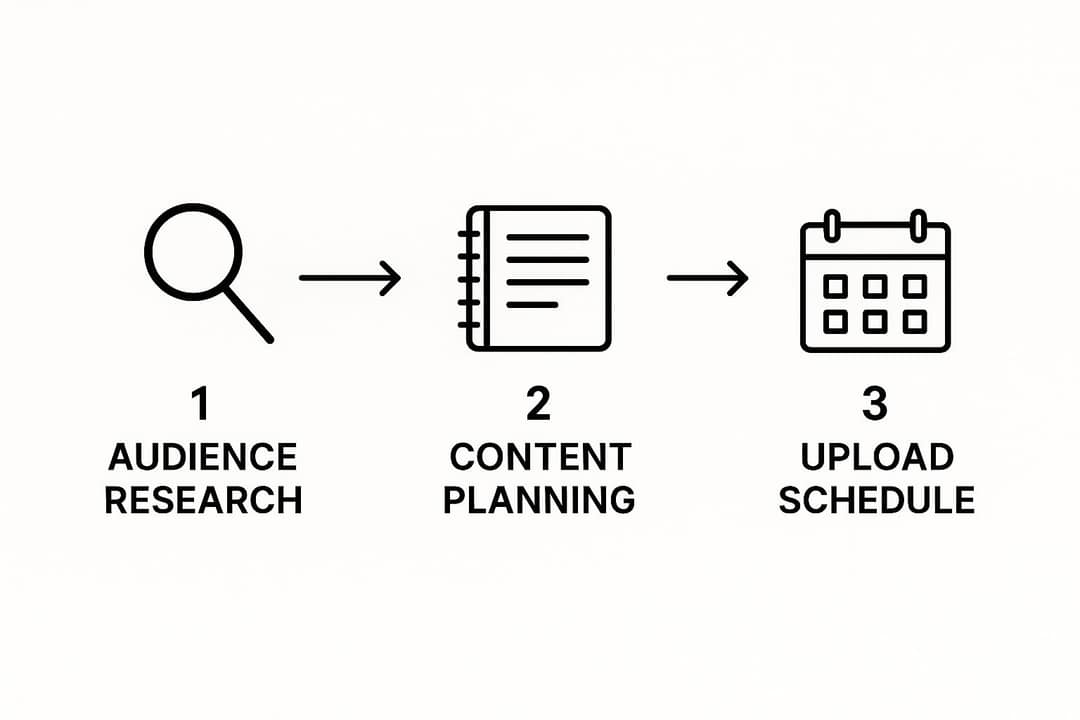
Batch the work: script several videos in one session, film them on one day, edit on another. Keep ideas, drafts and publish dates in one place, such as a Trello board with columns for Idea, Scripted, Filmed, Edited and Scheduled. If you want a broader planning method, Blog Tyrant's guide to starting a YouTube channel is a useful second read.
Build a community from your first comments
Your first viewers are the easiest to keep. Reply to every comment early on with something specific, ask a question at the end of each video, and feature good comments in later videos. Use the Posts tab for polls and updates between uploads, and ask viewers which video they want next.
When you have a few videos out, look for creators in your niche with a similar audience size for a collaboration or a shout-out swap. Expect negative comments and slow weeks; answer useful criticism and ignore the rest.
Your first 90 days on YouTube
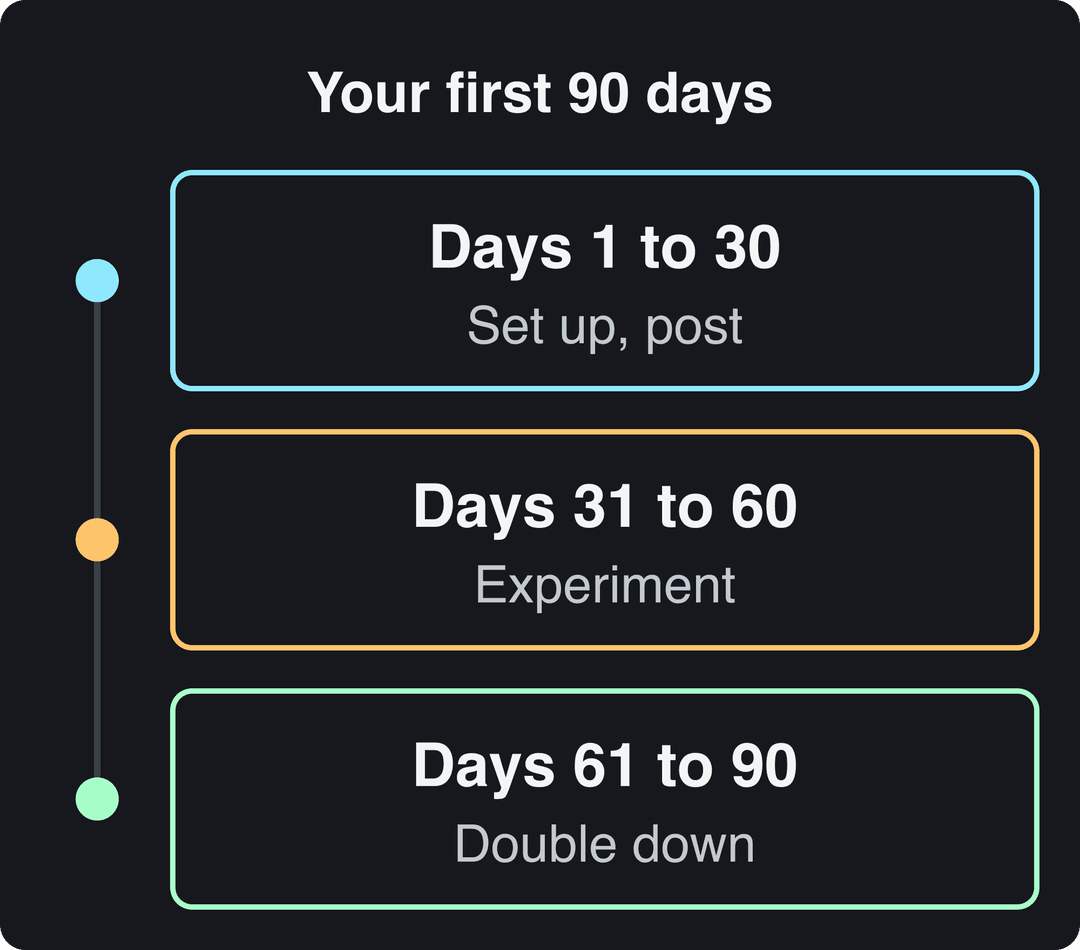
Days 1 to 30: set up and publish
- Week 1: create and set up the channel, lock your niche, and list your first ideas.
- Week 2: make your first video. Take your time; it sets the tone for the channel.
- Week 3: learn titles, descriptions, tags and thumbnails, and open Analytics.
- Week 4: publish 1 to 2 more videos and reply to every comment.
Milestone: your first video is live and you have your first 10 subscribers.
Prompt to try
Make a 40-second YouTube Short for a beginner sourdough channel. Open with the hook "Your starter isn't dead, it's just hungry", then explain three signs a starter needs feeding. Use close-up footage of bread and jars, a calm voice-over and bold captions, and end by pointing viewers to the full video on the channel.
Days 31 to 60: experiment
- Weeks 5 to 6: try different formats and angles within your niche, including Shorts.
- Weeks 7 to 8: focus on community: questions, polls, replies.
Milestone: around 50 subscribers and views that no longer drop to zero between uploads. If you catch yourself comparing your channel to big creators, compare it to your own last month instead.
Days 61 to 90: double down
- Weeks 9 to 10: sort videos by watch time and retention, find what worked, and plan more of it.
- Weeks 11 to 12: batch production, schedule uploads ahead, and reach out for a first collaboration.
Milestone: 100 subscribers and at least one video that clearly beat the rest. If growth stalls, go back to keyword research and try a new format before changing niche.
When can you make money on YouTube?
When you meet the Partner Program thresholds, which are changing for new applicants on February 1, 2027:
| Program tier | Requirements today | From February 1, 2027 (new applicants) |
|---|---|---|
| Fan funding, Shopping, Creator Partnerships | 500 subscribers, 3 public uploads in 90 days, plus 3,000 watch hours in 12 months or 3 million Shorts views in 90 days | Unchanged |
| Ad revenue sharing | 1,000 subscribers plus 4,000 watch hours in 12 months or 10 million Shorts views in 90 days | 1,000 subscribers plus 8,000 watch hours in 365 days or 20 million Shorts views in 90 days |
Channels already in the program are not affected by the new entry thresholds. Also from February 1, 2027, earning Shorts ad revenue in a given month requires at least 10 million qualified Shorts views in the last 90 days. To join, you also need to live in an eligible country, have no active Community Guidelines strikes, use 2-Step Verification and link an AdSense for YouTube account; review typically takes about a month.
If you use AI, YouTube allows it in monetized videos when the result shows your own creative vision and gives real value. It refuses to monetize mass-produced template content, incoherent compilations of AI clips, and AI personas presented as experts on health, legal, financial or political topics. Disclose realistic AI-generated scenes with the AI use setting in YouTube Studio; the label alone does not limit reach or earnings.
FAQ
Is it too late to start a YouTube channel in 2026?
No. YouTube said in August 2026 that it sees over 200 billion daily Shorts views, and the audience keeps growing. Competition is real (Alphabet said over ten million channels were publishing Shorts each day as of March 2026), which is why a narrow niche matters more than starting early.
How much does it cost to start a YouTube channel?
Nothing. Creating a channel is free, and a phone, window light and free editing software are enough for your first videos. If you spend anything, spend it on a microphone.
Can I use AI to make YouTube videos?
Yes, as long as the final video reflects your own ideas and adds value. YouTube does not monetize generic, mass-produced AI content, and it asks you to disclose realistic AI scenes; AI-written scripts, titles and thumbnails do not need disclosure.
How long should my first YouTube video be?
As long as it takes to fully deliver what the title promises, with no padding. For many beginner tutorials that fits well under the 15-minute default limit; check your retention graph afterward and cut whatever made people leave.
How long does it take to get 1,000 subscribers?
There is no standard timeline; it depends on the niche, the format and how consistently you upload. Channels that publish on a steady schedule in a searchable niche and improve each video from their analytics get there far faster than channels that post at random.
For more on growing an audience across platforms, see Learning Revolution's list of YouTube stats for context on how much content competes for attention, then come back to the 90-day plan and publish your first video this week.