How to Increase Video Views in 2026: 9 Data-Backed Fixes
Views depend on whether a platform shows your video, whether people stop on it and whether they finish it. Here are nine fixes, with Revid's TikTok data and current platform rules.
On this page
To increase video views, fix the three moments every view depends on. The platform has to show your video (topic, title, keywords, timing), a viewer has to stop on it (hook, thumbnail, first frame), and they have to watch to the end (pacing and payoff). Then publish each video natively on every platform where your audience already scrolls.
Most creators work on the wrong lever. In Revid's analysis of 176,367 TikToks with 1,000+ likes posted between October 2025 and October 2026, every length bucket from under 15 seconds to 10 minutes landed between 58K and 76K median views. What a video was (its format, its first line, whether a face was on screen) moved results far more than how long it ran.
What decides how many views a video gets
Platforms test videos before they spread them. A new video goes to a small group first, and what those viewers do decides whether it reaches more people. Every view passes four gates, and a stalled video is almost always stuck at one of them.
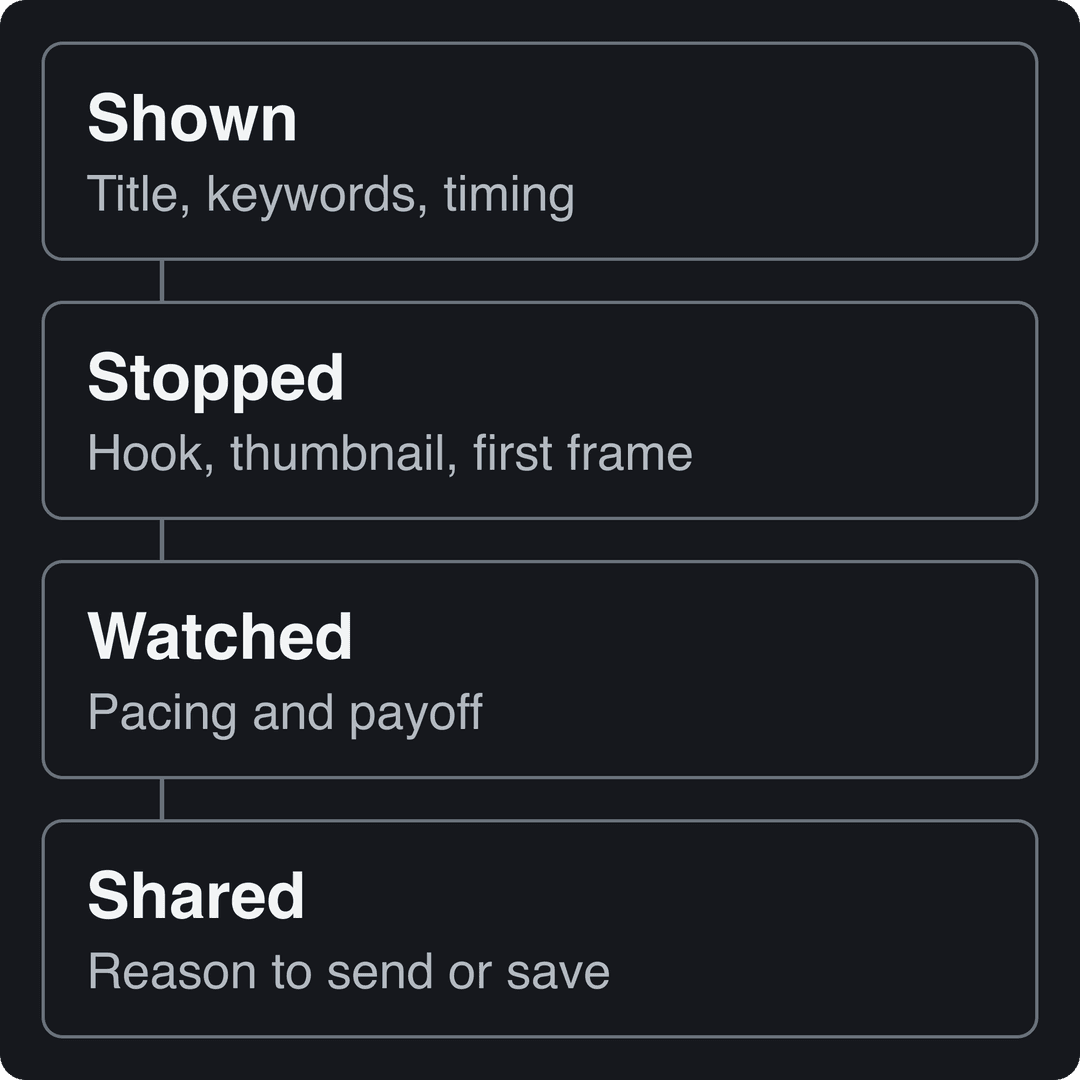
- Shown: the platform has to understand what the video is about and who wants it. Titles, keywords, captions and posting time decide this gate.
- Stopped: a viewer has to pick your video over the next one. On YouTube long-form that is the thumbnail and title. On TikTok, Reels and Shorts it is the first frame and the first line.
- Watched: retention tells the platform the click was worth it.
- Shared: sends and saves carry a video past your own followers.
Check what your view count actually measures. Since August 24, 2026, YouTube counts a view the moment a video starts to play, on Shorts, long-form and live, while YouTube Partner Program earnings still use engaged views. Instagram insights lead with Views (every play or display), separate from Viewers (unique accounts). A rising view count can hide weak watch time, so always read views next to retention.
1. Hook viewers in the first seconds
The opening has one job: give the viewer a reason not to swipe. In Revid's study of the most viewed TikTok videos, which covers every TikTok over 100 million views, 51% of the videos with a transcript open with a statement and only 16% with a question. A confident claim beats "Have you ever wondered...".
Talking less also helps. In the same 176,367-video TikTok sample, videos with under 40 characters of speech had a 123K median and 20.2% passed 1M views. Videos that talk throughout had 68K and 11.9%. Let the picture carry the first seconds and cut the preamble.
Hook formulas you can adapt today:
- The claim: "This is the cheapest way to [result]."
- The warning: "Stop [common habit] if you want [outcome]."
- The reveal: show the finished result first, then "Here's how."
- The insider: "Nobody tells beginners this about [topic]."
- The POV: "POV: you just [relatable situation]."
Rules that keep a hook from backfiring:
- Open on the most visual moment or the payoff, never on a greeting or your logo.
- Make the hook a promise the video keeps. A misleading opener gets swiped, and those swipes count against you in the next test batch.
- Put the hook on screen as text too, so it works with the sound off.
- Rotate hook styles. The same opener on every video wears out with your regular viewers.
For ready-made openers sorted by type, browse our list of copy-and-paste TikTok hooks.
Prompt to try
Create a 30-second faceless vertical video titled "3 kitchen tricks restaurants don't tell you." Open on the most visual result with the on-screen hook "Stop salting your pasta water like this," then show each trick with close-up AI visuals, a fast confident voiceover and bold captions.
2. Pick formats that already pull views
Format sets your ceiling before you film anything. In Revid's TikTok data, challenges had a 182K median (25.6% past 1M views), comedy 155K, reactions 105K and dance 84K, while storytelling sat at 66K and tutorials at 62K. That does not make tutorials a bad bet. It means a plain tutorial needs a sharper angle to compete.
Challenges and comedy passed 1M views about twice as often as tutorials and storytelling, which are the most common formats.
Source: Revid analysis of 176,367 TikToks with 1,000+ likes posted between Oct 1, 2025 and Oct 16, 2026 (61,203 creators)
Show the data
| Median views | Share that passed 1M views | |
|---|---|---|
| Challenge | 182.3K | 25.6% |
| Comedy | 154.8K | 22.1% |
| Reaction | 104.8K | 16% |
| Dance | 83.8K | 15.5% |
| Storytelling | 66.1K | 12.2% |
| Lip Sync | 61.7K | 12.3% |
| Tutorial | 61.9K | 12.1% |
Two more patterns from the same data are worth testing:
- Faceless beats on-camera: faceless videos had a 114K median and 17.4% past 1M, against 67K and 12.7% for one person on camera. Faceless tutorials reached 156K, compared with 52K for on-camera tutorials.
- Point of view matters: POV footage had a 107K median and screen recordings 91K, while selfie-style videos had 48K.
Keep the limits in mind. The index only holds TikToks that already reached 1,000+ likes, so these figures describe what high performers have in common, not what causes views. Use them to decide what to test, then let your own analytics decide what to keep.
3. Make titles, thumbnails and covers people click
On YouTube long-form, the thumbnail and title are the whole pitch: the video itself does nothing until someone clicks. Fixing them is also the fastest way to lift views on videos you have already published.
- Title: YouTube allows 100 characters. Put the keyword and the promise in the first 50, then add detail.
- Thumbnail text: 3 to 4 words at most, one face or one object, strong contrast. It should add to the title, not repeat it.
- Test instead of guessing: YouTube Studio on desktop can A/B test up to 3 titles and thumbnails. The version with the highest watch time is then shown to everyone. Shorts are not eligible.
- Size: custom thumbnails need a verified account, and YouTube recommends 3840x2160. For Shorts, custom thumbnails can only be uploaded in YouTube Studio on a computer, at 9:16 (2160x3840 recommended).
- Vertical videos: a 16:9 custom thumbnail is replaced by an auto-generated 4:5 one on the home, explore and subscription pages, so keep your subject centered.
- Instagram Reels: Instagram recommends a 420x654 cover. Its help page says the cover can't currently be edited after upload, so check it before you post.
Then go back to your archive. Older videos with decent retention but a weak click-through rate are the cheapest views you will ever get: swap the thumbnail or title and watch the next few weeks.
4. Optimize for search on YouTube and TikTok
Feed views spike and fade. Search views keep coming as long as people type the phrase. Use this three-step routine for every video you plan:
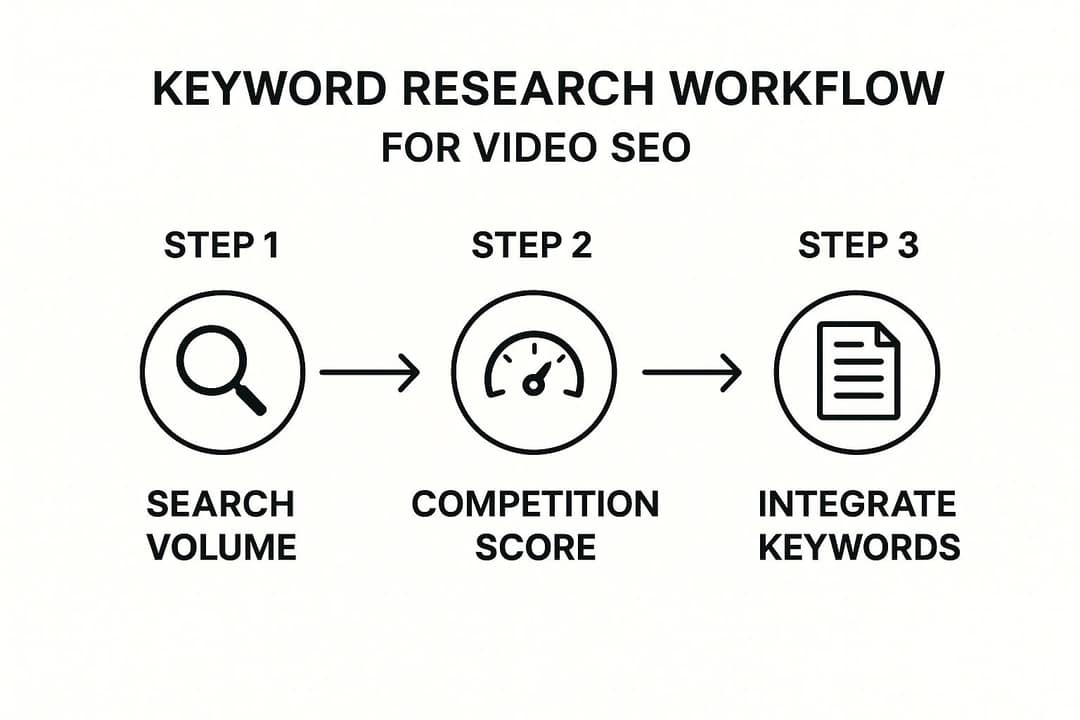
- Find the phrase people type. Use YouTube's search autocomplete, TikTok's search suggestions and the titles of the top videos in your niche.
- Check the competition. If the results are dominated by huge channels, pick a narrower phrase ("budget home gym for small apartments" instead of "home gym").
- Use it everywhere it counts. Put it in the title, say it out loud early so it appears in the captions and transcript, and write a description of 200+ words that answers the question (YouTube allows 5,000 characters). Add timestamps to longer videos so viewers can jump to the part they searched for.
Updating old videos works here too: a refreshed title and description on a video that already has watch time can pull new search traffic. For the YouTube side in detail, see our YouTube SEO tips.
5. Use 3 to 4 hashtags and a short caption
More hashtags do not mean more reach. In Revid's TikTok data, 4 hashtags had the best median (77K views, 13.4% past 1M) and 3 hashtags 75K. Videos with none had 51K, and 9 or more only 16K. Caption length followed the same logic: 41 to 80 characters had the best median (67K), while videos with no caption had 36K.
A caption formula that fits those numbers: one line that adds context the video doesn't say, with your keyword in it, then 3 to 4 specific hashtags (one niche tag, one topic tag, one broader tag).
On Instagram the choice is made for you: the Help Center says you can use up to 5 hashtags per post, and a caption with more won't post.
6. Post when your audience is online
Your own data beats any generic schedule. In TikTok Studio, the Viewers tab shows when your viewers were most active over the last 7 days, and the Followers tab breaks follower activity down by hours and days. Instagram shows your followers' most active times once you have at least 100 followers, over a window of up to 90 days. Post shortly before your biggest peak so the first test batch finds people awake.
If you have no data yet, one TikTok benchmark: Revid's study found English-language posts at 3 to 6 a.m. US Eastern outperformed the evening, with 5 to 9 p.m. the weakest window, partly because those early US hours are daytime for creators and viewers in Europe and Asia.
7. Repurpose every video for each platform
The same video can find a different audience on each platform. Google said in April 2026, citing GWI data on US internet users from February 2025, that 45% of YouTube Shorts users are not on TikTok and 65% are not on Instagram Reels (more in our YouTube Shorts statistics).
| Platform | Shape | Length rules that affect reach | Discovery lever |
|---|---|---|---|
| TikTok | 9:16, 1080x1920 recommended | Uploads up to 60 minutes | For You feed and search |
| YouTube Shorts | Vertical or square | Up to 3 minutes; a Short over 1 minute with a Content ID claim is blocked globally | Shorts feed |
| YouTube long-form | 16:9 | 15 minutes by default, longer for verified accounts | Search, suggested videos, thumbnail and title |
| Instagram Reels | 1.91:1 to 9:16, 9:16 recommended | Up to 20 minutes, but reels over 3 minutes are not recommended to non-followers | Trial reels, up to 5 hashtags |
| Any; every new video is a reel | No length limit | Original edits only |
On Instagram, use trial reels to reach new people without risking your main feed. They need a public account with at least 200 followers (professional) or 1,000 (personal). They are shown first to non-followers, insights arrive within 24 hours, and they don't affect the ranking of your standard reels.
If your best material lives in long YouTube videos, Revid's YouTube clip maker turns a video link into vertical clips you can post as Shorts, Reels and TikToks, each pointing back to the full video.
Prompt to try
Make a 20-second vertical POV video: "POV: you tried the viral 5-minute morning routine for a week." Start with the day-7 result, then quick cuts of each day with punchy captions, upbeat trending-style music and a short honest verdict at the end.
8. Borrow audiences: collaborations and trends
A collaboration puts your video in front of people who already trust the other creator. To make one work:
- Partner with creators of a similar size whose content complements yours rather than duplicates it.
- Agree in writing who posts what, when, and how each side promotes it.
- Start with something small (a duet, a stitch, a guest segment) before a joint series.
- Look for repeat partners. One-off collaborations rarely move a channel for long.
- On Twitch, raids send your live audience to another streamer at the end of your stream, and creators tend to return the favor.
Trends work the same way, with a shorter window. Check today's TikTok trends, set Google Alerts for your niche, and keep a template ready so you can publish while a format is still rising. Add your own angle: a trend copied without a point of view brings views that rarely turn into followers.
9. Read your analytics and fix the weakest gate
Once a week, open the analytics of your last videos and find where viewers leave. Then fix only that gate:
| What you see | Gate that fails | What to change |
|---|---|---|
| Few impressions | Shown | Topic with search demand, keyword in the title, posting time |
| Impressions but few clicks or stops | Stopped | Thumbnail, cover, first frame, first line |
| Sharp drop in the first seconds | Stopped | Open on the payoff and cut the intro |
| Slow, steady drop mid-video | Watched | Trim dead time, change shots more often, deliver the promise sooner |
| Good retention, few shares | Shared | Give a reason to send it: a list, a reveal, a strong take |
Compare your three best videos with your three worst and write down what differs: hook type, format, length, face or no face. For TikTok, a free TikTok account audit shows which of your videos and patterns work best. If you manage several platforms, MakeInfluencer's roundup of social media analytics tools compares third-party dashboards that pull them into one place.
Don't over-read a single video. Change one thing at a time across a series, and judge it over several posts.
How to make view-ready videos faster with Revid
Revid starts a video from a format that has already earned views, not from a blank page:
- Search Revid's library of viral videos, about 2.77 million short-form videos and posts with their engagement data, by topic, platform and engagement tier.
- Run Deep analysis on a video that fits your niche (free, up to 60 a day) to see its hook, timed structure and scroll-stopping moment.
- Choose "Same energy, new script" or "Make it about your topic". Revid writes an original script and generates the visuals, voice-over, captions and music, which you can adjust in the timeline editor.
- Publish directly to TikTok, Instagram and YouTube. Each post reports its views, likes and comments, and a post that did well can be remixed in one click.
Sign-up is free and new accounts get free credits to try video creation; regular creation then uses the monthly credits of a paid plan, from $39/month.
FAQ
Why are my videos getting no views?
Usually one gate is failing: the platform isn't showing the video (weak topic or keywords), people aren't stopping (weak first frame or thumbnail), or they leave early (slow opening). Check impressions first, then click-through, then retention. For Shorts specifically, see why YouTube Shorts get no views.
Does buying views help?
No. Paid or bot views don't teach the algorithm anything about real viewers, and they don't pay: TikTok's Creator Rewards Program excludes fraudulent, paid, promoted and artificial views from the qualified views it pays on.
How long should a video be to get more views?
Length matters less than most people think: in Revid's TikTok study, median views stayed between 58K and 76K across every length bucket. The hard limits are platform rules. Instagram doesn't recommend reels over 3 minutes to non-followers, and Shorts can run up to 3 minutes.
Does labeling a video as AI-generated reduce its views?
No, according to the platforms. TikTok says its AI-generated content setting does not affect distribution if the video follows the Community Guidelines, and YouTube says disclosure alone does not limit a video's audience or its eligibility to earn.
Do YouTube Shorts help long videos get more views?
They can, if you keep the mix balanced. AIR Media-Tech's 2026 study of 18,000 English-language channels found the best results when Shorts made up 25% to 40% of a channel's uploads.