On this page
Script to video AI turns a written script into a finished video. It splits the text into scenes, finds or generates a visual for each one, adds an AI voice-over, captions and music, then exports a video you can edit and post. To make one, paste your script, pick a visual style and voice, review each scene, and export.
The most common mistake is pasting a script that talks nonstop. In Revid's analysis of 176,367 TikToks with 1,000+ likes, videos with under 40 characters of speech had a median of 123K views, against 68K for videos that talked from start to finish. The script that works best for AI video is usually far shorter than the one you would write for a narrator.
How does script to video AI work?
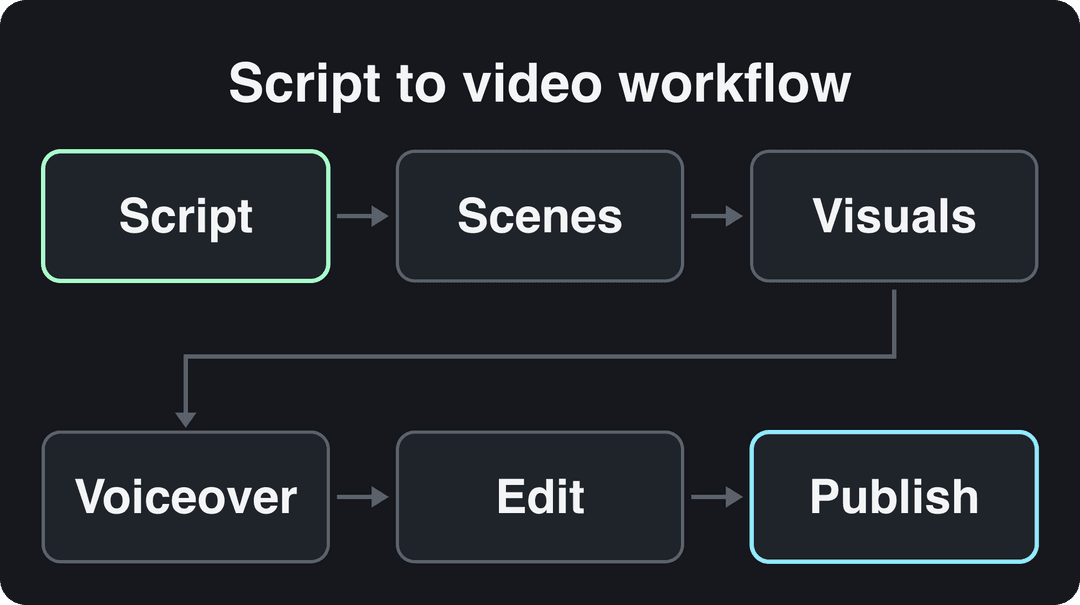
A script to video tool runs your text through four jobs that used to need a writer, an editor and a voice actor:
- Scene splitting. A language model reads the script, breaks it into scenes (usually one per sentence or idea) and writes a visual description for each.
- Visuals. For each scene, the tool picks stock footage, generates an AI image or generates an AI video clip from that description.
- Audio. An AI voice reads the script, captions are synced to the voice, and music goes underneath.
- Assembly. Scenes are timed to the voice-over and joined into one vertical or horizontal video that you can still edit.
Scene splitting is where most of the quality comes from, because video models only make short clips. Google's Veo 3.1, for example, generates 4, 6 or 8-second clips in the Gemini API. A finished video is a sequence of such clips, so the tool's real job is cutting your script into scenes that each fit one clip and still flow together.
The models themselves come from a short list of labs. Google AI builds Veo, and companies such as Microsoft, Meta AI and Nvidia invest heavily in generative AI research and the hardware it runs on. Most script to video tools rent these models through APIs, so two tools that send the same prompt to the same model get similar clips. What separates them is what they feed the model: the script, the scene descriptions, the pacing and the edit.
How to generate a video from a script, step by step
- Write or paste the script. One idea per sentence: each sentence becomes a scene.
- Pick the format. 9:16 vertical for TikTok, Reels and Shorts (TikTok recommends 1080x1920); 16:9 for regular YouTube videos.
- Choose a visual source per scene. Stock footage for real-world b-roll, AI images for illustrations and diagrams, AI video for scenes no stock library has.
- Choose a voice and language. Listen to one full sentence before you commit; the voice sets the tone of the whole video.
- Add captions and music. Captions keep the video watchable with the sound off; keep music low under speech.
- Review every scene. Replace visuals that do not match their line, fix mispronounced names, trim dead air.
- Export or publish. Export at 1080p for social platforms, or post directly if your tool publishes to them.
How to write a script that AI turns into good video
Say less, show more
In Revid's analysis of 176,367 TikToks with 1,000+ likes posted between October 2025 and October 2026, videos with under 40 characters of speech had a median of 123K views and 20.2% passed 1 million. Videos with speech throughout (300+ characters) had a 68K median and 11.9% past 1 million; fully silent videos sat in between at 73K and 14.3%. This is TikTok data from videos that had already cleared 1,000 likes, so it shows what top performers have in common rather than proving cause. The full method is in our study of what makes TikToks go viral.
Videos with just a few spoken words (a line or two) beat both silent videos and videos that talk the whole way through, which were the most common and the weakest.
Source: Revid analysis of 176,367 TikToks analyzed by AI, with 1,000+ likes posted between Oct 1, 2025 and Oct 16, 2026 (61,203 creators)
Show the data
| Median views | Share that passed 1M views | |
|---|---|---|
| No speech | 73.3K | 14.3% |
| Under 40 | 122.7K | 20.2% |
| 40 to 120 | 97.2K | 17.6% |
| 120 to 300 | 91.6K | 16.8% |
| 300+ | 67.7K | 11.9% |
For a script, that means letting visuals and on-screen text carry part of the story and keeping the voice-over for lines that must be heard. If a sentence narrates something the viewer can already see, cut it.
Prompt to try
Make a 20-second vertical video that opens with the hook "Your coffee is bitter for one reason." Explain that boiling water burns the grounds and the fix is letting the kettle rest before pouring. Use warm, close-up morning kitchen shots, one clear visual per sentence, a calm voice and bold captions.
Write one visual per sentence
The most reliable script format pairs every spoken line with the exact shot you want. Copy this template:
| Beat | Voice-over (what is said) | Visual (what is shown) |
|---|---|---|
| Hook | Your coffee is bitter for one reason. | Close-up of dark coffee pouring into a white mug, steam rising |
| Problem | Boiling water burns the grounds. | Kettle at a rolling boil, bubbles filling the frame |
| Fix | Let the kettle rest before you pour. | A hand setting a kettle down on a wooden counter, morning light |
| Payoff | Same beans. Smoother cup. | A person sipping from the same white mug and smiling |
Rules that make AI visuals match your intent:
- Describe concretely. "A bustling city street filled with pedestrians and traffic" gets better footage than "a busy street".
- Repeat recurring descriptions word for word. Each scene is generated separately, so write "a woman in a red raincoat with short gray hair" every time she appears, not "she".
- Open with a claim or a question the video pays off. Sample hooks: "Your coffee is bitter for one reason." "Nobody tells you this before renting your first apartment." "This free setting fixes blurry phone videos."
- Mark scene changes. Start a new line, or write "Cut to:" if your tool reads directions.
- Write numbers and names the way they should be spoken, so the voice does not stumble.
For the prompt formats Revid reads, see our guide to writing scripts for AI videos.
How to make a video from a script with Revid
Revid's script to video tool takes a script, a prompt or a link and returns a finished, editable video:
- Paste your script.
- Choose visuals for each scene: stock footage, AI images or AI video. You can pick the model per scene among Seedance 2.5, MiniMax Hailuo H3, Wan 3.0 and Google Veo 3.
- Choose a voice (1,000+ AI voices in 70+ languages), one of 30 caption styles, and music.
- Fix anything in the timeline editor: swap a scene, change timing, edit a caption.
- Export in 720p, 1080p or 4K at 30 or 60 fps, or publish and schedule directly to TikTok, Instagram and YouTube.
Sign-up is free and new accounts get free credits to try video creation, no credit card needed. Regular creation then uses credits from a paid plan, starting with Growth at $39/month for 2,000 credits. A 30-second video with Pro AI visuals and a voice-over costs about 40 to 80 credits, and Revid shows the estimate before you generate.
Prompt for a daily series
Create a 30-second vertical faceless video on one money mistake people make in their first apartment, opening with "Nobody tells you this before renting your first apartment." Keep narration short, let on-screen text carry the numbers, and use clean stock b-roll with upbeat music.
How to automate script writing to video
In Wyzowl's 2026 survey, 63% of video marketers said they had used AI video tools to create or edit marketing videos, up from 51% a year earlier (more in our short-form video statistics, and in Vidjet's roundup of AI-generated video statistics). The next step after making videos one by one is automating the whole chain, from script to post. There are three levels:
- Batch by hand. Write a week of scripts in one sitting with the template above, generate them in a row, and schedule them. Lowest risk, most control.
- Scheduled workers. Revid's Auto-Mode workers create a fresh video every day from a prompt or a content source (3 workers on Growth, 5 on Elite, 10 on Ultra). When Revid writes a script from a prompt in automations, it first retrieves transcripts of related TikToks with more than 10,000 likes and uses them as references for style and story. The Search and Remix automation goes further: it picks a high-engagement reference from Revid's library of about 2.77 million videos and generates an original video from it on a schedule.
- API and AI agents. Every paid Revid plan includes a REST API, an MCP server and a CLI, so a script written by Claude, ChatGPT or your own code can be rendered and published without opening the app. The script to video API docs show the request format.
Keep a human checkpoint before anything publishes. If you post to YouTube, the platform does not monetize mass-produced content made from generic templates, so review scripts for original insight before they go live.
What makes a script to video maker stable?
A stable tool is one that renders reliably, keeps your scenes consistent and does not break when a model is retired. Check these before you commit:
| What to check | Why it matters | How to test it |
|---|---|---|
| Render reliability | Failed or slow renders kill a daily posting schedule | Generate the same script several times; Revid publishes speed and failure rates per model in its AI video model index, based on 713,649 production generations |
| Character and style consistency | Each scene is generated separately, so faces and settings can drift | Use a script with one recurring character and check every scene |
| Manual editing | Re-prompting a whole video to fix one scene wastes credits | Look for a timeline editor where you can swap a single scene |
| More than one model | Models get retired: OpenAI shut down the Sora 2 API on September 24, 2026, and Google shut down veo-3.0 in the Gemini API on June 30, 2026 | Prefer tools that offer several models so a retirement does not stop your pipeline |
| Publishing | Downloading and re-uploading every file is where automation breaks | Check for direct posting and scheduling to the platforms you use |
Script to video AI tools compared
| Tool | Strengths | Visuals | Best for | Starting price |
|---|---|---|---|---|
| Revid | Script, prompt or link to video; per-scene choice of AI models; 1,000+ voices in 70+ languages; timeline editor; direct publishing to TikTok, Instagram and YouTube; API, MCP and CLI on every paid plan | AI video, AI images or stock | Short-form social videos and automated channels | $39/month ($32/month billed yearly) |
| InVideo (Revid vs InVideo) | Chat-style agent that edits by typed commands, 16M+ stock library, AI avatars and voice clones | Stock plus third-party AI models | Light usage, stock-based videos | From $20/month |
| Pictory (Revid vs Pictory) | Blog posts, scripts and URLs to video; 12M+ licensed stock from Getty Images and Storyblocks; clips from webinar recordings | Stock footage | Repurposing text and recordings at volume | From $29/month |
| Fliki (Revid vs Fliki) | 2,000+ voices in 80+ languages with emotional delivery; recurring TikTok series with direct publishing | Stock-based slideshows | Voice-first videos | From $28/month ($21/month billed yearly) |
Some tools people try for this job are a different category. Raw clip generators such as Runway, Pika or Kling make single clips and leave the script, voice and assembly to you. Avatar platforms such as Synthesia or HeyGen make presenter videos. If you already filmed your footage and only need to edit it, a classic editor such as CapCut fits better.
The category is growing fast, and analysts publish forecasts for it: see Maximize Market Research's text-to-video AI market report and Verified Market Research's text-to-video AI market report. Treat their numbers as estimates, not measurements.
Rules to check before you publish AI videos
- YouTube monetization. Using AI is allowed in monetized content if the final video shows your creative vision and gives educational or entertainment value. AI content made with generic templates that looks mass-produced cannot be monetized, and videos that only read out text you did not write (website copy, news feeds) count as reused content. YouTube renamed its repetitious content policy to "inauthentic content" on July 15, 2025.
- YouTube disclosure. Disclose realistic AI-generated scenes with the "AI use" setting in YouTube Studio. An AI-written script, captions or cloning your own voice do not need disclosure.
- TikTok labels. TikTok requires a label on AI-generated content with realistic images, audio or video. Turning the label on does not affect distribution as long as the video follows the Community Guidelines.
- Instagram and Facebook. Meta asks you to disclose photorealistic AI video and shows its label as "AI info".
FAQ
Is there a free script to video AI?
Partly. Revid sign-up is free and new accounts get free credits to try video creation, with no credit card needed. Regular creation then uses credits from a paid plan starting at $39/month. Fliki has a free plan with a watermark, 720p and a 1-minute export limit, and Pictory offers a free trial but no permanent free tier.
Can AI write the script for me too?
Yes. Revid can write the script from a prompt, and in automations and several tools it first pulls transcripts of related TikToks with more than 10,000 likes as references. Read and edit the result before publishing, since your own angle is what makes the video worth watching.
What is the difference between script to video and text to video AI?
Script to video starts from a full script and builds a multi-scene video around it with voice, captions and music. Text to video often means generating a single clip from a short prompt, which you then have to assemble yourself.
Can I use my own voice instead of an AI voice?
Yes. Revid offers voice cloning on the Elite plan and above, and you can also upload your own recording and build the video around it.
Which AI video models does Revid use?
Revid offers Seedance 2.5, MiniMax Hailuo H3, Wan 3.0 and Google Veo 3, plus lower-cost tiers, all under one credit system and selectable per scene. OpenAI Sora 2 is no longer offered because OpenAI shut down the Sora API on September 24, 2026.