Small Business Automation Tools Guide: What to Automate First (2026)
A practical guide to small business automation tools: which ones handle email, social posts, sales, projects, invoicing and video, what to automate first, and how to prove it saves time.
On this page
Small business automation tools take repeat tasks off your plate: an email platform sends follow-ups, a scheduler publishes social posts, a CRM logs leads, and accounting software chases invoices. Start with one weekly task that follows the same steps every time, automate it with a tool that connects to what you already use, and measure the time saved.
The usual mistake is buying software first. Automate a messy process and you get the same mess, only faster and harder to spot. Write the steps down, fix them, then automate. Small businesses are moving fast on this: Meta said on its July 2026 earnings call that 9 million small businesses on its platforms were using at least one AI ad creative tool as of Q2 2026, one of the figures in our short-form video statistics.
What counts as a small business automation tool?
Any software that runs a task on its own when something happens. Every automation has three parts: a trigger (a form is submitted, an invoice passes its due date), a rule (only for new customers, only above a certain amount) and an action (send an email, create a task, update a record).
There are two kinds:
- Built-in automations inside tools you already pay for, such as invoice reminders in accounting software or welcome sequences in an email platform.
- Connector tools such as Zapier or Make, which pass data between apps that don't talk to each other natively.
Start with built-in automations. They cost nothing extra and have fewer moving parts to break.
The best small business automation tools by task
| Task | What gets automated | Tools to look at |
|---|---|---|
| Email marketing | Welcome sequences, follow-up emails, list segmentation | Mailchimp, Constant Contact, Kit (formerly ConvertKit) |
| Social media posting | Scheduled posts across accounts, a shared calendar, reporting | Buffer, Hootsuite, Sprout Social |
| CRM and sales | Lead capture, deal stages, follow-up tasks, contact history | HubSpot, Salesforce |
| Projects and tasks | Task assignment, recurring checklists, deadline reminders | Asana, Trello, Monday.com |
| Accounting | Invoicing, payment reminders, expense tracking | QuickBooks, Xero |
| Customer support | Answers to common questions, ticket routing | Help desk software and chatbots |
| Short-form video | Script, visuals, voice-over, captions, scheduled publishing | Revid (see the video section below) |
How to pick within each category
- Email: if your list is mostly store customers, choose the platform that connects to your store. If you publish a newsletter, Kit is built around creators and newsletters.
- Social scheduling: Buffer is the simplest place to start. Hootsuite and Sprout Social add team workflows and deeper reporting, which matter more for agencies or several brands. Our social media automation tools comparison goes through the options side by side.
- CRM: HubSpot is a common choice for small teams that want marketing and sales contacts in one place. Salesforce is built for heavier customization and larger sales teams.
- Projects: Trello's boards are the quickest to learn. Asana and Monday.com handle recurring tasks and many projects at once better.
- Accounting: pick QuickBooks or Xero based on which one your accountant already uses. That single choice saves more hours than any feature.
Prompt to try
Create a 30-second vertical video for a local bakery showing three reasons to order a custom birthday cake this week. Open with the hook "Stop buying grocery store cakes." Use warm close-up food visuals, an upbeat friendly voice and bold captions, and end with a call to order online.
What should a small business automate first?
Score every repeat task on three questions:
- Does it happen every week or more often?
- Does it follow the same steps every time?
- Is a mistake cheap and easy to catch?
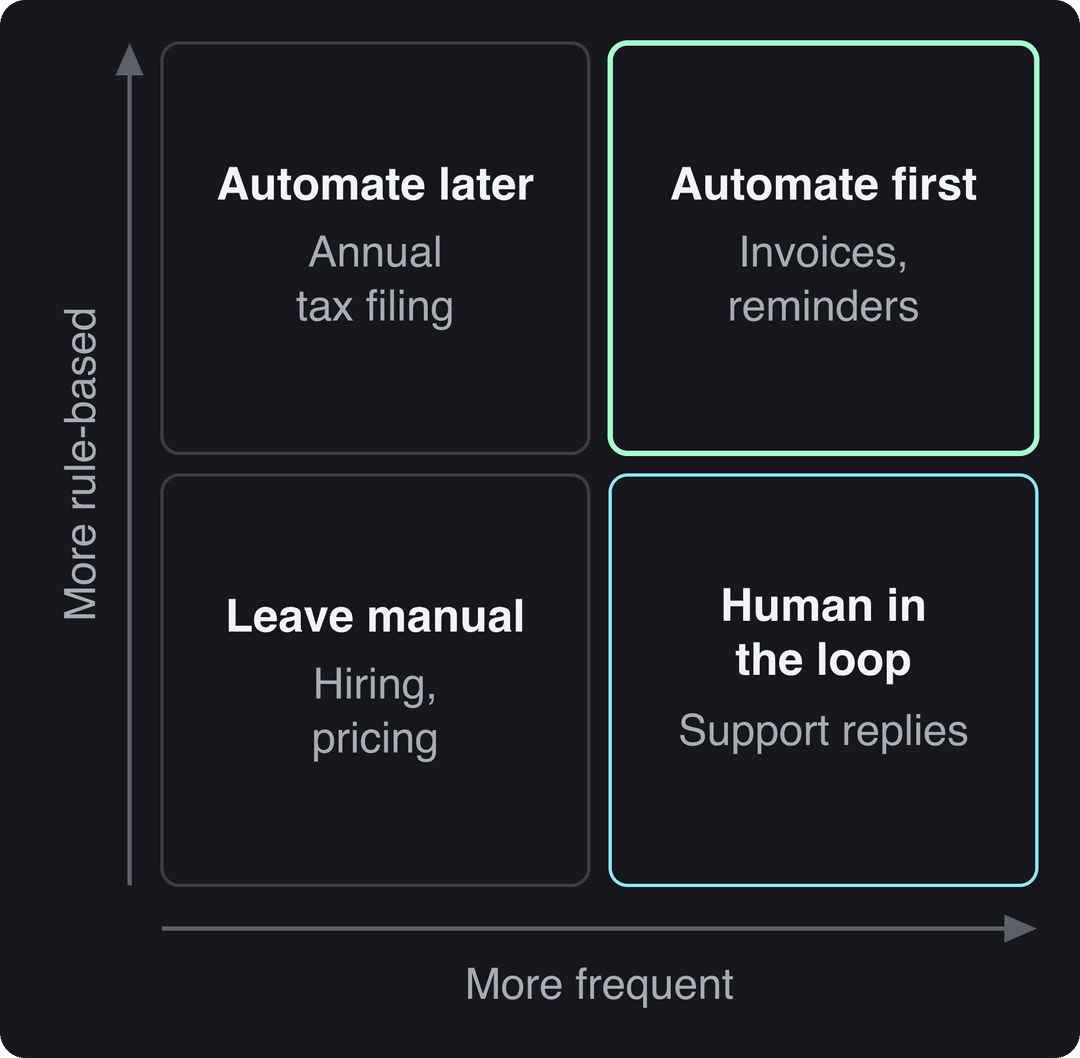
If the answer is yes to all three, automate it now. If it is rule-based but rare (a quarterly report), write a template or checklist and automate it later. If it is frequent but needs judgment (customer complaints, sales replies), let a tool draft or route it and keep a person on the decision. If it is rare and judgment-heavy (hiring, pricing), keep it manual.
These starter automations pass all three tests for most small businesses:
| Repeat task | Trigger | Automated action |
|---|---|---|
| New lead from your website | Form submitted | Contact added to the CRM, welcome email sent, follow-up task created |
| Unpaid invoice | Due date passes | Reminder sent from your accounting software |
| New customer | First purchase | Welcome email sequence starts |
| Weekly social posts | Calendar slot | Posts publish at set times |
| Recurring admin | Start of the week or month | Checklist created in your project tool |
| Common support question | Message received | Help article or saved reply sent, ticket opened if unresolved |
| Short videos for social | Daily schedule | Video generated, reviewed, then published |
How to set up automation step by step
- List your repeat tasks. For one normal week, write down every task you do more than once and roughly how long it takes.
- Pick one. Score each task with the three questions above and choose the one that passes all three and eats the most time.
- Map the process on paper. Write every step, who does it and which tool holds the data. Cut or fix steps that make no sense before you automate them.
- Check what you already own. Your email, accounting or CRM tool may already have the automation you need.
- Choose a tool if you need one, using the criteria in the next section.
- Record a baseline. Before switching anything on, note the time per task, the error rate and the response time.
- Pilot with one process and one owner. Run it for a few weeks, check every output at first, then less often once it proves reliable.
- Review, then add the next. Compare against your baseline before you automate anything else.
Tell your team what is being automated and why before it goes live. Give every automation a named owner who checks it and fixes it when it breaks; unowned automations fail silently.
How to choose the right automation tool
| Criterion | Question to ask | Red flag |
|---|---|---|
| Ease of use | Can the person who does the task today set it up without help? | Changing one rule needs a consultant |
| Integration | Does it connect natively to your CRM, store and accounting software? | Data gets copied by hand between tools |
| Scalability | Does the price grow in a way you can predict? | Price jumps at a contact or seat count you will hit soon |
| Cost | Is there a free plan or trial you can test on a real process? | Annual contract before any test |
| Support | Are there docs, tutorials or live chat for the feature you need? | No documentation for your use case |
| Security | Does it offer two-step login, permission levels and data export? | Shared logins and no way to get your data out |
Integration is where most small business automations break, so test it first. This short explainer covers how apps pass data to each other:
How to measure the ROI of automation
Use a simple monthly formula:
Monthly value = (hours saved x hourly cost of the person) + cost of errors avoided - monthly tool cost
Track these against the baseline you recorded before launch:
- Time per task
- Error rate (wrong invoices, missed follow-ups, duplicate records)
- Response time to leads and customer questions
- Tasks completed per week
- Customer satisfaction and staff feedback
Some value won't show up in the formula: staff spend freed-up hours on sales, product or customer work, and faster replies keep customers coming back. Count those, but don't use them to justify a tool that fails the hard numbers. For industry-wide figures, CRMside keeps a roundup of business automation statistics, though your own before-and-after numbers are the ones that matter.
Prompt to try
Make a 40-second vertical explainer for a small accounting firm on how automatic invoice reminders get clients paid faster. Start with the hook "Still chasing unpaid invoices by hand?" Use clean motion graphics, a calm professional voice and clear captions, ending with a tip to set up reminders in your accounting software.
Where AI fits in small business automation in 2026
AI has moved automation from fixed rules to drafts and decisions. In the Small Business & Entrepreneurship Council's 2023 AI survey, 75% of small businesses surveyed said they were using AI tools, most often for finances, email marketing and security.
Use AI where a first draft saves time and a person can check the result: email copy, saved support replies, ad variations, product descriptions and short videos. Keep a human approval step on anything a customer sees.
If you automate video, know the platform rules. TikTok requires a label on AI-generated content with realistic images, audio or video, and YouTube requires creators to disclose realistic AI-generated or altered content. Both say the label alone does not reduce a video's reach.
How to automate social media video with Revid
Video is the content task small businesses skip most often because it takes the longest to make. Revid turns an idea, a link or a proven viral format into a finished short video and publishes it to TikTok, Instagram and YouTube.
- Paste a product page into the product video generator: Revid reads the product, keeps its real photos, writes the script and generates the video.
- For a steady flow, set up an Auto-Mode worker that creates a fresh video every day from a prompt or a content source. The Growth plan ($39/month) includes 3 workers; see how automated video creation works.
- Review each video in the timeline editor before it goes out.
- Schedule it to TikTok, Instagram and YouTube from one queue with social media publishing.
Scripts start from a library of about 2.77 million real short-form videos with their engagement data, so ideas build on formats audiences already watch instead of a blank prompt. For the strategy side, see our plan for short-form video marketing for small business and the broader roadmap to automate content creation.
Common automation mistakes to avoid
- Tools that don't connect. If data moves between apps by copy and paste, you have added work, not removed it.
- No owner. Every automation needs one person who checks it and fixes it.
- Weak security. Use two-step login, give each person their own account, and limit who can see customer and financial data.
- Automating the human moments. Complaints, apologies and large sales deserve a person. Automate the admin around them instead.
- Set and forget. Prices, products and team members change. Review every automation on a schedule, for example when you close each month.
If social media is the area eating most of your week, start with a clear posting plan first: our small business social media strategy lays one out before you add any scheduler.
FAQ
What is the best automation tool for a small business?
There is no single best tool; the best first automation is usually one built into software you already pay for, such as invoice reminders in your accounting tool or a welcome sequence in your email platform. Add a CRM or connector tool once those basics run reliably.
How much do small business automation tools cost?
It varies widely by tool and plan, and many offer a free plan or trial, so test on one real process before committing. Revid is free to sign up, with free credits to try video creation and no credit card needed; paid plans start at $39/month, and the live list is on the Revid pricing page.
Do you need technical skills to automate a small business?
No for most tasks: built-in automations and no-code connectors like Zapier or Make work with forms and menus. You only need a developer for custom integrations between systems without native connections.
Will automation replace employees in a small business?
It replaces tasks, not judgment. The usual result is that staff stop doing data entry and reminders and spend that time on customers, sales and the decisions automation can't make.