Social Media Content Ideas: 9 Formats That Get Engagement in 2026
Nine social media content ideas, from UGC and polls to episodic series and original data, each with a first post to try, plus the simple loop creators use to never run out of topics.
On this page
The best social media content ideas in 2026 are user-generated content campaigns, polls and quizzes, educational carousels, behind-the-scenes clips, trend commentary, live Q&As, contests, episodic series and original data. Choose by goal: polls and contests for fast interaction, carousels and data for authority, series and behind-the-scenes for loyal repeat viewers.
The format you pick moves the numbers more than most creators expect. In Revid's analysis of 176,367 TikToks with 1,000+ likes posted between October 2025 and October 2026, challenges had a median of 182K views (25.6% passed 1M), comedy 155K and reactions 105K, while storytelling (66K) and tutorials (62K) trailed. The sample only holds videos that already cleared 1,000 likes, so it shows what strong posts have in common, not what causes success. The method and every chart are in our study on what makes a TikTok go viral.
Challenges and comedy passed 1M views about twice as often as tutorials and storytelling, which are the most common formats.
Source: Revid analysis of 176,367 TikToks with 1,000+ likes posted between Oct 1, 2025 and Oct 16, 2026 (61,203 creators)
Show the data
| Median views | Share that passed 1M views | |
|---|---|---|
| Challenge | 182.3K | 25.6% |
| Comedy | 154.8K | 22.1% |
| Reaction | 104.8K | 16% |
| Dance | 83.8K | 15.5% |
| Storytelling | 66.1K | 12.2% |
| Lip Sync | 61.7K | 12.3% |
| Tutorial | 61.9K | 12.1% |
How do content creators generate new ideas and topics?
Creators who never run out of ideas rarely brainstorm from a blank page. They run a loop: collect what the audience already asks, borrow a format that has proven it holds attention, publish, read the results, and turn the winners into a repeatable series.
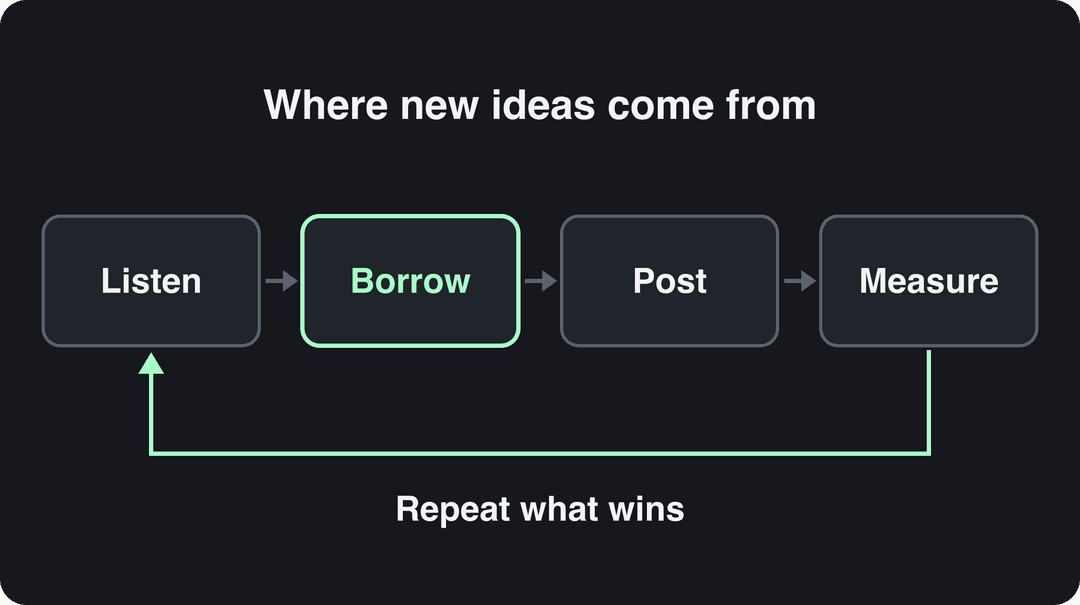
- Listen. Mine your comments, DMs, Story replies and the autocomplete in TikTok, YouTube and Instagram search. Every question that comes up more than once is a post. Keep them in a single running list.
- Borrow the format, not the content. Find what already works in your niche, keep the structure (hook, pacing, payoff) and change the topic. Revid's library of about 2.77 million short-form videos with their engagement data lets you search by topic and remix a proven format into an original video. Its free deep analysis (up to 60 a day) explains why a reference worked: the hook, the timed structure and three ways to adapt it to another niche.
- Post and test. On Instagram, trial reels are shown first to non-followers and don't affect the ranking of your standard reels, which makes them a low-risk way to test a new idea. They need a public account with 200 followers (professional accounts) or 1,000 (personal accounts).
- Measure. Compare each post with your own median, not with someone else's viral outlier. Saves and shares say the idea was useful; comments say it started a conversation.
- Repeat what wins. An idea that beats your median more than once becomes a series (idea 8 below).
Each of the nine ideas below comes with when to use it and a first post you can make this week.
Which content idea fits your goal?
| Content idea | Best for | Effort | First post to try |
|---|---|---|---|
| User-generated content | Trust and social proof | Low to medium (needs moderation) | Repost a customer video, with permission and credit |
| Polls and quizzes | Quick interaction, audience research | Low | A poll on a real decision you're about to make |
| Educational carousels | Saves and authority | Medium to high | A step-by-step answer to your most asked question |
| Behind-the-scenes | Loyalty, a human face for a brand | Low | A POV or screen recording of how you make one thing |
| Trend commentary | Reach and discovery | Medium (speed matters) | Your niche's take on a format rising this week |
| Live streams and Q&As | Community, direct questions | Medium to high | A Q&A built from questions in your comments |
| Contests and giveaways | Fast reach and follower growth | Medium (rules and prizes) | A giveaway that asks for a niche-relevant comment |
| Episodic series | Habit and return viewers | Medium to high | A weekly segment with a fixed name and format |
| Original data | Authority, links, press | High | One finding from your own analytics or a poll |
1. User-generated content campaigns
A UGC campaign asks your audience to create content about your product or community, which you then share with credit. It works because people trust other customers more than brands: Bazaarvoice's Shopper Experience Index (November 2024) found that 65% of global shoppers rely on UGC such as ratings, reviews, photos and videos in their buying decisions.
Two familiar models: Coca-Cola's "Share a Coke" printed names on bottles and people photographed theirs, and GoPro reposts customer footage and pays cash prizes for the best clips through the GoPro Awards.
How to run one:
- Pick one simple action (unbox it, show your setup, share a before-and-after) and a branded hashtag.
- Write the rules: what to film, the deadline, and that you may repost with credit.
- Give people a reason to join: a feature on your account, a discount or a prize.
- Ask permission before reposting and tag the creator every time. If you want to run a submission as a paid ad, agree the usage rights in writing.
- Collect the best entries into a compilation video or a highlight.
Not everyone wants to be on camera. Participants who prefer to stay anonymous can make a narrated video with one of the AI faceless video generator tools rounded up on ClipCreator's blog, so make sure your rules accept faceless entries.
Don't feature only glowing posts. In Bazaarvoice's Shopper Preference Report 2025, 43% of shoppers said they trust creators who share both the pros and cons of a product.
Sample call to action: "Show us where you use [product]. Post it with #YourTag and we'll feature our favorites every Friday."
2. Polls and quizzes
Polls turn followers into participants with one tap, and they double as free audience research. Use the native tools: Instagram Story poll and quiz stickers, X polls and LinkedIn polls.
Poll questions that get answers:
- "Which should I make next: A or B?" (the audience picks your next post)
- "Be honest: do you [common habit in your niche]?"
- "Which mistake have you made?" with options taken from your comments
- "What's harder: X or Y?"
The step most accounts skip is the follow-up. Post the result as its own piece of content ("You voted, here's what won and what I'm doing about it"). That second post often does better than the poll, because the audience already has a stake in the answer.
Quizzes work as video too: a question on screen, a pause, then the reveal, the format BuzzFeed built its personality quizzes on. Revid's video quiz maker builds that format from your questions.
One limit: poll results reflect who follows you and how you worded the question. Treat them as direction, not market research.
Prompt to try
Make a 40-second faceless vertical video titled '5 settings that fix blurry Instagram Reels'. Open with the hook 'Your Reels look blurry for one reason, and it's not your camera.' Show one step per scene with screen-style visuals and large captions, a calm narrator voice, and end with 'Save this for your next upload.'
3. Educational carousels and infographics
Carousels break one useful topic into swipeable slides; infographics compress it into one image. Both collect saves because people keep them for later. An Instagram carousel holds up to 20 photos and videos and a TikTok photo post up to 35, so length is rarely the limit. Clarity is.
A carousel structure that works:
- First slide: the promise in a few words ("Fix blurry Reels with one setting").
- Middle slides: one step or one point per slide, in text large enough to read on a phone.
- Last slide: a recap and one action (save it, follow for the next part, comment your question).
Cite the source of every statistic, keep your colors and fonts consistent, and save a template so each new carousel takes less time than the last. HubSpot's marketing statistics carousels and Canva's design tips are good models of the format.
Then turn your best carousel into a video. Educational content does well without a face: in Revid's TikTok data, faceless tutorials had a median of 156K views against 52K for tutorials with a person on camera. A faceless video generator turns the same steps into a narrated short with visuals and captions.
4. Behind-the-scenes content
Show how the thing gets made: your process, your team, your tools, your mistakes. It gives a brand a human face and costs little to produce, since a phone and honest footage are enough.
Ideas to film:
- A day in the life of one team member
- How one product, post or video gets made, start to finish
- Your workspace and tools, and what each one does
- A mistake you made and how you fixed it
- The real numbers behind a launch or a month (Buffer built its reputation partly by publishing its salaries)
Faceless channels can do this too: show the editing timeline, the research doc or the script. Patagonia's manufacturing footage and Everlane's transparency posts show the same idea at brand scale.
How you film matters. In Revid's TikTok data, POV videos had a median of 107K views and screen recordings 91K, while selfie-style videos had 48K. For a process video, film from your own eye line or record your screen instead of talking into the front camera.
Keep the boundaries: no client data, no unreleased products, and nobody on camera who hasn't agreed to be filmed.
5. Trend commentary
Take something already getting attention (a sound, a format, a news story, a seasonal moment) and add your niche's angle. Oreo's "You can still dunk in the dark" post during the Super Bowl blackout is the classic example; Duolingo's mascot-led TikToks show the same skill applied week after week.
Before you jump on a trend, ask:
- Can I connect it to my topic in one sentence?
- Can I post while it's still rising?
- Will my audience get the reference?
- Is it safe for my brand (no tragedies, no politics I don't want to own)?
If any answer is no, skip it. Humor is the usual way in: in HubSpot's 2026 research, 48% of marketers said funny content yields the highest ROI among short-form content types.
To spot formats early, search Revid's viral library by topic and engagement tier, open a rising video and remix it into your own version. Once the post is live, our guide to increasing social media engagement covers how to turn views into replies and shares.
6. Live streams and Q&A sessions
Live video lets you answer questions in real time, and every stream leaves a recording you can cut into clips. Check the requirements first: going LIVE on TikTok requires being at least 18 and having 1,000 followers (the threshold may vary by region).
A simple run of show:
- Announce the date, time and topic a few days ahead, and collect questions in advance.
- Open with the question most people asked.
- Answer one question at a time and say the asker's name.
- Have someone moderate the comments if you can.
- Close by announcing the next session.
After the stream, cut the best answers into vertical clips titled with the question. A long video to short video converter finds the moments and reframes them. On Instagram, keep each clip under 3 minutes: longer reels aren't recommended to non-followers.
The trade-off: you need someone comfortable on camera, a stable connection and some promotion beforehand, or you'll be talking to an empty room.
7. Contests and giveaways
A giveaway asks people to take an action (follow, comment, share, create something) for a chance to win. It grows reach fast, but it attracts prize hunters when the prize has nothing to do with your niche.
What separates a useful giveaway from a follower spike that vanishes:
- A relevant prize. A free month of your product or a niche tool beats a generic gadget.
- A single entry action. Every extra step loses entrants.
- Published rules. Deadline, eligibility, how the winner is picked and when it's announced.
- An entry that creates content. Ask for a photo or video (idea 1), as GoPro and REI's #OptOutside did, so the campaign leaves you with material.
- A plan for the day after. Have your next few posts ready for the new followers.
Entry template: "To enter: follow us and comment what you'd use [prize] for. Winner announced [date]. Rules in bio."
Prompt to try
Create episode 1 of a weekly series called 'Tool Tuesday', a 45-second vertical video reviewing one free note-taking app for students. Open with the same branded line 'It's Tool Tuesday: one tool, sixty seconds, honest verdict.' Use motion graphics, an upbeat voiceover and captions, and close by teasing next week's tool.
8. Episodic series and themed content
A series is a recurring format with a fixed name, structure and schedule: "Tool Tuesday", a weekly teardown, a story with recurring characters. Viewers follow to catch the next episode, and you stop starting from zero because the format is already decided.
YouTube now supports this directly: in September 2026 it began rolling out Shorts series, which organize Shorts into seasons and episodes across web, mobile and TV.
How to build one:
- Pick a format you can repeat many times (one question asked about many products, a recurring character, a weekly review).
- Name it and give it the same opening line and visual template.
- Batch-create several episodes before launch so you never miss the schedule.
- Plan a season end, then refresh the format before it goes stale.
Apple's "Shot on iPhone" and Red Bull's extreme sports documentaries are long-running examples. For animated series, Revid University's breakdown of an animated series with consistent characters shows how one runs day to day. Revid's Auto-Mode workers can also create a fresh video every day from a prompt or a content source, which keeps a series on schedule.
9. Original data and industry insights
Publishing your own numbers is the slowest idea on this list and the one with the longest life. Edelman's Trust Barometer, HubSpot's State of Marketing and Buffer's State of Remote Work get cited for years. Revid does the same with its library: its analysis of 2.4 million TikToks found couples videos average 2.4M views per video versus 332.2k for crypto videos, a 7.3x gap.
You don't need a research team:
- Run a poll (idea 2) and publish the results with the number of votes.
- Share your own analytics: what worked, what flopped and your best guess why.
- Count something in your niche (prices, features, review scores) and chart it.
- Repeat it every year so it becomes a reference.
Always state the method (what you measured, how many items, over what dates). One dataset then becomes a post, a carousel, a short video and a thread.
Turn any of these ideas into a short video with Revid
Most of these ideas end up as short vertical video. With Revid's AI video generator:
- Paste an idea, a script or a link (a blog post, a YouTube video, a Reddit thread).
- Revid writes the script, builds scene-by-scene visuals (stock footage, AI images, AI video or motion graphics) and adds a voice-over in 70+ languages, synced captions and music.
- Fix any scene in the timeline editor.
- Publish or schedule directly to TikTok, Instagram and YouTube.
Sign-up is free and new accounts get free credits to try video creation, no credit card needed; regular creation then uses the monthly credits of a paid plan, from $39/month.
FAQ
What type of social media content gets the most engagement?
In Revid's TikTok data, challenges, comedy and reactions had the highest median views, ahead of storytelling and tutorials. Beyond views, content that asks for a response (polls, contests, questions) tends to collect comments, and reference content (carousels, tutorials) tends to collect saves.
Can I make social media content without showing my face?
Yes. Carousels, screen recordings, POV clips and narrated faceless videos all work. In Revid's TikTok data, faceless videos had a median of 114K views versus 67K for one person on camera.
How often should I post new content ideas?
Post on a schedule you can keep for months without dropping quality. A recurring series makes that easier, because the format is decided and only the topic changes each time.
Do I have to label AI-generated videos on social media?
Only realistic AI content needs a label. TikTok requires creators to label realistic AI-generated images, audio or video, and YouTube requires disclosure of realistic altered or synthetic content; both say the label alone does not affect a video's distribution.
What's the difference between content ideas and content pillars?
Pillars are the handful of broad topics your account covers; ideas are the specific posts inside them. Pick your pillars first, then run the formats in this article through each one.