TikTok Aspect Ratio: 9:16 Size, Specs and How to Fix Black Bars
TikTok videos should be 9:16 at 1080x1920 pixels. This guide covers the specs TikTok publishes, what happens to horizontal and square uploads, and how to reframe any clip.
On this page
The aspect ratio of TikTok videos is 9:16, a vertical frame, and TikTok's Creator Academy recommends 1080x1920 pixels. A 9:16 video fills a phone screen held upright. Horizontal (16:9) and square (1:1) uploads still play, but TikTok shows them smaller, with black bars above and below.
The ratio is the easy part. Most TikToks that look wrong fail in one of two ways. Either the frame is 9:16 but the captions sit exactly where TikTok's buttons go, or a 16:9 clip was letterboxed into a thin strip in the middle of the screen. Both take minutes to fix, and both are covered below.
- TikTok's recommended aspect ratio, a vertical frame
- 9:16
- TikTok Creator Academy
- Recommended TikTok video resolution in pixels
- 1080x1920
- TikTok Creator Academy
- Longest video you can upload to TikTok
- 60 min
- TikTok Support
- Largest file TikTok Studio Web accepts
- 30 GB
- TikTok Creator Academy
TikTok video size and specs at a glance
| Spec | What to use | Source |
|---|---|---|
| Aspect ratio | 9:16 (vertical) | TikTok Creator Academy |
| Resolution | 1080x1920 px (2K and 4K also accepted) | Creator Academy, TikTok Studio Web |
| File format | MP4 (safest) or MOV | TikTok for Developers |
| Codec | AVC, the standard MP4 video codec | TikTok for Developers |
| Frame rate | 30 or 60 fps (accepted range: 23 to 60 fps) | TikTok Content Posting API |
| Length | Up to 60 minutes uploaded, up to 10 minutes with the in-app camera | TikTok Support |
| File size | Up to 30 GB on TikTok Studio Web, 4 GB through the API | Creator Academy, TikTok for Developers |
| Cover image | 9:16 at 1080x1920 px | Creator Academy |
The index leans toward videos that surface in hashtag and keyword searches, so its view counts run high: compare the groups, not the absolute numbers.
Source: Revid TikTok index: 2,377,477 TikToks with AI labels per video, snapshot of Sep 15, 2026. Median views estimated from view buckets.
Show the data
| Median views | Share past 1M views | |
|---|---|---|
| 0-7s | 88.3K | 19.9% |
| 8-15s | 111.1K | 22.6% |
| 16-30s | 141K | 25.1% |
| 31-60s | 120.4K | 22.8% |
| 61-120s | 97K | 19.8% |
| 2-5 min | 89.1K | 18.3% |
| 5 min+ | 90.1K | 17.2% |
What is the aspect ratio of TikTok, exactly?
A 9:16 frame is 9 units wide for every 16 units tall, the shape of a phone held upright. 1080x1920 is the standard size at that ratio and the one TikTok recommends. A 4K vertical file (2160x3840) has the same shape with more pixels, and TikTok Studio Web accepts 2K and 4K uploads. If your viewers mostly watch on phones, 1080x1920 is plenty.
Filming upright at 1080p on a phone already gives you a 1080x1920 file, so the ratio problem usually appears only when the footage started horizontal: a camera clip, a screen recording, a YouTube video or a slide deck. TikTok Studio Web accepts landscape uploads too. They just won't fill the screen.
What happens if you upload a 16:9 or square video to TikTok?
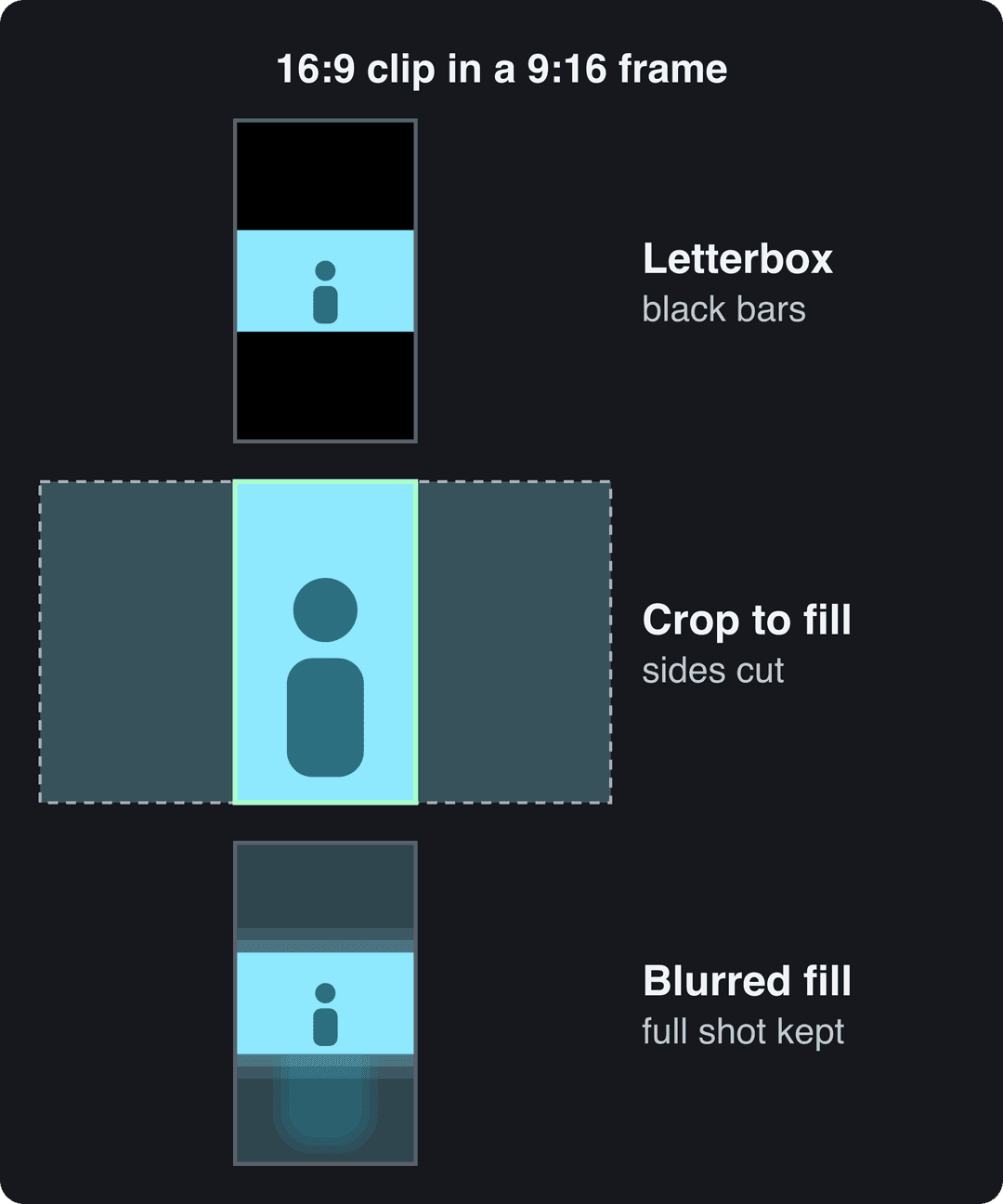
TikTok doesn't reject it. The app fits the whole frame inside the vertical screen and fills the empty space with black, which is called letterboxing. The wider your video, the smaller it plays and the thicker the bars.
| Your video | How it looks on TikTok | What to do |
|---|---|---|
| 9:16 (1080x1920) | Fills the screen | Nothing |
| 4:5 or 3:4 portrait | Bars above and below | Crop or extend to 9:16 |
| 1:1 square | Wide bars above and below | Reframe to 9:16 |
| 16:9 horizontal | A narrow strip in the middle, thick bars | Crop or use a blurred fill |
With letterboxing, the problem is the size of what's left. Faces shrink, on-screen text becomes hard to read, and the bars tell viewers the clip was made for somewhere else.
How to convert a video to TikTok's 9:16 aspect ratio
You have three options. Pick one per clip:
- Crop and reframe when there is one subject you can keep centered (a talking head, a product, a single person moving). You lose the sides of the shot, but the subject fills the screen.
- Blurred fill when the whole width matters (a group, scenery, a slide, a screen recording). The original clip sits sharp in the middle over an enlarged, blurred copy of itself, so nothing is cut and there are no black bars.
- Letterbox only as a last resort, for footage you can't crop and don't want to restyle.
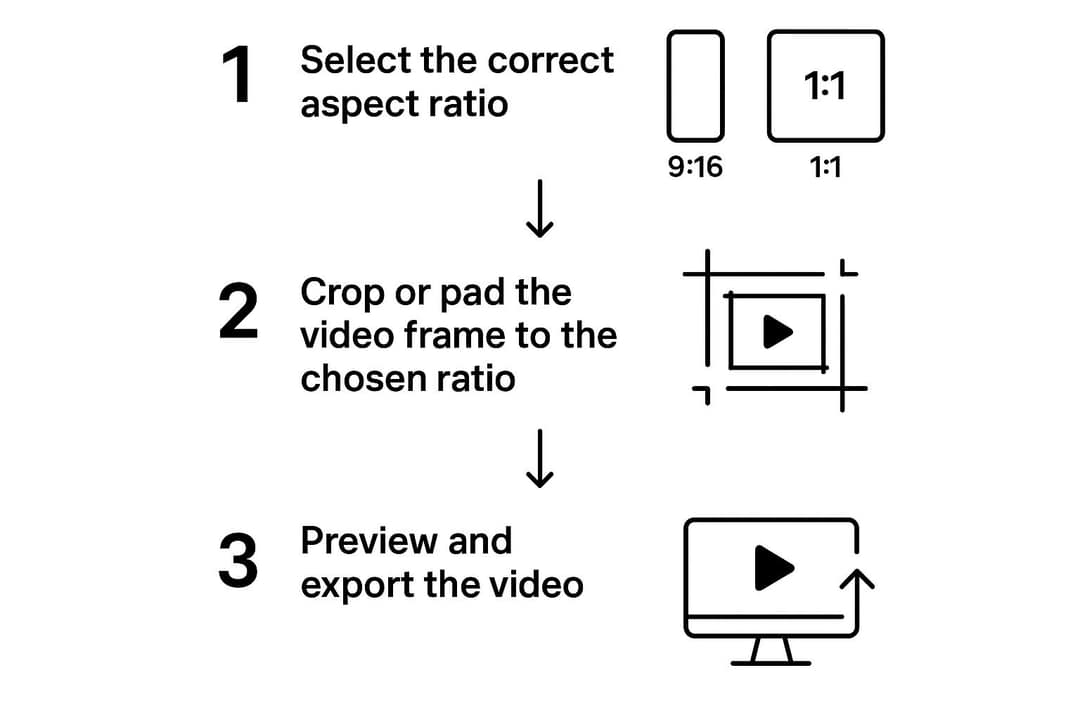
The steps are the same in CapCut or most other editors:
- Set the project canvas to 9:16 before you add any clip. Setting the ratio first prevents most reframing problems later.
- Add your footage and scale it to fill the frame (crop) or place it over a blurred copy (fill).
- Reframe shot by shot. If the subject moves across the frame, use position keyframes so the crop follows them.
- Check every caption and title against TikTok's safe zone (next sections).
- Export at 1080x1920 as an MP4 with the standard AVC codec, at 30 or 60 fps.
For an editor-specific walkthrough, see Filmora's guide to the TikTok aspect ratio. Our guide on how to change a video's aspect ratio covers other tools and ratios. If you are reformatting a whole back catalog, converting videos to TikTok format walks through batch workflows.
Convert or create 9:16 videos with Revid
- To reformat an existing file, upload it to Revid's resize video tool and choose portrait 9:16. The tool also outputs 4:5, 16:9 and 1:1.
- To reuse a long YouTube video, paste the link into the YouTube to TikTok converter. It cuts the video into vertical clips.
- To start from a script or a link instead of footage, the AI TikTok video generator builds a vertical voiceover video with captions. You can export it at 720p, 1080p or 4K, at 30 or 60 fps.
- When the video is ready, publish it directly to TikTok, Instagram or YouTube from the same queue.
The index leans toward videos that surface in hashtag and keyword searches, so its view counts run high: compare the groups, not the absolute numbers.
Source: Revid TikTok index: 2,377,477 TikToks with AI labels per video, snapshot of Sep 15, 2026. Median views estimated from view buckets.
Show the data
| Median views | Share past 1M views | |
|---|---|---|
| Drone | 173.9K | 27.9% |
| Steady cam | 162.7K | 26.2% |
| Screen recording | 159.9K | 23.8% |
| Handheld | 140.9K | 25.6% |
| POV | 139.9K | 26% |
| Tripod | 117K | 23.6% |
| Selfie | 67K | 16.3% |
How to film for a 9:16 frame
- Shoot upright. Footage recorded vertically never needs to be cropped, so you keep the full resolution.
- Center the subject. Keep faces and products in the middle of the frame, a little above center, where the eye lands on a phone.
- Use vertical shapes. Doorways, trees, stairs and buildings run with the frame and add depth to a tall shot.
- Leave room at the edges. Don't frame anything important tight against the right side or the bottom, where the interface sits.
- Plan for other crops. If the same video goes to an Instagram feed, keep the action in the middle so a 4:5 crop (full width, top and bottom trimmed) still works.
The camera in the TikTok app records in 9:16 automatically, up to 10 minutes per video. For longer pieces, film with your phone's camera and upload the file.
Prompt to try
Make a 30-second vertical 9:16 TikTok titled "3 framing mistakes that make your TikToks look amateur". Open with the hook "Your video has black bars and you didn't even notice." Cover letterboxed 16:9 clips, subjects framed off-center, and captions hidden under the like and share buttons, with clean stock footage, a fast upbeat voice and bold captions kept in the center of the frame.
Where to put text so TikTok's buttons don't cover it
TikTok draws its interface on top of every video. The like, comment, share and profile buttons run down the right side. Your username, caption and sound name sit along the bottom, and the feed tabs sit at the top. Anything placed there can be hidden or hard to read.
Keep captions, titles and key visuals in the central area of the frame, with clear space on the right and at the bottom. To check placement before you post, drop a frame into the free TikTok safe zone checker. It overlays the interface on your video so you can see exactly what gets covered.
Does the same 9:16 video work on Instagram Reels and YouTube Shorts?
Yes. A 1080x1920 file is the right starting point on all three platforms.
| Platform | Best ratio | What the platform says |
|---|---|---|
| TikTok | 9:16, 1080x1920 | Recommended by TikTok Creator Academy |
| Instagram Reels | 9:16 | Accepts 1.91:1 to 9:16, minimum 30 fps and 720 px |
| YouTube Shorts | 9:16 | Square or vertical videos up to 3 minutes are classified as Shorts |
Each app places its buttons slightly differently, so check the safe zone separately for each one. Our vertical video aspect ratio guide compares the platforms in more depth, and the Instagram Reels dimensions guide covers covers and feed crops.
On Instagram, profile grids now show posts as vertical rectangles. For examples of how vertical posts look side by side on a profile, see these Instagram feed ideas. If you make videos for brands, vertical 9:16 is the format most short-form deliverables use. This roundup of UGC creator platforms lists where that kind of work is posted.
FAQ
Is TikTok 9:16 or 4:5?
TikTok is 9:16. A 4:5 video (the common Instagram feed shape) plays on TikTok with bars above and below, so crop or extend it to 9:16 before posting.
How long can a TikTok video be?
Uploaded videos can be up to 60 minutes long. Videos recorded with TikTok's in-app camera can be up to 10 minutes.
Can you upload 4K video to TikTok?
Yes. TikTok Studio Web accepts vertical or landscape uploads in 1080p, 2K or 4K, with files up to 30 GB. TikTok still recommends 1080x1920, which is enough for phone viewing.
Does using 9:16 get more views on TikTok?
TikTok doesn't say that aspect ratio affects ranking. A 9:16 video does use the whole screen, though, while a letterboxed clip shows viewers a smaller picture with tiny text. That is a good reason to reframe before posting.
Sources
- Revid TikTok index: 2,377,477 TikToks with AI labels per video, snapshot of Sep 15, 2026. Median views estimated from view buckets.
Charts and figures checked on November 6, 2026.