Video Content Management: What a VCMS Does and How to Pick One
What a video content management system (VCMS) does, how it differs from cloud storage and YouTube, and a step-by-step checklist for choosing one.
On this page
A video content management system (VCMS) is software that stores, organizes, secures, delivers and measures an organization's videos in one place. Unlike cloud storage, it converts each upload for smooth playback on any device, controls who can watch, brands the player and reports how every video is actually watched.
Most teams adopt one too late. Videos sit in shared folders until a sales demo buffers on a client call, a confidential all-hands recording spreads through a public link, or nobody can find the customer testimonial filmed last spring. Those are exactly the failures a VCMS is built to prevent, and they get more expensive the bigger the library grows.
What is a VCMS and what does it do?
A VCMS handles the full life of a video file, from upload to the last view. In practice that means four stages:
- Ingestion: uploads land in one central library, with titles, owners and tags attached from the start.
- Processing: the system transcodes each file into several sizes and formats, so the same video plays on a phone on mobile data and on a conference-room screen.
- Storage and management: videos are tagged, transcribed, searchable and protected by permissions.
- Distribution and measurement: a branded, embeddable player delivers the video (usually through a content delivery network) and records how people watch it.
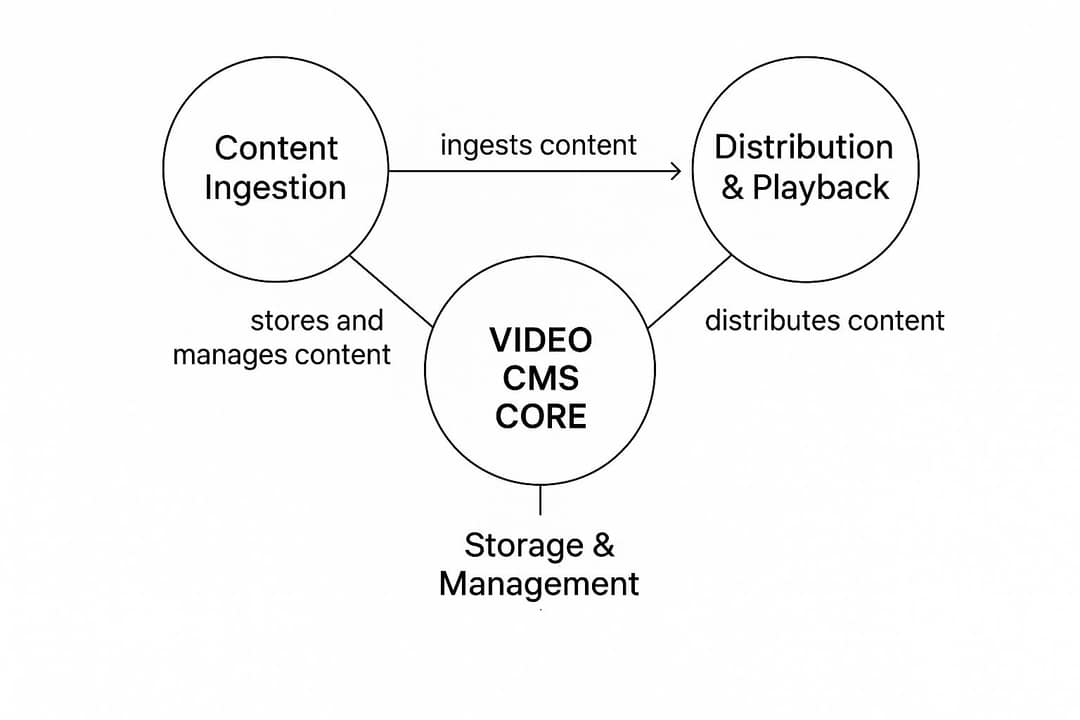
The short version: cloud storage is a place to keep video files, and a VCMS is a platform to use them.
Demand has grown with video use at work. MarketsandMarkets projected the video content management market would grow from USD 3.5 billion in 2021 to USD 6.8 billion in 2026 in its video content management market report. Fortune Business Insights publishes separate VCMS market research with a broader enterprise scope, so market estimates vary with what each firm counts.
VCMS vs. cloud storage vs. YouTube: which one do you need?
Most teams start with Google Drive or Dropbox, or post everything to YouTube and TikTok. Each is a good tool for its own job. The difference is control versus reach.
| Cloud storage (Drive, Dropbox) | Public platform (YouTube, TikTok) | VCMS | |
|---|---|---|---|
| Main purpose | Keep and share files | Reach the largest audience | Control, deliver and measure owned video |
| Playback | Basic preview, can buffer on large files | Streams well, on the platform's player | Adaptive streaming in your own player |
| Who can watch | Anyone with the link, or named users | The public, or unlisted links | Granular rules: users, groups, SSO, passwords, domains |
| Branding | None | Platform branding, other channels' videos nearby | Your logo, colors and calls to action |
| Analytics | Views and downloads at most | Channel analytics inside the platform | Per-video and often per-viewer engagement, drop-off and heatmaps |
| Search inside videos | File names and folders | Public search and recommendations | Tags, custom metadata and searchable transcripts |
| Best for | Raw footage and working files | Marketing and audience growth | Training, internal comms, sales video, gated content |
A simple decision rule: if the goal is public reach, post to public platforms. If you only need to keep files and pass them to a few colleagues, cloud storage is enough. If you need access rules, viewing data or a branded player on your site or intranet, you need a VCMS.
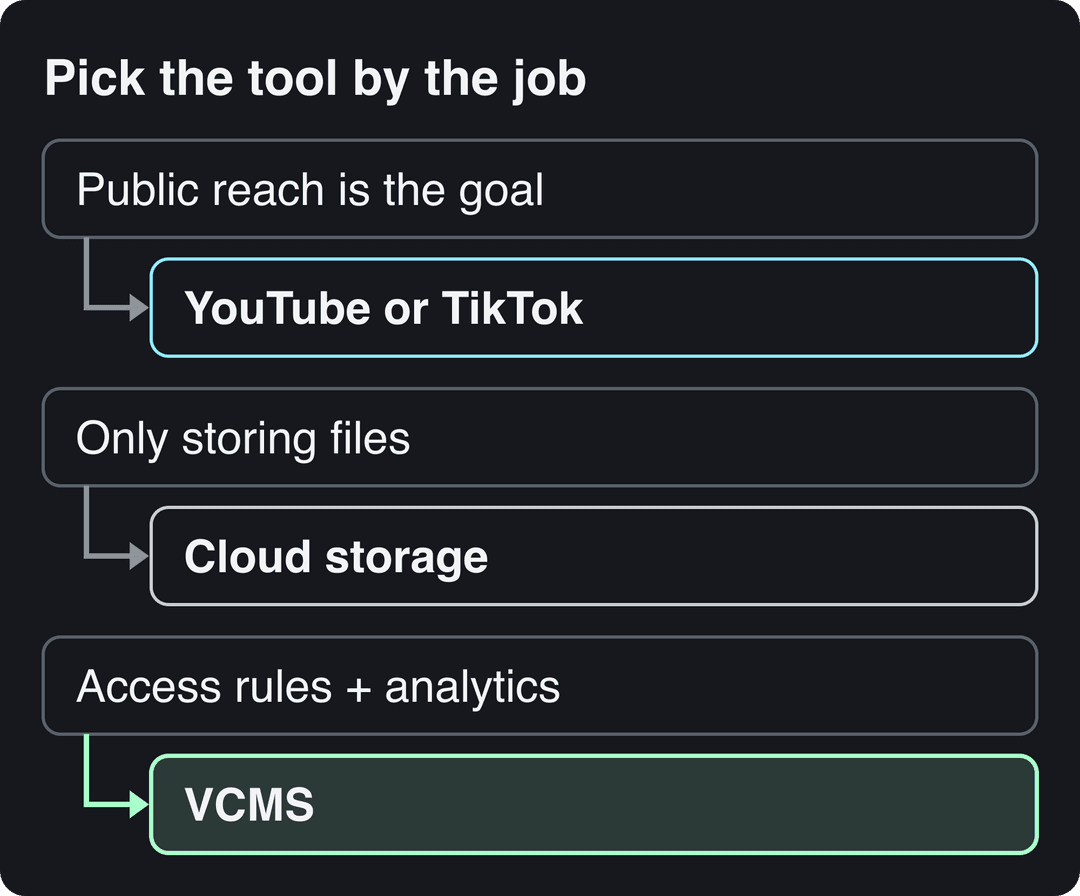
Many companies run both: a VCMS for private and owned video, public platforms for reach. Public platforms are also where views can earn money, which a private library never will; if that is part of your plan, Boostfluence has an overview of TikTok monetization strategies.
Is a VCMS the same as a VMS?
No. VMS usually means a video management system for security cameras: software that records, stores and monitors surveillance footage. It is a separate and larger category. Precedence Research valued the global VMS market at USD 17.12 billion in 2024 and projects 20.31% annual growth through 2034 in its video management system market analysis.
If a vendor's homepage talks about camera feeds, motion detection and recording retention, you are looking at surveillance software, not a platform for marketing, training or communications video.
Core features of a video content management system
These are the features that separate a VCMS from a folder of files. Use the last column to decide which ones your team actually needs.
| Feature | What it does | Who needs it most |
|---|---|---|
| Automatic transcoding | Converts each upload into multiple formats and resolutions | Everyone |
| Adaptive bitrate streaming | Adjusts quality to each viewer's connection to avoid buffering | Sales demos, live events, global teams |
| AI tagging and custom metadata | Labels speakers, objects and topics; adds your own fields like product line or campaign | Large libraries |
| Searchable transcripts | Finds a spoken word or phrase and jumps to that moment | Training, sales, media archives |
| Access controls | User and group permissions, SSO, passwords, domain restrictions, watermarking | Internal comms, confidential content |
| Branded player | Your logo and colors, no outside branding, custom calls to action | Marketing, customer-facing video |
| Engagement analytics | Drop-off points, rewatch heatmaps, viewer location, viewer-level tracking | Marketing, sales, training |
| Integrations and API | Sends viewing data to your CRM, LMS, marketing automation and analytics | Any team that reports on video |
| Live streaming | Broadcasts events and archives the recording | Corporate comms, events |
| Interactive elements | In-video questions, quizzes and clickable actions | Training, lead generation |
For an example of how far interactive features go, see Mindstamp's features page, which belongs to an interactive video platform.
Analytics deserve extra attention during a trial. Drop-off charts show the exact second viewers leave, which tells you whether to cut an intro, move the key point earlier or split a long video in two. Tie those numbers to pipeline or completion data and you can start measuring content ROI instead of counting views.
How teams use video content management
Corporate communications
A company broadcasts a live update from the CEO to employees only, with access tied to company sign-in. The recording is archived automatically, so people in other time zones watch it on demand, and the content never sits on a public platform.
Prompt to try
Make a 30-second vertical customer story video for a project management app. Start with the hook "This team cut weekly status meetings from 3 hours to 30 minutes." Use clean motion graphics, a confident voiceover and bold captions, and close with a call to book a demo.
Marketing and sales
Product demos, case studies and testimonials live in one tagged library, so a rep can find the right customer story for a prospect's industry in seconds. Many platforms alert the rep when a prospect watches a shared demo and show which parts were rewatched, which shapes the follow-up call. The format earns the effort: in Wyzowl's 2026 survey, 63% of consumers said a short video is how they would most like to learn about a product or service, ahead of text articles at 12% (more in our short-form video statistics).
Prompt to try
Create a 60-second vertical training video on how to spot a phishing email. Open with the hook "One click can cost your company thousands." Show three warning signs with simple animated visuals and on-screen captions, and end with a one-line rule to remember.
Training and compliance
Training teams organize modules into learning paths, add in-video quizzes and track who completed what. For regulated industries, that completion record doubles as an audit trail. If you are building the modules themselves, an educational video maker can turn lesson scripts into videos before they go into the library.
Media and entertainment
For media companies, the VCMS is production infrastructure: crews upload daily footage from the field, editors pull it from anywhere, and distribution teams push finished content to broadcast and streaming partners from the same hub.
How to choose a video content management system
- Name the primary job. Training, marketing and sales, internal communications or selling access to video each lead to a different shortlist. If social video is your main goal, start with your social media content strategy instead, since public platforms may cover most of it.
- Turn the job into must-haves. Training needs quizzes, completion tracking and LMS sync. Marketing needs calls to action, viewer-level analytics and a CRM connection. Ignore features outside that list during demos.
- Check security and compliance. Look for granular permissions, single sign-on, HTTPS delivery and encryption at rest and in transit. If you handle health data (HIPAA) or serve customers in Europe (GDPR), ask for compliance documentation and verify it.
- Map your integrations. List the systems the VCMS must talk to: a CRM such as Salesforce or HubSpot, your LMS, your marketing automation, and Google Analytics for a single view of how video affects site behavior. Ask whether each connection is native or needs the API.
- Test scale and pricing together. Ask how the platform handles a traffic spike from a company-wide live event, and how the bill changes as storage, viewers and seats grow.
- Trial with your own files. Upload real videos, share them with real colleagues and read the analytics. A demo library always looks organized; yours is the test.
VCMS selection checklist
Fill in the priority for your organization first, then score each vendor against it.
| Criterion | Priority (High/Medium/Low) | Vendor A | Vendor B |
|---|---|---|---|
| Training features (quizzes, completion tracking) | |||
| Marketing features (calls to action, viewer analytics) | |||
| Live streaming and virtual events | |||
| SSO and granular access controls | |||
| Encryption at rest and in transit | |||
| GDPR, HIPAA or other compliance documentation | |||
| CRM integration | |||
| Marketing automation and LMS integration | |||
| API access and documentation | |||
| Handling of traffic spikes | |||
| Predictable pricing model | |||
| Storage and bandwidth limits |
How much does a VCMS cost?
There is no standard price. Most vendors combine three levers:
- Storage: how much video you keep, priced by gigabyte or terabyte tiers.
- Bandwidth: how much video is streamed; more viewers means more data transferred.
- Seats: how many team members can log in to upload, manage or analyze.
Live streaming, advanced analytics, SSO and compliance features are often reserved for higher tiers. To compare quotes fairly, give every vendor the same scenario: your current library size, your expected monthly viewers, your number of admins, and the features from your checklist. Then ask what the same scenario costs when the library doubles.
How to roll out a VCMS without it becoming shelfware
Set governance before the first upload. Decide who can upload, who can edit metadata and who can delete. Agree on retention rules for old recordings.
Start with a pilot. Give the platform to one team that wants it, fix the problems they hit, then expand.
Train by role. Marketing, HR and training teams use different features, so show each group its own daily tasks: uploading, tagging, setting permissions and sharing. Back the sessions with quick-reference guides and a few short tutorial videos people can rewatch later.
Turn your video library into short-form content
Recorded webinars, all-hands and product demos stored in a VCMS are raw material for social clips. Revid's long video to short video converter turns long recordings into short vertical clips, and Revid can publish them to TikTok, Instagram and YouTube. For a full plan, see the content repurposing guide and our content distribution strategy.
FAQ
Do I need a VCMS for only a few videos?
Usually not. A handful of marketing videos embedded on your site can live on a basic hosting service; a VCMS starts paying off when you need access rules, viewer-level analytics or reliable playback for important audiences.
Is a VCMS the same as an online video platform (OVP)?
Largely, yes. Vendors use VCMS, OVP and video hosting platform for overlapping products, so judge each one on its access controls, analytics and integrations rather than its label.
What is the difference between a VCMS and a DAM?
A digital asset management (DAM) system organizes all media types, such as images, documents and video files, mainly for internal reuse. A VCMS specializes in video: transcoding, streaming, a branded player and viewing analytics.
Can a VCMS stream live events?
Many can, and they archive the recording automatically afterward. Live streaming is often sold as a separate tier, so confirm it is included before you sign.