On this page
A YouTube channel growth strategy that works in 2026 has four parts: pick a narrow audience with a repeatable promise, publish searchable long-form videos on a fixed schedule, use Shorts for about 25% to 40% of uploads to reach new viewers, and fix your weakest metric each month. That Shorts share comes from AIR Media-Tech's study of 18,000 channels.
The trap is treating Shorts as the whole plan. AIR Media-Tech's September 2026 analysis of 274 channels found Shorts RPM was 3% to 14% of long-form RPM in almost every niche. That means most channels need 11,000 to 34,000 Shorts views to earn what 1,000 long-form views pay. From February 1, 2027, new YouTube Partner Program applicants will also need 8,000 qualified watch hours instead of 4,000. Shorts bring reach, but long-form watch time is what compounds.
Step 1: Pick a channel promise viewers can repeat
Every channel growth strategy starts with one sentence a viewer could say to a friend: "This channel teaches [audience] how to [result] through [format]." If you can't fill the three blanks, the algorithm can't either. It learns who to show your next video to from who watched the last ones.
YouTube's audience is enormous (Global Media Insight keeps a running roundup of YouTube user statistics), and that cuts both ways. Almost any niche has viewers, and every broad niche is crowded. Narrow down until you can be the obvious pick. A general cooking channel competes with everyone, while "vegan weeknight dinners for students" competes with far fewer channels and gives viewers a clear reason to subscribe.
How to find the gap in your niche:
- Search your main keywords on YouTube and open the top results.
- Note what they skip: an outdated method, no beginner version, videos far longer than the topic needs, no comparison of options.
- Read their comments for questions that keep coming up without an answer.
- Make the video that fills that gap, in your own style, not a copy.
Then make the promise visible. Use the same thumbnail style and color palette, a small set of content pillars (themes you return to) and a consistent tone, whether dry and technical or loud and funny. Viewers should recognize your video in a busy feed before they read the channel name. For starting points, see these YouTube niche ideas.
Keep the promise stable and change the packaging. If a pillar keeps underperforming after a fair run, drop it. If one keeps winning, give it its own series.
Step 2: Plan a content mix of search, series and trends
A healthy upload calendar has three layers. Evergreen videos get searched for years, series bring viewers back, and a few trend videos spike and fade. Evergreen is the base: a gaming channel's fundamentals tutorials keep pulling views long after its review of a trending game has died.
| Format | What it does for growth | Watch out for |
|---|---|---|
| Tutorials and how-tos | Steady search traffic for years | Burying the answer behind a long intro |
| Reviews and comparisons | Reaches viewers close to a decision | Going stale when products change |
| Signature series | Return viewers who expect the next episode | Episodes that only make sense in order |
| Trend and news videos | Short spikes and new-viewer reach | Content that ages in weeks |
| Reactions | Fast to make | YouTube treats mostly non-verbal reactions as reused content, which can't be monetized |
| Lives and Q&As | Deeper loyalty from existing fans | Little reach to non-subscribers |
| Shorts | Reach to people who don't know you yet | Low revenue per view |
Signature series are underrated. A recurring segment with the same format and name gives viewers a concrete reason to subscribe: they want the next episode. In September 2026, YouTube began rolling out Shorts series, which organize Shorts into seasons and episodes across web, mobile and TV. A series now works in both formats.
A simple rule: if a topic will still be searched next year, make it a long-form, evergreen video. If it only matters this week, make it a Short or skip it.
Prompt to try
Create episode 1 of a weekly YouTube Shorts series called "60-Second Budget Fix" for students. Open with the hook "You are paying for 3 subscriptions you forgot about" and walk through how to find and cancel them in three quick steps. Use clean screen-style visuals, bold synced captions and a friendly voiceover, about 50 seconds long, ending with "Next fix drops Friday."
Step 3: Use YouTube Shorts as the top of your funnel
Shorts started as YouTube's answer to TikTok, with an early beta in India in September 2020. By July 2023, Shorts had over 2 billion monthly logged-in users (one of the figures in Rev's roundup of YouTube statistics). In August 2026, YouTube said the platform sees over 200 billion daily Shorts views. Our page of YouTube Shorts statistics collects the sourced numbers.
The rules that shape a Shorts plan in 2026:
- Square or vertical videos up to 3 minutes count as Shorts (for uploads since October 15, 2024).
- Most Shorts Audio Library songs can run for up to 90 seconds; some are limited to 60 or 30 seconds.
- Monetizing creators keep 45% of the Shorts Feed ad revenue allocated to them, with or without music.
Shorts do grow channels. Alphabet said in April 2023 that channels posting weekly on Shorts saw the majority of their new subscribers come from Shorts. The effect on long-form growth depends on the niche, though. In AIR Media-Tech's 18,000-channel study, mixed channels had up to 41% more subscribers in niches where mixing led, but in niches where long-form-only channels led, the gap reached 85%. That is why the best results came from Shorts making up 25% to 40% of uploads, not all of them.
Make every Short point somewhere:
- Trailer Shorts: show the most striking moment of a long video and end on the question the full video answers.
- Related video link: attach the matching long-form video to the Short so viewers can tap through.
- Best-moment clips: cut the highest-retention segment of a long video into a vertical Short.
- Expand the winners: when a Short outperforms, turn its topic into a full long-form video.
- Specific asks: "Full breakdown on the channel" beats a generic "subscribe for more".
TikTok data is a useful signal for which short formats travel. In Revid's analysis of 176,367 TikToks with 1,000+ likes posted between October 2025 and October 2026, challenges had the highest median views (182K), comedy came next (155K) and tutorials sat at 62K. The sample only holds videos that already passed 1,000 likes, so these figures show what successful videos have in common, not guaranteed causes. The full TikTok virality study explains the method.
Challenges and comedy passed 1M views about twice as often as tutorials and storytelling, which are the most common formats.
Source: Revid analysis of 176,367 TikToks with 1,000+ likes posted between Oct 1, 2025 and Oct 16, 2026 (61,203 creators)
Show the data
| Median views | Share that passed 1M views | |
|---|---|---|
| Challenge | 182.3K | 25.6% |
| Comedy | 154.8K | 22.1% |
| Reaction | 104.8K | 16% |
| Dance | 83.8K | 15.5% |
| Storytelling | 66.1K | 12.2% |
| Lip Sync | 61.7K | 12.3% |
| Tutorial | 61.9K | 12.1% |
The same data has a lesson for tutorial channels: faceless tutorials reached a 156K median, against 52K for on-camera tutorials. If your long-form videos are talking-head lessons, test Shorts that show the screen, your hands or the result instead of your face.
Prompt to try
Make a 40-second faceless YouTube Short for a vegan weeknight dinner channel. Open on the finished chickpea curry with the line "Dinner for under $3 in 15 minutes, no cooking skills needed." Show only hands, the pan and an on-screen ingredient list, with bold captions and an upbeat voiceover. End with "Full breakdown on the channel."
How to make Shorts for your channel with Revid
Revid fits this step when you need a steady stream of Shorts without filming each one.
- Open the AI YouTube Shorts generator and paste an idea, a script or a link to one of your videos or blog posts. Revid writes the script, picks the visuals and adds a voice-over and synced captions.
- To cut highlights from your own long uploads instead, paste the link into the YouTube clip maker to get vertical clips.
- To start from a proven format, search Revid's library of viral short-form videos. Then use "Make it about your topic" to apply a reference's hook style and pacing to your niche.
- Adjust scenes in the timeline editor, then publish or schedule the video straight to YouTube.
Plans start at $39/month (current pricing). Keep your own angle in every script: YouTube does not monetize AI content made from generic templates that looks mass-produced.
Step 4: Win the click, then hold the opening
Search and suggested videos both reward two things: people click, and people keep watching. Optimize in that order.
Start with searchable topics. Long-tail phrases with clear intent beat broad terms. "Fitness routines for beginners at home" attracts viewers who want exactly that video, while "fitness" pits you against everyone. TubeBuddy and vidIQ show search volume and competition for keyword ideas. YouTube's own search suggestions are free and show what people actually type.
Then package the video:
| Element | Limit or spec | What to do |
|---|---|---|
| Title | Up to 100 characters | Put the searched phrase and the promise early, since mobile cuts long titles |
| Thumbnail | 3840x2160 recommended, 640 px minimum width; 50 MB on desktop, 2 MB on mobile; verified accounts only | One subject and a few words, readable at phone size |
| Shorts thumbnail | 9:16 at 2160x3840, uploaded in YouTube Studio on a computer | Set one for every Short you want found from your channel page |
| Description | Up to 5,000 characters | Answer the query in the first lines, then add chapters and links |
| Tags | 500 characters in total | Mainly useful for common misspellings, so keep them low priority |
For vertical videos, YouTube replaces a 16:9 custom thumbnail with an auto-generated 4:5 thumbnail on the home, explore and subscription pages. Check how that frame reads before you publish.
Test before you guess. YouTube Studio on desktop can A/B test up to 3 titles and thumbnails per video. The variant with the highest watch time wins and is then shown to every viewer. Shorts aren't eligible. A YouTube title generator can draft variants worth testing.
Then hold the opening. The first seconds must confirm the title's promise: show the result, state the question or start mid-action. Write the opening line first; a YouTube Shorts script generator drafts hooks you can rewrite in your own voice. After the hook, keep retention up with chapters, B-roll, on-screen graphics and a change of shot whenever the energy dips. Run each upload through a video optimization checklist before publishing.
Find your growth bottleneck in YouTube Analytics
Most channels have one weak link at a time. Look for it in this order, because each stage feeds the next.
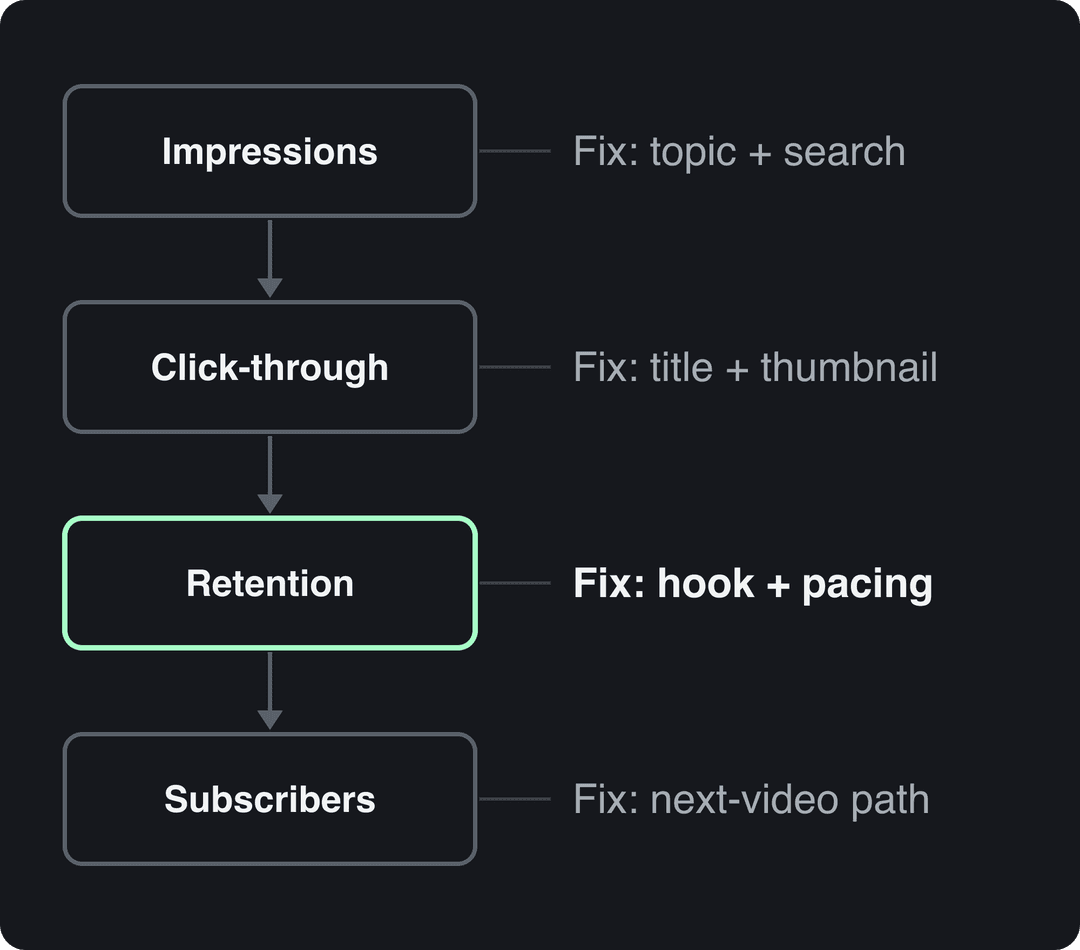
| What you see in YouTube Analytics | Likely cause | What to change |
|---|---|---|
| Few impressions | Topics with little search or browse demand | Pick topics people search for and make more of your best pillar |
| Impressions but a low click-through rate | The title and thumbnail don't earn the click | Test new packaging with Test & Compare |
| Clicks, but retention falls in the opening | The opening doesn't match the title's promise | Deliver the promised result or question immediately |
| Retention dips mid-video | A slow section or a tangent | Cut it, or add a visual change at that point |
| Views but few subscribers or returning viewers | No reason to watch the next video | Add end screens to a related video, playlists or a series |
Run a content audit once a month. Sort your videos by watch time, then by returning viewers. Make more of what tops both lists, fix or retire what sits at the bottom, and list topics viewers asked for in comments that you haven't covered yet. For platform-wide context, Notta keeps a roundup of YouTube statistics.
Let data guide you, not dictate to you. Keep one slot in the calendar for experiments: a format with no history produces no data until you try it.
What growth rate should a new YouTube channel expect?
YouTube publishes no growth-rate benchmark for new creators, and third-party averages swing widely by niche. The useful comparison is your own channel month over month, plus a handful of channels in your niche at a similar size. These reference points help set realistic targets:
| Reference point | Figure | Source |
|---|---|---|
| Average views per Short, accounts under 5,000 followers | 15,160 | Socialinsider's 2026 study of 69 million short-form videos |
| Average Shorts engagement rate by followers | 0.30% (TikTok 2.60%, Reels 0.45%) | Socialinsider, 2026 |
| Fan funding, Shopping and Creator Partnerships tier | 500 subscribers plus 3,000 watch hours in the last year, or 3 million Shorts views in 90 days | YouTube Help |
| Ad revenue sharing today | 1,000 subscribers plus 4,000 watch hours in 12 months, or 10 million Shorts views in 90 days | YouTube Help |
| Ad revenue for new applicants from February 1, 2027 | 1,000 subscribers plus 8,000 watch hours in 365 days, or 20 million Shorts views in 90 days | YouTube Help |
Two traps when you measure:
- Views changed meaning. Since August 24, 2026, YouTube counts a view as soon as a video starts to play, on Shorts, long-form and live. Raw view counts from before and after that date aren't comparable. Track engaged views instead, which YPP still uses.
- Shorts hours don't count toward watch hours. Watch time from the Shorts Feed is excluded from the watch-hour threshold, so a Shorts-only channel has to qualify through Shorts views.
A practical target for a new channel: improve one bottleneck metric each month (click-through rate, average view duration or returning viewers) instead of chasing a subscriber number.
How do you attract a US or European audience on YouTube and Instagram?
Where your viewers live depends more on your language, references and timing than on any setting. These steps work on both YouTube and Instagram:
- Check your baseline. YouTube Studio's Audience tab shows your top geographies and when your viewers are on YouTube. Instagram shows follower locations and most-active times once you have 100 followers.
- Make it local to them. Use English (or the target language) and their currency, units, brands, holidays and everyday problems. A price comparison in dollars or euros signals who the video is for.
- Publish in their daytime. Schedule uploads around those activity reports, not your own clock.
- Add languages. Translated titles, descriptions and subtitles in YouTube Studio open your videos to non-English European viewers. Revid's AI video translator translates a Revid project while keeping the edit, media and captions.
- Use Instagram's reach tools. Reels up to 3 minutes can be recommended to non-followers. Trial reels are shown to non-followers first (from 200 followers on a professional account). Each post allows up to 5 hashtags.
The US audience is worth the effort: in AIR Media-Tech's 2026 partner data, Shorts RPM for US audiences was $0.328 per 1,000 views, against $0.166 for the UK and $0.165 for Canada.
Build a community that brings viewers back
Returning viewers are the clearest sign a channel is growing for real, and they come from conversation, not from upload volume.
- Reply early. Answer comments in the first hours after upload, while the video is still being tested on new viewers.
- Pin a question. A specific prompt ("Which step failed for you?") gets more useful replies than "let me know in the comments".
- Turn comments into content. A regular Q&A video built from viewer questions is easy to make and shows people you read them.
- Use the Posts tab. Run polls on YouTube to choose the next topic, share behind-the-scenes shots and tease upcoming videos.
- Credit viewers. When a video comes from a viewer's suggestion, say so on screen.
Your approach should change with the channel's size:
| Channel size | Focus |
|---|---|
| Under 1,000 subscribers | Reply to every comment and build personal connections |
| Past 10,000 subscribers | Videos and posts that start broader discussions between viewers |
| Past 100,000 subscribers | Dedicated community management, often with moderators |
Judge community health by returning viewers, comment depth and Posts interactions, not raw like counts.
FAQ
Do YouTube Shorts help grow a channel?
Yes, mostly through new subscribers. Alphabet said in April 2023 that channels posting weekly on Shorts got the majority of their new subscribers from Shorts. Their effect on long-form growth varies by niche, so keep Shorts at a share of uploads rather than all of them.
How often should you upload to grow a YouTube channel?
As often as you can sustain for months without dropping quality; consistency beats bursts. From February 1, 2027, YouTube counts a YPP channel as active with 2 long-form videos or 5 Shorts every 90 days, but treat that as a floor, not a growth target.
Is there still a YouTube Trending page to aim for?
Not a general one. YouTube's Help Center now only describes Trending Charts for select categories (Movie Trailers, Music Videos and Gaming), so build your strategy on search and suggested traffic instead.
Can you grow a YouTube channel with AI videos?
Yes, if the final video shows your creative vision and gives educational or entertainment value. YouTube won't monetize AI content made from generic templates that looks mass-produced. You must also disclose realistic AI scenes with the AI use setting, though the disclosure alone doesn't limit a video's audience.
Do tags still matter on YouTube?
Barely. Tags are capped at 500 characters in total and mostly help with common misspellings; your title, thumbnail and description do far more for discovery.