On this page
The best YouTube channel ideas are repeatable formats, not single topics: teardowns, mistake lists, budget vs premium tests, faceless explainers, experiments and build-in-public reports. Pick the one where your interest, proven demand and a way to earn overlap, then publish your first 10 videos in it before you judge the idea.
Small channels have more to gain on YouTube than on any other short-form platform. Socialinsider's 2026 study of 69 million short-form videos found that accounts under 5,000 followers averaged 15,160 views per YouTube Short, against 625 on Instagram Reels and 350 on TikTok. Those views only turn into a growing channel when every upload belongs to one recognizable series, which is why each idea below is a format you can repeat, not a one-off topic.
How to choose a YouTube channel idea
Run every idea through three filters before you film anything:
- Interest: list 10 video titles on the topic in one sitting. If you stall at five, you will stall in month two.
- Demand: search the topic on YouTube and look for small channels whose recent videos got far more views than they have subscribers. That proves viewers want the topic itself, not just a famous host. Google Trends, vidIQ and TubeBuddy help you compare topics.
- Money: name one sponsor category, one affiliate product or one product of your own that fits the audience.
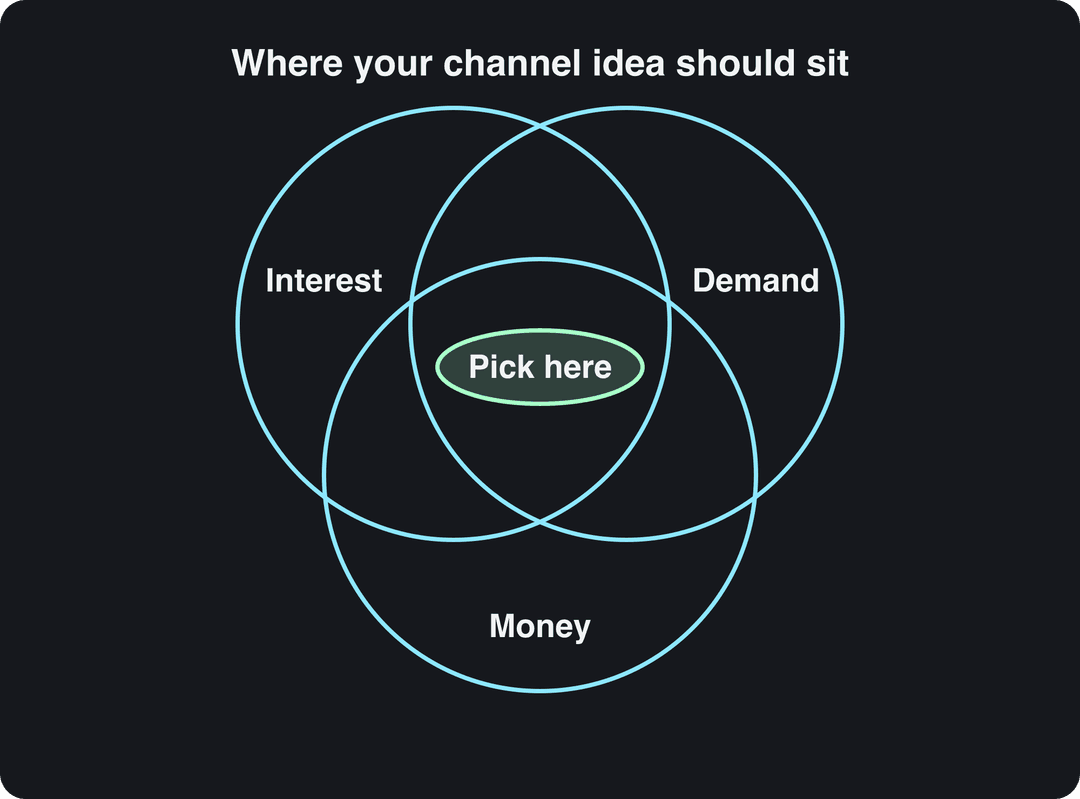
If an idea passes interest and demand but has no money path, run it as a side series. If it passes demand and money but bores you, drop it: you will not survive the slow first months. For a scored list of niches to plug into these formats, see our YouTube niche ideas.
10 YouTube channel ideas that grow
Each idea is a series format that works across niches, with title templates you can fill in today. Most of them work without showing your face.
1. The teardown channel: break down what works in your niche
Each video dissects one successful channel, product, business or viral video in your niche and ends with 3 to 5 takeaways the viewer can copy. Teardowns of well-known names get found by people searching those names, so every video borrows an existing audience.
Title templates:
- "Why [channel] grew so fast, and what you can copy"
- "I broke down [brand]'s best-selling product page"
- "What every top [niche] video does in the first 10 seconds"
How to run it:
- Pick a subject your viewers already follow.
- Pull public numbers: subscriber trends on Social Blade, the channel's most popular videos, upload frequency.
- Study the structure of the top videos: hook, pacing, titles and thumbnails.
- Explain why it worked for that audience, not just what happened. Your interpretation is the product.
Revid's viral video research and remix tools track YouTube and TikTok channels daily and flag their outlier videos, which gives you a steady list of teardown subjects.
Prompt to try
Make a 45-second YouTube Short titled "The mistake almost every beginner makes with their first home workout." Open with the hook "Stop doing this if you want results," show the mistake (skipping warm-ups and going too heavy too soon), explain why it causes injury, then give a 3-step fix the viewer can apply today. Use clean stock footage, bold captions and a calm, helpful voice-over.
2. The mistakes channel: one common error per video
Each video shows one mistake people make in your niche, why it costs them, and the fix in steps. Loss-avoidance titles get clicked because nobody wants to be the person making the mistake.
Title templates:
- "Stop doing this when you [task]"
- "The mistake almost every beginner [task] makes"
- "[Number] mistakes to avoid in your first [project]"
How to run it:
- Keep it to one mistake per video so each one can rank for its own search.
- Show it: a before and after clip, a bad example next to a good one.
- Give a fix the viewer can apply the same day.
- Offer a free checklist ("The 10 mistakes to avoid in your first 10 videos" works in almost any niche) to start an email list.
Keep the tone helpful, not mocking. Viewers subscribe to the person who saved them time, not to the one who made them feel stupid.
3. Budget vs premium comparisons
Put a cheap option next to an expensive one and let viewers judge. The format works far beyond camera gear: food, skincare, travel, software (free vs paid), furniture, tools.
Title templates:
- "$200 vs $2,000 [product]: can you tell the difference?"
- "Cheap vs expensive [item]: which one is worth it?"
- "The best [product] under $500"
How to run it:
- Set clear price tiers, such as under $200 vs premium.
- Test both in identical conditions: same light, same scene, same script.
- Show where the cheap option is good enough and where the premium one earns its price.
- Say who each option is for, and disclose affiliate links in the description.
Film a little of your setup too. Seeing how a result was achieved makes the advice feel attainable.
Input
Why can you pull a seatbelt slowly, but it locks during a sudden stop? Show the retractor mechanism and the consequence in a fast stylized 3D explainer.
Output
4. The "how it actually works" explainer channel
Explain one system per video: how the YouTube algorithm ranks videos, how credit scores are calculated, how a vaccine is tested, how a game's matchmaking works. Diagrams and on-screen text do the heavy lifting, so this format runs well without a face.
Title templates:
- "How [system] actually works, explained simply"
- "What really happens when you [action]"
- "[Rule] just changed. Here's what it means for you"
Cite official sources on screen, and make a fast follow-up whenever the rules change. A real example from 2026: since August 24, 2026, YouTube counts a view the moment a video starts to play, while YPP earnings still use engaged views. A clear video on a change like that gets searched for weeks.
Prompt to try
Create a 60-second faceless tutorial: "How to use VLOOKUP in Google Sheets in 3 steps." Hook in the first line with "This one formula saves me an hour every week." Walk through each step with on-screen text and simple spreadsheet visuals, then end with a common error and how to fix it. Clear, friendly voice-over and large captions.
5. The faceless tutorial channel
Screen recordings, hands-only shots or narrated visuals that teach one task per video: spreadsheet formulas, design software, cooking, repairs, coding. It is the easiest format to start, and the data is on its side.
In Revid's analysis of 176,367 TikToks with 1,000+ likes posted between October 2025 and October 2026, faceless tutorials had a median of 156K views (22.1% passed 1 million) against 52K (10%) for tutorials with a person on camera. This is TikTok data from videos that already did reasonably well, and it shows what top performers have in common rather than a cause, but it is a strong sign that viewers want the task, not the presenter. The full method is in our study of what makes a TikTok go viral.
Faceless tutorials earned about 3x the median views of on-camera tutorials (156K vs 52K).
Source: Revid analysis of 176,367 TikToks with 1,000+ likes posted between Oct 1, 2025 and Oct 16, 2026 (61,203 creators)
Show the data
| Median views | Share that passed 1M views | |
|---|---|---|
| Faceless tutorials | 155.6K | 22.1% |
| Product or object tutorials | 80.7K | 14.9% |
| On-camera tutorials | 52.5K | 10% |
| Faceless storytelling | 72.7K | 13.3% |
| On-camera storytelling | 64.4K | 11.7% |
| Faceless comedy | 326.7K | 26.4% |
| On-camera comedy | 135.5K | 20.7% |
Title templates:
- "How to [task] in [tool] (step by step)"
- "[Task] the fast way: [number] steps"
- "The [tool] trick most people don't know"
For setup, voice and niche choices, follow our guide on how to start a faceless YouTube channel.
6. The experiment and challenge channel
Set a rule, follow it, show the result: "I tried [habit] for 30 days", "Can a beginner [skill] in 24 hours?", "I only used free tools for a week". In the same Revid TikTok study, challenges had the highest median views of any format (182K), with comedy second (155K).
How to run it:
- State the rules and the goal in the first seconds.
- Film short check-ins along the way, not just the start and the end.
- Tease the outcome early ("by day 30 this happened") so viewers stay for the payoff.
- Report failures honestly. A failed experiment explained well is still a good video.
This format costs the most filming time, so pick experiments that also fit your niche, not random stunts.
7. The build-in-public channel
Document something you are building: a business, an app, a garden, a channel. Income reports, launch results, pricing decisions and mistakes become the content.
Title templates:
- "What my [business] made this month (real numbers)"
- "I launched [product]. Here's what happened"
- "How I got my first [customers or sponsors]"
Share real figures where you can, even small ones: specific numbers are what make this format credible. Episodes on pitching sponsors, setting up affiliate links or comparing Patreon, Gumroad and Teachable double as useful tutorials for viewers on the same path.
8. The systems and workflow channel
Show how you plan, batch and produce work: a content calendar in Notion, a month of meal prep in one afternoon, a study system, a freelance workflow. Viewers come for the template and stay for the person behind it.
How to run it:
- Screen-record your actual tools and walk through each step.
- Explain batching: one block for scripting several videos, one for filming, one for editing.
- Offer the templates as downloads.
- Show the version that failed before the one that works. It makes the system believable.
9. The critique channel: review viewer submissions
Viewers send their work and you review it on camera: thumbnails, resumes, room setups, logos, garden layouts, workout form. The audience supplies an endless stream of topics, and every submitter shares the video with friends.
Title templates:
- "Rating my subscribers' [submissions]"
- "Fixing your [thing] in [time]"
- "I redesigned a viewer's [thing]"
Ask permission before featuring anyone, be specific about what to change, and show the improved version. A before and after redesign is the strongest episode type.
10. The community and live channel
Build the channel around regular conversation: weekly Q&A videos, live streams, polls in the Posts tab, a Discord server, channel memberships. Topics such as staying consistent, handling negative comments or slow growth fit naturally here, because the audience asks for them.
How to run it:
- Reply to comments in the first hours after each upload.
- Turn the best questions from your lives into standalone videos and Shorts.
- Reward your most active viewers with early access or members-only posts.
- Set boundaries early: name moderators and use moderation tools before the community grows.
The 10 ideas compared
| Idea | Effort per video | Face needed? | Works as Shorts? | Main money path |
|---|---|---|---|---|
| Teardown | Medium (research) | No | Yes, one takeaway per Short | Sponsors, courses |
| Mistakes | Low | No | Yes, one mistake per Short | Affiliates, checklists |
| Budget vs premium | High (access to products) | No | Yes, side-by-side clips | Affiliates |
| Explainer | Medium (diagrams) | No | Yes | Sponsors, ads |
| Faceless tutorial | Low to medium | No | Yes | Affiliates, templates, courses |
| Experiment or challenge | High (filming over days) | Usually | Yes, the result as a Short | Sponsors, ads |
| Build in public | Low | Helps | Partly | Your own product, sponsors |
| Systems and workflow | Low | No | Yes | Templates, software affiliates |
| Critique | Low | No | Yes | Memberships, services |
| Community and live | Medium (ongoing time) | Usually | Clips from lives | Memberships, fan funding |
If you are starting alone with little time, begin with the mistakes, faceless tutorial or systems format. If you already have an audience elsewhere, the community format converts it fastest.
How to grow the channel once you pick an idea
Package every video for the click. YouTube titles can be up to 100 characters, but the promise belongs in the first few words because the end gets cut on phones. On desktop, YouTube Studio's Test & Compare lets you test up to 3 titles and thumbnails on a long-form video and shows the variant with the most watch time to everyone; Shorts are not eligible. A YouTube title generator helps when you need variants to test.
Mix Shorts with long videos. Square or vertical videos up to 3 minutes count as Shorts. AIR Media-Tech's 2026 study of 18,000 English-language channels found the best results when Shorts made up 25% to 40% of a channel's uploads. The fastest supply is your own long videos: a YouTube clip maker cuts them into vertical clips.
Judge by outliers, not averages. After your first 10 videos, sort them by views and look at the top two. Make your next videos closer to those, in topic, title style and length. For the full system, read our YouTube channel growth strategy. For more subscriber tactics, Mayur Networks publishes a third-party list of ways to increase YouTube subscribers.
How YouTube channels make money in 2026
To earn ad revenue through the YouTube Partner Program today, a channel needs 1,000 subscribers plus either 4,000 public watch hours in the last 12 months or 10 million qualified Shorts views in the last 90 days. Watch hours from the Shorts Feed do not count toward the 4,000 hours. A lower tier (500 subscribers plus 3,000 watch hours or 3 million Shorts views) gives access to fan funding, YouTube Shopping and Creator Partnerships, but not ad revenue.
The bar rises in 2027. From February 1, 2027, new applicants need 8,000 qualified watch hours in 365 days or 20 million qualified Shorts views in 90 days, and earning Shorts ad revenue in a given month requires 10 million qualified Shorts views in the last 90 days. Channels already in YPP keep their status and their long-form earnings.
Shorts pay less per view than long videos. AIR Media-Tech's September 2026 analysis of 274 channels found Shorts RPM was 3% to 14% of long-form RPM in almost every niche, one of the figures in our YouTube Shorts statistics. That is why the money filter matters from video one: sponsors, affiliates and your own products start paying long before the thresholds do.
AI is allowed, with limits. YouTube monetizes videos made with AI or automated tools when the result shows your creative vision and gives real educational or entertainment value. Since July 15, 2025, its "inauthentic content" policy blocks mass-produced, template-looking videos, and the reused content policy blocks channels that only read out text they did not write. Realistic AI scenes must be disclosed with the "AI use" setting in YouTube Studio; disclosure alone does not limit reach or earnings.
How to make videos for these ideas with Revid
Revid fits the formats above that run without a camera: teardowns, explainers, faceless tutorials, mistake lists and systems videos, mostly as Shorts.
- Find a proven format. Search Revid's library of about 2.77 million short-form videos and posts with their engagement data, or add YouTube and TikTok channels to watch (5 on the Growth plan). They sync every night and surface each channel's outlier videos.
- Understand why it worked. Run a free Deep analysis (up to 60 a day) to see the hook, the timed structure and three ways to adapt the video to your niche.
- Generate an original Short. The AI YouTube Shorts generator writes the script and builds visuals, voice-over, captions and music.
- Edit and publish. Adjust any scene in the timeline editor, then publish or schedule directly to YouTube.
Searching the library is free, and new accounts get free credits to try video creation with no credit card needed; regular creation uses the credits of a paid plan, from $39 a month.
FAQ
What type of YouTube channel is easiest to start?
A faceless tutorial or mistakes channel is the easiest: you need a screen recorder or a phone pointed at your hands, a clear voice-over and a skill you already use. Each video covers one task, so you never run out of topics.
Can you start a YouTube channel without showing your face?
Yes. Screen recordings, hands-only footage, diagrams and narrated visuals all work, and they can be monetized as long as the videos show original work rather than mass-produced templates or readings of text you did not write.
How many videos should I post before deciding if a channel idea works?
Publish your first 10 videos in one format before judging it. Compare them with each other rather than with big channels: if two or three clearly beat the rest, you have found the angle to repeat.
Can AI-generated YouTube channels be monetized?
Yes, if the videos reflect your own creative choices and give viewers real value. YouTube refuses to monetize mass-produced AI template content, incoherent AI clip compilations and AI personas posing as experts on health, legal, financial or political topics.
How do I find video ideas for my YouTube channel?
Start with YouTube search autocomplete, the questions in your competitors' comments and the outlier videos on channels in your niche. A YouTube video ideas generator can then turn those seeds into a month of titles.