AI Content Generator for Social Media: Best Tools + 2026 Workflow
The best AI content generators for social media sorted by job (text, design, video, clipping), plus a five-step workflow, copy-paste prompts, Instagram specs and the 2026 AI labeling rules.
On this page
An AI content generator for social media turns a short brief into ready-to-edit captions, hashtags, images, scripts and short videos for Instagram, TikTok, LinkedIn and YouTube. Pick a tool by job (text, design, video or clipping), then run five steps: brief, AI draft, human edit, label and publish, measure and repeat.
The edit step decides whether any of it works. In Revid's study of AI videos vs real footage, AI-generated TikToks averaged twice the views of real footage, while on X, Instagram and Threads AI visuals clustered in the lowest engagement tier. Audiences punish lazy output: Sprout Social research published in March 2026 found that 50% of Gen Z have already blocked, muted or unfollowed a brand or creator whose content felt like "AI slop."
What does an AI content generator for social media do?
It handles the slow but predictable parts of social media work: first drafts, variations, rewriting one idea for several platforms, and turning text into visuals or video. Adoption is mainstream: 73% of marketers use generative AI tools to create social content, according to HubSpot's 2026 social media trends data, which we collect with other sourced figures on our short-form video statistics page. For a wider set of adoption figures, SQ Magazine keeps a third-party roundup of AI in social media tools statistics.
The term covers five kinds of tools, and most teams use more than one:
| Type | What it makes | Best for |
|---|---|---|
| Text and caption generators | Captions, hooks, threads, post ideas, briefs | Daily posts on LinkedIn, X and Instagram |
| Design tools with AI | Graphics, carousels, covers, image edits | Static posts and carousels |
| AI video generators | Full short videos: script, visuals, voice, captions | Reels, TikToks and Shorts without filming |
| Clipping tools | Short clips cut from long recordings | Podcasts, webinars, streams |
| Avatar platforms | Presenter-style videos | Explainers with a talking presenter |
Best AI content generators for social media, by job
There is no single best AI content generator for social media, because a caption writer and a video generator do different jobs. The tools below are in no particular order, grouped by what they do best. Prices are the entry plans listed in August to September 2026; confirm on each vendor's pricing page before you buy.
| Tool | Type | Best for | Free option | Paid from |
|---|---|---|---|---|
| Revid | AI video generator | Short videos from an idea, a link or a proven viral format, published to TikTok, Instagram and YouTube | Free credits on sign-up, no card | $39/month |
| Canva (Magic Studio) | Design suite with AI | Graphics, presentations and carousels from templates | Free plan with 1.6 million+ templates and up to 20 AI uses | €110/year (Pro) |
| CapCut | Video editor | Editing footage you filmed, trend templates | Free tier with 1080p export | About $9.99/month |
| Pictory | Text to video | Blog posts, scripts and URLs into stock-footage videos | Free trial, no permanent free tier | $29/month |
| InVideo | Chat-style video agent | Editing by typing commands, large stock library | Free plan with watermark | $20/month |
| Fliki | Voice-first video | 2,000+ voices in 80+ languages | Free plan with watermark, 720p | $28/month |
| OpusClip | Clipping | Turning podcasts and webinars into clips | Free plan, watermarked captions | $15/month |
| HeyGen | Avatar platform | Realistic presenters and video translation | 3 watermarked videos a month | $29/month |
| Creatify | Ad generator | URL-to-ad videos with AI actors, batch variants | 10 credits a month, watermarked | $39/month |
Text-first platforms also belong on a shortlist. Jasper is a marketing-team platform built around brand voice, campaigns and agents. Copy.ai now sells itself as a go-to-market agent platform for sales and marketing teams. Writesonic, Anyword and Rytr write captions and ad copy, and schedulers such as Buffer (with its AI Assistant) and Predis.ai put AI writing or AI ad creatives next to the posting calendar. Their plans and feature lists change often, so check each vendor's site rather than trusting a year-old listicle.
How to choose the right tool
- If your posts are mostly text (LinkedIn, X, captions): a general chat assistant such as ChatGPT, Claude or Gemini plus the brief template below is enough. Pay for Jasper or Copy.ai only when a team needs shared brand voice and approval workflows.
- If you need static visuals and carousels: Canva, because the AI sits inside the templates you would use anyway.
- If you need videos without filming: an AI video generator such as Revid, InVideo or Fliki. Revid is the one that starts from real viral formats and publishes directly.
- If you already have long recordings: a clipping tool such as OpusClip. Revid also turns YouTube videos into Shorts.
- If you are making ads: Creatify or Arcads for AI actors; Revid for UGC-style ads plus organic content in the same subscription.
- If you film yourself on a phone: CapCut, or Instagram's Edits app, a free standalone editor for Android and iPhone that exports without a watermark.
For fact-checked, head-to-head comparisons with Canva, CapCut, Pictory, InVideo, Fliki, OpusClip, HeyGen and others, see our AI video tool comparisons.
How does AI generate social media content?
Three kinds of models do the work:
- Large language models write the text. Trained on huge amounts of writing, they predict the most likely next word for your prompt. That is why a vague prompt gets an average-sounding caption.
- Diffusion models make images. They start from random noise and refine it step by step into a picture that matches your description.
- Video models (Google Veo, Seedance, Kling, Wan, MiniMax Hailuo) generate short clips from text or images. OpenAI's Sora 2 is gone: OpenAI removed it from its API on September 24, 2026.
These models are sold through APIs to every tool. Two products that send the same prompt to the same model get similar results. What changes the output is what you put in: the idea, the hook, the structure and the examples. Machine text also has recognizable fingerprints. This explainer on what AI detectors look for covers the patterns that make it easy to spot, and those are the patterns to edit out of any draft.
What makes a smart social media content generator?
Most generators start from a blank prompt. A smart one starts from evidence. Check for these five things before you commit to a tool:
- Grounding in what performs. Does it use real examples of posts that did well in your niche, or only your prompt?
- Platform adaptation. One idea rewritten for LinkedIn, Instagram, TikTok and X, each with the right length and format.
- Brand voice from examples. You paste your best posts and it matches them, instead of picking from a "tone" dropdown.
- Real editing control. You can change any line, image or scene without regenerating everything.
- Publishing and results. It posts or schedules, then shows how each post did, so your next brief is better.
Speed is not on the list because every tool drafts in seconds. The slow part is fixing the draft, so the fastest social media content generator is the one whose first draft needs the least editing.
Revid is built around the first point. It grounds video creation in a library of about 2.77 million real short-form videos and posts with their public engagement data, so you can remix a proven viral format into an original video instead of prompting from nothing.
What does an AI social media content generator interface look like?
Whatever the brand, most interfaces share the same panels. Once you know them, any new tool takes minutes to learn.
| Panel | What you do there | What to look for |
|---|---|---|
| Input | Type a prompt, paste a script or link, upload media | Accepts links and files, not only prompts |
| Platform and format | Pick the network and post type (post, carousel, Reel, TikTok) | Native sizes, such as 9:16 for Reels and TikTok |
| Brand settings | Tone, audience, banned words, example posts | Settings saved so every draft starts on-brand |
| Variations | Compare several drafts side by side | Regenerate one part without losing the rest |
| Editor | Rewrite text, swap images, trim scenes | A timeline or scene editor for video |
| Calendar and publishing | Schedule or post directly | Direct publishing to the platforms you use |
| Analytics | Views, likes and comments per post | Results tied back to the draft that made them |
How to use an AI social media content generator in 5 steps
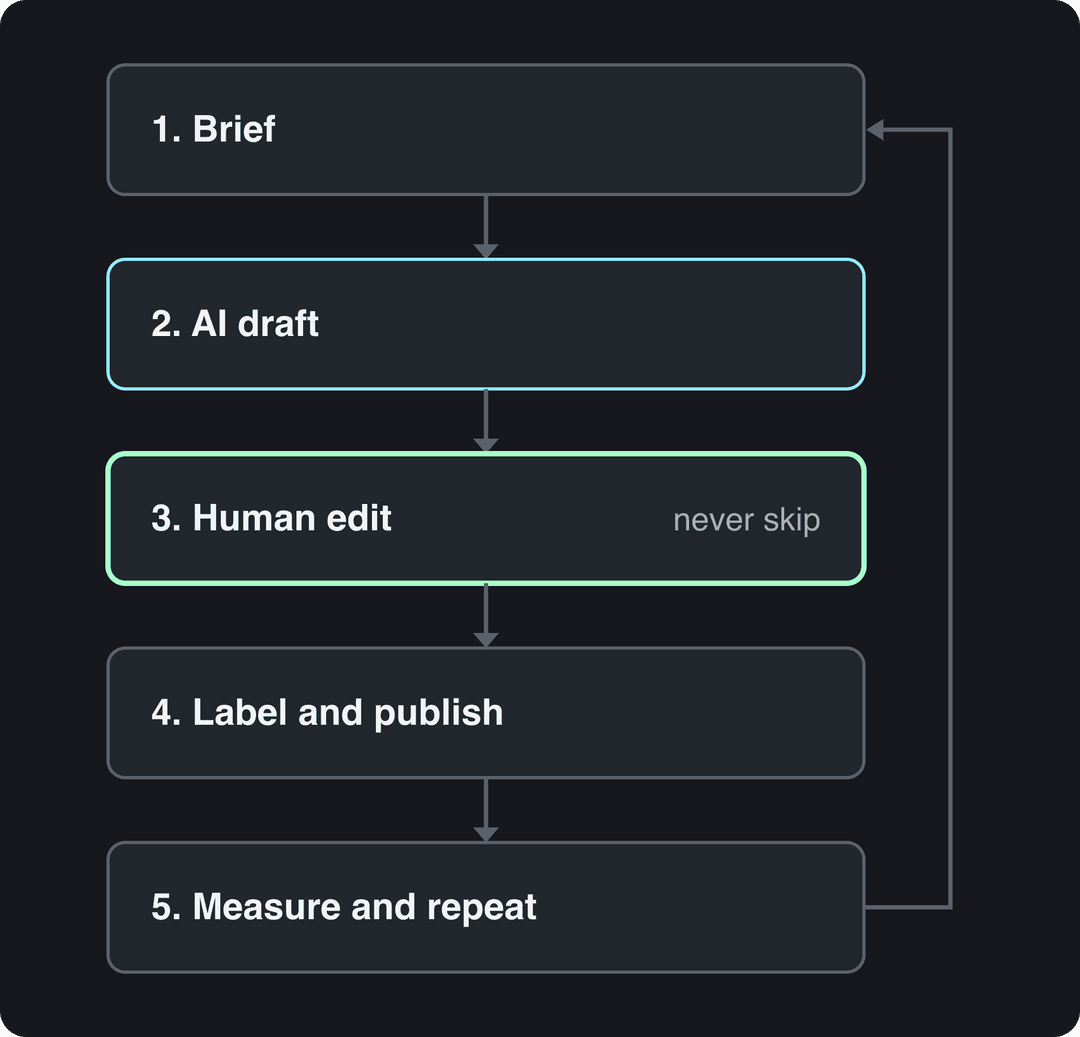
Step 1: Write a brief, not a prompt
Generic in, generic out. Give the AI what you would give a freelance writer. Copy this template:
Platform and format: [Instagram Reel caption / LinkedIn post / TikTok script]
Audience: [who they are and what they already know]
Goal: [comments / saves / link clicks / follows]
Topic and angle: [the one point this post makes]
Proof: [a real number, example or customer detail]
Tone: [three adjectives]. Never use: [words you avoid]
Examples: [paste two or three of your best posts]
Output: [three variations, each with a different hook]The "Proof" line matters most. The AI cannot know your numbers, customers or opinions. If you do not supply a specific detail, it fills the gap with filler.
Step 2: Let the AI draft variations
Ask for several drafts with different angles rather than one "perfect" post: a question hook, a bold claim, a short story, a list. Pick the strongest and ask for edits on that one only. The variations double as free A/B tests: post two hook styles in the same week and keep the winner.
Step 3: Edit it like an editor-in-chief
This is the step most people skip, and the one audiences punish. Before anything goes out:
- Fact-check every claim, number and product detail. Models invent with confidence.
- Cut the stock phrases: generic openers, stacked emojis, hype adjectives, anything you would never say out loud.
- Add one detail only you know: a customer question, a behind-the-scenes number, an opinion.
- Check the length against the platform (see the Instagram specs below).
- Read it aloud. If the first line sounds like an ad, rewrite it.
Length matters more than most AI tools assume. In Revid's analysis of 176,367 TikToks with 1,000+ likes posted between October 2025 and October 2026, captions of 41 to 80 characters had the best median views (67K, with 12.5% passing 1M), while videos with no caption had a median of 36K (7.5%). The sample only holds videos that already reached 1,000 likes, so it shows what strong videos have in common, not a guaranteed cause. The full method is in our study of what makes a TikTok go viral. In practice: when the AI hands you a paragraph for a TikTok caption, cut it to one sentence that adds context the video does not show.
A caption of 41 to 80 characters (one clear sentence) performed best. Posts with no caption at all earned roughly half the median views.
Source: Revid analysis of 176,367 TikToks with 1,000+ likes posted between Oct 1, 2025 and Oct 16, 2026 (61,203 creators)
Show the data
| Median views | Share that passed 1M views | |
|---|---|---|
| No caption | 36.4K | 7.5% |
| 1 to 40 | 58K | 11.1% |
| 41 to 80 | 67.3K | 12.5% |
| 81 to 150 | 66.6K | 12.3% |
| 151 to 300 | 63.8K | 11% |
| 300+ | 67.8K | 11.7% |
Step 4: Label realistic AI media, then publish
If the post includes photorealistic AI video or images, or a realistic AI voice, turn on the platform's AI label (rules below). Then schedule or post. Tools with direct publishing remove the export-and-upload step. Revid, for example, publishes and schedules to TikTok, Instagram and YouTube from one queue.
Step 5: Measure and feed results back
After a week, compare posts by views, saves, shares and comments. Paste your best performers into the next brief as examples, and note which hook styles lost. This loop turns a draft machine into a system that gets better every week.
For a look at how one creator structures an AI writing workflow end to end, this breakdown is worth the watch:
Prompt to try
Make a 30-second vertical TikTok for small bakery owners about the three pricing mistakes that quietly kill their profit. Open with the hook "You're losing money on every croissant" shown as on-screen text, then three short beats with warm stock footage of a bakery and a friendly voiceover, and end on a one-line payoff with bold captions.
Copy-paste prompts for each platform
Each platform rewards a different shape, so give the AI the shape explicitly. Replace the brackets and keep the rest.
LinkedIn post:
Write a LinkedIn post for [audience] about [lesson]. Open with a one-line observation, not a question. Use short paragraphs, include this real example: [detail]. End with a question that invites people to share their own experience. Give me three versions.X post:
Turn this announcement into one post for X: [paste text]. State the user benefit in the first sentence. No hype words, at most one hashtag. Then write a three-post thread version.Instagram Reel caption:
Write an Instagram caption for a Reel that shows [what is on screen]. Put the hook in the first line, because Instagram cuts long captions off in the feed. Add one line of context the video does not show, one call to action (save, comment a keyword, or link in bio) and up to five specific hashtags.TikTok script:
Write a 30-second TikTok script about [topic] for [audience]. Line one is the hook, spoken and shown as on-screen text. Then three short beats and a payoff. Finish with a caption of 41 to 80 characters.For scripts with hooks built in, our free TikTok script generator runs the same structure for you.
How to use an AI content generator for Instagram
Instagram is where AI drafts break most often, because older tools still suggest long hashtag blocks and outdated length limits. Give the AI these current specs in your brief:
| Element | Current limit or spec |
|---|---|
| Reel aspect ratio | 1.91:1 to 9:16, with 9:16 recommended for full screen |
| Reel length | Up to 20 minutes, but Reels over 3 minutes are not recommended to non-followers |
| Frame rate and resolution | At least 30 FPS and 720 px |
| Caption | Up to 2,200 characters |
| Hashtags | Up to 5 per post (more and the caption won't post) |
| Carousel | Up to 20 photos and videos |
| Reel cover | 420x654 px recommended |
The hashtag cap is the most common failure: if your generator suggests a dozen tags, the caption will not post. TikTok data points the same way. In the same Revid sample of TikToks, posts with 4 hashtags had the best median views (77K, 13.4% past 1M) and 3 hashtags had 75K, while no hashtags got 51K (9.8%) and 9 or more only 16K (7.8%). That is TikTok data, not Instagram, but the rule carries over: ask the AI for three to five specific hashtags and delete the generic ones.
Posts with 3 or 4 hashtags earned the most views. Captions stuffed with 9 or more hashtags did worst of all, with median views cut by about 80%.
Source: Revid analysis of 176,367 TikToks with 1,000+ likes posted between Oct 1, 2025 and Oct 16, 2026 (61,203 creators)
Show the data
| Median views | Share that passed 1M views | |
|---|---|---|
| None | 51.1K | 9.8% |
| 1 | 64K | 11.8% |
| 2 | 71.3K | 12.7% |
| 3 | 75.4K | 13.1% |
| 4 | 77.2K | 13.4% |
| 5 | 67.3K | 12.1% |
| 6 to 8 | 71.8K | 12.7% |
| 9+ | 15.6K | 7.8% |
Two more Instagram tips make AI content safer to test:
- Trial reels are shown first to non-followers, report insights within 24 hours and do not affect the ranking of your standard reels. You need a public account with at least 200 followers (professional) or 1,000 followers (personal). Post an AI-made Reel as a trial before it reaches your followers.
- Captions on a budget: our free Instagram caption generator drafts several caption options per post for you to edit.
Rules for AI-generated social media content in 2026
AI-generated social media content is allowed on every major platform, but realistic AI media must be disclosed. Platforms are labeling at scale: TikTok said in July 2026 that it had labeled over 3 billion videos as AI-generated. Here is what each platform asks of you:
| Platform | When you must disclose | What viewers see | Effect on reach |
|---|---|---|---|
| TikTok | AI content with realistic images, audio or video | "Creator labeled as AI-generated"; TikTok may auto-label uploads with C2PA Content Credentials, and an auto label cannot be removed | None if the video follows the Community Guidelines |
| Instagram, Facebook, Threads | Photorealistic video or realistic-sounding audio that was created or altered digitally | "AI info" label | Meta may penalize undisclosed content; since September 2026, Instagram accounts featuring an AI-generated person without the "AI-generated profile" label can have their reach limited |
| YouTube | Realistic altered or synthetic content, via the "AI use" setting in YouTube Studio | A label below the player, or an overlay on Shorts; since May 2026 YouTube auto-labels undisclosed photorealistic AI | Disclosure alone does not limit audience or earnings |
You do not need to disclose AI-written scripts, captions, titles or thumbnails on YouTube, or cloning your own voice for a voice-over.
Originality is the other line to watch:
- YouTube allows AI-assisted videos that show your creative vision and give real value. It does not monetize mass-produced template content, incoherent AI clip compilations, or AI personas posing as experts on health, legal, financial or political topics. On July 15, 2025 it renamed its "repetitious content" policy to "inauthentic content".
- Facebook has, since March 2026, deprioritized reaction-only, clip-stitching and narrate-what's-on-screen reels, plus reposts changed only with borders, captions or speed. Repeat offenders can be demonetized.
- TikTok Creator Rewards does not count lightly modified reposts, Duets, Stitches or looping videos as original.
Prompt to try
Create a 40-second Instagram Reel for freelance designers on how to write a client brief that prevents endless revisions. Hook in the first line: "Most revisions start before you open Figma." Use clean motion graphics, a calm confident voice, and captions that highlight each of the four brief sections.
How to make social media videos with Revid
When your posts are videos (Reels, TikToks, Shorts), Revid covers the full pipeline in one place:
- Open the AI video generator and enter an idea, a script or a link (a blog post, a YouTube video, an X or Reddit post). Or search the viral video library by topic and pick "Make it about your topic" to apply a proven hook and pacing to your niche.
- Revid writes the script and builds scene-by-scene visuals: stock footage, AI images, or AI video from Seedance 2.5, MiniMax Hailuo H3, Wan 3.0 or Google Veo 3. It adds a voice-over in 70+ languages, synced captions and music.
- Fix any line, scene or caption in the timeline editor, then export in 720p, 1080p or 4K.
- Publish or schedule directly to TikTok, Instagram and YouTube, then check each post's views, likes and comments.
For Instagram, the AI Reel generator starts in 9:16. To keep a channel active, Auto-Mode workers create a fresh video every day from a prompt or a content source. Sign-up is free and new accounts get free credits to try video creation, no credit card needed; regular creation then uses the monthly credits of a paid plan, from $39/month.
FAQ
Is there a free AI content generator for social media?
Yes, for text. General chat assistants and many caption tools have free tiers, and Revid's Instagram caption generator is free. AI video generation almost always uses paid credits: Revid sign-up, free starter credits and viral library search cost nothing, while regular video creation starts at $39/month.
Which platform can auto-generate creator briefs and content briefs?
Any general AI assistant (ChatGPT, Claude, Gemini) can turn the brief template above into a full creator or content brief in seconds. For video, Revid's free deep analysis (up to 60 a day) breaks any viral video into its hook, timed structure, three ways to adapt it and a checklist to replicate it, which works as a brief you can hand to a creator.
Will AI make my brand sound robotic?
Only if you publish the first draft. Paste your best posts as examples, list the words you never use, and rewrite the first line of every draft yourself.
Can you monetize AI-generated social media content?
Yes, on most platforms, as long as it is original. YouTube monetizes AI-assisted videos that show your creative vision but not mass-produced template content; TikTok Creator Rewards excludes lightly modified reposts, and Facebook deprioritizes unoriginal reels.
Will AI replace social media managers?
No. It replaces the blank page and the busywork of reformatting, while strategy, fact-checking, replying to comments and knowing what your audience cares about still need a person.