Automated Content Creation in 2026: What to Automate and How
Which content steps to automate, how to wire a pipeline with a human review gate, a free content brief template, how automated publishing works, and where AI still falls short in 2026.

On this page
Automated content creation means using software to run the repeatable steps of making content (research, briefs, first drafts, visuals, formatting and publishing) while a person sets the strategy and approves what goes out. The setup that works is a pipeline: a trigger, an AI generation step, a human review gate, scheduled publishing and a measurement loop.
The review gate is the step most teams skip, and it is the expensive mistake. In Sprout Social research published in March 2026, 50% of Gen Z said they had already blocked, muted or unfollowed a brand or creator because its content felt like "AI slop", and 56% of consumers said they see AI slop often or very often. YouTube and Facebook now also cut monetization or reach for mass-produced, unoriginal content. Automate the labor, not the judgment.
Below: which steps to hand to software, how to wire the pipeline, a content brief template, how automated publishing and remixing work, where video automation now runs end to end, and where AI still falls short.
What is content automation?
Content automation is the use of software to create, adapt, publish and track content with as little manual handling as possible. Automated content creation is the production part. Content automation also covers distribution (scheduling and cross-posting), personalization (changing content by audience segment) and content operations (assigning tasks, moving drafts between stages, reminders and reports).
AI content automation is the same pipeline with an AI model in the generation step: it writes the brief, draft, script, caption or video that people used to produce by hand. The rest of the chain (triggers, approvals, scheduling) is ordinary workflow software.
Where businesses use it most:
- Blog and SEO content: briefs built from keyword data, first drafts, on-page checks.
- Social media: captions, graphics and short videos, queued and posted on a schedule.
- Email: newsletters assembled from your latest posts or an RSS feed.
- Product content: descriptions generated from a spreadsheet of specs.
- Repurposing: one webinar or long video turned into clips, posts and emails.
| Manual process | Automated process | |
|---|---|---|
| Ideas | Brainstorming sessions | Topic suggestions from search and trend data |
| First draft | A writer starts from a blank page | AI drafts from a brief, an editor rewrites |
| Distribution | Posting to each channel by hand | One approved queue publishes everywhere on schedule |
| Repurposing | Re-editing each asset by hand | One asset converted into several formats by rules |
| Where people spend time | Repetitive production | Strategy, editing and review |
What can you automate in content creation?
Most of the production chain, but not the decisions. Use this split:
| Step | Automate it? | What software does | What a person still does |
|---|---|---|---|
| Topic research | Yes | Pulls keywords, search demand, competitor rankings, trending formats | Picks the topics that fit the business |
| Content briefs | Yes | Fills a brief template from search data | Sets the angle and the one point the piece must make |
| First drafts and scripts | Yes | Writes from the brief and your prompt library | Adds expertise, examples and opinion |
| Visuals and video | Mostly | Generates images, b-roll, voice-over, captions, finished short videos | Checks product accuracy and brand fit |
| Editing and SEO checks | Partly | Grammar, readability, keyword coverage, plagiarism scans | Fact-checks every claim and number |
| Repurposing | Yes | Turns one post into clips, threads and captions | Chooses the strongest angles |
| Scheduling and publishing | Yes | Posts to each platform on a schedule | Approves the queue |
| Measurement | Yes | Collects views, clicks and leads in one place | Decides what to change |
The decision rule: if a step has a right answer you can write down (a format, a checklist, a schedule), automate it. If it needs taste or accountability (what to say, whether a claim is true), keep a person on it.
This is also where teams already are. According to HubSpot's 2026 State of Marketing Report, 80% of marketers use AI for content creation and 75% use it for media production. More adoption numbers are on our short-form video statistics page.
How an automated content pipeline works
Every working content creation pipeline has the same five parts, whatever tools you use:
- Trigger. Something starts the run: a new keyword in a spreadsheet, a card moved on a board, a new item in an RSS feed, or a daily schedule.
- Generation. An AI model produces the brief, draft, script, image or video from a template and a saved prompt.
- Human review gate. An editor checks facts, voice and originality, then approves, edits or rejects.
- Publishing. Approved pieces go to a queue that posts on schedule.
- Measurement. Results flow back, and you rewrite the briefs and prompts that produced weak pieces.
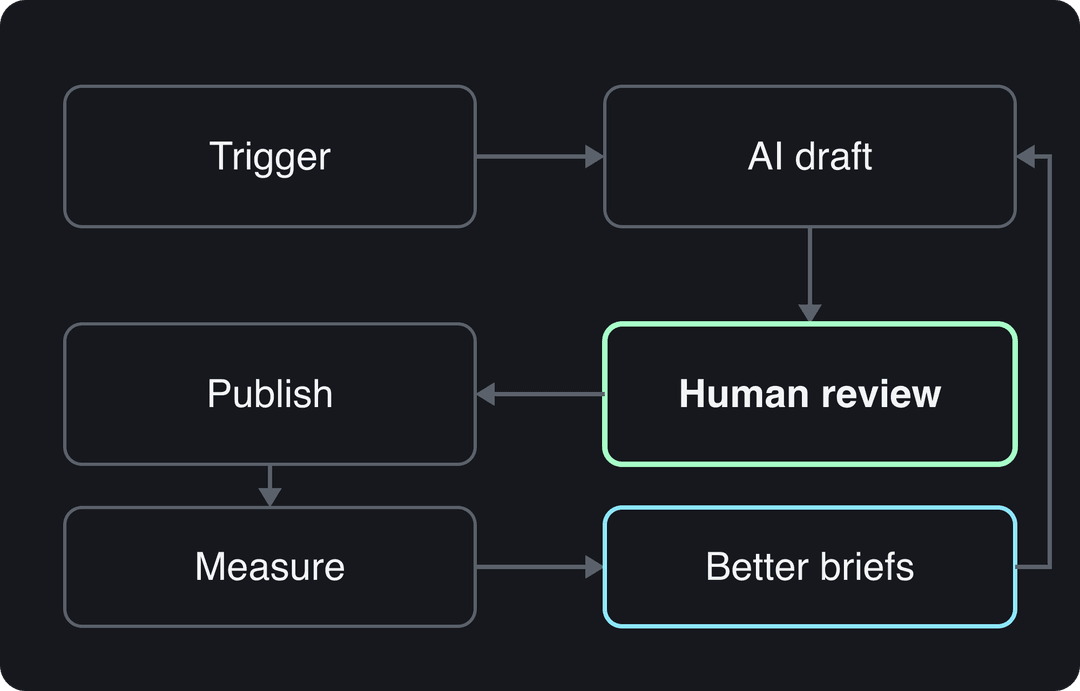
A concrete example: when you move a card in Trello to a "Draft" list, Zapier sends the card title and the linked brief to an AI model, saves the draft to a Google Doc and assigns it to an editor. Nobody copies or pastes anything, and nothing publishes until the editor moves the card to "Approved".
Autonomous vs hybrid content creation: which should you run?
Autonomous content creation means no person checks a piece before it goes live. Hybrid content creation means AI produces and a person approves. Most teams should run hybrid.
| Autonomous | Hybrid | |
|---|---|---|
| Speed | Fastest | Fast, limited by review time |
| Risk | Errors and off-brand posts go live | Caught at the review gate |
| Platform policy risk | Highest (mass-produced content rules) | Low if the editor adds real value |
| Best for | Fixed formats with no factual claims | Anything that states facts or speaks for a brand |
If a wrong post would cost you little and the format never changes, autonomous can work. If the content gives advice, quotes numbers or represents your company, keep the gate. Hybrid is also the realistic way to do rapid content creation: the speed comes from automated drafts, not from skipping the check.
How to automate content creation, step by step
- Pick one bottleneck and one metric. Start with the slowest step, not the whole workflow. Going from one blog post to four per week needs a different setup than turning each post into short videos.
- Write your templates before buying tools. You need three: a brief template (below), a drafting prompt that states audience, tone, structure and what to avoid, and a short style sheet. Generic prompts produce generic drafts, and fixing them eats the time you saved.
- Choose one tool per job. Research, drafting, visuals, scheduling and a connector. The tools table below sorts them by job, and our roundup of small business automation tools covers more options.
- Connect the tools with a trigger. Use Zapier or a similar connector so each step hands its output to the next.
- Add the review gate with a checklist. Facts and numbers sourced, claims true today, brand voice, original angle, links work, AI disclosure set where required.
- Run it for a few weeks, then fix the inputs. When a piece needs heavy edits, change the brief or prompt that produced it, not just the piece. Document each step so anyone can fix it, and let the editors who run the gate help choose the tools: they know where drafts break.
For how these steps map onto the stages from idea to published piece, see our breakdown of content creation workflow stages.
https://www.youtube.com/embed/JtdUgJGI_Oo
What is an automated content brief?
An automated content brief is a writing brief that software fills in from search and audience data, so every writer or AI model starts from the same structured instructions. Content brief automation removes the slowest part of briefing (collecting keywords, competitor headings and questions) and leaves the editor to set the angle.
A brief template that works for both people and AI models:
| Field | What goes in it | Filled by |
|---|---|---|
| Main search | The query the piece must win | SEO tool |
| Related searches | Close variants and questions people type | SEO tool |
| Reader and intent | Who is searching and what they want to do next | Editor |
| Angle | The one point this piece makes that others miss | Editor |
| Outline | Headings, drawn from top-ranking pages and the questions list | AI, edited by a person |
| Facts to use | Numbers and sources the writer may cite | Editor |
| Internal links | Pages to link and their anchors | AI from your sitemap |
| Format | Length range, tables, examples, call to action | Template default |
To automate it, start the run when a keyword is added to a sheet, pull keyword and competitor data from your SEO tool, have an AI model fill the template, and save the result as a document for the editor. The editor only writes two fields by hand: the angle and the facts to use.
What's the fastest way to standardize brief creation workflows?
Use one template, make every field required, and store every brief in one place. Then write one prompt that fills the template, and version it: when briefs come out weak, fix the prompt once instead of fixing each brief.
How to automate creator briefs
The same method works when you brief UGC creators or influencers. Keep a fixed template (product, key message, must-say claims, must-avoid claims, format and length, deliverables, deadline, usage rights) and let a form or spreadsheet row generate each creator's brief. Have a person approve the claims section, because that is where legal and accuracy problems start.
How does content remix automation work?
Content remix automation turns one source into many formats by rule, so your best material keeps working after it is published. A webinar is the classic case:
- Transcribe the source automatically (webinar, podcast, long video or blog post).
- Have an AI model pull the strongest moments and draft short clips, quote posts, a blog summary and an email.
- Have a person pick the angles and check every quote in its original context, since a line cut loose can say the opposite of what the speaker meant.
- Send each format to its own queue with platform-specific captions.
Publishers run the same idea in reverse: a connector watches the site's RSS feed and builds a weekly newsletter from new headlines and summaries, and posts each new article to social the moment it goes live. For short video, Revid also turns long YouTube videos into Shorts and can remix a proven viral video into an original one (more on that below).
How do automated content publishing and distribution work?
Automated content publishing means approved pieces post themselves from one queue, formatted for each platform, at times set by rules. Content distribution automation adds everything that happens after publishing: cross-posting, newsletter inclusion, team notifications and resharing old posts that still perform.
What to set up:
- One approval queue for every channel. Schedulers such as Buffer and Hootsuite, or Revid for video, post to several networks from it.
- Per-platform formatting rules. Limits differ: Instagram allows up to 5 hashtags per post, and YouTube titles stop at 100 characters. Write them into your templates so drafts arrive compliant.
- Timing from your own analytics. TikTok Studio's Viewers tab shows when your viewers were most active over the last 7 days, and Instagram's follower insights show most-active times once you have at least 100 followers.
- Notifications. Each publish can ping a Slack channel or add the piece to the next newsletter automatically.
To automate publishing decisions with AI instead of by hand, give the software rules rather than free rein: post inside the windows your analytics show, hold any piece that fails the review checklist, and pause the whole queue when news breaks that could make a scheduled post look tone-deaf. Our guide on how to automate social media posts walks through the scheduling setup.
Prompt to try
Make a 40-second faceless explainer on why most content calendars fail after three weeks. Open with the hook "Your content calendar isn't the problem, your brief is." Use clean motion graphics, a calm confident voice-over and bold captions, and end with one tip: write the angle before the outline.
Automating short-form video: where pipelines now run end to end
Short-form video is where automation has gone furthest, because a faceless video (voice-over, captions, b-roll or AI visuals) can be made without anyone filming. That does not have to cost you reach. In Revid's analysis of 176,367 TikToks with 1,000+ likes posted between October 2025 and October 2026, faceless videos had a median of 114K views and 17.4% passed 1 million, against 67K and 12.7% for videos with one person on camera. Faceless tutorials did even better against on-camera tutorials: a 156K median versus 52K. This is TikTok data, and the sample only includes videos that already reached 1,000 likes, so it shows what successful videos have in common, not a cause. The method is in our study of what makes a TikTok go viral.
Faceless videos earned a median of 114K views, against 67K for videos with one person on camera, and passed 1M views 38% more often.
Source: Revid analysis of 176,367 TikToks with 1,000+ likes posted between Oct 1, 2025 and Oct 16, 2026 (61,203 creators)
Show the data
| Median views | Share that passed 1M views | |
|---|---|---|
| Animals | 147.4K | 24.1% |
| Faceless | 113.9K | 17.4% |
| Groups of people | 96.1K | 16% |
| Objects or products | 70.8K | 13.2% |
| One person on camera | 67.4K | 12.7% |
If you are looking for AI content pipeline automation that includes video creation, Revid covers the whole loop for TikTok, Instagram Reels and YouTube Shorts. Revid users render more than 100,000 videos and publish more than 30,000 through it every month. A typical setup:
- Start from a proven format, not a blank prompt. Search Revid's library of about 2.77 million short-form videos with their engagement data and remix a viral video into an original one, or let a Search & Remix automation pick a high-engagement reference on your topic (it never reuses the same reference twice).
- Or start from your own content. Turn a blog post into a narrated short with the article to video converter, so every post you publish also becomes a video.
- Put it on a schedule. An Auto-Mode worker creates a fresh video every day from a prompt or a content source (3 workers on the Growth plan, $39/month).
- Keep the review gate. Open any video in the timeline editor to fix a scene before it posts, then schedule it to TikTok, Instagram and YouTube from one publishing queue.
- Close the loop. Every post reports its views, likes and comments, and a post that did well can be remixed in one click. If your pipeline runs through AI agents, every paid plan includes the Revid API, MCP server and CLI.
Prompt to try
Create a 30-second vertical product video for a waterproof hiking backpack using its real product photos. Hook: "This bag survived a week of rain and my coffee spills." Keep a friendly upbeat voice-over, show three features from the spec sheet (28L capacity, roll-top seal, padded laptop sleeve) and close with a clear call to shop.
Content automation for products and personalization
Product content automation is the clearest win for e-commerce: feed a spreadsheet of specs (sizes, materials, features) to an AI model with a description template, and it drafts a description for every product in the catalog. The rule: generate from the spec sheet, never from the product name alone, and have a person spot-check claims about materials, sizing and safety, because those are the errors that cause returns. Most store platforms, Shopify included, can also build collections automatically from rules such as a tag or a price, so new products land in the right collection without anyone sorting them.
Personalization automation swaps parts of a message by audience segment: a different headline, product or call to action based on behavior or past purchases. It only works on clean data. A personalized email with the wrong name or an interest the customer never had does more damage than a generic one, so clean and segment your lists before you switch it on. If you want to go beyond linear video, this walkthrough on creating interactive videos covers formats that let viewers choose what they see.
Where automation still falls short
Automation fails in predictable places. Plan the review gate around them.
- Facts. AI models state wrong numbers and outdated rules with confidence. Every figure needs a source a person has opened.
- Originality rules. On July 15, 2025, YouTube renamed its "repetitious content" policy to "inauthentic content", covering repetitive or mass-produced videos, and AI content made with generic templates without the creator's own insight cannot be monetized. Using AI is allowed when the result shows your creative vision and gives real value. Since March 2026, Facebook deprioritizes reaction-only reels, clip compilations, narrate-what's-on-screen reels and reposts changed only with borders, captions or speed.
- Search. Google says it rewards helpful content however it is produced, but its spam policies treat pages mass-produced mainly to rank as "scaled content abuse".
- Taste. Software can produce ten hooks; picking the one that fits your audience and your brand is still a human call.
Can you automate most of your visual content with AI?
Yes for b-roll, illustrations, social graphics, faceless explainers, voice-overs and captions: these are now routine to generate at volume. It still falls short on exact product details (a model can change a logo, a label or a shape), on real people and real events, and on anything where a fact shown on screen must be right. For product content, start from your real product photos and let AI handle motion, voice and captions around them.
Automated quality control vs periodic manual review
Use both, for different jobs. Automated checks run on every piece and catch what has a clear rule: broken links, missing alt text, banned words, keyword coverage, plagiarism matches, an outdated year in a title. A periodic manual review catches what rules miss: claims that were true when published and are not anymore, advice that no longer fits your product, pieces that rank but do not convert. Run the automated checks before publishing, and schedule the manual audit for your highest-traffic pages first.
Which AI content platforms automate which steps?
No single platform does everything well. Pick one tool per job and connect them.
| Job | Tools | What they automate |
|---|---|---|
| Keyword and topic research | Semrush, Ahrefs | Keyword data, competitor rankings, content gaps |
| Drafting copy | Jasper, Copy.ai | Drafts and marketing copy from templates and brand voice settings |
| Brand consistency at team scale | Writer | Style guide and terminology rules applied to every draft |
| On-page SEO | Surfer SEO | Keyword coverage and structure compared with top-ranking pages |
| Editing | Grammarly | Grammar, clarity and tone checks |
| Images | Midjourney | Images from text prompts |
| Short-form video | Revid | Script, visuals, voice-over in 70+ languages, captions, music, scheduling and publishing |
| Social scheduling | Buffer, Hootsuite | Queues and publishes posts across networks |
| Connecting apps | Zapier | Passes outputs from one tool to the next |
If you want market context before investing, Grand View Research's AI content creation market report and Cognitive Market Research's digital content creation market report both track the category. Their forecasts depend on their methods; treat them as background, not as a reason to buy a tool.
How to tell if your automation is paying off
Track three groups of numbers from the first week:
- Output: pieces published per week, by format.
- Efficiency: hours per piece from brief to publish, and editing time per piece.
- Performance: organic traffic, views, engagement and leads per piece, compared with your manual baseline.
If output went up but performance per piece fell, you automated the judgment along with the labor: tighten the brief and the review gate. If editors spend about as long fixing drafts as they would writing them, the prompt or brief is the problem. And judge success by outcomes, not volume: "did content bring more qualified leads" beats "did we ship more posts". For a framework on tying content to results, this guide on how to measure content performance covers the main metrics and ROI.
FAQ
Is it worth automating parts of content creation to scale output?
Yes, for steps with repeatable answers: research, briefs, first drafts, repurposing and scheduling. It stops being worth it when quality per piece drops, so measure performance per piece, not just volume.
Will automated content hurt my SEO?
Not by itself. Google says it rewards helpful content however it is produced, but mass-producing unedited pages mainly to rank falls under its scaled content abuse policy. Keep a person editing for accuracy and adding something competitors don't have.
How do I automate content creation from an XML or RSS feed?
Use the feed as a trigger. RSS feeds are XML, and connectors such as Zapier can watch a feed and start a workflow (draft a summary, a social post or a video script) each time a new item appears, then send it to review.
Can AI-generated content be monetized on YouTube?
Yes, if the final video shows your creative vision and gives educational or entertainment value. YouTube does not monetize template-based, mass-produced AI content, incoherent AI clip compilations, or AI personas presented as human experts giving health, legal, financial or political advice.
Will content automation replace marketers?
No. It replaces repetitive production work, while strategy, angles, fact-checking and approval stay with people, and platforms increasingly penalize content that skips those steps.
How do I start automating on a small budget?
Automate one bottleneck first, using free plans or trials, and prove it saves time before adding tools. A brief template plus one AI model and a scheduler covers most of the gain for a small team.