Content Creation Workflow: 5 Stages, Templates and Tools (2026)
The five stages of a content creation workflow, with a copyable brief template, review rules that remove bottlenecks, where AI fits, and the KPIs that decide what you make next.

On this page
A content creation workflow is the fixed sequence every piece of content follows: plan, create, review, publish and measure, with one owner, one template and one deadline per stage. What you learn when you measure decides what you plan next, so the workflow runs as a loop rather than a line.
Most teams try to speed up the creation stage, but that is rarely where the time goes. Work stalls at the edges: a vague brief that forces rewrites, and a review stage with no deadline and no final decider. Fix those two and output goes up without anyone writing or editing faster.
The 5 stages of a content creation workflow
| Stage | What happens | Output | Done when |
|---|---|---|---|
| Plan | Audience, goal, format, brief, calendar slot | Approved brief | The brief names a goal, a format and an owner |
| Create | Write, design, film or generate from a template | Complete first draft | Every section of the template is filled |
| Review | Accuracy, brand voice, platform specs, approval | Approved final version | One named decider signs off |
| Publish | Adapt per channel, schedule, promote, repurpose | Live posts on each channel | Every channel version is scheduled |
| Measure | Track KPIs, audit, write down lessons | Inputs for the next plan | Lessons are added to the next briefs |
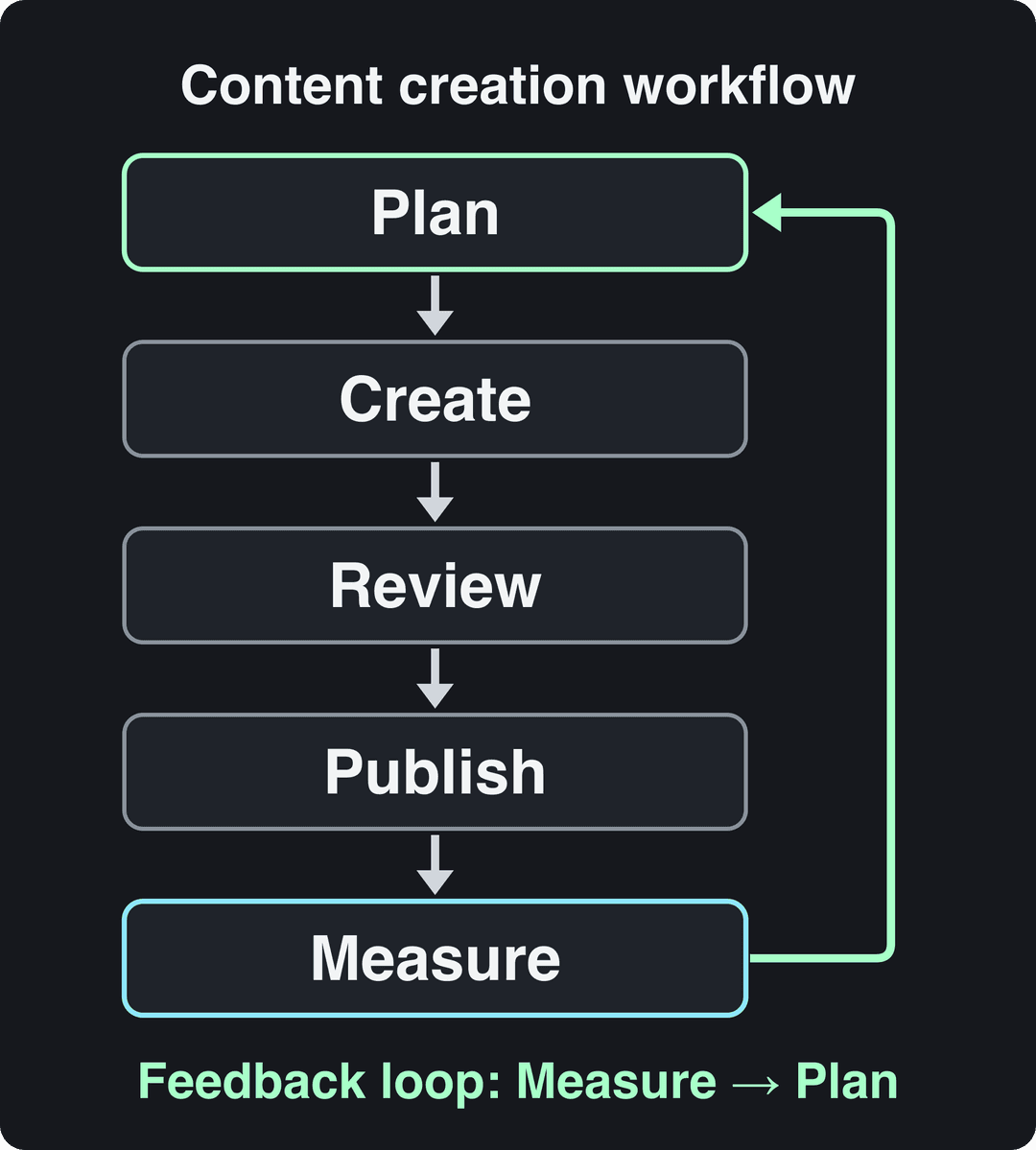
Give each stage an owner and a written "done when" rule, even if you work alone. For a solo creator, the stages become separate work sessions: plan on one day, batch-create on another, then review with fresh eyes before anything is scheduled. If you edit while you are still deciding what the piece is about, it will drag on.
If you need to justify a documented process to your team, market.us compiles a roundup of digital content creation statistics on the size of the market. Trace any figure back to its original source before you quote it.
Stage 1: Plan around an audience, a goal and a format
Define who it is for and what it should do
Write one sentence for the audience ("first-time SaaS founders who have never made a launch video") and one for the goal ("get trial sign-ups from the product page"). If a piece does not serve a named goal, take it off the calendar. The goal also sets the KPI you will read in stage 5, so decide it now, not after the post is live.
Then find out where that audience already spends time and what it watches there. Comments under competitors' posts, questions from sales calls and your own search data are faster than any survey.
Choose pillars, clusters and a calendar
These three tools work in order:
- Content pillars: the few themes your brand should be known for.
- Topic clusters: the related pieces that cover each pillar in depth.
- The calendar: when each piece ships.
| Planning framework | Best for | Main benefit | Limitation |
|---|---|---|---|
| Editorial calendar | Teams with a regular publishing rhythm | Keeps output consistent | Gets rigid when news or trends break |
| Content pillars | Building authority on a few themes | Every idea maps to a theme | Needs strategy work upfront |
| Topic clusters | Search traffic and in-depth coverage | Strong internal linking and SEO | Slow to build out fully |
A social media calendar template gives you a calendar ready to fill. Leave open slots for reactive posts. Otherwise the calendar pushes you to publish stale ideas while a trend passes you by.
Prompt to try
Make a 40-second faceless tutorial on how to batch-create a week of short videos in one afternoon. Open with the hook "Stop filming every day. Do this instead." Use clean screen-style visuals, bold captions and a calm, confident voice-over, then end with one clear step the viewer can try today.
Choose the format before you write a word
Format is a planning decision, not a production one, and on short-form video it moves results more than polish does. In Revid's analysis of 176,367 TikToks with 1,000+ likes posted between October 2025 and October 2026, challenges had a median of 182K views and comedy 155K, while storytelling had 66K and tutorials 62K. This is TikTok data, and it only includes videos that already passed 1,000 likes, so it shows what top performers have in common rather than what causes views. The full method is in our study of what makes a TikTok go viral.
Challenges and comedy passed 1M views about twice as often as tutorials and storytelling, which are the most common formats.
Source: Revid analysis of 176,367 TikToks with 1,000+ likes posted between Oct 1, 2025 and Oct 16, 2026 (61,203 creators)
Show the data
| Median views | Share that passed 1M views | |
|---|---|---|
| Challenge | 182.3K | 25.6% |
| Comedy | 154.8K | 22.1% |
| Reaction | 104.8K | 16% |
| Dance | 83.8K | 15.5% |
| Storytelling | 66.1K | 12.2% |
| Lip Sync | 61.7K | 12.3% |
| Tutorial | 61.9K | 12.1% |
The same study found a large gap inside a single format: faceless tutorials had a 156K median against 52K for tutorials with a person on camera. The decision rule:
- If your goal is reach, plan formats with a high ceiling in your niche (comedy, reactions, challenges).
- If your goal is leads, a tutorial still makes sense because it attracts the right viewer. Consider a faceless version and give it a stronger hook.
Write a one-page brief
The brief is the handoff between planning and creation. Fill every line before anyone starts drafting:
- Working title and the one-sentence angle
- Audience and the problem this piece solves
- Goal and the KPI that will judge it
- Format and main channel, plus the channels it will be repurposed to
- Hook or opening line, in draft
- A reference: an existing piece that performed, and why
- Key points, with a source for every fact
- Call to action
- Owner, reviewer, decider and due dates
Prompt to try
Create a 30-second vertical video for first-time SaaS founders on the three mistakes that ruin a launch video. Hook: "Your launch video is losing sign-ups in the first 3 seconds." Follow the hook, setup, three value beats, payoff and a CTA to follow for more, with fast cuts and on-screen captions.
Stage 2: Create from templates, in batches
Templates remove the blank page and keep the brand consistent when several people produce. Build one for each format you publish regularly:
| Format | What the template fixes | What stays free |
|---|---|---|
| Blog post | Heading structure, answer-first intro, CTA block, SEO fields | Angle, examples, voice |
| Social post | Visual layout, caption structure, hashtag set | Hook, image, copy |
| Short video script | Hook, setup, value beats, payoff, CTA | Topic, visuals, delivery |
| Podcast | Intro and outro, segment order, question bank | Guest, conversation |
For social posts, keep separate layout and caption templates for Facebook and Instagram. Crops, hashtag rules and caption habits differ between them.
Here is a short video script template you can copy:
HOOK: the claim, question or visual that stops the scroll
SETUP: why this matters to the viewer, in one line
VALUE: a few points, one idea per shot
PAYOFF: the result, the reveal or the answer
CTA: one action (follow, comment, click the link)Store every template in one shared place with a version date, so nobody drafts from an outdated copy. Then batch: make several pieces of the same format in one session. Switching between writing, designing and editing is where solo creators lose the most time. For the filming and editing side, our video production workflow guide goes step by step.
Plan for repurposing while you create. If each section of a blog post can stand on its own, it can later become a post, a carousel slide or a short video.
Where AI fits in a content creation workflow
AI is fastest at first drafts and repetitive transformations, and weakest at deciding what is worth saying. Split the work accordingly:
| Task | Let AI do it | Keep a human on it |
|---|---|---|
| Ideas and outlines | Generate angles and outlines from a brief | Pick the angle that serves the goal |
| First drafts | Draft from the outline and template | Add the examples, data and opinions only you have |
| Rewrites | Shorten, simplify, adapt per channel | Check that the meaning did not change |
| Captions and titles | Produce variants to test | Choose one and check its claims |
| Video | Generate visuals, voice-over and captions | Approve the script and the final cut |
| Facts | Nothing on its own | Verify every number against its source |
Writing assistants such as Jasper handle outlines, drafts and rewrites for text. Give them your editorial guidelines and a few of your best pieces so the drafts start closer to your voice. Our list of AI tools for content creation compares more options by task.
AI is already mainstream in video: 63% of video marketers in Wyzowl's 2026 survey said they had used AI video tools to create or edit marketing videos, up from 51% a year earlier (more in our short-form video statistics). Spiralytics keeps a separate roundup of content creator statistics for survey data on creators specifically.
Stage 3: Review without the bottleneck
Review is where most workflows stall, and the cause is structural: no criteria, no deadline, and too many people with a veto. Three rules fix it.
- Review against a written checklist, not personal taste.
- Set turnaround times upfront, for example 24 hours for a first-draft review and 48 hours for the final review. If a reviewer misses the window, the piece moves on.
- Name one decider. Everyone else comments, and the decider settles conflicting feedback and signs off. One decision replaces a long email thread.
The review checklist:
- Every number and claim traces to a source
- The piece delivers the brief's goal and call to action
- The voice matches your editorial guidelines
- Links work and go where the anchor text says
- Platform specs are right: aspect ratio, length, captions
- Rights are cleared for music, footage and images
- Realistic AI video or audio is labeled. TikTok requires a label on realistic AI-generated content, YouTube asks you to disclose it with the "AI use" setting in YouTube Studio, and Meta requires its AI disclosure tool for photorealistic video. TikTok and YouTube both say the label alone does not reduce distribution.
| Tool | Best for | Why it helps review |
|---|---|---|
| Google Docs | Text drafts and quick feedback | Comments, suggestions and version history in one file |
| Notion | Briefs, calendars, status tracking | One board shows every piece and its stage |
| Planable | Social posts that need manager or client approval | Built for approving social posts before they are scheduled |
Whatever the tool, add a status field (Brief, Drafting, In review, Approved, Scheduled, Live) so nobody has to ask where a piece is.
Stage 4: Publish, adapt and repurpose
Start on owned channels, then earn reach
Owned media is what you control: your site, your email list and your social profiles. Earned media is other people sharing your work: mentions, guest posts, creator collaborations. Publish on owned channels first so every earned mention has something to point to. Influencer Marketing Hub covers how creator partnerships are priced and run.
Adapt each version to the channel
| Channel | Adapt this | Check this |
|---|---|---|
| TikTok | Vertical 9:16, 1080x1920 recommended | Follower activity by hour in TikTok Studio analytics |
| Instagram Reels | Hook in the first frame, caption up to 2,200 characters | 5 hashtags at most per post; reels over 3 minutes are not recommended to non-followers |
| YouTube Shorts | Vertical or square, up to 3 minutes | A Short over one minute with a Content ID claim is blocked |
| Professional angle, video up to 15 minutes | You can't post directly to the mobile vertical feed; regular posts can appear there | |
| X | Short text, up to 4 photos or 1 video | Lead with the point |
| Every new video is shared as a reel | Reaction-only or lightly edited reposts are deprioritized |
Repurpose one piece into many
One substantial piece can feed the rest of the week:
- A blog post becomes short videos, one per section, with a blog to video converter
- The key steps become a carousel
- The checklist becomes a downloadable template
- The main argument becomes a newsletter issue
- The open questions become a podcast segment
Our guide to repurposing video content covers the video side in detail.
Schedule from one queue
Schedule every channel version in one place instead of app by app. Revid's social media publishing does this for TikTok, Instagram and YouTube. Focus on the channels your audience actually uses: a steady cadence on fewer channels beats bursts everywhere. For roles and approvals on the social side, Your Social Strategy has a guide to social media workflow management.
Stage 5: Measure what the content was supposed to do
Read the KPI that matches the goal in the brief, not the biggest number on the dashboard.
| Goal | KPIs to track | Don't judge by this alone |
|---|---|---|
| Awareness | Reach, views, shares, follower growth | Likes |
| Traffic | Link clicks, click-through rate, sessions from social | Impressions |
| Leads | Sign-ups, conversion rate per piece | Page views |
| Sales | Purchases and revenue attributed to content | Follower count |
| Community | Comments, replies, saves | Views |
The numbers tell you what happened, and comments, DMs and sales-call questions tell you why. Questions people ask under a post make good briefs for the next one.
Run a content audit on a fixed rhythm. List every piece with its format, topic, channel and KPI result, sort by the KPI, and apply three rules:
- If a format beats your average, give it more calendar slots.
- If a topic underperforms in every format, drop it or reframe it.
- If a channel drives sign-ups but few views, keep it anyway.
A spreadsheet is enough at the start. When several people need the same view, Looker Studio (formerly Google Data Studio) pulls your data sources into one shared dashboard. Close the loop by writing each lesson into the next briefs, in the reference line.
How to run the video side of the workflow in Revid
For short-form video, Revid covers all five stages in one product:
- Plan: search Revid's library of about 2.77 million short-form videos with their engagement data, and run the free deep analysis on a reference to see its hook, its structure and how to adapt it to your niche. Then remix a proven format into an original video.
- Create: generate the script, visuals, voice-over (70+ languages), captions and music from an idea, a script or a link.
- Review: fix any scene in the timeline editor before export.
- Publish: schedule to TikTok, Instagram and YouTube from one queue.
- Measure: each post published through Revid reports its views, likes and comments, and a post that did well can be remixed in one click.
To keep a channel active without daily work, Auto-Mode workers create a fresh video every day from a prompt or a content source. Sign-up is free and includes credits to try video creation, and paid plans start at $39/month.
FAQ
How do I build a content workflow from scratch?
Write down the steps you already take, group them into the five stages, and give each stage an owner and a "done when" rule. Build one template per format and run the process for a few weeks before you add tools, so the tools fit the process.
What is the difference between a content workflow and a content calendar?
The calendar says what goes out and when. The workflow says how each piece gets from idea to published and measured. The calendar lives inside the plan stage, and the workflow runs every stage after it.
Can AI run the whole content creation workflow?
No. AI can outline, draft, generate video and help schedule, but a person should set the goal, check the facts and approve what goes out. YouTube does not let mass-produced AI content without original insight monetize, and TikTok and YouTube require disclosure of realistic AI-generated video.
How often should you audit your content?
Check your dashboard on a fixed weekly or monthly rhythm, and run a full content audit every quarter, or sooner if results drop. The point of the audit is to change the next briefs, so schedule it before your planning session.
What is the best tool to manage a content workflow?
The best tool is the one your team already opens every day. Google Docs works well for drafts and comments, Notion for briefs and status boards, and Planable for social approvals. For short-form video, Revid takes a video from idea to published post.