Content Repurposing Guide: Research Reports to Demand Gen Assets
A content repurposing guide built on one example: turning a research report into gated and ungated demand gen assets, with an asset map, a video script template, platform specs and the metrics to track.

On this page
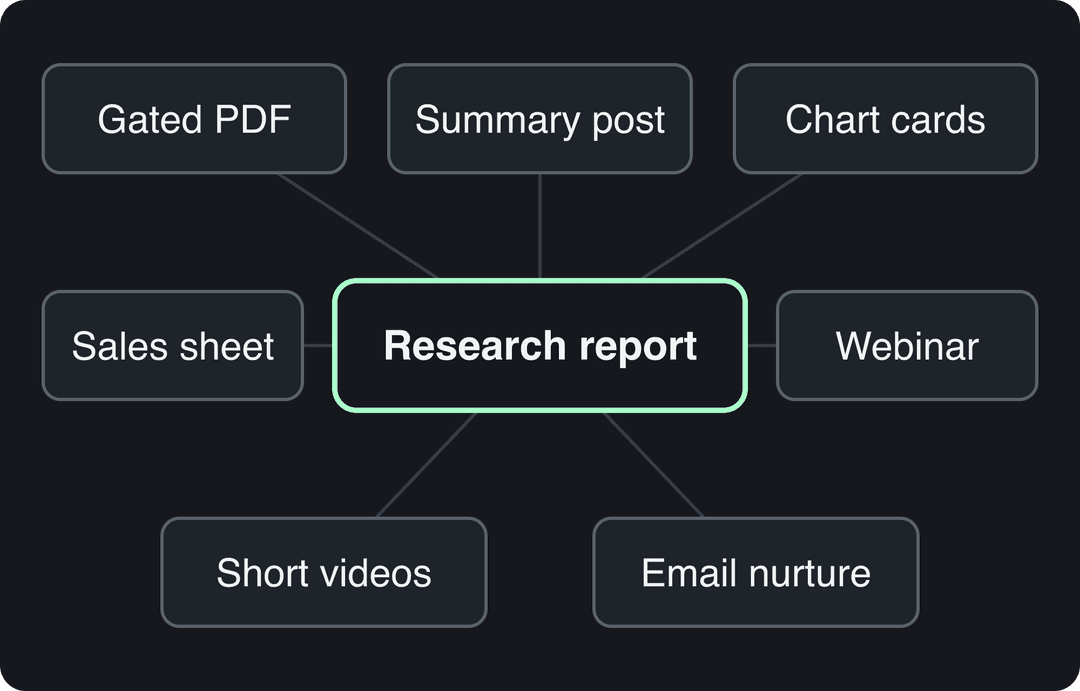
To repurpose a research report into demand gen assets, keep the full report gated as your lead magnet and publish its findings ungated. Those free pieces are a summary blog post, one chart card per finding, short faceless videos, a webinar, an email nurture sequence and a sales one-pager. Every piece points back to the report.
The most common mistake is the reverse: the report goes behind a form, gets one launch post, and disappears. Nobody fills in a form for a PDF they have never heard of. The free pieces create the demand for the gated one, and the same logic applies to any big asset you repurpose, from a webinar recording to a long blog post.
What content repurposing is (and what it is not)
Content repurposing means turning one substantial piece of content into new formats built for other channels and audiences. Posting the same PDF link on five networks is distribution, not repurposing. Rewriting one finding as a LinkedIn post, a vertical video and a nurture email is repurposing, because each version is shaped for where it will be seen.
Contently's guide to repurposing content covers the general principle. This guide uses a single worked example, the research report, because it holds the most raw material and has the most pipeline at stake. The method transfers to webinars, ebooks and pillar blog posts.
Which content should you repurpose first?
Start with the piece that gives you the most to work with and the clearest business goal. Use these rules:
- If a piece has original data or a strong point of view, repurpose it first. Findings split into standalone posts; generic advice does not.
- If a piece already performs (organic traffic, downloads, leads), repurpose it before creating anything new. Demand is already proven.
- If a piece is evergreen (a how-to guide, a benchmark, an industry survey), it can feed content for months. News-driven pieces expire fast, so repurpose them within days or skip them.
- If a piece maps to a pipeline goal (a product launch, a target segment, a sales objection), it earns a full repurposing plan. Otherwise, a summary post and a few social posts are enough.
A research report usually passes all four tests, which is why it is the best starting asset for demand gen.
How to repurpose a research report into demand gen assets
Map every asset to a funnel stage before you write anything. The free assets at the top build awareness and send people to the report; the gated report converts them into leads; the bottom assets help sales close.
| Asset | Built from | Funnel stage | Gated? |
|---|---|---|---|
| Summary blog post | Headline findings and method | Awareness, search | No |
| Chart cards | One chart per finding | Awareness | No |
| Short videos | One finding per video | Awareness | No |
| LinkedIn document post | Top findings as slides | Awareness | No |
| Landing page | Key findings and a preview | Consideration | Form for the full report |
| Full report (PDF) | The report | Conversion | Yes |
| Webinar and its clips | Walkthrough and Q&A | Consideration | Registration |
| Email nurture sequence | One finding per email | Nurture | Sent to report leads |
| Sales one-pager | Findings relevant to the buyer | Decision | Shared by reps |
| Outreach snippets | One stat plus its source line | Prospecting | No |
Step by step
- List every finding as one sentence. Include the number and the sample ("In our survey of X companies, Y said..."). This list is the raw material for every other asset, and it stops numbers drifting as they get rewritten.
- Rank the findings. Put first the ones that are surprising, tied to a problem your buyer has, and easy to show in one chart. Weak findings stay in the report only.
- Write the summary post and landing page first. Everything else links to them, so they must be live on launch day.
- Make one chart per finding. Use a vertical frame for video and a square or portrait frame for feed posts. One idea per chart; the takeaway goes in the chart title, not in the caption.
- Script the short videos. One finding per video, using the template in the next section.
- Build the nurture sequence. One finding per email for people who downloaded the report, each linking to a related asset or a demo.
- Hand sales the one-pager and outreach snippets. Reps should quote the finding, the sample and the link, not a paraphrase.
- Run the webinar, then clip it. The recording gives you a second round of short videos with a human voice and audience questions.
On launch day, publish the summary post, the landing page, a LinkedIn post with the headline finding and an email to your list. After launch, release one finding at a time across posts, videos and emails, so the report keeps getting mentioned instead of peaking once.
Gate the report, not the findings
The findings are your marketing; the full report (methodology, segment breakdowns, raw tables) is the reward for filling in the form. If you gate everything, nobody hears about the report. If you gate nothing, you get attention but no leads.
How to turn report findings into short videos
Short video is where most report findings get seen. Wyzowl's 2026 survey found that 63% of consumers would most like to learn about a product or service through a short video, ahead of text articles (12%) and infographics (7%). For B2B, start on LinkedIn: Wistia's 2026 State of Video Report found that over half of companies repurpose their videos into social clips, and 67% of those teams post clips on LinkedIn, ahead of Instagram (49%) and YouTube (41%). Both figures are on our short-form video statistics page.
You also do not need an analyst on camera. In Revid's analysis of 176,367 TikToks with 1,000+ likes posted between October 2025 and October 2026, faceless tutorials had a median of 156K views (22.1% passed 1M) against 52K (10%) for tutorials with a person on camera, and screen recordings had a 91K median. This is TikTok data on videos that already cleared 1,000 likes, so it shows what successful videos have in common rather than a cause, but it supports narrated chart videos as a format. The method is in our study of what makes a TikTok go viral.
Faceless tutorials earned about 3x the median views of on-camera tutorials (156K vs 52K).
Source: Revid analysis of 176,367 TikToks with 1,000+ likes posted between Oct 1, 2025 and Oct 16, 2026 (61,203 creators)
Show the data
| Median views | Share that passed 1M views | |
|---|---|---|
| Faceless tutorials | 155.6K | 22.1% |
| Product or object tutorials | 80.7K | 14.9% |
| On-camera tutorials | 52.5K | 10% |
| Faceless storytelling | 72.7K | 13.3% |
| On-camera storytelling | 64.4K | 11.7% |
| Faceless comedy | 326.7K | 26.4% |
| On-camera comedy | 135.5K | 20.7% |
Prompt to try
Create a 30-second vertical faceless video about one research finding: 'In our survey of 400 B2B marketers, 62% said their gated reports get fewer than 100 downloads.' Open with the number as a bold claim, add one line on who was surveyed, explain why it matters for budget, give one concrete fix, and end with 'Full report in the link.' Use animated stat cards, clean kinetic text and an upbeat voice-over.
A script template for one finding
- Hook: state the finding as a claim, with its number, in the first line.
- Context: one sentence on who was surveyed or what was measured.
- Why it matters: what this means for the viewer's job or budget.
- What to do: one concrete action.
- CTA: "Full report in the link" or "Comment REPORT and we'll send it."
Sample hooks to adapt:
- "Most teams gate the wrong part of their research. Here's what our data says."
- "We asked [audience] one question. The answer surprised us."
- "If you [common practice], this number should worry you."
Post the same vertical cut to TikTok, Instagram Reels and YouTube Shorts, and upload it natively to LinkedIn rather than sharing a link.
How to do it with Revid
- Upload the report to Revid's PDF to video converter, or paste a script built from one finding. Revid writes the scenes, adds an AI voice-over (1,000+ voices in 70+ languages), synced captions and music.
- For animated stat cards and kinetic text, use the motion graphics video maker.
- Check every number on screen against your findings list in the timeline editor before export.
- Turn the webinar recording into vertical clips with the long video to short video converter.
- Publish and schedule to TikTok, Instagram and YouTube from one queue. If you publish a series, an Auto-Mode worker can create a fresh video every day from a content source.
Which formats get the most out of one piece of content?
Not every transformation is worth the effort. This matrix rates common conversions by effort (1 is easiest, 5 hardest), time and reach potential:
| Original format | New format | Effort (1 to 5) | Time | Reach potential |
|---|---|---|---|---|
| Blog post | Infographic | 2 | Low | Medium |
| Blog post | Video | 3 | Medium | High |
| Webinar | Podcast | 1 | Low | Medium |
| White paper | Ebook | 2 | Medium | Medium |
| Case study | Blog post | 2 | Low | Medium |
| Podcast | Blog post | 3 | Medium | Medium |
| Infographic | Social media posts | 1 | Low | High |
| Video | Short video clips | 2 | Low | High |
| Presentation | Blog post series | 3 | High | Medium |
| Ebook | Checklist | 2 | Low | Medium |
| Interview | Quote cards | 1 | Low | Medium |
| Data and statistics | White paper | 4 | High | Medium |
The rule of thumb: low-effort, high-reach conversions (infographic to social posts, video to short clips) come first. High-effort conversions only pay off for your best-performing pieces. For ten worked conversions with steps, see these content repurposing examples.
How should you adapt each asset to the platform?
The same finding needs a different frame on each network. LinkedIn rewards a professional angle and comments from peers; Instagram rewards a strong visual; TikTok rewards a fast hook and a native feel; YouTube works for both Shorts and the full webinar.
| Platform | Best formats for report findings | Specs to know (2026) |
|---|---|---|
| Native video, document posts, text posts with one stat | Video up to 15 minutes; the full-screen vertical feed is mobile-only and picks from all posted videos | |
| Reels, carousels of chart cards | Reels up to 20 minutes, but reels over 3 minutes are not recommended to non-followers; up to 5 hashtags per post | |
| TikTok | Faceless chart videos, screen recordings, short explainers | Uploads up to 60 minutes; 9:16 at 1080x1920 recommended |
| YouTube | Shorts for single findings, the full webinar as a long video | Square or vertical videos up to 3 minutes count as Shorts |
A repeatable repurposing workflow
Once the report is done, the same four phases work for every big asset:
- Audit and select. Pick the piece using the rules above, then write the findings or key-points list.
- Choose formats. Map each asset to a funnel stage and a channel, using the table above.
- Produce and check. Batch production by format (all chart cards together, all videos together), and check every number against the source.
- Distribute and measure. Release on a schedule, tag every link, and review results before the next round.
For a full template with owners and timelines, see our content repurposing workflow. To compare tools for each phase, see the roundup of content repurposing software.
How to measure repurposing ROI
Track each asset against the goal it was built for, not against views alone.
| Goal | Metrics to track | Where to find them |
|---|---|---|
| Reach | Impressions, reach, shares | Each platform's native analytics |
| Engagement | Comments, saves, watch time, replies to emails | Platform analytics, email tool |
| Search visibility | Rankings, organic traffic to the summary post | Search Console, web analytics |
| Leads | Landing page conversion rate, report downloads | Web analytics, marketing automation |
| Pipeline | Opportunities and revenue from report leads | CRM |
Practical setup:
- Add UTM parameters to every link in every repurposed asset, with the asset type in the content parameter, so you can see whether chart cards or videos drive more downloads in Google Analytics.
- Add a "How did you hear about us?" field to the report form. Short videos and LinkedIn posts often get watched without a click, and self-reported answers catch that.
- Compare each repurposed asset with the original's performance, then put more effort into the formats that brought leads, not just views.
Be careful with benchmark numbers. Older roundups such as this 2023 list of content repurposing statistics circulate widely, but many of their figures come without a traceable source. Sourced figures are collected in our content repurposing statistics article.
FAQ
How many assets can you get from one research report?
Usually a dozen or more. Count one summary post and one landing page, then one chart card, one short video and one email per strong finding, plus a webinar with its clips and a sales one-pager. The real limit is how many findings stand on their own.
Does repurposing content hurt SEO?
No, as long as each piece is adapted rather than copied word for word. If you republish a full article on another site, ask for a canonical tag pointing to your original, so the copy does not compete with it in search.
Can you use AI to repurpose content?
Yes, for drafting scripts, voice-overs, captions and visuals, as long as you check every number against the source. On YouTube, AI-assisted videos can earn money when they show creative vision and value, while mass-produced template content cannot.
What is the difference between repurposing and recycling content?
Recycling republishes the same piece again, often with light edits. Repurposing changes the format and the framing for a new channel or audience, such as turning a report finding into a vertical video.
How often should you repurpose old content?
Whenever a piece still performs or its data still holds, and again when you update it. Review your top pieces on a regular schedule and retire any whose findings are out of date.