How to Make a Christmas Wish Video with AI in 5 Steps (2026)
Turn a personal wish or a short holiday story into a narrated Christmas video in Revid. Five steps on today's interface, a copy-and-paste wish script and the right ratio for TikTok, WhatsApp or the family TV.

On this page
To make a Christmas wish video with AI, write a short wish script and open Revid's Create page (the Create button, or press C). Choose "From script", paste the text, pick a warm voice and festive visuals, set 9:16 and click "Generate video". The video is ready to preview in a few minutes.
The usual mistake is pasting a generic Christmas poem and expecting it to feel personal. A wish video works when the script names the person, mentions one shared memory and ends with a direct wish. The visuals can be AI-generated. The words should be yours, and Step 1 gives you a template for them.
This is the kind of video the steps below produce:
- Lines in the Christmas wish script template, one scene each
- 5
- Revid guide
- Monthly price of Revid's Growth plan for regular video creation
- $39
- Revid pricing
- Cost to re-generate a voiceover, per 500 characters
- 10 credits
- Revid editor
- Longest pause you can add with a break tag in the script
- 10 s
- Revid guide
Step 1: Write the wish (or pick a Christmas story)
Start with the text, because the scenes, the voice and the pacing are all built from it. You have two options: a personal wish to one person or your whole family, or a short holiday story (Santa's workshop, a snowed-in village, a reindeer who gets lost). If you need a theme, browse these Christmas video ideas. If you want a story drafted for you, type "A short Christmas story for my kids" into the free AI script generator and copy the result.
Prompt to try
A 45-second Christmas story for kids about a small reindeer named Pip who gets lost in a snowstorm on Christmas Eve and finds his way back by following the lights of a village. Open with the hook "Every reindeer knows the way home, except one." Warm storybook style with falling snow and glowing windows, a calm narrator, 9:16.
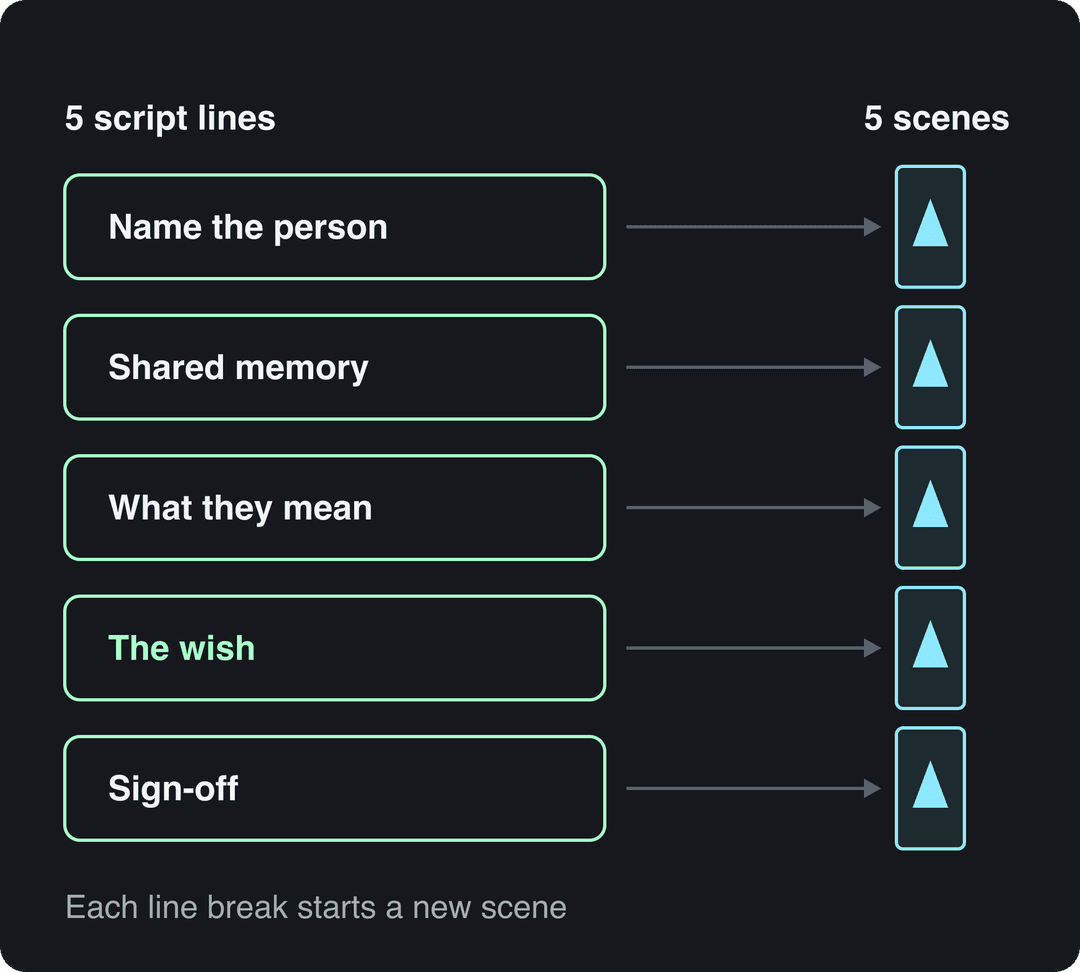
A Christmas wish script template
Fill in these five lines and paste them as your script:
- Open with the person: "Grandma, this one is for you."
- One shared memory: "Remember the year the tree fell over and we decorated it lying down?"
- What they mean to you: "Every Christmas still smells like your kitchen."
- The wish: "This year, I wish you a slow morning, a full table and no dishes."
- Sign-off: "Merry Christmas, from all of us."
Put each line on its own line. Revid keeps line breaks and uses them to separate scenes, so five lines give the AI five clear images to illustrate.
Prompt to try
A 30-second vertical Christmas wish video for my grandmother, narrated by a warm, slow voice. Open with "Grandma, this one is for you", recall the year the tree fell over and we decorated it lying down, then wish her a slow morning, a full table and no dishes. Cozy living room scenes with Christmas tree lights, a warm glow and gentle snow outside the window.
Steer the visuals with brackets
Text in square brackets is treated as a note for the visuals, not narration. Add one cue per line to keep every scene festive:
- "Grandma, this one is for you. [cozy living room, Christmas tree lights, warm glow]"
- "Remember the year the tree fell over... [decorated Christmas tree lying on a carpet, family laughing]"
Older versions of this guide used an "Environment" preset and a "Generation style" field set to "Christmas". Those are not part of the current Create page. Bracketed cues are now the way to keep a consistent winter look across scenes.
Step 2: Open the Create page and paste your script
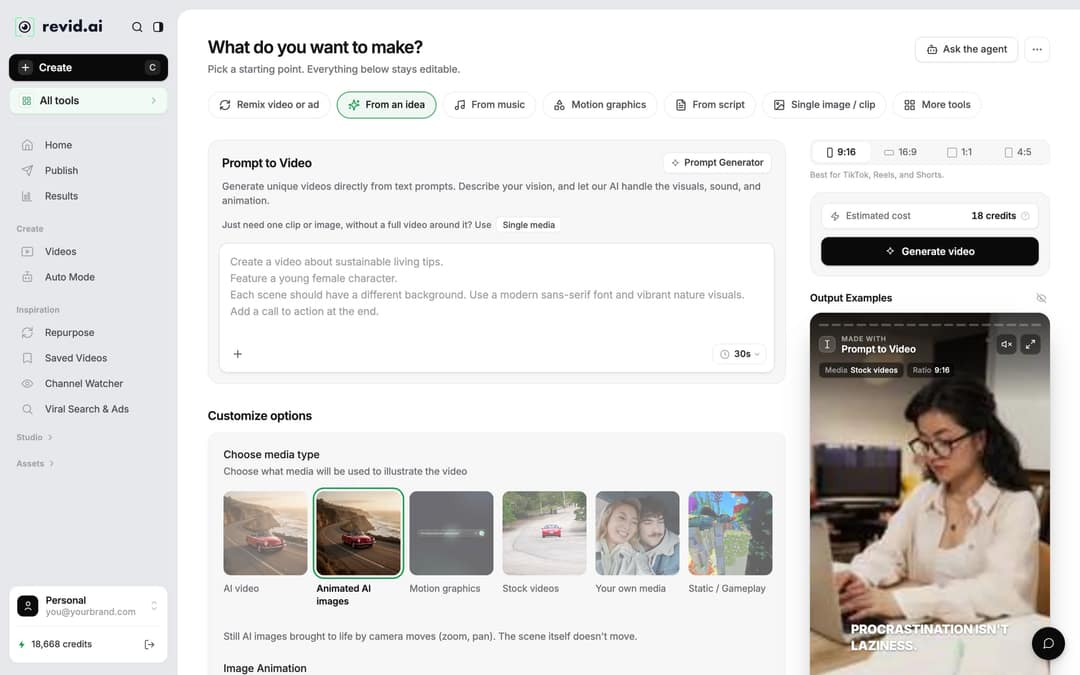
- Click Create at the top of the left sidebar (shortcut C). The page asks "What do you want to make?"
- Choose From script to have your exact words narrated, or From an idea to describe the video in a sentence and let Revid write it.
- Paste your wish into the script box ("Your video narrator script").
- Pick the ratio in the ratio picker: 9:16, 16:9, 1:1 or 4:5.
The example video above was made with the AI Movie Maker, which turns a story or a one-line idea into a short movie with written scenes. It now lives under "More tools" (or "All tools" in the sidebar) rather than in a row of templates. For a personal wish, "From script" is the simpler route because it reads your words as written.
Share of clips
Source: Revid production data: 713,649 AI video clips generated Jun 29, 2026 to Sep 26, 2026.
Show the data
| Share of clips | |
|---|---|
| 16:9 | 54% |
| 9:16 | 40.3% |
| 1:1 | 4.3% |
| 3:4 | 0.5% |
Which ratio should a Christmas video use?
| Where you will share it | Ratio |
|---|---|
| TikTok, Instagram Reels, YouTube Shorts, WhatsApp or a text message | 9:16 |
| A TV or laptop at a family gathering, a regular YouTube video, an email | 16:9 |
| An Instagram feed post | 4:5 or 1:1 |
If you are unsure, choose 9:16, because most people open a wish video on their phone.
Stock footage, the core of InVideo's library, is the look 8.5% of Revid videos use. Shares are of the 71,907 builds that recorded a visual type (5,109 more had none recorded).
Source: Revid product analytics (Amplitude), event project_built grouped by mediaType, September 29 to October 28, 2026, 77,016 builds
Show the data
| Share of videos (%) | Videos built | |
|---|---|---|
| Animated AI images | 64.9% | 46.7K |
| AI video clips | 15.6% | 11.2K |
| Stock footage | 8.5% | 6.1K |
| Their own photos and videos | 6.4% | 4.6K |
| Still images | 2.2% | 1.6K |
| Motion graphics | 1.8% | 1.3K |
| Media from the source link | 0.6% | 397 |
Step 3: Pick a voice and festive visuals
- Voice. Choose a warm, calm narrator. A slower voice suits a wish better than an energetic one. If you write the script in another language, set it under "Advanced options" > "Language & Localization" > "Language" (the default is "Automatic") and pick a matching voice.
- Media type. Under "Choose media type", pick how the scenes are illustrated:
| Media type | What you get | Good for |
|---|---|---|
| Animated AI images | Still AI images brought to life by camera moves (zoom, pan) | Storybook wishes, the cheapest option |
| AI video | Real motion: falling snow, flickering fire, moving characters | The most magical result (needs a paid plan) |
| Stock videos | Real footage of winter landscapes and decorations | A realistic, classic card look |
| Your own media | Your own family photos and clips | The most personal wish |
| Motion graphics | Animated text and shapes | A modern greeting card style |
With AI video, Revid generates the scenes with models such as Seedance 2.5, MiniMax Hailuo H3, Wan 3.0 and Google Veo 3. You can choose a model scene by scene.
For a longer pause before the wish itself, type in the script (up to 10 seconds). ElevenLabs and MiniMax voices honor it, while Gemini and Kling voices ignore it.
Step 4: Generate the video, then polish it in the editor
- Check Estimated cost next to the button: it shows the credits the video will use before you spend them.
- Click Generate video. After a few minutes you can preview it.
- To change anything, click the video card in Videos (or choose "Open in editor" in its menu).
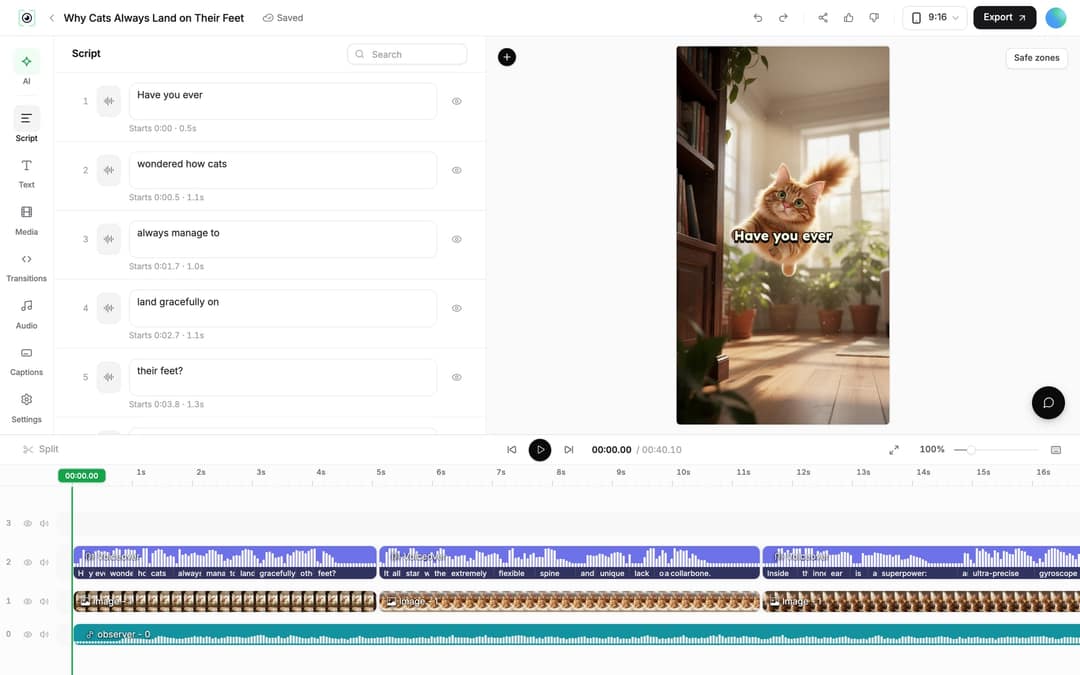
In the editor:
- Fix a word: edit it in the Script panel. If the timing changed, open the Audio panel and click Re-generate on that voiceover, then Generate Voice. This is for paid plans and costs 10 credits per 500 characters.
- Swap a scene: select an image or video clip and click Replace, or use "Regenerate from prompt" on an AI clip to get a new version.
- Change the music: open the Audio panel and switch to the Music tab to pick another track from the built-in library. If you upload your own song, use only music you have the rights to.
- Captions are added automatically, which matters because social feeds often autoplay muted.
Step 5: Share your Christmas wish
- Send it to family. Click Export in the editor, download the file and send it by WhatsApp, text or email.
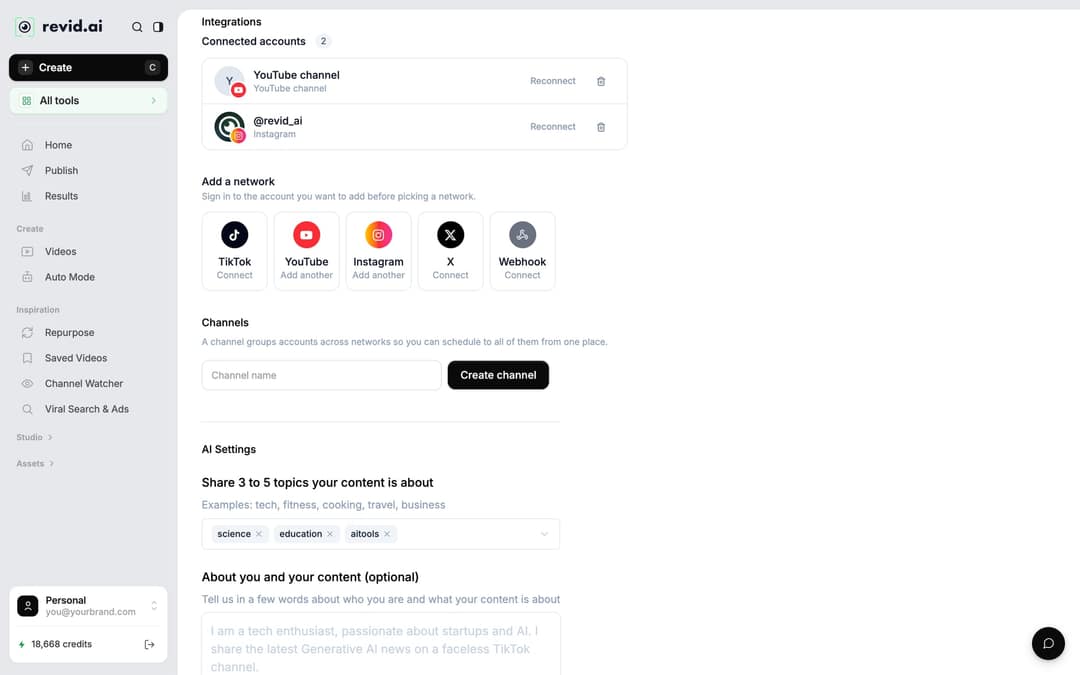
- Post or schedule it. From the project card's Publish option (or "Export / Publish"), the "Publish Video" window offers Publish now or Add to queue, so you can schedule it to TikTok, Instagram and YouTube for Christmas morning. First connect your accounts in Settings > Integrations, under "Add a network" (TikTok, YouTube, Instagram, X or a Webhook).
- Play it at the gathering. A 16:9 version on the living room TV makes a good Christmas Eve surprise.
If you post realistic AI scenes publicly, TikTok and YouTube ask you to turn on their AI-generated content label. Both say the label alone does not reduce a video's reach.
Send the same wish in another language
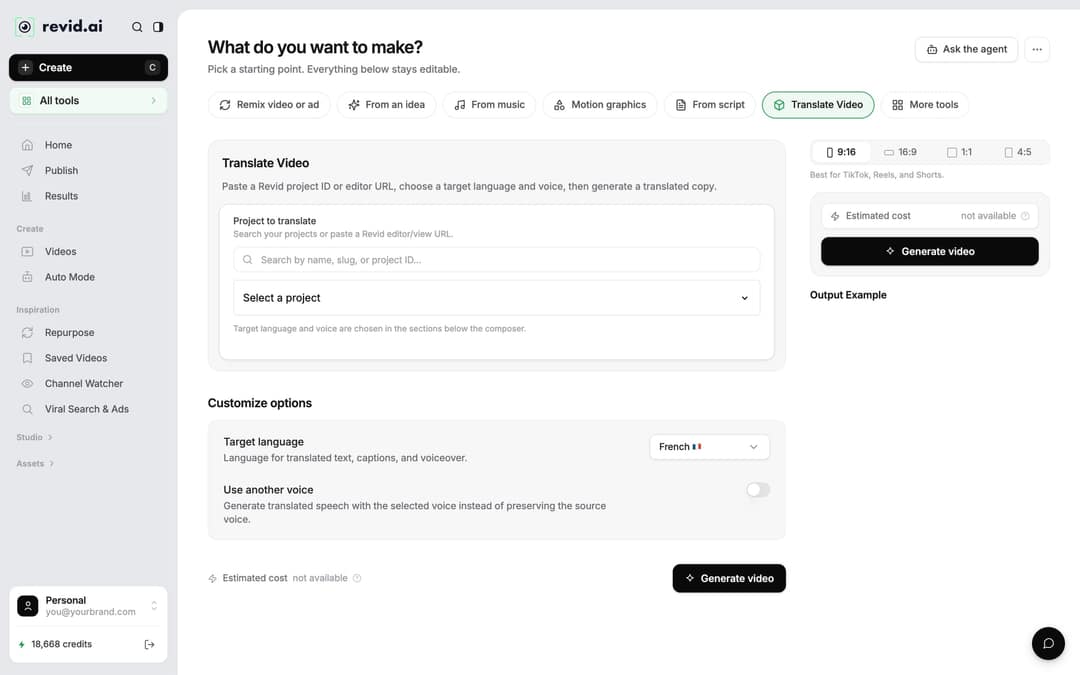
For relatives abroad, you don't need to rebuild the video. Open the project card menu and choose Translate. This opens the video translator, where you pick a "Target language" and keep the original voice or switch on "Use another voice". The edit, media, timing and captions stay the same.
More ways to make it personal
For kids, a talking Santa video that calls them by name usually beats a narrated story. For a wish that feels like a direct message, put a presenter on screen with an AI talking avatar. The same steps also work for a bedtime story video told in Christmas style.
FAQ
Is Revid free for making a Christmas video?
You can start for free: sign-up is free, and new accounts get free credits to try video creation, with no credit card needed. Regular creation then uses the monthly credits of a paid plan, from $39/month (Growth). The pricing page has the current prices.
How long does it take to make a Christmas wish video?
Writing the five lines takes the longest. Once you click "Generate video", the video is usually ready to preview within a few minutes.
Can I narrate the video in my own voice?
Yes. Record your wish on your phone, then use "From a link or audio" on the Create page: the audio to video converter turns the recording into a captioned video. Voice cloning is available on the Elite plan and above.
Can I make a Christmas video from my family photos?
Yes. In "Choose media type", pick "Your own media" and upload your photos and clips. Revid narrates your script over them, adds captions and keeps everything editable.
Can I use a real Christmas song in the video?
You can add your own track, but use only music you have the rights to, especially if you post the video publicly. Otherwise, pick a track from Revid's built-in music library in the Audio panel.
Sources
- Revid production data: 713,649 AI video clips generated Jun 29, 2026 to Sep 26, 2026.
- Revid product analytics (Amplitude), event project_built grouped by mediaType, September 29 to October 28, 2026, 77,016 builds
Charts and figures checked on November 6, 2026.