How to Automate Social Media Posts: A 5-Step System for 2026
A practical system to automate social media posts: what to automate, what to keep human, platform rules that trip up schedulers, and a weekly template you can copy.

On this page
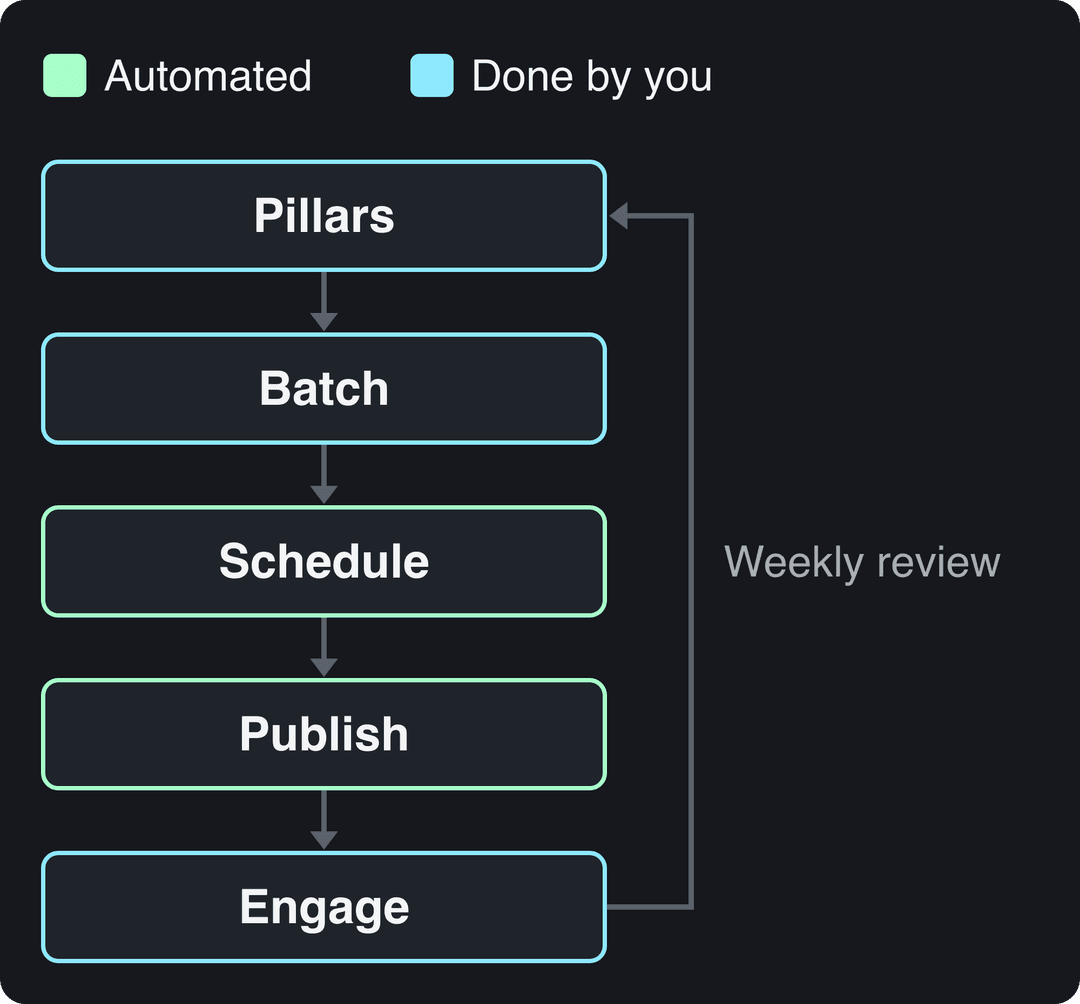
To automate social media posts, connect your accounts to one scheduling tool, batch-create one to two weeks of content, load it into a calendar with time slots taken from your own analytics, and add evergreen posts to a queue that fills the gaps. The tool publishes; you reply to comments and review results once a week.
The mistake that sinks most automated accounts is automating sameness, not scheduling. Since July 15, 2025, YouTube calls repetitive, mass-produced uploads inauthentic content and won't monetize them, and since March 2026 Facebook deprioritizes reposts changed only with borders, captions or speed. Automate the delivery, keep the ideas and the replies human.
What can you automate on social media, and what should stay manual?
Social media automation works best on repetitive, rule-based tasks. Anything that needs judgment or a real conversation stays with you.
| Task | Automate it? | How |
|---|---|---|
| Publishing at set times | Yes | Scheduler calendar |
| Filling quiet days | Yes | Evergreen content queue |
| Cross-posting one asset | Partly | Adapt caption and format per platform |
| Turning a blog post into social posts or a video | Yes | RSS trigger or an article-to-video tool |
| Making short videos | Yes, with a review step | AI video tool, then a human check |
| Replies, comments, DMs | No | A daily manual block |
| Reacting to news | No | Pause the queue |
How to automate social media posts in 5 steps
1. Choose 3 to 5 content pillars
Pillars are the 3 to 5 themes your account owns. Every post fits one of them, which keeps your automated feed from turning random or too salesy, and gives you a ready list when you sit down to batch.
A fitness coach might use:
- Workout tutorials: short exercise demos.
- Nutrition tips: meal prep and healthy swaps.
- Client results: real progress stories.
- Mindset: the mental side of training.
If an idea doesn't fit a pillar, it doesn't go in the queue.
Prompt to try
Make a 30-second vertical video for a fitness coach's nutrition tips pillar: three easy meal-prep swaps for busy weekdays. Open with the hook 'Stop making meal prep you throw out by Wednesday.' Use bright kitchen stock footage, a friendly upbeat voice and bold captions, and end with a call to save the video.
2. Batch-create one to two weeks of content
Batching means making all your posts in one focused block instead of one a day. A single four-hour batching session can fill a week: graphics or videos first, then captions, then scheduling. Switching between creating, editing and publishing every day is what burns the time automation is supposed to save.
Write a caption template per pillar so batching goes faster: a hook line, two or three lines of value, one call to action, then hashtags. Keep the call to action native to each network: ask for a professional take on LinkedIn, a tag-a-friend on Instagram.
For the hashtag line, Revid's analysis of 176,367 TikToks with 1,000+ likes posted between October 2025 and October 2026 found that 4 hashtags had the best median (77K views) and 3 hashtags 75K, while posts with 9 or more dropped to 16K. That is TikTok data from videos that already performed, so it shows a pattern, not a cause. Instagram caps posts at 5 hashtags, so a template with 3 to 4 tags works on both.
Posts with 3 or 4 hashtags earned the most views. Captions stuffed with 9 or more hashtags did worst of all, with median views cut by about 80%.
Source: Revid analysis of 176,367 TikToks with 1,000+ likes posted between Oct 1, 2025 and Oct 16, 2026 (61,203 creators)
Show the data
| Median views | Share that passed 1M views | |
|---|---|---|
| None | 51.1K | 9.8% |
| 1 | 64K | 11.8% |
| 2 | 71.3K | 12.7% |
| 3 | 75.4K | 13.1% |
| 4 | 77.2K | 13.4% |
| 5 | 67.3K | 12.1% |
| 6 to 8 | 71.8K | 12.7% |
| 9+ | 15.6K | 7.8% |
3. Connect every account to one scheduler
Pick one tool and connect each profile through its authorization screen: Instagram, Facebook Page, LinkedIn Page, TikTok, YouTube. One dashboard for everything is the point; two schedulers means double-booked slots. If you use Revid, the steps are in the guide to linking your social accounts to Revid.
Evergreen post to try
Create a 40-second evergreen FAQ video answering the question my customers ask most: 'How do I choose the right size?' Start with the hook 'You're probably measuring this wrong.' Use clean motion graphics with each step on screen, a calm expert voiceover and captions, so it works in a queue any week of the year.
4. Fill the calendar, then the evergreen queue
Schedule your pillar posts first, then let an evergreen queue fill the gaps. Evergreen posts are timeless: answers to frequent questions, your best blog posts cut into carousels or short videos, your brand story, customer reviews. Load them into a queue and the scheduler publishes one whenever a slot is empty. For a ready layout, use this social media calendar template.
Pick time slots from your own data, not guesses. TikTok Studio's Viewers tab shows when your viewers were most active over the last 7 days, and Instagram shows your followers' most active times once you have 100 followers. With no data yet, the same Revid study found TikTok posts at 3 to 6 a.m. US Eastern beat those at 5 to 9 p.m.; because English TikToks come from creators worldwide, those hours also cover daytime in Europe and Asia.
As a rule of thumb, leave at least 3 to 4 hours between posts on Facebook or LinkedIn so one post doesn't bury the last. For more on slots and frequency, see how to schedule social media posts.
5. Engage daily and review weekly
The scheduler is your delivery driver, not your community manager. Block time every day to answer comments and DMs yourself: replies keep the conversation going and show the platform people care about the post. Once a week, check which pillars earned saves, shares and comments, and move more of the queue toward them.
Which social media automation tool should you use?
Start from your workflow, not the feature list:
- If you post mostly short video, pick a tool that creates the videos as well as publishing them, or you've only automated the easy half.
- If you manage many client accounts, you need approval workflows, team roles and reporting.
- If you post text and images to one or two networks, a simple queue is enough.
| Tool | Best for | What it automates | Pricing |
|---|---|---|---|
| Revid | Brands and creators publishing short video | Creates videos daily (Auto-Mode, Search & Remix), publishes and schedules to TikTok, Instagram and YouTube | From $39/month |
| Buffer | Solo creators and small businesses | Clean scheduling queue, link-in-bio page | Per-channel subscription |
| Hootsuite | Agencies and large teams | All-in-one management, analytics, team collaboration | Premium subscription |
| Workflow automation templates | Cross-posting between networks | Trigger-based reposting | Varies by tool |
For a longer comparison, see our roundup of social media automation tools. Niche lists exist too, such as Church Social's roundup of social media automation tools.
How to automate Instagram posts
Third-party schedulers publish to Instagram through Meta's API, which works with professional (Business or Creator) accounts. Meta's own Business Suite can also schedule Instagram and Facebook posts.
- Switch your profile to a professional account in Instagram settings.
- Connect it to your scheduler through the Meta login screen.
- Upload Reels, carousels or Stories, write the caption and set the time.
- Choose the reel cover before it goes live: Instagram's help page says you can't currently edit the cover after upload (it recommends 420x654 px).
Limits that apply to scheduled posts:
| Item | Limit through the API |
|---|---|
| Reels | 3 seconds to 15 minutes, up to 300 MB |
| Stories (video) | 3 to 60 seconds, up to 100 MB |
| Carousels | 10 items (the app allows 20) |
| Caption | 2,200 characters |
| Hashtags | 5 per post, or the caption won't post |
Reels longer than 3 minutes aren't recommended to non-followers, so keep scheduled reach content under that.
TikTok, YouTube and Facebook rules that affect automated posts
- TikTok: scheduled uploads go through TikTok's Content Posting API, which accepts videos up to 10 minutes and 4 GB with captions up to 2,200 characters. Longer videos (TikTok allows up to 60 minutes) have to be uploaded in TikTok Studio.
- YouTube: titles are limited to 100 characters. AI-made videos built from generic templates that look mass-produced can't be monetized, while AI used inside a video with your own creative vision is allowed.
- Facebook: since March 2026, reaction-only reels, clip stitching and reposts of others' clips with only borders, captions or speed changes are treated as unoriginal and pushed down.
- AI labels: TikTok and YouTube require you to label realistic AI-generated content. Both say the label alone doesn't reduce a video's distribution.
How to automate weekly social media content
A fixed weekly rhythm is what keeps automation from drifting into a backlog. Copy this and adjust the days:
| When | Task |
|---|---|
| Monday | Four-hour batching session: create the week's posts and videos |
| Tuesday | Write captions from your templates, schedule everything, top up the evergreen queue |
| Every day | Reply to comments and DMs, check nothing is off-tone with the news |
| Friday | Review the week's results per pillar and note next week's topics |
Social media automation for designers
Designers save the most time with master templates: one file per pillar at each platform's size (TikTok recommends 9:16 at 1080x1920), exported in one batch. Name files by date and platform so a bulk upload maps each asset to the right slot without manual sorting.
How to automate content scheduling for blogs
- Set a publish date for the article in your CMS; most CMSs, WordPress included, support scheduled publishing.
- Point your scheduler or a workflow tool at the blog's RSS feed so a draft social post is created when the article goes live. Edit the draft before it publishes.
- Turn the article into a short video with a blog to video converter and schedule it after the launch post.
- Queue 3 to 5 follow-up posts over the next weeks: a quote, a key number, a question for the audience.
How to build a social reposting workflow
Post natively where the format fits best first, then cross-post with a caption rewritten for each network. Trigger-based tools handle the copying: for example, a ready-made template for automating cross-platform content syndication posts your Farcaster content to X. Reposting your own work is fine; reposting other people's clips with only light edits is what Facebook now treats as unoriginal. For turning one asset into many, see this guide to repurposing content for social media.
How to automate short-form videos with Revid
For TikToks, Reels and Shorts, the slow part isn't scheduling, it's making a new video every day. More than 30,000 videos are published to TikTok, Instagram and YouTube through Revid every month. To automate the creation side:
- Set up an Auto-Mode worker from a prompt or a content source such as your blog. It creates a fresh video every day with script, visuals, voice-over, captions and music. Growth includes 3 workers, Elite 5 and Ultra 10.
- Or run the Search & Remix automation: it searches Revid's library of about 2.77 million videos with engagement data on your topic, picks a high-engagement reference and generates an original video from it on a schedule, never reusing the same reference.
- Check each video in the timeline editor, then publish or schedule it to TikTok, Instagram and YouTube from one publishing queue.
- Read the views, likes and comments reported on each post, and remix the ones that did well in one click.
Sign-up is free and new accounts get free credits to try video creation, no credit card needed. Paid plans start at $39/month, and every paid plan includes the API, MCP server and CLI if you want an AI agent to run the pipeline.
FAQ
Will automating posts hurt my engagement?
No, scheduling itself doesn't lower reach. What hurts is content that feels mass-produced and comments nobody answers, so keep replies and DMs manual.
How far ahead should I schedule social media posts?
One to two weeks for most accounts, with evergreen posts queued further out. Leave room for fresh posts: Meta said same-day posts made up more than 30% of recommended Reels on Instagram and Facebook in Q1 2026, more than double a year earlier.
Do daily automated posts improve visibility over time?
Only if each post is worth watching. No platform rewards volume alone, and YouTube and Facebook now demote or demonetize repetitive, mass-produced output, so post less often if daily means lower quality.
Can I use AI to automate social media content?
Yes, and most marketers already do: 73% use generative AI tools to create social content, according to HubSpot's 2026 data (more in our short-form video statistics). Label realistic AI visuals on TikTok and YouTube, and add your own angle so the output isn't generic.