On this page
You open YouTube, click where the Trending page used to be, and land on something else entirely. Or you follow an old tutorial that tells you to type youtube.com/feed/trending into the address bar, and the page that loads has nothing to do with trends. That's not a glitch on your end. YouTube retired the Trending page and the Trending Now list on July 21, 2025, and spread discovery across category Charts, search, Shorts and personalized recommendations instead. Most guides on the internet haven't caught up, which is why so many creators still think they're one bookmark away from a reliable trend list.
The bigger problem is what comes after you find the new surfaces. Each one tells you something different, and none of them tells you the whole truth. A chart says a category is popular, but not whether the topic will travel. Your homepage says a video matters to you, but not whether it matters to anyone else. The work is in trend triangulation: checking one idea across at least two discovery surfaces, more than one market, and more than one viewing profile before you commit a script or a shoot day to it.
That's what this guide covers. Not "where is the Trending tab," but how a working researcher builds a shortlist from the surfaces that exist now, and how to filter out the noise before it costs you a production cycle.
- Daily YouTube Shorts views
- 200B+
- YouTube Official Blog, August 2026
- Recommended videos that already had more than 1M views
- 64%
- Pew Research recommendation walks
- Recommended videos with under 50,000 views when recommended
- 5%
- Pew Research recommendation walks
- Unique videos recommended more than once
- 28%
- Pew Research recommendation walks
Where to Find Trending Videos After the Trending Page Closed
Start with the change itself. The YouTube Help documentation confirms the old single global list is gone and replaced by category-specific Charts, including Trending Music Videos, Weekly Top Podcast Shows and Trending Movie Trailers. Youtube's reasoning, per the TechCrunch report on the shutdown, was declining traffic to the page over the previous five years. Read that carefully: people didn't stop wanting trends, they stopped going to one destination for them. Discovery moved into recommendations, Explore, creator channels, subscriptions and Gaming Explore.
If you're still following a tutorial that walks you through the Trending tab, close it. The URL redirects into something that won't give you what the guide promised.
Here's the lookup table I keep open when I'm deciding where to spend the first minute of a research session.
| Surface | What it shows | Best use | Limit |
|---|---|---|---|
| Trending Music Videos chart | Most-watched music videos by country | Spotting audio and music trends | Covers music only |
| Weekly Top Podcast Shows chart | Leading podcast shows each week | Checking podcast format demand | Covers podcasts only |
| Trending Movie Trailers chart | Most-watched movie trailers | Gauging film and entertainment interest | Narrow category |
| Search suggestions | Phrases viewers type into search | Finding title wording and topics | Shows intent, not view counts |
| Shorts feed | Fast-moving vertical short clips | Early signals on new hooks and formats | Short-lived and noisy |
| Personalized recommendations | Videos matched to your viewing history | Audience-specific signals | Reflects your own viewing bubble |
| Explore and Gaming Explore | Category-level picks curated by YouTube | Scanning a niche quickly | Only covers features YouTube selects |
The trade-off jumps out of that table. Charts give you broad popularity with a narrow lens, so they're useful only if your niche touches music, podcasts or film. Recommendations give you a lens shaped for one person, which is fast but claustrophobic: if you spend three weeks researching cooking content, your feed will happily hide every format shift happening in woodworking.
Practical rule: A chart tells you what a category is doing. A recommendation tells you what one viewer is doing. Neither is a trend on its own.
No single surface answers the question. The sections that follow combine at least two, and the order matters less than the habit of crossing them.
The index leans toward videos that surface in hashtag and keyword searches, so its view counts run high: compare the groups, not the absolute numbers.
Source: Revid TikTok index: 2,377,477 TikToks with AI labels per video, snapshot of Sep 15, 2026. Median views estimated from view buckets.
Show the data
| Median views | Share past 1M views | |
|---|---|---|
| Challenge | 226.9K | 32% |
| Comedy | 194.6K | 29.9% |
| Dance | 121K | 23.4% |
| Reaction | 117.4K | 23.4% |
| Tutorial | 111.5K | 22.2% |
| Storytelling | 107.7K | 21.5% |
| Lip Sync | 90.7K | 21.4% |
How to Run a Five-Minute Trend Search
The routine below is what a scan looks like when you've done it a few hundred times. It's fast because it's narrow: you're not trying to find every trend on YouTube, you're trying to leave with a shortlist worth judging. Set a timer. Five minutes is enough.
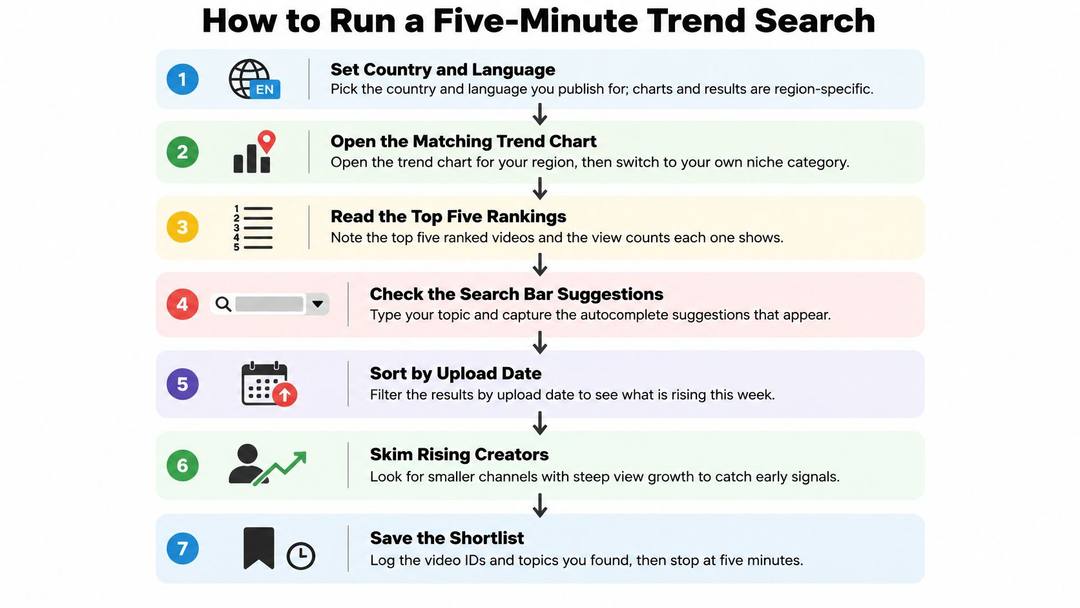
- Set the country and language you publish for. Charts and search results are region-specific, so a global view mixes signals from markets you'll never reach. Pick one market first, add others later when you're verifying.
- Open the matching category chart, but only if your niche touches it. Music, podcasts and trailers are the only broad charts left, so a cooking channel gets nothing from them and should go straight to Explore or Gaming Explore instead. Don't force a category fit that isn't there.
- Type your seed keyword into search and read the autocomplete. The suggestions show the phrases viewers are typing right now, which is demand expressed before it shows up in view counts. This is the cheapest signal on the page.
- Filter search results by upload date and scan the last few days. Recent uploads with unusual view counts are the raw material of a trend, and filtering by age strips out the decade-old videos that win on accumulated views alone.
- Open the Shorts feed for the same topic and watch for repetition. Repeated hooks, identical opening lines and the same visual format across different creators means a format is spreading, which is a different and often earlier signal than a single video doing well.
- Log eight to ten candidates in a sheet with title, channel, publish time and view count. The sheet is the point. Without it you're comparing memories, and memory flatters whatever you saw most recently.
- Stop there. Judging whether each candidate is rising is the next step, not this one, and blending the two is how a five-minute scan turns into an hour of scrolling.
A finished search should leave you with two things: a shortlist of candidates with timestamps attached, and two or three repeated hooks you noticed across creators. The hooks often matter more than the videos. If five channels in your niche all open with the same question in the first two seconds, the question is the format, and the individual videos are just evidence of it.
Measure Real Momentum With Velocity and Baselines
Raw view counts are the worst trend detector available, and they're the one most creators reach for. Total views reward age and channel size. A video with two million views published eight months ago tells you nothing about what's rising this week, and a video with 40,000 views on a channel that normally gets 4,000 is a stronger signal than either.
The fix is velocity: views divided by hours since publication. Then compare that pace against the channel's own recent-upload baseline, meaning the average views across its last several uploads. YouTube's own Trending Chart ranking documentation describes a blend of view count, growth speed (which YouTube calls temperature), traffic sources, topic, video age and performance relative to recent uploads from the same channel. That's the same logic the platform uses, applied at your scale.
The sampling habit matters as much as the math. Capture several snapshots per day rather than one ranking, and record video ID, publication time, views, likes, comments, category, title and channel each time. A single snapshot is a photograph; snapshots are a film, and only the film shows direction.
| Signal | How to calculate or read it | Strong sign | Weak sign |
|---|---|---|---|
| Velocity | Views divided by hours since publication | Pace above the channel's usual pace | Large total but slow pace |
| Channel baseline | Average views across the channel's recent uploads | Video beats its own baseline | Video sits at or below baseline |
| Snapshot trend | Velocity logged at several times per day | Rising between snapshots | Flat or falling between snapshots |
| Market spread | Same topic ranking in two or more countries | Appears in several markets | Appears in one market only |
| Paid promotion check | Ask whether the spike follows an ad push | Growth pattern looks organic | Spike coincides with paid promotion |
Market spread deserves its own sentence. One video climbing in several countries is stronger evidence of a durable topic than one climbing in a single market, because it's harder to explain away as a local fluke or a single community's inside joke. The trade-off is that cross-market checking takes time, and if you publish in one country you may not care.
Absolute thresholds are the trap to avoid. A one-million-view rule ignores video age, channel size and market, and it hides exactly the early-stage videos you want. Set thresholds in relative terms instead: this video is beating its channel's baseline by a wide margin, at a pace that hasn't flattened between snapshots, in more than one market.
Keep this filter: high velocity, beats its own channel baseline, appears in more than one market. Drop everything that fails any of the three.
Validate Broad Demand With Google Trends
A video can climb fast inside one channel's audience while almost nobody else is searching the topic. Velocity already showed the video is moving. Google Trends shows whether the topic has demand past that audience.
Google's own documentation describes Google Trends as a random sample of aggregated, anonymized, categorized Google and YouTube searches. The curve is what people search across geographies and cities, not what one channel's subscribers watch.
Run the check in this order:
- Enter the shortlisted topic or seed keyword. Use the topic, not the video title. Titles carry channel-specific phrasing that skews the comparison.
- Set geography to each country where your audience sits, then compare global interest with city-level interest. A topic that only registers in one metro area is a local angle.
- Switch the search property to YouTube Search so the curve tracks YouTube behavior. Web search can reflect a completely different intent.
- Read the shape over the last 90 days. A steady climb points to growing demand. A single spike that collapses means you are likely late.
- Stretch the same query across a longer range in Google Trends. A rise that repeats on the calendar is seasonal. A rise with no earlier match is a new subject.
- Keep topics whose interest rises in more than one market. That is the cross-market test applied to search demand rather than views.
Google Trends reports relative interest, not view counts. It answers whether the topic is in demand. The velocity check answers whether this particular video is moving. I would not script from a shortlist that fails either test.
If the shortlist is built on search demand, the techniques in this guide to finding YouTube keywords will sharpen the phrasing you test.
Verify Recommendation Trails and Filter Feed Bias
A video at the top of your home feed is a record of one viewing history: yours. YouTube filled that row from language, location, subscriptions, and recent watches. Call it a trend only after the same video survives a different feed.
Run a recommendation walk on purpose. Start with three to five strong seed videos in the niche. Logged out, or in an incognito window, record the recommended panel on each seed. Pick one of those recommendations, open it, and record the next panel. Repeat to a fixed depth. Five steps is a practical stop. Deduplicate the video IDs, then score what is left on recommendation frequency, recency, view velocity, engagement rate, and novelty. On the highest scorers, note repeated title structures, opening hooks, thumbnail conventions, and top comments. Those are the reusable parts.
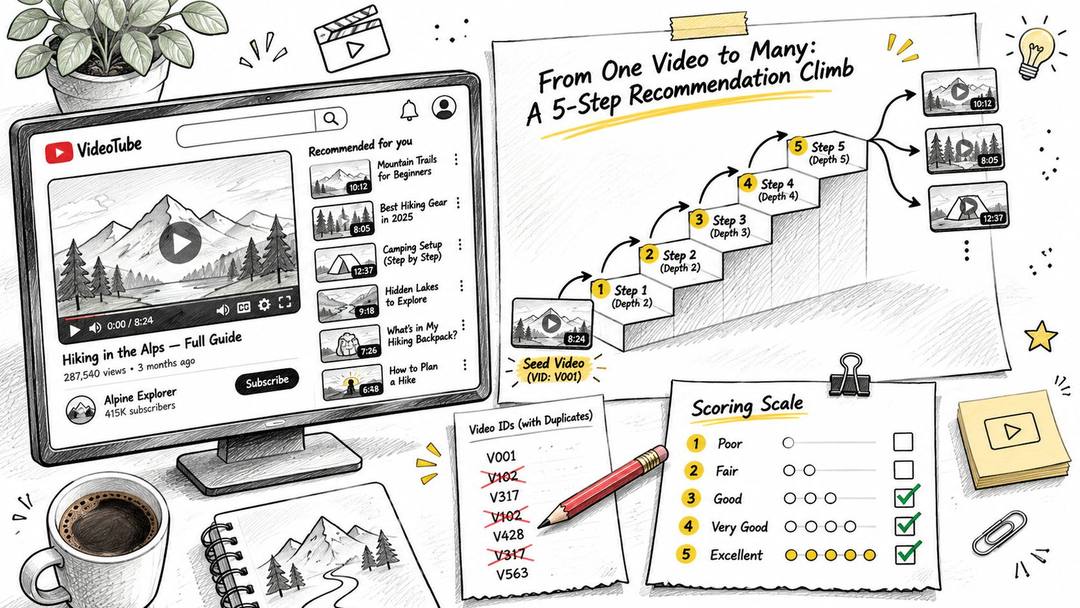
The mix inside that graph is why the walk is worth the time. Pew Research's analysis of 174,117 five-step recommendation walks found that 64% of recommended videos already had more than one million views, while 5% had fewer than 50,000 when they were recommended. That 5% is the case for adjacency: smaller videos can show up before the charts catch them. The same analysis found that 28% of unique videos were recommended more than once. Recurrence is a useful signal. It is not proof of a breakout.
One history is a weak sample. Recommendations change with viewer history, location, language, subscriptions, and recent behavior. Trails can also drift toward more ideologically extreme channels the further you walk, so the most visible video in a single feed is not automatically safe for a brand. Screen anything with brand-safety or monetization exposure before it reaches a scripting doc.
Repeat the walk in at least two countries or languages where your audience sits, and on two feed profiles: a clean incognito session, and an account whose history is not your own. Keep a candidate only when it recurs across those samples and on a second discovery surface.
A topic that shows up across two surfaces, two audience profiles and more than one market is a trend. A topic seen in one feed is a niche signal to test carefully, and often to skip.
If a candidate only recurs inside one profile, treat it as a niche bet. Hold the angle up against the cross-sample shortlist before you give it a slot this week.
Prompt to try
Make a 40-second YouTube Short for a home cooking channel that opens with the contrarian question "Why are you still salting pasta water like this?" Explain the one change that makes the biggest difference in three quick steps, using close-up kitchen b-roll, bold captions and an upbeat voiceover. End by asking viewers to comment which method they use.
Pick One Trend to Test This Week
A shortlist is not a decision. Pick one candidate that cleared all three gates: velocity above its channel baseline, rising search interest in more than one market, and recurrence across two discovery surfaces. Then convert it into an original test rather than a reproduction.
Write a title and opening hook that follow the pattern you observed, not the wording of the video you found. If three creators opened with the same contrarian question, use the question and not their phrasing. The format is the finding; the words are theirs.
- Publish inside a week. Trend windows close faster than production schedules allow, and a perfectly researched video published in three weeks is a history piece.
- Log views against your channel baseline, not against the source video's numbers. The only comparison that means anything is your normal performance versus this upload.
- Track the first seconds in YouTube Studio's audience retention if you have access. A hook that loses viewers at four seconds tells you the pattern didn't transfer, even if the topic was right.
- Review after two weeks and decide plainly: repeat the angle, adjust the hook, or drop it and go back to the shortlist.
That last step is the one people skip, and it's the one that teaches you whether your read on the trend was correct.
A trending topic is an input to your angle, never a finished script. The test tells you whether your angle works on your audience.
If your research keeps landing on the same handful of formats, Revid's Viral Search can widen the net: it searches real TikToks, Reels, Shorts and posts by topic, platform and engagement, and shows you the views, hooks and transcripts behind them, drawn from a library of 2.77 million short-form videos. You can start from a proven format you found and turn it into an original video about your own product, and a free account can run the search before you commit to anything. Visit revid.ai to see what's rising in your niche right now.
FAQ
Does YouTube still have a Trending page?
No. YouTube retired the Trending page and the Trending Now list on July 21, 2025. Discovery now runs through category Charts such as Trending Music Videos, Weekly Top Podcast Shows and Trending Movie Trailers, plus search, Shorts, Explore and personalized recommendations.
How can I tell if a YouTube video is actually trending?
Calculate velocity, meaning views divided by hours since publication, and compare it to the channel's average views across its recent uploads. Take several snapshots per day to see whether the pace is rising. Keep videos that beat their own baseline and appear in more than one market.
Can Google Trends show YouTube search trends?
Yes. Set the search property to YouTube Search so the curve tracks YouTube behavior instead of web search. Read the shape over the last 90 days, check a longer range for seasonality, and keep topics whose interest rises in more than one market.
Why is my YouTube home feed a bad source for trends?
Your home feed reflects one viewing history, shaped by your language, location, subscriptions and recent watches. Run recommendation walks in an incognito window and on a second profile, in at least two countries or languages. Keep a candidate only when it recurs across those samples and on a second discovery surface.
How quickly should I publish a video on a trend?
Publish within a week, because trend windows close faster than most production schedules. Judge the upload against your own channel baseline rather than the source video, and review after two weeks to repeat, adjust or drop the angle.
Sources
- Revid TikTok index: 2,377,477 TikToks with AI labels per video, snapshot of Sep 15, 2026. Median views estimated from view buckets.
- YouTube Official Blog, New opportunities to earn and changes to the YouTube Partner Program (August 2026)
Charts and figures checked on November 18, 2026.