How to Get More Views on YouTube Shorts in 2026: 9 Steps
Shorts views come from viewers who don't swipe away. Nine fixes for hooks, length, titles and analytics, plus how YouTube counts Shorts views in 2026.

On this page
To get more views on YouTube Shorts, open on your strongest moment, keep the Short tight enough that people finish or replay it, give it a title people search for, and post on a steady schedule. YouTube shows each Short to viewers in the Shorts feed and widens its reach when they watch instead of swiping away.
Shorts is the friendliest short-form feed for small channels. In Socialinsider's 2026 study of 69 million short-form videos, accounts with under 5,000 followers averaged 15,160 views per YouTube Short, against 625 per Instagram Reel and 350 per TikTok. If your Shorts sit far below that, the problem is rarely the algorithm. It is usually the first second of the video.
How YouTube decides who sees your Short
Most Shorts views come from the Shorts feed, where nobody chose your video and leaving costs one swipe. YouTube puts a new Short in front of some viewers, measures what they do, and keeps showing it to more people while the reaction holds up. The pool is enormous: YouTube CEO Neal Mohan said in June 2025 that Shorts averaged over 200 billion daily views, and the YouTube user statistics compiled by Global Media Insight track how that audience grew. So is the competition: over ten million channels were publishing Shorts each day as of March 2026, according to Alphabet.
YouTube ranks reactions, not effort. These signals decide how far a Short travels:
| Signal | What it tells YouTube | If it's weak |
|---|---|---|
| Viewed vs. swiped away | Whether the opening stopped the scroll | Rework the first frame and the on-screen text |
| Average view duration and percentage viewed | Whether people stayed to the end | Cut setup and filler, shorten the Short |
| Replays | Whether the Short rewards a second watch | End on a beat that loops into the opening |
| Likes, comments, shares, subscribes | Whether it earned a reaction | Take a clearer position or ask a specific question |
A polished Short that people swipe past loses to a rough one they watch twice. For the full mechanics, read how the YouTube Shorts algorithm works.
How to get more views on YouTube Shorts: 9 steps
1. Open on the payoff
Your first frame decides whether the Short gets watched. Lead with the result, the reveal or the conflict. Never open with a logo, a greeting or "hey guys, today I'm going to..."
Openers that work in the Shorts feed:
- Result first: a DIY channel shows the finished piece, then overlays "Here's how I made this for under $10."
- Polarizing question: a tech channel puts "Is the new iPhone camera actually a downgrade?" on screen in the first frame.
- Problem and fix: a life-hack Short shows the mess and the solution in the first clip, before any explanation.
- Motion: a fast push-in or a hard cut on the first beat breaks passive scrolling.
For more starting points, adapt lines from this list of 130+ scroll-stopping hooks. They are written for TikTok but work the same way in the Shorts feed.
Prompt to try
Make a 30-second YouTube Short on how to patch a hole in drywall. Open on the finished wall with on-screen text "No one can tell this was a hole", then show three quick steps with jump cuts and bold captions. Faceless, hands-only style, no intro or outro, ending on a shot that loops back to the finished wall.
2. Cut everything that isn't payoff
Once the hook lands, pacing keeps people watching. One idea per Short, a cut every time the energy drops, on-screen text for the key line, and no outro. The strongest structure is a tiny story: hook, value, and an ending that loops back to the opening so replays feel natural. These editing techniques for YouTube Shorts cover jump cuts, text animation and sound effects, and the Marcom Society's guide to creating video content is a good primer on visual storytelling.
Say less than you think. In Revid's analysis of 176,367 TikToks with 1,000+ likes posted between October 2025 and October 2026, videos with under 40 characters of speech had a median of 123K views, against 68K for videos that talked throughout. It is TikTok data and it shows what successful videos have in common, not causes, but the lesson carries over: let visuals and on-screen text do the work when they can.
3. Make it as long as the idea, no longer
Square or vertical videos up to 3 minutes count as Shorts if they were uploaded on or after October 15, 2024. Longer is allowed, not rewarded by default. In the same Revid TikTok study, every length bucket from under 15 seconds to 10 minutes landed between 58K and 76K median views, so length alone barely moved the result. What moves it is whether people stay.
Decision rule: if the idea fits in under a minute, keep it under a minute. Go longer only for a story or tutorial that holds attention all the way through.
4. Use trending audio without getting blocked
Most songs in the Shorts Audio Library can be used for up to 90 seconds in a 3-minute Short, though some tracks are limited to 60 or 30 seconds. Trending audio can help discovery, but a popular sound pasted onto an unrelated video reads as generic. Use the trend as the background of a tutorial or the punchline of a skit that fits your niche.
5. Keep text and faces inside the safe zone
The title, channel name, subscribe button and action buttons cover the bottom and right edge of every Short. Captions or a face placed there get hidden, and viewers swipe past what they can't read. Check your layout with the free YouTube Shorts safe zone checker before you export in vertical 9:16.
6. Write a title people actually search for
Shorts also surface in YouTube search, and those views keep coming long after the feed moves on. Your title (up to 100 characters) should name the topic in the words viewers type, then add a reason to watch.
| Weak title | Strong title |
|---|---|
| Cool DIY Project | DIY Concrete Planter in Under 60 Seconds |
| Drywall fix | How to Patch a Hole in Drywall in Under 60 Seconds |
| Baking tips | The #1 Mistake Ruining Your Cookies |
YouTube's Test & Compare tool cannot A/B test Shorts, so choose your title deliberately. A free YouTube title generator gives you options to pick from.
7. Add a short description and 3 to 5 hashtags
Write one or two sentences that restate the topic with your main keyword and a related term. Then add a few focused hashtags:
- One broad tag, such as
#diyor#gaming - Two or three niche tags, such as
#concretecraftsor#valorantclips #shortsonly if you like: YouTube already classifies square or vertical videos up to 3 minutes as Shorts
A wall of 20 unrelated tags tells YouTube nothing about who the Short is for.
8. Upload a custom thumbnail
Shorts appear as tiles on your channel page and in search, where a frame grabbed mid-motion looks like a blur. Verified accounts can upload a custom Shorts thumbnail in YouTube Studio on a computer; YouTube recommends 9:16 at 2160x3840 with a minimum height of 640 px. Use one clear subject and a few words of text that match the title.
9. Post on a schedule you can keep
Consistency compounds. Alphabet said in April 2023 that channels posting weekly on Shorts saw the majority of their new subscribers come from their Shorts. Pick 2 to 4 content pillars (the core topics your channel covers) and filter every trend through them: if it doesn't tie back to a pillar, skip it.
Plan most uploads as evergreen Shorts that answer a question people will still ask next year, and use trends for occasional discovery spikes. For recurring formats, the Shorts series feature YouTube began rolling out in September 2026 lets you organize Shorts into seasons and episodes, so a viewer who likes one episode can find the next.
Faceless Short to try
Create a 25-second faceless Short titled "The #1 Mistake Ruining Your Cookies". Hook with a close-up of flat, burnt cookies and the text "Stop doing this", then reveal the fix (chilling the dough) with side-by-side results. Fast cuts, minimal narration, large captions kept in the center of the frame.
What kinds of Shorts get the most views
YouTube publishes no breakdown of views by format, so the largest dataset available comes from TikTok, a similar swipe feed. In Revid's study, challenges had the highest median views (182K, with 25.6% passing 1 million), followed by comedy (155K) and reactions (105K), while storytelling (66K) and tutorials (62K) trailed. The sample only holds TikToks that already reached 1,000+ likes, and the format labels come from Revid's AI analysis of each video.
Challenges and comedy passed 1M views about twice as often as tutorials and storytelling, which are the most common formats.
Source: Revid analysis of 176,367 TikToks with 1,000+ likes posted between Oct 1, 2025 and Oct 16, 2026 (61,203 creators)
Show the data
| Median views | Share that passed 1M views | |
|---|---|---|
| Challenge | 182.3K | 25.6% |
| Comedy | 154.8K | 22.1% |
| Reaction | 104.8K | 16% |
| Dance | 83.8K | 15.5% |
| Storytelling | 66.1K | 12.2% |
| Lip Sync | 61.7K | 12.3% |
| Tutorial | 61.9K | 12.1% |
Two more patterns from the same TikTok data:
- Faceless videos had a median of 114K views, against 67K for one person on camera.
- Faceless tutorials reached 156K median views, against 52K for on-camera tutorials, so a screen recording or a hands-only demo can beat talking to the lens.
For trends, don't look for a Trending tab: YouTube's Help Center now describes Trending Charts only for select categories (Movie Trailers, Music Videos, Gaming). Spot trends in your own Shorts feed and in what channels in your niche post, then put your spin on them. A "Get Ready With Me" trend becomes "Get Ready With Me... to Bake the Perfect Sourdough Loaf" on a cooking channel.
How to read your YouTube Shorts insights
Open YouTube Studio, go to Analytics and open a single Short to see its numbers. Four metrics tell you what to fix:
- Viewed vs. swiped away: the share of people who stayed to watch instead of swiping past when the Short appeared in their feed. YouTube publishes no target, so compare each Short with your own channel: the ones with the highest viewed share show which openings work for your audience.
- Average view duration and average percentage viewed: how much of the Short people watched. A sharp drop at one moment in the retention graph points to the exact second to cut.
- Traffic source: views from the Shorts feed mean YouTube is recommending the Short; views from YouTube search mean the title is pulling its weight.
- When your viewers are on YouTube (Audience tab): the days and hours your audience is active, your starting point for posting times.
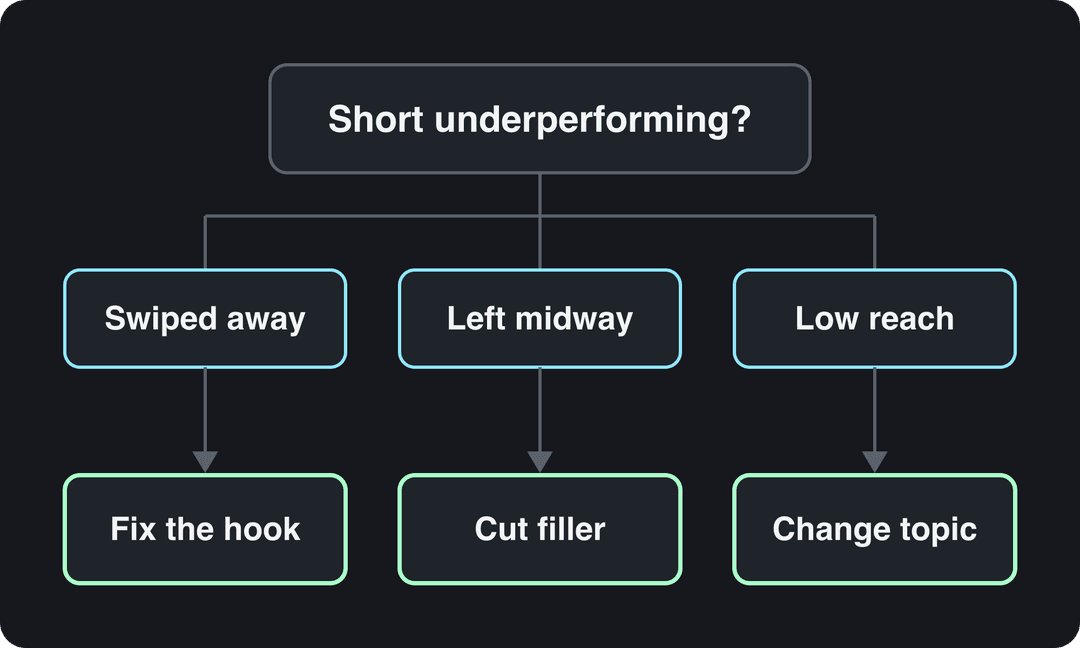
Read them in that order. A Short that loses people in the opening needs a new hook. One that loses them midway needs tighter pacing. One that holds viewers but gets little reach needs a different topic or title.
How YouTube counts Shorts views, and what "valid public Shorts views" means
Since March 31, 2025, YouTube counts a Shorts view every time a Short starts to play or replay, with no minimum watch time (TechCrunch's report on the Shorts view count change has the background). Since August 24, 2026, YouTube counts views the moment playback starts on long-form videos and live streams too. The older metric is now called engaged views, and it is still the one used for YouTube Partner Program (YPP) eligibility and revenue sharing.
The YPP thresholds use qualified Shorts views, the figure many creators still call valid public Shorts views. Today, ad revenue sharing requires 1,000 subscribers plus either 4,000 qualified public watch hours in the last 12 months or 10 million qualified Shorts views in the last 90 days. From February 1, 2027, new applicants need 20 million qualified Shorts views in 90 days or 8,000 qualified watch hours in 365 days. Image Posts in the Shorts Feed do not count as qualified Shorts views. There is no shortcut: these views come from real people watching your public Shorts, which is everything above.
Can you buy or boost YouTube Shorts views?
Skip the view boosters and free-views sites. Paying for or trading views breaks YouTube's fake engagement policy, and YouTube can remove the views, the Short or the whole channel. Bot views don't watch either, so your viewed-versus-swiped and retention numbers collapse and real distribution stops.
The free boosts that work:
- Link each Short to a related long-form video so viewers who like it have somewhere to go next.
- Reply to early comments and pin one that starts a discussion.
- Share the Short in a community post and on your other social accounts.
- Cut your best long-form moments into Shorts, since that material has already proven itself.
If you want paid reach, run the Short as a video ad through Google Ads. That buys ad placement, not organic views, and it won't rescue a Short people swipe past.
Make YouTube Shorts with Revid
When the bottleneck is producing enough strong Shorts, Revid shortens the work and starts from formats that already performed:
- Find a proven format. Search Revid's library of about 2.77 million short-form videos with their engagement data, or repurpose a YouTube Short that already worked into an original video with the same structure and a new script.
- Generate the Short. The AI YouTube Shorts generator writes the script and builds the visuals, voice-over (70+ languages), synced captions and music.
- Repurpose long videos. Paste a link into the YouTube clip maker to get vertical clips from a long video.
- Edit and publish. Fix any scene in the timeline editor, then publish or schedule to YouTube directly. Each post reports its views, likes and comments.
If you plan to monetize, add your own angle to every video: YouTube does not let generic, mass-produced AI template content earn money.
FAQ
How many YouTube Shorts should I post per day?
There is no official number. Post only as often as you can keep quality high: one strong Short beats three weak ones, and a steady weekly rhythm matters more than volume.
What is the best time to post YouTube Shorts?
The best time is when your own viewers are online. Check the "When your viewers are on YouTube" chart in the Audience tab of YouTube Studio, post shortly before the peak, and compare results over a few weeks.
Do YouTube Shorts make money?
Yes, inside the YouTube Partner Program: monetizing creators keep 45% of the Shorts Feed ad revenue allocated to them from the Creator Pool. AIR Media-Tech's 2026 partner data put Shorts RPM at $0.328 per 1,000 views for US audiences, $0.166 for the UK and $0.165 for Canada (see AIR Media-Tech's breakdown of Shorts RPM). From February 1, 2027, earning Shorts revenue requires 10 million qualified Shorts views in the last 90 days; more figures are in our YouTube Shorts statistics.
Why did my YouTube Shorts views suddenly drop?
Usually because the opening or topic of your newer Shorts performed worse with their first viewers than your earlier ones. Compare viewed vs. swiped away across recent Shorts, and check for Content ID claims: a claimed Short over one minute is blocked globally.
Do I need #shorts in the title?
No. YouTube automatically classifies square or vertical videos up to 3 minutes as Shorts, so the tag is optional.
Do Shorts help a long-form channel grow?
They can, in moderation. AIR Media-Tech's study of 18,000 English-language channels found the best results when Shorts made up 25% to 40% of a channel's total uploads.