How to Get More Views on YouTube Shorts: 8 Fixes for 2026
Eight fixes that increase YouTube Shorts views, from the first-second hook to loopable endings, plus how YouTube counts qualified Shorts views for monetization in 2026.
On this page
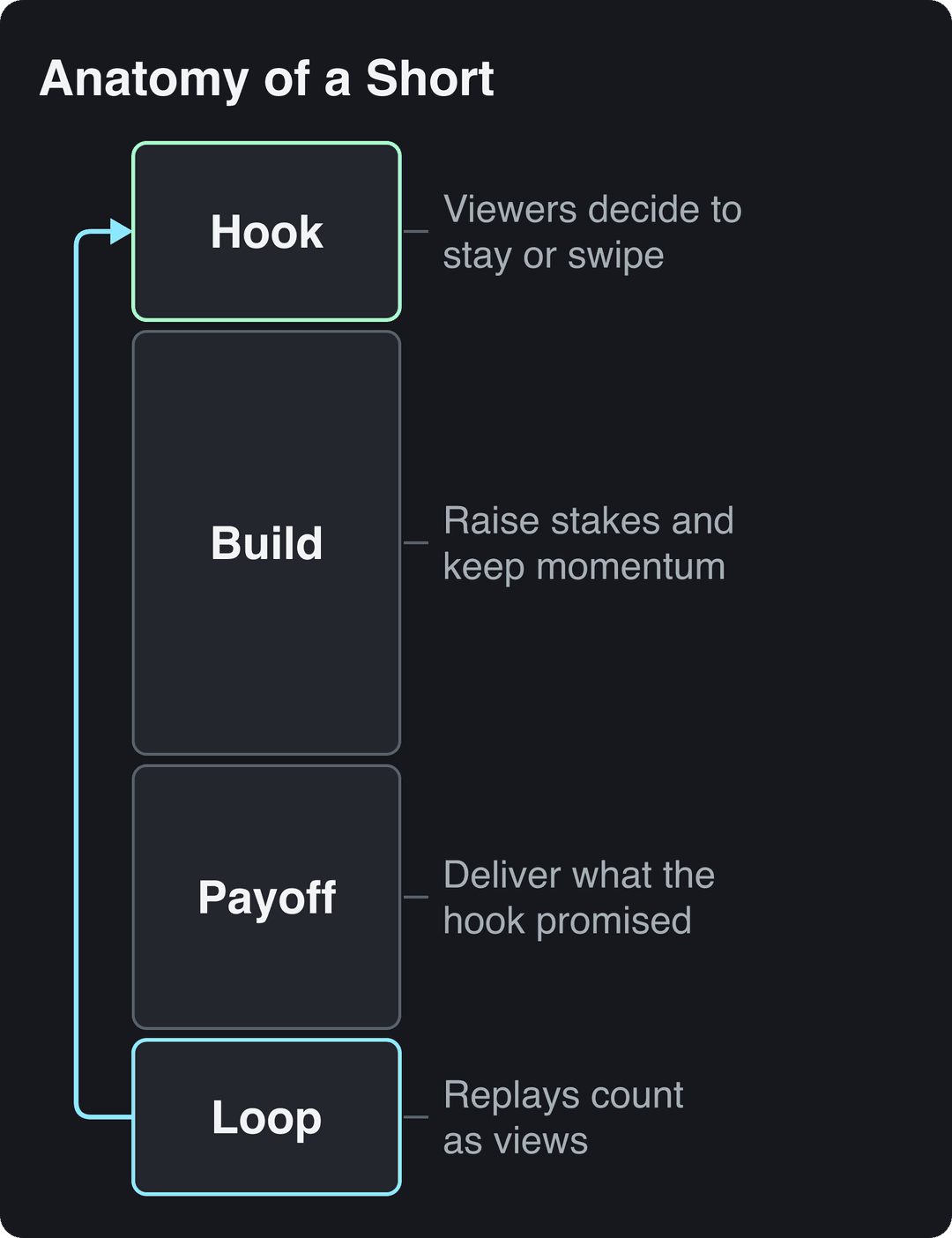
To get more views on YouTube Shorts, win the swipe: hook viewers in the first second, cut anything that doesn't move the idea forward, end on a payoff or a loop, and post consistently. YouTube keeps recommending Shorts that viewers choose to watch rather than swipe away, and then watch to the end.
Small channels have the most to gain. Socialinsider's 2026 study of 69 million short-form videos found that accounts with under 5,000 followers averaged 15,160 views per YouTube Short, against 625 per Instagram Reel and 350 per TikTok. The mistake that wastes that reach is treating a Short like a trimmed long video, with a slow intro, a logo sting or a "hey guys" before the point.
How YouTube decides which Shorts get views
Shorts run in their own feed, with their own recommendations, separate from long-form browse and search. The scale is large: YouTube said in August 2026 that it serves over 200 billion Shorts views a day, and this independent roundup of YouTube Shorts statistics tracks how that number grew.
The feed works like a series of gates. First, does the viewer stop or swipe? YouTube Studio shows this for each Short as the share of viewers who chose to view versus swiped away. Next, do they stay to the end or replay? Finally, do they like, comment, share or subscribe? A Short that clears the first gate for a small audience gets shown to more people. Our breakdown of how the YouTube Shorts algorithm ranks videos goes further.
How do you get your Shorts into the Shorts feed?
Upload a vertical or square video up to 3 minutes long. Since October 15, 2024, YouTube classifies those uploads as Shorts automatically, from a phone or a computer. A landscape video stays a regular video, however short it is.
Shoot or export at 9:16 so the Short fills the screen. Keep captions and key visuals out of the areas covered by the title, buttons and channel name. A free YouTube Shorts safe zone checker shows you exactly where those overlays sit.
8 fixes that increase Shorts views
1. Hook viewers in the first second
The swipe decision happens almost instantly, so the opening frame and the first line carry the whole video. Start with the most interesting moment, not the setup. Hook patterns that work across niches:
- Call out the viewer: "If your sourdough comes out flat, it's this."
- Show the result first: open on the finished room, the plated dish or the final score, then rewind.
- Contradict a belief: "Everyone tells you to stretch before running. Don't."
- Open a loop: "Watch what happens when I add the last ingredient."
Say less than you think. In Revid's analysis of 176,367 TikToks with 1,000+ likes posted between October 2025 and October 2026, videos with under 40 characters of speech had a 123K median and 20.2% passed 1 million views, against 68K and 11.9% for videos that talked throughout. This is TikTok data, and the sample only includes videos that already did reasonably well, so it shows what top videos share, not causes. The full method is in Revid's study of what makes a TikTok go viral.
Prompt to try
Make a 20-second vertical YouTube Short for home bakers that opens on a flat, dense sourdough loaf with the line "If your sourdough comes out flat, it's this." Reveal the cause (under-proofed dough) in one quick visual and one short sentence, then show the tall, airy loaf as the payoff. Close-up kitchen shots, warm light, bold captions, no intro.
2. Make the Short only as long as the idea
The 3-minute cap is a limit, not a target. In the same TikTok analysis, every length bucket from under 15 seconds to 10 minutes landed between 58K and 76K median views, so length alone barely separated winners. Videos under 15 seconds had the lowest median (58K) but the most shares per view (1.41 per 100).
Length alone barely moves views: every bucket lands between 58K and 76K median views (the 790 videos over 10 minutes are a small, unusual group). Clips under 15 seconds get shared the most per view.
Source: Revid analysis of 176,367 TikToks with 1,000+ likes posted between Oct 1, 2025 and Oct 16, 2026 (61,203 creators)
Show the data
| Median views | Share that passed 1M views | Shares per 100 views | |
|---|---|---|---|
| Under 15 s | 57.6K | 11.6% | 1 |
| 16 to 30 s | 64.9K | 12.3% | 1 |
| 31 to 60 s | 61.8K | 11.8% | 1 |
| 61 to 90 s | 70.5K | 12.2% | 1 |
| 91 s to 3 min | 63.4K | 11.1% | 1 |
| 3 to 10 min | 76.4K | 12.4% | 1 |
| 10 min+ | 129.6K | 13.8% | 0 |
The decision rule: a single fact, joke or reveal should be as short as you can make it. A tutorial or story can run longer if every second earns its place. Cut pauses, repeated points and any intro that delays the hook.
Loop prompt to try
Create a 25-second looping YouTube Short that opens with "This is the only knot you'll ever need" over a close-up of hands tying a fishing line. Show the knot in three fast steps with large captions, then end on "...which is why I tie every line with it" on a shot that matches the opening frame so the video loops cleanly. Calm outdoor look, no outro.
3. End on a payoff or a loop
Since March 31, 2025, YouTube counts a Shorts view every time a Short starts to play or replay, with no minimum watch time. A clean loop turns one viewer into several views and tells the feed people watched to the end.
Two ways to end:
- Payoff: deliver exactly what the hook promised, then stop. No outro or "thanks for watching".
- Loop: write the last line so it flows into the first. If the Short opens with "This is the only knot you'll ever need," end on "...which is why I tie every line with it," and cut on the motion that matches the opening frame.
4. Write a title people would search for
Shorts also surface in search, so the title should name what the video is about in the words viewers type. Titles can be up to 100 characters; put the key phrase first and keep it readable. Use a free YouTube title generator for options, then pick the most specific one.
| Weak title | Stronger title |
|---|---|
| Morning routine | Morning routine for night shift nurses |
| Quick tip | Fix a squeaky door hinge without WD-40 |
| Part 3 | How I paid off my car loan early (part 3) |
Keep the description to a line or two with the same keywords. A few relevant hashtags are fine; a wall of them adds nothing. For a fuller checklist, see our guide to YouTube Shorts SEO.
5. Add a custom thumbnail
In the feed a Short autoplays, but on your channel page and in search results it appears as a tile, and the tile decides the click. Verified accounts can upload custom Shorts thumbnails in YouTube Studio on a computer. YouTube recommends 9:16 at 2160x3840, with a minimum height of 640 px. Use one face or object, high contrast, and three or four words at most.
6. Post consistently, in series, and next to long-form
Consistency compounds. Alphabet said in April 2023 that channels posting weekly on Shorts got the majority of their new subscribers from Shorts. Pick a cadence you can keep for months rather than a burst you abandon.
Series give viewers a reason to come back. In September 2026 YouTube began rolling out Shorts series, which lets you organize Shorts into seasons and episodes across web, mobile and TV. Recurring formats ("Day in the life of...", "Rating every...") are easier to make and easier to binge.
If you also make long videos, cut Shorts from them as trailers and link the full video from the Short as a related video. AIR Media-Tech's study of 18,000 English-language channels found the best results when Shorts made up 25% to 40% of a channel's uploads. Revid's YouTube clip maker turns a long YouTube video into vertical clips from a link.
7. Adapt trends to your niche
Trends bring borrowed attention, but only if the result still fits your channel. Social listening tools such as Brand24 track rising hashtags and topics, and many short-form formats show up on TikTok before they spread to Shorts. Take the structure (the hook style, the pacing, the reveal), not the topic. A cooking channel can use a trending "rank them" format to rank knife techniques.
Some formats travel better than others. In Revid's TikTok data, challenges (182K median views) and comedy (155K) far outperformed tutorials (62K). Revid's repurpose viral videos feature lets you open a trending video and choose "Make it about your topic" to apply its hook style, pacing and energy to your own niche.
8. Read the three numbers that matter
In YouTube Studio, check these for every Short:
| Metric | What it tells you | What to do |
|---|---|---|
| Viewed vs. swiped away | Whether the opening earns the watch | Low: rework the first second and the first frame |
| Audience retention graph | Where viewers leave | A drop mid-video: cut that section or add a reveal there |
| When your viewers are on YouTube (Audience tab) | When your audience is active | Publish shortly before the peak |
YouTube's built-in title and thumbnail A/B testing doesn't support Shorts. Test manually instead: change one variable (hook style, length, ending) across consecutive Shorts on similar topics, and keep what moves the swipe rate.
Promote your Shorts beyond YouTube
The Shorts audience only partly overlaps with other apps. Google said in April 2026, citing GWI data from February 2025, that 45% of YouTube Shorts users aren't on TikTok and 65% aren't on Instagram Reels. Alphabet put Shorts at over 2 billion monthly logged-in users back in July 2023, and Hootsuite's YouTube statistics roundup collects more of these platform figures.
That means posting the same idea natively on each platform reaches mostly different people. Promote your channel from other accounts with a teaser that points to a series, not a bare link. Announce new Shorts on your Community tab, and link Shorts from your long videos. For broader channel and statistics context, Revid keeps a sourced list of YouTube Shorts statistics.
How to get valid public Shorts views (and why they differ from your view count)
"Valid public Shorts views" is how older YouTube help pages described the Shorts views that count toward the YouTube Partner Program. Current pages call them qualified Shorts views. They are not the same as the number under your Short, which is why your view count can look healthy while your YPP progress moves slowly.
| Counter | What it counts | Used for |
|---|---|---|
| Views | Every play or replay, from the moment it starts (Shorts since March 31, 2025; all formats since August 24, 2026) | Public view count and analytics |
| Engaged views | The previous view metric, which filters out some plays the new count includes | YPP eligibility and Shorts revenue sharing |
| Qualified Shorts views | The eligibility counter in YouTube's YPP requirements; Image Posts in the Shorts Feed don't count | Reaching the YPP thresholds |
Digital Music News explained the background in its piece on how YouTube changed Shorts view counting in March 2025.
To increase public Shorts views that count:
- Keep Shorts public. Private and unlisted uploads don't build public views.
- Post video, not image posts. Image Posts in the Shorts Feed don't count as qualified Shorts views.
- Grow real views only. Bought views and view exchanges break YouTube's fake engagement policy and put the channel at risk.
- Optimize for watching, not just starting. The fixes above (hook, length, loop) are what turn plays into engaged views.
Today, YPP ad revenue sharing requires 1,000 subscribers plus either 4,000 qualified public watch hours in the last 12 months or 10 million qualified Shorts views in the last 90 days. From February 1, 2027, new applicants need 1,000 subscribers plus 8,000 qualified watch hours in the last 365 days or 20 million qualified Shorts views in the last 90 days. Channels already in YPP are not affected by the new entry thresholds.
Turning Shorts views into income
The YouTube Shorts Fund, a $100 million fund paid out over 2021 and 2022, is gone. Shorts now earn through revenue sharing: Shorts Feed ad revenue is pooled each month, allocated by each creator's share of engaged views, and monetizing creators keep 45% of their allocation whether or not they used music. Music shrinks the pool, not your share of it.
Two things to plan for:
- From February 1, 2027, monthly Shorts earnings need 10 million qualified Shorts views in the last 90 days. Channels below that stay in YPP and keep long-form earnings.
- Shorts pay less per view than long-form. AIR Media-Tech's September 2026 analysis of 274 channels found Shorts RPM was 3% to 14% of long-form RPM in almost every niche, with US Shorts RPM at $0.328 per 1,000 views.
For most channels, Shorts work best as discovery that feeds long videos, memberships and brand deals. This third-party guide to monetizing YouTube Shorts covers more revenue options.
If you use AI, YouTube allows it for monetized content when the result shows your creative vision and gives real value. It does not monetize AI content made from generic templates that looks mass-produced, or clips stitched together with no narrative.
How to make Shorts faster with Revid
If production time is what limits how often you post, Revid's AI YouTube Shorts generator turns an idea, a script or a link into a finished vertical video with AI visuals, a voice-over and synced captions. To start from a format that already performed, search Revid's library of about 2.77 million short-form videos, open one and remix it into an original video on your topic. You can fix any scene in the timeline editor, export up to 4K, and publish or schedule the Short to YouTube directly. Keep your own angle in the script so the result reads as yours, not as a template.
FAQ
Why are my YouTube Shorts getting no views?
Usually the opening: if Studio shows most viewers swiping away, the first second isn't earning the watch. Also check that the video is vertical or square and no longer than 3 minutes, then work through these fixes for Shorts with no views.
Do Shorts views count toward the 4,000 watch hours?
No. Watch hours from Shorts in the Shorts Feed don't count toward the 4,000-hour YPP threshold. Shorts count only through the separate qualified Shorts views path.
Does labeling a Short as AI-generated reduce its views?
No. YouTube says disclosing AI doesn't by itself limit a video's audience or its eligibility to earn. Realistic AI content must be disclosed with the "AI use" setting in YouTube Studio, and since May 2026 YouTube labels undisclosed photorealistic AI automatically.
Can you buy YouTube Shorts views?
You can find sellers, but bought views break YouTube's fake engagement policy and can get videos removed or the channel penalized. They also tell the feed nothing useful about real viewers, so they don't lead to more organic reach.
What is the best time to post YouTube Shorts?
The best time is when your own viewers are online, which YouTube Studio shows under "When your viewers are on YouTube" in the Audience tab. Publish shortly before that peak, then compare results across a few weeks.