How to Make a Highlight Video: 7 Steps From Footage to Export
A step-by-step way to turn hours of footage into a tight highlight video: who it's for, which clips make the cut, how to pace it, what music is safe, and how to export for each platform.
On this page
To make a highlight video, decide who it's for, pull your strongest 15 to 20 moments into one folder, order them as hook, build and climax, and cut them to the beat of licensed music. Then export at 1080p in the platform's shape: 16:9 for YouTube, 9:16 for TikTok, Reels and Shorts.
Two mistakes sink most highlight videos. They run long because every clip feels precious, and they use a song nobody licensed. On YouTube, any Short longer than one minute with an active Content ID claim is blocked globally and can't be monetized. The seven steps below avoid both.
Step 1: Decide who the video is for and what it must do
Every later choice (length, pacing, music, shape) follows from one sentence: who watches this, and what should they do afterward? A sports reel for a college coach, a wedding film for family and a gaming montage for a channel are three different edits of the same idea.
| Audience | What they want to see | What it means for the edit |
|---|---|---|
| College coach or recruiter | Raw skill, consistency, decisive plays | Best play first, no long intro, you clearly identified in every clip |
| Couple or wedding guests | Emotion, faces, the story of the day | Slower cuts, cinematic shots, vows or speeches as the audio spine |
| Gaming audience | High-skill plays, funny moments, nonstop action | Fast cuts, meme edits, upbeat electronic music |
| Customers or event attendees | The product or the atmosphere, proof it was worth it | Key moments plus on-screen text that says what they're seeing |
Then write down four answers before you touch any footage:
| Planning element | Question to answer | Example (gaming highlights) |
|---|---|---|
| Purpose | What is the one thing this video must achieve? | Show my top 10 plays of the season to grow subscribers |
| Audience | Who am I reaching, and what do they care about? | Gamers who like high-skill, fast gameplay and funny edits |
| Key message | What should viewers remember? | "This player is skilled and fun to watch" |
| Tone and style | What should it feel like? | Energetic and funny, with meme edits and upbeat electronic music |
If you can't fill in the purpose row in one line, you're not ready to edit yet.
Step 2: Gather and organize your footage
Create one project folder before importing anything. A desktop full of files named final_video_01.mp4 costs you hours later. This structure works for any highlight project:
- Project name (for example,
Smith_Wedding_Highlights)01_Raw_Footage: every original file, untouched02_Audio: external mic recordings, music tracks, sound effects03_Selects: the trimmed clips you plan to use04_Project_Files: your editor's project files05_Final_Exports: rendered versions, one per platform
As you review clips, check three technical things:
- Resolution: use clips shot at 1080p or higher. 4K gives you room to crop and reframe, which matters when you turn horizontal footage into a vertical cut.
- Frame rate: keep one timeline frame rate (24, 30 or 60 fps) and don't mix rates casually, or playback looks jerky. Footage shot at 60 fps can be slowed down in a 30 fps timeline for clean slow motion.
- Audio: listen on headphones. Drop clips with heavy wind, distorted sound or loud background chatter unless the noise is the point (a crowd erupting after a goal is worth keeping).
Step 3: Pick only your best moments
Here is the rule for every clip: does it make someone say "wow"? If the answer isn't an immediate yes, cut it. A 90-second video with 15 to 20 strong clips beats a five-minute video with 50 average ones every time, because viewers judge the whole reel by its weakest stretch.
Trim each select tightly: start just before the action, end just after the payoff. Dead air at either end of a clip is what makes a highlight video feel slow even when every moment in it is good.
Let AI do the first pass on long footage
Scrubbing through a three-hour stream or a full game by hand is the slowest part of the job. AI clip tools scan the footage and transcript and propose the moments worth cutting, so you start from a shortlist instead of a blank timeline. Adoption is mainstream now: in Wyzowl's 2026 survey, 63% of video marketers said they had used AI video tools to create or edit marketing videos (more in our short-form video statistics).
Treat the AI's picks as a draft. You still decide the order, the pacing and what the story is. For a broader view of the options, see this roundup of AI video editing software on MyKaraoke, and for context on how fast the category is growing, this LinkedIn post on video editing software market projections.
Step 4: Build the story: hook, build, climax
A highlight video is a story, not a montage. You don't need a drawn storyboard: a numbered list of selects in order is enough. Use a simple three-part structure:
- The hook: your single best or most surprising moment, in the first seconds. Don't open with a logo or a slow title card.
- The build: strong moments that raise the energy, grouped by type or by time so the viewer follows along.
- The climax: a top-tier moment saved for the end, followed by a short closing shot (the trophy, the first dance, your channel name or contact details).
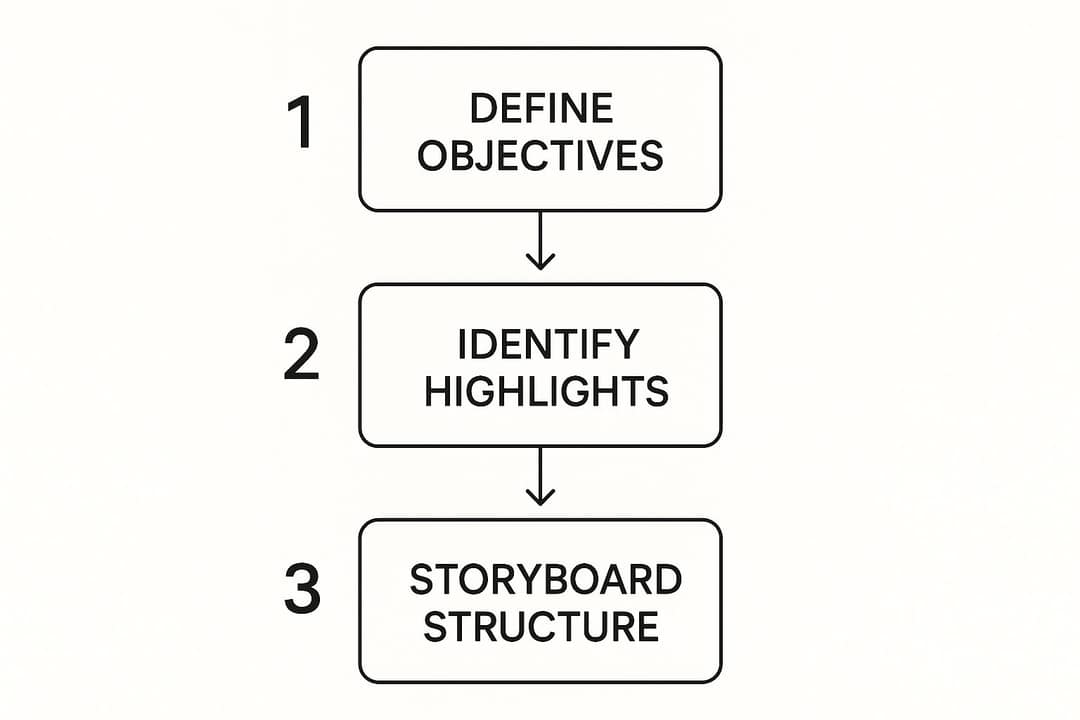
Opening with your best clip and also ending strong means you need at least two standout moments. If you only have one, lead with it. For more ways to guide the viewer's eye from shot to shot, these visual storytelling techniques from Creativize are a useful reference.
Step 5: Set the pacing and cut to the music
Pacing is the rhythm of the reel. Match it to the goal from Step 1:
- Gaming and sports: quick, punchy cuts timed to a high-energy track. A brief slow-motion beat right before the big play makes the payoff hit harder.
- Travel and weddings: let wide shots and emotional moments breathe before cutting away.
- Product or event recaps: steady pace, with each clip long enough for on-screen text to be read.
Choose the music by mood before you search for a track:
- High energy: electronic, rock or hip-hop for sports, gaming and launches.
- Emotional: a cinematic score or acoustic track for weddings, travel and personal stories.
- Inspiring: uplifting tracks for achievement reels and company recaps.
Then edit to the music, not under it. Place cuts on beats, and land your biggest moments on drops or swells. This one habit is what makes an amateur edit look intentional.
Step 6: Polish color, sound and text
Color correction comes first. Make every clip match: fix shots that are too bright or too dark, set white balance so whites look white, and check that skin tones look natural. Clips from different cameras or phones usually need the most work.
Color grading comes second and sets the mood. A gritty sports reel can take higher contrast and slightly muted colors; a travel video usually suits warmer tones and a bit more saturation.
For audio, build in layers:
- Set the music level so it supports the energy without burying key moments.
- Place dialogue, commentary or speeches clearly on top.
- Duck the music (lower it automatically or with keyframes) whenever someone speaks.
- Add sound effects sparingly to punch up actions: the swish of a net, a final click.
Finish with text. Names, scores, dates and short labels tell viewers what they're looking at, and captions help anyone watching with the sound off. Keep text away from the edges where platform buttons sit. You can add text overlays to a video without opening a full editor.
Step 7: Export for each platform
Every platform, from YouTube to TikTok, recompresses what you upload, so give each one a clean master in the shape it expects. Export MP4 with H.264 video and AAC audio unless a platform says otherwise.
| Platform | Shape | Resolution | Frame rate | Length to know |
|---|---|---|---|---|
| YouTube (long-form) | 16:9 | 1920x1080 or 3840x2160 | 24, 30 or 60 | 15 minutes by default; verify your account for longer |
| YouTube Shorts | 9:16 or square | 1080x1920 | 30 or 60 | Up to 3 minutes |
| TikTok | 9:16 | 1080x1920 (recommended) | 30 or 60 | Uploads up to 60 minutes |
| Instagram Reels | 9:16 (accepts up to 1.91:1) | 1080x1920 (minimum 720 px) | At least 30 | Up to 20 minutes; over 3 minutes isn't shown to non-followers |
| Facebook Reels | 9:16 | 1080p, H.264 or H.265 | 24 to 60 | No length limit |
| X | 16:9, 9:16 or square | 1280x720, 720x1280 or 720x720 | 30 or 60 | 20 minutes (125 with Premium) |
| 16:9, vertical or square | Up to 4096x2304 | 10 to 60 | Up to 15 minutes |
Most sports and gaming footage is horizontal, so the vertical version is a crop, not a resize. Anything outside the center of the frame gets cut off.
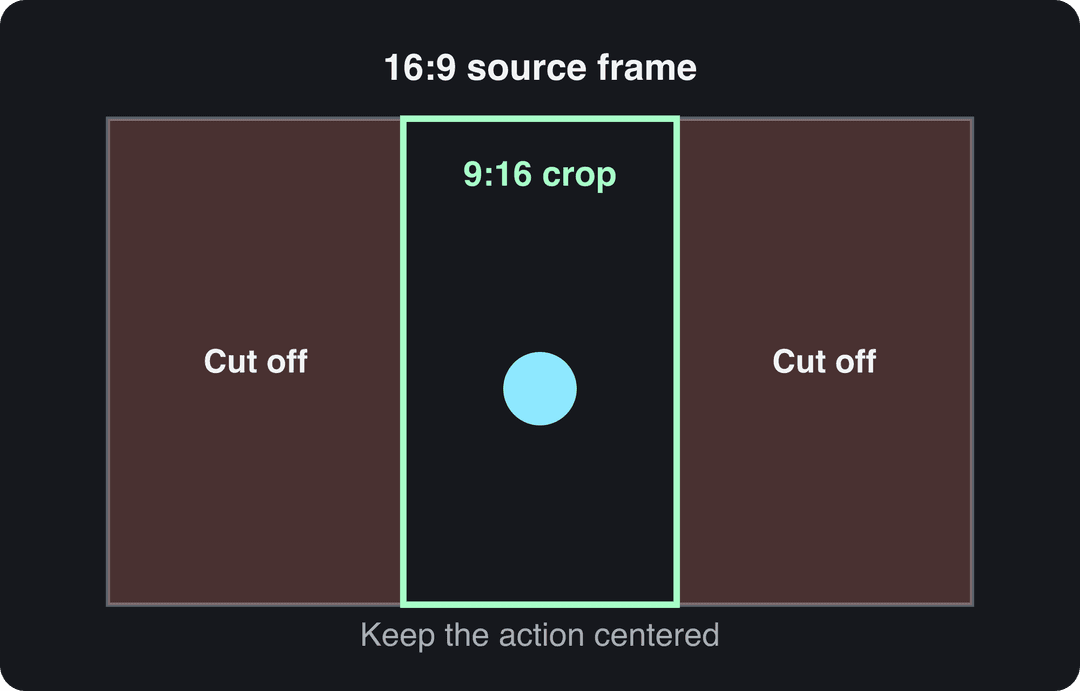
Reframe clip by clip so the ball, the player or the action stays inside the vertical window, or use a tool that can resize a video to 9:16 and then adjust the framing. For more format-by-format detail, see our guide on how to make highlight videos.
How long should a highlight video be?
Length depends on where the video goes and who watches it:
- Sports recruiting reel: two to four minutes. Coaches decide fast, so your best plays go first.
- TikTok, Reels and Shorts: aim for 15 to 60 seconds, and only go longer if the extra clips are as strong as the first ones.
- YouTube long-form: past five or six minutes, a highlight video has to be exceptional to hold viewers.
- Wedding and event films: long enough to tell the day's story, with a short vertical cut for social.
On short-form platforms, length matters less than what fills it. In Revid's analysis of 176,367 TikToks with 1,000+ likes posted between October 2025 and October 2026, every length bucket from under 15 seconds to 10 minutes had a median between 58K and 76K views, and 61 to 90 second videos landed at 70K. Videos under 15 seconds earned the most shares per view (1.41 per 100), which suits a highlight built to be sent to friends. The sample only includes videos that already cleared 1,000 likes, so read it as "length alone won't make or break you," not as a cause. The method is in the full study of what makes a TikTok go viral.
Length alone barely moves views: every bucket lands between 58K and 76K median views (the 790 videos over 10 minutes are a small, unusual group). Clips under 15 seconds get shared the most per view.
Source: Revid analysis of 176,367 TikToks with 1,000+ likes posted between Oct 1, 2025 and Oct 16, 2026 (61,203 creators)
Show the data
| Median views | Share that passed 1M views | Shares per 100 views | |
|---|---|---|---|
| Under 15 s | 57.6K | 11.6% | 1 |
| 16 to 30 s | 64.9K | 12.3% | 1 |
| 31 to 60 s | 61.8K | 11.8% | 1 |
| 61 to 90 s | 70.5K | 12.2% | 1 |
| 91 s to 3 min | 63.4K | 11.1% | 1 |
| 3 to 10 min | 76.4K | 12.4% | 1 |
| 10 min+ | 129.6K | 13.8% | 0 |
A practical rule: cut until removing one more clip would lose something you'd miss. That point is your length.
What music can you use in a highlight video?
Using a popular song without a license is the fastest way to get a highlight video muted, blocked or taken down, especially on YouTube. Safe options:
- Royalty-free libraries: subscription services such as Epidemic Sound and Artlist license large catalogs of tracks for use in your videos. Check what your plan covers (personal, commercial, client work).
- YouTube Audio Library: free music and sound effects cleared for YouTube. Most Shorts Audio Library songs can run up to 90 seconds in a 3-minute Short; some are limited to 60 or 30 seconds.
- Creative Commons music: usable, but read each license. Some require credit, some forbid commercial use.
How to make a highlight video with Revid
Revid turns long footage, links or photos into vertical highlight clips with captions and music, then publishes them. Pick the starting point that matches your footage:
- A long recording you have: upload it to the long video to short video converter, which cuts it into short clips. For a YouTube link, the YouTube clip maker does the same from the URL.
- A game stream: the gaming clip generator adds voiceover and subtitles to clips from your streams.
- A game or match: the AI sports highlights generator builds a short video from your raw footage.
- A wedding: the wedding highlight video maker picks the best moments from your photos and clips and adds transitions.
- Finish and publish: adjust scenes in the timeline editor, choose one of 30 caption styles, export in 720p, 1080p or 4K at 30 or 60 fps, or publish straight to TikTok, Instagram and YouTube.
Sign-up is free and new accounts get free credits to try it (no credit card needed), then regular generation uses the monthly credits of a paid plan (from $39/month). If your only need is cutting many clips out of your own long recordings, a dedicated clipping tool such as OpusClip may fit that job better.
FAQ
What is the best free software to make a highlight video?
CapCut is a strong free choice for editing footage you filmed: its free tier includes the full editor and 1080p export. Pair it with the free YouTube Audio Library for music you're allowed to use.
Can I make a highlight video on my phone?
Yes. CapCut works on mobile, and Instagram's Edits app (Android and iPhone) adds generated captions and exports without a watermark. Shoot or import in 1080p and edit in 9:16 if the video is going to TikTok, Reels or Shorts.
How do I make a sports highlight video for recruiting?
Keep it to two to four minutes and put your best plays first. Start with a title card showing your name, position, team and contact details, and mark yourself (an arrow or spotlight) at the start of each clip so the coach knows who to watch.
Should a highlight video be horizontal or vertical?
Both, if you post in more than one place. Export a 16:9 master for YouTube and recruiting links, then a separate 9:16 cut, reframed clip by clip, for TikTok, Reels and Shorts.
How many clips should a highlight video have?
As few as it takes to keep every second strong: 15 to 20 clips is plenty for a 90-second reel. If a clip doesn't make you say "wow," cut it.