How to Repurpose Content for Social Media With AI (2026 Workflow)
How to repurpose content for social media with AI: pick a proven piece, extract its ideas and rebuild each one for its platform. Steps, specs, a weekly workflow and the metrics to track.
On this page
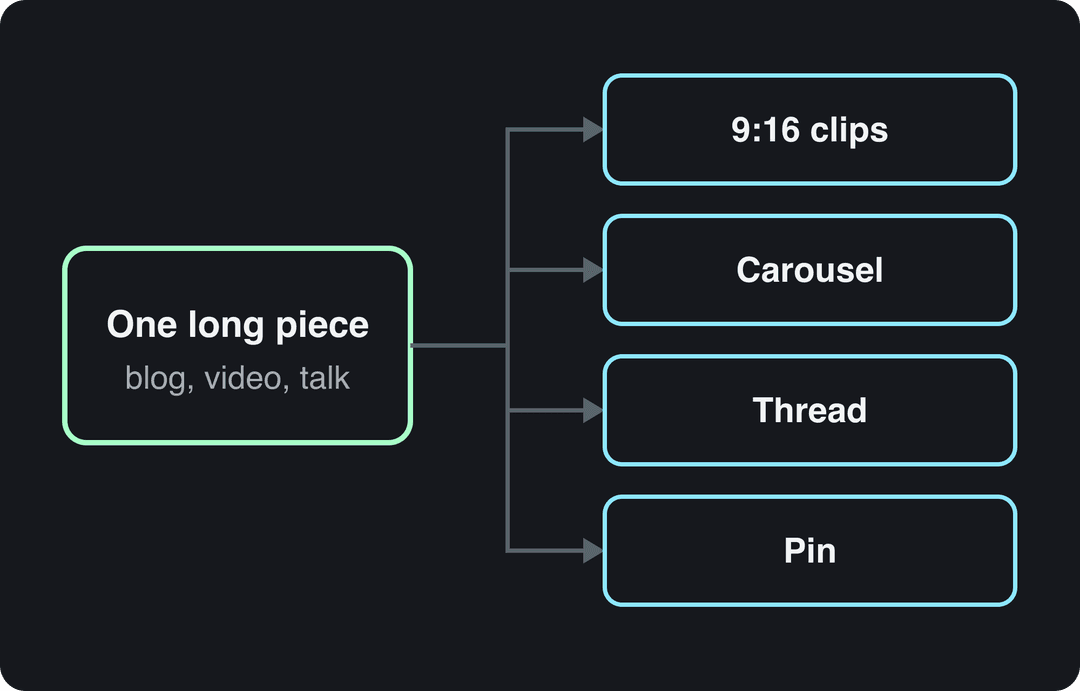
To repurpose content for social media, pick one proven long piece (a blog post, webinar, podcast or YouTube video), pull out its standalone ideas and rebuild each one as a native post for each platform: vertical clips, carousels, threads and pins. AI handles the extraction, scripts, captions and visuals; you add the new hook and check the facts.
The common mistake is pushing the same file everywhere. Since March 2026, Facebook treats reposts that only add borders, captions or speed changes as unoriginal and deprioritizes them, and TikTok's Creator Rewards Program does not count lightly modified reposts as original. Repurposing pays off only when each version is rebuilt for the feed it lands in.
Most brands already repurpose in some form. Wistia's 2026 State of Video Report found that over half of companies repurpose their videos into social clips. LinkedIn is the top destination (67% of teams post clips there), followed by Instagram (49%) and YouTube (41%).
What AI does well in content repurposing, and what it doesn't
AI handles the mechanical half of repurposing: finding moments, summarizing, reformatting, voicing and captioning. It is weak at deciding what deserves a second life and at adding the new angle that makes a version feel original. Split the work accordingly.
| Task | Can AI do it? | What you still check |
|---|---|---|
| Finding the strongest moments in a long video | Yes, clipping tools find and cut highlights | Whether each clip makes sense without context |
| Summarizing a blog post into a video script | Yes | Facts, numbers and your voice |
| Writing captions and hashtags per platform | Yes | Platform limits (Instagram allows up to 5 hashtags) |
| Generating visuals, voice-over and captions | Yes | Realistic AI footage needs an AI label on TikTok and YouTube |
| Choosing which piece to repurpose | Partly | Your analytics decide, not the tool |
| Adding a new insight or opinion | No | This is what keeps the version original |
That split matters for monetization as well as reach. YouTube allows AI tools in monetized videos when the final product shows your creative vision, for example AI used to edit a script or create a background visual. It does not monetize AI content made with generic templates that looks mass-produced, and it treats videos that only read out material you didn't write (website text, news feeds) as reused content. Repurposing your own blog post with your own commentary is fine. Pushing someone else's article through a template is not.
How to repurpose content for social media, step by step
- Pick one proven source. Start with the piece that already earned attention: the blog post with steady search traffic, the webinar that drew questions, the video with the best retention. Repurposing a flop only spreads the flop.
- Extract ideas, not paragraphs. Ask your AI assistant to list every standalone idea in the source: a statistic, a mistake, a how-to, a strong opinion, a story. Each idea becomes one asset, and each asset makes one point.
- Rewrite each idea for its platform. Write a new hook, cut to the length the feed rewards and choose the native format (clip, carousel, thread, pin). The idea stays the same; the packaging changes.
- Produce with AI, then edit by hand. Let AI draft the video, captions and graphics. Then fix the facts, tighten the opening seconds and cut anything generic.
- Publish natively and link back. Upload a clean file to each platform instead of sharing a link to another app, write a caption for that platform, and point to the original piece for people who want more.
- Measure, then repurpose the winners again. The asset that outperforms becomes your next source.
Prompt to try
Make a 30-second faceless vertical tutorial on themed workdays for remote teams. Open with the hook "Your calendar is the reason you never finish anything," then show a color-coded weekly calendar filling in day by day with bold on-screen text and minimal narration. Clean motion graphics style, upbeat music, captions throughout.
Turning text into video: show more, say less
The biggest quality gap in AI repurposing is the blog post read aloud over stock footage. In Revid's analysis of 176,367 TikToks with 1,000+ likes posted between October 2025 and October 2026, faceless tutorials had a median of 156K views (22.1% passed 1M) against 52K (10%) for tutorials with a person on camera.
Faceless tutorials earned about 3x the median views of on-camera tutorials (156K vs 52K).
Source: Revid analysis of 176,367 TikToks with 1,000+ likes posted between Oct 1, 2025 and Oct 16, 2026 (61,203 creators)
Show the data
| Median views | Share that passed 1M views | |
|---|---|---|
| Faceless tutorials | 155.6K | 22.1% |
| Product or object tutorials | 80.7K | 14.9% |
| On-camera tutorials | 52.5K | 10% |
| Faceless storytelling | 72.7K | 13.3% |
| On-camera storytelling | 64.4K | 11.7% |
| Faceless comedy | 326.7K | 26.4% |
| On-camera comedy | 135.5K | 20.7% |
The amount of talking showed the same pattern: videos with under 40 characters of speech had a 123K median, while videos that talked throughout (300+ characters of speech) had 68K. This is TikTok data, it only covers videos that already reached 1,000+ likes, and it shows what top videos share, not what causes success. It still points one way: when a blog post becomes a short, show the idea on screen and cut the narration hard. The full method is in our study of what makes a TikTok go viral.
Which content should you repurpose first?
Repurpose what has already proved itself. Pull your top pages by traffic and engagement time in Google Analytics, and your top posts by shares and saves in each platform's analytics. Then keep the evergreen ones: how-to guides, original data, practical checklists and stories that will still be true next year.
Decision rules:
- If a page ranks and brings steady search traffic, turn it into a short video and a carousel that point back to it.
- If a webinar or podcast drew questions, each answered question becomes a clip.
- If the facts are outdated, refresh the source first. Repurposing stale numbers multiplies the error.
- If the core message no longer fits your strategy, write something new instead.
| Source | Turns into | Best platforms |
|---|---|---|
| Blog post or guide | Short video script, carousel, thread, pin | TikTok, Reels, Shorts, LinkedIn, X, Pinterest |
| Webinar or talk | Highlight clips, Q&A clips, quote cards | LinkedIn, YouTube Shorts, Reels |
| Podcast | Captioned clips, audiograms, quote graphics, episode recap post | Reels, TikTok, LinkedIn |
| Original data or research | Chart posts, data carousel, short explainer | LinkedIn, X, Pinterest |
| Product photos | Carousel, photo post, slideshow video, pins | Instagram, TikTok, Pinterest |
| Customer reviews | Quote cards, UGC-style video | Instagram, TikTok, Facebook |
Repurposing also works in the other direction, from social posts back into search content. ClearVoice's guide to repurposing content for SEO covers that side.
How to turn a blog post into social media posts
Read the post once looking for standalone moments, not for a summary. Four kinds travel well:
- Quotes: a sentence or two that nails a key idea becomes a quote card.
- Statistics: one surprising number, with its source, becomes a chart post or the opening line of a short.
- Steps and lists: any how-to becomes a carousel or a numbered thread.
- Contrarian takes: an opinion that pushes back on common advice starts conversations on LinkedIn and X.
Then package each moment for the platform it lands on:
| Blog element | X | TikTok | ||
|---|---|---|---|---|
| Key statistic | Chart or text post with your read of the number | One graphic or one carousel slide | A post that leads with the number | A short that shows the number on screen |
| How-to list | Document or carousel post | Carousel, one step per slide | Numbered thread, one step per post | Photo carousel or a short with one step per scene |
| Strong quote | Clean quote graphic plus your reflection | Quote card in the feed or a Story | Quote card image | Text-on-screen short with a voice-over |
| Contrarian opinion | Text post laying out your reasoning | Reel with your take | Thread that opens with the claim | Short that states the claim in the first line |
Quote cards and carousels people actually read
Build a small set of branded templates (quote, statistic, step) so every graphic is fast to make and recognizable in the feed. Put one idea on each slide, use large type and strong contrast, and keep text short enough to read in a glance. Type choice carries most of the clarity, and Remote Sparks' guide to typography in design covers the basics. A tall graphic that stacks steps vertically doubles as a Pinterest pin, and a carousel exported as a PDF works as a LinkedIn document post.
Example: one blog post turned into a week of posts
Say your post is "5 Time-Management Hacks for Remote Teams." One hack, themed workdays, becomes five assets:
| Platform | Asset | Sample hook |
|---|---|---|
| 30-second Reel explaining the idea with on-screen text | "Mondays are for meetings. Tuesdays are for deep work." | |
| Text post that asks readers whether they theme their days | "Most remote teams lose their best hours to meeting sprawl." | |
| X | Thread on why theming works, one reason per post | "Themed workdays sound rigid. Here is why they free up your week." |
| TikTok | Faceless short showing a color-coded week in a calendar | "Your calendar is the reason you never finish anything." |
| Vertical pin listing all five hacks, linking to the post | "5 time-management hacks for remote teams" |
The other four hacks follow the same pattern, so one post fills several weeks of a calendar without repeating a single asset.
How should each platform's version differ?
Same idea, different packaging. Use this table as a checklist before you publish.
| Platform | What the repurposed version should be | Specs and rules to know |
|---|---|---|
| TikTok | A vertical short with a new hook, or a photo carousel from a list post | 9:16 at 1080x1920 recommended; uploads up to 60 minutes; photo posts up to 35 photos |
| A Reel for reach, a carousel for detail | Reels up to 20 minutes, but reels over 3 minutes aren't recommended to non-followers; up to 5 hashtags; carousels up to 20 photos and videos | |
| YouTube Shorts | A vertical clip that teases or completes one idea from the long video | Square or vertical videos up to 3 minutes count as Shorts |
| Native video, a document carousel or a data post with your own take | Video up to 15 minutes and 5 GB; aspect ratios from 1:2.4 to 2.4:1; the vertical video feed is mobile-only and you can't post to it directly | |
| X | A thread of key points, with one video or up to 4 images | Video up to 20 minutes for non-Premium accounts; aspect ratios from 1:3 to 3:1 |
| A reel with original commentary, or a community question | Every new video is shared as a reel, with no length limit; cosmetic-only reposts are deprioritized | |
| A vertical pin that links to the source page | Check Pinterest's help center for current pin sizes |
The tone shifts too. Someone on LinkedIn is in a work frame and responds to lessons and data; someone on TikTok wants a quick payoff in the first line. For channel planning beyond repurposing, Grassroots Creative Agency's social media marketing strategies cover the wider picture.
Two decision rules help here. On Instagram, test a repurposed reel as a trial reel first: it is shown to non-followers, insights arrive within 24 hours, and it doesn't affect the ranking of your standard reels. Trial reels need a public account with 200 followers (professional) or 1,000 (personal). On TikTok, keep hashtags to a few: in Revid's TikTok study, posts with 3 to 4 hashtags had the best median views, and those with 9 or more did worst.
How do you break a long video into platform-specific assets?
Start from your best-performing long YouTube video, podcast or webinar. There are five approaches, and most long videos support more than one:
- Highlight clipping. AI finds self-contained moments, reframes them to 9:16 and adds captions. This works best for podcasts, interviews and talks where people already say quotable things. Revid's YouTube clip maker does this from a link.
- Topic re-scripting. Take one idea from the video and remake it as a new short with fresh visuals and a tighter script. This works best when the original is slow or visually flat, such as a webinar with slides.
- Quote clips. One strong line with large captions, for LinkedIn and Reels.
- Text assets. Run the transcript through an AI assistant to draft a thread, a carousel, a LinkedIn post and a recap article.
- A Shorts series. Split a long tutorial into numbered parts. Since September 2026, YouTube lets creators organize Shorts into seasons and episodes.
A recorded talk like the one below is a typical source: the Q&A answers become clips, the slides become a carousel, and the main argument becomes a re-scripted short.
Watch the music: a Short longer than one minute with an active Content ID claim is blocked globally and can't be monetized. For a video-only workflow in more depth, see how to repurpose video content.
Podcasts: audiograms, teasers and quote cards
An audiogram pairs a still image (cover art or a guest photo) with a moving audio waveform and captions, which turns a listen into something to watch in the feed. Keep each one 30 to 60 seconds, put a headline on screen that says what the clip is about, and add word-for-word captions so the point lands for people scrolling with the sound off. Revid's podcast clip generator creates a video from a recording you drop in.
From the same episode, cut a teaser that ends on an open question and points to the full show, a standalone tip that delivers value on its own, and an outtake if the recording had a funny moment. Then pull the sharpest lines into quote cards using your templates.
How do I repurpose product images across Instagram, Pinterest and TikTok?
Keep one high-resolution master per product and crop it to each platform's shape. Then change the format, not just the size: a carousel on Instagram, a photo post or slideshow video on TikTok, and a pin that links to the product page on Pinterest.
- Keep a master file at the largest size you have, with space around the product so every crop works.
- Instagram: portrait crops up to 3:4 keep full resolution (1080x1440 is the tallest uncropped portrait). A carousel holds up to 20 photos and videos, enough for angles, details and a lifestyle shot.
- TikTok: a photo post takes up to 35 photos. For more reach, turn the set into a 9:16 video with a hook and captions.
- Pinterest: make a vertical pin with a short text overlay and link it to the product page. Check Pinterest's help center for current pin sizes.
- Rewrite the caption for each platform: lead with the benefit on Instagram, with the hook on TikTok, and with search keywords on Pinterest.
To skip the editing, Revid's product video generator reads a product page URL, keeps its real photos, writes the script and generates a short video.
How to repurpose content with AI in Revid
Revid covers the video half of repurposing: it turns a link, a script, a recording or a long video into a finished short.
- Paste a blog or article URL into the article to video converter, or upload a long recording to the long video to short video tool.
- Revid writes the script and builds scene-by-scene visuals from stock footage, AI images or AI video (Seedance 2.5, MiniMax Hailuo H3, Wan 3.0 or Veo 3), with a voice-over in 70+ languages, synced captions and music.
- Adjust any scene in the timeline editor and export in 720p, 1080p or 4K.
- Publish or schedule to TikTok, Instagram and YouTube from one queue.
- To repurpose on a schedule, set up an Auto-Mode worker to create a fresh video every day from a content source.
Sign-up is free and new accounts get free credits to try video creation, no credit card needed; regular creation then uses credits from paid plans starting at $39/month.
Which tools make the repurposing process more efficient?
No single tool does every job well. Efficient setups use one tool per step: create, edit, design, write, schedule. For a longer comparison, see our roundup of content repurposing software.
| Job | Tools | What to know |
|---|---|---|
| Cut long recordings into clips | OpusClip, Revid | OpusClip specializes in clipping and captioning footage you already have (how the two compare); Revid also turns YouTube videos into Shorts |
| Make new videos from a link, script or post | Revid | Script, AI visuals, voice-over, captions, music and direct publishing in one product |
| Edit your own footage by hand | Adobe Premiere Pro, Final Cut Pro, CapCut, InShot | Premiere Pro and Final Cut Pro for full control; CapCut and InShot for quick edits on a phone |
| Quote cards, carousels, pins | Canva, Adobe Photoshop | Canva for templates and speed, Photoshop for custom design |
| Captions and copy variants | Jasper | An AI writing assistant; edit every draft for facts and voice |
| Scheduling | Buffer, Hootsuite, Sprout Social | Content calendars and posting across platforms |
If you work alone, keep the stack to one creation tool and one scheduler. If a team shares the work, give each platform one owner, so every version actually gets rewritten instead of resized.
A weekly repurposing workflow you can train a team on
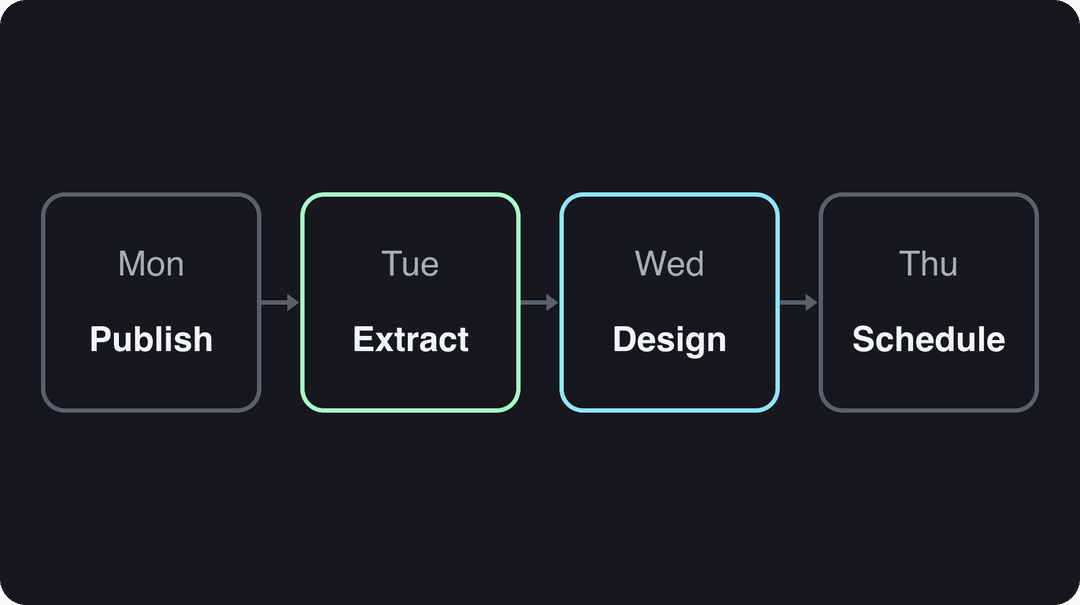
Repurposing breaks down when it happens whenever someone has a spare hour. A fixed weekly rhythm turns it into a routine anyone on the team can run. Here is one built around a weekly 45-minute podcast:
- Monday, publish the source. The full episode goes live on every audio and video platform it lives on.
- Tuesday, extract. Get a transcript, ask an AI assistant to list every standalone idea, and pick the five strongest moments for vertical clips.
- Wednesday, design. Turn the clips into captioned shorts or audiograms, and turn five more lines into quote cards and a carousel with your templates.
- Thursday, schedule. Write a separate caption for each platform and spread the posts over the next two weeks in your scheduler.
To train someone on this, write it down as a one-page checklist:
- Source rule: only repurpose pieces that cleared your traffic or engagement bar, and refresh outdated facts first.
- Extraction prompt: "List every standalone idea in this transcript: statistics, mistakes, how-to steps, opinions and stories. For each, write a one-line hook and suggest the best format: short video, carousel, thread or pin."
- Platform owners: one person signs off on each platform's versions, so nothing ships as a resized copy.
- Review gate: facts and numbers checked, AI label added when visuals or audio are realistic AI, no claimed music in Shorts over one minute.
- Tracking: every link back to the source carries a UTM tag.
Which metrics show your repurposing is working?
Track two things: whether repurposing saves time, and whether repurposed assets perform as well as content made for the platform.
| Goal | Metrics | Where to look |
|---|---|---|
| Efficiency | Assets published per source piece, hours spent per asset | Your content calendar |
| Reach | Views, views from non-followers, shares, saves | TikTok Studio, Instagram insights, YouTube Studio |
| Leads | Link clicks, sign-ups from tagged links | UTM-tagged links in your web analytics |
| Sales | Conversions, revenue from tagged links, return on ad spend | Web analytics and your ads manager |
Shares and saves tell you more than likes or follower count: a share means someone vouched for the post, and a save means they plan to come back to it. TikTok analytics live in TikTok Studio, with date ranges of 7, 28, 60 or 365 days. Instagram insights now lead with Views, and follower activity data needs at least 100 followers. Add UTM tags to every link back to the source so your analytics can credit each platform. If you send traffic through a link-in-bio page, check what click data it gives you; Linkshop's explainer on whether Linktree shows who clicks covers that tool.
For a TikTok reference point, the videos in Revid's study sample averaged 7.1% likes per view and 0.88% shares per view. All of them had already passed 1,000 likes, so treat those numbers as a high bar, not an average.
To improve, test one variable at a time on the same idea: two hooks for the same clip, two covers for the same quote card, or the same insight as a text post versus a carousel. Keep whichever wins on shares, saves or clicks, and make the next batch that way.
The decision rule: compare each repurposed asset with your platform-native posts over the same date range. If the repurposed ones trail, step 3 (the rewrite) is too thin. If one format wins on a platform, make more of it there and drop the one that lags. For broader benchmarks on how marketers measure content, see the Content Marketing Institute's content marketing statistics.
FAQ
What is AI content repurposing?
AI content repurposing is using AI tools to turn one long piece of content into native posts for each platform. AI handles transcripts, clip finding, scripts, captions and visuals, while a person picks the source, adds the new angle and checks the facts.
What is the best AI tool for content repurposing?
It depends on your source. A clipping tool such as OpusClip is built for cutting long recordings into clips, Revid turns a link, script or blog post into a new short video and publishes it, and Canva handles graphics. Most teams pair one tool per job with a scheduler.
Can you post the same video on TikTok, Instagram Reels and YouTube Shorts?
Yes, if the file fits each platform: vertical 9:16, and under 3 minutes so it counts as a Short and Reels can recommend it to non-followers. Upload the clean file to each app and rewrite the caption and hashtags for each one (Instagram allows up to 5).
Do you have to label AI-repurposed videos?
Only when they contain realistic AI-generated or altered visuals or audio. TikTok and YouTube both require a label for those, and Meta asks for disclosure of photorealistic AI video. YouTube doesn't require disclosure for AI-written scripts, captions or non-realistic visuals, and both TikTok and YouTube say the label alone doesn't reduce distribution.
How is repurposing different from cross-posting?
Cross-posting publishes the same file everywhere. Repurposing rebuilds the idea for each platform with a new hook, format and caption, which is why it reaches more people and avoids the unoriginal-content rules on Facebook and TikTok.