How to Repurpose Social Media Content: One Post, Five Formats
Pick the posts that earned comments, saves and shares, then rebuild the idea natively for each platform. The format map, 2026 originality rules and a weekly system.
On this page
To repurpose social media content, pick posts that earned comments, saves and shares, pull out the idea that made them work, and rebuild it for each platform: a vertical short video for TikTok, Reels and Shorts, a carousel for Instagram or LinkedIn, a thread for X, a blog post for search. Rebuild, never just repost.
The "just repost it" shortcut now costs reach. Since March 2026, Facebook treats reposts changed only with borders, captions or speed tweaks as unoriginal and pushes them down, and TikTok's Creator Rewards Program does not count lightly modified reposts as original. Repurposing works when the idea travels and the execution is new.
Companies already work this way: Wistia's 2026 State of Video Report found that over half of companies repurpose their videos into social clips, and LinkedIn is the top destination, with 67% of teams posting clips there.
Which posts are worth repurposing?
Start with posts your audience already proved it wants. Likes are the weakest signal because they cost nothing. Comments, saves and shares tell you why a post worked, and that "why" decides the new format.
Pull the numbers from the last 90 days. Instagram insights cover up to the past 90 days; TikTok Studio analytics let you pick 7, 28, 60 or 365 days.
| Signal | What to look for | Repurposing potential | Best new format |
|---|---|---|---|
| Comments | Long threads, recurring questions, debate | High | Long-form video, blog post, Q&A video |
| Saves | Saves well above your usual post | High | Carousel, checklist, guide |
| Shares | Shares above your average, shares across platforms | High | Short video, quote card, graphic |
| Likes | High likes but few comments, saves or shares | Low on its own | Re-promote, use as social proof |
Use these decision rules:
- If a post has many comments asking the same question, the answer is your next piece. Make a short video that answers it, then a blog post that covers it fully.
- If a post has a high save rate, it is reference material. Turn it into a carousel or a checklist people keep.
- If a post was shared a lot, the idea travels. Rebuild it as a short video for TikTok, Reels and Shorts.
- If a post only got likes, skip it or test it once in a new format before investing more time.
- If the topic expires (a news reaction, a dated offer), leave it. Evergreen ideas are the ones you can repurpose again next quarter.
One post, five formats: the repurposing map
Every repurposed piece keeps the same core idea and changes four things: the hook, the structure, the visuals and the length. This map shows what to rebuild for each destination, with the limits that apply in 2026.
| New format | Where it goes | What you rebuild | Limits to know |
|---|---|---|---|
| Vertical short video | TikTok, Instagram Reels, YouTube Shorts | A spoken or on-screen hook, one visual per point, captions | 9:16 at 1080x1920 recommended by TikTok; Shorts up to 3 minutes; Reels over 3 minutes are not recommended to non-followers |
| Carousel | Instagram, LinkedIn, TikTok photo posts | One point per slide, a hook slide, a payoff slide | Instagram up to 20 photos and videos; TikTok photo posts up to 35 photos |
| Thread | X | One claim per post, the strongest line first | Up to 4 photos or 1 video per post |
| LinkedIn post or video | Lessons and numbers, professional framing | Videos up to 15 minutes and 5 GB | |
| Blog post | Google and AI assistants | The full explanation, examples, a FAQ | Built around one search phrase |
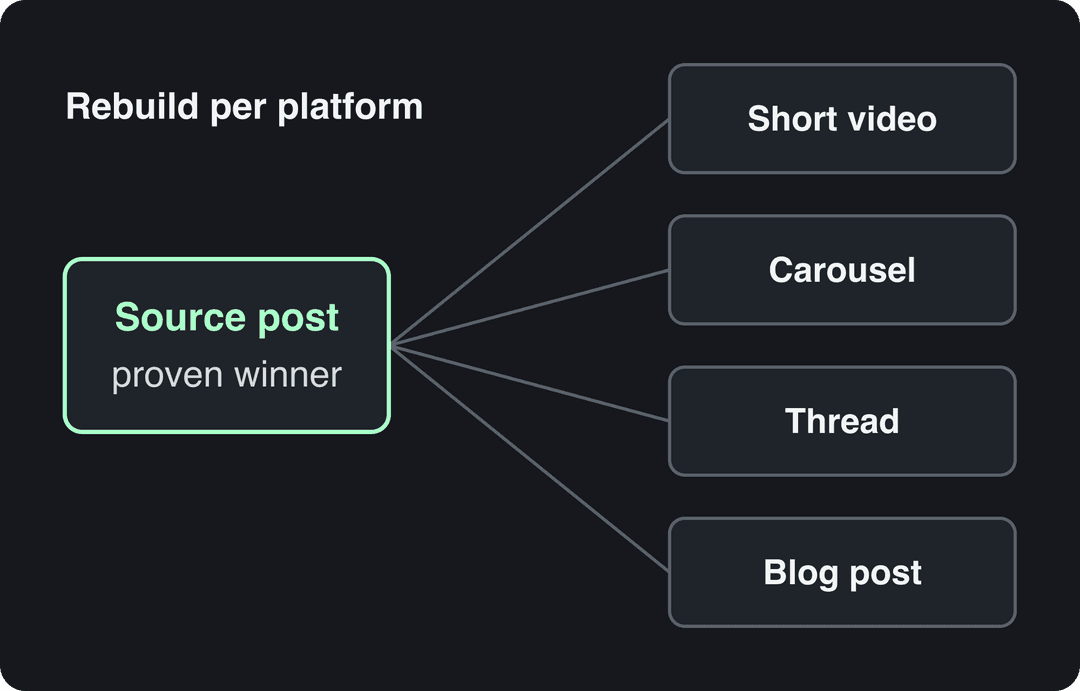
Work in one direction: from the richest format to the lightest. A blog post or long video holds enough material for a thread, a carousel and several short videos. A single tweet rarely holds enough for a blog post unless the comments added the depth.
Prompt to try
Make a 40-second vertical video for TikTok and Reels that opens with the hook "Most morning routines fail for one reason." Show one habit per scene with its own visual, use only a line or two of voice-over per scene with bold burned-in captions, and end with "Save this for Monday."
How do you turn a text post into a video people watch?
Putting the text of a post over a static image is a slideshow, not a video. Viewers stop scrolling for a hook in the first line, a visual change on every point and a payoff at the end. Your post already has the ideas; the video needs a structure.
Use this template for a 30 to 60 second short:
- Hook (first line): the post's strongest claim, rewritten to be heard, not read. A thread titled "5 habits that fixed my mornings" becomes "Most morning routines fail for one reason."
- Beats: one point per scene, each with its own visual. Cut any point that needs a paragraph to explain.
- Payoff: the takeaway, then one call to action ("the full list is in my bio", "save this for Monday").
- Captions: burned-in text for the key lines, since many people watch without sound.
Talk less than you think. In Revid's analysis of 176,367 TikToks with 1,000+ likes posted between October 2025 and October 2026, videos with under 40 characters of speech had a median of 123K views and 20.2% passed 1 million views, against 68K and 11.9% for videos that talked throughout (300+ characters of speech). Silent videos sat in between at 73K. This is TikTok data on videos that already cleared 1,000 likes, so it shows what winners have in common rather than a cause, but the repurposing lesson holds: a post read aloud word for word is its weakest version. The full method is in our study of what makes a TikTok go viral.
Videos with just a few spoken words (a line or two) beat both silent videos and videos that talk the whole way through, which were the most common and the weakest.
Source: Revid analysis of 176,367 TikToks analyzed by AI, with 1,000+ likes posted between Oct 1, 2025 and Oct 16, 2026 (61,203 creators)
Show the data
| Median views | Share that passed 1M views | |
|---|---|---|
| No speech | 73.3K | 14.3% |
| Under 40 | 122.7K | 20.2% |
| 40 to 120 | 97.2K | 17.6% |
| 120 to 300 | 91.6K | 16.8% |
| 300+ | 67.7K | 11.9% |
Match the platform's pace. An X thread reborn as a TikTok needs fast cuts and a visual on every beat. The same idea as a LinkedIn video can run longer, show a slide or a screen recording, and lead with a business result. On YouTube, a Short can send viewers to the long video that covers the topic in full. Video keeps taking a larger share of attention on these platforms, which Sprout Social's social media trends report tracks year by year.
Repurpose a post into a video with Revid
Revid turns a link into a finished short video, so you can rebuild a post without filming.
- Paste the link: a blog post into the article to video converter, a tweet or thread into the tweet to video tool, or a LinkedIn post into the LinkedIn post to video generator.
- Revid writes the script and builds scene-by-scene visuals (stock footage, AI images or AI video), a voice-over in 70+ languages and synced captions.
- Adjust any scene in the timeline editor, then export in 1080p or 4K.
- Publish or schedule to TikTok, Instagram and YouTube from one queue with social media publishing; each post then reports its views, likes and comments.
If your best content is a long YouTube video, the YouTube clip maker cuts it into vertical clips. For the full video-to-video workflow, see our guide to repurposing video content with AI.
How to turn a post into a carousel
A carousel works when every slide earns the next swipe. Use hook, build, reveal:
- Hook (slide 1): a bold claim, a specific question or a striking visual. "You are posting at the wrong time" beats "Posting tips".
- Build (middle slides): one point per slide, a short headline and one supporting line. Reveal enough to keep the reader swiping, never the whole answer at once.
- Reveal (last slide): the takeaway or solution, plus one action: save, follow, comment a keyword or click the link.
Starting points by source format:
| Source | Slides to start with | How to adapt it |
|---|---|---|
| Blog post | 5 to 7 | One key takeaway per slide, each with its own visual |
| X thread | 3 to 5 | One tweet per slide, keep the conversational tone |
| Instagram caption | 2 to 4 | Strong visuals with a short chunk of the caption on each |
These are guidelines, not caps: Instagram allows up to 20 items and TikTok photo posts up to 35. Add slides only when each one carries a new point.
On LinkedIn, a carousel or post shows up next to your profile photo, so a weak headshot undercuts a strong deck. These tips for a good LinkedIn photo cover lighting, framing and background.
Will TikTok, Instagram, YouTube and Facebook penalize repurposed content?
Not when you repurpose your own ideas into new formats. The platforms target lazy reposts and content that is not yours. Here is what each one says.
| Platform | The rule | What it means for you |
|---|---|---|
| Since March 2026, reaction-only, clip-stitching or narrate-what's-on-screen reels, and reposts with only borders, captions or speed changes, are unoriginal and deprioritized; repeat offenders can be demonetized | Rebuild the video; do not just reframe an old clip | |
| TikTok | For Creator Rewards, Duets, Stitches, lightly modified reposts, looping videos and photo-only or text-only videos are not original | Repurposed TikToks earn only when they are genuinely new videos |
| YouTube | Content that only reads out material you did not write counts as reused and cannot be monetized; mass-produced template content falls under the inauthentic content policy | Repurposing your own posts is fine; reading other people's text is not |
| Up to 5 hashtags per post; reels over 3 minutes are not recommended to non-followers | Rewrite hashtags per post and keep discovery reels under 3 minutes |
Rewrite captions and hashtags for each platform instead of pasting them. On TikTok, Revid's same study found that posts with 4 hashtags had the best median (77K views) and posts with none had 51K. On Instagram, 5 is the hard limit.
Build a repurposing system that sticks
Repurposing done when you have a spare hour gives random results. A fixed routine makes it close to automatic.
Batch it. Block one session a week for repurposing only. Switching between "create new" and "adapt old" in the same hour is where time disappears.
Template it. Once a conversion works (blog post to carousel, thread to short video), save it as a template: the slide layout, the caption formula, the video structure. The next one takes a fraction of the time and looks consistent.
A weekly routine that works for a solo creator or a small team:
- Monday: pull the last 90 days of analytics and pick the posts with the highest comments, saves and shares.
- Tuesday: write the core idea of each in one sentence, then choose the new formats from the map above.
- Wednesday to Thursday: produce the short videos and carousels in one batch.
- Friday: schedule everything across platforms and log each piece in a tracking sheet (source post, new format, platform, publish date, results after 7 days).
If your source is a blog, you can go further and automate videos from a blog: a Revid Auto-Mode worker creates a fresh video every day from a content source. For more cross-platform tactics, Circleboom's overview of content repurposing across platforms adds a vendor's view, and our companion guide on repurposing content for social media covers the reverse direction, from long content to social posts.
Pick the rhythm you will keep. Some people repurpose right after publishing, while the ideas are fresh; others prefer a set day. Consistency matters more than the day you choose.
Does repurposing social media content help SEO?
Yes, when the social idea becomes a page built for a search. A thread that drew dozens of questions is a ready-made outline: turn it into a blog post that answers the search people would type ("how to repurpose social media content", not your thread's clever title), add the questions from the comments as a FAQ, and embed the short video.
That page can rank and get quoted by AI assistants long after the original post stopped getting views, and it links back to your social profiles. ClearVoice's guide to repurposing content for SEO covers the on-page side in more detail.
How to tell if repurposing is working
Judge each repurposed piece against your own baseline on that platform, not against the original post. A carousel that beats your average carousel worked, even if the source tweet did better on X.
Track three numbers per piece after 7 days: views or reach, saves plus shares, and follows or clicks it drove. Keep the conversions that beat your baseline and drop the ones that do not. If you need a way to tie these numbers to business results, this walkthrough covers social media ROI:
FAQ
What does it mean to repurpose social media content?
It means taking an idea that already performed in one post and rebuilding it in another format or on another platform, such as a thread turned into a short video or a carousel. The idea stays; the hook, structure and visuals change.
How often can you repurpose the same post?
As often as the idea stays relevant and each version is a new format. An evergreen post can become a video, a carousel and a blog post, then come back as a fresh video months later with a new hook.
Can you post the same video on TikTok, Reels and Shorts?
Yes, if it is your own original video. Upload the clean 9:16 export from your editor, keep it under 3 minutes so it qualifies for Shorts and Reels recommendations, and rewrite the caption and hashtags for each platform.
What content should you not repurpose?
Skip posts that only earned likes, dated news reactions, expired offers and anything built mostly on other people's material. Reposting someone else's content with light edits is treated as unoriginal on Facebook, TikTok and YouTube.
What is the fastest way to turn a post into a video?
Paste the post's link into an AI video tool that writes the script, picks visuals, adds a voice-over and captions, then edit and publish. Revid does this for blog posts, tweets and LinkedIn posts, and publishes directly to TikTok, Instagram and YouTube.