On this page
The best Runway alternatives in 2026 are Kling, Luma Dream Machine and Higgsfield for cinematic AI clips, Pika for effects, Adobe Firefly for Creative Cloud teams, Revid for finished short-form videos, and Synthesia for avatar presenters. Pick by what you need after the clip is generated, not by the model.
That second point is where most switches go wrong. Swapping Runway for another clip generator keeps the same bottleneck: a generated clip still needs a script, a voice-over, captions, music and an edit before it becomes a post. And the models are less exclusive than they look. Kling and Veo are sold through APIs to many tools, so the real difference between products is what happens around the model.
Runway alternatives compared
| Tool | Best for | Entry price | Free option |
|---|---|---|---|
| Revid | Finished TikToks, Reels and Shorts, published for you | $39/month (Growth) | Free sign-up with free credits to try video creation |
| Kling AI | Realistic human motion | Check site | Check site |
| Luma Dream Machine | Cinematic camera movement | Check site | Check site |
| Higgsfield | Camera presets and many models in one plan | About $15/month billed yearly | 10 credits a day, watermarked |
| Pika | Effects and edits on your own footage | $8/month billed yearly | Free account, credits bought in packs |
| Hailuo AI | Fast text and image to video | Check site | Check site |
| Adobe Firefly | Creative Cloud and Premiere Pro workflows | Check site | Check site |
| InVideo AI | Prompt-edited marketing videos | $20/month per seat | Watermarked free plan |
| Synthesia | Training and presenter videos | $29/month | Up to 10 minutes of video a month |
| Lumen5 | Turning blog posts into videos | Check site | Watermarked free plan |
| Runway (for reference) | Shot-level creative control | $15/month | 125 one-time credits, watermarked |
Prices are the entry plans listed on each vendor's site when Revid checked them in August and September 2026. "Check site" means we could not confirm a current figure. Confirm every price on the vendor's pricing page before you buy.
Why people look for a Runway alternative
Runway is still one of the strongest pure generators. Its Gen-4.5 model is among the highest-rated for video quality, and Aleph gives shot-level control: camera moves, relighting and object removal. It also offers native audio, motion transfer, an API and an MCP server.
The reasons to leave are usually practical:
- Credits run out fast when you iterate. The free plan is 125 one-time credits (not monthly), watermarked and limited to select models. Paid plans start at $15/month, and every re-roll of a shot spends credits. Check Runway's pricing page for current higher tiers.
- It makes clips, not posts. Script, voice, captions, assembly and publishing happen in other tools.
- It is built for film-style control. If you post a TikTok a day, you may not need shot-by-shot tools at all.
The choice keeps widening. Fortune Business Insights estimates the global AI video generator market at $716.8 million in 2025 and projects $2.56 billion by 2032, so expect prices and model lineups to keep shifting through the year.
Which Runway alternative should you pick?
Use these rules before you open a single free trial:
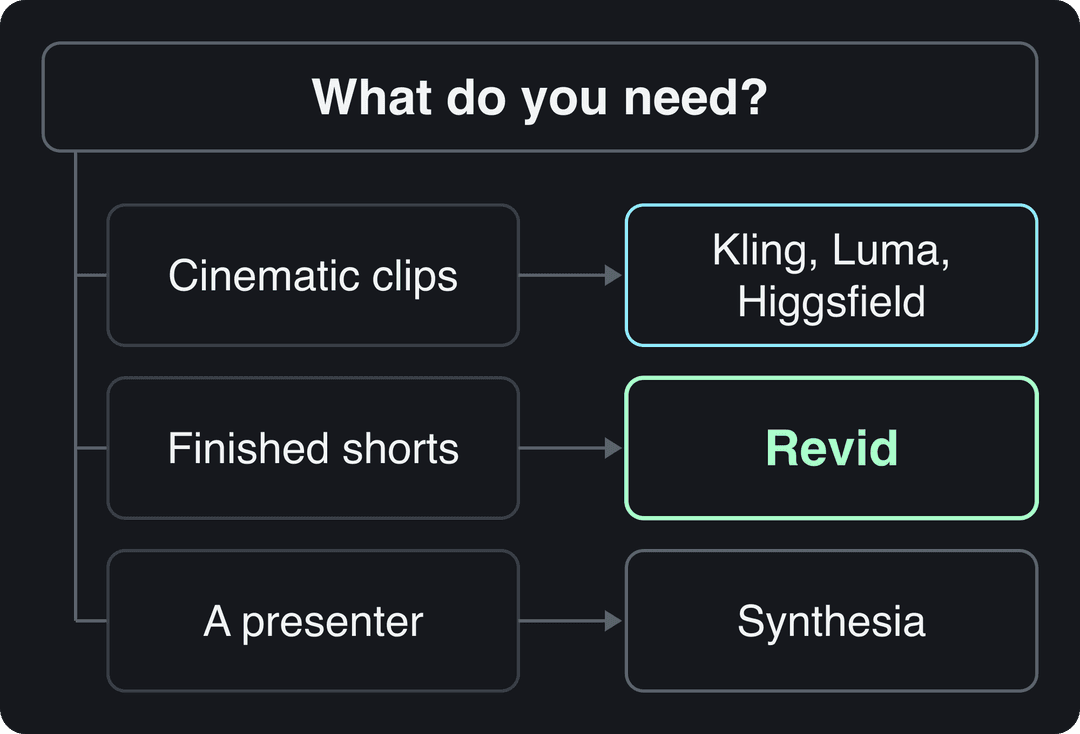
- If you want the same cinematic, shot-level work at a different price or with a different look, try Kling, Luma or Higgsfield.
- If you want effects added to footage you filmed, try Pika.
- If you already pay for Creative Cloud and edit in Premiere Pro, start with Adobe Firefly.
- If you publish short-form video every week and want the script, voice, captions and posting handled, use Revid.
- If you need a presenter for training, onboarding or internal updates, use Synthesia.
- If you turn blog posts into marketing videos, look at Lumen5 or InVideo AI.
The 10 best Runway alternatives in 2026
The list is grouped by use case, not ranked by quality. Each entry says what it does better than Runway and where it falls short.
1. Revid: best for finished short-form videos
Revid is an AI video platform that turns an idea, a link or a proven viral format into a finished short-form video and publishes it to TikTok, Instagram and YouTube. Where Runway hands you a clip, Revid writes the script, generates the scenes, adds a voice-over, captions and music, and puts it all on a timeline you can edit.
It runs several models under one subscription: Seedance 2.5, MiniMax Hailuo H3, Wan 3.0 and Google Veo 3, chosen per scene, with export up to 4K at 30 or 60 fps. Runway's own models are not among them, so if Gen-4.5 is the exact look you need, keep Runway for those shots.
The part no clip generator has is the starting point. Revid includes a searchable library of about 2.77 million real short-form videos and posts with their public engagement data, so you can start from a format audiences already watch instead of a blank prompt. Its script writer analyzes the reference's structure, hook and pacing, then writes new words and new visuals.
What else you get:
- 1,000+ AI voices in 70+ languages, 30 caption styles and automatic captions in 100+ languages
- Direct publishing and scheduling to TikTok, Instagram and YouTube from one queue
- Auto-Mode workers that create a fresh video every day (3 on Growth)
- A REST API, an MCP server and a CLI on every paid plan
Watch out for: Revid is not built for long-form or cinematic film work edited shot by shot. Generation uses credits: a 30-second video with Pro AI visuals and a voice-over costs about 40 to 80 credits.
Pricing: sign-up is free, with no credit card, and new accounts get free credits to try video creation; regular creation uses a paid plan, from $39/month (Growth, 2,000 credits, or $32/month billed yearly). See Revid plans and credits, or read the full Revid vs Runway comparison.
How to make a short in Revid instead of Runway
- Open the AI video generator and paste an idea, a script or a link (a blog post, a YouTube video, a Reddit thread).
- Or search the viral library, open a video that fits your niche and choose "Make it about your topic" to reuse its hook style and pacing.
- Pick a visual style and, if you want, a different model for each scene. The credit cost is estimated before you generate.
- Fix any scene, voice line or caption on the timeline.
- Export in 720p, 1080p or 4K, or publish and schedule straight to TikTok, Instagram and YouTube.
Prompt to try
A 30-second vertical story about a street musician in rainy Tokyo who plays one last song before his guitar breaks. Open with the hook "He had one string left and one song to play." Realistic cinematic style with close-ups on his hands and face, warm neon reflections, a calm voice-over and bold captions.
2. Kling AI: best for realistic human motion
Kling is a clip generator known for lifelike human motion and character animation from text prompts or still images. That makes it a strong pick for narrative scenes, ads with people in them and character-driven shorts. Its 3.0 models also run inside aggregators such as Higgsfield, so you can test them without a separate subscription.
Watch out for: like Runway, it produces single clips. Scripting, voice, captions and assembly are up to you.
Pricing: Kling offers free and paid plans; check its site for current credits and prices.
3. Luma Dream Machine: best for cinematic camera movement
Luma AI's Dream Machine turns text prompts and images into short video scenes with realistic camera movement, depth and lighting. It suits concept films, product shots and mood pieces where the camera does the storytelling.
Watch out for: output is clips, not edited videos, and render times vary with scene complexity.
Pricing: check Luma's pricing page for current plans and free limits.
4. Higgsfield: best for camera presets and many models in one plan
Higgsfield is the closest match to Runway's creative-control pitch. It adds cinematic camera presets (dolly, crane, FPV, bullet time) to generated clips and bundles 30+ models, including Veo 3.1 and Kling 3.0, in one subscription. Soul ID keeps characters consistent, and its photo-to-talking-video lip sync is strong.
Watch out for: it makes clips. Multi-scene voice-over, captions and publishing need other tools, and premium models such as Veo are locked on the free tier.
Pricing: about $15/month (Starter, billed yearly); the free tier gives 10 credits a day with a watermark. More detail in the Revid vs Higgsfield breakdown.
5. Pika: best for effects on your own footage
Pika has effects nothing else has: Pikadditions inserts AI characters and objects into footage you filmed, Pikaswaps replaces elements, and Pikaffects transforms them. Generations are fast (1 to 2 minutes) and credits roll over.
Watch out for: the free plan has no commercial license, and you still assemble finished videos elsewhere.
Pricing: from $8/month billed yearly. The free account includes all models with no watermark but no monthly credits; you buy one-time credit packs. See the Revid vs Pika comparison for how the two differ.
6. Hailuo AI: best for fast generation
Hailuo is MiniMax's own video app for text-to-video and image-to-video. Speed is its strong suit: in Revid's AI video model index of 713,649 production generations, MiniMax H3 Max Turbo had a 23s median clip time, the fastest model Revid runs. Revid offers MiniMax Hailuo H3 inside its full short-form workflow, so you can use the model with script, voice and captions already attached.
Watch out for: the standalone app is a generator, not an editor or publisher.
Pricing: check Hailuo's site for current plans and free credits.
7. Adobe Firefly: best for Creative Cloud teams
Adobe Firefly generates video from text and images and fits into Creative Cloud workflows, including Generative Extend in Premiere Pro to lengthen a clip. Adobe says its Firefly models are trained on licensed content and markets them as commercially safe, which matters to brands and agencies with legal review.
Watch out for: it rewards people who already know Adobe tools; non-designers face a learning curve.
Pricing: Firefly has its own plans and is also included, with generative credits, in Creative Cloud plans. Check Adobe's site for current tiers.
8. InVideo AI: best for prompt-driven marketing videos
InVideo AI uses a chat-style agent: you describe the video, then edit it by typing commands instead of working on a timeline. It pairs a 16M+ stock library with access to third-party models such as Veo 3.1, and includes AI avatars and voice clones from the entry tier.
Watch out for: fixing one scene often means re-prompting rather than editing it by hand.
Pricing: from $20/month per seat (Starter); the free plan is watermarked with weekly generation limits. Compare it in Revid vs InVideo.
9. Synthesia: best for training and presenter videos
Synthesia turns scripts into presenter videos for corporate training, onboarding and internal comms. Its Express-2 avatars use full-body gestures, it covers 140+ languages, and it exports to SCORM and LMS platforms with SSO and enterprise controls. When a policy changes, you edit the script and re-render.
Watch out for: it is a presenter on a background, not generated scenes, so it fits training better than storytelling or social entertainment.
Pricing: from $29/month; the free plan covers up to 10 minutes of video a month with 9 stock avatars. See Revid vs Synthesia if you need both social and training video.
10. Lumen5: best for turning blog posts into videos
Lumen5 converts blog posts, articles and scripts into marketing videos with stock media, captions and brand kits for fonts, colors and logos. It is less a Runway alternative than an answer to a different job: repurposing written content without editing skills.
Watch out for: limited creative freedom and a watermark on the free plan. If you outgrow it, these Lumen5 alternatives cover the next step.
Pricing: check Lumen5's site for current plans.
For a broader roundup that is not limited to Runway, see our best AI video generators by use case.
FAQ
Is there a free Runway alternative?
Yes, with limits. Pika's free account includes every model with no watermark but no monthly credits, Higgsfield gives 10 credits a day with a watermark, and Synthesia's free plan covers up to 10 minutes of avatar video a month. Runway's own free plan is 125 one-time credits, and Revid gives new accounts free credits to try video creation, no credit card needed.
Is Sora still a Runway alternative?
No. OpenAI discontinued the Sora web and app experiences on April 26, 2026 and removed Sora 2 from its API on September 24, 2026, so any list that still recommends it is out of date.
Can I use Runway's models inside Revid?
No. Revid offers Seedance 2.5, MiniMax Hailuo H3, Wan 3.0 and Google Veo 3 under one subscription, chosen per scene. If you depend on Runway's Gen-4.5 look, generate those shots in Runway and build the rest of the video elsewhere.
What is the best Runway alternative for TikTok and YouTube Shorts?
Revid, if you want finished vertical videos with script, voice-over, captions and music, published or scheduled directly to TikTok, Instagram and YouTube. If you prefer to generate clips and edit them yourself, Kling or Higgsfield are the closer swaps for Runway.
Is Kling better than Runway?
It depends on the shot. Kling is known for realistic human motion, while Runway leads on shot-level control with Gen-4.5 and Aleph. Run the same prompt through both before you commit to a paid plan.