Best Hashtags for YouTube Shorts to Go Viral: The 2026 Tag Stack
The hashtags that help a Short go viral are specific, not #viral. Here is the 3 to 5 tag stack, evergreen hashtags by niche, and how tags differ from hashtags.

On this page
The best hashtags for YouTube Shorts to go viral are 3 to 5 specific ones: #shorts plus 2 to 4 tags that name your exact topic, such as #airfryerrecipes instead of #food. No hashtag makes a Short viral by itself. Hashtags label the video; how viewers watch it decides how far YouTube pushes it.
The most common mistake is the tag everyone copies. YouTube said in August 2026 that Shorts get over 200 billion daily views, and DataReportal's Digital 2024 Global Overview Report places YouTube among the largest social platforms in the world. In a feed that size, #viral, #trending and #fyp sit on millions of videos and tell YouTube nothing about who should see yours. Specific tags do.
The best hashtags for YouTube Shorts: a 3 to 5 tag stack
A good hashtag set does two jobs: it tells YouTube which audience the Short belongs to, and it matches words a viewer would actually type or tap. Build it from these slots:
| Slot | What it does | Example for a cooking Short |
|---|---|---|
| Format (optional) | Marks the video as short-form | #shorts |
| Topic | Places the Short in a niche people browse | #recipe |
| Specific | Matches what a viewer would search for | #airfryerchicken |
| Series or brand (optional) | Groups your own videos so viewers find the next one | #sundaymealprep |
#shorts is optional. YouTube classifies any square or vertical video up to 3 minutes long as a Short, with or without the tag. It costs nothing to add, but it says nothing about your topic, so never let it replace a niche tag.
The specific tag is the one most creators skip, and it is the one most likely to match a real search. Write it the way a viewer would phrase the problem: #budgetmealprep, #beginnerdeadlift, #iphonecameratips.
Prompt to try
Make a 30-second YouTube Short on crispy air fryer chicken thighs with no oil. Open with the hook "You don't need a single drop of oil for this." Show quick step-by-step close-ups with bold on-screen text for each step and an upbeat, friendly voice-over.
Evergreen YouTube hashtags for Shorts, by niche
Evergreen hashtags are topic words people use all year, not tied to a news cycle or a meme. Use one or two as your base, then swap the specific tag for every video.
| Niche | Broad evergreen hashtags | Specific examples |
|---|---|---|
| Cooking | #recipe, #cooking | #airfryerrecipes, #mealprep |
| Fitness | #workout, #fitness | #homeworkout, #glutesworkout |
| Gaming | #gaming | #minecraftbuilds, #fortniteclips |
| Beauty | #makeup, #skincare | #makeuptutorial, #drugstoremakeup |
| Tech | #tech, #techtips | #iphonetips, #androidtips |
| Personal finance | #personalfinance, #money | #budgeting, #investingforbeginners |
| Facts and education | #facts, #science | #historyfacts, #spacefacts |
| Pets | #dogs, #cats | #dogtraining, #goldenretriever |
| Travel | #travel | #japantravel, #budgettravel |
| Comedy | #comedy, #funny | #skit, #officehumor |
A simple rule: if a broad tag appears on nearly every video in your niche, pair it with a specific one. If a specific tag's hashtag page shows no recent Shorts, it is too narrow, so go one step broader.
Do #viral, #trending and #fyp help on YouTube?
Barely. #fyp refers to TikTok's For You feed, so on YouTube it is noise. #viral and #trending describe what you hope happens, not what the video is about, and they are shared by so many unrelated videos that they cannot point YouTube to an audience. Use the slot for a specific tag instead. The one exception: if your Short is about a named trend, tag the trend itself (the challenge, the sound, the event), not the word "trending".
How many hashtags should you use on YouTube Shorts?
Use 3 to 5. Revid's data on hashtag counts comes from TikTok, not YouTube, but it is the largest sample we have on the question. In Revid's analysis of 176,367 TikToks with 1,000+ likes posted between October 2025 and October 2026, videos with 4 hashtags had the highest median views (77K, with 13.4% passing 1 million views), 3 hashtags came next at 75K, videos with no hashtags got 51K (9.8%), and videos with 9 or more hashtags fell to 16K (7.8%). The sample only includes videos that already reached 1,000 likes, and it shows what top videos have in common rather than proving cause. The full study of what makes TikToks go viral has the method.
Posts with 3 or 4 hashtags earned the most views. Captions stuffed with 9 or more hashtags did worst of all, with median views cut by about 80%.
Source: Revid analysis of 176,367 TikToks with 1,000+ likes posted between Oct 1, 2025 and Oct 16, 2026 (61,203 creators)
Show the data
| Median views | Share that passed 1M views | |
|---|---|---|
| None | 51.1K | 9.8% |
| 1 | 64K | 11.8% |
| 2 | 71.3K | 12.7% |
| 3 | 75.4K | 13.1% |
| 4 | 77.2K | 13.4% |
| 5 | 67.3K | 12.1% |
| 6 to 8 | 71.8K | 12.7% |
| 9+ | 15.6K | 7.8% |
YouTube's own rules point the same way. A Short's title is limited to 100 characters, so every hashtag you put there takes room from the words that explain the video. Keep 1 or 2 hashtags in the title at most and put the rest in the description.
What are tags on YouTube Shorts?
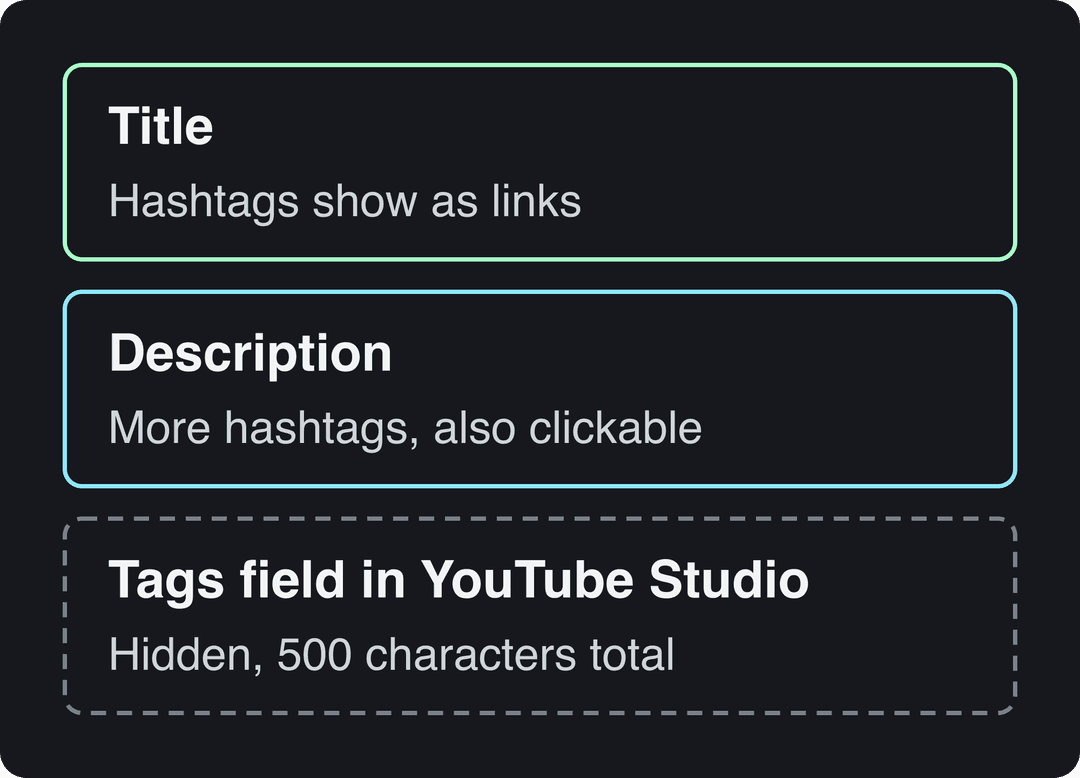
Two different things share the name. Hashtags are words with a # (#homeworkout) that you write in the title or description; viewers see them, and tapping one opens a page of videos using it. Tags are keywords you type into the Tags field in YouTube Studio; viewers never see them, and the field holds 500 characters in total, not per tag.
YouTube says tags play a minimal role in helping viewers find a video and are most useful when your topic is commonly misspelled. So the "viral tags" that matter for Shorts are your hashtags and the words in your title. For the hidden Tags field in detail, see our list of the best YouTube tags.
How to tag YouTube Shorts, step by step
- Write the title around the phrase a viewer would search, then add 1 or 2 hashtags at the end if the 100 characters allow it.
- Put the remaining hashtags in the description so the total stays at 3 to 5. The description holds up to 5,000 characters, so you can also add a sentence that repeats the topic in plain words. A free YouTube description generator can draft that line.
- Add tags in YouTube Studio on a computer: Content, select the Short, open Details, click Show more, and fill the Tags field with variants and common misspellings.
- If you uploaded from your phone, open YouTube Studio afterward to add tags; the mobile Shorts upload is built for speed and is not the easiest place to edit metadata.
- After publishing, tap one of your hashtags to check it opens the right hashtag page and that the videos there match yours.
For a closer look at hashtag placement on each upload screen, the YouTube Shorts hashtag guide walks through it.
How to find viral hashtags for your niche
- Open hashtag pages. Go to youtube.com/hashtag/ followed by the tag (for example youtube.com/hashtag/mealprep) and check whether recent Shorts appear and how well they perform.
- Use YouTube search suggestions. Type # plus your topic and note the combinations YouTube suggests: they reflect what people search.
- Study the Shorts that win in your niche. Watch the top recent Shorts on your topic and write down which hashtags repeat across them.
- Search Revid's viral library. Revid's library of about 2.77 million viral short-form videos, including 73,227 YouTube posts, stores each video's hashtags, transcript and engagement counts, so you can filter by topic and platform and see the tags the best performers carried.
- Read your own analytics. In YouTube Studio, the YouTube search traffic source shows the terms viewers typed to find your videos; turn the recurring ones into hashtags and title words.
- Keep a swipe file. Save the tag sets of your best Shorts and reuse the structure, not the exact block, on the next topic.
Prompt to try
Create a 40-second YouTube Short titled "Why octopuses have three hearts." Start with the line "An octopus has three hearts, and one of them stops when it swims." Use vivid underwater visuals, a curious documentary-style voice, and captions that repeat the key fact on screen.
What keywords make a YouTube Short go viral?
There are no magic viral keywords. Keywords help a Short get found in search; in the Shorts feed, reach depends on whether people keep watching. So the keyword job is to name the topic clearly, and the content job is to make the first seconds worth staying for.
| Weak title | Stronger title |
|---|---|
| Wait for it #viral #shorts | Crispy air fryer chicken thighs, no oil #airfryer |
| My routine #fyp | Morning routine for night-shift nurses #nurselife |
| Insane fact #trending | Why octopuses have three hearts #oceanfacts |
The stronger versions put the searchable phrase first and use the hashtag to repeat the niche. Say the same topic in the first spoken line and in the on-screen text so a viewer knows in a second what the Short is about. A YouTube title generator helps with phrasing, a Shorts script generator helps with the opening line, and our YouTube Shorts SEO techniques cover the rest of the metadata.
Hashtag mistakes that cost Shorts views
- Irrelevant trending tags. A trending tag on an unrelated video shows your Short to people who will swipe away, and YouTube's hashtag policy prohibits misleading hashtags.
- Only broad tags. #shorts, #viral and #funny on their own cannot place your video with an audience. Always include at least one specific tag.
- The same block on every video. Your hashtags should change with the topic of each Short.
- Tag walls. Anything past 5 dilutes the signal, and above 60 YouTube ignores them all.
- Copying a TikTok caption as is. Drop #fyp when you cross-post, and keep Instagram versions to 5 hashtags or fewer.
- Expecting tags to rescue a weak opening. If viewers swipe in the first seconds, no hashtag set brings them back.
How to make Shorts worth tagging with Revid
Hashtags only help a Short that people want to finish. Revid starts from videos audiences already watched:
- Search Revid's viral library for your topic, filtered to YouTube and a high engagement tier, and note the hooks and hashtags of the top Shorts.
- Run a free deep analysis (up to 60 a day) on a Short you like: it breaks down the hook, the timed structure and three ways to adapt it to your niche.
- Generate an original video with the AI YouTube Shorts generator: script, scene visuals, AI voice-over, synced captions and music, all editable in the timeline.
- Publish or schedule it directly to YouTube (and TikTok or Instagram) from one queue, then check its views and remix the Shorts that did well.
Sign-up is free and new accounts get free credits to try video creation, no credit card needed; regular creation then uses the monthly credits of a paid plan, from $39/month.
FAQ
Do hashtags help YouTube Shorts go viral?
Only a little. Hashtags tell YouTube and searchers what the Short is about, but reach in the Shorts feed depends on how viewers respond. A specific hashtag can bring search and hashtag-page views; a generic one like #viral adds almost nothing.
Should I put #shorts on every Short?
You can, but it is optional. Any square or vertical video up to 3 minutes long is classified as a Short with or without the tag, so spend your other slots on topic hashtags.
Can I add tags to a YouTube Short after posting?
Yes. Open YouTube Studio, select the Short and edit its title, description hashtags or Tags field at any time.
Do the YouTube Shorts viral tags lists from 2022 still work?
The broad tags in those lists (#shorts, #viral, #trending) never did much and still don't. What works in 2026 is the same principle: a few hashtags that name your exact topic.
Do the same hashtags work on YouTube Shorts, TikTok and Instagram Reels?
Topic hashtags carry over well. Drop platform tags like #fyp or #shorts when cross-posting, and keep Instagram posts to 5 hashtags or fewer, because Instagram will not post a caption with more.