YouTube Shorts Editing: A Step-by-Step Workflow for 2026
A practical YouTube Shorts editing workflow: plan the hook, cut fast, caption, mix sound, export at 9:16 and publish without copyright claims, with the best apps for each skill level.
On this page
YouTube Shorts editing comes down to six moves: frame everything at 9:16, put the hook in the first 3 seconds, cut a new shot every 1 to 2 seconds, add word-by-word captions, keep music well under your voice, and export a vertical file up to 3 minutes long. Add commercial music inside YouTube, not in your editor.
Most editing time goes to the wrong place. In Revid's analysis of 176,367 TikToks with 1,000+ likes posted between October 2025 and October 2026, videos with under 40 characters of speech had a 123K median and 20.2% passed 1M views, against 68K and 11.9% for videos that talked throughout. It is TikTok data and it shows what top videos share, not causes, but the lesson carries to Shorts: cutting words usually does more than adding effects. The method and limits are in the full TikTok virality study.
Plan the Short before you film
A Short that holds viewers is mostly decided before you open an editor. Map three beats: a hook in the first 3 seconds, a lean middle that delivers on the hook's promise, and a payoff (the reveal, punchline or fix) that makes a replay feel natural.
Three structures that edit cleanly:
- Problem to solution: open on a frustration the viewer recognizes, then show the fix as fast as you can.
- Before and after: the "before" is the hook, the "after" is the payoff.
- Question and answer: put the question on screen or say it as your first line, then answer it.
Prompt to try
Make a 30-second YouTube Short in a problem to solution structure about why your phone videos look dark indoors. Open with the hook "Your videos look cheap for one reason", then show the fix: face a window or bounce a lamp off a wall. Use fast cuts every 1 to 2 seconds, word-by-word captions and a quick payoff that shows the before and after.
Shoot for the edit
- Film vertically at 9:16. Cropping horizontal footage later costs resolution and usually breaks the framing.
- Lock focus and exposure on your subject so brightness and focus don't pulse mid-shot.
- Shoot at 60 fps when your phone allows it, so you can slow a moment down in the edit without stutter.
- Leave a beat of padding before and after each take. It gives you room to cut on movement instead of mid-word.
Light and sound matter more than the camera
Viewers forgive slightly soft video. They swipe on muddy audio and dark faces. Face a window for free, soft light, or bounce a desk lamp off a wall at night.
A clip-on lavalier mic is the cheapest upgrade you can make: it sits close to your mouth and picks up far less echo and room noise than the phone's built-in mic.
Which app should you use to edit YouTube Shorts?
Pick by where you edit and how much control you need. Mobile apps win on speed, desktop editors on control, and browser tools on automation.
| Editing tool | Best for | Key features | Price |
|---|---|---|---|
| CapCut | Beginners and mobile creators | Auto-captions, trend templates, keyframes, green screen | Free, paid Pro |
| InShot | Quick, simple edits | Fast trims, filters, text overlays | Free, paid upgrade |
| DaVinci Resolve | Color and audio control | Pro color grading, advanced audio tools | Free, paid Studio version |
| Adobe Premiere Pro | Professionals and teams | Text-Based Editing, Adobe app integration | Subscription |
| Revid | Creating and repurposing Shorts with AI | Long video to Shorts, AI visuals, auto captions, direct publishing | Free sign-up with free credits to try, plans from $39/month |
Mobile apps
CapCut packs keyframe animation, green screen and auto-captions into a phone interface, with a free tier that exports at 1080p. InShot is simpler: trim, add text, apply a filter, post. If your edits are mostly cuts and captions, either one is enough.
Desktop software
DaVinci Resolve has a capable free version with the best color and audio tools in the group, and a steep learning curve. Adobe Premiere Pro is the industry standard; its Text-Based Editing lets you cut a video by deleting words from the transcript, which is the fastest way to pull a Short out of a long talk. Both need a reasonably powerful computer.
Browser-based AI editors
Browser tools run in the cloud, so a modest laptop is fine. Revid builds Shorts from a long video, a script or a link, adds captions and publishes straight to YouTube. If you are choosing between manual editing and AI generation, the Revid vs CapCut comparison lays out the trade-offs, and our roundup of video editing software for YouTube Shorts covers more options.
How to edit a YouTube Short step by step
- Set up a 9:16 project and import only the takes you will use.
- Cut the hook first. Find the most surprising line or image and put it at second zero.
- Trim every pause. Remove breaths, "um"s and any moment where nothing is said or shown.
- Add captions and on-screen text timed to the voice.
- Smooth the joins with J-cuts and L-cuts where a hard cut feels abrupt.
- Mix the sound so your voice sits on top of the music.
- Check the safe zone so captions don't hide behind YouTube's buttons and title.
- Export at 9:16 and upload (settings below).
Input
Your video as it is
Output
Cut fast, but cut with purpose
On Shorts, a new shot every 1 to 2 seconds keeps momentum. That doesn't mean random jump cuts: it means removing everything that doesn't move the story. The instant a sentence or an action ends, cut to the next one.
A cooking Short shows the idea in four seconds:
- Clip 1: whole onion on the board (1 second).
- Clip 2: tight shot of the first slice (0.5 seconds).
- Clip 3: close-up of the diced pile (1 second).
- Clip 4: onion hitting the hot pan (1.5 seconds).
Use text as part of the story
Word-by-word captions keep sound-off viewers watching and make every line easier to follow. Animate words in as they are spoken rather than dropping a static block on screen. Your opening text works as a second hook: "3 gym mistakes you're making" tells the viewer why to stay before you say a word. An AI caption generator times captions automatically in 100+ languages, so you only adjust style and fix names.
Keep captions and key text out of the bottom strip and right edge, where YouTube places the title, channel name and buttons. Test a frame against the YouTube Shorts safe zone template before exporting.
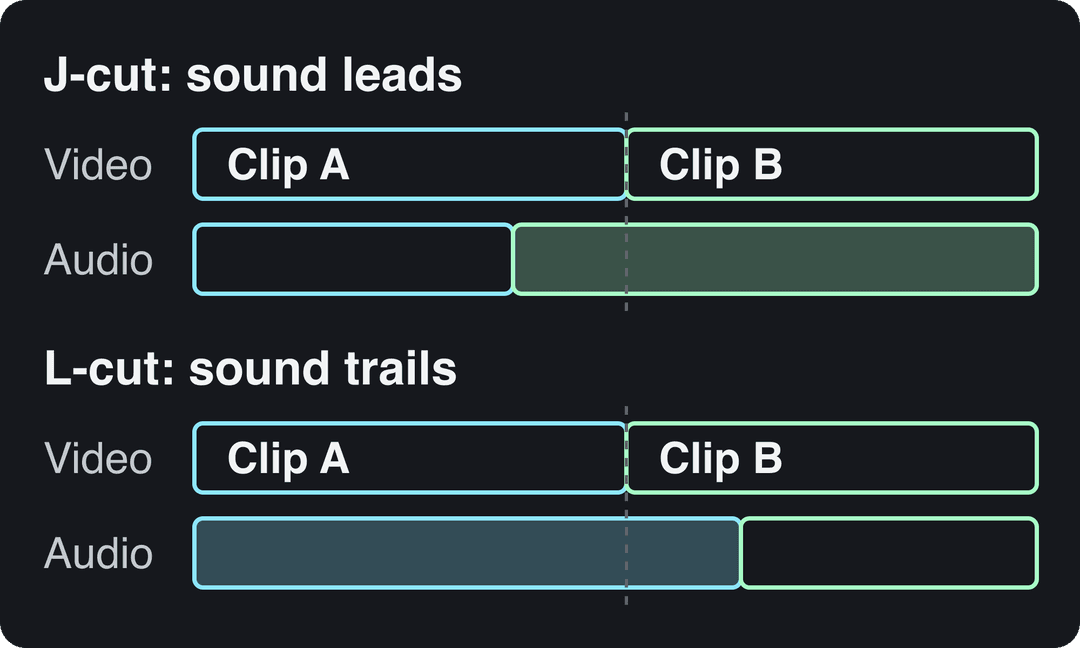
J-cuts and L-cuts
Use a clean cut most of the time; skip star wipes and spins. When a hard cut feels abrupt, offset the audio:
- J-cut: the next clip's audio starts a moment before its picture. It pulls the viewer into the next scene.
- L-cut: the picture cuts to the next clip while the previous clip's audio keeps playing. It works for reaction shots and for linking two ideas.
Mix the sound
Your voice is the star. A common rule is to set background music around -18dB to -25dB under speech and bring it up only in gaps. Add sound effects sparingly, on cuts and reveals.
For commercial songs, add the track in the YouTube app's sound picker after you upload, not in your editor. Music dropped into CapCut or Premiere from elsewhere is the usual source of Content ID claims.
How long should a YouTube Short be?
YouTube treats square or vertical videos up to 3 minutes as Shorts (for uploads since October 15, 2024). How long yours should be is less settled than most advice claims, so cut to the length the idea needs and not a second more.
Revid's numbers come from TikTok, the closest large public sample of short vertical video, and two samples point in slightly different directions. In Revid's full index of about 2.39 million TikToks with 1,000+ likes (all posting dates), 16 to 30 second videos had the highest median views, about 141K, ahead of 31 to 60 seconds (120K). In the 12-month study of 176,367 TikToks posted from October 2025 to October 2026, every length bucket from under 15 seconds to 10 minutes had a median between 58K and 76K views: 61 to 90 seconds reached 70K, and clips under 15 seconds had the lowest median (58K) but the most shares per view (1.41 per 100).
Length alone barely moves views: every bucket lands between 58K and 76K median views (the 790 videos over 10 minutes are a small, unusual group). Clips under 15 seconds get shared the most per view.
Source: Revid analysis of 176,367 TikToks with 1,000+ likes posted between Oct 1, 2025 and Oct 16, 2026 (61,203 creators)
Show the data
| Median views | Share that passed 1M views | Shares per 100 views | |
|---|---|---|---|
| Under 15 s | 57.6K | 11.6% | 1 |
| 16 to 30 s | 64.9K | 12.3% | 1 |
| 31 to 60 s | 61.8K | 11.8% | 1 |
| 61 to 90 s | 70.5K | 12.2% | 1 |
| 91 s to 3 min | 63.4K | 11.1% | 1 |
| 3 to 10 min | 76.4K | 12.4% | 1 |
| 10 min+ | 129.6K | 13.8% | 0 |
The decision rule: if the payoff lands in 20 seconds, stop at 20 seconds. If the story genuinely needs 90 seconds, length alone won't hold you back, but a sagging middle will, and anything over one minute raises the stakes on music rights.
Export settings for YouTube Shorts
| Setting | What to use |
|---|---|
| Aspect ratio | 9:16 vertical (square also counts as a Short) |
| Resolution | 1080x1920, or 2160x3840 if you shot in 4K |
| Frame rate | Match what you shot: 30 or 60 fps |
| File format | MP4 with H.264 is the safe default |
| Length | Up to 3 minutes |
| Audio Library music | Most tracks up to 90 seconds; some capped at 60 or 30 seconds |
| Title | Up to 100 characters |
If you edit in Premiere Pro, this walkthrough shows the export step by step:
Edit Shorts faster with AI
Volume is part of the game: YouTube said in August 2026 that Shorts get over 200 billion daily views, and Alphabet said more than 10 million channels were publishing Shorts each day as of March 2026 (more sourced figures on our YouTube Shorts statistics page). AI tools take over the slow, mechanical parts of editing:
- Clip finding: scan a 30-minute livestream or tutorial and surface the moments that stand alone.
- Silence removal: strip dead air in one pass, which is most of what makes a Short feel snappy.
- Auto-reframing: keep the speaker centered when you convert 16:9 footage to 9:16.
- Captions: transcribe and time every word, then apply one style across all your Shorts.
- B-roll: add stock or generated visuals that match the script, useful for faceless channels.
Two YouTube rules apply. AI-assisted videos can be monetized when the final video shows your creative vision, but mass-produced template content and stitched-together unrelated AI clips cannot. And realistic AI scenes need the "AI use" disclosure in YouTube Studio; disclosure by itself doesn't limit a video's audience.
How to make and edit Shorts with Revid
- From a long video: paste the link into the YouTube clip maker to turn it into short vertical clips.
- From talking-head footage: upload it to auto edit video and it comes back edited, with your key lines turned into motion graphics.
- From an idea or script: the AI YouTube Shorts generator writes the script and builds scenes from stock footage or AI video models (Seedance 2.5, MiniMax Hailuo, Wan 3.0, Google Veo 3), with a voice-over in 70+ languages and synced captions.
- Finish and publish: adjust any scene in the timeline editor, export in 1080p or 4K at 30 or 60 fps, and publish or schedule to YouTube directly. Creation uses plan credits, with plans from $39/month.
Publish so YouTube knows who to show it to
Title. You get 100 characters, but put the hook words first. "My skincare routine" describes; "The one mistake ruining your skin" makes people stop.
Description. Never leave it blank: one or two sentences that expand the title with your main keywords. A YouTube description generator gives you a first draft, and this guide to YouTube SEO optimization tips on mykaraoke.video covers keywords and metadata in more depth.
Hashtags. Add 3 to 5 that describe the niche:
- One broad tag, such as
#cookingor#gaming. - One or two specific tags, such as
#veganrecipesor#valorantclips. - One branded tag unique to your channel.
How do edited Shorts make money?
Shorts ad revenue is pooled each month and allocated to monetizing creators by their share of engaged Shorts views in each country; creators keep 45% of their allocation whether or not they used music. The old YouTube Shorts Fund is not how Shorts creators get paid today.
Today, YPP ad revenue needs 1,000 subscribers plus either 4,000 qualified public watch hours in the last 12 months or 10 million qualified Shorts views in the last 90 days. From February 1, 2027, new applicants need 8,000 watch hours in 365 days or 20 million Shorts views in 90 days, and earning Shorts revenue in a given month will require 10 million qualified Shorts views in the last 90 days.
Where your viewers live matters too. AIR Media-Tech's 2026 partner data put US Shorts RPM at $0.328 per 1,000 views, against $0.166 for the UK and $0.165 for Canada, and found Shorts RPM at 3% to 14% of long-form RPM in almost every niche. If income is the goal, edit Shorts that send viewers to your long videos. Third-party roundups such as resourcera.com's YouTube Shorts statistics collect more figures; check each one's original source before you quote it.
FAQ
Do I need to add #shorts to my video?
No. YouTube automatically classifies square or vertical videos up to 3 minutes long as Shorts. Adding #shorts to the description does no harm, but it isn't required.
Can I use popular songs in a YouTube Short?
Yes, if you add them through YouTube's own sound picker after uploading. Most Shorts Audio Library songs can run up to 90 seconds in a Short, though some are limited to 60 or 30 seconds; songs added in an outside editor often trigger Content ID claims.
Can I add a custom thumbnail to a YouTube Short?
Yes, if your account is verified: upload it in YouTube Studio on a computer, not on your phone. YouTube recommends 9:16 at 2160x3840 with a minimum height of 640 px.
What is the best free app to edit YouTube Shorts?
CapCut is the best free option for most people editing on a phone, with auto-captions and 1080p export. On a computer, DaVinci Resolve's free version gives you far more control over color and audio.
Can AI-edited Shorts be monetized?
Yes, as long as the final video reflects your own creative choices and adds entertainment or educational value. YouTube refuses to monetize mass-produced template content and incoherent compilations of AI clips.