How to Edit YouTube Shorts in 2026: Phone, Desktop and AI Steps
Step-by-step ways to edit YouTube Shorts on a phone, on a computer or with AI, plus the music, layout and length rules that decide whether a Short gets seen.
On this page
To edit a YouTube Short, open the YouTube app, tap +, choose Create a Short, and record or upload a vertical clip of up to 3 minutes. Trim it, add sound, text and filters, then post. For multi-track edits, cut a 9:16 video in CapCut, Premiere Pro or Revid and upload it through YouTube Studio.
The edit most likely to sink a Short is the music track. YouTube blocks any Short longer than one minute that has an active Content ID claim, worldwide, and that Short can't be monetized. A Short that runs past the minute mark with a claimed song gets no audience at all. This guide covers which editor to use, the phone and desktop steps, the layout, the audio rules and what you can still change after posting.
Which YouTube Shorts editor should you use?
The right editor depends on where your footage comes from and how much control you need. You have three options: the editor built into the YouTube app, a general video editor on your phone or computer, or an AI tool that builds the video for you.
| Editor | Where it runs | Best for | Price |
|---|---|---|---|
| YouTube Shorts editor | YouTube app (iOS, Android) | Quick trims, sound, text and filters right before posting | Free |
| CapCut | Mobile and desktop | Hands-on edits of footage you filmed, trend templates, auto-captions | Free tier with 1080p export; Standard about $9.99/month |
| Adobe Premiere Pro | Desktop | Multi-track timelines, color grading, audio mixing | Paid subscription |
| Revid | Browser | Making a Short from a script, prompt, link or long video, with voice-over, captions and direct publishing | Free sign-up with free trial credits; paid plans from $39/month |
Use these decision rules:
- If you film on your phone and post the same day, start in the YouTube app. Move to another editor only when you need something the app can't do, such as splitting a clip in the middle.
- If you edit your own footage several times a week, use CapCut. Our Revid vs CapCut comparison explains where manual editing beats AI generation.
- If you cut Shorts out of long videos or need precise audio work, use Premiere Pro or another desktop editor.
- If you don't want to film at all, generate the Short with an AI tool (steps below).
For more editor options, read our comparison of YouTube Shorts editors.
How to edit YouTube Shorts on your phone
The Shorts camera and its editor live in the YouTube mobile app. On a computer, YouTube and YouTube Studio handle uploads, but you edit in your own software first. Button labels shift between app versions, but the flow is:
- Open the YouTube app, tap + at the bottom of the screen and choose Create a Short.
- Record with the Shorts camera, or tap the gallery icon to upload a vertical or square clip from your phone.
- Trim the clip by dragging the handles at each end until only the part you want remains.
- Add a sound from the library, then pick the section of the song that plays under your clip.
- Add text, then use the timeline to set when each piece of text appears and disappears. Add a filter or record a voiceover if you need one.
- Tap Next, write a title (up to 100 characters), choose the visibility and upload.
How to cut and trim a YouTube Short
To shorten a clip, drag the start and end handles in the trim view. To remove a middle section, the in-app editor is limited: either record in separate segments with the Shorts camera and undo the bad take, or split the clip in CapCut or a desktop editor before uploading. Cut every silence, false start and repeated take. If a shot doesn't add new information or a laugh, it goes.
How to edit a YouTube Short on a computer
A desktop editor gives you multiple tracks, precise audio and proper color control. The workflow:
- Create a vertical 9:16 project (square also counts as a Short, but vertical fills the phone screen).
- Edit and export the video. Keep it at 3 minutes or less: YouTube classifies square or vertical videos up to 3 minutes, uploaded on or after October 15, 2024, as Shorts.
- Upload it in YouTube Studio like any other video. YouTube detects the format and files it under Shorts.
- Add a title of up to 100 characters and a description.
- If your account is verified, upload a custom thumbnail from YouTube Studio on the computer. YouTube recommends 9:16 at 2160x3840.
A 6-step workflow for editing YouTube Shorts
This order works in any editor and keeps you from polishing footage you later cut.
- Open on the payoff. Start on the most interesting frame you have: the result, the reveal, the strongest line. Cut logos, intros and "hey guys" openers.
- Rough cut. Remove every pause, breath and repeated take. Read your script back: any sentence you could delete without losing meaning gets deleted.
- Set the rhythm. Cut on music beats or at the end of sentences. When a single shot runs long, change something on screen: a punch-in zoom, a new angle, b-roll or a text pop. These pattern interrupts give the viewer a reason to keep watching. Use jump cuts to tighten talking segments, but don't jump-cut every sentence or the video feels choppy.
- Add captions. Captions keep the Short readable for anyone watching without sound. An automatic caption generator saves typing them by hand; check names and numbers afterward.
- Mix the audio. Voice on top, music well below it, sound effects only on cuts and reveals you want noticed (details below).
- Check on a phone. Watch the export on your phone, once with sound and once muted. Confirm no text sits under YouTube's buttons and the first frame makes sense without context.
A cooking tutorial shows the difference. The raw footage is long takes of chopping and stirring. The edited Short opens on the finished dish, shows each step in one tight shot with the ingredient and amount as on-screen text, cuts on the music, and ends on the plated result.
What layout works for a YouTube Short?
YouTube draws its interface over your video: like, comment, share and remix buttons down the right edge, and the title, channel name and subscribe button along the bottom. Anything you place there gets covered. Put the hook text in the upper part of the frame, keep faces and the main action in the center, and leave the right edge and bottom clear.
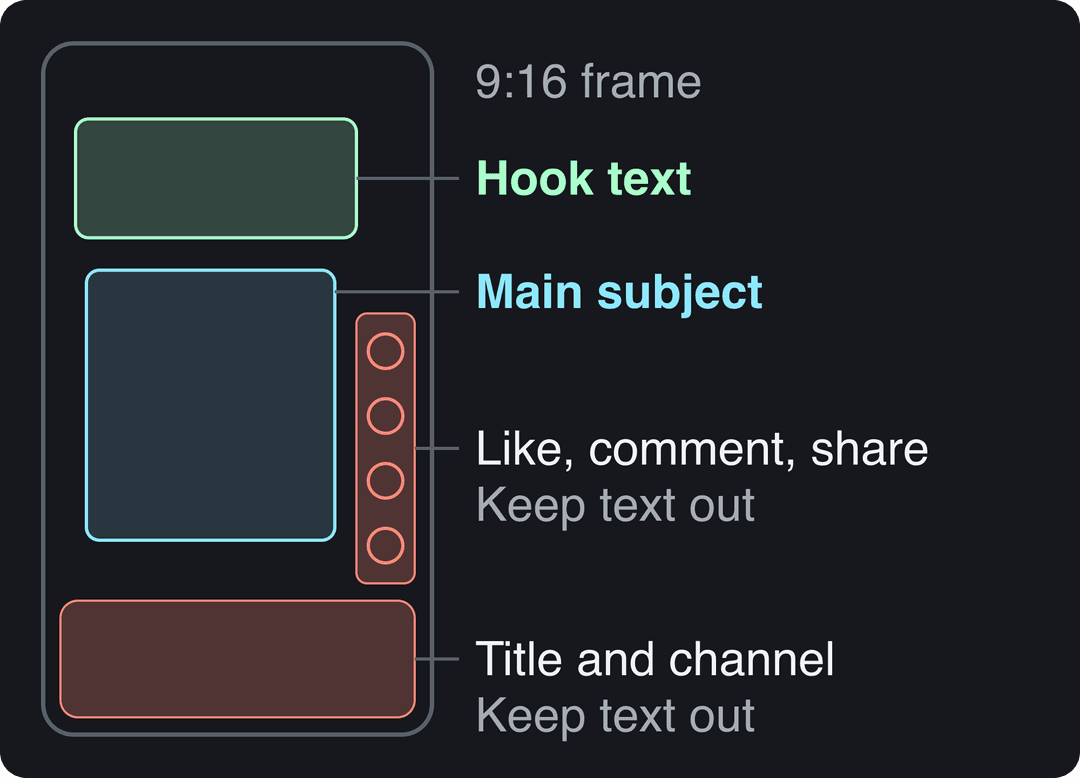
To check an export against YouTube's overlays before posting, use the free YouTube Shorts safe zone checker.
How long should you cut your YouTube Short?
Cut to the length the content needs, not to a target number. TikTok data points the same way: in Revid's analysis of 176,367 TikToks with 1,000+ likes posted between October 2025 and October 2026, every length bucket from under 15 seconds to 10 minutes had a median between 58K and 76K views. Videos of 61 to 90 seconds reached a 70K median, and clips under 15 seconds had the lowest median (58K) but the most shares per view (1.41 per 100). The sample only includes videos that already passed 1,000 likes, so it shows what successful videos have in common rather than causes. The full method is in our study of what makes a TikTok go viral.
Length alone barely moves views: every bucket lands between 58K and 76K median views (the 790 videos over 10 minutes are a small, unusual group). Clips under 15 seconds get shared the most per view.
Source: Revid analysis of 176,367 TikToks with 1,000+ likes posted between Oct 1, 2025 and Oct 16, 2026 (61,203 creators)
Show the data
| Median views | Share that passed 1M views | Shares per 100 views | |
|---|---|---|---|
| Under 15 s | 57.6K | 11.6% | 1 |
| 16 to 30 s | 64.9K | 12.3% | 1 |
| 31 to 60 s | 61.8K | 11.8% | 1 |
| 61 to 90 s | 70.5K | 12.2% | 1 |
| 91 s to 3 min | 63.4K | 11.1% | 1 |
| 3 to 10 min | 76.4K | 12.4% | 1 |
| 10 min+ | 129.6K | 13.8% | 0 |
On YouTube, add one hard rule: if your Short uses music that could be claimed, keep it under one minute. A short, highly shareable cut suits jokes and single tips; a longer cut suits tutorials and stories that need the time.
How to handle music, sound effects and background noise
Audio decides whether a Short feels finished. Three rules cover most cases.
Pick licensed sound. The Shorts sound library inside the app is the safest choice: most of its songs can be used for up to 90 seconds in a 3-minute Short, though some tracks are limited to 60 or 30 seconds. For background tracks in a desktop edit, the YouTube Audio Library in YouTube Studio is free, and subscription libraries such as Epidemic Sound and Artlist license music and sound effects for creators.
Balance the layers. Keep the voice clearly louder than the music, and lower the music under speech rather than cutting it. If music and voice sound muddy together, cut some of the music's mid frequencies with an equalizer so the voice has room.
Clean the recording. Phone audio picks up rooms, traffic and fans. Record in a quiet, soft-furnished space when you can, and run noisy clips through an AI audio enhancer before editing.
Use sound effects with intent: a whoosh on a fast transition, a hit on a reveal. One per moment you want noticed, not one per cut.
Prompt to try
Make a 45-second vertical YouTube Short titled '3 knife mistakes that ruin your vegetables'. Open on a close-up of perfectly diced onions with the hook 'You're probably holding your knife wrong'. Show each mistake and its fix in one tight shot with on-screen text, upbeat music under a clear voice-over, and end on the finished plate.
How to make YouTube Shorts fast
Competition is heavy: YouTube said in August 2026 that Shorts get over 200 billion daily views, and Alphabet said that as of March 2026 more than ten million channels were publishing Shorts each day. More figures, with sources, are on our YouTube Shorts statistics page; Photutorial also keeps a third-party roundup of YouTube Shorts statistics. Speed comes from removing decisions, not rushing edits:
- Film several Shorts in one session with the same setup and lighting.
- Save a template in your editor with your font, caption style and colors so every Short starts styled.
- Cut Shorts out of long videos you already made. Our guide on turning a YouTube video into a Short covers that route.
- Generate the Short from a script or link when filming isn't needed.
Make a YouTube Short with Revid
When the Short doesn't need your own footage, Revid builds it for you:
- Open the AI YouTube Shorts generator and paste a script, a prompt or a link.
- Revid writes the script and builds scene-by-scene visuals (stock footage, AI images or AI video from models such as Seedance 2.5, MiniMax Hailuo H3, Wan 3.0 and Google Veo 3), with a voice-over in 70+ languages, synced captions and music.
- Fix any scene, line or caption in the timeline editor.
- Export in 1080p or 4K, or publish straight to YouTube from Revid.
To start from a long video instead, paste its link into the YouTube clip maker and Revid cuts it into vertical clips. Sign-up is free and new accounts get free credits to try it, no credit card needed; regular creation then uses the monthly credits of a paid plan, from $39/month.
YouTube Shorts editing services and editing packs
If you'd rather hand off editing, you have three choices: a freelance editor, an agency, or an AI tool you run yourself. Freelancers and agencies make sense when you film a lot of raw footage and want a human eye on pacing. Send them a sample Short you like, your caption style and your fonts, and agree on how many revision rounds are included. Teams working with an outside editor benefit from a shared review process; this guide to collaborative video editing workflows from BugSmash covers timestamped feedback and approvals.
YouTube Shorts editing packs are bundles of transitions, overlays, sound effects and presets sold for editors like CapCut or Premiere Pro. Buy only packs whose license covers commercial use on YouTube, and use them sparingly: a pack's signature transition on every cut makes your Shorts look like everyone else's. For another take on pro editing techniques, Project Aeon has a guide on editing YouTube Shorts like a pro.
Can you edit a YouTube Short after posting?
Yes, partly. In YouTube Studio, open Content, go to the Shorts tab and open the Short's details. There you can change the title, description and visibility, and verified accounts can add a custom thumbnail from a computer.
You can't swap the video file. YouTube Studio has an Editor for basic trimming and blurring on uploaded videos; if it isn't available for your Short, or you need more than a trim, re-edit the original and upload it again as a new Short.
How to customize your YouTube Shorts feed
This is the viewer side of Shorts, not editing, but the controls are simple. You can watch Shorts in the YouTube app or on the YouTube website, in its Shorts section.
- Hide content you don't want: on a Short, open the three-dot menu and choose Not interested, or Don't recommend channel to stop seeing a creator.
- Reset recommendations: pause or clear your YouTube watch history in your account settings; the feed relearns from what you watch next.
- See more of what you like: subscribe to channels and watch their Shorts through to the end; YouTube recommends based on what you watch.
- Limit scrolling for kids: YouTube's CEO said in January 2026 that parents would be able to set how long kids and teens spend scrolling Shorts, including setting the timer to zero.
FAQ
Is the YouTube Shorts editor free?
Yes. The editor in the YouTube app is free and includes trimming, sounds, text, filters and voiceover. CapCut also has a free tier with 1080p export if you need more control.
How long can a YouTube Short be?
Up to 3 minutes, for square or vertical videos uploaded on or after October 15, 2024. Past one minute, any active Content ID claim blocks the Short worldwide.
Can I use copyrighted music in a YouTube Short?
Only safely through YouTube's Shorts sound library, where most songs can run up to 90 seconds and some are capped at 60 or 30 seconds. Adding a commercial song yourself in another editor risks a claim, which blocks any Short longer than one minute.
What aspect ratio should a YouTube Short be?
Vertical 9:16, which fills the phone screen. Square videos also count as Shorts, but they leave empty space above and below.
Do I have to label AI edits on YouTube Shorts?
Only for realistic AI content, such as a real person appearing to say something they didn't or a realistic scene that never happened, using the AI use setting in YouTube Studio. AI-written scripts, captions and your own cloned voice don't need disclosure, and since May 2026 YouTube automatically labels undisclosed videos with significant photorealistic AI.