YouTube Shorts SEO: 9 Steps to Rank Your Shorts in 2026
How to do SEO for YouTube Shorts in 2026: find the phrase people type, put it in the title and the first seconds, use 3 to 5 hashtags, and track search traffic in YouTube Studio.

On this page
YouTube Shorts SEO comes down to two jobs: help YouTube match your Short to a search, and make people keep watching once it shows up. Put the phrase viewers type in the first words of your title, say and show it in the opening seconds, add a short description with 3 to 5 hashtags, and add captions.
Keywords alone rank nothing. Most Shorts are first seen in the Shorts feed, before anyone reads a title, and a Short that viewers swipe past has little to show search either. A few rules also catch creators out: you can't A/B test a Short's title, custom Shorts thumbnails can only be uploaded from a computer by verified accounts, and a Short longer than one minute with an active Content ID claim is blocked worldwide.
Are YouTube Shorts good for SEO?
Yes, for discovery on YouTube and in Google. Shorts appear in YouTube search results (which have a Shorts filter), on hashtag pages, on your channel's Shorts tab, and often in the short video results Google shows for many searches. A well-titled Short keeps getting found for months, long after the feed has moved on.
The audience is there: YouTube said in August 2026 that the platform sees over 200 billion daily Shorts views. Small channels get a real chance too. Socialinsider's 2026 study of 69 million short-form videos found that accounts with under 5,000 followers averaged 15,160 views per Short, compared with 625 on Instagram Reels and 350 on TikTok (more sourced numbers in our YouTube Shorts statistics).
What Shorts won't do is help your website rank directly: links in Shorts descriptions are not clickable, so a Short is not a backlink. Its SEO value is on YouTube itself, and in sending viewers to your long videos and your channel. For ranking long-form videos, the rules differ in places; see our YouTube SEO tips for long videos.
How YouTube decides who sees a Short
A Short reaches people through two doors, and SEO only controls one of them.
- The Shorts feed. YouTube shows your Short to a small group of viewers and watches what they do: do they choose to watch or swipe away, do they finish, replay, like, share or comment? Good answers earn a wider audience.
- Search. YouTube matches the words people type against your title, description and hashtags, then ranks the matches on relevance, engagement and quality. A relevant Short that people abandon will not hold its position.
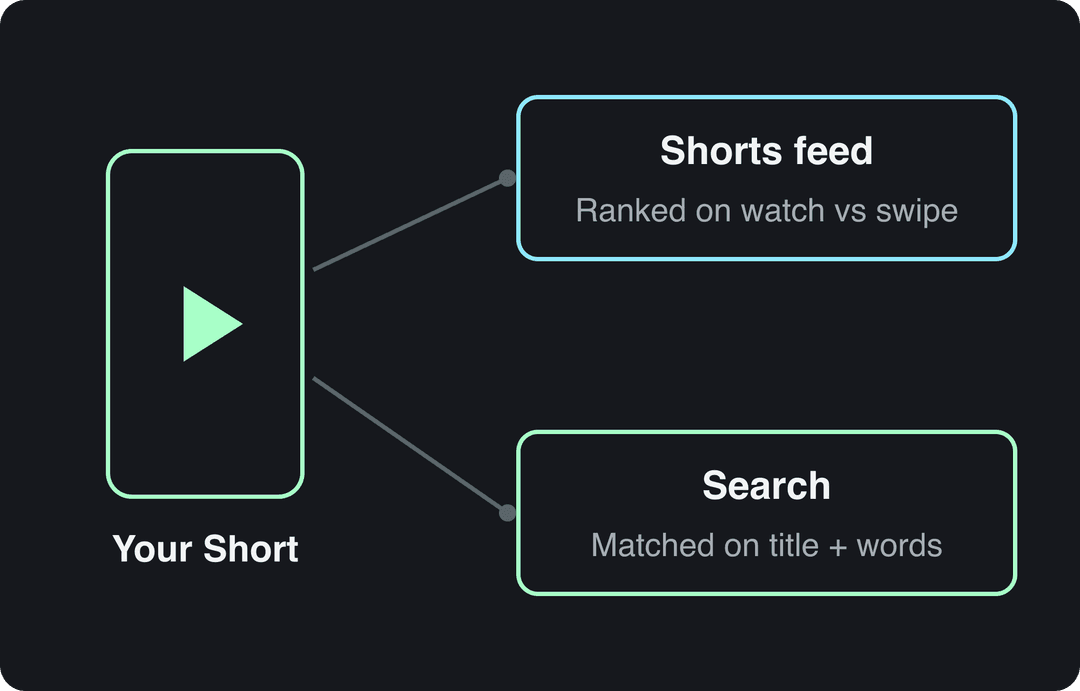
So every step below serves both doors: words that match the search, and opening seconds that deliver what the words promised.
How to do SEO for YouTube Shorts, step by step
Here are the fields that matter and their current limits.
| Field | Limit | What to do |
|---|---|---|
| Title | 100 characters | Search phrase in the first few words; keep it short (under 60 characters reads cleanly on the Shorts player) |
| Description | 5,000 characters | One or two sentences that restate the topic in other words, then 3 to 5 hashtags |
| Tags | 500 characters in total | Optional: common misspellings and variants only |
| Custom thumbnail | 9:16, 2160x3840 recommended, minimum height 640 px | Upload from YouTube Studio on a computer (verified accounts) |
| Length | Up to 3 minutes for square or vertical videos | As long as the topic needs, no longer |
1. Find the phrase people actually type
Start in YouTube's own search bar. Type your topic slowly and write down the suggestions: they are real searches, ranked by how often people make them.
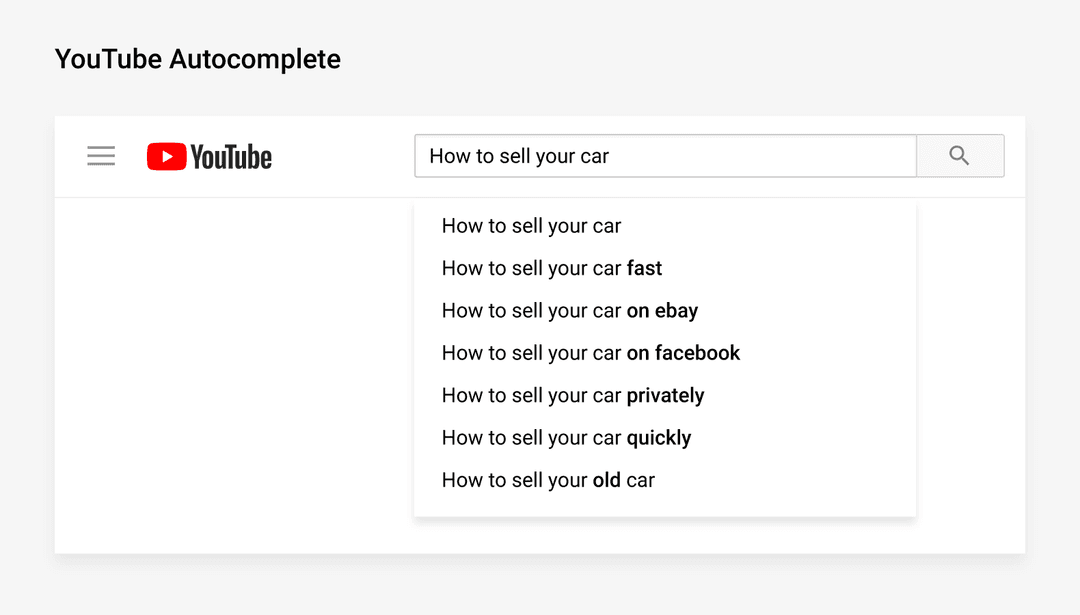
Then sharpen the list:
- Add question words and modifiers to your topic ("how to", "best", "vs", "for beginners", "fast") and note the new suggestions.
- Search your top phrase and switch on the Shorts filter. If Shorts already rank there, a Short can win it. If only long tutorials appear, make a long video for that phrase and use Shorts to point to it.
- Open the Research tab in YouTube Studio analytics to see what your viewers search for and where content is missing.
- Pick one phrase per Short. A Short about one thing ranks better than a Short that tries to cover three.
For a fuller method, see how to find YouTube keywords.
2. Write a title that matches the search
Your title is the strongest text signal you control. Put the search phrase first, then add the specific promise.
| Weak title | Better title |
|---|---|
| Cooking Tips | 5 Quick Cooking Tips for Busy Weeknights |
| My morning routine | Morning routine for students: 10 minutes, no coffee |
| This changed everything | Sourdough starter not rising? Fix it in 3 steps |
Three rules: write for a human first (the phrase must read naturally), describe what the Short shows rather than teasing it, and skip clickbait the video does not deliver, because viewers who feel tricked swipe away. Shorts are not eligible for Test & Compare, YouTube's title and thumbnail A/B test, but you can edit a title in YouTube Studio at any time. A free YouTube title generator helps when you need several angles to choose from.
Prompt to try
Make a 30-second YouTube Short titled "Sourdough starter not rising? Fix it in 3 steps". Open with the line "If your sourdough starter isn't rising, it's one of these three things" and show it as on-screen text in the first frame. Cover feeding ratio, temperature and timing in quick close-up kitchen shots with bold captions, and end on the fixed, bubbly starter.
3. Make the first seconds match the title
The opening is where search and the feed meet. A viewer who searched "sourdough starter not rising" needs to hear and see exactly that, at once.
- Say the search phrase, or a close variant, in your first sentence.
- Put it on screen as text in the first frame, so muted viewers get it too.
- Start with the payoff or the problem, never with a greeting or a logo.
Sample opening lines:
- "If your sourdough starter isn't rising, it's one of these three things."
- "Change these camera settings before you film your next Short."
- "The cheapest way to soundproof a room for recording: blankets, not foam."
If you write scripts, a YouTube Shorts script generator can draft the hook and body around your phrase.
4. Write a short description that adds context
Shorts viewers rarely open the description, but YouTube reads it. Keep it brief and useful:
- First sentence: restate the topic with your phrase or a close variant.
- Second sentence: what the viewer will learn or see, using related terms.
- Then 3 to 5 hashtags.
Template:
How to fix a sourdough starter that won't rise: feeding ratio, temperature and timing.
The exact schedule that brings a sluggish starter back.
#sourdough #sourdoughstarter #bakingSkip links in the description: they aren't clickable on Shorts. A free YouTube description generator gives you a first draft to trim.
5. Use 3 to 5 hashtags, and don't worry about tags
Hashtags make your Short appear on hashtag pages and tell YouTube what the video is about. Use 3 to 5 specific ones: one broad topic tag and the rest about the exact subject. You don't need #Shorts: YouTube classifies any square or vertical video up to 3 minutes as a Short on its own.
There is no public YouTube data on hashtag counts, but TikTok data points the same way. In Revid's analysis of 176,367 TikToks with 1,000+ likes posted between October 2025 and October 2026, videos with 4 hashtags had the best median (77K views, 13.4% past 1M views), 3 hashtags followed at 75K, videos with none reached 51K, and videos with 9 or more hashtags only 16K. The sample only includes TikToks that already passed 1,000 likes, and it shows what successful videos have in common, not causes (full study and method).
Posts with 3 or 4 hashtags earned the most views. Captions stuffed with 9 or more hashtags did worst of all, with median views cut by about 80%.
Source: Revid analysis of 176,367 TikToks with 1,000+ likes posted between Oct 1, 2025 and Oct 16, 2026 (61,203 creators)
Show the data
| Median views | Share that passed 1M views | |
|---|---|---|
| None | 51.1K | 9.8% |
| 1 | 64K | 11.8% |
| 2 | 71.3K | 12.7% |
| 3 | 75.4K | 13.1% |
| 4 | 77.2K | 13.4% |
| 5 | 67.3K | 12.1% |
| 6 to 8 | 71.8K | 12.7% |
| 9+ | 15.6K | 7.8% |
Tags matter much less. YouTube says tags play a minimal role in discovery and are mostly useful when your topic is often misspelled. Fill them only with misspellings and variants, within the 500-character total.
6. Add captions and on-screen text
Captions help viewers who watch muted follow the Short, and they spell out the topic in words. Add captions in YouTube's editor or burn styled captions into the video, and keep key text where the interface won't cover it: the title, buttons and channel name sit over the bottom and right edge. Check your layout with the free YouTube Shorts safe zone checker before you export.
7. Choose a cover that sells the topic
Shorts covers show on your channel's Shorts tab, in search results and on the home page, so they still matter for clicks from search.
- In the mobile upload flow, pick the frame that shows the topic most clearly, ideally one with your on-screen title.
- To upload a custom thumbnail, use YouTube Studio on a computer with a verified account: 9:16 at 2160x3840 is recommended, with a minimum height of 640 px.
- Don't use a 16:9 thumbnail on a vertical video: YouTube replaces it with an auto-generated 4:5 thumbnail on the home, explore and subscription pages.
Short answer, short video
Create a 20-second vertical Short answering "How to soundproof a room for recording on a budget". Start with "The cheapest way to soundproof a room for recording: blankets, not foam", then show three quick steps with clean stock footage, a calm voiceover and large captions kept away from the bottom and right edges.
8. Make it as long as the topic needs
Shorts can run up to 3 minutes for square or vertical videos, so length is a choice, not a limit. Don't pad a Short to reach a length you read about: retention, the share of viewers who stay, is what earns more distribution.
TikTok data again suggests length on its own barely matters. In the same Revid analysis of 176,367 TikToks, every length from under 15 seconds to 10 minutes had a median between 58K and 76K views. Videos of 61 to 90 seconds reached 70K; videos under 15 seconds had the lowest median (58K) but the most shares per view (1.41 per 100 views).
Length alone barely moves views: every bucket lands between 58K and 76K median views (the 790 videos over 10 minutes are a small, unusual group). Clips under 15 seconds get shared the most per view.
Source: Revid analysis of 176,367 TikToks with 1,000+ likes posted between Oct 1, 2025 and Oct 16, 2026 (61,203 creators)
Show the data
| Median views | Share that passed 1M views | Shares per 100 views | |
|---|---|---|---|
| Under 15 s | 57.6K | 11.6% | 1 |
| 16 to 30 s | 64.9K | 12.3% | 1 |
| 31 to 60 s | 61.8K | 11.8% | 1 |
| 61 to 90 s | 70.5K | 12.2% | 1 |
| 91 s to 3 min | 63.4K | 11.1% | 1 |
| 3 to 10 min | 76.4K | 12.4% | 1 |
| 10 min+ | 129.6K | 13.8% | 0 |
The decision rule: if the answer fits in 20 seconds, make a 20-second Short. If it needs steps, take the time, but cut every pause and repeat. Use music with care in longer Shorts (see the mistakes section below).
9. Connect your Shorts to the rest of your channel
A Short that ranks should send viewers somewhere.
- Link a related video from the Short to send viewers to the long video on the same topic.
- Add Shorts on one subject to a playlist, and use Shorts series, which YouTube began rolling out in September 2026, to organize Shorts into seasons and episodes.
- Cut Shorts from your long videos with a YouTube clip maker, then link each one back to its source.
The mix pays off: AIR Media-Tech's study of 18,000 English-language channels (March 2025 to March 2026) found the best results when Shorts made up 25% to 40% of a channel's uploads.
What are the best SEO tools for YouTube Shorts?
You can do Shorts SEO with free tools. Paid ones save time once you publish often.
| Tool | Best for | Cost |
|---|---|---|
| YouTube search autocomplete | Finding the exact phrases people type | Free |
| YouTube Studio Research tab | What your viewers search and where content is missing | Free |
| Google Trends (YouTube Search filter) | Comparing phrases and spotting seasonal spikes | Free |
| TubeBuddy or vidIQ | Keyword scores and title and tag suggestions inside YouTube | Free and paid plans |
| Ahrefs YouTube keyword tool | Search volume estimates for YouTube phrases | Free and paid versions |
| Revid YouTube title and description generators | Drafting titles and descriptions around your phrase | Free |
Start with autocomplete and the Research tab: they show real YouTube searches, which no outside tool can match.
How to check if your Shorts SEO is working
Give a Short a few days, then look at where its views came from.
- In YouTube Studio, open Analytics, go to the Content tab and select Shorts.
- Check viewed vs swiped away: if most people swipe, fix the opening before you touch the title.
- Open the traffic sources and click YouTube search to see the exact terms that brought viewers.
- If a Short gets search traffic for a phrase you didn't target, use that phrase in the title of your next Short.
Read view counts with care. Since August 24, 2026, YouTube counts a view the moment a video starts to play on every format (Shorts have counted that way since March 31, 2025). Engaged views are the closer measure of real watching, and they are what the YouTube Partner Program uses for earnings.
Mistakes that keep Shorts out of search
- A title the video doesn't deliver. Viewers who searched for one thing and got another swipe away, and the Short drops.
- Stuffed hashtags and tags. A wall of hashtags reads as spam and dilutes what the Short is about.
- Relying on description links. They aren't clickable on Shorts; use the related video link instead.
- Mass-produced templates. YouTube does not let AI content made from generic, unoriginal templates monetize. AI tools are fine when the result shows your own ideas and gives real value.
How to make search-ready Shorts with Revid
Revid handles the slow parts of this checklist: the script, the visuals, the captions and the publishing.
- Open the AI YouTube Shorts generator and enter your search phrase as the topic, or start from a link to an article or video.
- To start from proof instead of a blank prompt, search Revid's library of about 2.77 million short-form videos with engagement data and remix a format that already works in your niche.
- Make sure the first line of the script says your phrase, then pick a voice (1,000+ voices in 70+ languages) and one of 30 caption styles; captions sync automatically.
- Export in 720p, 1080p or 4K and publish or schedule to YouTube from Revid's queue; each post's views, likes and comments show up in Revid.
If you use realistic AI visuals, turn on YouTube's AI use disclosure: YouTube says disclosure alone does not limit a video's audience. Sign-up is free and new accounts get free credits to try video creation, no credit card needed. Regular creation then uses credits from paid plans starting at $39/month.
FAQ
Do YouTube Shorts show up in Google search?
Often, yes. Google shows short videos, including YouTube Shorts, for many searches, and a clear title and description help your Short appear there. YouTube search, with its Shorts filter, is still where most search views come from.
Do you need #Shorts in the title or description?
No. YouTube classifies any square or vertical video up to 3 minutes as a Short automatically. Use your 3 to 5 hashtags on the topic instead.
Do tags matter for YouTube Shorts SEO?
Very little. YouTube says tags play a minimal role in discovery, so use them only for misspellings and variants of your phrase, within the 500-character total.
Can you change a Short's title after posting?
Yes, in YouTube Studio you can edit a Short's title and description at any time. Shorts can't be A/B tested with Test & Compare, so changing the title and comparing search traffic is the only way to test.
Should a channel post both Shorts and long videos?
Usually, yes. AIR Media-Tech's study of 18,000 channels found the best results when Shorts made up 25% to 40% of uploads, with Shorts linking to the related long videos.