On this page
An AI video agent is software that takes a goal, such as "turn this podcast into three vertical clips," and plans and runs the production steps itself: it analyzes the footage, picks moments, writes hooks, adds captions, reframes and exports, then returns drafts for your approval. A regular AI tool does one task per command; an agent chains many.
The generator is rarely what separates a good agent from a bad one. Google Veo, Seedance, Kling, Wan and MiniMax Hailuo are sold through APIs to every video tool, so two agents sending the same prompt to the same model get comparable clips. What differs is the plan: in a 2026 research paper on agentic video generation, the planning-first system reached 80% end-to-end success with seeded generation, while a staged language-model pipeline reached 0%.
What are video agents?
Video agents (usually called AI video agents) are AI systems that work toward a video outcome instead of answering one instruction. The closest human equivalent is a production assistant who reads a brief, opens the right apps, does the routine work, checks the draft against the brief and comes back with something to review.
The difference from a basic AI tool is scope:
- A basic tool does what you say. "Remove this silence" removes silence. "Generate captions" generates captions.
- An agent gets a goal, like "make a vertical highlight for beginner photographers from this interview," and decides which passages to use, in what order, with what hook, where captions go and which formats to export. It also remembers what happened in earlier steps.
The four stages inside an agent
- Perception: the agent reads the source material: speech, scenes, faces, on-screen text, objects, timing and format requirements.
- Planning: it turns the goal into a production plan: which passages, which opening, how long, where captions sit, which aspect ratio.
- Execution: it calls the tools that do the work: editing, voice-over, translation, captions, visual generation, music, resizing and export.
- Feedback: it checks the result against your constraints and either revises the draft or asks for approval. Typical failed checks are a wrong caption, an awkward crop, an unsupported claim or a visual that doesn't match the brief.
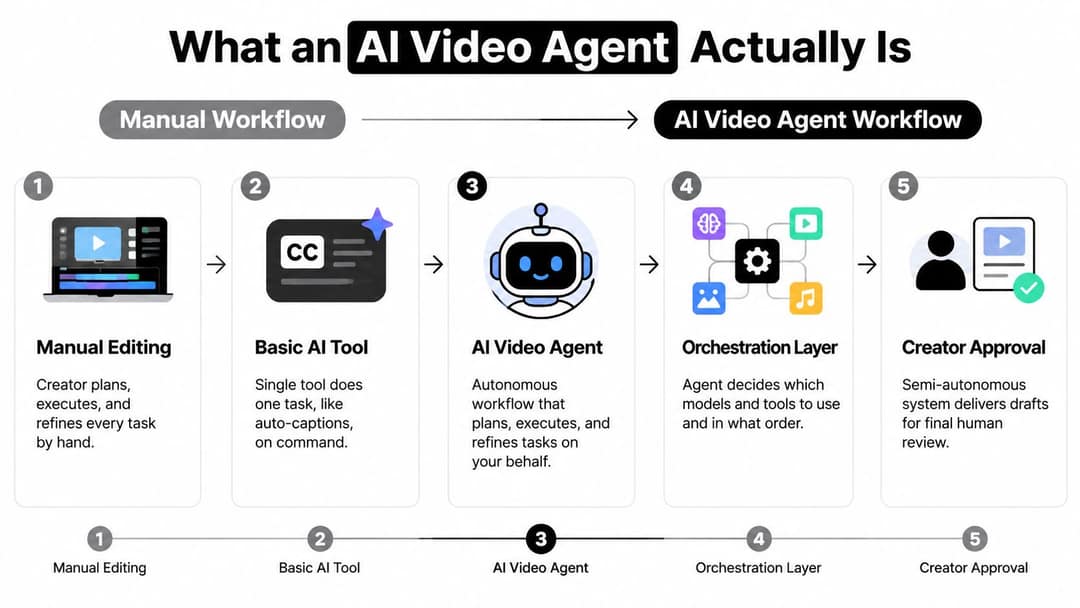
"Autonomous" doesn't mean unlimited. An agent needs a goal, source material, permissions and boundaries. You might let it create drafts but not publish, or rewrite a caption but never change product facts. If you want to compare how agent products expose capabilities, permissions and connected actions, Orbit Forms' overview of AI agent features is a compact reference outside the video space.
How AI video agents work under the hood
Video generation gets the attention, but orchestration is what turns separate capabilities into a production process. Most agents have four layers:
| Layer | What it does | What breaks without it |
|---|---|---|
| Model | Reads the brief, infers audience and tone, chooses the next action | The agent runs steps in the wrong order or for the wrong goal |
| Tools | Transcription, editing, stock search, voice, captions, translation, publishing | The agent can describe a workflow but not complete it |
| Memory | Brand colors, recurring intros, preferred hook styles, rejected edits | You repeat the same instructions in every brief |
| Guardrails | What it must not do without permission: publish, change claims, use a likeness, exceed a budget | Errors ship directly to your audience |
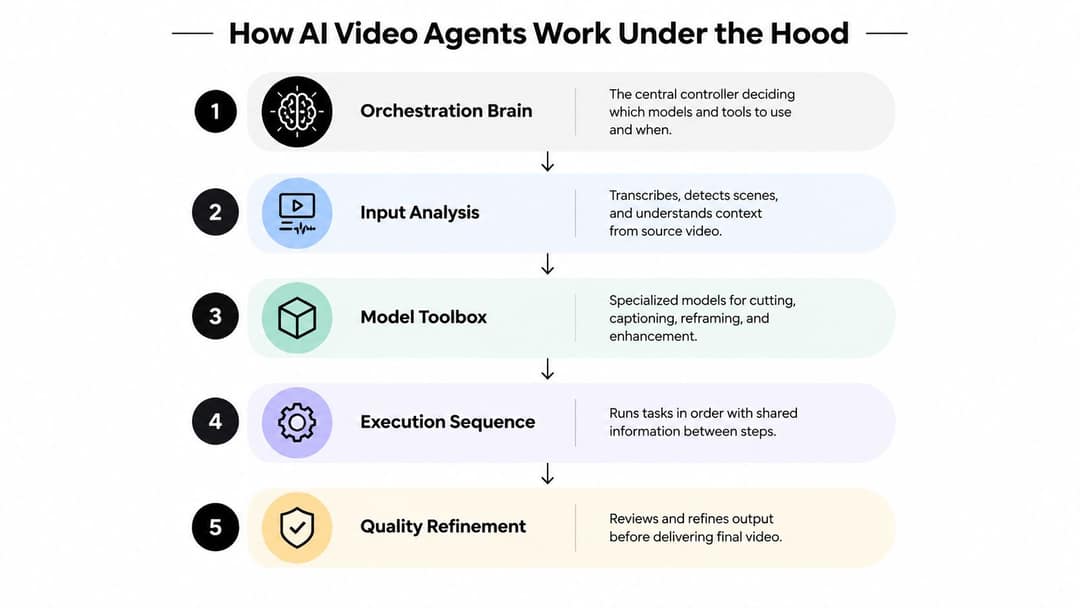
A typical request moves from source analysis to transcription, topic segmentation, clip selection, visual matching, captions, voice-over decisions, platform formatting and a quality check. If the selected passage turns out to be off-topic, a good agent goes back to an earlier decision, tries another tool or asks you, instead of polishing the wrong clip.
The hard part is holding instructions over a long workflow. The VideoWebArena benchmark tests exactly that: 2,021 web-agent tasks built from 74 manually created video tutorials totaling almost four hours, scored on whether agents retain both skills and facts from long videos rather than answering a question about one short clip.
How do AI video agents search inside a video?
Multimodal video understanding means the agent reads speech, visuals, on-screen text and timing together, so you can ask for a moment by what happens in it, not only by what is said. That matters because meaning rarely lives in one channel: a spoken claim may depend on a chart, a product demo or text that flashes on screen for a second.
Where search inside video pays off:
- Product launches: pull every moment from a launch webinar where the product is on screen, and cut them into a teaser and a demo clip.
- Commerce: find every time a product is shown or named in a livestream and turn each into a short product clip.
- Quality control: flag places where the narration says one thing and the visual shows another.
A quick test before you commit to a tool: ask it for a moment that is only visual ("the shot where the dashboard first appears"). If it can only find moments that someone describes out loud, it searches the transcript, not the video.
Revid applies the same idea to research. Each video in its library of about 2.77 million short-form videos and posts stores a full transcript, hashtags, duration, public engagement counts and an AI description of the visuals (camera perspective, shooting style, mood, content type, setting, format, and whether the footage is real or AI-generated). Its free Deep analysis, up to 60 a day, watches a video and breaks down the hook, the timed structure and the scroll-stopping moment. For launches and stores, the Product Hunt launch video generator and the AI product video generator read your launch or product page, keep its real screenshots and photos, and write the script.
How creators use AI agents for video production
The strongest use cases start with material you already own. You supply the source, the audience and the constraints; the agent does the search, assembly and formatting, then hands back a draft.
Turning long recordings into shorts
Give the agent a podcast, livestream or webinar. It transcribes, finds passages on a topic, cuts them, writes a fresh opening, adds readable captions and reframes the speaker for vertical. A podcast clip generator is a good first pilot because the source exists and the pattern repeats.
Your checkpoint: does the clip make sense without the rest of the conversation, and does the new hook promise only what the clip delivers?
Prompt to try
Make a 45-second faceless explainer on why the Roman concrete in harbor walls got stronger over time. Open with the hook "This 2,000-year-old concrete heals itself." Use calm documentary narration, historical visuals and bold captions, and end with one clear takeaway.
Faceless explainers
You give a subject, sources and a style. The agent outlines a script, records narration, picks visuals, captions and assembles. Review research quality and visual fit: polished narration over an inaccurate claim or unrelated stock footage is still a weak video.
Ecommerce and product videos
A product page, approved copy and a set of images become a short ad in several platform versions. Keep a hard approval gate on specs, prices, guarantees and comparisons. The agent should assemble approved facts, never invent new promises.
Multilingual versions
One master edit becomes localized versions: the agent can translate the video, pick a voice, adapt captions and swap on-screen text. A fluent translation is not automatically a good ad, so have a native speaker check phrasing, pronunciation and claims that need regional changes. For the marketing case behind all of this, CrowdTamers has a primer on video content in modern marketing.
The common thread is batch production from a trusted source. Agents save the most time when the same editorial pattern repeats; you protect meaning, taste and accountability.
AI video agents vs traditional editing tools
Most creators will use both. The question is where your hours actually go.
| Point tool | AI video agent | |
|---|---|---|
| Input | One narrow instruction (caption, resize) | A goal, a source package and constraints |
| Scope | One task | Plans and chains many tasks |
| Your role | Operate each tool and move files between them | Set direction, review drafts, handle exceptions |
| Best fit | Small, predictable jobs | Repetitive workflows with lots of glue work |
| Main risk | No context between tasks | One wrong decision spreads through every step |
| Review needed | Check the output | Gates for claims, branding, rights and publishing |
Decision rule: if a task takes a few minutes and has a clear output, a point tool is enough. If the time goes into moving between transcription, editing, captions, resizing and export, an agent earns its keep. Choose the smallest system that removes the bottleneck; more autonomy is not better if you still correct every draft. For the step-by-step version of a full pipeline, see our AI video creation workflow.
Prompt to try
Create a 40-second vertical video titled "3 things you should never let an AI do for your channel." Hook: "Your AI editor can get you demonetized." Cover auto-publishing, invented product claims and missing AI labels, with clean motion graphics and punchy captions.
What should you never let an AI video agent do alone?
Give the agent the assembly line, and keep these decisions:
- Publishing: review at least the first batches before anything goes live.
- Facts and claims: product specs, prices, names and numbers.
- Likeness and rights: whose face, voice or footage appears, and whether you have permission.
- AI disclosure: TikTok requires a label on AI-generated content with realistic images, audio or video, and says the label does not affect distribution for videos that follow its Community Guidelines. YouTube requires disclosure of realistic AI content through the "AI use" setting in YouTube Studio. Meta shows an "AI info" label on Facebook, Instagram and Threads and asks you to disclose photorealistic AI video.
- Volume: YouTube does not let mass-produced AI content made from generic templates monetize, while AI tools are allowed when the result shows your creative vision and gives real value.
Common misconceptions about AI video agents
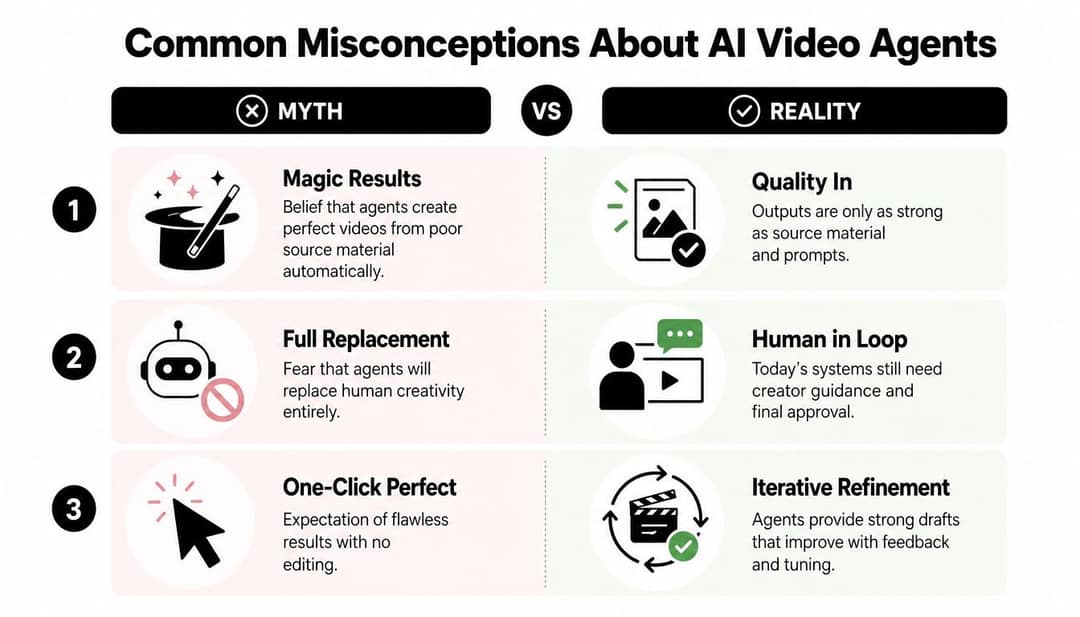
- "Agents make great videos from weak inputs." They can organize poor material, but they can't recover a missing idea, bad audio or an unsupported claim. Output tracks the source, the brief and the checks.
- "Agents replace the creator." They move you from button operator to editor-in-chief: you set the brief, the taste standard and what ships.
- "One agent handles every channel the same way." TikTok, YouTube, Instagram and LinkedIn reward different hooks, pacing and framing. A vertical crop alone is not a platform adaptation; look for per-channel presets or set your own.
How to start with your first AI video agent
- Name the bottleneck precisely. "Make more content" is too vague. "Find three excerpts, caption them, reframe them, export them" is a brief an agent can run.
- Match the tool to the job. Compare workflow coverage, integrations, editing controls, export options and approval settings. A tool great at generating scenes may be wrong for interview clipping.
- Prepare one source folder. Recording, transcript if you have it, logo, fonts, brand colors, music guidance, target platforms and a two-line audience description.
- Write checkpoint rules. List what the agent may do alone and what needs approval: factual copy, likenesses, rights-sensitive media, translations, publishing.
- Run a small pilot on evergreen material. Score each draft on hook, accuracy, captions, visual fit and brand. Note the mistakes it repeats; those become new lines in your brief.
Judge the pilot on how much you had to fix, not only on speed. Give the agent more autonomy only where its drafts stopped needing corrections.
How to run a video agent with Revid
Revid is built to be driven by AI agents: every paid plan includes its REST API, an MCP server and the revid-cli npm package. A typical setup:
- On a paid plan (Growth is $39/month with 2,000 credits; see Revid pricing), add the MCP server at
https://www.revid.ai/api/mcpto Claude, ChatGPT, Claude Code, Cursor or VS Code with one-click sign-in. - Ask your agent to research a topic. The
search_viral_videostool returns real short-form videos with their transcript, hook, engagement counts, engagement tier and visual style. - Ask it to render an original video from the format that fits: Revid writes the script, generates scenes with Seedance 2.5, MiniMax Hailuo H3, Wan 3.0 or Google Veo 3, and adds a voice-over in 70+ languages, captions and music. You can estimate the credit cost before generating.
- Review the draft in the timeline editor, then publish or schedule it to TikTok, Instagram and YouTube.
The Revid MCP, CLI and API page covers the setup, and our comparison of 18 video MCP servers shows how it differs from HeyGen, Runway, Agent Opus and the others. If you want a recurring pipeline without a chat agent, Auto-Mode workers create a fresh video every day from a prompt or content source (3 workers on Growth).
Where AI video agents are heading
Buyers are already moving. In IAB research published in May 2026, two in three US digital video ad buyers said they are live with (21%), testing (20%) or planning to use (25%) agentic AI for video campaigns in 2026, as compiled in our short-form video statistics. For wider context on AI media adoption, see the Artificial Analysis 2025 AI media survey and AutoAE's overview of the state of AI video agents in 2026.
What to expect next:
- Better multimodal clip selection. Agents that weigh speech, visuals and on-screen text together will pick stronger moments and catch narration that contradicts the picture.
- Agents handing off to agents. A research agent prepares a brief, a video agent renders it, another checks claims or translations. Each handoff needs a clear owner and a record of what changed.
- Memory of editorial taste. Useful memory stores rejected hooks, recurring corrections and approved terminology, and lets you inspect and delete what it learned.
- Provenance and disclosure. As synthetic presenters, cloned voices and generated visuals spread, teams will need to track where each asset came from and what must be labeled.
If you'd rather see agent products demoed in person, community roundups such as one attendee's handpicked guide to New York Tech Week 2026 events are a way to find meetups. The same agentic generation paper also reported physical-validity judgments of 58% for its agentic system versus 25% for Veo 3.1 and 20% for Wan 2.2, another sign that planning and review loops matter as much as the raw model.
FAQ
What is the difference between an AI video agent and an AI video generator?
A generator turns one prompt into one clip. An agent plans a whole video, calls a generator (and other tools for voice, captions and editing) as one step among many, and checks the result against your brief.
Can an AI video agent publish to TikTok, Instagram and YouTube automatically?
Yes, if it is connected to a publishing tool and you give it permission. Revid, for example, publishes and schedules directly to all three, but reviewing drafts before they go live is the safer default.
Can videos made by an AI agent be monetized on YouTube?
Yes, if the final video shows your creative vision and gives real value. YouTube does not monetize mass-produced AI content from generic templates, incoherent AI clip compilations, or AI personas posing as experts on health, legal, financial or political topics.
Do I have to label videos made with an AI agent?
Only when they contain realistic AI-generated or altered content. TikTok, YouTube and Meta all require disclosure in that case, while AI-written scripts, captions or titles do not need a label on YouTube.
Are AI video agents free?
Most charge for generation because the underlying models cost money per second of video. On Revid, sign-up is free and new accounts get free credits to try video creation with no credit card needed, while regular creation uses the monthly credits of a paid plan from $39/month.