On this page
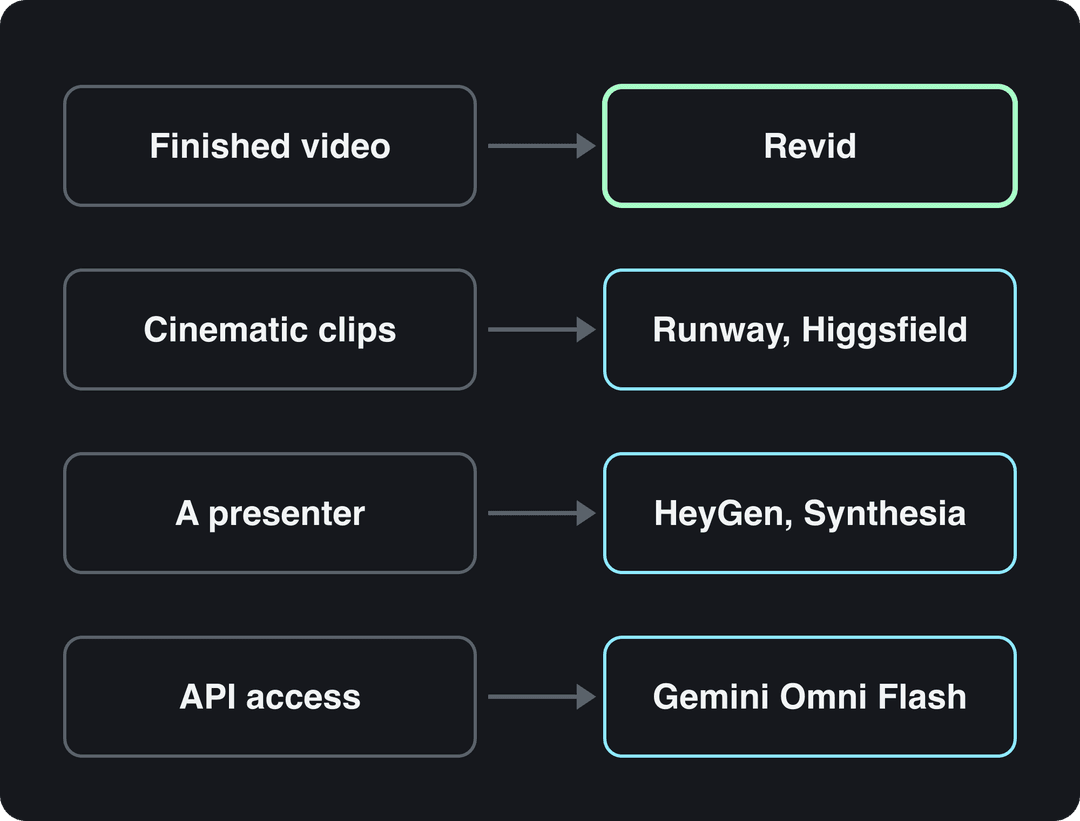
The best Veo 3 alternative depends on the job. Revid makes finished short-form videos with voice, captions and publishing, and Veo 3 is one of its models. Runway makes cinematic clips with native audio, and HeyGen or Synthesia make presenter videos. Developers on the Gemini API should test Gemini Omni Flash, which Google now recommends over Veo.
The timing matters. On the Gemini API, Google shut down the veo-3.0 models on June 30, 2026, and the veo-3.1 preview models (standard, fast and lite) shut down on October 22, 2026. If your script, pipeline or favorite tool calls those models directly, it breaks or changes next week.
Veo 3 alternatives compared
The prices and free plans below are what each vendor listed when Revid last checked them (August to September 2026). Confirm on the vendor's site before you buy.
| Tool | Best for | Sound | Paid plans from | Free option |
|---|---|---|---|---|
| Revid | Finished short-form videos (script, scenes, voice, captions, publishing) | Voice-over in 70+ languages, music, captions | $39/month ($32 billed yearly) | Free sign-up with free credits to try video creation; regular use needs paid-plan credits |
| Runway | Cinematic clips with shot-level control | Native audio | $15/month | 125 one-time credits, watermarked |
| Higgsfield | Camera presets and many models on one plan | Photo-to-talking-video lip sync | About $15/month (billed yearly) | 10 credits a day, watermarked, premium models locked |
| Kling | Raw text-to-video and image-to-video clips | Check Kling's site | Check Kling's site | Check Kling's site |
| Pika | Effects and AI elements on footage you filmed | Check Pika's site | $8/month (billed yearly) | Free account with no monthly credits (buy packs), no commercial license |
| HeyGen | Avatars and video translation | Voiced avatars, lip-synced translation in 175+ languages | $29/month ($24 billed yearly) | 3 watermarked videos a month, up to 1 minute each |
| Synthesia | Corporate training presenters | Voiced avatars in 140+ languages | $29/month | Up to 10 minutes a month, 9 stock avatars |
| Gemini Omni Flash (Google) | Developers replacing Veo in the Gemini API | Check Google's docs | Check Google's pricing page | Check Google's pricing page |
What is the best alternative to Veo?
No single tool wins, because Veo 3 is a model, not a finished product. It turns a prompt into a short clip, and everything around that clip is still your job. Pick the alternative by the job you hired Veo for:
- Finished social videos: you need a vertical video with a script, scenes, voice-over, captions and music that you can post today. Use Revid, which also lets you keep using Veo 3 next to Seedance 2.5, MiniMax Hailuo H3 and Wan 3.0.
- Cinematic shots: you need one striking shot with camera moves, relighting or object removal. Use Runway. For preset camera moves (dolly, crane, FPV, bullet time) and many models on one plan, use Higgsfield.
- A presenter on screen: use HeyGen for marketing videos and lip-synced translation, or Synthesia for corporate training.
- Your own footage: Pika adds AI characters, objects and effects to clips you filmed.
- Code that calls Veo: test Gemini Omni Flash first, since it is Google's recommended default.
How Revid is built points to a related rule: the model matters less than most buyers think. Google Veo, Seedance, Kling, Wan and MiniMax Hailuo are sold through APIs to many video tools, Revid included, and two tools that send the same prompt to the same model get comparable clips. What changes the result is the input (the idea, the hook, the pacing, the visual direction) and what the tool does after the clip is generated.
What Veo 3 does, and what it costs in October 2026
You need a baseline before you replace Veo. Veo 3.1 in the Gemini API generates 4, 6 or 8-second clips (8 seconds only at 1080p or 4K) in 16:9 or 9:16, with native audio, and every clip carries a SynthID watermark. A 30-second Short therefore means stitching several clips together, then adding your own voice-over, captions and music.
| Gemini API model | 720p | 1080p | 4K |
|---|---|---|---|
| Veo 3.1 | $0.40 per second | $0.40 per second | $0.60 per second |
| Veo 3.1 Fast | $0.10 per second | $0.12 per second | $0.30 per second |
| Veo 3.1 Lite | $0.05 per second | $0.08 per second | Not listed |
None of these models has a free tier. Google is also moving its default away from Veo. According to the Gemini API deprecations page, veo-3.0 and veo-2.0 shut down on June 30, 2026, and the veo-3.1 preview models shut down on October 22, 2026, with gemini-omni-1.1-flash as the recommended replacement. Google keeps Veo 3.1 for scene extension, last-frame control and legacy pipelines.
The 8 best Veo 3 alternatives in 2026
The category keeps growing: Grand View Research's AI video generator market report valued the global market at USD 554.9 million in 2023 and projects USD 1,959.24 million by 2030, a 19.9% annual growth rate. The eight options below cover what creators and teams actually use Veo for. They are in no particular order of quality, because each one wins a different job.
1. Revid: best for finished short-form videos
Revid is an AI video platform that turns an idea, a link or a proven viral format into finished short-form videos and publishes them to TikTok, Instagram and YouTube. Where Veo hands you a clip, Revid's AI video generator writes the script, builds the visuals scene by scene, adds a voice-over, synced captions and music, and lets you fix anything in a timeline editor.
It is also the simplest way to keep using Veo without tracking API changes yourself. You can choose Google Veo 3 per scene, next to Seedance 2.5, MiniMax Hailuo H3 and Wan 3.0, all under one credit system, with export in 720p, 1080p or 4K.
The other difference is where a video starts. Revid includes a searchable library of about 2.77 million real short-form videos and posts with their public engagement data. Instead of a blank prompt, you can start from a format audiences already watch, and Revid turns it into an original video with a new script and new visuals.
- Pick it if: you publish TikToks, Reels or Shorts and want them finished, not just generated.
- Skip it if: you edit long-form or cinematic film shot by shot. A professional editor or Runway fits better.
- Price: Growth costs $39/month ($32 billed yearly) with 2,000 credits. Sign-up is free and new accounts get free credits to try video creation, no credit card needed. See the current Revid plans.
2. Runway: best for cinematic shots and control
Runway is the closest like-for-like Veo replacement for filmmakers. Its Gen-4.5 model is one of the highest-rated video models available, and Aleph adds shot-level control: camera moves, relighting and object removal. Runway ships frontier features early (native audio, world models, motion transfer) and offers a developer API and MCP server.
The trade-off is the same as with Veo: you get clips, and the script, voice, captions, assembly and publishing are up to you. Plans start at $15/month. The free plan is 125 one-time credits, watermarked, with select models only. The Revid vs Runway comparison shows where each fits.
3. Higgsfield: best for camera moves and many models
Higgsfield wraps 30+ models, including Kling 3.0, into one subscription and adds cinematic camera presets: dolly, crane, FPV and bullet time. Soul ID keeps characters consistent across clips, its photo-to-talking-video lip sync is strong, and it also generates 4K images.
It starts at about $15/month billed yearly. The free tier gives 10 credits a day with a watermark, and premium models such as Veo are locked. The output is still single clips, so plan to assemble and publish elsewhere. See Revid vs Higgsfield for a side-by-side view.
4. Kling: the raw clip model to try next
Kling, developed by Kuaishou, is one of the video models most often compared with Veo. Like Veo, it is a raw clip generator: you write a prompt or upload an image and get a clip back. You can use it on Kling's own site or inside multi-model tools such as Higgsfield.
Kling's plans, clip lengths and audio options change often. Check its site for current limits and commercial terms before you build a workflow on it.
5. Pika: best for effects on your own footage
Pika competes less on photorealism and more on effects no other tool offers: Pikadditions, Pikaswaps and Pikaffects, plus inserting AI characters and objects into footage you filmed. Generations take 1 to 2 minutes, and credits roll over.
It is the cheapest paid entry here, at $8/month billed yearly. The free account includes all models with no watermark but no monthly credits (you buy one-time packs), and it carries no commercial license. The Revid vs Pika comparison covers when each one fits.
6. HeyGen: best for avatars and translation
If you used Veo to generate a spokesperson, a dedicated avatar tool does that job better. HeyGen offers some of the most realistic avatars and digital twins available, video translation with lip sync across 175+ languages, and real-time interactive avatars (LiveAvatar). It is rated 4.8/5 on G2 (Summer 2026).
Plans start at $29/month ($24 billed yearly). The free plan gives 3 watermarked videos a month, up to 1 minute each. HeyGen makes presenter videos, not scene-based stories. See Revid vs HeyGen for the difference.
7. Synthesia: best for corporate training videos
Synthesia is built for training and internal communications. It offers polished avatar presenters with Express-2 full-body gestures, 140+ languages, a slide-based workflow, SCORM and LMS export, SSO and enterprise governance. When a policy changes, you re-render the video instead of reshooting it.
Plans start at $29/month, and the free plan covers up to 10 minutes of video a month with 9 stock avatars. For social content rather than training, read Revid vs Synthesia.
8. Gemini Omni Flash: Google's own replacement for Veo
For developers, the most direct Veo alternative now comes from Google itself. Google recommends Gemini Omni Flash as the default video generation model in the Gemini API, and gemini-omni-1.1-flash is the named replacement for the retired veo-3.1 previews.
Pick it if you already build on the Gemini API and want the shortest migration. Check Google's pricing page for its current rates before you switch production traffic.
Editors such as Descript and CapCut are not on this list: they edit footage you already have rather than generating new footage. For a wider roundup organized by use case, see the best AI video generators of 2026.
Prompt to try
Make a 30-second vertical explainer on why an octopus has three hearts. Open with the hook: "Your heart beats alone. An octopus has three." Use photorealistic underwater AI visuals, a calm narrator voice-over, bold synced captions and soft ambient music.
Which Veo 3 alternatives generate audio?
Veo 3.1 generates native audio with each clip, which is why many people look for a Veo 3 alternative with audio. The options fall into three groups:
- Native audio inside the clip: Runway.
- Talking faces: Higgsfield (photo-to-talking-video lip sync), HeyGen and Synthesia (voiced avatars and lip-synced translation).
- A full soundtrack built around the visuals: Revid adds a voice-over from 1,000+ AI voices in 70+ languages (ElevenLabs, Google Gemini and MiniMax), synced captions in 30 styles, and music. Voice cloning is available on Elite and above.
Choose by what the sound has to do. If it belongs inside the shot (footsteps, a single line of dialogue, ambient noise), native audio is the fastest route. If the sound carries the video, as in a narrated explainer, a product demo or a story, you want a voice-over, captions and music you can edit separately. Native audio is tied to the clip, so changing one line usually means regenerating the shot.
Is there an uncensored AI video tool like Sora for commercial use?
Sora itself is gone. OpenAI discontinued the Sora web and app experiences on April 26, 2026 and removed the Sora 2 models from its API on September 24, 2026, with no recommended replacement. Revid no longer offers Sora 2 either.
None of the mainstream tools in this article offers uncensored generation. Each enforces a content policy, and the realistic output that makes these models useful is exactly what platforms regulate:
- TikTok requires a label on AI-generated content with realistic images, audio or video. It may apply an "AI-generated" label automatically to uploads that carry C2PA Content Credentials, and that label cannot be removed.
- YouTube requires you to disclose realistic AI content with the "AI use" setting in YouTube Studio. Since May 2026, it also applies permanent labels to content made with Veo.
- Meta shows "AI info" labels on Instagram, Facebook and Threads and requires disclosure for photorealistic AI video.
- The EU AI Act transparency rules, which require deepfakes to be clearly labeled, come into effect in August 2026, according to the European Commission.
The label itself does not hurt you. TikTok and YouTube both say a disclosure label alone does not reduce a video's reach or its eligibility to earn. For commercial work, check whether your plan includes a commercial license rather than looking for an uncensored tool. Pika's free plan, for example, does not include one, so read each tool's terms for the plan you actually pay for.
How to make a Veo-style video with Revid
- Open the Veo 3 video generator and paste a prompt, a script or a link. You can also start from a video in Revid's viral library and choose "Same energy, new script".
- Pick the model for each scene: Google Veo 3, Seedance 2.5, MiniMax Hailuo H3 or Wan 3.0. Revid shows the estimated credit cost before you generate.
- Choose a voice, a caption style and music.
- Fix any scene in the timeline editor, then export in 720p, 1080p or 4K at 30 or 60 fps.
- Publish now or schedule the video to TikTok, Instagram and YouTube from one queue.
As a guide, a 30-second video with Pro AI visuals and a voice-over costs about 40 to 80 credits. Premium models cost 100 to 130 credits per 5 seconds of video.
FAQ
Is Veo 3 still available?
Yes, with changes. On the Gemini API, veo-3.0 shut down on June 30, 2026 and the veo-3.1 previews shut down on October 22, 2026. Google keeps Veo 3.1 for scene extension, last-frame control and legacy pipelines, and Veo 3 is also available inside tools such as Revid.
Is there a free Veo 3 alternative?
Not for regular use, but several tools let you test for free. Revid gives new accounts free credits to try video creation, Runway gives 125 one-time credits, Higgsfield 10 credits a day (watermarked, premium models locked), HeyGen 3 watermarked videos a month and Synthesia up to 10 minutes a month. Veo 3.1 itself has no free tier in the Gemini API.
Who are Veo 3's main competitors?
Among models, the main competitors are Seedance, Kling, Wan, MiniMax Hailuo and Runway's Gen-4.5. Among products, they are Runway, Higgsfield and Pika for clips, HeyGen and Synthesia for avatars, and full pipelines such as Revid that let you use several models in one workflow.
Which AI video model is the fastest and most reliable?
Revid's AI video model index measured speed and failure rates per model across 713,649 production generations. Check it before you pick a model for high-volume work.
Does Revid use Google Veo 3?
Yes. Google Veo 3 is one of the models you can choose per scene in Revid, alongside Seedance 2.5, MiniMax Hailuo H3 and Wan 3.0, all under one credit system.