Social Media Audit Checklist: 9 Steps, Key Metrics and Free Tools
A nine-step social media audit checklist for 2026, with the metrics to pull, how to audit responses and competitors, and the free tools that do most of the work.
On this page
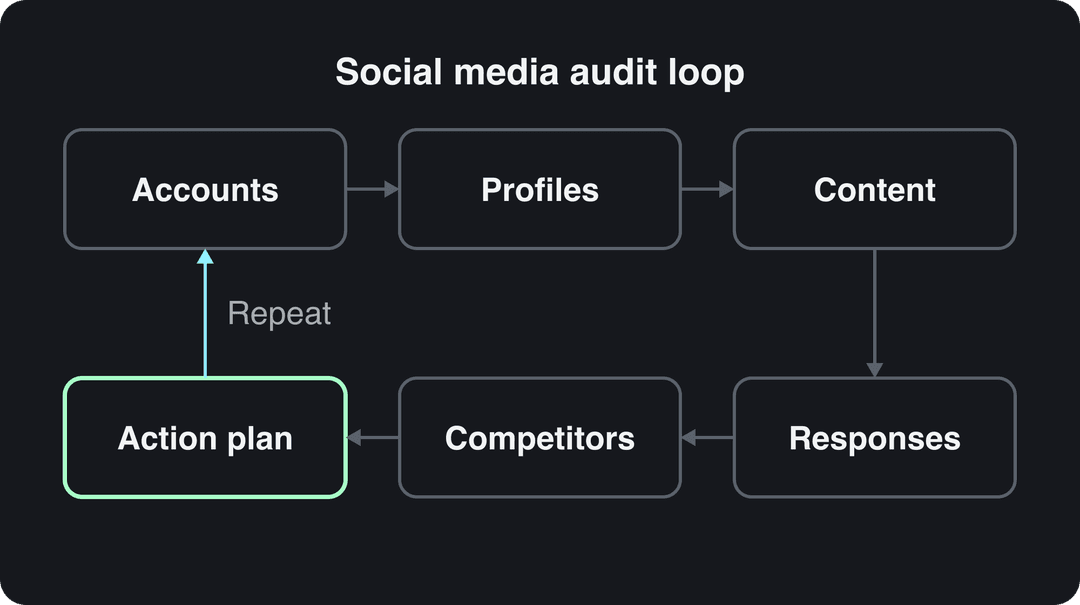
A social media audit checklist has nine steps: list every account, fix each profile, set a goal and review window, pull performance metrics, audit your content, audit your responses, benchmark competitors, check platform rules, and turn the findings into an action plan. Most of it runs on free native analytics and one spreadsheet.
The step most audits get wrong is the comparison. Since August 24, 2026, YouTube counts a view the moment a video starts to play, on Shorts, long-form and live, and Instagram insights now lead with Views, which count every play or display rather than unique accounts. Put this quarter's numbers next to last year's without noting those changes and your audit will report growth that never happened.
- Median TikTok views for posts with 4 hashtags, the best of any hashtag count
- 77K
- Revid analysis of 176,367 TikToks
- Median TikTok views for posts with 9 or more hashtags
- 16K
- Revid analysis of 176,367 TikToks
- Global shoppers who rely on UGC like reviews, photos and videos when buying
- 65%
- Bazaarvoice, November 2024
- Maximum hashtags allowed per Instagram post
- 5
- Instagram rules
The social media audit checklist at a glance
| Step | What you check | What you walk away with |
|---|---|---|
| 1. Accounts | Every profile, active or dormant, and who has access | A master account list |
| 2. Profiles | Handles, bios, links, images, pinned posts | A fix list per profile |
| 3. Goal and window | What social is for, and the period you review | One goal and a date range |
| 4. Metrics | Reach, engagement, clicks and conversions per platform | A metrics sheet |
| 5. Content | Top and bottom posts by format, topic, hook, hashtags | Keep, fix and stop lists |
| 6. Responses | Reply rate, reply time, tone, unanswered messages | A response scorecard |
| 7. Competitors | Their formats, frequency and best posts | Benchmarks and gaps |
| 8. Rules | AI labels, originality rules, hashtag limits | A compliance fix list |
| 9. Action plan | What changes, who owns it, by when | Dated goals |
Step 1: List every account you own
Start by searching your brand name on each network, not with the accounts you remember. You are looking for active profiles, abandoned ones from old campaigns, regional pages, and impostor accounts using your name or logo.
Check at least Facebook, X (formerly Twitter), Instagram and LinkedIn, plus TikTok, YouTube, Threads and any network your audience uses. Record each account in one sheet:
| Column | Example |
|---|---|
| Platform and handle | Instagram, @yourbrand |
| URL | Link to the profile |
| Owner | The person accountable for it |
| Login access | Who holds it, and whether 2-step verification is on |
| Last post date | Date of the most recent post |
| Status | Keep, merge, archive or report (impostor) |
Two decision rules. If an account has gone quiet and holds no audience you need, archive it instead of leaving a dead profile that shows up in search. If a former employee or agency holds the only login, fix that before anything else.
Step 2: Audit each profile
Open each profile on a phone, the way a stranger sees it, and check:
- Name and handle: identical, or as close as possible, across platforms.
- Photo and cover: current logo, readable at thumbnail size.
- Bio: says what you do and who it is for, with a current offer.
- Link: works, lands on the right page, and carries UTM tags so clicks show up in your web analytics.
- Pinned posts and highlights: still current, no expired promotions.
- Contact details and category: correct email, phone, address and business category where the platform supports them.
If you want a second list to compare against, LGX Branding's overview of audit benefits and checks covers the same profile basics.
Step 3: Set the goal and the review window
An audit without a goal turns into a pile of numbers. Write one sentence: "Social exists to drive X for us," where X is awareness, website traffic, leads, sales or customer support. That sentence decides which metric wins in the next step.
Then pick one review window and use it on every platform. Native tools limit what you can pull: TikTok Studio analytics offers 7, 28, 60 or 365 days or a custom range, and Instagram insights cover up to the past 90 days. Export your Instagram data at every audit so you build your own longer history.
Which metrics should a social media performance audit measure?
Pull the same core metrics for every platform, then give extra weight to the one that matches your goal.
| Metric | What it tells you | How to get it |
|---|---|---|
| Views or impressions | How often content was shown or played | Native analytics |
| Reach (unique viewers) | How many different people saw it | Native analytics (Viewers on Instagram) |
| Engagement rate | Whether people act on what they see | (likes + comments + shares + saves) ÷ reach × 100 |
| Shares and saves | Content worth passing on or keeping | Native analytics |
| Follower growth | Net new followers in the window | Followers at the end minus the start |
| Watch time and retention | Whether videos hold attention | Video analytics on TikTok, YouTube, Instagram |
| Link clicks | Traffic social sends to your site | UTM-tagged links in your web analytics |
| Conversions | Sign-ups, leads or sales from social | Web analytics goals or a CRM source field |
| Response rate and time | How well you answer people | Step 6 |
| Sentiment | Whether mentions are positive, negative or neutral | A manual sample or a listening tool |
For monitoring between audits, keep a short list: views, engagement rate, link clicks and the conversion that matches your goal. The rest belongs in the full audit. HubSpot's social media audit walkthrough is a useful reference when you set up the metrics sheet.
Each platform reports these differently, so note where the data comes from:
| Platform | Where the data lives | What to watch in an audit |
|---|---|---|
| TikTok | TikTok Studio > Analytics (app, Studio app or Studio Web) | Viewers tab shows when viewers were most active over the last 7 days; Followers tab breaks activity down by hour and day |
| Insights in the professional dashboard | Views counts plays and displays, Viewers counts unique accounts; follower insights need at least 100 followers | |
| YouTube | YouTube Studio > Analytics | Views count on play since August 24, 2026; RPM is earnings per 1,000 views after YouTube's share |
| Professional Dashboard or Meta Business Suite | Since June 2025 every new video is shared as a reel, so separate video results before and after | |
| Page analytics | Any video may appear in the mobile vertical video feed, though you can't post to it directly |
Prompt to try
Make a 30-second vertical TikTok, the first episode of a series on the topic that topped my content audit: '3 mistakes people make when brewing coffee at home'. Open with the hook 'You're probably ruining your coffee before it hits the cup', then cover one mistake per scene with a quick fix. Use close-up stock footage, a friendly voiceover, bold captions and 4 relevant hashtags.
Step 5: Audit your content
Sort the window's posts by your goal metric and pull the top and bottom posts on each platform. Tag each one: format (video, carousel, image, text, live), topic, hook (first line or first seconds), length, caption length, hashtags and posting time. Patterns show up fast once the tags sit side by side.
Apply three rules:
- A format that keeps landing in the bottom group: stop it or rework it.
- A topic in the top group on two platforms: turn it into a series.
- A post that beat your usual numbers: find the reason (hook, topic, timing) before you try to repeat it.
Hashtags are an easy audit item because they are countable. On TikTok, Revid's analysis of 176,367 TikToks with 1,000+ likes posted between October 2025 and October 2026 found that posts with 4 hashtags had the best median (77K views), 3 hashtags came next (75K), posts with none had 51K, and posts with 9 or more only 16K. In the same data, captions of 41 to 80 characters had the best median (67K) and posts with no caption the lowest (36K). This is TikTok data from videos that already did reasonably well, so it shows what strong posts have in common, not causes; the full method is in Revid's study of what makes a TikTok go viral.
Posts with 3 or 4 hashtags earned the most views. Captions stuffed with 9 or more hashtags did worst of all, with median views cut by about 80%.
Source: Revid analysis of 176,367 TikToks with 1,000+ likes posted between Oct 1, 2025 and Oct 16, 2026 (61,203 creators)
Show the data
| Median views | Share that passed 1M views | |
|---|---|---|
| None | 51.1K | 9.8% |
| 1 | 64K | 11.8% |
| 2 | 71.3K | 12.7% |
| 3 | 75.4K | 13.1% |
| 4 | 77.2K | 13.4% |
| 5 | 67.3K | 12.1% |
| 6 to 8 | 71.8K | 12.7% |
| 9+ | 15.6K | 7.8% |
While you count, compare your tags with current trending TikTok hashtags by niche, and remember that Instagram allows up to 5 hashtags per post.
For timing, trust each platform's own audience data over generic charts: TikTok's Viewers tab and Instagram's follower activity tell you when your followers are online. As a TikTok-only reference point, the same Revid study found posts at 3 to 6 a.m. US Eastern outperformed posts at 5 to 9 p.m.
Videos posted between 3 and 6 a.m. Eastern earned the most views and passed 1M views most often. The evening slot most guides recommend (5 to 9 p.m.) was the weakest of the day.
Source: Revid analysis of 123,704 English-language TikToks with 1,000+ likes posted between Oct 1, 2025 and Oct 16, 2026
Show the data
| Median views | Share that passed 1M views | |
|---|---|---|
| 12a | 67.3K | 14% |
| 1a | 79.4K | 15.1% |
| 2a | 79K | 14.2% |
| 3a | 90.8K | 16.1% |
| 4a | 120.4K | 19.9% |
| 5a | 93.5K | 16.7% |
| 6a | 97K | 17% |
| 7a | 75.8K | 13.1% |
| 8a | 83.9K | 14.3% |
| 9a | 70.5K | 13.1% |
| 10a | 65.5K | 13.6% |
| 11a | 65.7K | 13.1% |
| 12p | 60.4K | 11.9% |
| 1p | 60.9K | 11.8% |
| 2p | 53.7K | 11.2% |
| 3p | 63K | 11.9% |
| 4p | 63.8K | 11.5% |
| 5p | 55.6K | 11.1% |
| 6p | 55.3K | 11.5% |
| 7p | 50.4K | 11% |
| 8p | 60.5K | 12.3% |
| 9p | 62.2K | 13.1% |
| 10p | 62.3K | 12.6% |
| 11p | 67.2K | 13.3% |
How do you audit social media responses?
A social media response audit checks how you answer the people who talk to you: comments, DMs, mentions and reviews. Pull a sample of conversations from the review window on each platform and score them:
| Check | How to measure it |
|---|---|
| Response rate | Messages and comments answered ÷ those that needed an answer |
| Response time | Time from message to first reply; use the median, not the average |
| Unanswered threads | Questions, complaints or leads left with no reply |
| Tone and accuracy | Did the reply solve the problem, in your brand voice? |
| Escalation | Did complaints reach the right person and get closed? |
| Sentiment | Share of positive, negative and neutral mentions |
Set a target response time your team can actually staff, then measure against it at every audit. The most expensive gap is usually an unanswered sales question in DMs: that is a lead you already earned and dropped.
Audit the community around you too. Count user-generated content and untagged brand mentions, and note which posts made people share their own photos or videos. In Bazaarvoice's Shopper Experience Index (November 2024), 65% of global shoppers said they rely on UGC such as ratings, reviews, photos and videos in their buying decisions, one of the sourced figures on our UGC statistics page. If replies and comments are thin across the board, start with these ways to increase social media engagement.
How to run the competitive analysis in a social media audit
Pick three to five competitors: the direct ones selling what you sell, plus one account in your niche whose audience you want, even if it sells something else. Record the same window you used for yourself:
| Benchmark | What to note |
|---|---|
| Platforms | Where they post, and where they don't |
| Posting frequency | Posts per week on each platform |
| Formats | Their mix of video, carousel, live and text |
| Best posts | Their top posts in the window and why they worked |
| Engagement | Visible likes, comments and shares per post |
| Responses | Whether they reply to comments, and how fast |
| Gaps | Topics or formats nobody in your niche covers well |
The goal is the gap, not a copy. If every competitor posts talking-head video, a faceless explainer or a screen-recording series is open space. If none of them answers comments, fast replies become your edge.
On TikTok and YouTube, Revid's channel watcher syncs the competitor channels you choose every day (5 on Growth, 20 on Elite, 50 on Ultra) and flags their outlier videos, so you can spot the posts that beat their usual numbers and adapt the format to your brand.
Step 8: Check platform rules and AI labels
Platform rules changed a lot in 2025 and 2026, and an audit is the right moment to catch posts that break them:
- Instagram hashtags: up to 5 per post; with more, the caption or comment won't post.
- AI labels on TikTok: realistic AI-generated images, audio or video must be labeled. TikTok says the label does not affect distribution if the video follows the Community Guidelines.
- AI disclosure on YouTube: realistic AI content needs the "AI use" setting in YouTube Studio. Disclosure alone does not limit reach or earning eligibility, but repeated failure to disclose risks removal or YPP suspension.
- AI labels on Meta: photorealistic video or realistic audio that was created or altered must be disclosed, and Meta shows it as "AI info".
- Facebook originality: since March 2026, reaction-only, clip-stitching or narrate-what's-on-screen reels, and reposts with only borders, captions or speed changes, are treated as unoriginal and deprioritized.
- YouTube monetization: mass-produced or template-made AI content can't monetize under the "inauthentic content" policy (renamed from "repetitious content" on July 15, 2025).
Step 9: Turn findings into an action plan
Give every finding one verdict: keep, fix, stop or test. Then turn each one into a SMART goal (specific, measurable, achievable, relevant, time-bound). "Get more engagement" is not a goal; "increase Facebook post comments by 20% over the next three months" is.
| Finding | Action | Owner | Due |
|---|---|---|---|
| Carousels lead Instagram saves | Make them a weekly series | Content lead | End of next month |
| DMs with sales questions go unanswered | Daily DM check with a reply template | Community manager | Next week |
| Dormant regional X account | Archive and redirect the bio | Social lead | This week |
| Competitors ignore short tutorials | Test a tutorial series on TikTok | Video producer | End of quarter |
Put the changes into your calendar right away; this social media content planning template works as the next step after an audit.
How does a social media performance audit drive results?
An audit drives results by moving time and budget from what doesn't work to what does, and by tying posts to business outcomes. It works in three ways:
- It cuts waste. Platforms and formats that never move your goal metric get less effort, or none.
- It ties social to ROI. With UTM links and conversion tracking, you can calculate social ROI as (revenue from social minus cost) ÷ cost, per platform.
- It finds repeatable winners. Tagged top posts show which formats and topics to make more of, instead of guessing.
The audit only pays off if the next one checks whether the action plan worked. Compare the same metrics, over the same window length, against the goals you set in step 9.
Which social media audit tools should you use?
Most of an audit runs on free tools. Add paid ones only when volume or team size makes the copy-paste painful.
| Tool | Use it for |
|---|---|
| Native analytics (TikTok Studio, Instagram insights, YouTube Studio, Meta Business Suite, LinkedIn page analytics) | Reach, engagement, audience and video data for each platform |
| Web analytics with UTM-tagged links | Clicks and conversions from social |
| A spreadsheet | The master sheet: accounts, metrics, content tags, action plan |
| Hootsuite | Scheduling and reporting across several networks in one dashboard |
| Buffer | Scheduling and post analytics, popular with small teams |
| A social listening tool | Mentions, sentiment and competitor share of voice |
| Revid's free TikTok account audit | An online check of what actually works on your TikTok account |
Decision rule: one or two accounts, use native analytics and a spreadsheet. Several accounts or a team, add a dashboard such as Hootsuite or Buffer. Reputation or support matters to the business, add listening.
Audit and act on your short-form video with Revid
If video is where your audit points, Revid covers both the check and the follow-up:
- Run the free TikTok account audit (in the tools table above) to see which of your videos work.
- Add competitor TikTok and YouTube channels to the channel watcher to track their outliers every day.
- Publish and schedule to TikTok, Instagram and YouTube from one queue with Revid's social media publishing; every post reports its views, likes and comments, and any post that did well can be remixed in one click.
- Turn a winning format into a steady stream with automated video creation, where Auto-Mode workers make a fresh video every day from a prompt or content source.
FAQ
How often should you do a social media audit?
Do a full audit once a quarter and a light metrics check every month. Run an extra audit after a rebrand, a new platform launch or a major platform rule change.
Is there a free social media audit tool?
Yes. Every platform's native analytics is free, and a spreadsheet ties them together. For TikTok, Revid's account audit is also free.
What is the difference between a social media audit and a social media report?
A report shows the numbers for a period. An audit also reviews accounts, profiles, responses, competitors and rules, and ends with an action plan that changes what you do next.
Should a social media audit include inactive accounts?
Yes. Dormant and impostor accounts still show up in search and can confuse customers, so list them and decide to keep, merge, archive or report each one.
Sources
- Revid analysis of 176,367 TikToks with 1,000+ likes posted between Oct 1, 2025 and Oct 16, 2026 (61,203 creators)
- Revid analysis of 123,704 English-language TikToks with 1,000+ likes posted between Oct 1, 2025 and Oct 16, 2026
- Bazaarvoice, Shopper Experience Index Vol. 18 (press release) (November 2024)
Charts and figures checked on November 6, 2026.