AI Talking Avatar: Create a Talking Avatar Video in 5 Steps (2026)
How to make an AI talking avatar video in Revid's current interface: open the Talking Avatar tool, add a script, pick a voice, upload a photo or video, check the credit estimate and generate. Includes real credit costs and a script template.
On this page
To create an AI talking avatar video in Revid, open the Talking Avatar tool, paste your script or a URL, pick an AI voice, upload a photo or video as the avatar and choose a quality tier. Then check the Estimated cost and click Generate video. The result opens in the editor, ready to export or publish.
Script length decides both your cost and your results. The avatar is billed per 500 characters of narration (80 to 200 credits depending on the tier), and long talking videos rarely earn that back: in Revid's TikTok data, videos with very little speech outperformed videos that talk from start to finish (numbers below). Write short, then generate.
Here is a sample talking avatar video made in Revid:
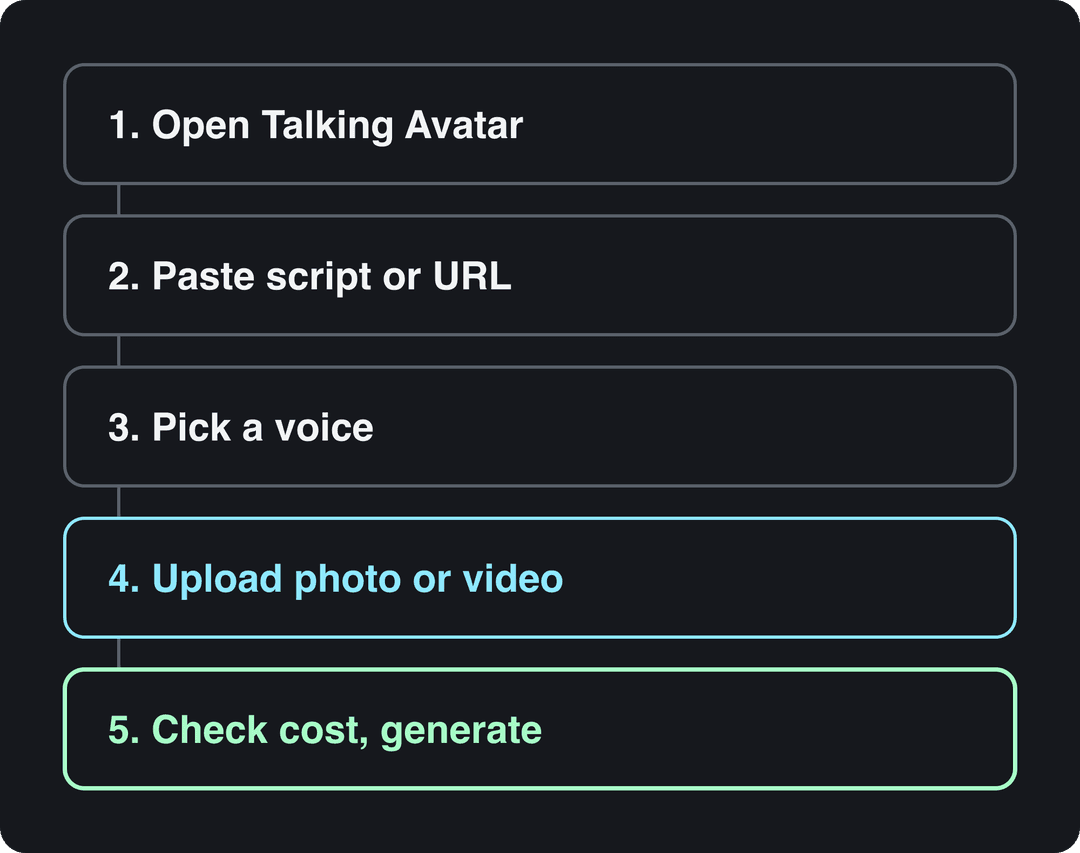
How to create a talking avatar video in Revid
Step 1: Open the Talking Avatar tool
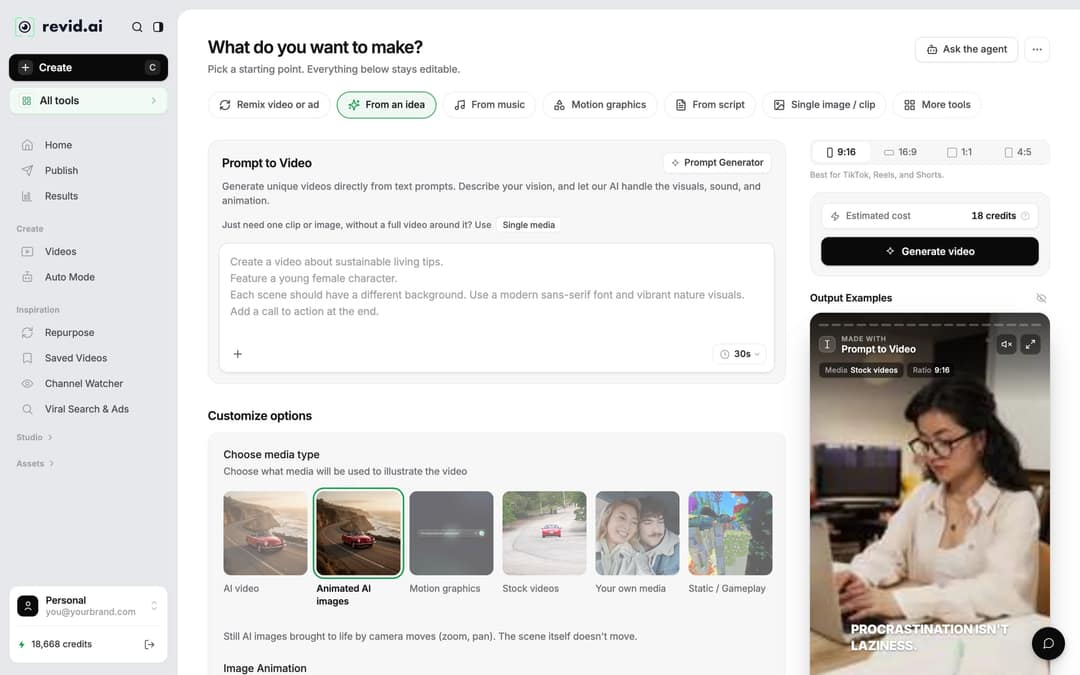
Click Create at the top of the sidebar (or press C). The Create page asks "What do you want to make?" and shows chips such as From an idea, From script and Motion graphics. Talking Avatar is not one of those chips: open More tools, or use the All tools card in the sidebar, and pick Talking Avatar. The AI talking avatar generator page takes you there directly.
Prompt to try
A 20-second vertical talking avatar video for a release notes app. Hook: "Writing release notes takes hours. It shouldn't." Then two short points on pasting commits and getting notes users read, closing with "Try it free. Link in bio." Friendly, direct founder tone with short punctuated sentences.
Step 2: Add the script or a link
Paste the exact words the avatar should say into the script box. You can also paste a URL, such as a blog post or a product page, and let Revid write the script from it. Keep it short and punctuated: the script section below gives you a template and a sample.
Step 3: Pick a voice
Choose one of Revid's 1,000+ AI voices (from ElevenLabs, Google Gemini and MiniMax) and preview it before you commit. The voices cover 70+ languages. Write the script in your audience's language, or set it under Advanced options > Language & Localization > Language (the default is Automatic), and the voice picker filters to voices that speak it.
To make the avatar speak with your own voice, use voice cloning, which is included on the Elite plan and above (plans and pricing).
Step 4: Upload the avatar and choose the quality
Upload the face that will speak: a photo or a short video of yourself, or of someone who has agreed to it. Then pick the avatar quality, Low, Pro or Ultra. Higher tiers cost more credits per 500 characters (see the table below), and an option to remove the avatar's background adds 20 credits per 500 characters.
For the source, use a sharp, well-lit, front-facing shot with the head and shoulders fully in frame. A short clip gives the animation real head movement to start from, so it often looks more natural than a still photo.
Want a famous face instead? Revid's AI celebrity video generator is the separate tool for that. Read the permission rules further down first.
Input
Create a short vertical product promotion video for InnerNote. Positioning: LinkedIn posts that actually sound like you, not a robot.
Output
Step 5: Check the cost and generate
Pick the ratio: 9:16 for TikTok, Reels and Shorts, with 16:9, 1:1 and 4:5 also available. Next to Generate video, the Estimated cost shows the price in credits before you spend anything. Click Generate video. When the render finishes, the project appears in Videos; click its card to open it in the editor. If a build fails, its credits are refunded automatically.
What does an AI talking avatar cost in Revid?
Everything runs on credits, and the estimate on the Create page shows the total for your exact script and settings. These are the rates that matter for avatar videos:
| What you pay for | Credits |
|---|---|
| Avatar, Low tier | 80 per 500 characters |
| Avatar, Pro tier | 100 per 500 characters |
| Avatar, Ultra tier | 200 per 500 characters |
| Remove avatar background | 20 more per 500 characters |
| AI voice | 10 per started 500 characters |
| Regenerating the voice and avatar in the editor | 10 per started 500 characters, plus twice that again for the avatar |
| 4K export | 10 |
Sign-up is free and new accounts get free credits to try video creation, with no credit card. Regular creation then uses a paid plan: Growth is $39/month for 2,000 credits ($32/month billed yearly). One-time credit packs start at 1,000 credits for $49.
Short script to try
A 15-second vertical talking avatar video for a local restaurant. Open with "Here is how to book a table in 10 seconds," then give two quick steps and end with "Link in bio." Warm, conversational voice, one idea per sentence.
How to write a script for an AI talking avatar
Shorter scripts are cheaper, and the data suggests they also perform better. In Revid's analysis of 176,367 TikToks with 1,000+ likes posted between October 2025 and October 2026, videos with under 40 characters of speech had a 123K median and 20.2% passed 1 million views, while videos that talked throughout (300+ characters of speech) had 68K and 11.9%. The sample only holds videos that already reached 1,000+ likes, so it shows what top videos have in common, not what causes views (full TikTok virality study).
Videos with just a few spoken words (a line or two) beat both silent videos and videos that talk the whole way through, which were the most common and the weakest.
Source: Revid analysis of 176,367 TikToks analyzed by AI, with 1,000+ likes posted between Oct 1, 2025 and Oct 16, 2026 (61,203 creators)
Show the data
| Median views | Share that passed 1M views | |
|---|---|---|
| No speech | 73.3K | 14.3% |
| Under 40 | 122.7K | 20.2% |
| 40 to 120 | 97.2K | 17.6% |
| 120 to 300 | 91.6K | 16.8% |
| 300+ | 67.7K | 11.9% |
You can't make a talking avatar silent, but you can make every line count:
- Open with the point. The first line says what the viewer gets ("Here is how to book a table in 10 seconds"), not who you are.
- Punctuate on purpose. Commas and full stops become pauses. A long run-on sentence comes out rushed and flat.
- Write for the ear. Short sentences, one idea each, words you would say out loud.
- Add deliberate pauses with
<break time="1.0s" />before a reveal. Pauses up to 10 seconds work with ElevenLabs and MiniMax voices; Gemini and Kling voices drop the tag and don't pause. More in this guide on adding a pause in the voice. - Use [brackets] for notes, not narration. Bracketed text is not read aloud, but ElevenLabs v3 and v4 voices treat bracketed words as acting cues, such as [whispers].
- Spell out numbers and names the way they should sound if the voice stumbles on them.
A template that fits most short avatar videos:
- Hook: the problem or the promise in one sentence.
- Body: two or three short points.
- Close: one clear next step ("Link in bio", "Try it today").
Sample script for a product intro: "Writing release notes takes hours. It shouldn't. Paste your commits into [your product], and it writes notes your users actually read. Try it free. Link in bio."
How to edit a talking avatar video after it's generated
Click the project card in Videos (or choose Open in editor from its menu). The Script panel lists every caption segment with an editable text box and its start time, so you can fix a word without starting over.
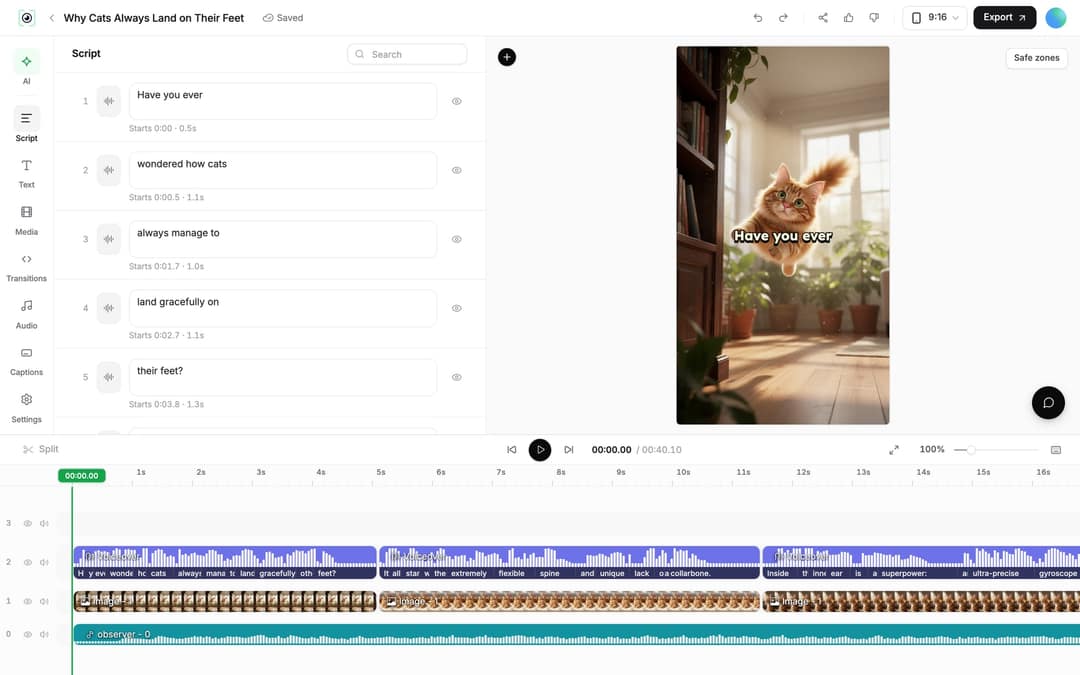
When you change a line, Revid shows "Caption updated. Re-generate voice and avatar if timing changed." To do that, select the voiceover clip on the timeline and click Re-generate Voiceover and Avatar, or use Re-generate on the voiceover row in the Audio panel. The dialog shows the cost, lets you keep Keep timeline in sync on so clips and text follow the new narration, and runs when you click Generate Voice. Regenerating the voice is for paid plans only.
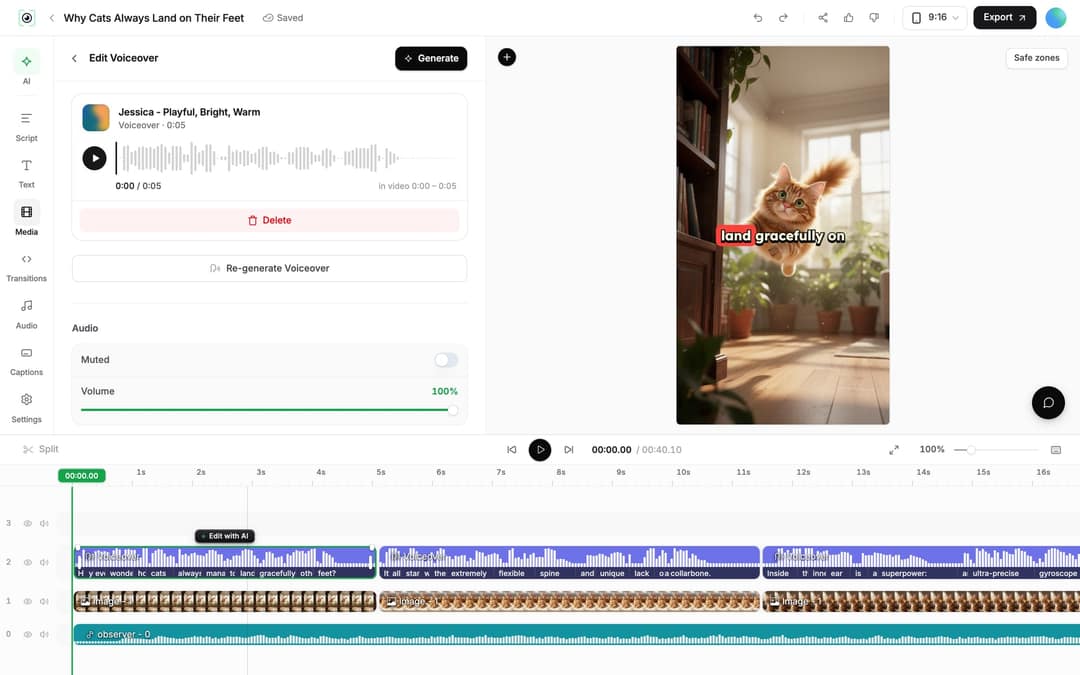
To trim, drag a clip's start or end edge on the timeline, or place the playhead and press S to split.
How to publish or translate an avatar video
Export: click Export in the editor header and download in 720p, 1080p or 4K, at 30 or 60 fps.
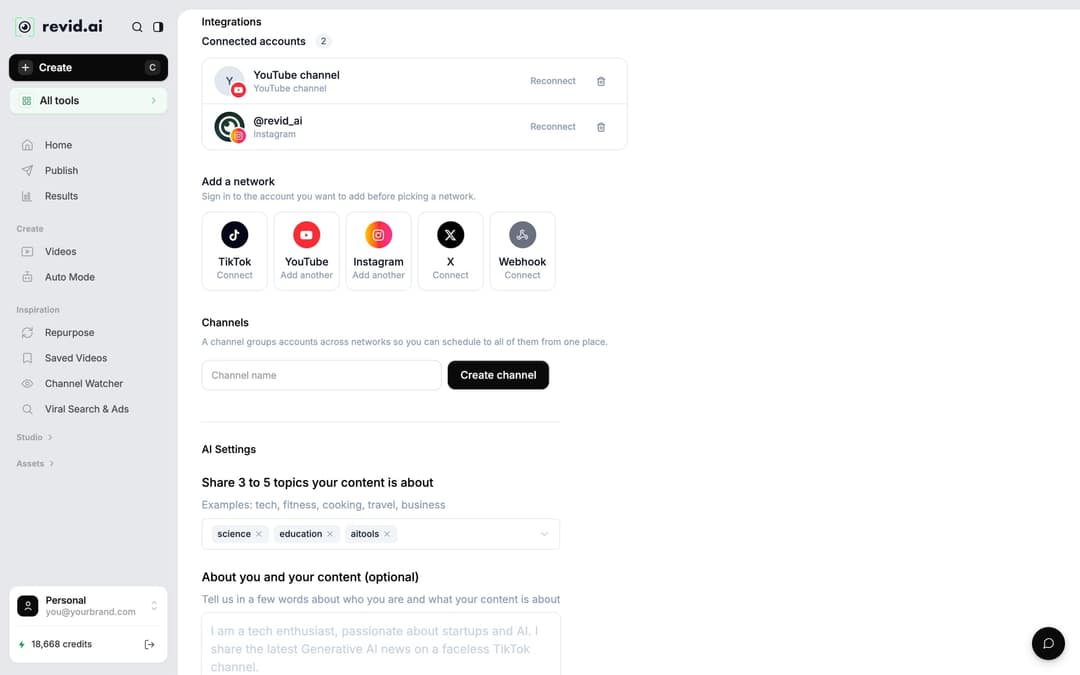
Publish: first connect your accounts in Settings > Integrations, under Add a network: TikTok, YouTube, Instagram (business or creator account required), X, or a Webhook for Zapier or Make. Then open Publish on the project card, choose the accounts under Publish to, and click Publish to post now or Add to queue to schedule it.
Translate: open the project card menu and choose Translate. The AI video translator keeps the edit, media, timing and captions, lets you pick from 74 target languages, and keeps the original voice unless you turn on Use another voice. It costs 10 credits per 500 characters per voice segment, plus the avatar lip-sync again.
Can you turn a photo into a talking video for free?
Yes, to try it. Create a free Revid account, use the free credits that new accounts get, and upload your photo in Step 4. A short, low-tier video is the cheapest test. Once the free credits are gone, regular creation runs on a paid plan's monthly credits.
What can you use AI talking avatar videos for?
Use an avatar where a presenter carries the message, not by default. In the same Revid TikTok data, faceless videos had a 114K median versus 67K for one person on camera. A face earns its place when trust or explanation matters: a founder explaining a product, a walkthrough, a testimonial.
| Use | Avatar source | Where to start |
|---|---|---|
| Product intro or founder message | Your own photo or video | Talking Avatar tool |
| Website or product walkthrough | Your own photo or video | Website walkthrough with an AI avatar |
| Educational explainers | Your own or a consenting presenter | Talking Avatar tool |
| Two-host conversations | Several avatars | AI video podcast generator |
| Reacting to another video | An avatar reacting on screen | Reaction Video Generator |
| Celebrity-style or parody content | A famous face (with the rights) | AI Celebrity Video Generator |
Best AI video avatar tool: Revid, HeyGen or Synthesia?
The right tool depends on whether the avatar is the whole video or one part of it.
| Tool | Best for | Starting price | Free option |
|---|---|---|---|
| Revid | A finished short-form video around the avatar: script, voice, visuals, captions, music, direct publishing | $39/month | Free credits on sign-up, no card |
| HeyGen | The most realistic avatars and digital twins, video translation with lip sync in 175+ languages | $29/month | 3 watermarked videos a month, up to 1 minute each |
| Synthesia | Corporate training with polished presenters, 140+ languages, SCORM and LMS export | $29/month | Up to 10 minutes of video a month |
If presenter realism is the priority, HeyGen is the stronger pick (Revid vs HeyGen). For internal training at company scale, Synthesia fits better (Revid vs Synthesia). If you want a TikTok, Reel or Short that is finished and posted, Revid covers more of the job.
FAQ
Can the avatar speak with my own voice?
Yes. Clone your voice on Revid's Elite plan or above, then pick the cloned voice in the voice step.
What languages can an AI talking avatar speak?
Revid's voices cover 70+ languages. Write the script in the target language or set the Language option, and the voice picker shows voices that speak it.
Does labeling an AI avatar video hurt its reach?
No. TikTok and YouTube both state that the AI-generated label alone does not affect a video's distribution, as long as the video follows their guidelines.
Can I monetize an AI avatar channel on YouTube?
Yes, if the videos show your own creative vision and give real value. YouTube does not let channels monetize when an AI persona is presented as a human expert giving health, legal, financial or political advice.
Can I make a celebrity talking avatar?
Only with the right to use that person's face and voice. Without it, you risk takedowns and legal trouble, and realistic results need an AI label on TikTok and YouTube.