On this page
YouTube automation is running a channel where software, AI tools and freelancers handle the repeatable work (research, scripts, voice-over, editing, captions, uploads and scheduling) while a person picks topics, reviews every video and owns policy compliance. YouTube allows automated and AI-assisted channels to earn, but its inauthentic content policy keeps mass-produced, repetitive videos out of monetization.
The rule most automated channels are not ready for is about money, not strikes. Most of them run on Shorts. From February 1, 2027, a YouTube Partner Program channel earns no Shorts Feed ad revenue in a month unless it had 10 million qualified Shorts views in the previous 90 days. A pipeline that pumps out cheap Shorts with no plan to clear that bar, or to sell something, automates its way to zero.
| What belongs here | |
|---|---|
| Automate | Topic research, first-draft scripts, AI voice-over, visuals and b-roll, captions, clipping long videos into Shorts, uploads, scheduling, analytics reports |
| Keep human | Who the channel is for, the angle of each video, fact-checking, original commentary, final review, the AI disclosure decision |
| Never automate | Near-identical videos at volume, reuploads of other people's content, realistic AI likenesses of real people without permission, bought or bot views |
How does YouTube automation work?
Every automated channel runs the same loop: choose a topic, draft a script, produce the video, review it, publish it, read the analytics, then feed what you learned into the next topic. Automation takes over the production steps in the middle. The steps that decide whether the channel is worth watching stay with a person.
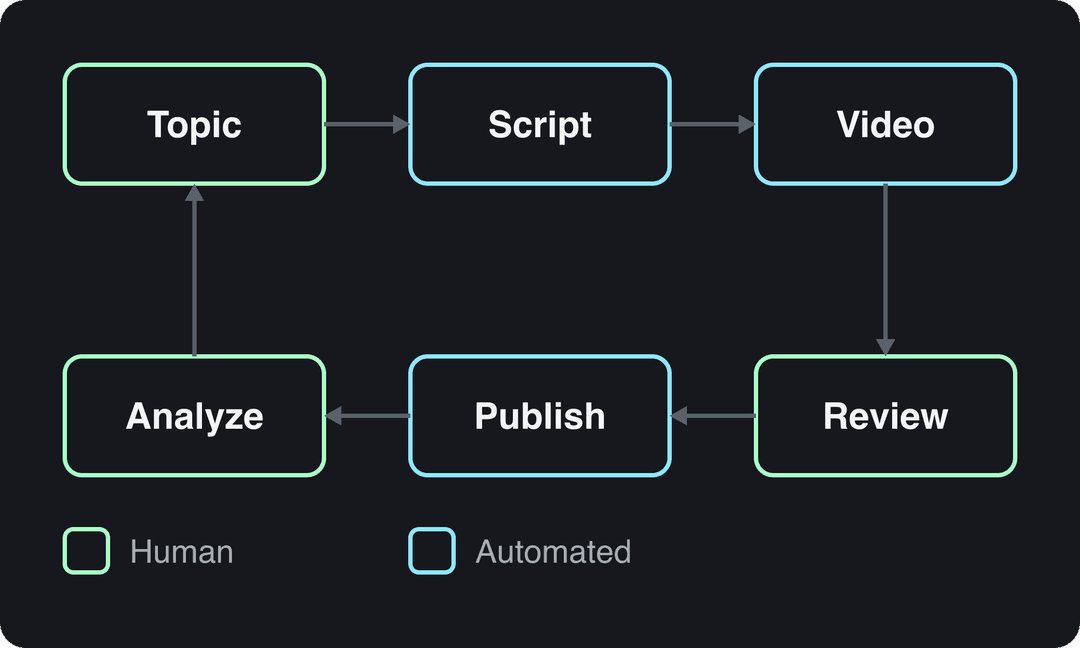
You can staff that loop three ways:
- AI-generated: one person plus tools that write, voice and assemble the videos. Lowest cost per video, highest risk of generic output.
- Outsourced: a scriptwriter, voice actor, editor and thumbnail designer working from your briefs. This is the "cash cow" model most YouTube automation courses sell. Better quality, a real monthly payroll, and your job becomes managing people.
- Hybrid: AI drafts and assembles, a human researches, edits and approves. Most channels that survive YouTube's 2026 policies end up here.
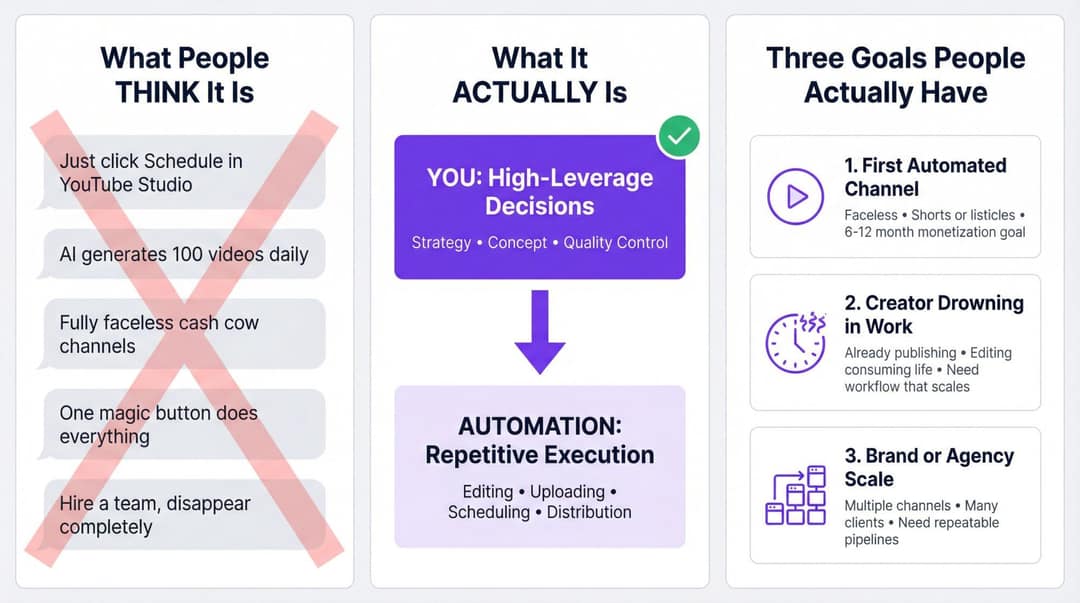
Can you do YouTube automation without making videos?
Yes, if you mean never filming, voicing or editing yourself. A team can produce from your briefs, or an AI tool can generate the video from a script, an article or a link. What you cannot hand off is deciding what each video says and watching it before it goes live.
A channel that only reads out material it did not write (website articles, news feeds, Reddit threads) counts as reused content under YouTube's rules and cannot be monetized, however good the visuals look.
What you can automate on YouTube, and what stays human
Split the channel into seven jobs and set the automation level of each one separately.
| Job | Automate | Keep human |
|---|---|---|
| Research | Keyword ideas from search suggestions and competitors, topic clustering, collecting viral reference videos | Which topics fit your positioning for the next 100 videos |
| Scripting | First drafts, hook and title variants, summaries of long content | The angle, your examples and opinions, a read-aloud check |
| Production | AI voice-over, visuals and b-roll matched to the script, clipping long videos | The voice and persona, where to use real footage |
| Editing | Captions, reframing to vertical, brand templates | Pacing and the final cut |
| Publishing | Uploads, scheduling, cross-posting to TikTok and Reels | Which videos get extra promotion |
| Analytics | Dashboards, retention and click-through tracking, alerts | Why a video flopped and what to test next |
| Operations | Task templates, status tracking, freelancer payments | Hiring, quality standards, when to start a new format |
Two rules keep this honest. Automate a step only after you have done it by hand often enough to know what good looks like. And never automate the step that makes your video different from the next channel's.
Prompt to try
Create a 45-second faceless YouTube Short explaining why the Library of Alexandria did not burn in a single day. Open with the hook "Everything you learned about this fire is wrong", then walk through three historical phases with dates shown on screen. Use a calm documentary voice, stylized illustrated visuals and bold captions.
YouTube automation with AI: what works in 2026
AI now covers most of the production column: scripts, voice-overs, scene visuals, captions and music can all come from a single prompt. That is also the problem. The video models (Google Veo, Seedance, Kling, Wan, MiniMax Hailuo) are sold through APIs to every tool, so two channels sending the same prompt to the same model get similar clips.
Our view at Revid is that the input decides the result: the idea, the hook, the structure and the pacing. A blank "make a viral video about X" prompt carries no evidence about what works in your niche, and the output drifts toward the generic average that YouTube's rules are written to keep out of monetization.
YouTube's monetization policy draws the AI line like this:
- Allowed: AI and automated tools, if the final video shows your creative vision and gives educational or entertainment value (for example, AI that edits your script or creates a background visual).
- Not monetizable: AI content built from generic or unoriginal templates that looks mass-produced, with no original insight from you.
- Not monetizable: unrelated or inconsistent AI clips stitched together to shock viewers, or realistic visuals that fake events.
- Not monetizable: AI personas presented as human experts giving health, legal, financial or political advice.
YouTube automation agents
The newest form of automation is an AI agent, such as Claude or ChatGPT, that researches, renders and publishes on its own. Revid's MCP server, CLI and API are included on every paid plan, so an agent can search Revid's library of about 2.77 million short-form videos for formats that already perform, generate an original video and publish it to YouTube, TikTok and Instagram. Keep a human approval step before anything goes live, for the same policy reasons as above.
YouTube automation rules: monetization, reused content and AI labels
The inauthentic content policy
On July 15, 2025, YouTube renamed its "repetitious content" monetization policy to "inauthentic content" and clarified that it covers repetitive or mass-produced videos. Reread the YouTube channel monetization policies before you scale any template: if your tenth video looks like your first with the nouns swapped, that is the pattern the policy describes.
Reused content: the faceless-channel trap
The reused content policy did not change in 2025, and it is the one that sinks most faceless automation. Videos that only read out material you did not write, or rely on mostly non-verbal reactions, count as reused content. The policy applies to the whole channel, so a run of narrated Reddit threads can cost you monetization on everything.
YouTube Partner Program requirements in 2026 and 2027
| Requirement | Today | From February 1, 2027 |
|---|---|---|
| Ad revenue sharing (new applicants) | 1,000 subscribers plus 4,000 qualified watch hours in 12 months or 10 million qualified Shorts views in 90 days | 1,000 subscribers plus 8,000 qualified watch hours in 365 days or 20 million qualified Shorts views in 90 days |
| Fan funding, Shopping, Creator Partnerships | 500 subscribers, 3 public uploads in 90 days, plus 3,000 watch hours in 12 months or 3 million Shorts views in 90 days | Unchanged (no ad revenue at this tier) |
| Shorts Feed revenue each month | 45% of your Creator Pool allocation, based on engaged views | Only if you had 10 million qualified Shorts views in the last 90 days |
| Staying active | YouTube may turn off monetization after 6 months without an upload or post | 1,000 qualified watch hours in 365 days, or 1 million qualified Shorts views in 90 days, or 2 long-form videos or 5 Shorts every 90 days |
Shorts Feed watch hours do not count toward the watch-hour threshold. Joining also requires an eligible country, no active Community Guidelines strikes, 2-Step Verification and a linked AdSense for YouTube account, and review typically takes about 1 month. Channels already in the program keep their status but must accept the updated terms in YouTube Studio by January 31, 2027 to keep earning from the affected features (see YouTube's summary of the 2027 YPP changes).
When you must disclose AI
Since March 2024, YouTube requires creators to disclose realistic AI content: anything that could be mistaken for a real person, place or event, such as making a real person appear to say something or generating a realistic scene that never happened. You do it with the "AI use" setting in YouTube Studio when you upload.
You do not need to disclose non-realistic content (animation, fantasy) or production help: AI-written outlines, scripts, titles or thumbnails, captions, beauty filters, or a clone of your own voice for voice-overs. Disclosure alone does not limit a video's audience or its eligibility to earn.
Skipping it carries risk. Since May 2026, YouTube automatically labels undisclosed videos with significant photorealistic AI, and the label is permanent for content made with Veo or Dream Screen or carrying fully generative C2PA metadata. Creators who keep failing to disclose risk content removal or suspension from YPP.
YouTube automation tools: what to use for each job
| Job | Tool type | Examples |
|---|---|---|
| Finished videos from a topic, script or link | AI video platform | Revid, InVideo, Pictory, Fliki |
| Long videos cut into Shorts | Clipping tool | OpusClip (from $15/month), Klap, Vizard, Revid's YouTube clip maker |
| A one-topic faceless series on autopilot | Faceless automation tool | AutoShorts (from $19/month, image slideshows), Crayo (Reddit stories, fake texts, gameplay splits), Revid Auto-Mode |
| Presenter videos | Avatar platform | HeyGen, Synthesia |
| Editing footage you filmed | Editor | CapCut, Descript, Premiere Pro, DaVinci Resolve |
| Uploads and scheduling | Native or API | YouTube Studio scheduler, YouTube Data API, Revid publishing |
| Connecting the steps | No-code or scripts | Make, Zapier, your own code |
| Analytics | Native | YouTube Studio analytics |
What is the best YouTube automation tool to reduce manual work?
The one that removes your biggest time sink, which depends on where you start:
- If you already record long videos, clipping saves the most: one episode becomes many Shorts.
- If you start from ideas and have no footage, use a platform that goes from script to a finished, captioned video and publishes it, so you skip four separate tools.
- If you want a recurring series with almost no daily input, use a scheduled worker that creates a video every day, and keep a review step.
- If your format is a presenter talking to camera, an avatar platform such as HeyGen or Synthesia fits better.
- If you only need videos to go live at a set time, YouTube Studio's scheduler is free and enough.
Where to get an AI content pipeline that includes video creation
Revid covers the whole loop for short-form video: research, creation, editing, publishing and results. To set it up as a YouTube pipeline:
- Choose a starting point: a prompt, a script, an article or link, an audio file, or a proven format from Revid's library (search and remix viral videos).
- Revid writes the script and generates the scenes with AI models such as Seedance 2.5, MiniMax Hailuo, Wan 3.0 and Google Veo 3, then adds a voice-over in 70+ languages, synced captions and music.
- Fix any scene in the timeline editor and export in 720p, 1080p or 4K.
- Publish or schedule to YouTube, TikTok and Instagram from one queue, and track each post's views, likes and comments.
- To make it recurring, set up an Auto-Mode worker that creates a fresh video every day from a prompt or a content source, or a Search & Remix worker that picks a high-engagement reference on your topic and never reuses the same one twice.
Revid is built for short-form. For long-form documentaries edited shot by shot, a professional editor such as Premiere Pro or DaVinci Resolve fits better.
What about YouTube ad automation?
Google Ads already automates bidding and placement for YouTube ads; the part left to you is the creative. AI ad generators, including Revid's ad and UGC ad generators, produce variations from product images so you can test several hooks instead of one.
Prompt to try
Make a 30-second YouTube Short titled "3 mistakes beginners make when pricing freelance work". Hook in the first 2 seconds: "You are probably charging half what you should." Give one concrete example per mistake, close with a single clear takeaway, and use a confident voice with clean motion graphics and captions.
YouTube automation examples: 3 workflows you can copy
Workflow 1: expert channel, Shorts first
For consultants, educators and founders who sell a product or service and have little time. The target is 5 to 7 Shorts per week that still sound like you.
- Build an idea grid once: 3 to 5 pillars (mistakes, myths, frameworks, tactics, stories) with 10 starter prompts each, such as "3 mistakes beginners make in X" or "The framework I use for Y".
- Generate a first-draft script with clear constraints: 15 to 45 seconds, one idea, one example, a hook in the first 2 seconds, a clear payoff.
- Edit by hand: cut the filler, add your own example, read it aloud.
- Produce, review and schedule.
- Once a week, compare your top 3 and bottom 3 Shorts by retention and update the grid.
Scheduling, volume and Shorts-specific limits are covered in our guide to YouTube Shorts automation.
Workflow 2: long video to Shorts
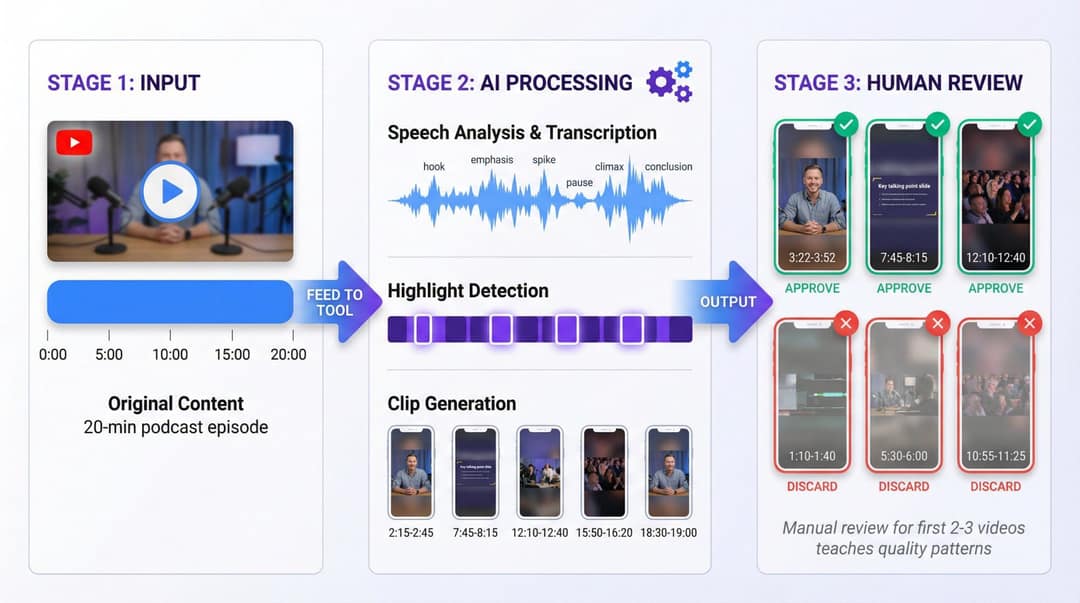
For podcasters, streamers and educators who already publish long videos. The goal is 5 to 20 Shorts per episode with minimal effort.
- Standardize recording: clear audio, consistent framing, and clear segments or chapters, so tools find clean cut points.
- Feed each episode into Revid's YouTube clip maker or a dedicated clipping tool. It picks highlight segments and returns vertical clips with captions.
- Review the clips from your first 2 to 3 episodes by hand: approve, discard, move the hook point. This teaches you what a good clip looks like for your audience.
- Tag every approved clip in a sheet (topic, guest, hook type, then results). After a few months it shows which segments deserve a full video of their own.
Watch the music: any Short longer than one minute with an active Content ID claim is blocked globally and cannot be monetized, and most Shorts Audio Library songs can be used for up to 90 seconds only.
Workflow 3: faceless channel that survives the 2026 rules
For people building a faceless channel (explainers, history, data breakdowns, tutorials) or agencies running media properties. Start with a concept, not with "faceless": who the channel is for, why someone would subscribe, and what information you bring that generic AI channels do not.
- Design a reusable episode format. A 6-minute explainer might be: cold open (5 to 10 seconds), why it matters, the story or breakdown in three acts, what to do with it.
- Research with a human: collect sources, data and examples for each episode, and store the notes so you can reuse them.
- Script with AI, then rewrite for interpretation and a recognizable voice. Cite sources on screen.
- Produce with a faceless video generator, keeping the same voice, caption style and visual style across episodes.
- Run the pre-upload checklist below before anything is scheduled.
Faceless is not a handicap in short-form, at least on TikTok. In Revid's analysis of 176,367 TikToks with 1,000+ likes posted between October 2025 and October 2026, faceless videos had a median of 114K views and 17.4% passed 1 million, against 67K and 12.7% for one person on camera. Faceless tutorials beat on-camera tutorials 156K to 52K in median views. The sample only holds TikToks that already reached 1,000 likes, the figures show correlation rather than cause, and YouTube's audience is not TikTok's, so read it as a signal, not a YouTube forecast. The method is in our study of what makes a TikTok go viral.
Faceless videos earned a median of 114K views, against 67K for videos with one person on camera, and passed 1M views 38% more often.
Source: Revid analysis of 176,367 TikToks with 1,000+ likes posted between Oct 1, 2025 and Oct 16, 2026 (61,203 creators)
Show the data
| Median views | Share that passed 1M views | |
|---|---|---|
| Animals | 147.4K | 24.1% |
| Faceless | 113.9K | 17.4% |
| Groups of people | 96.1K | 16% |
| Objects or products | 70.8K | 13.2% |
| One person on camera | 67.4K | 12.7% |
Faceless channel ideas that hold up under the reused content policy: niche explainers built on your own research, history or science with sources on screen, data breakdowns with original charts, screen-recorded tutorials, and stylized animated stories. More niches and setup steps are in our guide on how to create a faceless YouTube channel.
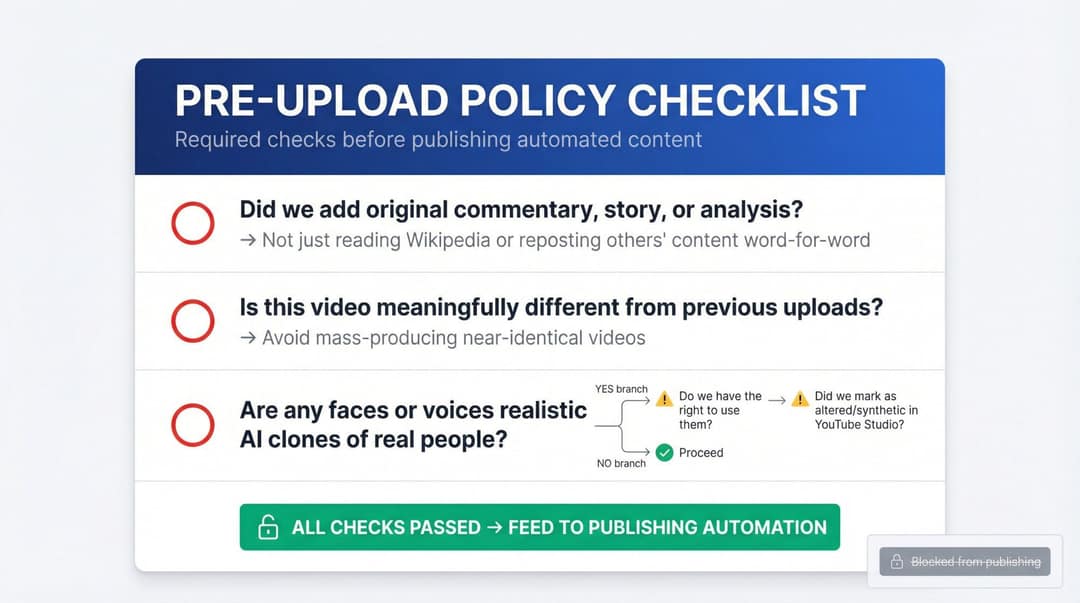
The pre-upload checklist:
- Did we add original commentary, analysis or story, rather than reading someone else's text?
- Is this video meaningfully different from our previous uploads?
- Are any faces or voices realistic AI versions of real people? If yes, do we have permission, and did we set "AI use" to Yes in YouTube Studio?
- Are the claims fact-checked, especially health, legal or financial ones?
How to connect YouTube's API and no-code tools
You do not need code to automate YouTube, but at volume it helps. The YouTube Data API v3 upload guide shows how software can upload videos, set titles, descriptions, tags and thumbnails, and manage playlists. Detailed watch-time and retention reports come from the separate YouTube Analytics API.
For your own channel, you create a Google Cloud project, enable the YouTube Data API v3 and authorize it with OAuth. Plan for the audit: videos uploaded through an unverified API project created after July 28, 2020 are locked to private until the project passes YouTube's API compliance audit, and uploads count against a daily quota.
A typical pipeline:
- Trigger: a new blog post, podcast episode or long video, or a fixed daily time.
- Create: your script or a Make or Zapier scenario calls Revid's REST API with the source (text, link or audio).
- Wait: a Revid webhook fires when the render is done.
- Publish: upload with metadata and a schedule time through Revid's publishing or the YouTube Data API.
- Log: store the video ID, notify the team, and add the video to your analytics sheet.
What does YouTube automation cost?
| Revid plan | Monthly | Billed yearly | Credits per month | Auto-Mode workers | Watched channels |
|---|---|---|---|---|---|
| Growth | $39 | $32/month | 2,000 | 3 | 5 |
| Elite | $89 | $74/month | 5,000 | 5 | 20 |
| Ultra | $199 | $166/month | 12,000 | 10 | 50 |
Elite adds voice cloning, and every paid plan includes the API, MCP server and CLI. As a guide, a 30-second video with Pro AI visuals and a voice-over costs about 40 to 80 credits, premium models cost 100 to 130 credits per 5 seconds of video, and you can estimate a video's cost before generating it. Revid's pricing page has the live price list. On top of that, budget for thumbnails, research help, a Make or Zapier plan, and any freelancers.
On the revenue side, AIR Media-Tech's September 2026 analysis of 274 channels found Shorts RPM was 3% to 14% of long-form RPM in almost every niche, so most channels need 11,000 to 34,000 Shorts views to earn what 1,000 long-form views do (more sourced figures in our YouTube Shorts statistics). If ad revenue is the plan, count cost per published video, not per generated one.
Three rules keep credits from burning:
- Measure the real cost of your first few videos before you plan volume.
- Set a credit ceiling per published Short and per long-form video.
- Treat scheduled workers as draft generators until a format has proven itself.
How to start YouTube automation step by step
A 30-day plan:
- Week 1, strategy and a manual pipeline: choose your workflow (expert Shorts, long-to-Shorts or faceless), then write down who the channel serves, 3 to 5 content pillars and one episode format. Make 3 to 5 videos end to end with AI drafts and your edits.
- Week 2, templates and batches: lock 1 to 2 caption styles and 1 to 2 voices, produce a batch of 10 to 15 videos, and schedule them over 2 weeks.
- Week 3, light automation and tracking: start one scheduled worker that drafts videos from your blog, your long videos or a topic, and review its first 10 outputs. Log each video's topic, format, credits spent, views, click-through rate, retention and subscribers gained after 7 days.
- Week 4, tighten and decide: compare your top 3 and bottom 3 videos, update templates, prompts and the idea bank, then pick one way to scale: 3 to 7 posts per week, a second format, or a second language.
How to learn YouTube automation, and when to hire help
The fastest way to learn is to run the 30-day plan on a real channel. 10 published videos and their retention graphs teach more than any course module. Read YouTube's monetization and disclosure pages once: they are short, and they are what reviewers apply.
If you consider a YouTube automation course, skip any that promise passive income, guaranteed monetization timelines, or channels built from reuploads or narrated Reddit posts. That model is exactly what the reused and inauthentic content policies target.
Hire a YouTube automation agency, team or expert when the bottleneck is hours, not know-how. Before you sign, ask:
- Which channels do they run now, and can you see the analytics?
- Who owns the channel, the Google account and the AdSense account? It should be you.
- How do they add original research or commentary to each video?
- How do they handle AI disclosure and music rights?
Common YouTube automation mistakes
- Automation as absence: someone still has to choose topics, review outputs and read analytics.
- Chasing every trend: switching style every two weeks confuses viewers and YouTube's recommendations. Keep one identity per channel.
- Automating before a hit: automate a format after it has worked, not before.
- Realistic AI people without permission: stylized or cartoon characters avoid most likeness and disclosure problems.
- Workers running unchecked: a scheduled worker that publishes mediocre drafts spends credits and trains your audience to scroll past.
FAQ
Is YouTube automation allowed in 2026?
Yes. YouTube allows AI and automated tools if the final video shows your creative vision and gives viewers value. What it refuses to monetize is mass-produced, repetitive or reused content, including generic AI template videos.
How much does YouTube automation cost?
A lean setup is one video tool plus your time: Revid starts at $39/month with 2,000 credits. Outsourced channels cost much more, because you pay a writer, voice actor, editor and thumbnail designer for every video.
Can a faceless automated channel get monetized?
Yes, if each video adds original research, commentary or storytelling and the channel meets the YPP thresholds. Faceless channels that only read text they did not write, such as news feeds or Reddit threads, count as reused content and cannot be monetized.
Can I do YouTube automation for free?
Partly. YouTube Studio scheduling and analytics are free, and so are Revid's sign-up, viral video library search and deep video analysis (up to 60 a day). New Revid accounts also get free credits to try video creation with no credit card needed, but regular AI video generation uses the monthly credits of a paid plan, from $39/month.
How many videos should an automated channel post per week?
As many as you can review properly: Shorts-first channels often aim for 5 to 7 a week, long-form channels for 1 to 3 plus clips. From February 1, 2027, staying active in YPP takes at least 5 Shorts or 2 long-form videos every 90 days, unless your views or watch hours already meet the bar.
Do I need to disclose an AI voice on YouTube?
Only if it is realistic and could make viewers believe a real person said something they did not. Cloning your own voice for voice-overs does not need disclosure.