
On this page
In 2026, the median lowest listed subscription among 60 AI video apps was $14.99 a month, while generation itself runs from about $0.05 to $0.50 per second. What you pay depends on how many attempts, assets, and edits it takes to produce a video worth posting.
The most useful unit for comparing AI video generator pricing isn't a subscription or a successful render. It's one finished, platform-ready short, with usable visuals, clear narration, readable captions, and an export you can publish.
- Median lowest monthly subscription across 60 AI video generator apps
- $14.99
- Mark Studios App Store study
- Median API price per minute of AI video with audio, across 29 models
- $8.40
- Axis Intelligence pricing snapshot
- How much failed attempts and hidden limits multiply effective clip costs
- 3-5x
- Creator-focused cost analysis
- Google Veo 2 price per generated second ($30 per minute)
- $0.50
- Marketing-Interactive report
AI Video Generator Pricing at a Glance in 2026
The $14.99 monthly median describes the lowest listed subscription across 60 AI video-generator apps, not the cost of completing a social post, according to Mark Studios' App Store study. A subscription buys access and an allowance; a generation rate prices a specific production operation.
That distinction matters before you compare any plans. A low monthly price doesn't tell you whether narration, premium models, or enough generation capacity for your posting calendar comes with it.
AI video generator prices in 2026
| Charge | 2026 price | What that price covers |
|---|---|---|
| Lowest listed app subscription | $14.99 per month | Median lowest plan across 60 App Store apps |
| Lower-cost video model | About $0.05 per second | About $0.50 for a 10-second clip before extras |
| Higher-quality video with audio | About $0.40 per second | About $4 for a 10-second clip before extras |
| 2024 typical generation rate | $0.15 to $0.30 per second | Earlier industry range, useful as a historical baseline |
| Google Veo 2 | $0.50 per second | $30 per minute at the announced rate |
| API video with audio | $8.40 per minute | Median across 29 models |
| Revid Growth plan | $39 per month | Paid plan entry price with monthly creation credits |
The historical range isn't a current quote: FindAIVideo's 2024 industry report placed generation at approximately $0.15–$0.30 per generated second. At the higher end of the comparison, Marketing-Interactive's report on Google's announced pricing puts Veo 2 at $0.50 per generated second, equivalent to $30 per minute.
US dollars per month
Revid's $39 Growth plan includes 2,000 credits, the editor, direct posting and the API. Yearly billing is cheaper on most tools.
Source: Pricing page of each tool, checked for Revid's comparison pages (revid.ai/vs) in November 2026.
Show the data
| US dollars per month | |
|---|---|
| Creatify | 15 |
| OpusClip | 15 |
| Higgsfield | 19 |
| Synthesia | 19 |
| CapCut | 20 |
| InVideo | 20 |
| Fliki | 28 |
| Klap | 29 |
| Revid | 39 |
Compare the deliverable before the price
A generated scene and an edited social video aren't interchangeable purchases. The scene may still need a script, additional shots, narration, captions, music, and a final edit.
For a product launch, you might need precise motion in a close-up. For a daily educational post, moving images with narration may communicate the idea without generating every frame from scratch. Buying the same production method for both jobs can waste your allowance.
Buying rule: Compare prices only after you've specified the output, including duration, visual method, audio, and what counts as finished.
Read the table as a menu of billing units, not the bill for a postable video. The lowest entry price is useful for getting started, but it doesn't establish which workflow costs least to publish consistently.
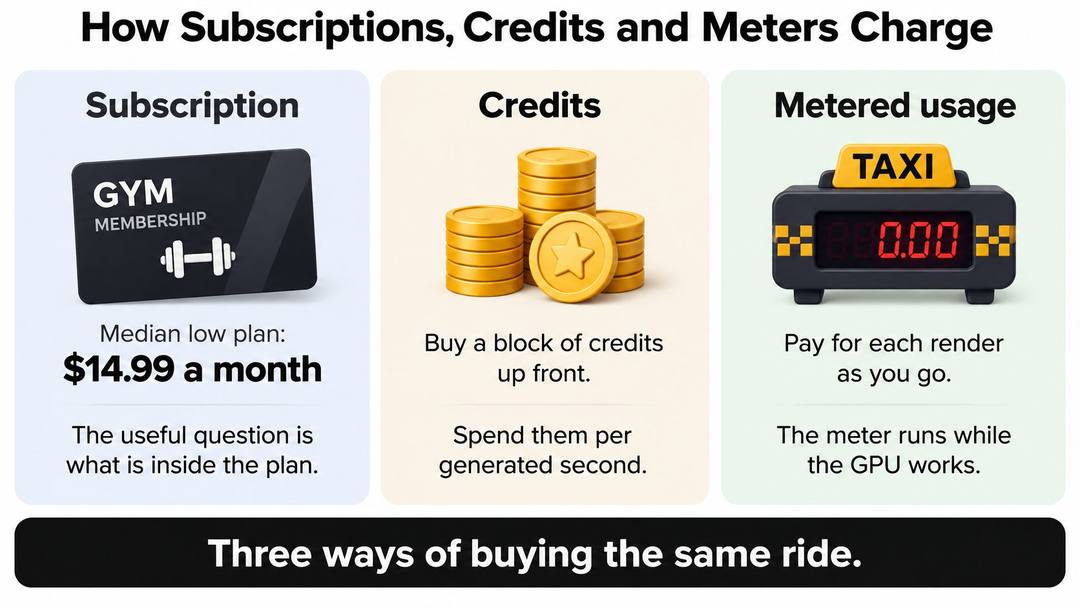
How Subscriptions Credits and Meters Charge
Say a bakery needs a steady stream of posts about seasonal products. The owner wants edited videos ready for Instagram, not a folder of experimental clips. The right billing model should support that recurring job without making each production session difficult to budget.
A subscription works like a gym membership: you pay for access, but the useful question is what's inside. Check the generation allowance, available editing tools, export conditions, and commercial-use rights rather than treating membership as unlimited production.
A credit plan is a book of metro tickets. Different production choices spend the balance at different rates, so the same allowance can support very different amounts of finished work.
This comparison separates the billing mechanisms from the output they buy.
Credits buy operations, not identical videos
In our workflow, image and video generations use credits. Full AI video models cost more credits per second than Pro moving images, so choosing a visual method is also a budget decision.
Before generating, you choose a format, a style, and a voice, and you can see the credit cost first. That's the right moment to simplify an expensive draft, not after you've generated it. Our guide to how Revid credits are used explains the spending mechanism.
A metered API resembles a taxi meter: you pay for usage rather than relying solely on a monthly allowance. In 2026, the median API price for a minute of AI-generated video with audio was $8.40 across 29 models, according to Axis Intelligence's pricing snapshot.
For a developer integrating generation into a product, that meter can be practical. For a creator posting frequently, a credit allowance may be easier to manage.
Match the payment model to the job
- Recurring social production: Favor a plan whose allowance supports your repeatable production method, including supporting assets.
- Occasional cinematic work: Consider metered generation when you need a particular model without maintaining unused subscription capacity.
- Irregular publishing: Examine credit expiration, rollover, and whether you can still export after ending the subscription.
Ownership and continuing access are separate questions. Tintd's explanation of subscription versus one-time license costs is useful context when comparing ongoing payments with a purchase intended to remain usable.
Don't assume unused credits retain value indefinitely, or that an export remains available without an active account. The unit that matters is an accepted, platform-ready short, not a raw generation call.
What Makes One Generated Second Cost More
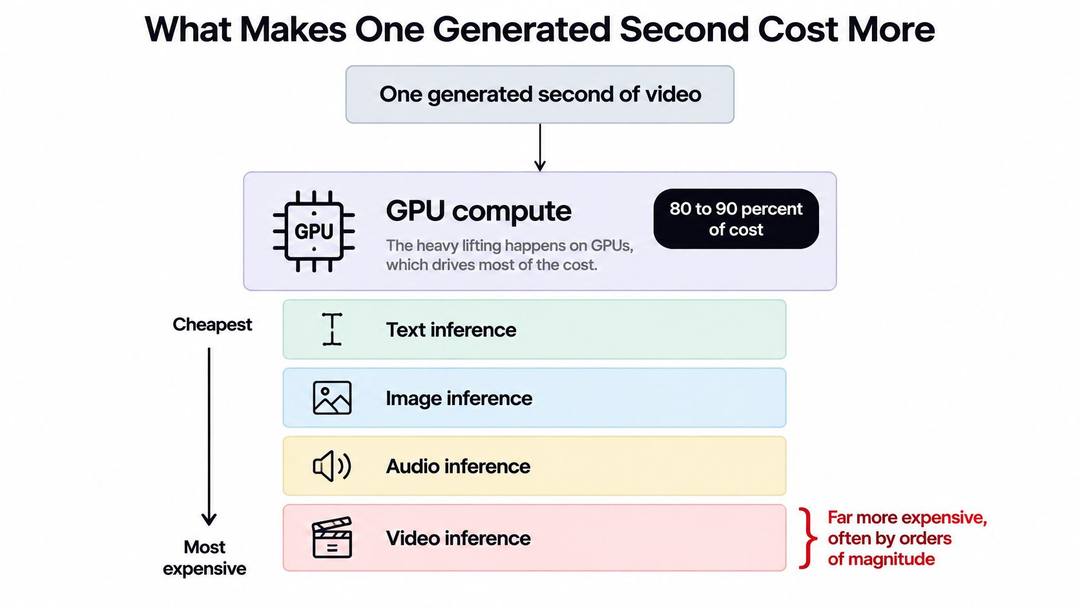
GPUs account for approximately 80–90% of total energy consumption in measured open video-generation systems, according to the video-inference study, which also describes video inference as exceptionally expensive relative to text, image, and audio inference. That energy share helps explain the economics, but it isn't a precise breakdown of a vendor's retail price.
The practical point is simple: the provider must allocate computing capacity to your request. Counting videos alone hides how much capacity each request needs.
The diagram illustrates that relationship; its cost badge should be read as a simplified representation of the measured GPU energy share, not an audited share of subscription revenue.
The settings that change the workload
A short, low-resolution draft and a longer, high-resolution scene shouldn't automatically consume the same allowance. They're different computing jobs, even if the dashboard labels each as a video.
Several settings shape that job:
- Duration: Longer generated footage requires the system to maintain appearance and motion across more output.
- Resolution: Larger frames require more image detail to be generated and processed.
- Frame rate: More frames add temporal information that the system must produce or reconstruct.
- Diffusion steps: Additional processing steps can increase the computation allocated to an attempt.
- Model tier: Different architectures and quality settings have different resource requirements.
Upscaling and additional variations also deserve their own place in the budget. They're extra processing, not free consequences of having already generated a clip.
Faster architecture doesn't guarantee a cheaper accepted result
Technical improvements can change a provider's break-even cost. The CVPR LinGen paper reports 5×, 8×, and 15× FLOP reductions against a comparable DiT-4B baseline for 512p videos of 17, 34, and 68 seconds, respectively.
Those are architecture-specific findings, not a promise that any subscription becomes proportionally cheaper. Providers still have to manage serving capacity, idle hardware, queues, moderation, storage, and retries.
Creators should care about the result as well as the computation. A faster attempt isn't a bargain if the output needs repeated replacement because the subject changes or the motion doesn't match the brief.
A useful credit schedule names the duration, resolution, and quality setting behind the charge. A flat video count doesn't tell you enough.
Choose draft settings that let you evaluate composition and movement without buying final-quality output prematurely. Reserve premium motion and upscaling for scenes that have already earned a place in the edit.
Cost per Finished Short After Retries
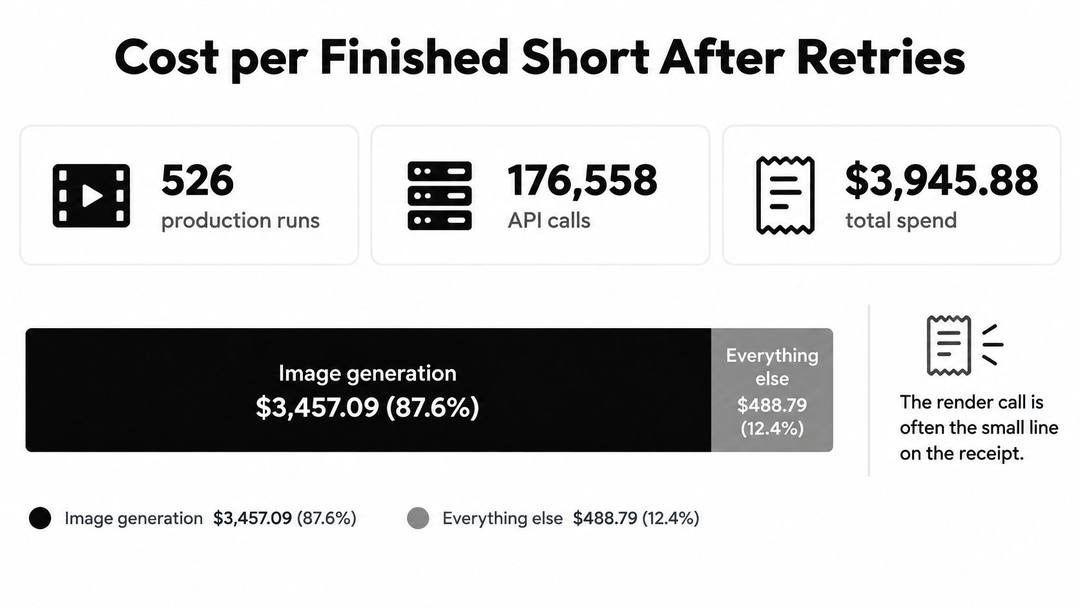
Image generation accounted for 87.6% of spending, while direct video-generation calls accounted for just 1.6%, in an open production dataset covering 526 runs and 176,558 model API calls. That's a useful warning against treating the final render as the entire production bill.
The distribution belongs to that particular collection of workflows, not every AI video tool. Its lesson is still practical: supporting operations can cost more than the operation you think you're buying.
This breakdown makes the supporting-asset spend visible.
Build a receipt for the whole short
Start with the deliverable. A platform-ready short should have an approved script, usable visuals, intelligible audio, correctly timed captions, and an export that matches the destination.
Then record every paid operation needed to reach that state:
- Preparation: Script generation, reference images, and asset creation.
- Production: Scene generation, narration, variations, and replacement shots.
- Finishing: Caption correction, music, editing, upscaling, and export.
- Discarded work: Generations you paid for but couldn't use.
The resulting calculation is:
Cost per finished short = total production spending ÷ accepted, publishable shorts
Use the full subscription payment when you're evaluating your actual monthly cash outlay. If you leave much of an allowance unused, don't divide the payment by a theoretical maximum output you never publish.
Prompt to try
Make a 30-second vertical explainer for a bakery's seasonal pumpkin bread. Open with the hook "This loaf sells out every October, here's why." Use animated AI images of the bakery and the bread, a warm friendly voiceover and bold readable captions.
Calls that failed
Source: Revid production data: 713,649 AI video clips generated Jun 29, 2026 to Sep 26, 2026.
Show the data
| Calls that failed | |
|---|---|
| Seedance | 2.7% |
| MiniMax Hailuo | 2.2% |
| PixVerse | 6.4% |
Treat attempts as part of the purchase
An advertised clip price assumes the attempt gives you something useful. A creator-focused analysis of AI video costs reports advertised generation costs of roughly $0.14–$2.50 per clip, with failed attempts and hidden limits multiplying effective costs by 3–5 times.
Your own acceptance criteria should determine the retry budget. For a product ad, check that the packaging remains recognizable, the logo doesn't change, and the demonstrated action makes sense. For a narrated explainer, verify that the visuals support the sentence being spoken rather than merely looking attractive.
Don't regenerate a complete video to fix something the editor can repair. Replace the weak scene, shorten an awkward pause, or correct the caption without discarding approved work.
For a walkthrough of the video-creation workflow, use this demonstration.
Give revisions a stopping rule
Decide what makes a take acceptable before you generate it. Otherwise, you can keep paying for alternatives without improving the post's message.
Producer's test: Does this revision fix a publishing problem, or am I buying another version because I haven't decided what I want?
Keep a simple production log with the model or visual method, credits spent, rejected scenes, and accepted exports. Include your editing time separately so a cash-saving workflow doesn't hide an impractical manual workload.
A higher subscription fee can be economical if the included scripting, templates, and editing tools reduce paid attempts. That advantage only counts when your completed posts demonstrate it, not when a feature list suggests it.
Monthly Video Volumes and the Plans That Fit
Choose a plan against a posting calendar, not a list of capabilities you might eventually use. Our typical 30-second video with Pro moving images and a voiceover costs about 40–80 credits, so 2,000 credits cover roughly 25–50 such videos a month.
That capacity describes the stated workflow. It isn't a guarantee for full AI video models, extensive variations, or repeated complete regenerations.
Monthly output and a plan that can hold it
| Monthly output | Draft load | Credit or cash picture | Plan that usually fits |
|---|---|---|---|
| About 20 shorts | One or two takes | Initial versions fit within 2,000 credits at 40–80 each; complete retries can exceed it | Growth at $39 a month, if revisions remain limited |
| About 50 shorts | Mostly one take on Pro images | Near 2,000 credits if each stays near 40 credits | Growth, with little room for retries |
| About 30 shorts | Several drafts or full AI models | Full models cost more credits per second | Evaluate Elite at $89 a month against a live quote |
| About 100 shorts | Regular posting plus revisions | Requires more than the entry allowance for the typical workflow | Evaluate Ultra at $199 a month or reduce premium generation |
| 20 minutes via API | Successful minutes only | Accepted minutes × the chosen model's audio-inclusive rate, plus supporting work | Metered API only if retries stay low |
The higher-tier recommendations are candidates to price, not output guarantees. A credit quote for your chosen model matters more than the plan name.
Where the entry plan stops fitting
Growth can suit a modest calendar built around repeatable formats. At the high end of the typical credit range, however, regenerating every planned short can exhaust the allowance before you've finished the calendar.
A denser publishing schedule leaves less room for experimentation. If your budget only fits when every draft is accepted, you haven't left room for a production problem.
Our paid tiers are Growth, Elite, and Ultra, with yearly billing available from $32 a month. All plans include AI video generation technology, ready-to-use tools, and commercial usage rights. New exports require an active plan, so account for that if you intend to pause between campaigns.
Don't confuse model economics with subscription economics
Public model-level estimates range from approximately $0.05 per generated second for lower-cost video to $0.40 per second for higher-quality video with audio, according to Adwave's AI video-generation statistics guide. Those figures describe generation charges before the rest of production.
An API can suit a tightly controlled request with predictable acceptance. A bundled workflow can suit a creator who needs scripting, visuals, voice, editing, and publishing tools together.
The fairest comparison gives both options the same assignment: the same calendar, acceptance standard, supporting assets, and revision load. Otherwise, you're comparing finished posts on one side with raw footage on the other.
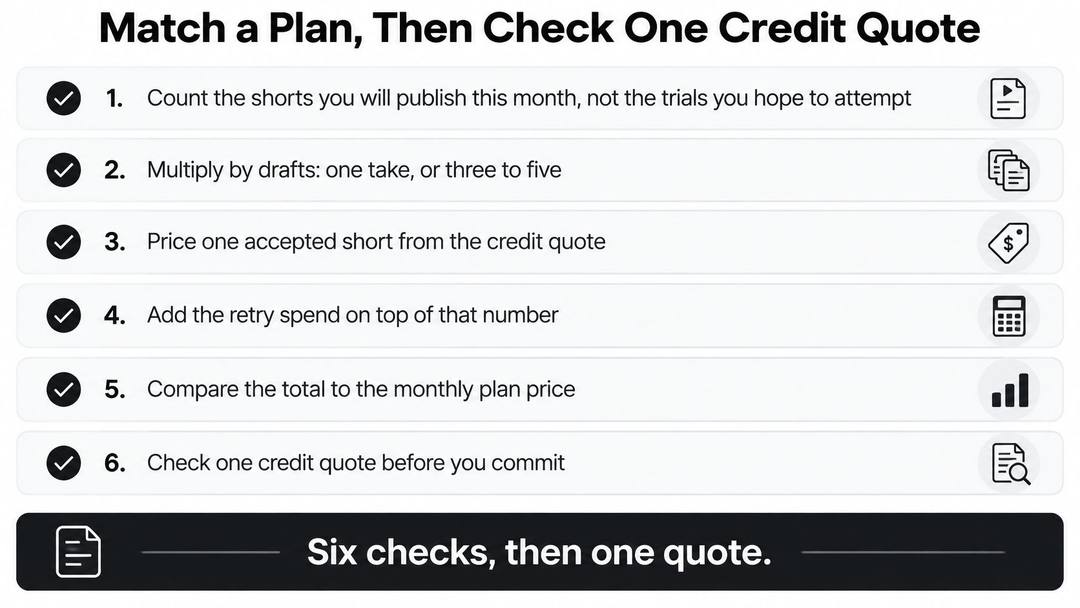
Match a Plan Then Check One Credit Quote
A good purchasing decision ends with a production budget you can explain plainly. You should know what you're publishing, which workflow you'll use, and what could cause you to exceed the allowance.
Use this checklist to turn a promising plan into a practical monthly commitment.
Build the budget around accepted work
Count the posts you intend to publish. Separate regular educational posts, product ads, and cinematic experiments. They don't need identical production methods, and combining them into a single average can hide expensive requirements.
Describe the draft load. Identify which scenes need generated motion and which can use moving images or existing assets. Budget additional attempts for shots with strict product, character, or action requirements rather than assuming every scene will succeed immediately.
Price an accepted short. Use the quoted credit cost, then include the attempts needed to meet your acceptance standard. Keep the cost of an attempt separate from the cost of a keeper.
Include supporting production. Account for scripts, images, narration, captions, music, editing, and export. Mark each item as included, separately billed, or handled with an existing tool so you don't pay for overlapping subscriptions without a reason.
Read the allowance conditions. Check expiration, rollover, top-ups, and cancellation terms before choosing monthly or annual billing. Schedule final exports while your plan is active rather than assuming account access includes continuing export access.
Reject both kinds of waste. An undersized plan can interrupt production; an oversized plan can leave paid capacity unused. Choose the option that fits your likely published output with a deliberate revision buffer, not the largest allowance you can afford.
Test assignment prompt
Create a 30-second vertical TikTok for a coffee shop launching a cold brew subscription. Hook: "Your morning coffee just got cheaper." Use stock and AI visuals, an upbeat voiceover, captions and light background music, ending with a call to sign up in store.
Test a real publishing assignment
You can sign up for our platform without a credit card, and new accounts receive free credits to try video generation. A free account can also search viral videos; regular video creation uses the monthly credits included with a paid plan.
Choose an actual TikTok, Instagram, or YouTube assignment, not an unusually easy demonstration. Start with a prompt, script, link, or product page, then choose the format, style, and voice you intend to use in regular production.
Read the displayed credit quote before generating. After reviewing the result, decide whether it needs a replacement scene, an editor adjustment, or a complete regeneration, and record what you spend.
For commercial work, include the publishing requirements in your acceptance test. Our plans include commercial usage rights, but you still need to review the finished ad for accurate product claims and suitable assets.
Keep the purchase decision to a sentence: This plan covers my planned finished shorts, using this workflow, within this monthly budget. If you can't complete that sentence from a real quote and an honest revision allowance, don't commit to a larger plan yet.
Revid combines scripting, image and video generation, voice, captions, and editing in a workflow designed for publishable social videos. Visit revid.ai, try a real content assignment, and check its credit quote before choosing the plan that fits your monthly output.
FAQ
How much does an AI video generator cost in 2026?
The median lowest listed subscription across 60 AI video apps was $14.99 a month. Generation itself runs from about $0.05 per second for lower-cost models to about $0.40 per second for higher-quality video with audio, and Google Veo 2 was announced at $0.50 per second. What you really pay depends on attempts, supporting assets and edits.
Is a subscription, credit plan or metered API cheaper for AI video?
It depends on the job. Recurring social production usually fits a plan whose allowance covers your repeatable workflow, while occasional cinematic work can suit metered generation, where the median API price for a minute of video with audio was $8.40 across 29 models. For irregular publishing, check credit expiration, rollover and export access after cancelling.
How do retries change the cost of an AI video?
One creator-focused analysis found advertised costs of roughly $0.14 to $2.50 per clip, with failed attempts and hidden limits multiplying effective costs by 3 to 5 times. Set acceptance criteria before generating and fix weak scenes in the editor instead of regenerating the whole video.
How many videos can 2,000 Revid credits make?
A typical 30-second video with Pro moving images and a voiceover costs about 40 to 80 credits on Revid, so 2,000 credits cover roughly 25 to 50 such videos a month. Full AI video models cost more credits per second, and repeated full regenerations reduce that number. The Growth plan costs $39 a month.
How do I calculate the cost per finished AI short?
Divide total production spending by the number of accepted, publishable shorts. Include preparation, scene generation, narration, captions, music, editing, upscaling and the generations you paid for but discarded. Use your full subscription payment rather than a theoretical maximum output you never publish.
Sources
- Pricing page of each tool, checked for Revid's comparison pages (revid.ai/vs) in November 2026.
- Revid production data: 713,649 AI video clips generated Jun 29, 2026 to Sep 26, 2026.
Charts and figures checked on November 21, 2026.