On this page
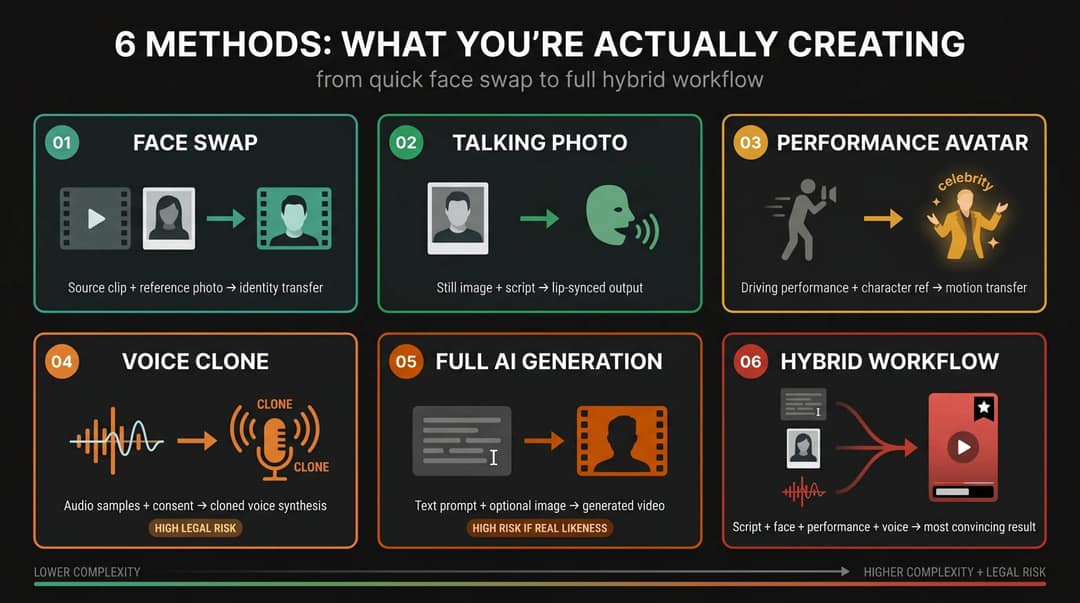
People make AI videos of celebrities talking with six methods: a face swap onto a real performance clip, a talking photo with lip-sync, motion transfer from an actor, a voice clone, full text-to-video generation, or a hybrid of these. The most convincing short clips swap a face onto real footage, add a voice and use big captions.
The models themselves push back on real faces. In Revid's AI video model index of 713,649 production generations, 55% of Seedance failures carried the same message: "input image may contain a real person." Generating the clip takes minutes. Deciding what you can actually publish is the hard part, and it is where videos get pulled, accounts get flagged and lawyers get involved.
How are people making AI videos of celebrities?
Six workflows produce almost every celebrity AI clip you see in your feed. They differ in what you start with, how real the result looks and how much legal exposure you take on.
| Method | What you start with | Realism | Main tell | Risk with a real celebrity |
|---|---|---|---|---|
| Face swap | A performance clip and a reference photo | Highest for short clips | Shimmer at the jaw and hairline | High |
| Talking photo (lip-sync) | One portrait and a script or audio | Medium | Dead eyes, frozen forehead | High |
| Motion transfer | Your own acted clip and a character image | High | Hands and shoulders drift out of sync | High |
| Voice clone | Clean audio samples and consent | Depends on the data | Flat emotion, odd pauses | Very high |
| Full text-to-video | A prompt, optionally a reference image | Improving, least controllable | The face shifts between shots | High if identifiable |
| Hybrid | Script, face, performance and voice | Most convincing | The weakest layer gives it away | Depends on each layer |
Face swap: the method behind most "celebrity reacts" clips
Best for sports reactions, "celebrity reacts to X" clips and sketches where you already have a strong performance.
You start from a short clip that already has the head movement, expressions and comic timing you want, then swap in a face from a clear, front-facing reference image. Revid's Face Swap tool works this way: upload the source video and the reference image, and it keeps the original motion and timing. Because the body language and lighting are real, the model only transfers identity, which is why face swaps usually look better than fully generated clips in 5 to 20 second videos.
What gives it away: blending errors along the jawline, shimmer at the face edges, hairline artifacts, lighting that doesn't match the background, hands or microphones crossing the face, profile turns, glasses, motion blur and low-resolution source footage.
Talking photo: the fastest meme format
Best for quick meme videos, fake podcast clips and "celebrity explains X" monologues.
Upload one portrait, add a script or audio, and an avatar tool generates the lip-sync and facial motion. It is faster than a face swap because you don't need a performance clip, but the model invents every movement from a still image. Keep the lines short and the face frontal.
What gives it away: a frozen forehead, unblinking eyes, mushy teeth, blinking that ignores the voice rhythm, mouth shapes that miss consonants and a head that floats.
Motion transfer: your performance, another character
Best for talking heads that need real emotion, gestures and timing, such as AI podcasts and character debates.
Record yourself (or an actor) delivering the line with the energy you want, then apply that movement to a character image with motion transfer. The model isn't inventing emotion, it is transferring yours, so the result looks far more alive than a talking photo.
What gives it away: hands, shoulders and face drifting apart, big emotions breaking more easily than calm speech, and long monologues exposing repeated movements.
Voice clone: where the legal risk peaks
Best for videos where the voice itself is the joke.
Instant clones work from a minute or two of clean, single-speaker audio and capture tone and accent; professional clones need far more recordings and stricter consent checks. Most serious cloning platforms now make you confirm you have the right to clone a voice. A slightly wrong voice breaks the illusion faster than a slightly wrong face: listen for flat emotion, wrong breathing, clipped laughs, accent drift and an announcer rhythm.
Voice is also the layer creators most underestimate legally (see the legal section below). Without permission, a generic AI voice is the better choice.
Prompt to try
A 20-second vertical comedy sketch starring an original fictional action-movie star named Rex Hammer, who reacts in disbelief to learning his blockbuster was filmed entirely on a green screen in a parking lot. Open with the hook line "Nobody told me the volcano was fake." Cinematic film look, quick cuts, big word-by-word captions and a punchline in the last three seconds.
Full text-to-video: best for invented characters
Best for original celebrity-inspired characters, "what if" sketches and fictional scenes.
Describe the scene, optionally add a reference image, and a model generates the clip, sometimes with native dialogue. In Revid's Prompt to Video you choose Seedance 2.5, MiniMax Hailuo H3, Wan 3.0 or Google Veo 3 for each scene, under one subscription. For an exact real face across several shots, this is the least controllable method: the face shifts, the cadence drifts and micro-expressions look off. It is also where models refuse most often, as the Seedance failure data above shows.
Hybrid: what the convincing viral clips actually use
The clips that fool people are rarely one method. They combine:
- Script: hook in the first line, payoff fast.
- Face: swapped or avatar-generated.
- Performance: driven by a real clip or an acted take.
- Voice: a generic AI voice, a licensed voice or a consented clone.
- Edit: word-by-word captions, zooms, cutaways and sound effects.
The four layers that make a celebrity AI video convincing
Every one of these videos stacks four layers, and a video that looks fake usually got one layer right and ignored the rest.
- Identity: the face, hair, outfit, voice and persona that make viewers recognize the person.
- Performance: head and eye movement, mouth shapes, gestures and emotional timing.
- Message: the words. The viewer should get the joke before any artifact becomes visible.
- Edit: captions, pacing, music, cuts and 9:16 framing.
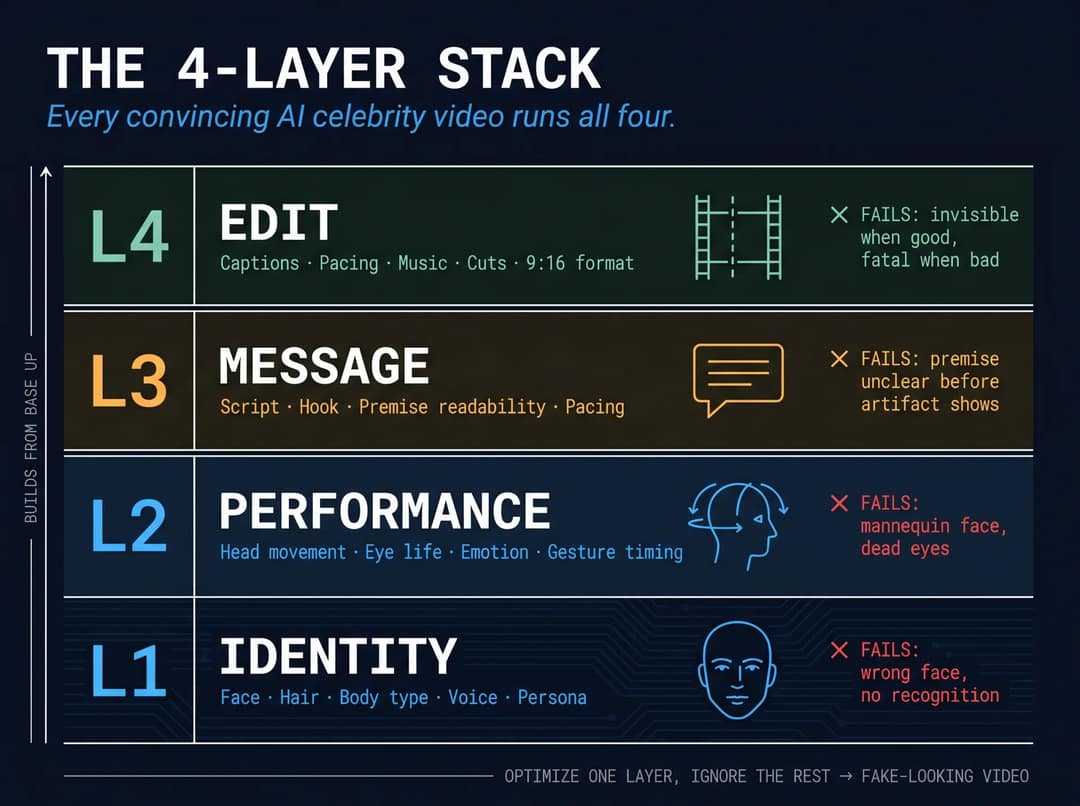
Viewers forgive a slightly imperfect face when the joke, pacing, captions and voice energy are strong. They spot a fake fast when the mouth, eyes, cadence or lighting don't match. That is why a face swap, which keeps a real performance, often beats a clip generated from nothing.
How to make a celebrity-style AI video with Revid
- Write a script under 30 seconds. The first line is the hook, and short lines with natural pauses lip-sync better than one long sentence.
- Pick the tool for what you have. Only a script: the AI Celebrity Video Generator (type a script or paste a URL, get a talking avatar video) or Talking Avatar. A performance clip: Face Swap. Your own acted take: Motion Transfer.
- Choose one of 1,000+ AI voices in 70+ languages. Voice cloning is available on the Elite plan and above; use it only for your own voice or one you have consent to use.
- Add word-by-word captions with the caption generator, plus a visible "AI parody" line in the first seconds.
- Fix weak moments in the timeline editor: cut to b-roll or a reaction image on any line where the mouth looks wrong.
- Export in 9:16 at 1080p or 4K, watch the exported file (not just the editor preview), publish to TikTok, Instagram or YouTube, and make sure each platform's AI label is on.
Revid's Terms of Service make you responsible for having the rights to the faces, voices and footage you use. The lowest-risk version of this workflow uses an original or licensed character, not a real celebrity's exact face.
What to gather before you start
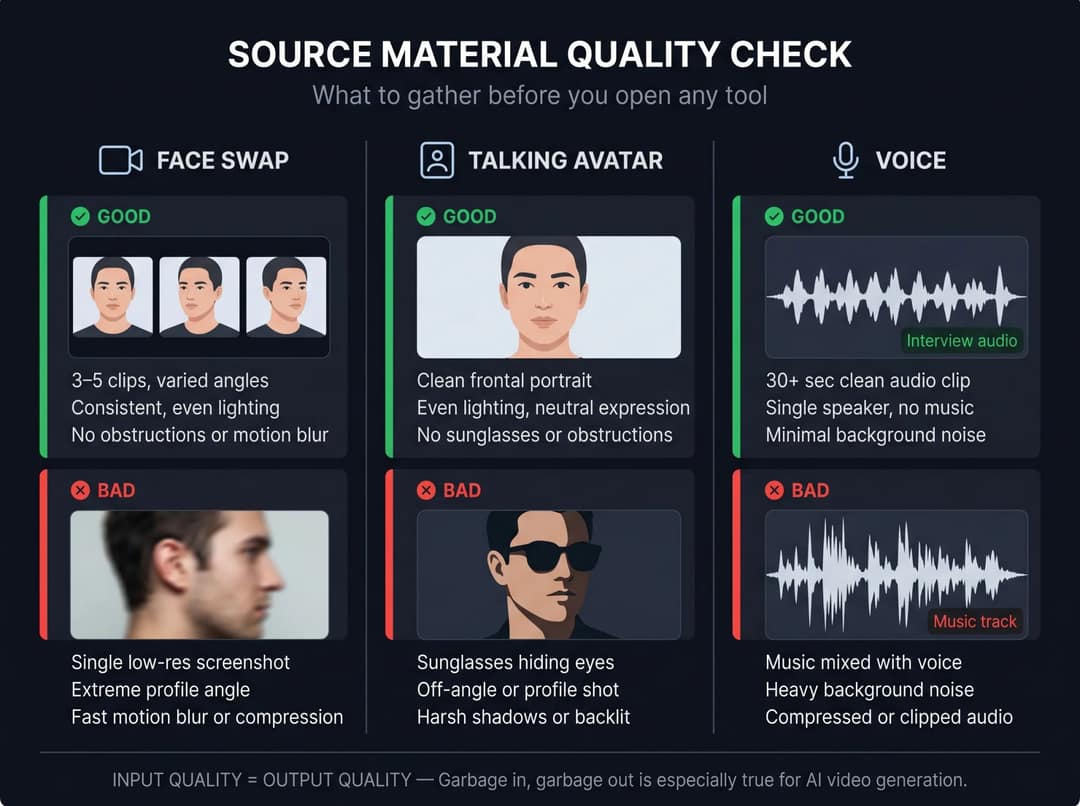
The output is only as good as the input, so collect these before opening any tool.
For a face swap:
- A high-resolution, front-facing reference photo with even lighting and nothing covering the face (no sunglasses, microphones or extreme angles).
- A 5 to 30 second source clip with natural head movement and clear expressions.
- Avoid clips with hands crossing the face, profile turns, camera shake, low resolution or heavy compression.
For a talking photo:
- A clean, front-facing portrait with a neutral expression.
- A script under 30 seconds with pauses written in.
For a voice:
- A generic AI voice by default for anything you post publicly.
- For a consented clone: a dry, single-speaker recording made in a quiet room, with no music or background noise.
For every video: rights-cleared footage and music, and your disclosure text ready before you upload.
How to make an AI celebrity video look real
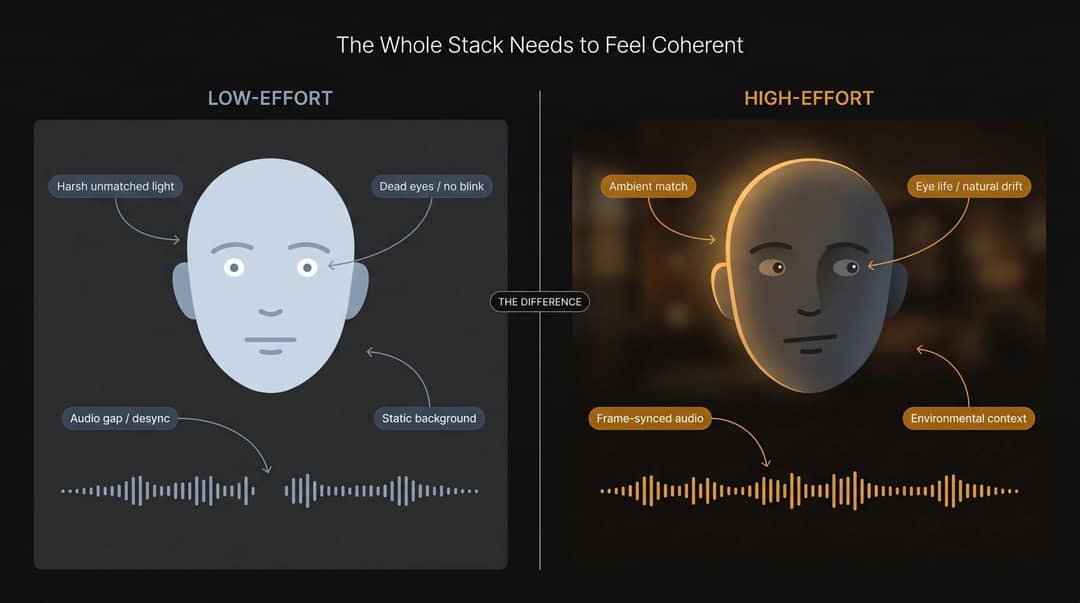
The face doesn't need to be perfect. The whole stack needs to feel coherent.
The four things viewers check without knowing it
- Mouth-to-audio match: the mouth must hit B, P, M, F, V, T and D. When those are off, viewers feel it even if they can't say why.
- Eye life: natural blinks, eye darts and focus shifts make a slightly imperfect face feel human.
- Voice cadence: celebrity voices are recognized by timing, pauses and emphasis as much as pitch.
- Lighting and compression: swaps fail at the jaw, hair, cheeks and shadows, and TikTok's compression can hide some shimmer or amplify it. Always preview the exported file.
Production fixes that work
- Keep it under 20 seconds. Every extra second is another chance for an artifact.
- Cut away on hard words. Let the audio carry the line while b-roll or a screenshot covers the mouth.
- Write short, punchy lines. Clear breaks give lip-sync models more anchor points.
- Copy the person's public rhythm, not just their face: sports-commentary pacing for an athlete meme, conversational cuts and filler pauses for a podcast clip.
- Use big word-by-word captions. They pull attention off the mouth and carry the joke for viewers watching on mute.
- Keep the premise obvious. A parody the audience gets instantly travels further than a clip people argue about.
Which celebrity AI formats get views on TikTok, Reels and Shorts
| Format | Why it works | Main risk |
|---|---|---|
| Sports celebrity reactions | Familiar faces, built-in fan rivalries, easy comment bait | Athlete likeness rights, club footage copyright |
| Public figure says something absurd | The mismatch is instantly funny and tied to an event | Defamation, removal, news confusion |
| Fake podcast clips | Simple visuals hide artifacts, captions carry the joke | Voice cloning, fake endorsement if a sponsor is mentioned |
| Original character debates | Clear creative space, lower legal risk | Copyright if you copy an existing character exactly |
| Celebrity-style AI commentary | Topical, low confusion when clearly labeled | Still needs disclosure |
The Gareth Southgate deepfakes during Euro 2024 are the textbook case: AI clips of the England manager swearing after matches reportedly passed a million views on TikTok despite visible mouth misalignment. The joke was clear, the event was live, and people shared it knowing it was fake.
The formats line up with what wins on TikTok in general. In Revid's analysis of 176,367 TikToks with 1,000+ likes posted between October 2025 and October 2026, comedy videos had a median of 155K views and reactions 105K, against 66K for storytelling and 62K for tutorials; only challenges did better, at 182K. The sample only includes videos that already reached 1,000 likes, so it shows what successful videos share, not what causes success. The method is in our study of what makes a TikTok go viral.
Challenges and comedy passed 1M views about twice as often as tutorials and storytelling, which are the most common formats.
Source: Revid analysis of 176,367 TikToks with 1,000+ likes posted between Oct 1, 2025 and Oct 16, 2026 (61,203 creators)
Show the data
| Median views | Share that passed 1M views | |
|---|---|---|
| Challenge | 182.3K | 25.6% |
| Comedy | 154.8K | 22.1% |
| Reaction | 104.8K | 16% |
| Dance | 83.8K | 15.5% |
| Storytelling | 66.1K | 12.2% |
| Lip Sync | 61.7K | 12.3% |
| Tutorial | 61.9K | 12.1% |
AI novelty buys the view, not the like. In Revid's comparison of AI videos and real footage across 292,784 TikToks, AI-generated videos averaged 1.4M views against 661.4k for real footage, but earned a 3.9% like rate against 7.7%.
AI content at scale is also what platforms are cracking down on. A Guardian report citing AI Forensics tracked 354 TikTok accounts that posted 43,000 AI-generated videos and earned 4.5 billion views in a single month, often without labels. Two rules follow: TikTok can keep unoriginal reposts and clips with other platforms' watermarks out of the For You feed, and since March 2026 Facebook treats reaction-only reels as unoriginal and deprioritizes them. Make the edit genuinely yours.
How to label an AI celebrity video on TikTok, YouTube and Instagram
| Platform | When you must label | What the label does |
|---|---|---|
| TikTok | Realistic AI-generated images, audio or video, including face swaps and AI speech (TikTok's AI content rules) | Shows "creator labeled as AI-generated"; TikTok may auto-label uploads with C2PA Content Credentials, and an auto label can't be removed. The label alone doesn't reduce distribution. |
| YouTube | Realistic content that makes a real person appear to say or do something, via the "AI use" setting in YouTube Studio (YouTube's disclosure policy) | Disclosure alone doesn't limit reach or earnings. Since May 2026 YouTube auto-labels undisclosed photorealistic AI, and labels on content made with Veo are permanent. Repeated failure to disclose risks removal or YPP suspension. |
| Instagram, Facebook, Threads | Photorealistic video or realistic audio that was created or altered (Meta's labeling approach) | Shows "AI info". In September 2026 Instagram said accounts featuring an AI-generated person without its "AI-generated profile" label could have their reach limited. |
Two details trip up parody accounts. First, TikTok's integrity and authenticity guidelines require fan and parody accounts to state that status in the account name, not only in the handle: @FakeRonaldo alone is not enough. Second, don't rely on metadata: Washington Post testing found C2PA provenance data is handled inconsistently across platforms and can be stripped on upload. Put a visible disclosure in the first seconds and use each platform's upload toggle.
Is it legal to make AI videos of celebrities?
This is not legal advice, it is the map a creator needs before publishing. The short answer: sometimes. It depends on the person, the country, what the video says and how realistic or misleading it is.
United States
There is no single federal celebrity deepfake law. The Copyright Office's 2024 report on digital replicas explains that copyright protects works, not a person's face or voice on its own. That doesn't make likeness free: state right-of-publicity and privacy laws apply, and they vary widely (some cover only commercial use, some don't cover voice).
At the federal level, the NO FAKES Act passed the Senate Judiciary Committee unanimously on June 18, 2026. It would create a federal right to authorize the use of your voice or likeness in highly realistic digital replicas, with exclusions for news, commentary, satire, parody and documentary. It is not law yet, and the EFF warns its vague language could still chill satire and commentary through takedown pressure.
States are moving faster. Tennessee's ELVIS Act was the first state law protecting musicians from unauthorized AI voice replication, and California and New York have passed digital replica laws covering performers, including deceased ones.
For intimate content, the TAKE IT DOWN Act covers AI-generated deepfakes. The FTC began enforcing its platform obligations on May 19, 2026: covered platforms must remove nonconsensual intimate content within 48 hours of a valid request.
European Union
The EU AI Act's transparency rules, which require deepfakes of real people, objects or events to be clearly and visibly labeled, apply from August 2026. Under GDPR's definitions, facial images processed to identify a specific person are biometric data, a special category that needs an explicit legal basis.
United Kingdom
The UK has no broad image right like some U.S. publicity laws. Creators face passing off, defamation, data protection and Online Safety Act exposure instead, and the UK government's report on copyright and AI acknowledges gaps and says it is exploring new digital replica protections.
Celebrity, private person or fictional character
- Celebrities: their face, voice, name and persona have commercial value, which is exactly what publicity law protects. Parody can help, but it is not a force field.
- Private individuals: TikTok prohibits realistic likenesses of adult private individuals (and of young people) without permission, and YouTube lets private people request removal of synthetic content that looks or sounds like them. Don't do it without consent.
- Fictional characters: not a publicity problem but a copyright and trademark one. A studio owns the design, name and voice; an original character in a similar format is a different thing.
The AI celebrity video risk ladder
| Zone | What's here | Reality |
|---|---|---|
| Green | Original AI avatar, consented actor, licensed voice, generic AI narrator, clear parody label, no endorsement, no politics, sex, minors or private people | Safest route |
| Yellow | Labeled public-figure parody, obvious satire, fictionalized celebrity-style character, no product claims, no breaking-news framing | Usually survives if clearly labeled, but can be taken down if the rights holder objects |
| Orange | Exact celebrity face or voice clone without permission, monetized pages built on one person, podcast clips that look too real | Fragile: one complaint can remove the video or the account |
| Red | Fake endorsements, fake medical, financial or political advice, sexual content, fake confessions, minors or private people, scams | Do not make it |
The disputes that drew the lines
- The estate of George Carlin sued over an AI special that mimicked his voice and comedic persona; the case settled with the video taken down and a promise not to use his likeness without approval.
- Scarlett Johansson said a ChatGPT voice sounded eerily similar to hers after she had declined to voice it. OpenAI denied imitation and paused the voice. Similarity alone was enough to start the fight.
- In India, the Bombay High Court granted singer Asha Bhosle relief against AI voice cloning, and actress Preity Zinta got permission to sue Google and Meta over AI deepfakes.
- On the legitimate side, AI voice companies have signed licensing deals with well-known actors. The clean commercial route is licensing, not scraping.
What never to make
- Fake endorsements for products, crypto, supplements or giveaways. This is the pattern behind the MrBeast, Tom Hanks and Gayle King fake ads, and it is consumer fraud territory, not just a policy breach.
- Political content: fake campaign statements, positions or endorsements. TikTok prohibits it, and some jurisdictions add election-law exposure.
- Medical, financial or legal advice in a celebrity's mouth.
- Sexual or intimate content, now covered by the TAKE IT DOWN Act.
- Minors and private individuals.
- Fake breaking news around live sports, elections or emergencies.
- Exact voice clones without permission.
- Misleading titles and thumbnails: "AI parody" in the description doesn't fix a "SHOCKING: [Celebrity] admits X" title.
- Stripping AI labels or metadata. Platforms detect content independently, and the person depicted can still file a removal request.
- Monetized channels built on one real celebrity's likeness. A one-off meme and a recurring business with sponsors are very different legal questions.
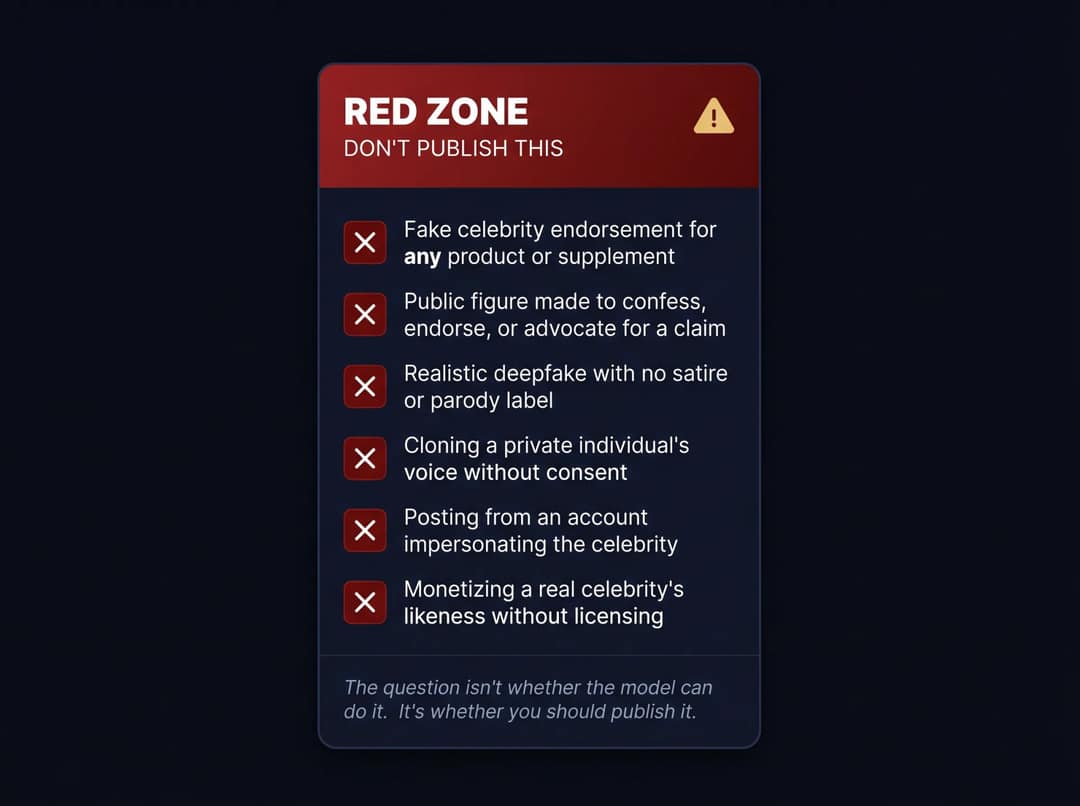
The losing formula is exact face plus exact voice plus a fake product or political claim plus no label. Each element adds risk; all four together is the red zone.
FAQ
Can I clone a celebrity's voice?
Not safely without permission. U.S. copyright doesn't protect a voice on its own, but publicity laws such as Tennessee's ELVIS Act, platform rules and false-endorsement claims do, and the Johansson dispute showed that even a similar-sounding voice can trigger a fight. Use a generic AI voice or a licensed, consented clone.
Can I post AI celebrity videos on TikTok?
Yes, if it is clearly labeled parody or humor that doesn't mislead. TikTok allows public figures in artistic or humorous contexts but bans fake endorsements, political positions, harassment and realistic likenesses of private people. Turn on the AI label and keep the parody obvious.
Can I monetize AI celebrity parody videos?
Rarely safely. Rights holders act faster when money is involved, and YouTube won't monetize mass-produced template AI content or AI personas presented as human experts giving health, legal, financial or political advice. Original characters and licensed likenesses are the monetizable path.
Is a fictional character like Peter Griffin different from a real celebrity?
Yes, but it is still an IP issue. A studio owns the character's design, name and voice, so copying them exactly risks copyright and trademark claims. An original parody character in a similar format is the safer route.
Can I still use Sora to make celebrity videos?
No. OpenAI closed the Sora app on April 26, 2026 and removed the Sora 2 models from its API on September 24, 2026. Revid's current models are Seedance 2.5, MiniMax Hailuo H3, Wan 3.0 and Google Veo 3.